
On 1 June 2026, GitHub moved every Copilot plan from premium request units to usage-based AI Credits, with one credit equal to one cent of underlying model cost. Within days, some developers were posting projections of monthly bills climbing from $29 to as much as $750. The product had barely changed. The billing logic had.
That episode sums up the problem with buying AI software right now. The price on a pricing page says little about the bill at the end of the month, and a polished demo says even less about how a tool copes with messy everyday work. Cursor made a similar switch a year earlier, in June 2025, moving its $20 Pro plan from a fixed allowance of 500 fast responses to credits billed at API rates. Metered pricing has since spread across coding assistants and agent platforms alike.
This guide sets out the Six-Gate Check, a buying framework built around six questions that decide whether an AI subscription earns its keep. Each gate is a test that can be run during a free trial or the first month of monthly billing, before any annual commitment. Every section comes with tables or worked numbers, and a weighted scorecard at the end turns the six results into a single decision.
The Six-Gate Check at a Glance
| # | Gate | The question to answer | Red flag | Time to check |
|---|---|---|---|---|
| 1 | Real cost at real usage | What will the bill be at the team's actual volume? | Credit costs or overage rates missing from the pricing page | 30 minutes plus a week of usage logs |
| 2 | Performance on real tasks | Does it beat the current method on the team's own work? | Only demo examples; no trial on the paid tier | 1 to 2 weeks |
| 3 | Data handling | Are inputs used for training, and how long are they kept? | Training on by default with no business tier | 1 hour |
| 4 | Workflow fit | Does it connect to the apps where work already happens? | Copy and paste is the only way in or out | 2 hours |
| 5 | Vendor stability and exit | Can the data leave if the vendor disappears? | No bulk export; a thin layer over one model | 1 hour |
| 6 | Payback and fine print | Will time saved cover the full cost, and can the deal be exited? | Auto-renewal with no price lock or refund window | 1 hour |
Real Cost at Real Usage
Most AI tools no longer sell a flat monthly allowance. They sell credits, tokens, requests or "fast" generations, and each action draws down a balance at a rate set by the model chosen and the number of steps the tool takes behind the scenes. A single agent run that reads dozens of files and retries twice can burn more credits than a week of simple chat.
A single $20 plan can therefore produce bills six times apart depending on how it is used. The first job is to find out which pricing model is on the table.
Know which pricing model applies
Table 1. Common AI pricing models and what to check
| Pricing model | How the bill grows | Predictability | What to check |
|---|---|---|---|
| Flat subscription | Fixed per month, usually with an unpublished fair-use ceiling | High, until the ceiling is hit | The fair-use threshold and what happens once it is crossed |
| Per seat | Grows with headcount rather than usage | High | Minimum seat counts, and whether AI features cost extra per seat |
| Credits or tokens | Grows with volume and with the model selected | Low to medium | Credits per action, overage rate, rollover rules, expiry dates |
| Outcome based | Charged per resolved ticket or completed task (Intercom's Fin, for example, launched at $0.99 per resolution) | Medium | How the vendor defines an outcome, and who audits the count |
| Hybrid | Base fee plus metered overage | Medium | Included allowance compared with typical monthly usage |
Model the bill at several usage levels
Pricing pages show the entry price. The useful number is the cost at the team's real volume, and that needs two figures from the vendor: how many credits a typical action consumes, and what extra credits cost. If either figure is missing from the public documentation, ask sales for it in writing.
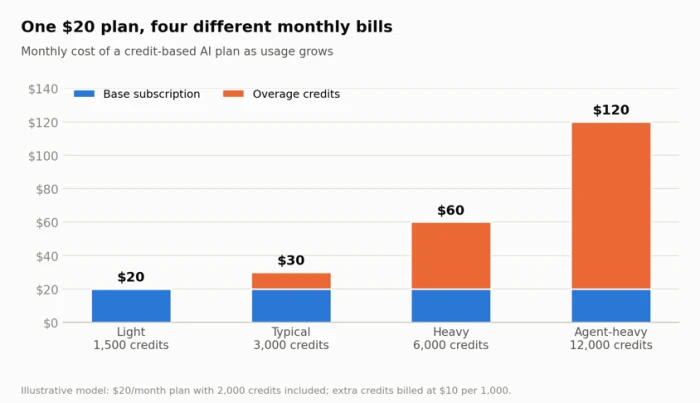
Figure 1. An illustrative credit plan. The advertised price holds only for light users; an agent-heavy workload costs six times the headline rate.
Even the light user in this model has a problem: 500 unused credits that may expire at month end. Rollover rules matter as much as overage rates. A tool that expires credits monthly charges light users for capacity they never touch, while a tool with no overage cap leaves heavy users exposed to open-ended bills.
During the trial, log every action for five working days and note the credits each type of action draws. Multiplying the weekly total by 4.3 gives a monthly projection. Adding 30% headroom covers the usage creep that follows once a tool becomes part of daily routine.
Annual discounts are a bet on survival
Annual billing commonly takes 15% to 20% off the monthly rate. That discount only pays off if the tool is still in use when the savings overtake the upfront payment.
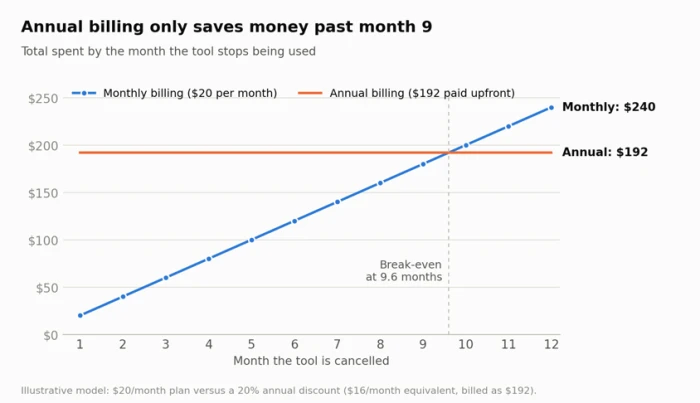
Figure 2. At a 20% annual discount, the break-even point sits at 9.6 months. Cancelling any earlier means the annual plan cost more than monthly billing would have.
For any AI tool that is new to the team, monthly billing for the first quarter is the cheaper insurance. Switching to annual makes sense once the tool has proved itself and the vendor has committed to a price lock for the full term.
Expect the price to move at renewal
AI features have become the main justification for software price rises. SaaStr analysis puts the average annual SaaS price increase at about 8.7%, with AI-enabled tools often rising between 10% and 25%. Vertice's SaaS Inflation Index estimates that software spend per employee reached roughly $9,100 by the end of 2025, up from $7,900 in 2023.
Two clauses deserve attention before paying: whether the vendor can change credit consumption rates in the middle of a paid term, and how much notice it must give before a price change takes effect.
Cost questions to put to the vendor
• How many credits does each common action consume, and does that vary by model?
• What does an extra block of credits cost, and can a hard monthly spending cap be set?
• Do unused credits roll over, and when do they expire?
• Can consumption rates change during a paid term?
• Are AI features included in the seat price or billed as an add-on?
Performance on the Team's Own Work
Demos are built on tasks the product handles well. The only test that predicts value is a run against the work the team does every week, including the awkward cases: the half-finished brief, the spreadsheet with merged cells, the scanned PDF, the client email that bundles three separate requests.
Build a test set before the trial starts
Pick 20 to 30 real tasks from the past month and freeze them as a fixed test set. Around a third should be tasks a person found hard, because easy tasks flatter every tool. Record how long each one took to complete manually and what a good result looked like.
This takes an afternoon. It turns the trial into a measurement rather than an impression.
Measure what decides value
Table 2. Trial scorecard with suggested pass marks
| Metric | How to measure it | Suggested pass mark |
|---|---|---|
| Usable output rate | Share of outputs accepted with light edits or none | 70% or higher |
| Edit time | Minutes spent fixing each output, compared with doing the task from scratch | Under 40% of the manual time |
| Factual error rate | Claims checked against a source; errors counted per 10 outputs | Fewer than 1 in 10 for client-facing work |
| Consistency | The same prompt run three times, with results compared | Same core answer in all three runs |
| Speed at peak hours | Response time during the team's busiest hours | Within what the workflow tolerates |
| Paid-tier parity | Trial runs on the same model and limits as the paid plan | Confirmed in writing |
Two traps that distort trials
The first is tier mismatch. A free tier running a smaller model makes a tool look worse than the paid version. A promotional trial with generous limits that shrink at checkout makes it look better. Either way, the trial result says nothing about the product actually being bought.
The second is the silent model swap. Many AI products run on models licensed from a handful of large labs, and a vendor can change the underlying model without changing the product name or the price. Ask which model powers each feature, and whether customers are notified before a switch.
Run the comparison blind
When the tool is replacing an existing method, or competing with a second candidate, strip the labels from the outputs and have the person who normally does the work rank them. Unlabelled review removes the novelty bias that makes new tools look better in week one than in week six.
Trial length should match the work cycle. A tool meant for monthly reporting needs a trial that spans a month-end close, because a two-week window can miss the one week that matters.
Where the Data Goes
Paying for a plan does not automatically keep inputs out of model training. On consumer plans, training is frequently switched on by default, and the setting sits in a menu rather than in the checkout flow.
OpenAI's "Improve the model for everyone" setting is on by default for ChatGPT's free and paid consumer plans, including Plus and Pro. Anthropic asked consumer Claude users on free and paid plans in 2025 to choose whether their chats could be used for training, with chats shared for training retained for up to five years. Business and API tiers from the major vendors generally exclude customer data from training by default, which means the stronger protection is something bought rather than granted.
Data terms by plan type
Table 3. How data treatment typically changes by plan tier
| Plan type | Training on inputs | Retention and deletion | Contract protection |
|---|---|---|---|
| Free consumer plan | Usually on by default; opt-out sits in settings | Set by the vendor's consumer policy | Standard terms only |
| Paid individual plan | Often still on by default; check the toggle | Vendor-set; opting out is not retroactive | Standard terms only |
| Team or business plan | Off by default at most major vendors | Admin-controlled retention in many products | Data processing agreement usually available |
| Enterprise or API | Off by default and stated in the contract | Configurable; zero retention offered to some customers | Negotiated DPA and, on some plans, IP indemnity |
The five-question privacy review
1. Are prompts and uploaded files used to train models, and is that the default setting?
2. How long is data kept after deletion, including backups and safety logs?
3. Can human reviewers read conversations, and under what conditions?
4. Which sub-processors handle the data, and in which countries?
5. Who owns the outputs, and does the vendor offer indemnity if an output infringes someone else's rights?
Opting out is rarely retroactive. Content that has already gone into a training run stays there, so the setting needs changing before the first real upload.
On the fifth question, Microsoft, Google, OpenAI and Anthropic have each announced copyright indemnities for certain business or API customers. Consumer plans generally fall outside those commitments, which matters for any team publishing AI-assisted content under its own name.
Regulation now shapes the answer
Table 4. Rules that affect AI tool buyers (status as of September 2026)
| Regulation | Current status | What it means for a buyer |
|---|---|---|
| India: DPDP Act 2023 and DPDP Rules 2025 | Rules notified in November 2025; consent manager framework from November 2026; full obligations from May 2027 | A business that feeds customer personal data into an AI tool is the data fiduciary and stays accountable for how the vendor processes it. Penalties for failing to protect personal data can reach ₹250 crore. |
| EU: AI Act | Article 50 transparency duties apply from 2 August 2026; the Digital Omnibus deferred Annex III high-risk obligations to 2 December 2027 | Chatbots must disclose that users are dealing with AI, and some generated content must be labelled. Tools used in hiring or credit decisions face the heaviest duties. |
| EU and UK: GDPR | In force | Processing personal data through an AI vendor needs a lawful basis and a data processing agreement with that vendor. |
Fit With the Existing Workflow
A tool that produces excellent output but lives in its own browser tab carries a hidden cost. Every task starts with copying context in and ends with pasting results out, and small delays add up quickly across a team.
Take a five-person content team running 40 AI-assisted tasks each per day. If each task needs 45 seconds of window switching and reformatting, the team loses 150 minutes a day, or about 55 hours a month across 22 working days. At that scale the integration gap can cost more than the subscription itself.
The integration ladder
Table 5. How work moves in and out of an AI tool
| Level | How work moves | Typical hidden cost | Best suited to |
|---|---|---|---|
| 0. Copy and paste | Manual transfer through the clipboard | High, and it grows with volume | Occasional personal use |
| 1. File import and export | Upload and download of documents or CSVs | Medium; version mix-ups are common | Weekly batch jobs |
| 2. Native integrations | Built-in connectors to specific apps | Low, if the right apps are covered | Teams on mainstream software |
| 3. API and webhooks | Programmatic access from other systems | Low after setup; needs developer time | Repeatable, high-volume workflows |
| 4. Agent connectors (MCP) | The tool reads from and acts inside other apps through standard connectors | Low; permissions need governance | Multi-step work spanning several apps |
The Model Context Protocol (MCP), an open standard Anthropic introduced in late 2024 and since adopted by other major AI vendors, lets tools connect to other applications through a common interface. A tool that supports it can often plug into a document store or ticketing system without a custom build. It also means the tool can act inside those systems, so permissions deserve the same scrutiny as the features.
Admin controls for anything beyond one user
- Single sign-on, so access ends automatically when someone leaves the company
- Role-based permissions over who can connect which apps and data sources
- Audit logs showing who ran what, and when
- Central billing with per-user spending limits
Published rate limits deserve a look as well. A tool that throttles after 50 requests an hour will stall a batch workflow no matter how good its output is.
Vendor Staying Power and the Exit Path
AI products shut down and change hands faster than most software categories. Relay, an AI workflow automation tool launched in 2021, cut off free users on 15 August 2026 and paying customers on 14 September 2026, after larger platforms built similar automation into their own products. Builder.ai, a Microsoft-backed app development platform once valued at $1.5 billion, collapsed into insolvency in 2025, leaving customers scrambling for access to applications built on it.
Supermaven's standalone coding assistant was wound down in late 2025 after its team was folded into Cursor. Humane shut down its AI Pin business in February 2025 and sold most of its assets to HP for $116 million.
Two patterns explain most closures. The first is the thin wrapper: a product whose core value is a prompt layer over someone else's model, which becomes redundant the moment the model provider ships the same feature. The second is the acqui-hire, in which a larger company buys the team and retires the product.
Vendor risk signals
Table 6. Signals that separate durable vendors from risky ones
| Signal | Lower risk | Higher risk |
|---|---|---|
| Core technology | Proprietary data or workflows built up over years | A prompt layer over a single third-party model |
| Funding and revenue | Profitable, or funded with 18 months or more of runway | Recent layoffs and a free tier that keeps shrinking |
| Product focus | A clear roadmap within its core use case | Frequent pivots and rebrands |
| Customer base | Named business customers and published case studies | Mostly anonymous testimonials |
| Data export | Full bulk export in open formats | Export limited to single items or proprietary formats |
| Shutdown terms | A written notice period and a data retrieval window | Silence on what happens to data at closure |
Run the exit test during the trial
Before paying, export everything created during the trial and try to open it somewhere else. Prompts, custom templates, knowledge bases, brand voice settings and custom assistants often represent weeks of setup, and many tools make them hard to extract. If the export turns out to be a single archive of unreadable JSON, the switching cost has just been measured.
The contract should cover two further points: how much notice the vendor must give before shutting down or retiring a plan, and how long customers have to retrieve their data afterwards.
The Payback Math and the Fine Print
The last gate turns everything above into one number: whether the time the tool saves is worth more than it costs. The calculation is simple.
Value ratio = Monthly value of time saved ÷ Total monthly cost
Total monthly cost is the subscription plus expected overage from the trial logs. Setup and training time counts too, spread across the first year. The value of time saved is net hours saved per month multiplied by the loaded hourly cost of the people using the tool, after subtracting the time spent checking and fixing output.
Table 7. Worked example: a five-seat plan for a marketing team
| Line item | Monthly figure |
|---|---|
| Subscription (5 seats × $30) | $150.00 |
| Expected overage, projected from trial logs | $60.00 |
| Setup and training (20 hours × $25, spread over 12 months) | $41.67 |
| Total monthly cost | $251.67 |
| Hours saved per person per month (measured in trial) | 6.0 |
| Hours spent checking and fixing output per person | 1.5 |
| Net hours saved across five people | 22.5 |
| Value of net hours at $25 per hour | $562.50 |
| Value ratio | 2.24 (about $2.24 returned for every $1 spent) |
Set a pass mark before the trial begins. A ratio of at least 1.5 leaves room for the optimism that creeps into every time-saving estimate. Below 1.0, the tool costs more than it returns, however impressive the output looks.
Spending does not stop at the purchase
Usage-based tools move the bill every month, and finance teams have noticed. The FinOps Foundation's State of FinOps 2026 survey of 1,192 practitioners found that 98% now manage AI spend, up from 63% in 2025 and 31% in 2024.
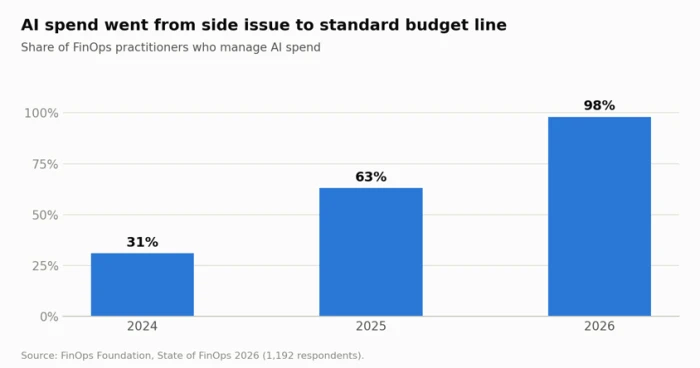
Figure 3. AI spend management became near-universal among FinOps practitioners within two years.
Name an owner for each paid AI tool and set a monthly spending cap wherever the vendor allows one. After 90 days, compare actual usage with the estimate that justified the purchase, and cut seats that have gone quiet.
Fine print to read before entering card details
Table 8. Contract clauses that decide what happens after payment
| Clause | What to look for | Why it matters |
|---|---|---|
| Auto-renewal | Renewal date and the notice period needed to cancel | Missing the cancellation window can lock in another full term |
| Refund policy | Pro-rated refunds and any refund window after renewal | Some vendors refund nothing once a billing period starts |
| Price lock | A guaranteed price for the term and a cap on renewal increases | Protects against mid-term credit repricing |
| Plan changes | Whether features can be removed from an active plan | Features sometimes move to a higher tier at renewal |
| Usage limits | Fair-use clauses and hard caps | "Unlimited" often means limited by an unpublished threshold |
| Service levels | Uptime commitment and service credits | Essential for any tool placed inside a customer-facing process |
| Termination and data | The data retrieval window after cancellation | Some consumer plans delete data immediately on closure |
Putting the Gates Together: A Weighted Scorecard
Some gates work as hard stops regardless of score. A tool that trains on client data with no business tier available, or that offers no export at all, should be ruled out before any points are counted. For tools that clear those stops, score each gate from 1 to 5 during the trial and apply the weights below.
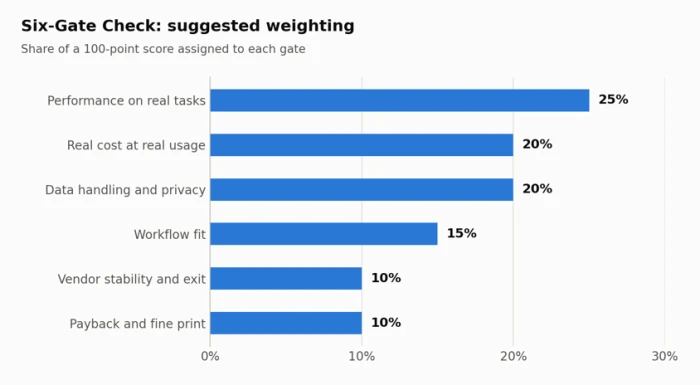
Figure 4. Suggested weights for the Six-Gate Check. Teams handling regulated data may want to raise the data handling weight.
Performance carries the most weight because no pricing model or privacy policy rescues a tool that fails on real work. Vendor stability and fine print weigh less, since monthly billing and a clean export can contain both risks.
Table 9. Example scorecard comparing two shortlisted tools
| Gate | Weight | Tool A score | Tool A weighted | Tool B score | Tool B weighted |
|---|---|---|---|---|---|
| Performance on real tasks | 25% | 4 | 1.00 | 5 | 1.25 |
| Real cost at real usage | 20% | 4 | 0.80 | 2 | 0.40 |
| Data handling | 20% | 5 | 1.00 | 3 | 0.60 |
| Workflow fit | 15% | 3 | 0.45 | 4 | 0.60 |
| Vendor stability and exit | 10% | 4 | 0.40 | 2 | 0.20 |
| Payback and fine print | 10% | 4 | 0.40 | 3 | 0.30 |
| Total (out of 5) | 100% | 4.05 | 3.35 |
Tool B produced the best output in this example and still lost by a clear margin, because its cost at real usage and its data terms dragged the total down. This is the case the scorecard exists for: the most impressive output in a trial is not always attached to the plan worth paying for.
A total of 3.5 or higher supports a purchase on monthly billing. Between 2.5 and 3.5, extend the trial or negotiate the weak gate, for example by asking for a business-tier data agreement or a price lock. Below 2.5, move on to the next candidate.
Frequently Asked Questions
Is a paid AI plan more private than a free one?
Not necessarily. On several major consumer assistants, paid individual plans still use conversations for training unless the setting is switched off. Contractual exclusion from training typically starts at the business or API tier.
How long should an AI tool trial run?
Long enough to cover one full cycle of the work the tool is meant to support. For daily content or support work, two weeks with a fixed test set is usually enough. For monthly reporting or billing work, the trial needs to span a month-end.
Should a small business pay annually for AI tools?
Only after the tool has passed a trial and a first quarter of monthly use. At a typical 20% annual discount, the saving only arrives after about 9.6 months, and AI pricing has changed often enough through 2025 and 2026 that a price lock is worth more than the discount.
What is the biggest hidden cost in AI tools?
For credit-based tools, it is overage from agent-style tasks that consume many credits per run. For flat-rate tools, it is the time spent moving work in and out of a product that does not connect to the rest of the stack.
Comments
Join the discussion and share your perspective.