
TEST PROMPT best AI tools for Instagram reels | TOOLS TESTED Koala Writer, Writesonic, Jasper AI, Rytr, Anyword | TESTED IN May 2026 | SCORING LENS Search intent fit, output quality, export workflow |
The Test Setup
The same prompt went into five popular AI blog generators with no instructions beyond the target keyword. This section explains what the prompt was, why it was chosen, and how each tool was scored against the same yardstick.
A simple test, five very different results
The prompt was “best AI tools for Instagram reels.” It is a buyer-style listicle keyword. Anyone searching it expects a ranked roundup of named tools, a few lines on what each does well, and ideally pricing or use cases. Nothing else qualifies as a real answer.
What came back from the five tools varied wildly. One produced a clean listicle. One returned a chatty, statistic-padded essay. One demanded payment before the test could begin. One generated a one-paragraph sales pitch instead of an article. One built the best structure but locked the export. The differences were not subtle, and they expose how each platform interprets the gap between a keyword and a publishable post.
Why this keyword was chosen for the test
The phrase carries clear, layered intent that no AI tool should be able to misread.
The format is dictated by the wording. “Best” plus a plural noun signals listicle. The topic is narrow: not video editors in general, but AI tools, used for Instagram reels specifically, where vertical format, short runtime, trending audio, and captions all matter. A useful article would name tools, separate categories such as editing, captioning, scheduling, and analytics, and give the reader enough to decide.
If a generator returns a generic explainer about what AI is or why Instagram is important, it has failed the test before quality enters the conversation. Output length, vocabulary, and SEO keyword density are secondary. The first question is whether the tool understood what the searcher actually wanted.
How the tools were scored
Three criteria, weighted equally, were used to produce a single intent score out of ten for each tool.
| CRITERION | WHAT IT MEASURES | WEIGHT |
|---|---|---|
| Format fit | Whether the output landed as a listicle, the format the query demands. | 33% |
| Category accuracy | Whether the article identified Reels-specific categories such as captioning, video editing, scheduling, or analytics, rather than generic video advice. | 33% |
| Export workflow | Whether the deliverable fits a standard publishing pipeline. HTML and markdown score higher than PDF or copy-paste-only. | 33% |
Jasper AI did not produce any output because of a paywall, so it carries an N/A rather than a low score. The other four tools were scored on the same three dimensions and the result is the chart in Part 03.
Tool by Tool Walkthrough
Each tool was given the same target keyword with default settings, save for an SEO-friendly tone preset where one was available. The notes below describe the setup interface, the actual output, and where each tool earned or lost points.
Koala Writer
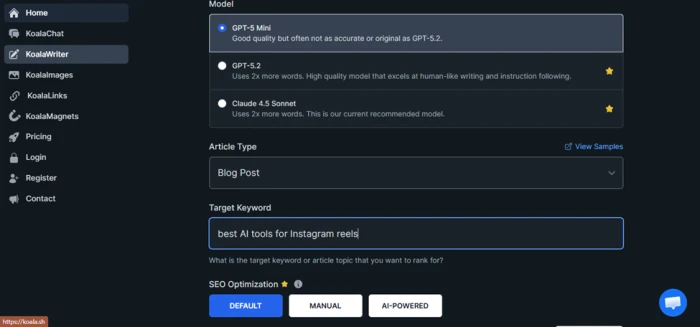
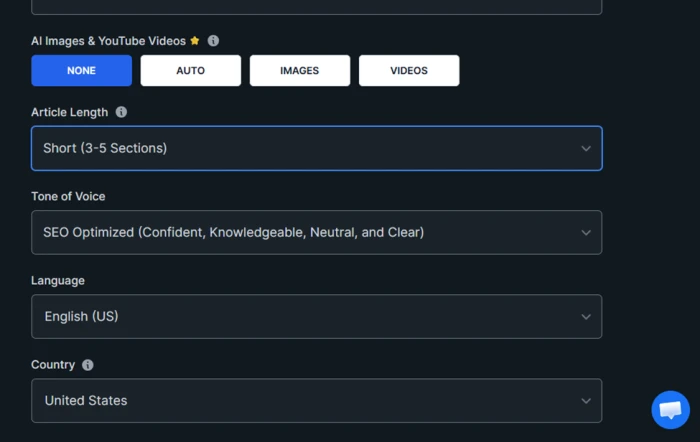
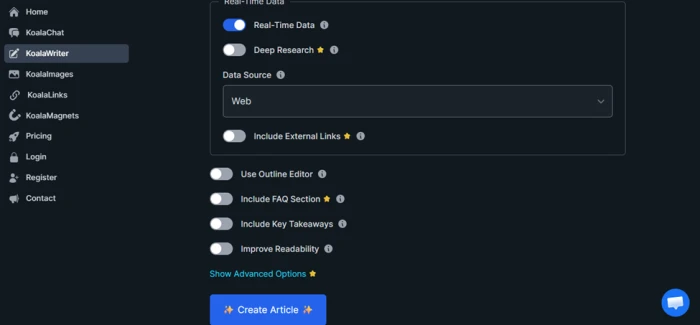
Koala Writer asked for the target keyword in a dedicated field before generation, alongside toggles for SEO optimization mode, real-time data, an optional FAQ section, key takeaways, and readability improvements. The level of granular setup signals a platform built around SEO-first article production rather than general writing.
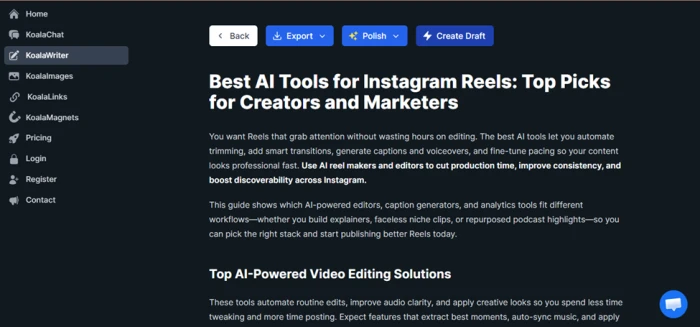
The output landed on the right format immediately. The headline read “Best AI Tools for Instagram Reels: Top Picks for Creators and Marketers,” and the article opened with a short intent-led paragraph followed by a section titled “Top AI-Powered Video Editing Solutions.” It then continued into categorized sections of tools, exactly the structure a buyer-stage query rewards.
Koala Writer also produced a downloadable HTML file at the end, the file format most blog publishing workflows can paste into directly. Combined with the keyword field, real-time data option, and listicle instinct, this was the most operationally complete experience of the five tools tested.
Part of an Output:
Best AI Tools for Instagram Reels: Top Picks for Creators and Marketers
You want Reels that grab attention without wasting hours on editing. The best AI tools let you automate trimming, add smart transitions, generate captions and voiceovers, and fine-tune pacing so your content looks professional fast. Use AI reel makers and editors to cut production time, improve consistency, and boost discoverability across Instagram.
This guide shows which AI-powered editors, caption generators, and analytics tools fit different workflows—whether you build explainers, faceless niche clips, or repurposed podcast highlights—so you can pick the right stack and start publishing better Reels today.
Top AI-Powered Video Editing Solutions
These tools automate routine edits, improve audio clarity, and apply creative looks so you spend less time tweaking and more time posting. Expect features that extract best moments, auto-sync music, and apply stylistic LUTs or motion effects with a few clicks.
Automated Clip Generation
Automated clip generation identifies highlights, trims dead space, and assembles sequences based on pacing rules or content cues. You can upload long-shot footage and let the tool detect action, faces, or speech to create a 15–60 second Reel-ready cut automatically.
Look for features that let you set target duration, aspect ratio (9:16 for Reels), and energy level; these options control cut frequency and shot length so the output fits your style.Good systems preserve important context by prioritizing clear audio, centered faces, and branded moments. They also let you preview multiple edit variations, swap clips manually, and adjust transition intensity. This reduces editing time from hours to minutes while keeping control over the final sequence.
WHAT WORKED Correct listicle format on the first try, SEO controls visible up front, clean HTML export ready for a CMS. | WHAT DIDN'T Like most SEO writers, the language reads competent rather than distinctive, and body paragraphs lean on stock openings. |
Writesonic
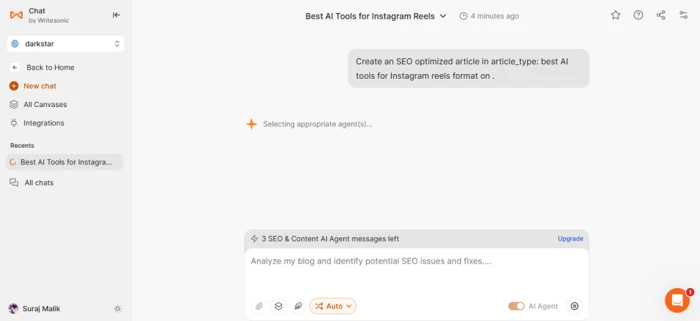
Writesonic, accessed through its Chat by Writesonic interface, ran a multi-step agent workflow before writing. The agent first reviewed the topic comprehensively, ran keyword research on related terms, and then pulled best practices for the listicle blog format before producing output. The process itself was interesting to watch and felt closer to how a freelance writer might approach a brief.
The final article carried the title “Best AI Tools for Instagram Reels: Your Complete Guide.” The intro opened with a claim that more than two billion users watch reels daily, framing the topic in scale terms before any tool was named. That figure reads like the kind of stat AI models invent for opening paragraphs, and a publication-ready article would need it verified or removed.
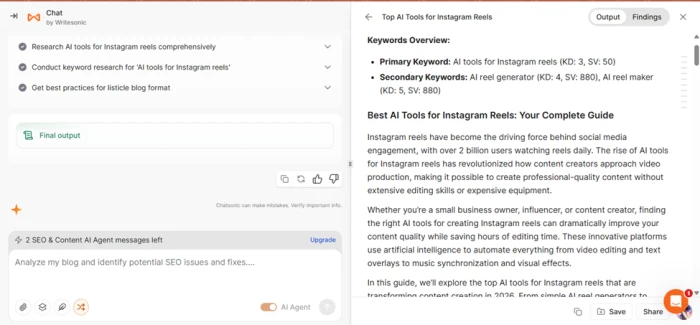
Beyond the opening, the prose stayed at a high altitude. Phrases about revolutionizing content creation and producing professional-quality video without expensive equipment filled space before the listicle proper got going. Writesonic delivered the article as a downloadable PDF, which is awkward for editorial workflows where HTML or markdown would slot directly into a CMS.
Part of an Output:
Top AI Reel Generator Tools for Quick Content Creation
1. Lumen5
Lumen5 stands out as a powerful AI reel generator that transforms text content into engaging video reels. This platform uses natural language processing to analyze your written content and automatically suggests relevant visuals, music, and transitions. The tool’s strength lies in its ability to repurpose blog posts, articles, or social media captions into dynamic video content. Users simply paste their text, and Lumen5’s AI engine creates a storyboard with matching visuals from its extensive media library. The platform offers customizable templates specifically designed for Instagram’s vertical format, ensuring your reels look professional and engaging. Pricing starts at $19 per month for the basic plan, making it accessible for small businesses and individual creators. The drag-and-drop interface requires no video editing experience, while advanced users can fine-tune every element for perfect brand alignment.
2. InVideo
InVideo’s AI-powered platform excels at creating Instagram reels from scratch or existing content. Their intelligent video assistant can generate complete reels based on simple text prompts, making it one of the most user-friendly AI reel maker platforms available. The platform features over 5,000 professionally designed templates optimized for Instagram reels, with AI automatically adjusting elements like text placement, color schemes, and timing to match your brand guidelines. InVideo’s smart cropping feature ensures your content looks perfect across different devices and screen sizes. What sets InVideo apart is its voice-to-video capability, where users can record a brief description of their desired reel, and the AI creates the entire video automatically. Plans start at $15 per month, with a free tier offering basic functionality for beginners
WHAT WORKED Transparent agent workflow that researches, gathers keywords, and references format guides before writing. | WHAT DIDN'T Opening statistic looks fabricated, prose drifts into marketing filler, and the PDF-only export adds friction. |
Jasper AI
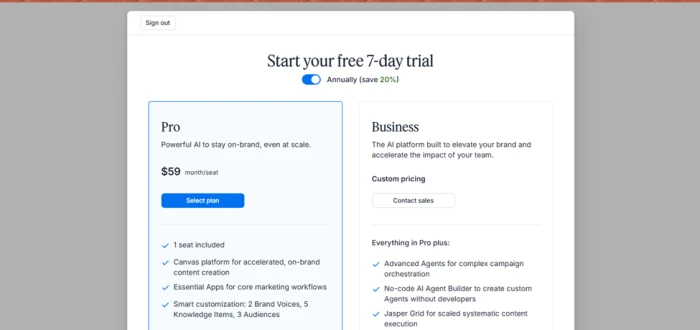
Jasper did not produce an article. The platform routed the test straight into a paywall, asking for a Pro plan at $59 per month per seat or a Business plan with custom pricing before any draft could be generated. The free path ended at the pricing page.
That is a legitimate business choice, and Jasper is positioned as a paid enterprise content tool rather than a casual-use generator. For the purposes of a search-intent test, however, it cannot be scored on output quality. The only observation worth recording is that for anyone evaluating tools before committing to a subscription, Jasper offers the least transparency on what the writing actually looks like.
Rytr
Rytr does not generate full articles by default. Its workflow is built around use cases like Blog Section Writing and Blog Idea and Outline, each of which produces a small unit of content rather than a complete post. Stitching a full article together requires running the tool multiple times across different sections.
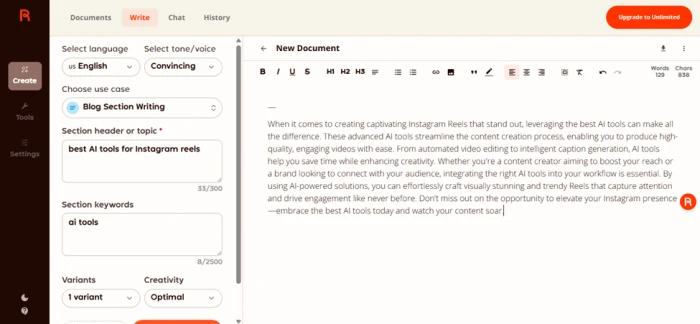
For the section-writing test, Rytr produced a single paragraph titled “best AI tools for instagram reels.” The tone setting was Convincing, and the output read accordingly. The closing line urged the reader not to miss out and to embrace the best AI tools today to watch their content soar. That is sales copy, not editorial coverage of named tools.
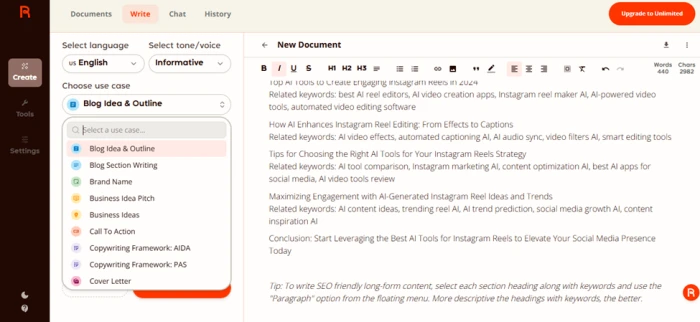
The second test, using the Blog Idea and Outline use case with an Informative tone, performed better. Rytr returned a structured outline with sections such as “How AI Enhances Instagram Reel Editing” and “Tips for Choosing the Right AI Tools for Your Instagram Reels Strategy,” each paired with related keyword clusters. That is genuinely useful pre-writing material.
The pattern suggests Rytr is most effective as a research and outline tool, not as a full-draft generator. The HTML export at the end was a small win for workflow.
Part of an Output:
When it comes to creating engaging Instagram Reels, leveraging the right AI tools can make a significant difference in both content quality and production efficiency. Several AI tools are designed specifically to enhance video creation, editing, and optimization for social media platforms like Instagram. For instance, some AI-powered video editors offer features such as automatic clipping, smart transitions, and music synchronization, which help in producing polished reels quickly. Additionally, AI tools that analyze trending topics and hashtags can assist creators in tailoring their content to current audience interests, boosting visibility and engagement. By integrating these AI tools into their workflow, content creators can streamline the reel-making process while ensuring their videos stand out in a crowded digital landscape.
WHAT WORKED Strong outline mode that produces section ideas paired with usable keyword clusters for pre-writing. | WHAT DIDN'T Default body output reads like a sales pitch, and the fragmented workflow forces manual stitching. |
Anyword
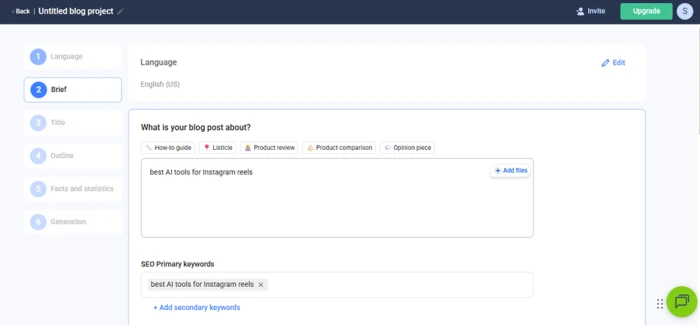
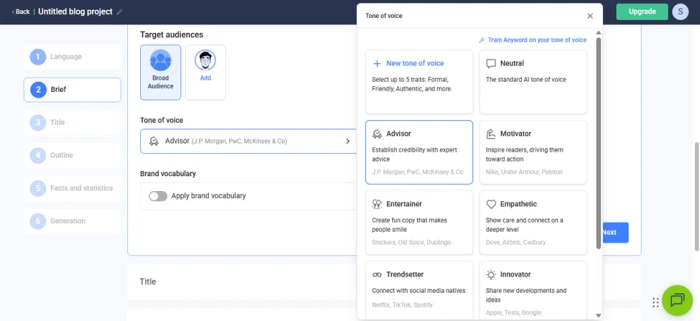
Anyword ran the most disciplined workflow of any tool tested. The wizard moved through six stages: Language, Brief, Title, Outline, Facts and Statistics, and Generation. Each stage exposed meaningful controls. The Brief stage asked explicitly whether the article should be a how-to, listicle, product review, product comparison, or opinion piece. Tone of voice options ranged from Advisor to Motivator to Entertainer, with example brands listed under each voice. The outline stage even offered an outline helper that could suggest headings, search the web, or pull from an uploaded file.
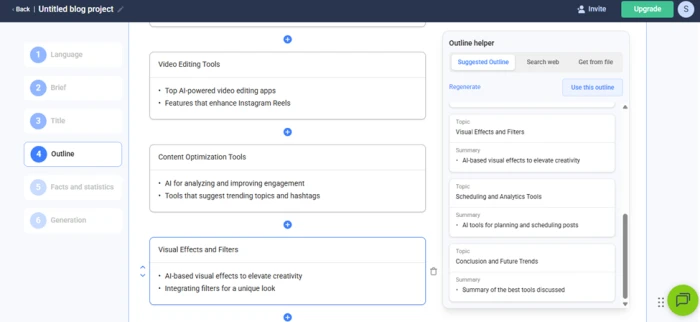
The generated article, titled “The Best AI Tools for Creating Engaging Instagram Reels,” was structured around named categories: Video Editing Tools, Content Optimization Tools, Visual Effects and Filters, Scheduling and Analytics Tools, and a conclusion on future trends. A research panel on the side suggested follow-up questions to layer in, including which facts to add and which subheadings would matter to the target reader. That is the closest any of the five tools came to acting like an editor rather than a writer.
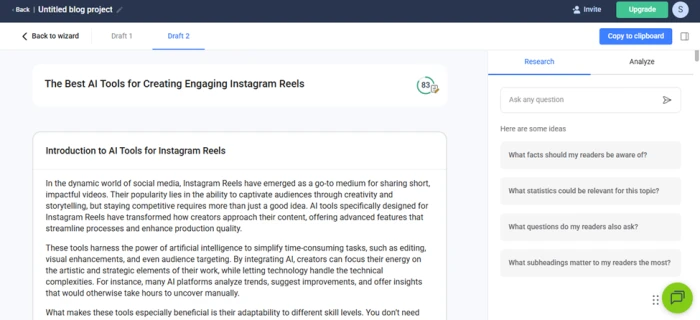
The catch is export. Anyword did not offer a direct download. The only path to using the output is copy-paste into another editor, which is workable but creates friction for anyone running content at volume.
Part of an Output:
In the dynamic world of social media, Instagram Reels have emerged as a go-to medium for sharing short, impactful videos. Their popularity lies in the ability to captivate audiences through creativity and storytelling, but staying competitive requires more than just a good idea. AI tools specifically designed for Instagram Reels have transformed how creators approach their content, offering advanced features that streamline processes and enhance production quality.
These tools harness the power of artificial intelligence to simplify time-consuming tasks, such as editing, visual enhancements, and even audience targeting. By integrating AI, creators can focus their energy on the artistic and strategic elements of their work, while letting technology handle the technical complexities. For instance, many AI platforms analyze trends, suggest improvements, and offer insights that would otherwise take hours to uncover manually.
What makes these tools especially beneficial is their adaptability to different skill levels. You don’t need extensive video production experience to produce professional-looking content anymore. With automated features like smart clip transitions, color adjustments, and even custom audio recommendations, these tools make it possible for creators to produce polished Reels that stand out in the ever-crowded social media landscape. Whether you’re producing content for personal branding, entertainment, or marketing, AI tools have become an essential resource for maximizing the quality and impact of your work.
WHAT WORKED The most editor-like brief in the test, with clean category structure and research suggestions built in. | WHAT DIDN'T No download option. Copy-paste-only output is a real workflow tax for anyone publishing at scale. |
Side-by-Side Comparison
The same five tools, lined up across three different lenses. The scorecard summarizes the overall result, the chart visualizes intent fit, and the two follow-up tables break down workflow and editorial controls in detail.
Scorecard across all five tools
The intent score weighs format fit, category accuracy, and export workflow equally. Color shading reflects relative strength within each column.
| TOOL | LISTICLE ON FIRST TRY | REEL-SPECIFIC CATEGORIES | EXPORT FORMAT | EDITOR-GRADE CONTROLS | INTENT SCORE |
|---|---|---|---|---|---|
| Koala Writer | Yes | Yes | HTML | Strong | 9/10 |
| Writesonic | Yes, after preamble | Partial | Limited | 6/10 | |
| Jasper AI | Not generated | Not generated | Paywalled | Not visible | N/A |
| Rytr | No, sections only | Outline only | HTML | Outline mode only | 5/10 |
| Anyword | Yes | Yes | Copy-paste only | Strongest | 8/10 |
Search intent score visualization
Plotting the same scores against a 0 to 10 scale makes the gap between the front-runners and the rest of the field visible at a glance.
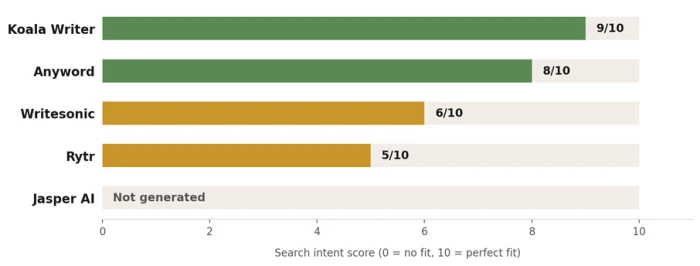
Intent score by tool, weighted equally across format fit, category accuracy, and export workflow.
Workflow and export comparison
Setup complexity, output type, and how the final article leaves the tool. This is where the publishing workflow either gains or loses time.
| TOOL | SETUP STEPS | OUTPUT FORMAT | EXPORT TYPE | CMS-READY? |
|---|---|---|---|---|
| Koala Writer | Single screen with toggles | Full article | Downloadable HTML | Yes, paste-ready |
| Writesonic | Multi-step agent run | Full article | Downloadable PDF | No, conversion needed |
| Jasper AI | Blocked at paywall | Not produced | None | Not applicable |
| Rytr | Use-case-based, per section | Section or outline | Downloadable HTML | Yes, after stitching |
| Anyword | Six-stage wizard | Full article | Copy-paste only | Manual transfer |
Editorial control comparison
Which tool gives the closest thing to an editor's panel. The matrix below shows five controls that matter most when steering an AI draft toward a specific brief.
| TOOL | DEDICATED KEYWORD FIELD | FORMAT TYPE SELECTOR | TONE PRESETS | OUTLINE EDITOR | RESEARCH PANEL |
|---|---|---|---|---|---|
| Koala Writer | Yes | Article type only | One preset | Optional outline | Real-time data |
| Writesonic | Inferred | No | No | Agent-built | Agent research |
| Jasper AI | Not visible | Not visible | Not visible | Not visible | Not visible |
| Rytr | Section keywords | Use-case based | Many presets | Outline mode | No |
| Anyword | Yes | Five formats | Many presets | Outline helper | Question prompts |
The Verdict
The two highest-scoring tools came at the same problem from opposite directions. One optimized for fastest path to publishable output. The other optimized for the most thoughtful brief. The takeaways at the end apply to any AI blog generator, not just these five.
Which tool understood search intent best
On format, both Koala Writer and Anyword matched the listicle intent without prompting. On editorial control, Anyword led with its tone presets, audience targeting, and integrated research suggestions. On workflow, Koala Writer led with its dedicated keyword field, exportable HTML, and visible SEO controls.
If the goal is fastest path from prompt to publishable draft, Koala Writer wins on output and export combined. If the goal is the most thoughtful brief and the closest thing to an AI editor, Anyword wins on process but loses on delivery. Writesonic and Rytr produce content but require heavy editing to remove the generic statistical claims and the sales-pitch phrasing. Jasper is unscorable without a paid account.
| The dividing line is not model quality. It is whether the tool was designed to satisfy a query or to fill a word count. |
What the test reveals about AI blog generators in 2026
A single keyword is enough to separate the AI writing tools that have been built around search-intent thinking from those that have been built around prose generation. The tools that asked structured questions before writing produced better-shaped articles. The tools that took the keyword and started writing produced filler.
For publishers using AI as a drafting layer, the practical takeaways are simple. SEO controls and format selection before generation matter more than tone presets after generation. Native export to HTML or markdown beats PDF-only or copy-paste-only output every time. Any tool that opens with a round-number user statistic should be expected to invent the next one too.
The same test could be run against twenty more tools and the split would likely look identical. The dividing line is not model quality, it is whether the tool was designed to satisfy a query or to fill a word count.
Comments
Join the discussion and share your perspective.