
An AI chatbot answers messages inside a single conversation. An AI agent pursues a goal across many steps: it decides which tools to call and acts on outside systems until the work is finished. The chatbot talks. The agent acts.
Both can run on the same underlying language model, which is why the real separation sits in the software wrapped around that model rather than in the model itself. A chatbot wraps the model in a request and reply. An agent wraps it in a loop that plans, acts, observes, and checks its own progress.
The distinction carries real money now. Gartner projects that agentic AI will sit inside roughly a third of enterprise software by 2028, up from almost none in 2024, and vendors have raced to attach the word “agent” to products that still behave like chatbots. Knowing where the line falls is what separates a sensible buying decision from an expensive one. The sections that follow define each system and give a clear rule for choosing between them, with concrete examples and data along the way.
What an AI chatbot does?
A chatbot is a conversational interface. A message comes in, the system interprets it, then matches it to a scripted answer or retrieves a passage from a knowledge base before sending a reply. Then it stops and waits for the next message. The scope of the conversation is the scope of the chatbot.
Two broad types sit under the label. A rule-based chatbot follows a fixed decision tree and a library of canned responses. A language-model chatbot, often paired with retrieval over a company’s own documents, reads natural language and generates a reply that fits the question. Both share the same shape: one pass per message, no action taken in the outside world.
Where a chatbot is the right tool:
- FAQ deflection, where the same bounded questions arrive at high volume
- Knowledge navigation, pointing a reader to the right document or section
- Status checks and simple lookups that need a single answer
- Lead capture and routing, collecting a few details before a handoff
Familiar examples include the support widget on a retail website, an internal policy assistant for HR questions, a lead-capture form on a landing page, and a vendor tool such as Intercom Fin that resolves common tickets. The consumer ChatGPT interface also behaves as a chatbot by default: it answers in conversation and takes no action on its own until it is connected to tools.
What an AI agent does?
An AI agent is a decision-and-action system that happens to use language. It is given a goal rather than a single question, and it works toward that goal with little intervention. The engine is a loop: the agent plans a step, acts by calling a tool or an API, observes what came back, reasons about whether the goal is met, and either repeats or stops. Along the way it can write to systems that sit well outside the chat window.
That loop is the whole difference. A chatbot without a reasoning loop handles one request at a time. An agent chains many observations and actions together to solve a compound problem, holding state as it goes so that step six can use what step two discovered.
Where an agent earns its cost:
- Multi-step work that spans several systems and needs conditional branching
- End-to-end execution, where the measure of success is a finished outcome rather than a good reply
- Tasks that require retrieving information and then acting on it in the same run
- Long-tail requests that no fixed script could ever fully anticipate
Real systems in 2026 show the pattern. Salesforce Agentforce runs autonomous workers inside the CRM. Devin and Cursor write and ship production code. Microsoft Copilot Studio builds agents that move across Microsoft 365 apps such as Outlook and Teams, and can hand tasks to other agents. Glean turns an enterprise search into action, and Harvey does the same for legal work. Developer frameworks such as LangGraph and CrewAI exist to wire these loops together.
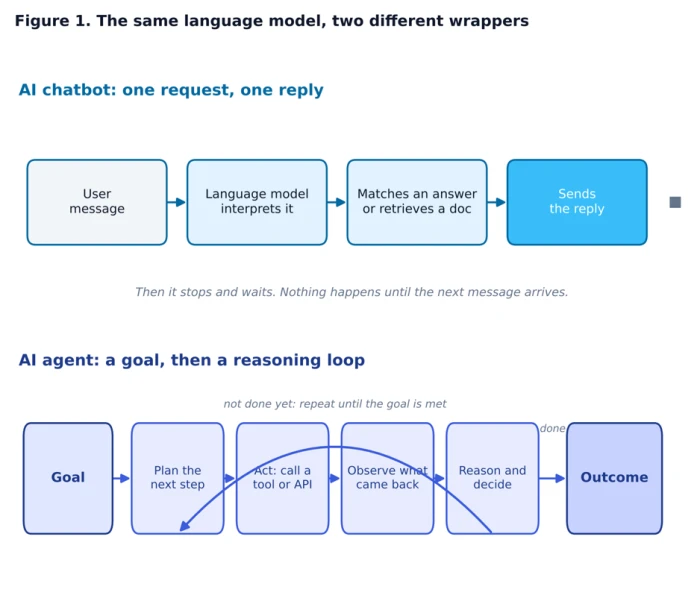
A chatbot runs one pass and stops; an agent runs a goal through a reasoning loop. The language model can be identical in both.
The core difference, on five signals
Surface comparisons tend to fixate on response quality or the number of integrations, which blurs the real boundary. A cleaner test uses five signals. Call it the Five-Signal Framework: score any AI product from one to five on each axis, and its true nature becomes obvious. Chatbots cluster at the low end. Agents stretch to the high end.
Goal orientation. A chatbot responds to a prompt. An agent pursues an objective and keeps working toward it.
Autonomy. A chatbot needs a human prompt for every turn. An agent runs with minimal supervision between start and finish.
Action and tool use. A chatbot talks or suggests. An agent executes through tools and APIs, changing state in real systems.
Memory and state. A chatbot largely treats each turn as fresh. An agent carries state across the whole task.
Reasoning and planning. A chatbot follows a script or returns the nearest document. An agent reasons about the task at runtime and plans its next move.
Plot those scores and the contrast reads at a glance. The chatbot footprint stays small and close to the centre. The agent footprint spreads outward across every axis, which is a visual way of saying it does more kinds of work with less hand-holding.
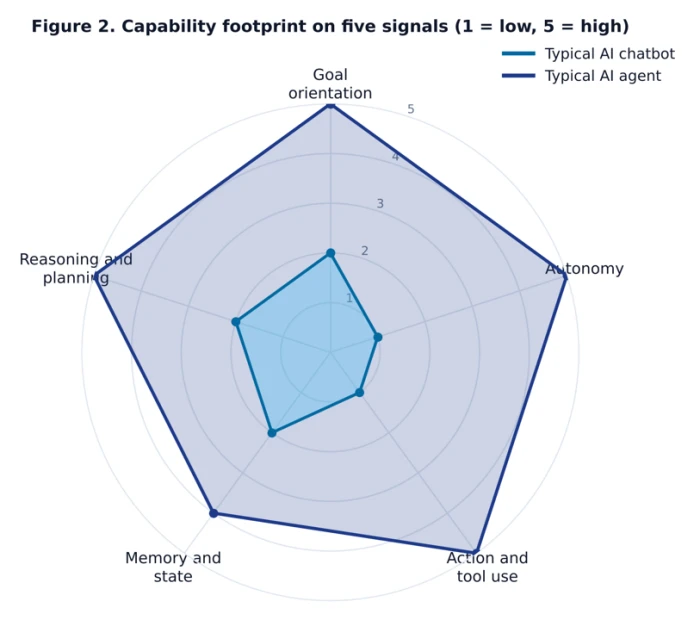
The capability footprint of a typical chatbot against a typical agent across the Five-Signal Framework.
Chatbot vs AI agent, side by side
The table below sets the two systems against the dimensions that decide cost, risk, governance, and fit. It is written for the common case in 2026: a language-model chatbot with retrieval on one side, and an autonomous agent on the other.
| Dimension | AI chatbot | AI agent |
|---|---|---|
| Core job | Answers a question or routes a request | Decides and executes to reach a goal |
| Handling a request | One pass: read, match or retrieve, reply | A loop: plan, act, observe, decide, repeat |
| Tool and API use | Limited or none | Native, orchestrates several tools |
| Workflow depth | One or two turns | Many steps with conditional branching |
| Memory | Mostly per turn | Persistent state across the task |
| Autonomy | Waits for the next prompt | Runs with little intervention |
| Typical failure | Falls back to “I can’t help with that” | Takes a wrong action, so it needs guardrails |
| Setup and governance | Light, low stakes | Heavier, needs oversight and limits |
| Running cost per task | Low, one model call | Higher, several model calls per run |
| Best fit | Bounded, predictable questions | Multi-step work across systems |
A spectrum, not a switch
The clean two-column split is useful, but most products live on a gradient. At the bottom sits the rule-based chatbot. Above it, a retrieval chatbot or copilot that reads language and answers from a knowledge base. Higher still, a tool-using assistant that can call a single tool when asked. Near the top, an autonomous agent that plans and loops, and above that a multi-agent system in which specialised agents coordinate.
The chatbot-to-agent line runs through the middle of that ladder. Anything that only answers belongs to the lower tiers. Anything that plans and acts belongs to the upper ones. This matters for buyers, because a large share of tools marketed as agents in 2026 are in fact retrieval systems or single-tool assistants that have been relabelled.
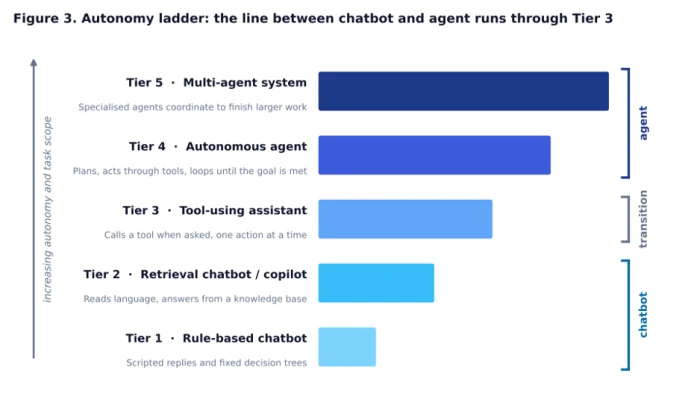
The autonomy ladder. Tools in the lower tiers answer; tools in the upper tiers plan and act.
What each looks like in practice
Chatbots in the wild
A shopper on a retail site asks about a return window. The chatbot reads the question, pulls the matching passage from the returns policy, then answers in one sentence. An employee asks the internal assistant how many leave days remain against policy, and the bot returns the figure from a connected document. In each case the work ends at the reply, and the stakes of a wrong answer are low.
Agents in the wild
A customer asks for a refund on a late order. An agent built into the CRM looks up the order, confirms it against the refund policy, issues the refund through a payment API, updates the account record, and sends a confirmation message. No single step is dramatic, but the run crosses several systems and ends in a completed outcome rather than a suggestion.
A coding agent receives a bug report, reads the relevant files, writes a fix, runs the test suite, and opens a pull request for review. If the tests fail, it reads the error, revises the code, then runs the tests again. That cycle of acting and checking is exactly the loop that a chatbot lacks.
When to use which
The decision is less about technology than about where the work ends. If the task ends at an answer, a chatbot is enough, and it will go live faster and cost less. If the task ends only when something has been done across one or more systems, an agent is the right shape, and it deserves a longer, safer rollout because a wrong action carries real consequences.
A practical sequence works for most teams: validate the use case with a chatbot first, then add agent capability for the specific workflows where automation clearly pays for itself. The use-case table below shows how that plays out.
| Scenario | Better fit | Why |
|---|---|---|
| Answer billing or shipping FAQs | Chatbot | Bounded, high volume, one-shot replies |
| Reset a password or check order status | Chatbot | A single lookup with no action to take |
| Resolve a refund from start to finish | AI agent | Needs a lookup plus a write across systems |
| Triage and route a support ticket | Chatbot, then agent | A front door that escalates when action is needed |
| Reconcile invoices against a policy | AI agent | Multi-step judgement over many records |
| Draft, test, open, and revise a code change | AI agent | Chained actions against real developer tools |
| Capture a lead and book a demo | Chatbot | Short and predictable |
The real cost of agents, and the agent-washing problem
Agents are not a drop-in replacement priced like a chatbot. Each agent run involves several model calls for planning, tool selection, evaluation, and retries, plus longer context as it tracks state. Industry estimates for 2026 put agent workloads at roughly three to ten times the per-task cost of a simple chatbot interaction. The reliability picture differs too. A chatbot that fails simply declines to answer, while an agent that fails may take a wrong action, which is why guardrails and human oversight are part of the build, not an afterthought.
Gartner has been blunt about the hype. The firm uses the term agent-washing for products that rebrand older tools such as assistants and chatbots without real agentic capability, and it estimates that only about 130 of the thousands of self-described agent vendors are the real thing. It also forecasts that more than 40 percent of agentic AI projects will be scrapped by the end of 2027, most of them early experiments driven by hype rather than a clear use case.
The direction of travel is still firmly toward agents. Gartner projects that 33 percent of enterprise software applications will include agentic AI by 2028, up from less than 1 percent in 2024, and that at least 15 percent of day-to-day work decisions will be made autonomously by the same year. The lesson is not to avoid agents, but to deploy them where the payoff is real and to recognise the difference between a genuine agent and a relabelled chatbot.
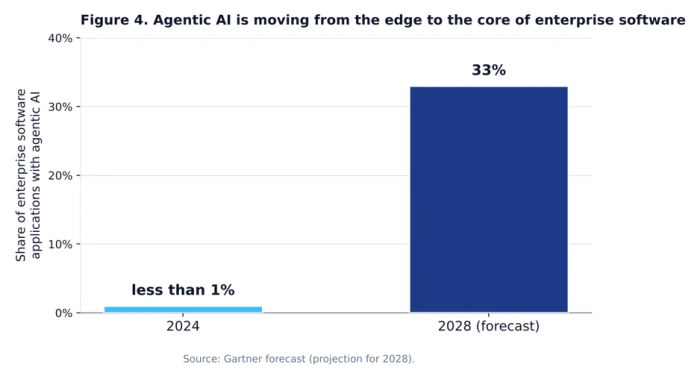
Figure 4. Gartner’s forecast for agentic AI inside enterprise software, from under 1 percent in 2024 to 33 percent by 2028.
Where the two meet
In production, most systems are hybrids rather than one pure type. A chatbot layer handles the high-volume front door, covering routing, FAQs, status checks, and simple lookups, and escalates to an agent only when a request needs multi-step action it cannot complete alone. That design keeps cost low on the easy traffic and reserves the expensive, powerful path for the work that justifies it.
The relationship is worth stating plainly. The language model is the same in both. Add planning, tool access, persistent memory, and guardrails, and a chatbot becomes an agent. Remove those layers, and an agent collapses back into a chatbot. The wrapper decides, not the model.
Frequently asked questions
What is the main difference between an AI agent and a chatbot?
A chatbot responds to messages inside one conversation and then stops. An AI agent pursues a goal across many steps, choosing which tools to call and acting on systems outside the chat window until the task is complete. The chatbot talks, and the agent acts.
Is ChatGPT an AI agent or a chatbot?
On its own, the consumer ChatGPT interface behaves as a chatbot that answers questions in a conversation. It becomes agent-like only when it is connected to tools, memory, a reasoning loop, and guardrails that let it take actions. The underlying model is the same either way.
Can a chatbot become an AI agent?
Yes. Adding planning logic, tool access, persistent memory, and human-in-the-loop controls turns a chatbot into an agent. Strip those layers away and the agent collapses back into a chatbot.
Are AI agents replacing chatbots?
No. Chatbots remain the better fit for simple, high-volume interactions such as FAQ deflection and status checks, while agents suit complex, multi-step workflows. Most production systems run both, with a chatbot front door that escalates to an agent when needed.
Which is better for a business, a chatbot or an AI agent?
Neither is better in the abstract, because the task decides. Work that ends at an answer favours a chatbot, and work that requires action across systems favours an agent. A common path starts with a chatbot and adds agent capability only where automation clearly pays for itself.
How much more does an AI agent cost than a chatbot?
An agent usually costs several times more per completed task, because each run involves multiple model calls for planning, tool selection, evaluation, and retries, plus longer context as it tracks state. Industry estimates put agent workloads at roughly three to ten times the per-task cost of a basic chatbot.
Comments
Join the discussion and share your perspective.