
The short version. If you write for a living and bill by the hour, the tools worth paying for cluster into two groups: the ones that speed up your writing (ChatGPT, Claude, Grammarly, Perplexity, Otter) and the ones that protect the income that speed can quietly erode (Toggl Track, Clockify, Timely, FreshBooks). The catch nobody mentions is that faster work plus an hourly rate equals a pay cut. This guide gives you the stack, the billing math that fixes that, and a straight answer on what to disclose to clients.
The hourly writer's dilemma that every “best tools” list ignores
Search for AI tools for freelance writers and you get two kinds of articles. One lists writing apps and never mentions how you charge. The other lists time trackers and invoicing software and never mentions AI. Neither answers the question an hourly writer is actually asking, which is quieter and more uncomfortable: if AI helps me finish in half the time, and I bill by the hour, do I just earn half as much?
Yes. That is exactly what happens if nothing else changes. It is the one problem this guide is built around, because the tools only pay off once you have solved it.
The math that punishes efficiency
Take a 2,000-word article that used to take six hours. At a $75 hourly rate, that is $450. Bring in AI for research scaffolding and a first draft, and the same piece now takes three focused hours. Bill by the hour and you invoice $225 for work of the same quality. You got faster and your income fell. Price that article at a flat $500 instead, and your pay holds steady no matter how quickly you deliver.
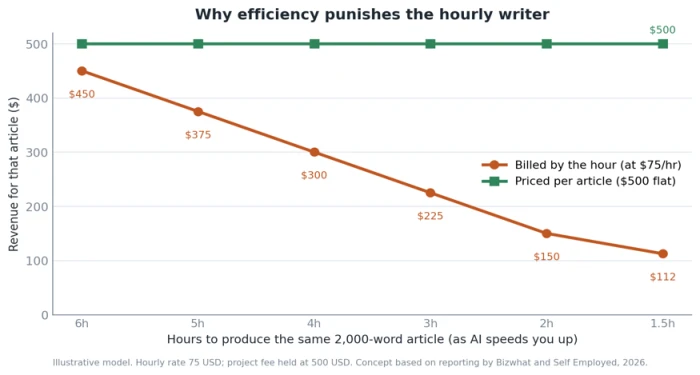
This is not a hypothetical unique to writing. A founding consultant on agency pricing, Tim Williams, put the mechanism plainly in reporting by Axios: with labor-based billing, the faster you work, the less you earn. Writers feel it first because AI reached their core task early.
What the data actually shows
Adoption is nearly universal. The Freelancer Kompass 2026 report found that 84% of freelancers now use AI tools regularly, up from 41% three years earlier. The productivity story is messier than the LinkedIn posts suggest. A University of Copenhagen study covering roughly 25,000 workers across 7,000 workplaces found that most people saw only about a 3% time saving from AI on their actual output. So the honest framing is this: AI helps at specific tasks, in specific hands, and the gains are easy to overstate.
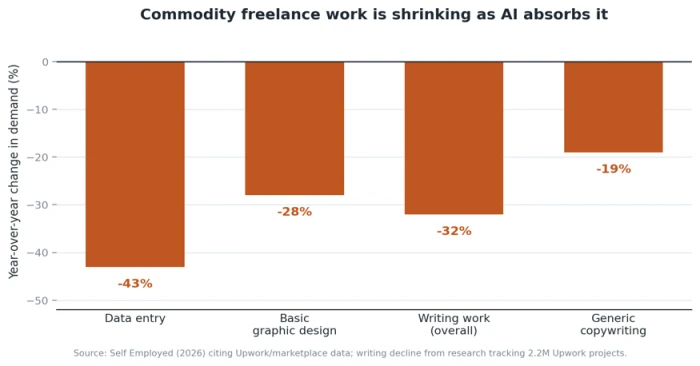
The market is splitting at the same time. Research tracking 2.2 million Upwork projects found writing work down about 32% year over year as AI swallowed the commodity layer, the $40 blog post and the boilerplate email. Meanwhile Upwork's own analysis of more than 130 work categories found that freelancers using AI in their delivery earn roughly 40% more per hour than peers who do not. The floor dropped and the ceiling rose. Which way you move depends on how you use these tools and how you charge for them.
The two layers every hourly writer needs
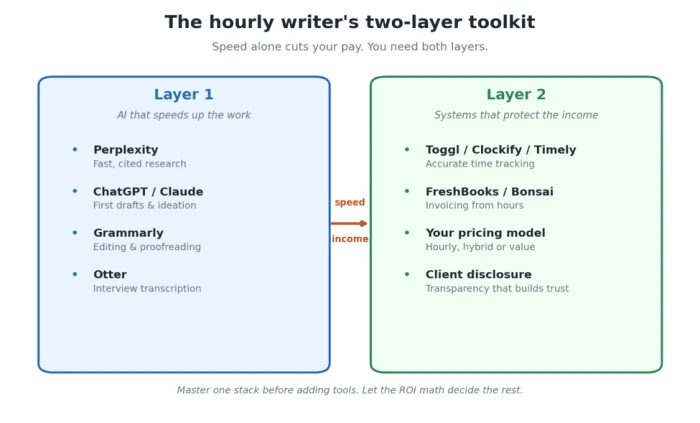
Think of your toolkit in two layers. The first is the AI that does the writing work faster: research, drafting, editing, transcription. The second is the system that converts that speed into money and keeps you from leaking it: time tracking, invoicing, transparency, and the pricing decisions behind them. Most guides cover one layer and pretend the other does not exist. You need both, so we will take them in order.
Layer 1: the AI writing stack, by workflow stage
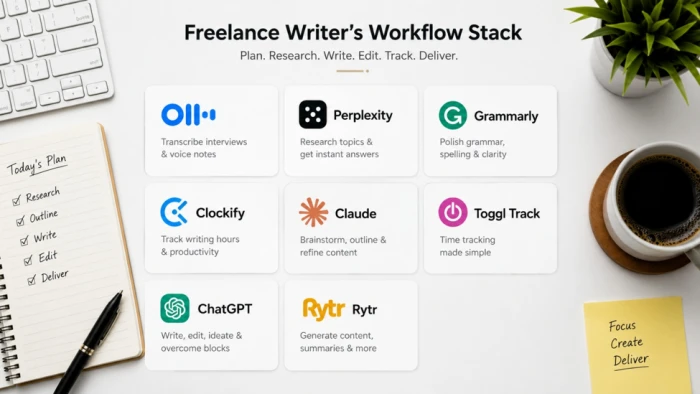
These are organized by where an hourly writer's time actually leaks, not by which brand is loudest. For each, the useful question is narrow: does it save you enough billable time to cover its cost, and does it hold up on client work?
Research and topic orientation
Perplexity is the standout here. It returns a synthesized, cited answer instead of a page of blue links, which turns a 45-minute orientation on an unfamiliar client topic into something closer to 10 minutes. ChatGPT's deep research mode does similar work with longer, more exploratory questions. The risk is real, though: both will state a confident wrong fact, so anything load-bearing still needs a primary source. Treat AI research as a faster way to build the map, then verify the roads yourself.
First drafts and ideation
ChatGPT and Claude are the general workhorses. Claude tends to hold tone and structure better across long-form pieces past 3,000 words, which matters for white papers and technical documentation. ChatGPT is quicker for short-form and ideation. Jasper and Writesonic wrap the same underlying models in marketing templates and brand-voice features, useful if you produce landing pages and email sequences at volume. Rytr is the budget entry point at around $9 a month.
Honest limitation. AI first drafts on serious pieces need heavy editing, and the editing often eats the time the drafting saved. The draft is worth it when you are stuck on a blank page or mapping structure. It is a net loss when the topic needs genuine expertise the model does not have.
Editing and proofreading
Grammarly is the highest-trust use of AI on this list because it corrects rather than generates. Tone detection and clarity suggestions on the Pro plan, around $12 a month, save most writers close to an hour a week on polishing. At a $50 hourly rate that is roughly $200 of recovered time a month against a $12 cost, which is the clearest ROI in the whole stack.
Transcription for interview-based work
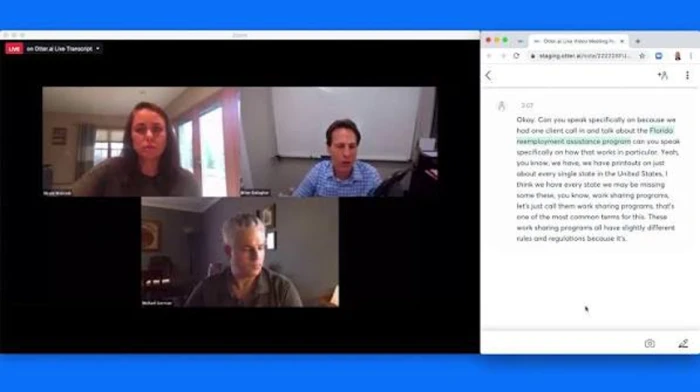
If you do interviews or take client calls, Otter records and transcribes so you are not typing up notes for an hour afterward. The free tier covers 300 minutes a month; Pro runs around $10 a month. For research-heavy and journalistic writers this is the single biggest time recovery outside of drafting.
The admin layer most writers under-count
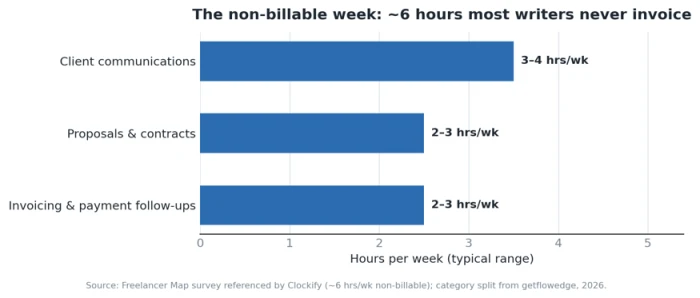
Here is where the money quietly goes. A Freelancer Map survey, referenced by Clockify, found that about half of freelancers spend roughly six hours a week on non-billable admin: proposals, client emails, invoicing chases. At a $75 rate, six hours a week is more than $22,000 of unbilled time a year. AI helps trim it, drafting proposals and scopes of work and cleaning up client emails, but the first win is simply seeing how much time this layer eats.
The stack at a glance
The table below is the quick reference. Prices are approximate and current for 2026; several tools raised prices in January 2026, so confirm before you subscribe.
| Tool | Stage | Approx. price (2026) | Best for | Skip if |
|---|---|---|---|---|
| Perplexity | Research | Free / ~$20 mo | Fast, cited topic orientation | You mostly write in familiar niches |
| ChatGPT | Draft + research | ~$20 mo (Plus) | Ideation, short-form, deep research | You need reliable long-form coherence |
| Claude | Long-form draft | ~$20 mo (Pro) | White papers, technical docs, tone | You only write short pieces |
| Grammarly | Editing | Free / ~$12 mo | Every writer; polishing and tone | Almost never; best ROI here |
| Otter | Transcription | Free / ~$10 mo | Interview and call-based writing | You never take recorded calls |
| Jasper / Writesonic | Marketing draft | ~$39–$79 mo | High-volume client marketing copy | You are a solo low-volume writer |
Layer 2: tracking and billing tools that protect your hours
For an hourly writer, time tracking is not paperwork. It is revenue defense. When you reconstruct a week's hours from memory before invoicing, you round down to avoid looking greedy, and you undercharge. One Forbes-cited estimate puts the loss from poor time documentation at up to 20% of potential income. The next step, once AI has made your hours fewer and more valuable, is to capture every one of them accurately.
AI-assisted time tracking
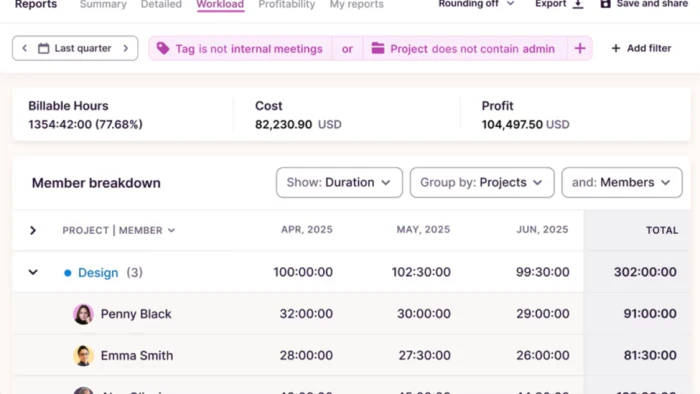
Toggl Track has the smoothest timer in the category and a firm stance against surveillance-style monitoring, plus reporting that shows which clients are actually worth your time. Clockify has the strongest permanent free tier, though billable rates and invoicing sit behind its paid plans. Timely goes further with AI that reconstructs your day from activity so you stop losing sessions you forgot to time, which is the exact failure that makes writers underbill.
• Toggl Track: free up to five users; paid from around $9 per user a month. Best reporting for spotting unprofitable clients.
• Clockify: genuinely usable free tier for solo tracking; billable rates and invoicing unlock on paid plans from around $5.49 a month.
• Timely: AI auto-tracking from around $9 a month, worth it if you habitually forget to start the clock.
Invoicing that turns tracked hours into money
The point of tracking is a clean handoff to an invoice. FreshBooks connects logged hours straight to invoice line items and automates late-payment reminders, which alone tend to recover revenue stuck in 60-day limbo. Bonsai bundles contracts, proposals, invoices, and time tracking for writers who want one freelance-specific platform. Harvest sits in between, pairing native time tracking with invoicing. Pick the one whose billing shape matches yours rather than the one with the longest feature list.
Transparency that builds trust instead of suspicion
Detailed logs are not only for you. Sharing a clean breakdown of hours by task reassures a client far more than a round number on an invoice. That habit, showing your work, is what makes the next and harder conversation possible: what you charge for when AI did part of the job.
The tool ROI test: does it actually pay for itself?
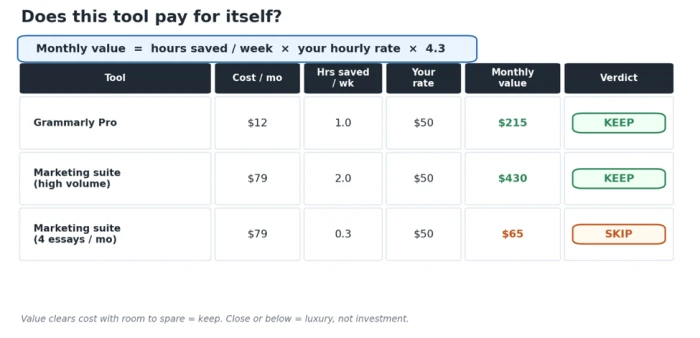
Before adding anything to the stack, run one calculation. A tool earns its place only if the billable time it frees is worth more than its price.
The breakeven formula
Monthly value = hours saved per week × your hourly rate × 4.3
If that number clears the subscription cost with room to spare, keep the tool. If it is close, the tool is a luxury, not an investment.
Grammarly saving one hour a week at a $50 rate returns about $215 a month against a $12 cost. Easy keep. A $79-a-month marketing suite saving two hours a week at the same rate returns about $430, which also clears, but only if you write enough marketing copy to use it. The same tool for a writer producing four essays a month fails the test. The math, not the marketing, decides.
The honesty problem: can you bill full hours when AI did the work?
This is the section the listicles skip, and it is the one that keeps thoughtful writers up at night. The professions that bill by the hour for knowledge work, law and accounting, have already fought this out, and their conclusions transfer cleanly.
What the professions already decided
The American Bar Association's long-standing rule is blunt: a lawyer who agreed to bill by the hour cannot charge for more time than was actually spent on the matter. A 2024 opinion applied it directly to generative AI, using an analogy that lands hard for writers. A lawyer who reuses an old research memo for a second client cannot bill the second client for the original hours; the same holds when AI compresses the work. The IRS reached a parallel position, advising that when AI cuts research and drafting time, practitioners should pass those efficiencies to clients and disclose AI-assisted work. The principle underneath all of it: you bill for time genuinely spent, including directing and verifying AI output, but not for hours that never happened.
A framework for every AI-assisted task
You do not need to relitigate this per invoice. Run each AI-touched task through one question and follow the branch.
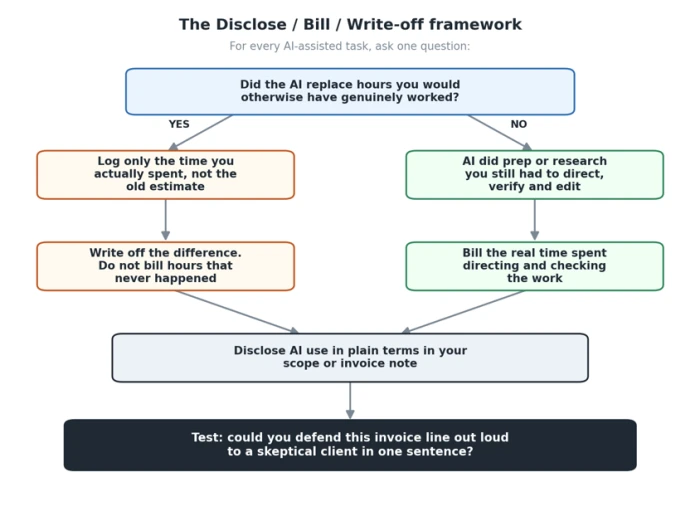
The test at the bottom is the whole thing in one line. If you can defend an invoice item out loud to a skeptical client in a single sentence, it is fair. If you cannot, rewrite it before you send it.
Why disclosing AI can raise your rate, not lower it
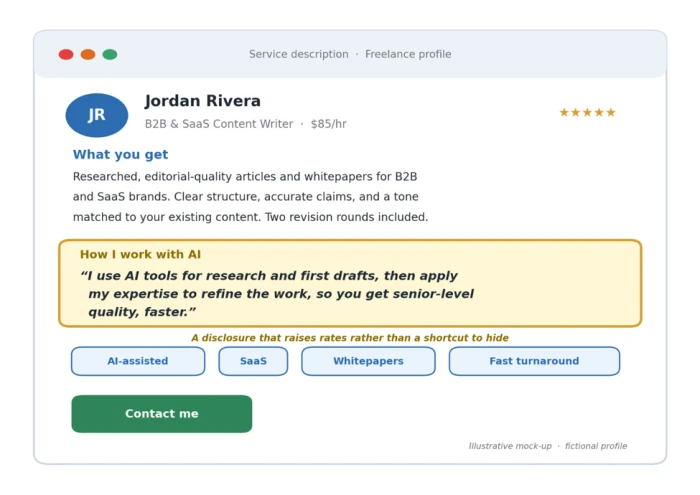
Disclosure feels like a confession, so writers hide it. The data says the opposite pays. Fiverr's data shows freelancers who explicitly market AI-assisted services charge 30% to 40% higher rates than those who do not. The operative word is explicitly. “I use AI for research and first drafts, then apply my expertise to refine the work” reads as a client benefit, not a shortcut you are embarrassed about. Speed becomes a feature you own rather than a discount you owe.
Three ways to respond so AI raises your income
Solving the paradox does not always mean abandoning hourly billing. It means choosing the response that fits your work. Here are the three that hold up, from least to most disruptive.
Response 1: keep hourly, but adjust
Raise your rate to reflect senior, AI-augmented output, and bill for judgment and revision rather than keystrokes. The recovered admin hours from Layer 2 become new billable capacity. This suits writers with steady clients who resist pricing changes but accept a rate that tracks seniority.
Response 2: go hybrid
Charge flat fees for the tasks AI accelerates predictably, such as standard blog posts, and keep hourly for genuinely variable work like open-ended research or heavy revision cycles. Hybrid pricing lets you capture efficiency gains where they are reliable without forcing every client into a new model at once.
Response 3: migrate to value or project pricing
This is where the earlier effective-hourly-rate math pays off. Price the deliverable, not the clock. The $500 article stays $500 whether it takes six hours or ninety minutes, so every efficiency gain flows to you. The move works when demand supports it and when your work produces an outcome a client can name. It struggles when clients are locked to hourly procurement or when your pipeline is thin.
Which response fits you?
Steady clients, predictable work, price resistance → adjust hourly.
Mixed work, some tasks predictable and some open-ended → go hybrid.
Outcome-driven work, healthy demand, room to reposition → value pricing.
Where hourly still wins: the writing AI cannot commoditize
The safest response of all is to move your hours toward work the model cannot do. Specialist technical writers with API documentation experience earn roughly 40% more than general technology writers, because the expertise barrier cannot be faked and AI cannot substitute for someone who understands the system being documented. A fintech writer who went deep on regulatory content reported earning $0.95 a word, with a 16% income lift from specialization alone.
The pattern is consistent across the market data: commodity content is vanishing while specialized content grows more valuable. The writing that keeps its pricing power shares a trait. The client's specific context, verifiable expertise, or authentic voice is the product, and none of those live inside a language model.
• Technical and API documentation that needs real system comprehension.
• Ghostwriting that captures an authentic individual voice.
• Primary-research reporting built on interviews and subject-matter interviews you conduct.
• Executive thought leadership where the byline's credibility is the point.

Recommended stacks under $50 a month, by writer type
Tie it together with a stack that fits how you actually work. Each of these clears the ROI test for its intended user and stays under $50 a month at the base tier.
| Writer type | Core stack | Approx. monthly cost |
|---|---|---|
| Interview-based / journalist | Otter + Perplexity + Grammarly + Clockify (free) | ~$32 / mo |
| Long-form / technical | Claude + Grammarly + Toggl Track | ~$41 / mo |
| High-volume content | ChatGPT + Grammarly + Clockify + Rytr | ~$41 / mo |
Pick one stack, learn it deeply, and add tools only when the breakeven math says yes. A writer who masters three tools and prices the work well beats one juggling ten and still billing by the clock. The tools were never the hard part. The pricing was, and now you have both.
How these picks were chosen
Every tool here was assessed against a single standard: does it save an hourly writer enough billable time to beat its cost, and does it hold up on real client work rather than in a demo. Statistics on adoption, earnings, and market shifts come from Upwork's platform research, the Freelancer Kompass 2026 report, a University of Copenhagen workplace study, and freelance-market survey data referenced by Clockify and reported by Self Employed and Bizwhat in 2026. Pricing reflects 2026 rates, several of which rose in January 2026, so confirm current figures before subscribing. Billing-ethics guidance is adapted from American Bar Association and IRS positions on AI-assisted professional work.
Comments
Join the discussion and share your perspective.