
The music under your video matters more than most creators admit. Pick the wrong track and a copyright claim can mute your audio or wipe out a video's ad revenue. That risk is why so many creators have moved to AI background music generators, tools that turn a short text prompt into an original instrumental track you can drop under a voiceover, a stream, a vlog, or a montage.
The scale of the shift is hard to ignore. Deezer, the French streaming service, reported that fully AI-generated tracks climbed from 10% of its daily uploads in January 2025 to more than half at peak by June 2026 (TechCrunch). The tools sound good now, and they are cheap and fast to use. The hard part now is choosing one that sounds right and keeps you safe to monetize.
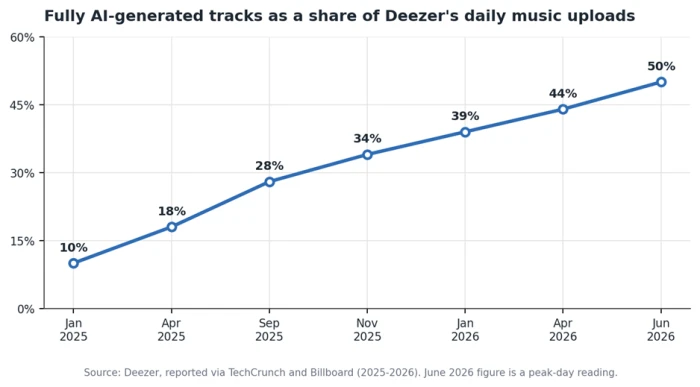
AI-generated uploads have gone from a novelty to the majority of new tracks on Deezer in about 18 months.
This guide ranks the strongest options for background scoring specifically, rates each on the licensing detail that protects your channel, and shows which tool fits which job.
The short answer: top picks at a glance
If you only skim one section, take these:
● Best overall for background music: Soundraw
● Best genuinely free starting point: Mubert, with 25 free tracks a month
● Best budget pick: Beatoven.ai
● Best for airtight copyright safety: Soundraw and Soundful, both trained on in-house music
● Best for cinematic and game scores: AIVA
● Best for live streaming: Mubert
One idea sits under this whole guide. The "royalty-free" label on a generator's homepage does not settle whether you can put the track on Spotify, run it through Content ID, hand it to a paying client, or resell it as your own. The fine print does, and it differs sharply between tools. The next sections get into exactly where.
How we ranked these tools
Every tool here was judged on the same five questions, weighted toward the needs of someone scoring content rather than releasing songs:
• Does the output work as background music, meaning it loops cleanly and stays out of the way under a voice?
• How much control do you get over mood, length, tempo, and instruments?
• What does the license actually permit, including commercial use and whether you can distribute to streaming platforms?
• How fast and cheap is it to reach a finished track?
• Can you export stems or higher-quality files when a project calls for it?
The licensing question carried the most weight, because it is the one that costs creators real money when they get it wrong. A generator can produce a gorgeous loop and still leave you exposed if its terms block the exact use you had in mind. Where a tool's rules are specific enough to matter, this guide quotes them rather than flattening them into "royalty-free" and moving on.
A quality note worth setting up front: background music is the category where AI already matches human work. A Deezer and Ipsos blind test of 9,000 listeners across eight countries found that 97% could not reliably tell AI-generated songs from human-made ones. For ambient beds and functional loops, the gap has effectively closed, so the decision comes down to control and rights rather than raw sound quality.
Background music or full songs? Sort the tools first
Before comparing products, split them into two camps, because mixing them up wastes time and money.
Song generators like Suno and Udio build complete tracks with vocals and a full arrangement from a prompt. They are impressive for making something people listen to on its own. They are the wrong tool when you need music to sit quietly under narration, since vocals fight your voiceover and busy arrangements pull attention away from your content.
Background and instrumental generators do the opposite. They produce vocal-free beds built around mood, tempo, length, and energy, so the music supports your content instead of competing with it. Every tool ranked below sits in this second camp.
The split has a licensing edge too. After Universal Music Group's October 2025 settlement with Udio, that platform moved to a licensed "walled-garden" model that gates downloads behind a paid, controlled system, so it is no longer a clean source of files you can freely drop into a video. Warner Music Group reached a similar deal with Suno weeks later. For background scoring, the purpose-built instrumental tools are simpler and safer anyway.
The tools at a glance
Here is how the leading background music generators compare on the factors that decide most projects.
| Tool | Best for | Free tier | Start price | Exports | Streaming release? |
|---|---|---|---|---|---|
| Soundraw | Copyright-safe commercial music | Preview | ~$5.99/mo | Stems, WAV | Allowed, keep 100% rights |
| Mubert | Streaming and long sessions | 25 tracks/mo | ~$11.69/mo | WAV, loops | Restricted, no Content ID |
| Beatoven.ai | Budget mood-matched scoring | Free trial | ~$6-10/mo | Stems, WAV | Not allowed |
| Soundful | Fast unlimited loops | Limited | ~$4.99/mo | Stems, WAV | Allowed on paid tiers |
| Loudly | Social-ready tracks | Limited | ~$5.99/mo | Stems | Pre-cleared for social |
| AIVA | Cinematic and game scores | Non-commercial | ~$12/mo | MIDI, WAV | Depends on plan |
Prices and terms change often. Treat these as a mid-2026 snapshot and confirm on each vendor's site before buying. Beatoven's entry price is listed differently across trackers, which is why it appears as a range.
The best AI music generators for background tracks
Soundraw: best overall for copyright-safe background music
Soundraw earns the top spot because it removes the biggest worry in one move. Its AI is trained only on music its in-house producers write and record, so no scraped catalog sits behind your track and no third-party sample waits to trigger a claim. The company owns the master and publishing rights to everything the model learned from, which is why it can promise you keep 100% of your revenue across YouTube, TikTok, Spotify, and other platforms with no copyright claims.
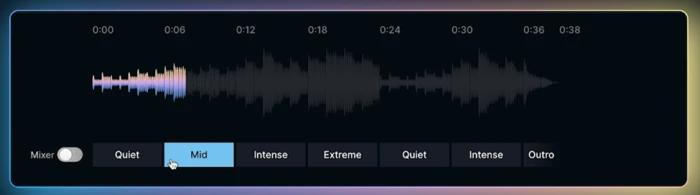
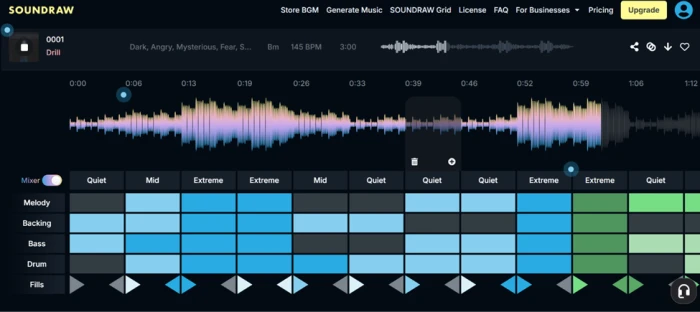
The workflow suits creators who want to shape a track rather than accept the first result. You pick a mood and length, then use a bar-level mixer to toggle instruments and rearrange whole sections, with genre blending that crosses styles like lo-fi and orchestral. Soundraw is used by teams at Canva and Captions and has been featured by Forbes, which are useful trust signals for client and brand work. The catch is that it makes instrumental music only, so look elsewhere if you need vocals.
Mubert: best for live streaming and long sessions
Mubert is built for audio that runs for hours without repeating or triggering a mute. Streamers are its core audience, and it keeps a dedicated Twitch playlist of chill instrumental beds designed to sit under voice and game sound. You describe a vibe or feed it an image, choose a loop or a full track, set the length, then download.
Its licensing note is the one creators most often miss. Mubert's royalty-free audio is meant to live inside your content, and the company specifically warns against running its tracks through Content ID or similar systems, since that makes it look like you own music you only licensed. Follow that rule and your VOD library stays clean. The free plan gives 25 tracks a month, enough to test whether the sound fits your channel before you pay.
Beatoven.ai: best budget pick for mood-matched scoring
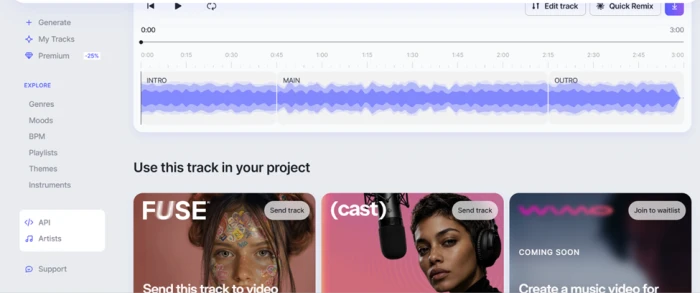
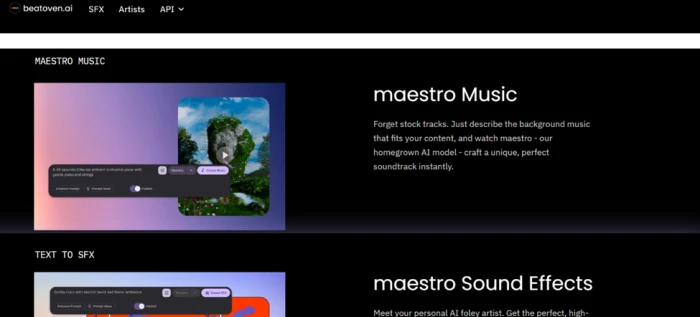
Beatoven is the value option, aimed squarely at video and podcast creators who want music that follows the emotion of a scene. You choose a genre and one of 16 moods, set a duration, then its Maestro model composes an original track to length, so you skip awkward loops and fades. More than 1.5 million creators have generated over 6 million tracks on it, per the company.
The license is a non-exclusive perpetual one that covers monetized video and audio content, which fits the vast majority of creator use. Read one line carefully, though. Beatoven does not allow direct distribution of its tracks to streaming platforms like Spotify or Apple Music. Score a podcast or a YouTube video and you are covered. Try to release the music as a standalone single and you are not.
Soundful: best for fast, unlimited background loops
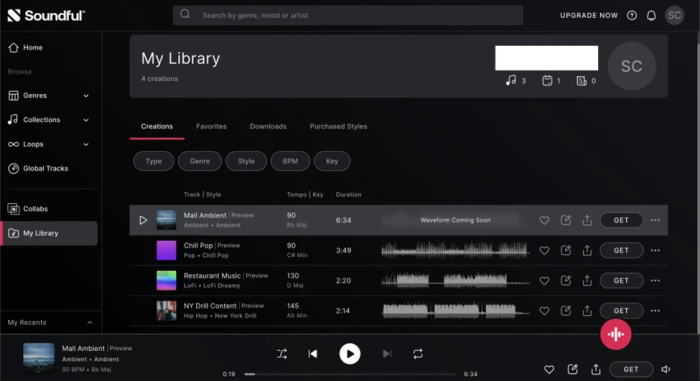
Soundful is the workhorse for creators who need a steady supply of loops without fuss. It offers more than 150 styles across common categories like corporate, lo-fi, gaming, and podcast audio, and like Soundraw it trains on music made in-house, so the copyright status is clean. You pick a style, generate, then download as MP3 or WAV, with stem packs available when you want to remix.
Pricing starts low, which makes it sensible for high-volume channels that burn through tracks. The trade-off is depth. It handles background and ambient work well, yet it does not build full songs, and its library can feel repetitive inside popular categories if you keep pulling from the same style.
Loudly: best for social-ready tracks
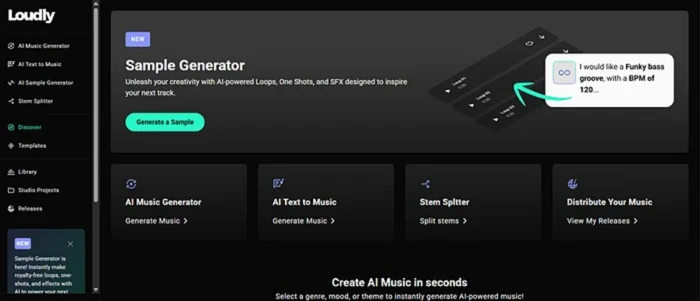
Loudly focuses on getting you a usable track fast, with a catalog trained on a fully licensed dataset and tracks pre-cleared for social platforms. That pre-clearance is the selling point for anyone posting to short-form feeds, where a muted upload is the worst outcome. It leans toward electronic and modern styles and exports stems on paid plans for creators who want to adjust the mix. If your work lives mostly on TikTok and Reels, its clearances save time.
AIVA: best for cinematic and game scores
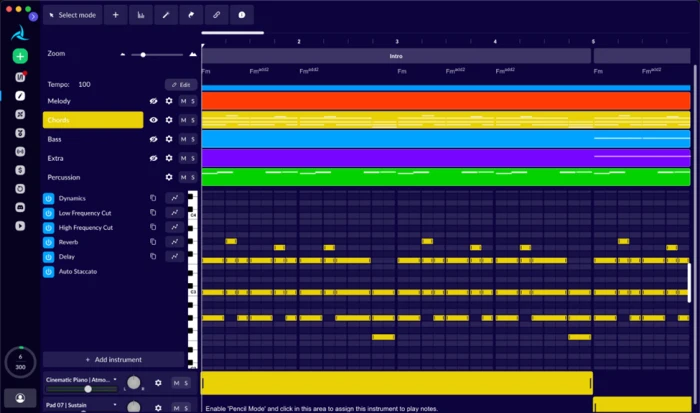
AIVA is the specialist. Composing music since 2016, it targets film, game, television, and orchestral projects, with more than 250 styles and a depth in cinematic and classical work that the general tools cannot match. Its standout feature for serious projects is MIDI export, which lets you take a generated piece into a notation program or a DAW and develop it further. You can also train a custom style model on reference tracks to hold a consistent sound across a project. It makes instrumental music only, and its longer workflow assumes some musical familiarity, so it rewards composers more than one-click creators.
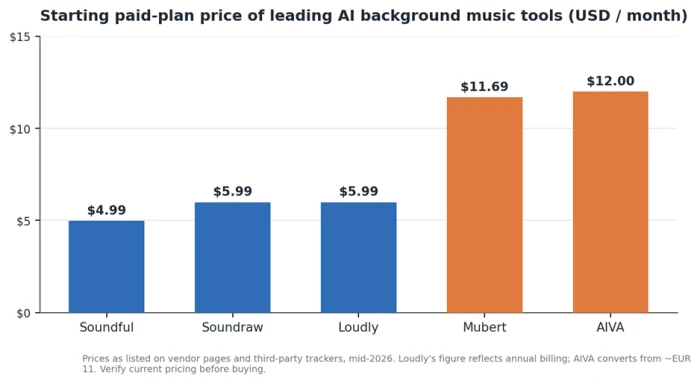
Entry pricing clusters into two bands: everyday creator tools near $5, and the streaming and cinematic specialists near $12.
The free route, and its limits
You can score real projects without paying, as long as you respect the ceilings. Mubert's free tier hands you 25 tracks a month, and Google's Lyria model, reachable through the Gemini app, produces strong short instrumental clips at no cost. The common trap is commercial rights. Many free tiers allow personal use only and quietly withhold the commercial license you need to monetize. Before you publish anything carrying ads, confirm the free plan actually grants commercial use, or move up to the cheapest paid tier, which usually does.
Which tool fits your use case
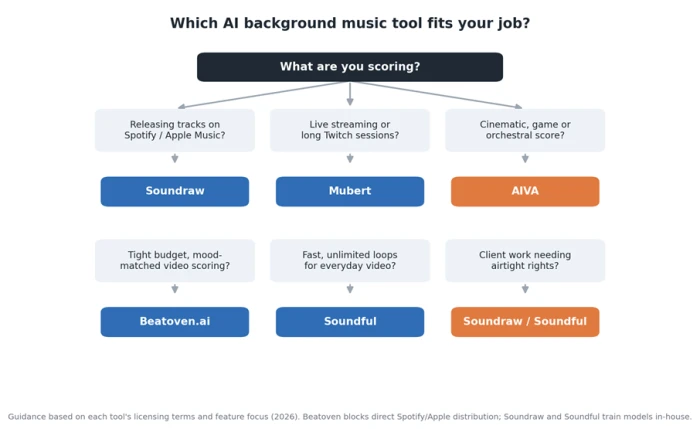
The right pick depends less on which generator is "best" and more on what you are scoring. Use the map below, then the short notes that follow.
YouTube videos
For monetized long-form video, copyright safety beats every other feature, which points to Soundraw or Soundful and their in-house-trained models. Keep proof of your license in case you ever need to dispute a claim.
Podcasts
Podcasters want voice-safe beds that hold up under long talk segments. Beatoven's mood-to-length composing fits the format cheaply, and its license covers podcast monetization directly.
Twitch and live streaming
Streaming punishes mistakes because you cannot fix a claim in post. Mubert's stream-focused loops and its clear no-Content-ID rule make it the low-risk choice for long broadcasts.
Corporate and client work
Brand and agency projects need airtight rights and clean provenance. Tools that own their training data, meaning Soundraw and Soundful, give you the cleanest paper trail to hand a client.
Games
Game soundtracks reward control and adaptability. AIVA's cinematic depth and MIDI export let you build themes you can layer and loop inside an engine.
Study, lo-fi, meditation, and focus
Ambient and focus content needs long, gently evolving loops. Mubert and Soundful both handle calm instrumental work well, and their speed makes it easy to generate several variations and keep the best.
What "royalty-free" and "safe to monetize" really mean
The phrase "royalty-free" appears on almost every generator's homepage, and it hides more than it reveals. Here is what actually governs whether you are safe.
Royalty-free is not the same as owning the track
Royalty-free means you will not owe recurring payments for using the music. It does not always mean you own the master. Beatoven, for example, grants you a perpetual license while keeping ownership of the track itself. That works for scoring content and becomes a problem if you planned to register or resell the music as your own.
Content ID can still flag AI music
YouTube's Content ID system scans uploads for matches, and in 2026 it relies on pattern recognition rather than simple waveform matching. Two risks follow. An AI track that echoes training-data melodies can occasionally get flagged. And if you wrongly register a licensed track through Content ID, you can create claims against yourself and other creators, which is the reason Mubert warns against it.
Disclosure is now mandatory on YouTube
Since 2024, YouTube has required creators to disclose altered or synthetic content, and enforcement tightened through 2026. For most background music this is a quick toggle in the upload flow, and skipping it when it applies is a policy violation you can avoid in seconds.

Not every tool lets you distribute to streaming
If your goal is to put the music itself on Spotify or Apple Music as tracks, check the distribution clause on its own. Soundraw permits it and lets you keep your revenue. Beatoven blocks it. This single line separates a tool you can build a release on from one you cannot.
A copyright-safety checklist before you publish
Run through these before every upload that uses AI background music:
• Confirm you are on a plan that grants a commercial license, not a personal-use free tier.
• Match the license to the use. Scoring a video is a different permission from releasing a single.
• Toggle YouTube's synthetic-content disclosure when it applies.
• Keep a dated record of the tool, the plan, the date, and the license terms, in case you need to dispute a claim later.
• Avoid prompts that name real artists or imitate a specific singer, which can raise separate rights issues.
• Do not register licensed AI music through Content ID unless the tool explicitly allows it.
How to prompt for background music that actually works
Getting a usable bed is mostly about being specific in the right places. A prompt that names the mood, the tempo, the lead instrument, and the job the music is doing beats a vague genre label every time. A simple frame to reuse:
mood + genre + lead instrument + tempo + energy level + "instrumental, no vocals, sits under a voice"
Two examples you can adapt (illustrative templates, not tied to any single tool):
• "Warm, cozy lo-fi with soft piano and mellow bass, around 70 BPM, low energy, instrumental and loopable, for a study video that sits under narration."
• "Bright corporate ambient with light synth pads and subtle percussion, around 100 BPM, medium energy, no vocals, for a product explainer under a voiceover."
Two habits improve results across every tool. Generate several takes from the same brief and keep the best, since output varies run to run. And ask for slightly lower energy than you think you need, because a track that sounds balanced on its own will usually overpower a voice once you drop it into the edit. That last adjustment, more than any single tool choice, is what separates background music that disappears politely under your content from music that quietly competes with it.
The Verdict
If you want one pick and the confidence to stop researching, choose Soundraw. It trains on music its own producers make and lets you keep 100% of your revenue, with enough control to shape a track rather than settle for the first result. That mix of clean rights and real editing is what earns it the top spot for background work.
The rest sort by job. Mubert is the safer choice for streamers and anyone running audio for hours, thanks to its loop-friendly catalog and its clear no-Content-ID rule. Beatoven.ai is the budget pick for podcasters and video creators who want music scored to a mood, as long as you never plan to release the tracks as singles on streaming platforms. AIVA is worth its steeper learning curve for cinematic and game projects, mostly for MIDI export. And if you are still testing the water, Mubert's 25 free tracks a month will tell you whether AI scoring fits your channel before you spend anything.
One rule outlasts any ranking: the plan you pay for and the license attached to it decide whether you are safe, not the tool's name. Confirm the commercial rights for your exact use before you publish, and the rest is down to taste.
Comments
Join the discussion and share your perspective.