
Fixed assets usually sit among the largest numbers on a company's balance sheet, yet they are the records most likely to drift out of date. Equipment moves between sites, laptops change hands, machines get scrapped, and the register rarely hears about any of it until audit season. The right software closes that gap.
What fixed asset software actually does?
Fixed asset software records, tracks, and accounts for the long-term physical assets a business uses to operate, from machinery and vehicles to IT hardware and office equipment, across their full lifecycle from acquisition to disposal. It replaces the error-prone spreadsheet with a controlled system that holds one version of the truth.
The category splits into three overlapping jobs, and most confusion in buying comes from treating them as one.
| The job | The question it answers | Who owns it |
|---|---|---|
| Fixed asset accounting | What do we own, what is it worth, and is depreciation correct? | Finance, accounts, audit |
| Fixed asset tracking | Where is each asset, who holds it, and does it still exist? | Operations, admin, IT |
| Asset maintenance (EAM / CMMS) | Is the asset running, and when does it need service? | Facilities, maintenance, plant |
A finance-first tool calculates book and tax depreciation and produces an audit trail. A tracking-first tool enforces tag uniqueness and shows location and custody. A maintenance-first platform ties each asset to work orders and condition data. Buy the one that matches the team that owns your register, and bolt on the others only where you genuinely need them.
Top fixed asset software at a glance
The table below is a fast scan of the leading platforms, the buyer each fits best, real starting pricing, and verified user ratings pulled from G2 and Capterra as of late 2026. Directory prices shift by billing term and plan, so confirm every figure in a live quote before you commit.
| Platform | Best for | Starting price | Rating G2 / Capterra | Trial |
|---|---|---|---|---|
| Sage Fixed Assets | Finance-grade depreciation | Quote-based | 4.2 / 4.3 | Yes |
| NetSuite FAM | Teams on NetSuite ERP | Custom quote | 4.0 overall | No |
| Asset Panda | Flexible mixed-asset tracking | From $50/mo | 4.5 / 4.6 | 14-day |
| EZOfficeInventory | Equipment and tool tracking | From $48/mo | 4.4 / 4.6 | 15-day |
| IBM Maximo | Large enterprises | From $3,150/mo | 4.4 / 4.2 | Yes |
| UpKeep | Lean maintenance teams | From $20/user/mo | 4.5 / 4.6 | Yes |
| Fiix | CMMS-led work orders | Free; $45/user/mo | 4.6 / 4.5 | Yes |
| AssetTiger | Small, budget-first teams | Free to 250 assets | 4.6 Capterra | Yes |
The seven paid platforms span the three jobs above. Sage and NetSuite own the accounting corner. Asset Panda and EZO own tracking. Maximo, UpKeep, and Fiix own maintenance. AssetTiger covers the budget-first small operation. Pick your corner, then read the matching review.
How we evaluate fixed asset software?
Marketing pages list features; buyers need weights. The rubric below scores what actually decides whether a tool becomes your system of record or another abandoned login. Use it as your own shortlist scorecard, and shift the weights toward whichever job owns your register.
| Criterion | Weight | What to test |
|---|---|---|
| Asset register and tagging | 18% | Does every asset carry an ID, location and history, with barcode, QR or RFID so a count reconciles? |
| Depreciation and compliance | 16% | Are book and tax methods, disposals and an audit trail correct for your standard? |
| Lifecycle coverage | 14% | Does it manage acquisition, transfers, verification and disposal, not just purchase and write-off? |
| Physical verification | 14% | Can field teams scan, photograph and flag missing or found assets, including offline? |
| Integrations | 12% | Does it exchange data with your ERP, accounting, CMMS and IT systems without rework? |
| Maintenance and work orders | 10% | Are preventive schedules and a usable mobile app present where uptime matters? |
| Reporting and analytics | 8% | Do dashboards turn asset data into cost, downtime and audit-readiness decisions? |
| Security and usability | 8% | Are role-based access, SSO and an app your teams will actually open in place? |
Score each shortlisted vendor out of 100 against these weights using the same demo script for all of them. A consistent test stops the best presenter from passing as the best product.
The best fixed asset software, reviewed
Each review follows the same structure so you can compare like for like: who it fits, its standout feature, verified ratings, what it does, pros and cons, pricing, and the trade-off to watch.
1. Sage Fixed Assets
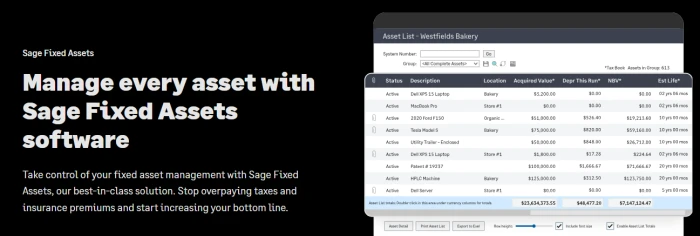
Sage Fixed Assets is the reference choice when depreciation and fixed asset accounting drive the decision. It calculates book and tax depreciation across a wide range of methods, handles disposals and transfers cleanly, and holds the documented trail auditors expect. US tax treatment is a particular strength, with ready-to-file reporting built in.
What Sage does not do is maintenance, work orders, or condition monitoring. On an operations-led shortlist it belongs beside a tracking or CMMS platform, not in place of one.
| Detail | Info |
|---|---|
| Best for | Finance and accounting teams managing a large depreciation register |
| Standout feature | Book and tax depreciation with a defensible audit trail |
| Rating | 4.2/5 (G2) · 4.3/5 (Capterra, 159 reviews) |
| Pricing | Quote-based; no reliable public per-seat rate |
| Trade-off to watch | Strong on accounting, thin on physical verification and field custody |
Pros: deep and accurate depreciation, mature compliance reporting, a proven product finance teams trust.
Cons: no maintenance or condition monitoring, an interface some reviewers call dated, little value for facilities teams.
Controllers consistently credit Sage with cutting the manual workload around asset depreciation, valuing reliability and calculation accuracy over polish.
2. NetSuite Fixed Assets Management (FAM)
If your business already runs NetSuite as its core ERP, the Fixed Assets Management module handles lifecycle records, depreciation, and lease accounting inside the system you already use. That consolidation is the main reason to choose it: one less integration, one fewer place for data to drift.
The module records assets well; it does not go and find them. Physical tracking, tagging, and field verification across many sites sit outside its scope, so asset-heavy operations usually pair it with a tracking layer that posts approved changes back to NetSuite.
| Detail | Info |
|---|---|
| Best for | Businesses standardized on NetSuite that want accounting kept in the ERP |
| Standout feature | Depreciation and lifecycle records native to NetSuite |
| Rating | 4.0/5 (G2, NetSuite overall) |
| Pricing | Core platform, modules and user tiers plus implementation; custom quote |
| Trade-off to watch | A steep learning curve and frequent manual register exports |
Pros: direct NetSuite integration, straightforward depreciation calculations, one consolidated system.
Cons: often needs a full-time admin, limited physical tracking, reviewers report exporting the register to Excel for real analysis.
NetSuite works best as the accounting record while a dedicated tracking tool handles the floor.
3. Asset Panda
Asset Panda is a highly configurable, mobile-first tracking platform that adapts to almost any asset type, from IT hardware to facilities equipment to hand tools. Its defining trait is flexibility: you shape the registry to your own fields, categories, and parent-child relationships rather than forcing assets into a fixed schema.
That flexibility suits teams whose asset base resists tidy categories, and its barcode, QR, and mobile scanning make physical audits quick. The trade-off is depth. Asset Panda is a tracking and light-maintenance tool, so deep preventive maintenance and finance-grade depreciation are comparatively thin.
| Detail | Info |
|---|---|
| Best for | Teams tracking mixed asset types that want a configurable registry |
| Standout feature | Fully configurable fields, groups and workflows, no code required |
| Rating | 4.5/5 (G2) · 4.6/5 (Capterra, 1,300+ reviews) |
| Pricing | From $50/mo flat on Starter; Business+ around $60/user/mo; Enterprise on quote |
| Trade-off to watch | Depreciation and accounting are basic; validate before making it a finance register |
Pros: extremely flexible, strong mobile and barcode workflows, no per-user pricing at the entry tier.
Cons: basic depreciation, a search function some reviewers find weak, advanced needs push to a custom quote.
Reviewers praise the customization and mobile accessibility, while cautioning that the search bar rewards knowing exactly what you are looking for.
4. EZOfficeInventory (EZO)
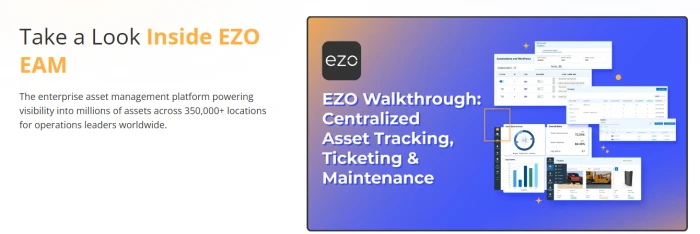
EZO is an asset and equipment tracking platform built around barcode, QR, and RFID. It suits operations that need to know where physical assets, tools, and consumables are, who is holding them, and when they are due back or due for service. Check-in and check-out workflows keep custody clear even as items move between sites and people daily.
EZO has extended into maintenance and a fuller CMMS suite in higher tiers, but its core value remains reliable tracking across many asset classes. Treat depreciation and heavy maintenance as secondary rather than the reason to buy.
| Detail | Info |
|---|---|
| Best for | Equipment-heavy teams tracking tools and consumables across locations |
| Standout feature | Barcode, QR and RFID tracking with check-in and check-out |
| Rating | 4.4/5 (G2) · 4.6/5 (Capterra, 1,500+ reviews) |
| Pricing | From $48/mo (Essential); Advanced $58; Premium $65; custom Enterprise |
| Trade-off to watch | Pricing climbs across modules and locations; depreciation stays basic |
Pros: excellent scanning across asset types, flexible multi-type register, clean custody workflows.
Cons: tiered pricing adds up, depreciation is light next to finance tools, some features gate behind higher plans.
Users single out the multi-type tracking as the feature that stops the system from boxing their assets into one rigid category.
5. IBM Maximo
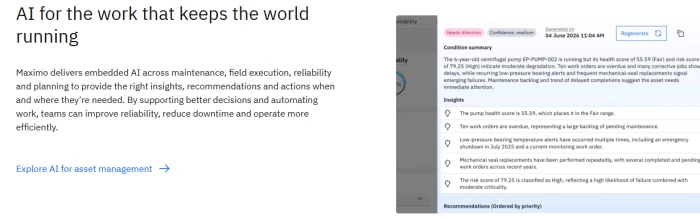
IBM Maximo is the long-standing benchmark for industrial-grade asset management, delivered as the Maximo Application Suite. It brings enterprise asset management, asset performance management, remote monitoring, and predictive maintenance under one license, built for organizations running tens or hundreds of thousands of assets in regulated environments.
Its depth is both the draw and the cost. Maximo models intricate asset hierarchies, linear assets like pipelines and rail, and reliability-centered maintenance strategies few competitors match. That same depth means long implementations and a steep learning curve, so it rewards teams with dedicated maintenance engineering and IT resources.
| Detail | Info |
|---|---|
| Best for | Large enterprises in manufacturing, energy, utilities and transport |
| Standout feature | AI-driven asset performance and reliability-centered maintenance |
| Rating | 4.4/5 (G2, 600+ reviews) · 4.2/5 (Capterra) |
| Pricing | Credit-based AppPoints licensing from around $3,150/mo |
| Trade-off to watch | Implementations commonly run 6 to 18 months; oversized for small teams |
Pros: unmatched industrial depth, strong predictive maintenance, mature compliance workflows at scale.
Cons: complex interface, long rollouts, AppPoints licensing hard to predict as usage grows.
Maximo team leads report stable maintenance management and few bugs once configured, while new users flag the learning curve.
6. UpKeep
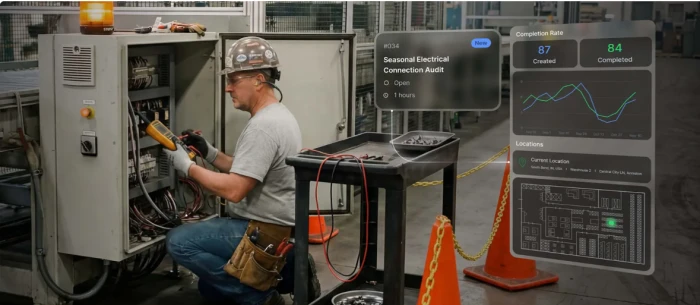
UpKeep is a maintenance-first platform built around a mobile app for frontline technicians. It centers the daily work of keeping assets running, work orders, inspections, parts, and requests, which makes it a practical fixed asset option for teams that measure success in uptime rather than depreciation schedules.
Its clearest strength is adoption. Because the mobile experience is genuinely built for the field, distributed technicians actually record what they do, which is what keeps a register accurate over time. UpKeep suits small and mid-sized teams moving off paper and spreadsheets quickly.
| Detail | Info |
|---|---|
| Best for | Lean maintenance teams in manufacturing, food and beverage, and facilities |
| Standout feature | Technician-first mobile app with strong field adoption |
| Rating | 4.5/5 (G2, 1,100+ reviews) · 4.6/5 (Capterra, 1,300+ reviews) |
| Pricing | Essential from $20/user/mo; Premium $55/user/mo; higher tiers on quote |
| Trade-off to watch | Light on finance-grade depreciation; costs climb with users and modules |
Pros: an app field teams actually use, fast setup, strong preventive maintenance and parts tracking.
Cons: advanced reporting gates behind higher tiers, pricing scales with headcount, accounting is not its job.
Managers report measurable efficiency gains in day-to-day operations, a theme that recurs around mobile adoption.
7. Fiix
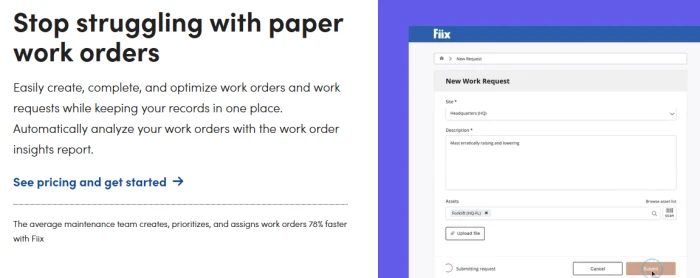
Fiix, part of Rockwell Automation, is a cloud CMMS that pairs a well-structured asset register with strong preventive maintenance and work order management. For teams whose fixed assets are production lines and facilities equipment, it keeps the asset record and the maintenance that protects it in one system rather than two.
Fiix leans into data and integration, with reliability analytics and an open API that connects to ERP and IoT systems. A free entry tier lowers the barrier for smaller teams. As with most CMMS tools, depreciation and finance-grade accounting sit outside its scope.
| Detail | Info |
|---|---|
| Best for | Maintenance and reliability teams in manufacturing and facilities |
| Standout feature | Preventive maintenance built on a clean, structured asset register |
| Rating | 4.6/5 (G2, 470+ reviews) · 4.5/5 (Capterra, 600+ reviews) |
| Pricing | Free plan; Basic from $45/user/mo; Professional $75/user/mo; Enterprise on quote |
| Trade-off to watch | No depreciation or accounting; advanced features sit in higher tiers |
Pros: clean asset hierarchy, strong preventive maintenance and reporting, a free tier to start.
Cons: accounting out of scope, integrations gate behind higher tiers, some configuration learning curve.
Fleet and maintenance directors credit Fiix with ending the pen-and-paper hunt for old work orders.
8. AssetTiger
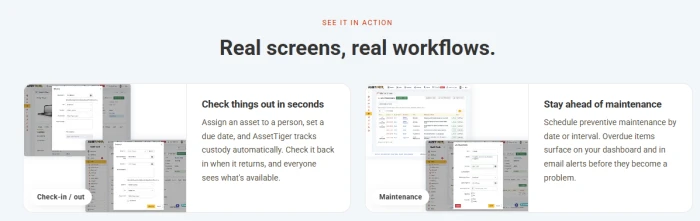
AssetTiger is a cloud-based tracking tool that is free for the first 250 assets, which makes it the natural starting point for small organizations, schools, and non-profits. It covers barcode scanning, maintenance scheduling, check-in and check-out, and basic reporting without hardware to buy.
It is a tracking tool, not a finance system. For a small, low-movement asset base with simple needs, that is often enough; as audits and asset counts grow, most teams graduate to a platform with deeper controls.
| Detail | Info |
|---|---|
| Best for | Small teams and budget-conscious organizations |
| Standout feature | Free tier covering the first 250 assets |
| Rating | 4.6/5 (Capterra) |
| Pricing | Free to 250 assets; paid plans from around $120/yr by asset count |
| Trade-off to watch | Basic depreciation and reporting; limited for enterprise audit needs |
Pros: genuinely free to start, easy to use, no hardware required.
Cons: shallow depreciation, limited advanced reporting, best suited to simple asset bases.
Reviewers consistently highlight ease of use as the reason small teams adopt it.
Feature comparison matrix
The table below compares eight asset management platforms across key features, including asset tracking, depreciation, maintenance, integrations, and reporting, to help you identify which solutions best match your business needs.
| Capability | Sage | NetSuite | Panda | EZO | Maximo | UpKeep | Fiix | Tiger |
|---|---|---|---|---|---|---|---|---|
| Barcode / QR tagging | Yes | Yes | Yes | Yes | Yes | Yes | Yes | Yes |
| RFID support | No | No | Yes | Yes | Yes | No | Yes | No |
| Book and tax depreciation | Yes | Yes | Yes | Yes | Yes | No | No | Yes |
| Physical verification (mobile) | Yes | No | Yes | Yes | Yes | Yes | Yes | Yes |
| Preventive maintenance | No | No | Yes | Yes | Yes | Yes | Yes | Yes |
| Condition monitoring / IoT | No | No | No | No | Yes | Yes | Yes | No |
| ERP / accounting integration | Yes | Yes | Yes | Yes | Yes | Yes | Yes | Yes |
| Audit trail and reporting | Yes | Yes | Yes | Yes | Yes | Yes | Yes | Yes |
| Free trial or free tier | Yes | No | Yes | Yes | Yes | Yes | Yes | Yes |
Read the matrix by column, not by row. The platform with the most filled circles is not the best; the one whose filled circles line up with your weighted rubric is.
Depreciation methods your software should handle
If finance owns your register, the depreciation engine is the heart of the decision. Different asset classes and jurisdictions call for different methods, and the best fixed asset software supports several and lets you run book and tax books in parallel. The table summarizes the methods you are most likely to need.
| Method | How it allocates cost | Typical use |
|---|---|---|
| Straight-line | Equal amount every year over useful life | Buildings, furniture, most book depreciation |
| Declining balance | A fixed percentage of the reducing balance each year | Assets that lose value fast early, like vehicles |
| Double declining balance | An accelerated version at twice the straight-line rate | Technology and machinery with rapid obsolescence |
| Units of production | Cost spread by actual output or usage | Manufacturing equipment tied to production volume |
| MACRS | The US tax system of prescribed class lives and rates | US federal tax depreciation |
| Written down value (WDV) | A reducing-balance method common under Indian tax law | Indian tax books under the Income Tax Act |
A finance-grade tool should let you maintain separate book and tax calculations on the same asset, because the method that satisfies your accountant rarely matches the one your tax filing requires.
What we saw inside the tools we tested?
We ran hands-on trials of several fixed asset platforms during this review, and the screenshots below come straight from those sessions. Feature tables tell you what a tool claims; the interface tells you whether you will actually use it daily. These are the screens that decided our verdicts, with what each one revealed in testing.
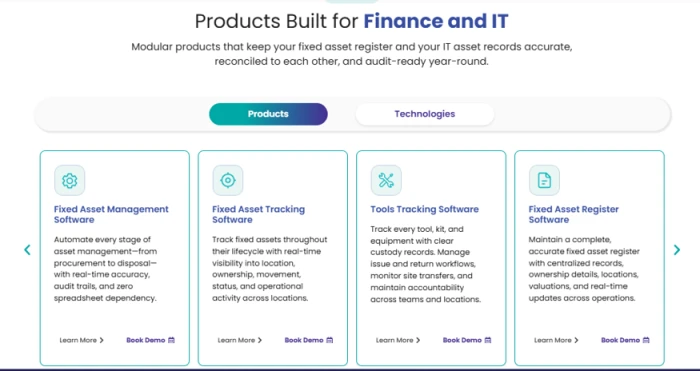
Figure 1. A product-selection screen from one platform we tested, splitting management, tracking, tools tracking and the register into separate modules.
The first platform we tested opened on a modular product grid, letting you pick fixed asset management, tracking, tools tracking, or the register as separate modules. In practice this matters at pricing time: you license only the layer you need now and add the others later, instead of paying for a full suite on day one. Tools built for finance and IT together, as this one was, tend to lead with this split.
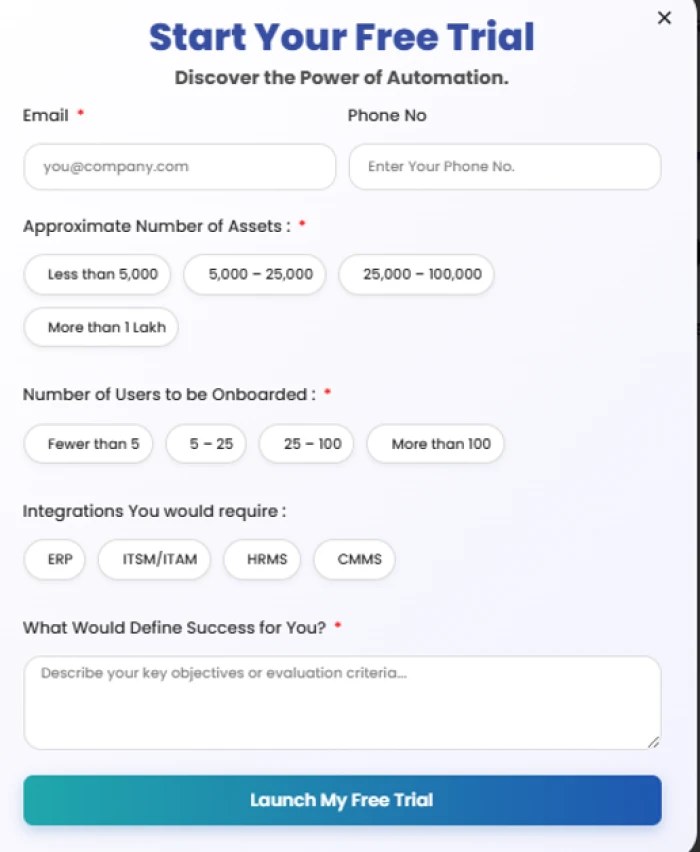
Figure 2. The free-trial sign-up on one tool we tested, scoping the account by asset count, user count and required integrations.
Starting a trial on this tool told us how its vendor scopes a deal. Before any quote, it asked for approximate asset count, number of users to onboard, and the integrations we needed, with ERP, ITSM/ITAM, HRMS, and CMMS as the options. Those three numbers are exactly what moves the price, so expect to answer them on almost any platform before you see a figure.
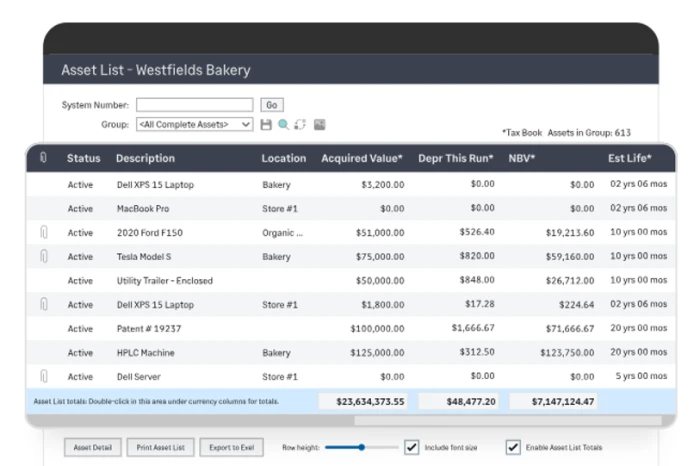
Figure 3. The asset list from a tool we tested, with status, location, acquired value, depreciation, net book value and estimated life on each row.
The asset list is where we spent most of our testing time, because it is where day-to-day work happens. This one showed status, location, acquired value, depreciation for the period, net book value, and estimated life on a single row, with running totals at the foot and a one-click export to spreadsheet. That last detail is what keeps finance from re-keying the register into Excel every close.
The same tool rolled those rows up into group-level totals, and that is the difference we look for between a register and a filing cabinet. Seeing acquired value, depreciation, and net book value summed across an asset group, not just per asset, is what lets finance report on a site or cost centre without exporting and pivoting the whole list by hand.
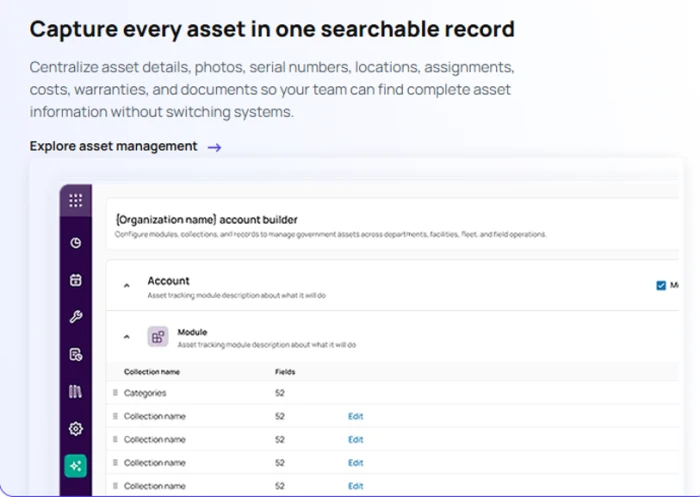
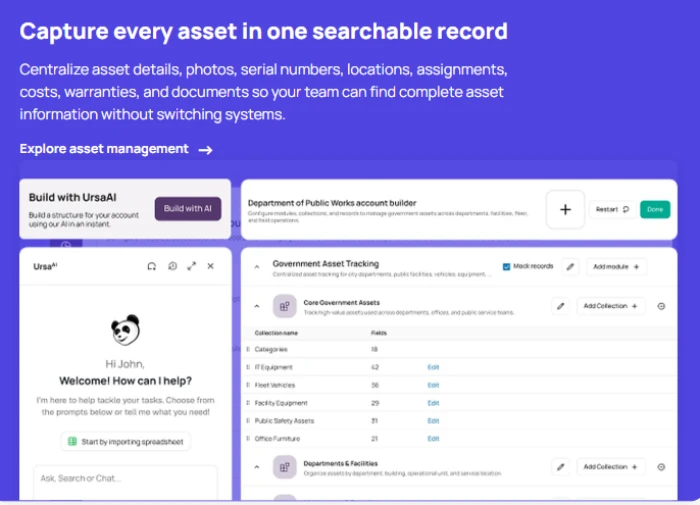
Figure 4. A configurable account builder from a tool we tested, capturing details, photos, serial numbers, locations and documents in one record.
The last tool we tested stood out for a configurable account builder, letting us define our own collections and fields so photos, serial numbers, warranties, locations, and documents all sat in one searchable record. This is the feature that decides whether a register stays usable once your asset types multiply, because a fixed schema someone else designed rarely survives contact with a real, mixed asset base.
How to choose: a decision path
Work through these questions in order. Each one narrows the field, and the answer to the first usually settles half the decision.
1. Who owns the register? If finance owns it, weight depreciation and audit, and start with Sage or NetSuite FAM. If operations or IT owns it, weight tracking and custody, and start with Asset Panda or EZO. If facilities and maintenance own it, weight lifecycle and condition, and start with Maximo, UpKeep, or Fiix.
2. Do you already run an ERP for asset accounting? If SAP, Oracle, Dynamics, or NetSuite already keeps the books right, you do not need another accounting tool. You need a tracking and verification layer that posts approved physical changes back to the ERP.
3. How many sites and assets? A single site with a few hundred assets can start on AssetTiger or an entry tracking plan. Multi-site, asset-heavy operations should prioritize standardized workflows, scheduled verification, and audit evidence at scale.
4. What must it integrate with? Name your ERP, accounting stack, CMMS, and IT systems up front, and confirm how each connector is built and maintained rather than trusting a generic claim.
5. Will the field team actually use it? Put the technician mobile workflow through a real test, offline included. The tool your crew will not open is the one that fails, whatever its feature list says.
Common mistakes buyers make
These traps surface again and again when teams choose a fixed asset tool. Each is avoidable once you know to look for it.
- Buying a finance tool for an operations job, or the reverse. A depreciation engine will not maintain your equipment, and a CMMS will not satisfy your auditor. Match the tool to the owner of the register.
- Pricing for headcount instead of asset count. Per-user pricing can punish you as assets grow faster than users, so model the plan against your real asset base, not your team size.
- Skipping integration due diligence. Assuming a tool connects to your ERP without confirming who builds the connector, and at what cost, is where projects stall after signing.
- Choosing barcode tracking alone. Tags tell you where an asset is, not its cost, health, or lifecycle, so a tracking-only tool leaves finance and maintenance gaps.
- Forgetting disposal and audit. Teams plan for acquisition and overlook disposals, transfers, and the audit trail compliance depends on, which is exactly where manual registers break.
The bottom line
The best fixed asset software is the one that matches the team that owns your register. Finance teams that live in depreciation and audit should start with Sage Fixed Assets or NetSuite FAM. Operations and IT teams tracking mixed assets across sites should start with Asset Panda or EZO. Facilities and maintenance teams whose assets are the equipment they keep running should weigh IBM Maximo, UpKeep, or Fiix, and small teams on a budget can start free with AssetTiger.
Whichever corner you are in, do three things before you sign: map which lifecycle stages break today, score every vendor on one weighted rubric and one demo script, and pilot with your own messy data, including missing tags and duplicate records. The best product is the one that survives your real exceptions, not the one that presents best.
Frequently asked questions
What is the best fixed asset software?
There is no single best. For finance-grade depreciation, Sage Fixed Assets leads. For flexible multi-asset tracking, Asset Panda and EZO lead. For maintenance-heavy operations, IBM Maximo, UpKeep, and Fiix lead. Match the tool to the team that owns your register.
What is the difference between fixed asset management and fixed asset tracking?
Tracking software shows where assets are and who holds them. Management software adds the finance side: capitalization, depreciation, disposals, approvals, audit evidence, and ERP integration. Many organizations need both jobs covered.
Can I use Excel instead of fixed asset software?
At small scale, yes. As assets, sites, and audits grow, manual updates, missing audit trails, and duplicate entries make a spreadsheet hard to defend, which is the point at which dedicated software pays for itself.
I already run SAP, Oracle, or NetSuite. Do I still need fixed asset software?
Usually yes, but a tracking layer rather than another accounting system. The ERP governs the financial record; it rarely tracks where each asset sits, who holds it, or whether it still exists. A tracking and verification layer fills that gap and posts approved changes back to the ERP.
Which is better for tracking, RFID or barcodes?
Barcodes and QR codes are low-cost and suit one-by-one scans. RFID reads in bulk without line of sight, which speeds up large audits at a higher tag and reader cost. Many programs mix both by asset class.
Comments
Join the discussion and share your perspective.