
You have an idea for an app, or maybe a half-finished version already sitting in a browser tab. The real question is who finishes it. For most people without a technical background, the honest answer is a sequence rather than a single pick. Prove the idea with an AI app builder first, then pay a developer for the specific parts where a mistake stays hidden until a customer trips over it.
Almost every page ranking for this question is published by a company that sells one of the answers. A no-code platform wants you to subscribe. An agency wants the contract. This guide takes no side and sells nothing. What follows is a framework for deciding, the real 2026 numbers for each route, and the parts of the trade-off that the sales pages leave out.

The short answer, and who each route is for
Use an AI app builder when your goal is to prove that people want the thing. Hire a developer for the parts where being wrong is invisible: who can see whose data, what happens when a payment fails, and how the app behaves when a stranger sends it something unexpected. Between those two poles sits the path most founders actually need, which is a measured bit of each in the right order.
Which reader you are changes where you start.
If you have not built anything yet
Your cheapest first move is validation, not construction. An AI builder can put a working prototype in front of real users within a day or two, at a cost measured in tens of dollars. Spend money to learn whether anyone wants the app before you spend money to make it durable.
If you already shipped something with AI
You built it in a tool like Lovable, Bolt, Replit, or Claude Code, and now you are unsure whether to keep prompting or start paying. The question is smaller than it feels. You do not hire someone to take over the whole app. You hire them for the one part that is stuck, or the one part that is risky, and you keep everything you can already check for yourself.
Score your project before you spend a dollar
Before choosing a route, score the project across five plain questions. None of them require technical knowledge, and together they tell you how much a mistake would cost.
• Stakes. If this breaks in front of a customer, is it an annoyance or a disaster?
• Data sensitivity. Does it touch health records, payment details, identity, or anything about children?
• Complexity. Is it a standard pattern like a dashboard or a booking tool, or something unusual?
• Your comfort. Can you describe what the app should do and recognise when it is wrong?
• Budget runway. Are you funding this yourself, where a wasted month stings, or is there real capital behind it?
Low stakes, gentle data, a standard pattern: an AI builder is almost certainly the right start. Score high on either of the first two questions and a developer belongs somewhere in the plan. The flowchart below turns those answers into a route.
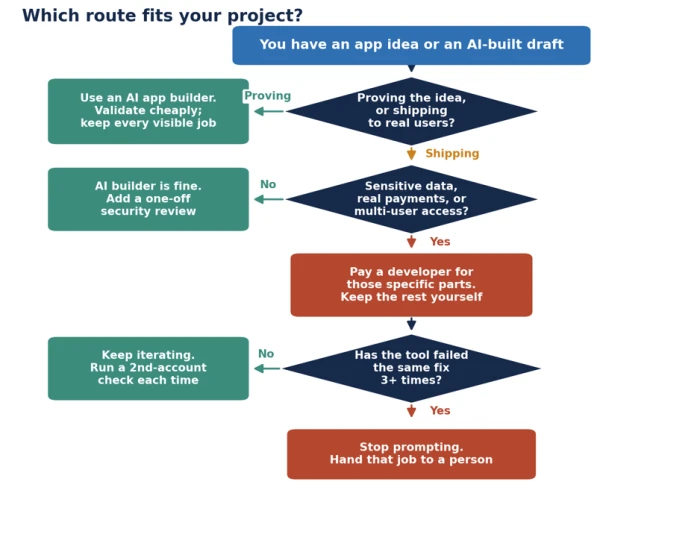
The three questions that decide any single feature
Once an app exists, the choice stops being about the whole thing and becomes a per-feature call. Three questions sort any job, including one this page never lists.
Can you see for yourself that it worked? The bar is a screen you can open that proves the thing you asked for is now true. An error message disappearing does not clear that bar.
Does it decide something for someone other than you? Anything that controls what another person can see, what another person is charged, or an action that cannot be undone.
Has the tool already failed at it several times? Count honestly, including the passes where it claimed success.
A no to the first question, or a yes to either of the others, puts the job on the pay side. Everything else you keep.
What AI app builders do well
The category has moved quickly. Gartner projected that by 2025, 70 percent of new applications built by organisations would use low-code or no-code technology, up from under 25 percent in 2020. The modern version is prompt-driven: you describe a screen, the tool writes the code, and you refine it in plain English.
These tools shine on the visible layer of an app. Screens, forms, layouts, and the basic movement of data come together in hours. For a booking tool, an internal dashboard, a client portal, or a simple marketplace, that visible layer is most of the product. A domain expert who understands a workflow can now build the tool for it without waiting on an engineer.
Speed is the obvious win. The quieter one is the cost of changing your mind. Testing five versions of an onboarding flow takes an afternoon instead of five change requests and five invoices.
Where AI builders fall short
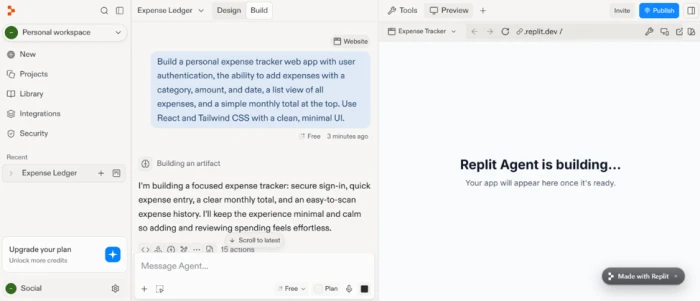
The trouble starts just past the happy path. A developer summed up the pattern: the buttons click, the forms submit, the dashboard renders, and then you try to make users see only their own data, or handle a payment that fails halfway through. This is the part of the app that looks finished and is not.
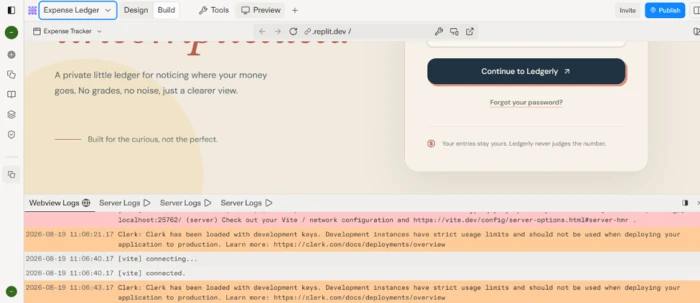
The failures share one trait: nothing on your screen tells you they are there. The usual suspects:
• Data permissions. One customer can read another customer's records, and your own view looks identical either way.
• Payment edge cases. The test card succeeds; the live card that fails on the third of the month is where money quietly leaks.
• Input validation. A price field that arrives as a negative number, or a request replayed by hand with different contents.
• Exposed secrets. API keys sitting in the browser where anyone who looks can read them.
Research supports the worry rather than merely reflecting it. A 2022 IEEE study found that roughly 40 percent of programs generated by GitHub Copilot contained security weaknesses. Veracode's 2025 review of AI-generated code found a flaw in about 45 percent of samples, and its 2026 re-test of newer flagship models landed on the same figure. A more capable model does not, on its own, write safer code.
The most useful finding for anyone using these tools concerns what happens when you ask the AI to fix its own work. Researchers from the University of San Francisco, the Vector Institute, and the University of Massachusetts Boston ran 400 code samples through 40 rounds of automated improvement. Critical vulnerabilities rose 37.6 percent after just five iterations, and prompts that explicitly asked for better security still introduced new flaws. The full study is available on arXiv. Vulnerabilities per sample climbed as the loop continued.
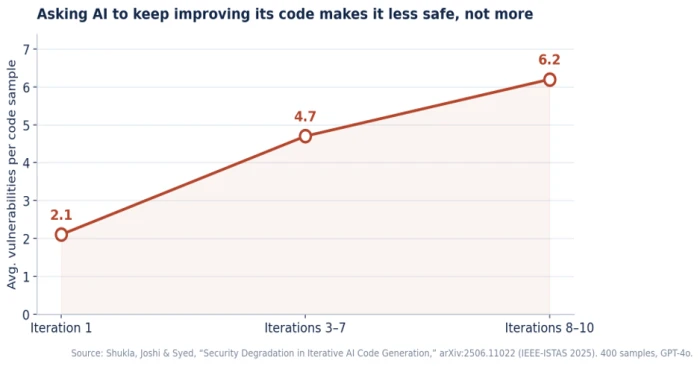
The three-attempt rule. The study's practical guidance is blunt: keep automated, unreviewed AI iterations to three at most, then have a person look. For a non-technical builder the lesson is the same. If the tool has taken more than a few passes at one problem without solving it, more prompting is the expensive option, not the cheap one.
What hiring a developer actually buys
A developer gives you three things an AI builder cannot: accountability, sound architecture, and judgement. Accountability means someone is answerable when the app breaks. Architecture means the data is structured so the app can grow without a rebuild. Judgement means knowing which of the hidden problems matter this month and which can wait.
Hiring is no guarantee, and the pages pushing it rarely admit as much. Custom projects overrun. A pattern that recurs in 2026 write-ups: a founder pays a nearshore agency tens of thousands of dollars over several months, receives an app that covers most of the spec but not all of it, then finds the gap sits in exactly the invisible parts described above. Paying a person removes the risk of nobody being responsible. It does not remove the risk of the work itself going wrong.
The real numbers: cost, time, and ownership compared
Costs sit scattered across a dozen vendor pages, each quoting the figure that flatters its own product. Pulled into one place, the routes are not even priced on the same scale.
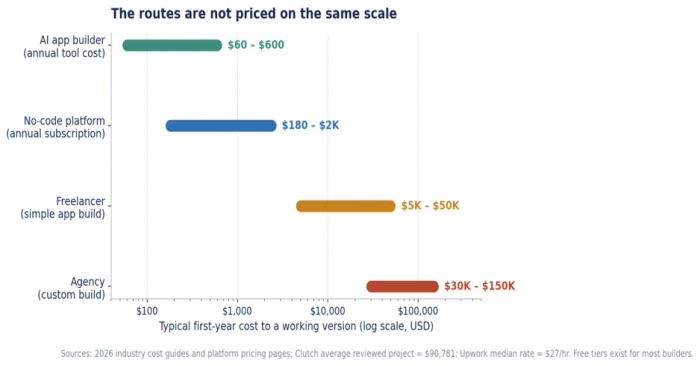
A note on reading that chart: the bars use a logarithmic axis because the routes differ by roughly a thousandfold. An AI builder's entire annual cost sits below the price of a single day of agency time. The table fills in the rest of the trade-off.
| Route | First-year cost | Cost per change | Time to v1 | Code ownership | Best fit |
|---|---|---|---|---|---|
| AI app builder | $0–$600 | A sentence | Hours to days | Exportable, often messy | Validation, standard apps |
| No-code platform | $180–$2,400 | Minutes | Days | Usually locked in | Internal tools, MVPs |
| Freelancer | $5,000–$50,000 | $100s each | Weeks | Yours by contract | Clear-scope custom work |
| Agency | $30,000–$150,000+ | $1,000s each | 2–6 months | Yours by contract | Complex, high-stakes builds |
Figures are 2026 ranges drawn from platform pricing and industry cost guides; the Clutch-reported average for a reviewed agency project is about $90,781, and Upwork's median app-developer rate is roughly $27 an hour. For a full breakdown, see a dedicated guide on what it costs to build an app in 2026.
The hidden costs nobody quotes
The headline price is the smallest part of the real one. Three costs hide underneath it.
Cost per iteration is the row most people miss. With a developer, every change carries a fee and a wait. With an AI builder, a change is a sentence. Over a year of active development, that gap alone can run into five figures.
Maintenance is the second. A common industry rule of thumb puts annual upkeep at 15 to 20 percent of the original build cost, covering updates, fixes, and operating-system changes. The build is not the end of the spending.
Rebuild risk is the third and largest. If an AI-built app has to be reconstructed for production, you pay twice: once to make it, once to replace it.
Do you actually own the code?
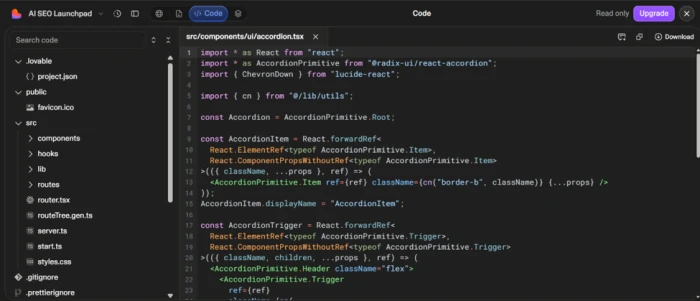
Every major builder lets you export your code, and that claim is true and slightly misleading. Export gets your files out. It does not hand you the ability to maintain them. If the app was built through conversation with an AI, you may not understand how any of it works, and the exported code tends to be messier than what a developer would write by hand. The real lock-in is knowledge, not file format. Ask before you start how portable the output is, because a prototype you can hand to a developer later is worth more than one you cannot.
When an AI app builder is the right call
Reach for a builder when most of these hold true:
• You are testing demand rather than serving paying customers at scale.
• The data is not sensitive and the users are known, such as an internal team tool.
• The app follows a common pattern: a dashboard, a booking flow, a waitlist, or a content admin panel.
• Speed of learning matters more than durability right now.
An internal scheduling tool for a team of twenty is a near-perfect fit. So is a landing page with a signup form you want live this week.
When you genuinely need a developer
Bring in a person when any one of these is true, whatever the budget:
• More than one customer stores data in the app, and each must see only their own.
• Real money moves through it, with refunds, failed charges, and cancellations to handle.
• The app handles regulated data.
• You need custom native features, unusual performance, or a deep integration no platform supports.
• The tool has failed the same fix several times over.
Compliance and sensitive data as the deciding factor
Some categories settle the question before cost enters it. Health data falls under regimes such as HIPAA. Card payments carry PCI obligations. Personal data belonging to European users sits under the GDPR. None of these is a feature you bolt on later. They shape how data is stored and logged from the first screen, and getting them wrong carries legal weight that an ordinary bug does not. If your app touches any of them, a person with the relevant experience belongs in the plan from day one.
Shipping to a store adds its own gate. Apple reviews most submissions within 24 hours, and its most common rejection reason is app completeness under Guideline 2.1, meaning crashes, placeholder content, and broken links, as set out in Apple's App Store Review Guidelines. Both hired developers and AI builders hit that same wall, and most first-time delays trace to incomplete setup rather than the build method.
The path most guides skip: do both, in sequence
The framing of hire versus build hides the answer most founders need. The productive route is an order of operations, not a fork in the road.
1. Build the first version with an AI app builder, cheaply and fast.
2. Put it in front of real users and watch whether they come back.
3. When revenue or risk justifies it, hire a developer for the invisible parts, using your working prototype as the specification.
A working app communicates what you want more clearly than any written brief. That sequence protects your budget and hands your eventual developer something concrete to build from.
The keep-versus-pay split
For an app that already runs, the decision splits job by job. Keep the work the app itself can prove; pay for the work where being wrong stays invisible until someone else finds it.
| The job | Keep or pay | The test that decides it |
|---|---|---|
| Screens, wording, and layout | Keep | The change is on your screen the moment it lands |
| Pricing copy and onboarding text | Keep | You read it back on the live page and know |
| A form that moves data you already hold | Keep | Fill it in, then find the record it created |
| Who can see whose data | Pay | A second account reaches the first one's rows, or not; your screen never shows it |
| Turning on real payments | Pay | A test card tells you nothing about a live card that fails |
| The libraries and versions underneath | Pay | Version numbers appear on no screen the app shows you |
How to know you have hit the graduation point
A few signals tell you the validation phase is over:
• Paying customers now depend on the app working.
• A second person's data lives inside it.
• You are turning on real payments.
• The tool has spent more than three or four attempts on one problem without closing it.
Any one of these is reason to move a specific job to a developer. None of them is reason to hand over the whole app.

If you decide to hire, make the first job small
A good first job is one problem you can name in a sentence, with a result you can watch happen in your own app. “Signed-in customers can see each other's orders, and they should not” is a first job. “Have a look at the app” is not.
Three habits make it go well. Give access to the app and its accounts before the work starts, so a three-day job does not sit for a fortnight waiting on a login. Agree that the person touches the one thing and tells you before touching anything else. And keep your own hands off that part while they are in it, so you are both looking at the same version.
Before you hand anything over, a short check protects you:
• Can they explain, in plain words, what your app currently does?
• Will they show you the fix working in your own app, rather than telling you it is done?
• Have you agreed the specific job and what finished looks like?
• Do you own the code and the accounts it runs on?
The part both sides get wrong
Deciding to pay someone for the invisible thirty percent does not mean the visible seventy stops being yours. You still know what the button should say and which record the form should create, and no developer holds that knowledge for you. The half of the answer that says keep going does not become wrong the day you hire someone for the other half. It gains a partner, and your budget survives the introduction.
The Bottom Line
The choice was never really developer versus AI app builder. It was a question of order. Start with an AI builder to find out cheaply whether anyone wants what you are making, and keep every job the app can prove to you by looking at a screen. Bring in a developer the moment a job goes quiet on you, when data belongs to more than one person, when real money moves, or when the tool has circled the same fix more than three or four times.
Score the project on stakes and data sensitivity first, because those two answers decide more than budget ever will. A low-stakes internal tool and a payment-handling app with customer records are not the same purchase, even when they look identical in the builder's preview.
If you take one habit from this guide, make it the smallest possible first hire: one problem named in a sentence, shown working in your own app before you pay. That single discipline protects your budget more than any platform choice, and it keeps the visible seventy percent of the work firmly in your hands where it belongs.
Comments
Join the discussion and share your perspective.