
Independent professionals face a paradox in 2026. The number of available AI tools has crossed 22,500 listings across major directories, while the average freelancer software budget remains tight. Picking the right subscription has become harder than the work itself for many creators. FirmCritics addresses that exact problem by serving as a discovery and comparison layer for AI tools, with affordability filters built into the core experience.
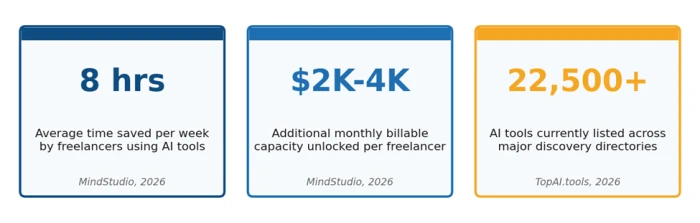
Figure 1. Three numbers that define the freelance AI buying problem in 2026.
This guide explains how freelance writers, designers, video creators, developers, and consultants use FirmCritics to find tools that match a real budget. It draws on verified pricing data current to April 2026, common workflow patterns, and the categories where independent professionals report the highest return on AI investment.
Key Fact Freelancers using AI tools report saving an average of eight hours per week, which translates to between 2,000 and 4,000 USD in additional monthly billable capacity at common consultant rates. The constraint is no longer whether AI helps, but which tools are worth the subscription cost. |
Why Affordable AI Tool Discovery Matters for Independent Workers
Three forces have shaped the freelance AI market in 2026. First, the catalog is enormous. Major directories such as TopAI.tools, Toolify, and Futurepedia list between 4,000 and 22,500 tools each, with new launches every week. Second, pricing is fragmented. Identical capabilities can range from 0 USD on a free tier to 49 USD per month on a polished alternative. Third, freelancer revenue is rarely predictable enough to justify the spray-and-pray subscription habit that drains many independent budgets.
FirmCritics narrows that catalog using freelancer-specific filters: price band, free trial availability, billing flexibility, and verified user ratings from peers in the same trade. The result is a shortlist instead of a search problem.
The Real Cost Problem for Freelancers and Creators
Most freelancers do not need a single tool. A working AI stack typically spans three to six categories: writing, design, scheduling, transcription, image generation, and automation. Stacking entry plans across all six pushes monthly software costs above 100 USD before any specialized add-on. Without disciplined comparison, the cost climbs further as duplicate tools accumulate.
Where the Money Actually Goes
• Subscription overlap, where two tools perform the same function on different platforms
• Annual contracts paid for tools used only seasonally
• Premium tiers chosen for one feature when a cheaper plan would have covered actual usage
• API or credit-based pricing that scales unpredictably with project volume
• Bundles or suites paid for to access a single component
Pricing Reality Check An entry paid plan in the AI software market in 2026 typically falls between 8 USD and 19 USD per month. A mid-tier plan usually sits between 19 USD and 30 USD. Anything advertised under 5 USD per month often carries hidden caps such as message limits, low credit allotments, or reduced model quality. |
What FirmCritics Provides for Independent Buyers
FirmCritics functions as a curated review and comparison platform focused on AI tools. The core value for freelancers and creators sits in four features that map directly to common buying friction points.
Category-First Discovery
Tools are grouped by the workflow they solve rather than by the AI model behind them. A freelance writer searches under Writing or Research instead of guessing whether a given GPT wrapper or Claude-based assistant fits the bill.
Price-Aware Filtering
Filters allow users to narrow results to free, freemium, under 10 USD, under 25 USD, or annual-only options. This removes the manual scrubbing of pricing pages that consumes most of the discovery time on traditional directories.
Verified User Reviews
Each listing carries reviews from actual users with role tags such as freelance writer, designer, or solo developer. Sentiment scoring and feature-specific ratings make it possible to read past marketing copy and judge real performance.
Side-by-Side Comparison
Two or more tools can be opened in a comparison grid that lines up features, pricing, free trial terms, and integrations. This collapses what is normally a half-day research session into a single screen.
Where AI Tools Recover the Most Hours
Adoption decisions often come down to how many hours a tool actually returns each week. Independent research from MindStudio, Location Rebel, and 2727 Coworking published across 2025 and 2026 places the median time saved at roughly eight hours per week, concentrated in a handful of repeatable activities.
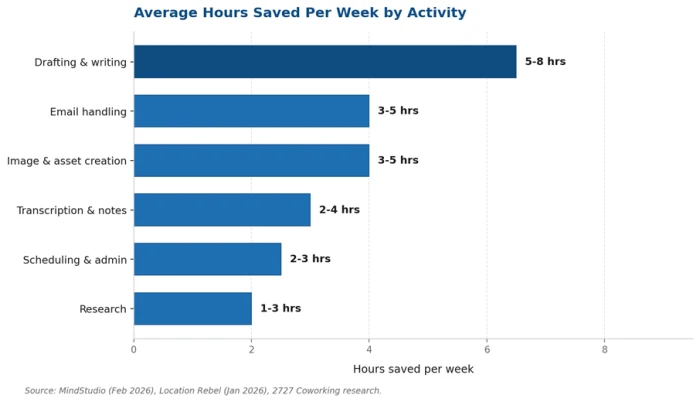
Figure 2. Average weekly hours saved by activity, based on 2025-2026 freelancer surveys.
Drafting and writing dominate the savings, followed by email handling and asset creation. These are the three categories where investing in a paid AI tool generally clears its own cost within the first billable engagement.
Categories Most Searched by Freelancers and Creators
Search behavior on AI review platforms in 2026 concentrates heavily in seven categories. The table below maps each category to its dominant freelance use case and the typical limit imposed by free tiers.
| Category | Common Use Case | Typical Free-Tier Ceiling |
|---|---|---|
| Writing and editing | Drafting blog posts, client emails, proposals, scripts | Daily message caps; advanced models locked |
| Image generation | Hero images, social posts, mood boards, mockups | Limited credits per month or watermarked output |
| Video and audio | Editing, captions, voiceovers, transcription, repurposing | Short export length and reduced resolution |
| Design and presentations | Slide decks, brand assets, social graphics, pitch documents | Limited templates and export formats |
| Productivity and admin | Note-taking, scheduling, project management, invoicing | Workspace or seat caps, no automations |
| Research and analysis | Market research, competitor analysis, citation gathering | Limited queries and shorter context windows |
| Code and automation | Snippet generation, debugging, no-code workflows | Slower model tier, fewer tasks per month |
Step-by-Step Workflow for Finding an Affordable AI Tool
The fastest path from a problem statement to a tested tool follows six steps. Each one removes a layer of noise.
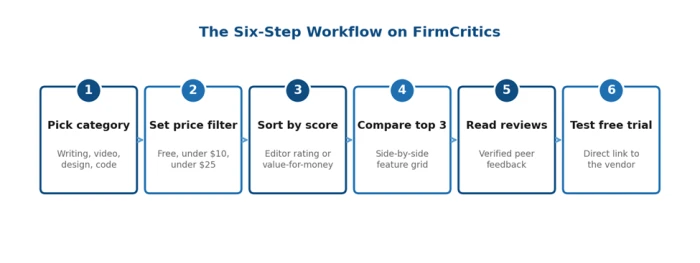
Figure 3. The six-step filtering workflow used by freelancers to shortlist affordable AI tools.
| Step | Action on the Platform | What the User Sees |
|---|---|---|
| 1 | Select a category that matches the bottleneck (writing, video, design, etc.) | A filtered list of tools in that category |
| 2 | Apply a price filter such as Free, Under 10 USD, or Under 25 USD | Only tools that fit the budget remain visible |
| 3 | Sort by editor rating, user rating, or value-for-money score | Highest-ranked affordable options surface first |
| 4 | Open the side-by-side comparison view for the top three contenders | Feature-by-feature grid plus pricing summary |
| 5 | Read recent reviews from verified freelancers in the same niche | Real-world performance signals before signup |
| 6 | Activate the free trial through the listed link | Direct path to test the tool risk-free |
Average time saved: users following this six-step workflow report cutting tool selection time from several hours of unstructured browsing down to under 20 minutes for most categories.
Pricing Bands Across Major AI Tool Categories
The chart and table below summarize April 2026 pricing for the categories freelancers compare most often. Figures reflect entry plan and mid-tier monthly rates verified against vendor pages and recent independent reviews.
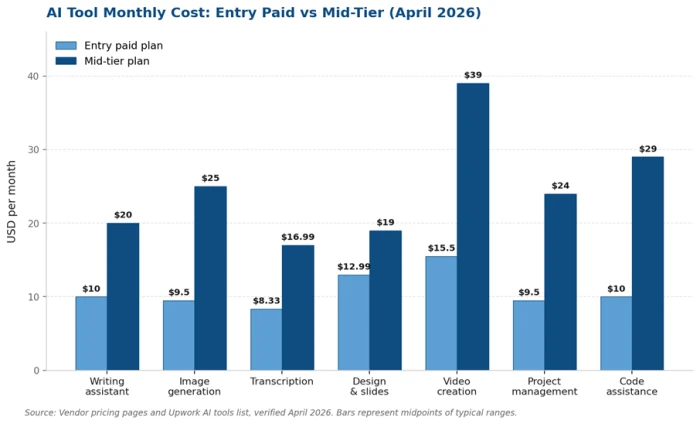
Figure 4. Entry-paid versus mid-tier monthly pricing across seven AI tool categories.
| Tool Type | Entry Paid Plan | Mid Plan | Reference Tools |
|---|---|---|---|
| AI writing assistant | 8 to 12 USD per month | 20 USD per month | Grammarly, Notion AI, ChatGPT Plus, Claude Pro |
| Image generation | 9 to 10 USD per month | 20 to 30 USD per month | Stable Assistant, Midjourney, Leonardo |
| Transcription and voice | 8.33 USD per month annually | 16.99 USD per month | Otter.ai, Descript, ElevenLabs |
| Design and slides | 12.99 USD per month | 19 USD per month | Canva Pro, Tome, Beautiful.ai |
| Video creation | 12 to 19 USD per month | 29 to 49 USD per month | Lumen5, Pictory, Runway, Veed |
| Project management | 8 to 11 USD per seat per month | 19 to 29 USD per seat per month | Asana, Motion, ClickUp, Reclaim |
| Code assistance | 10 USD per month | 19 to 39 USD per month | GitHub Copilot, Cursor, Codeium |
Use Case Mapping by Creator Type
Different creator profiles return to FirmCritics for different reasons. The matrix below summarizes which categories each profile filters most often and the bottleneck that drives the search.
| Creator Type | Primary Bottleneck | Categories Most Filtered |
|---|---|---|
| Freelance writer | Drafting speed, research depth, citation accuracy, plagiarism checks | Writing, research, transcription |
| Visual designer | Concept generation, asset variations, brand-consistent layouts | Image generation, design |
| Video creator | Editing time, captioning, repurposing long videos into shorts | Video, transcription, voice |
| Social media manager | Multi-platform scheduling, copy variations, hashtag research | Writing, design, automation |
| Independent developer | Code generation, refactoring, documentation, deployment | Code, productivity, automation |
| Coach or consultant | Course outlines, slide decks, client onboarding documents | Writing, slides, productivity |
| Podcaster | Editing, show notes, episode summaries, repurposing clips | Audio, transcription, writing |
Filter Settings That Surface Affordable Options
A short, deliberate filter sequence yields better results than a long search query. The five filter combinations below are the ones repeat users apply most often when budget is the priority.
The Under 10 USD Stack Filter
Combine the price filter set to under 10 USD per month with the freemium toggle and a category selection. This surfaces tools that have a viable free tier and a low-cost upgrade path, ideal for new freelancers still building income.
The Annual-Saving Filter
Toggle the annual billing filter. Most paid AI tools offer between 20 percent and 30 percent savings on annual plans, which often pushes a 14.99 USD monthly tool below 11 USD when paid yearly.
The Free Trial Filter
Apply the free trial filter alongside a higher price ceiling. This makes premium tools visible without commitment, useful for power users who want to test ceiling-of-quality tools before deciding.
The High Rating Plus Low Price Filter
Combine the value-for-money sort with a four-star minimum rating threshold. This protects against cheap tools with weak performance, which are common in the AI category.
The No Card Required Filter
Filter for tools that require neither credit card nor identity verification on the free tier. Useful for testing without account commitment.
Sample AI Stacks at Different Budget Tiers
The chart below visualizes common stack combinations chosen by generalist freelancers in 2026. Pricing reflects mainstream consumer rates as of April 2026, using annual billing where available.
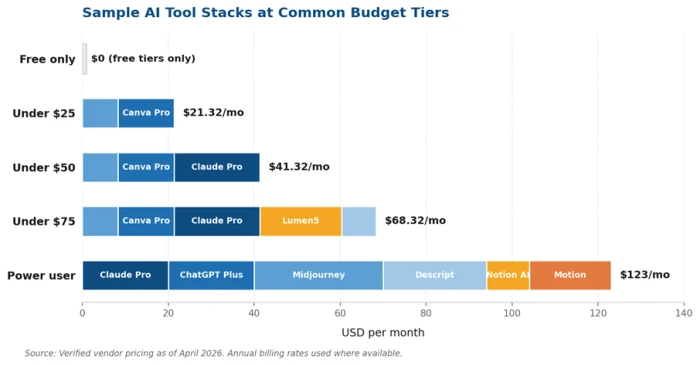
Figure 5. Sample AI tool stacks at five common freelancer budget tiers.
Stack Selection Tip Most freelancers do not need both ChatGPT Plus and Claude Pro. Run the free tiers of both for a week, identify which one matches the dominant workflow, and subscribe to only that one. The 20 USD saved each month covers transcription or design tooling instead. |
Pricing Traps Freelancers Should Watch For
Credit-Based Models Without Hard Caps
Tools that charge per credit, per generation, or per token can scale unpredictably. A freelancer expecting a 10 USD bill can land at 60 USD after a single high-volume project. FirmCritics listings flag credit-based pricing structures so this can be evaluated upfront.
Watermarks That Force Upgrades
Some free tiers include visible watermarks on output, which makes the tool unusable for client work. The watermark policy is listed under Free Tier Details on each platform card.
Single-Feature Premium Locks
Tools occasionally lock a critical feature, such as commercial-use rights or full-resolution export, behind a tier two levels above the entry plan. Reading verified reviews exposes this faster than reading the marketing site.
Auto-Renewal Without Reminder
Annual plans without reminder emails before renewal are a known source of unexpected charges. Listings on FirmCritics typically note renewal practices in the Billing section.
Bundle Pressure
Vendors increasingly bundle AI features into broader productivity suites. Paying 30 USD per month for a productivity suite to access a single AI feature is rarely the right call when a focused 10 USD tool exists.
Tactics to Stretch Free Tiers Before Paying
• Rotate between two free LLM tiers, such as Claude and ChatGPT, to double effective daily message caps
• Use focused prompts and short outputs to conserve token budgets on free transcription and writing tools
• Run image generation in batches during off-peak hours when free queues are shorter
• Combine a free design tool such as Canva free with a free AI writer rather than paying for an all-in-one suite
• Use browser-based tools to avoid app subscription bundles where possible
• Schedule monthly tool audits to cancel any subscription unused for 30 days
How Listings on FirmCritics Are Evaluated
The platform applies six evaluation criteria to each listing. Understanding these criteria helps freelancers interpret rankings correctly when choosing between similarly priced tools.
1. Pricing transparency, including how clearly free, paid, and credit-based costs are disclosed
2. Free tier viability, measured by whether the free tier is genuinely usable for paid client work
3. Performance against task, based on hands-on testing and verified user reports
4. Support quality, including documentation, response times, and refund handling
5. Privacy and data handling, with attention to whether user content trains third-party models
6. Integration depth, covering connections to common freelance tools such as calendar, billing, and storage platforms
Tailored Search Patterns for Common Roles
Pattern for Freelance Writers
Filter Writing category, price under 25 USD, sort by accuracy rating. The two tools that consistently surface near the top are Claude Pro at 20 USD per month and ChatGPT Plus at 20 USD per month, with Grammarly Premium at 12 USD per month as a complementary editor.
Pattern for Visual Designers
Filter Image and Design categories, price under 30 USD, sort by quality and commercial-use clarity. Canva Pro at 12.99 USD covers most asset creation, with Midjourney Standard at 30 USD positioned as the quality leader for original concept work.
Pattern for Video Creators
Filter Video and Audio, price under 30 USD per month for entry-tier and 50 USD for full editing suites. Descript at 24 USD per month is the most-cited tool for transcription-driven editing; Lumen5 at 19 USD per month dominates short-form social video creation.
Pattern for Independent Developers
Filter Code Assistance, price under 20 USD. GitHub Copilot at 10 USD per month is the entry standard. Cursor and Codeium offer alternative paths, with Codeium offering a robust free tier for individual use.
Pattern for Coaches and Consultants
Filter Productivity and Slides, price under 25 USD. Notion AI at 10 USD per user per month plus a presentation tool such as Tome or Beautiful.ai builds a complete client-facing stack inexpensively.
Bottom Line The freelance AI buying problem in 2026 is not access. It is filtering. FirmCritics solves the filtering problem by combining category-first discovery, price-aware filters, peer reviews, and side-by-side comparison. The freelancers who use it well typically build a 25 to 50 USD monthly stack that replaces work historically priced at three to five times that amount. |
Comments
Join the discussion and share your perspective.