
Every week, writers submit AI-assisted content that gets flagged before a human reads a single word. We ran the benchmarks, tested the tools, and tracked the exact signals that detectors measure, so you do not have to figure it out by trial and error.
This article shows you how to avoid AI detection in writing, explains what manual rewrites actually fix, and identifies the tool that produced the lowest detection scores in our tests.
What AI Detectors Actually Measure
Before you change a single word, it helps to know what detectors actually look at. Most writers assume they read for meaning or spot specific phrases. They do not. Detectors evaluate two statistical properties: perplexity and burstiness.
Perplexity measures how predictable each next word is. AI-generated text scores low because the model always picks probable tokens, so the output follows a pattern. Human writing scores higher because people make unexpected word choices, break sentence rhythm, and shift tone mid-paragraph.
Burstiness measures sentence-length variation. Humans mix short, punchy sentences with longer ones. AI tends to produce sentences of similar length throughout a paragraph, which creates a uniform rhythm that detectors recognise immediately.
A third signal is clause symmetry. AI drafts repeat the same sentence structure across paragraphs – similar clause order, similar emphasis, similar transition words. That regularity registers as a detection signal even when individual words look natural.
Detection systems also retrain on humanized samples. When tool-rewritten text spreads online, detectors learn from it – which is why synonym swaps and light paraphrasing lose effectiveness within months. The fixes that hold are the ones that change how a sentence is built, not just what words it uses. That starts with manual editing, which is the next step.
How to Rewrite Text to Avoid AI Detection Without a Tool
Manual editing addresses the core problem of short passages. Here is what actually changes detection scores – and what does not.
What Works:
- Vary sentence length. Aim for at least two sentences per paragraph under 12 words and one over 25. A paragraph of nothing but 18-word sentences is the most common pattern that detectors flag.
- Restructure clause order. Move the main verb earlier. Split compound sentences. Start a sentence with a qualifier instead of the subject.
- Insert specific detail. Do not write "a recent study found." Write "a 2023 Stanford study of 4,000 students found." instead. AI drafts avoid that level of specificity – and detectors know it.
- Break paragraph opener symmetry. If three consecutive paragraphs start with "The," change two of them. Uniform openers read as a pattern.
- Restore proper nouns after any rewrite. Many tools replace names with generic terms. Put them back before you export.
What Does Not Work:
The same draft through a detector after every small edit does not lower scores – it distorts phrasing and leaves the underlying patterns intact. The text starts to read as erratic, not as human.
Synonym replacement changes vocabulary, not structure. Detectors do not care whether you wrote "utilize" or "use." They track clause predictability and rhythm.
Manual editing holds up to a few hundred words. Beyond that, writers drift back into their own patterns, and passages rewritten by hand next to passages rewritten by a tool create new contrasts that are just as detectable. That is where a dedicated tool earns its place.
Two Types of Tools and Why Only One Type Works
Writers reach for two categories of tools when they need to avoid AI detection in writing. Not every avoid AI detection tool works the same way – each addresses a different layer of the problem, and only one targets the signals detectors actually measure.
Paraphrase Tools. These tools substitute synonyms and occasionally restructure individual sentences. Surface variation improves, but the underlying rhythm and clause predictability stay the same. Detection scores drop slightly, then plateau.
AI Writers with Built-In Humanization. Standard AI writers generate text but leave the structural patterns that detectors flag intact. The key distinction is a writer who builds humanization into the generation itself – producing output that reads naturally from the first draft, without a separate correction pass. That combination means the text is ready to edit immediately, not ready to reprocess.
Dedicated AI Humanizer Tools. Dedicated humanizers change how text is built: clause order, sentence rhythm, and where emphasis lands. The goal is not to fool a detector; it is to write human-like text to avoid AI detection – the tool produces output that genuinely reads as natural. That means the structural properties change, not just the vocabulary.
This category produces the most consistent detection drops. The next section covers the tool that led our benchmark and shows exactly how to use it.
How to Use AI Humanizer to Avoid AI Detection
Clever AI Humanizer rewrites drafts at the sentence and paragraph level. It does not change facts or alter source material. In our tests, it delivered the lowest average detection score among all five tools we evaluated, and it does it on a free plan with a 200,000-word monthly limit.
| Feature | Details |
|---|---|
| Monthly free limit | 200,000 words |
| Input limit per request | 7,000 words/run |
| Rewrite modes | Casual, Formal, Academic |
| Additional tools | AI Writer, Grammar Checker, Paraphraser |
| Language support | Multilingual |
How to Humanize an Existing Draft:
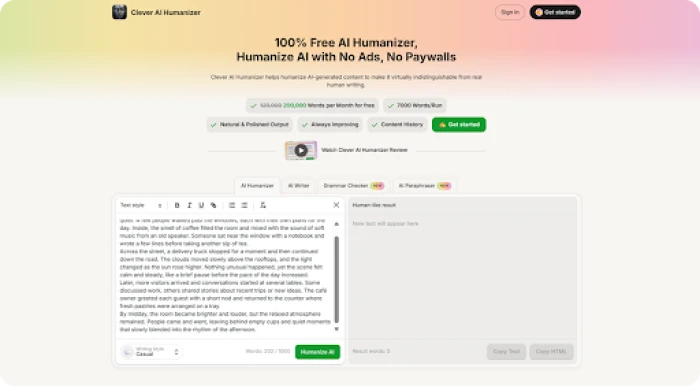
1. Open the Clever AI Humanizer editor in your browser.
2. Paste your draft into the input panel.
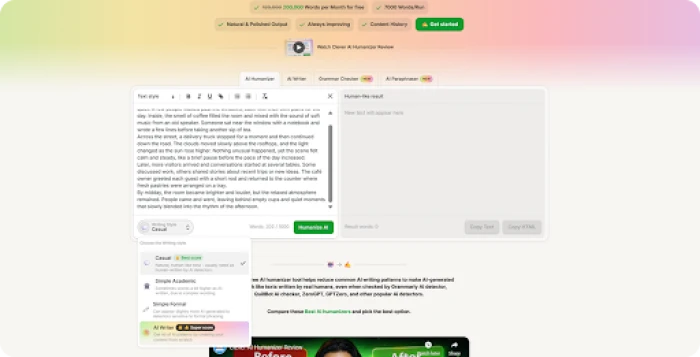
3. Select a writing style. We used Casual mode in our tests; it produced the most varied sentence structure and the lowest detection scores of the three options.
4. Click "Humanize AI" and wait for the output panel to load.
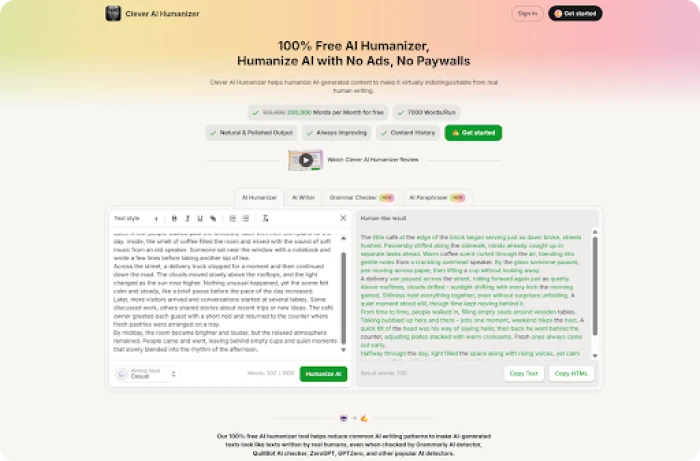
5. Compare the rewritten version with the original. Look specifically at how paragraphs open and whether sentence lengths now vary.
6. Export using "Copy Text" or "Copy HTML."
In our baseline test, the original AI draft scored above 90% on both ZeroGPT and GPTZero. After one pass through Humanizer, detection dropped to 0–14.71%, with GPTZero classifying the output as 93–94% Human.
That covers the case where you already have a draft. If you start from scratch, there is a second route that skips the separate humanizer step entirely.
How to Generate a Draft with Built-In Humanization
The AI Writer builds the structural changes into the generation itself, not as a correction pass after the fact. You can generate plagiarism-free text directly in the same interface, and in most cases, the output is ready to edit. You do not need to run it through the humanizer separately.
1. Open the AI Writer page and select the content type: essay, blog post, or article.
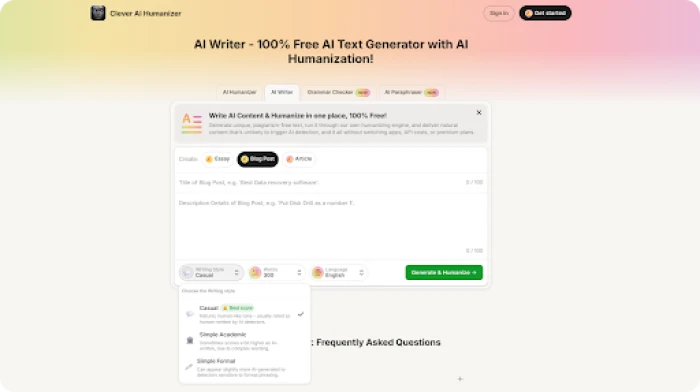
2. Add a headline and a short brief that states the topic and main point.
3. Set tone, language, and target word count before you generate.
4. Run and tap the " Generate & Humanize ” button. The structural adjustments apply during generation, not after.
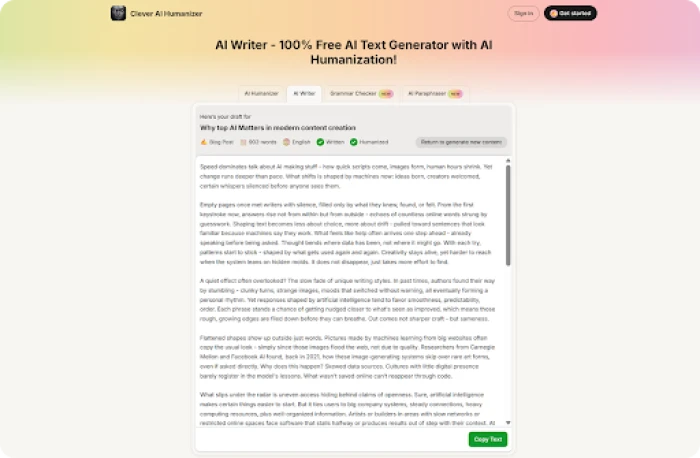
In our tests, the AI Writer output needed very little editing before it was ready to use. Sentence lengths varied naturally, paragraphs did not repeat the same opening structure, and the text did not read as mechanically generated.
Both workflows handle full-draft work. When you need to adjust a specific paragraph rather than rewrite the whole piece, the paraphraser is a more targeted option, and it works differently from the humanizer.
How a Paraphrasing Tool to Avoid AI Detection Differs from a Humanizer
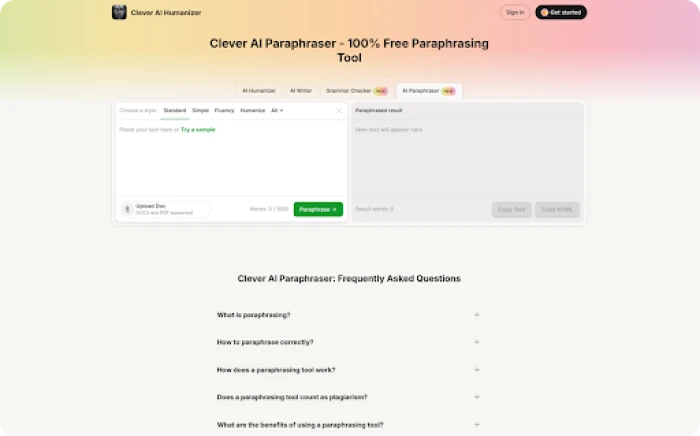
Writers often treat paraphrasers and humanizers as the same tool. They are not, and picking the wrong one wastes time.
A paraphraser rewrites at the sentence level. It swaps vocabulary and adjusts individual sentence structure, and leaves the broader paragraph intact. Use it when one dense section needs targeted variation – not when an entire draft needs to change.
A humanizer changes the draft more broadly. It adjusts how paragraphs are built across the piece – clause order, where emphasis falls, and how sentence length varies from one paragraph to the next. That is what moves a detection score from 90% to under 15%.
The best paraphrasing tool to avoid AI detection offers four style modes: Standard, Simple, Fluency, and Humanize. Standard swaps vocabulary and keeps sentence structure close to the original. Humanize goes further; it breaks up long compound sentences, shifts where the main point lands in a sentence, and changes how paragraphs connect. Use Standard when the text just needs fresher wording. Use Humanize when a paragraph still reads too evenly after the main tool pass.
Run the humanizer on the full draft first. Then use the paraphraser on any paragraphs that still feel flat.
Which tool for which task:
Full draft → AI Humanizer
Single paragraph → AI Paraphraser
Start from scratch → AI Writer
With the workflow clear, the question becomes how Clever AI Humanizer actually compares to other tools under the same test conditions.
Benchmark Results for Five Tools Tested Against Each Other
We ran each tool through three identical AI-generated drafts. Detection scores came from ZeroGPT and GPTZero, averaged across both. Grammar scores were assessed separately. Lower detection is better. Higher grammar is better.
Scope note: These tests used web-based detectors under standard conditions. They do not cover Turnitin, non-English text, or drafts longer than 1,000 words per run.
| Tool | Price | Free Limit | Avg Detection | Grammar Score |
|---|---|---|---|---|
| Clever AI Humanizer | Free | 200,000 words/mo | 4.45% | 92.6 / 100 |
| Undetectable AI | $19/mo | 20,000 words | 34.37% | 87.6 / 100 |
| Stealth Writer AI | Free | 300,000 words | 51.90% | 89.3 / 100 |
| Phrasly AI | $24/mo | Unlimited / 550w per run | 89.40% | 97.0 / 100 |
| Grammarly AI Humanizer | Free tier | 2,000 words | 100% | 100 / 100 |
Clever AI Humanizer finished with the lowest detection average at 4.45% and held grammar at 92.6/100. No other free tool came close on detection, and no paid tool matched the combination of low detection and high grammar at no cost.
Undetectable AI reduced detection more than Stealth Writer but averaged 34.37%, and costs $19 per month for 20,000 words. Stealth Writer AI offers a higher free word limit, but delivered a 51.90% average. Phrasly AI had the best grammar scores at 97.0/100, but averaged 89.40% detection. Grammarly AI Humanizer returned perfect grammar and 100% AI detection, but it does not address detection at all.
Those gaps matter practically. Turnitin alone reviewed hundreds of millions of student papers and flagged AI signals in tens of millions of submissions within its first year – at that scale, a 34% average detection rate means a significant share of work still gets caught.
A good tool handles the bulk of the work. A few targeted steps after the output protect the meaning and catch what automation misses.
What to Do After the Tool Runs
These five steps protect meaning and catch what the tool misses.
- Check the intro, main claim, and conclusion first. That is where structural changes show up most visibly. If the argument shifted, fix it before anything else.
- Restore all proper nouns, dates, and technical terms. Tools often replace these with generic substitutes. Put them back before you export.
- Add one grounding detail per paragraph that the AI draft left out -- a year, a person's name, a number, a place. For example: "researchers found" becomes "a team at Johns Hopkins found in 2022." That level of specificity is what automated drafts consistently skip.
- Run the detector once, at the end, not after every small edit. Each extra check distorts phrasing and does not move the underlying pattern. One final check tells you what you actually need to know.
- If a paragraph still reads too evenly, rewrite two sentences by hand. Make one sentence under 10 words. Make another start with a number or a proper noun. That breaks the uniformity. Do not run the full draft through automation again.
At scale, those specific edits reduce detection more reliably than repeated automated passes.
The Verdict
Before we wrap up, we want to tell you one simple thing: avoiding AI detection is not about replacing words; it is about changing how the text is built. AI detectors analyze structure, sentence rhythm, and predictability rather than meaning.
In our tests, tools that only swapped vocabulary barely improved detection results. The tools that rebuilt sentence structure performed much better. Clever AI Humanizer consistently produced the lowest detection scores while keeping grammar quality high, even on its free plan. Community feedback reflects similar results. One Reddit user shared a detailed experience after testing the tool in real workflows.
Two other tools we tested remain solid options, but none matched the balance of detection reduction, readability, and accessibility. We recommend it as the first tool to try if you need AI-assisted content to pass modern detection systems.
Comments
Join the discussion and share your perspective.