
New AI tools launch almost every week, and the catalog now runs well into the thousands. So most business owners ask a reasonable question: which AI tool should I use? On its own, that question has no good answer. The right tool for a solo consultant writing client proposals looks nothing like the right tool for a 200-person operations team trying to cut its reporting time in half.
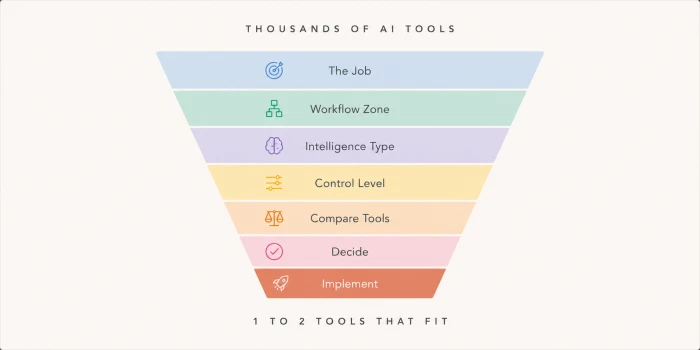
Choosing the right AI tool for your business works better as a process of elimination than a feature hunt. This guide walks you through a decision journey shaped like a funnel. Each stage removes the options that don’t fit until one or two realistic choices remain. By the end, you’ll know the category of tool you need and how to pick the specific product inside it.
Why Most AI Tool Decisions Go Wrong
Most failed AI rollouts don’t fail because the software was weak. They fail because the tool solved a problem the business didn’t have, or solved it in the wrong place. Poor tool choice is one of the most common reasons AI adoption stalls inside otherwise capable teams.
A marketing manager buys a powerful writing assistant, then finds out the team’s real bottleneck was approvals rather than drafting. A founder signs an annual contract for an enterprise analytics platform, then realizes a spreadsheet and a cheap summarization tool would have covered most of the need. These mistakes cost real money, and they repeat across companies of every size.
The pattern is simple. People shop for AI tools the way they shop for laptops, lining up features side by side. A feature only matters if it maps to something you actually do. So before you compare a single product, you need to work out what job you’re hiring AI for and where that job sits in your business.
How This Decision Journey Works
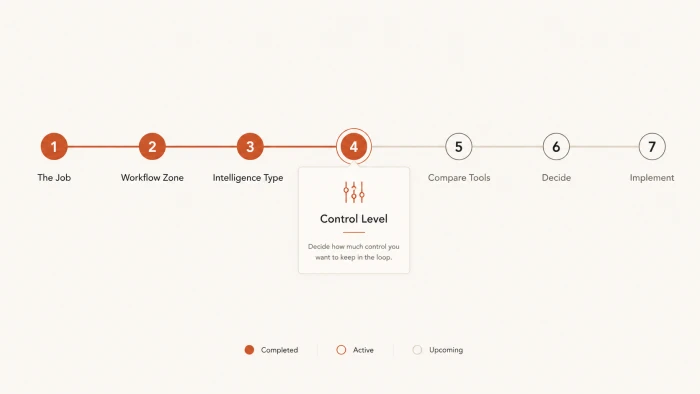
This AI tool selection framework runs through seven stages. The first four happen before you look at any tool at all, and they do the heavy lifting. By the time products enter the picture in Stage 5, you’ve already ruled out everything that was never going to fit.
Work through them in order. Each one ends with a single decision you carry into the next.
Stage 1: Name the Job You Want AI to Do
Forget tools for a moment. The opening question is about your business: what job do you want AI to do?
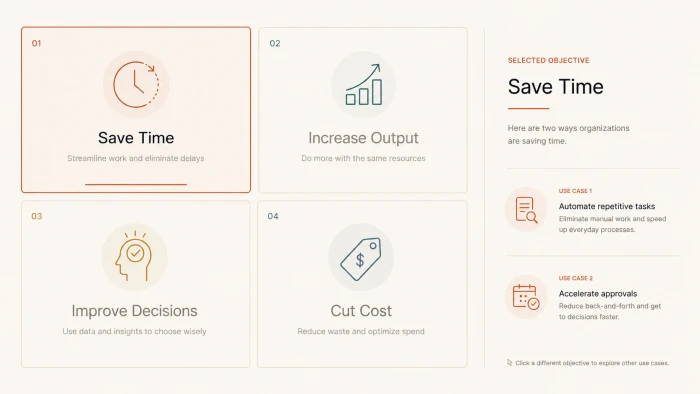
Most goals for AI fall into four buckets.
Save time. You have repetitive manual work eating hours every week, like data entry or document formatting. The goal here is hours back.
Increase output. You need more of something good, and you need it without a drop in quality. More marketing copy this month than last. More code shipped per sprint. The goal is volume.
Improve decisions. You’re sitting on data you can’t read fast enough. The goal is sharper analysis and forecasts you can act on.
Cut cost. You’re paying for work that software could absorb. The goal is a smaller bill for the same result.
Pick the one that matters most right now.
Not all four at once. Each goal pulls toward a different kind of tool, so a business chasing all of them tends to end up with a drawer of half-used subscriptions. If two feel equally urgent, ask which one, once solved, would free up the resources to handle the other. That answer is your primary objective.
Stage 1 leaves you with one objective, written in plain words.
Stage 2: Find Where AI Fits in Your Workflow
A clear goal still isn’t enough to pick a tool. A time-saving goal could live in your sales process or your month-end accounting close, and those call for completely different software. The next step locates where in your business the work actually happens.
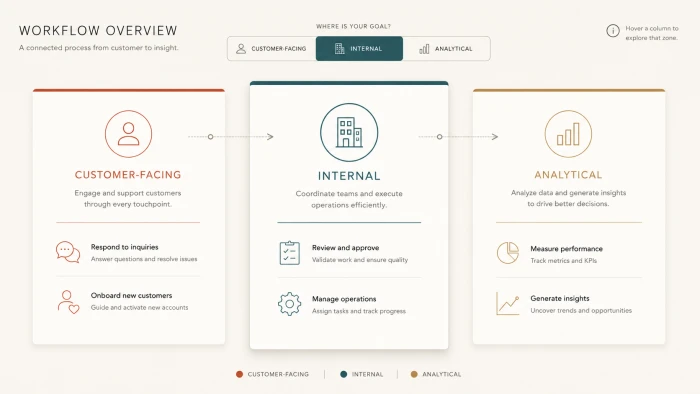
Picture your operations in three zones.
The customer-facing zone covers everything your audience touches: marketing campaigns, sales conversations, support replies, the copy on your website. AI here is visible to outsiders, so tone and accuracy carry extra weight.
The internal zone is the work your team does to keep things moving, like internal docs and first drafts of content before they ship. Nobody outside sees it, but it swallows a surprising number of hours.
The analytical zone sits at the back, where reporting and forecasting turn raw numbers into something you can decide on. Decisions get made here, so a wrong AI answer costs the most.
Most guides skip this step, which is why so many purchases miss. A tool can be excellent and still be aimed at the wrong part of your company.
Mark the zone where your primary objective lives. If it stretches across two, choose the one where the pain is sharpest today.
You now know which zone AI will operate in.
Stage 3: Match the Job to a Type of Intelligence
Now the funnel narrows to categories. Your goal plus your workflow zone points to the kind of intelligence you need, and most AI products are built around one of four.
Content generation tools produce language and media: blog posts, ad copy, images, video scripts. An “increase output” goal in a customer-facing or internal zone usually lands here.
Reasoning and analysis tools work through problems, summarizing long documents and drafting strategy out of messy inputs. An “improve decisions” goal points straight here.
Automation tools execute tasks and chain steps together, moving data between apps and running multi-step workflows without a person clicking each button. A “save time” or “cut cost” goal in the internal or analytical zone fits here.
Specialized tools go deep on one domain, like writing and debugging code or generating production-ready designs. If your work is technical and narrow, a generalist will frustrate you and a specialist will pay off.
You don’t have to choose perfectly. Some products blur these lines. Naming the dominant capability you need is what stops you from buying a writing assistant when the real need was a workflow engine.
Your category is set, and tools still haven’t entered the story.
Stage 4: Decide How Much Control You Need
This stage cuts the market roughly in half. Two tools can perform the identical task and still be built for completely different buyers, because they make different assumptions about setup, security, collaboration, and compliance. Match the wrong level and you either overpay for governance you’ll never touch or hit a wall the first time you try to scale.
There are three levels.
Lightweight: Solo Operators and Early Startups
You want to start today. Setup runs in minutes, and you’ll switch tools freely as you learn what works. Approval chains and audit logs aren’t on your radar yet. Speed is the priority and the risk is low, so free and low-cost plans usually cover you.
Team-Based: Growing Businesses and Agencies
Several people use the same tool, so shared workspaces and connections to the software you already run start to matter more than raw capability. You care about who can see what. Per-seat pricing enters the math.
Enterprise-Grade: Large or Regulated Organizations
Now compliance, data residency, security review, and governance drive the call. Your legal team has questions, and a tool that can’t answer them is out, however good its output looks. You’re buying control as much as capability, and the price reflects that.
Be honest about the level you’re at rather than the one you’re reaching for. A two-person startup on enterprise software burns cash on features it won’t open for years. A regulated firm on a consumer tool risks a data problem that dwarfs any subscription it saved.
The field is now down to a single class of tools.
Stage 5: Compare the Tools Inside Your Category
This is where most articles begin, and you’re arriving with four decisions already made. Your comparison will be quicker and sharper than someone starting from a blank search bar.
Inside your category and control level there are usually only a handful of serious contenders. Pull two to four of them and stop. A longer shortlist adds confusion instead of clarity.
Take content generation as a worked example. A few names dominate that space, and they behave differently. ChatGPT is a flexible generalist that handles a wide spread of tasks. Claude leans toward depth in reasoning and longer-form writing. Jasper is built around marketing teams and brand-consistent campaigns. The best of them depends entirely on what you’re producing and who’s doing the producing.
Reputation is a weak guide. Evaluate each contender against five factors instead.
Output quality on your actual work. Test it on a real task from your week, not a tidy demo prompt. A model that writes elegant essays can still write clumsy product descriptions.
Ease of integration. How much effort does it take to fit into the tools you already use? Anything that forces copy-paste across several apps costs more time than it returns.
Workflow fit. Does it match how your team already operates, or does it demand you rebuild your process around it?
Cost efficiency. Look past the sticker price to the cost per useful result, which is the real measure of return. A cheap tool that needs heavy editing can run more expensive than a pricier one that nails the first draft.
Scalability. If your usage triples next year, does the tool grow with you or fall over?
Run your shortlist through the same test on your own tasks and score them side by side. The winner for your business might not carry the biggest brand or the longest feature list.
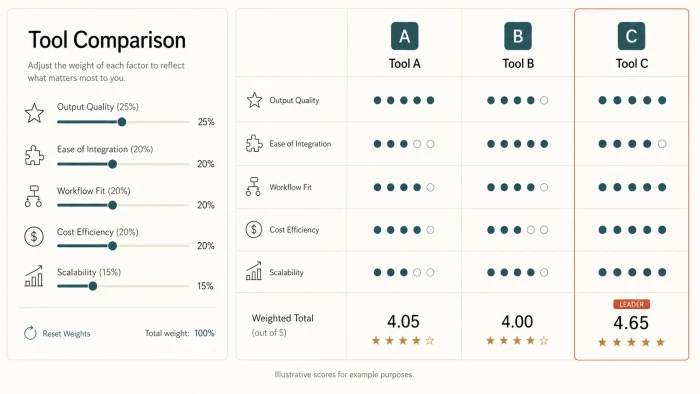
The result is a ranked shortlist, scored against your own work.
Stage 6: Make the Call
Analysis can stall right here. The scores come back close, so you keep researching instead of choosing. This stage breaks the loop with a simple rule tied to whatever you weighted highest.
If speed of adoption matters most, take the tool that had you running fastest in testing, even if another edged it on output.
If accuracy matters most, take the one that gives the most reliable results on your hardest test case, and accept a steeper learning curve.
If automation is the whole point, take the tool that connects to the most of your existing systems with the least custom work.
Still torn between two close options after all that? Default to the one that’s easier to walk away from: the shorter contract, the simpler data export. Early on, reversibility beats getting it perfect, because your needs sharpen the moment you start using something for real.
Commit to one. Set a real trial window with defined success criteria. A choice you can review in 60 days beats months of comparison.
Stage 7: Check the Implementation Reality
The tool you pick is only as good as the rollout behind it. Most articles end at Stage 6. Skipping the rollout is exactly why plenty of well-chosen tools sit abandoned by month three.
Budget for onboarding time. The first few weeks run slower while people learn the tool, not faster. Plan for that dip instead of expecting an instant lift and panicking when it doesn’t show.
Expect adoption friction. Some of your team will resist, quietly or out loud. A tool nobody opens returns nothing, so give it an internal owner and a short training session, then check in after the first month.
Watch for cost surprises. Usage-based pricing can climb fast once a tool catches on internally. Read how the billing scales before you roll it out company-wide.
Account for integration effort. Wiring a tool into your existing systems usually takes longer than the sales page implies. Ask current users how long setup actually took them, then add a buffer.
A tool that scores a 9 in the demo and a 4 in real daily use is worse than one that scores a steady 7 on both. Pick for the version of your business that has to live with it every Monday morning.
Turn This Into a Decision
If you take one action after reading this, write down your single objective from Stage 1 in one plain sentence. That line quietly decides everything downstream, and it's the step most teams rush past. Get that sentence right and every later choice has something to measure against.
The tool you settle on won't be permanent. New options appear every month, and a strong pick today can slip to second place within a year. The decision process you just ran is the part that lasts. Re-run it whenever something promising launches, and the choice that ate weeks the first time will take an afternoon.
Comments
Join the discussion and share your perspective.