
There are roughly six new AI tools launched every Tuesday. By Friday, three of them are on Product Hunt's front page. By the next Tuesday, two are pivoting and one is dead. This is not an exaggeration - it's just what 2026 looks like.
If you try to evaluate every tool that lands in your inbox, you'll burn your week. If you ignore them all, you'll miss the one that would have saved you eight hours a month. Most of us are stuck in the bad middle: signing up for trials we never finish, watching demos that all blur together, paying for things we used twice.
The fix isn't to evaluate harder. It's to evaluate faster - with a method, on a clock, in a way that catches the things that matter and ignores the things that don't. Fifteen minutes. Five phases. No spreadsheets, no committee meetings, no "we'll revisit it next quarter." Either it's worth a deeper trial, or it isn't.
| Demo theatre is the term for what happens in those polished walkthroughs where everything works perfectly because the demo data was built to make it work perfectly. Your real workflow is messier. Your real test should be too. |
Why fifteen minutes is the right budget
Five minutes is too short - you can't form an honest opinion. An hour is too long - you'll start rationalizing the time you've sunk into the test. Fifteen minutes is the sweet spot: enough to push past the marketing, not enough to fall in love with a problem you don't actually have.
It also forces a useful discipline. When the timer is real, you don't get to wander into the prettier corners of the product. You stay on the question that matters: does this thing solve the actual problem I'm paying it to solve, on the data I'd actually feed it, at a price I'd actually pay, from a company that will still exist when I need to call support?
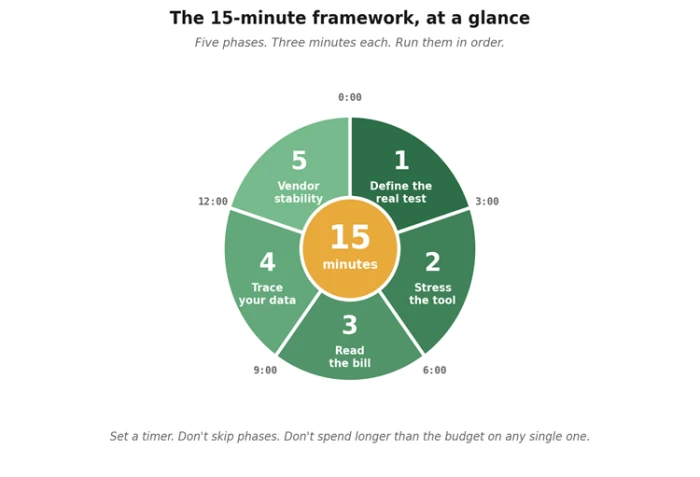
The whole framework, on one page. Every phase has a job. None of them is optional.
The five phases, summarized
Before we dig into each one, here's the whole framework in a single table. Print it, screenshot it, paste it into a sticky note on your second monitor - wherever it lives near the keyboard when the next "Hey have you tried…" lands in Slack.
| # | Phase | What you actually do | What you're looking for |
|---|---|---|---|
| 1 | Define the real test (0–3 min) | Write down one task you'd genuinely use this for. Real data, real context, real constraints. Not the demo task. | Clarity. If you can't define the test in two sentences, you can't fairly evaluate the tool. |
| 2 | Stress the tool (3–6 min) | Run your hardest version of that task first. Edge cases, ambiguity, weird inputs, the thing that breaks competitors. | How it handles confusion. A graceful failure tells you more than a clean success. |
| 3 | Read the bill (6–9 min) | Open the pricing page. Find the gotchas: usage caps, overage rates, seat minimums, plan ceilings. | Honest, public pricing. "Contact sales" for basic plans is a yellow flag at minimum. |
| 4 | Trace your data (9–12 min) | Skim the privacy policy. Find: training default, retention window, sub-processors, opt-out path. | Specific commitments. Vague language ("we may use data to improve services") is a red flag. |
| 5 | Vendor stability (12–15 min) | How old is the company? Funded? Profitable? Active changelog? Real status page? Founders findable? | A pulse. You're betting your workflow on this team being around in twelve months. |
Phase 1 (0–3 min): Define the real test
Most evaluations fail in the first sixty seconds, before the tool is even open. The reason is that the user hasn't decided what "good" would look like. They open the demo, see something cool, and start retrofitting the tool to imagined use cases. By minute four, they're sold on a problem they don't actually have.
So: open a notes app. Write one task you'd genuinely use this for in the next two weeks. Be specific. Not "summarize meetings" - "summarize the standup transcript I'm getting tomorrow morning, in the format my team's PM expects, without inventing action items." Real data. Real constraints. Real edges.
If you can't write that paragraph in three minutes, the problem isn't the tool. The problem is that you don't have a clear use case yet, and any tool will look good against an unclear case. Stop the timer and come back later.
The two-sentence test If you can't describe what you'd use the tool for in two sentences, you're not ready to evaluate it. Most adoption regrets start here - sold on capability, not on fit. |
Phase 2 (3–6 min): Stress the tool
Most people start their evaluation with the gentlest possible task - the one that's most like the demo. This is exactly backwards. The demo task already passed. Running it again tells you nothing.
Lead with the punishing case. Feed it the messiest version of your real task: the meeting transcript with three people talking over each other; the spreadsheet where someone put a footnote in row 47; the support ticket written in three languages. Whatever your version of "the data we actually get" looks like, that's your input.
Then watch what the tool does when it's confused. Does it admit it doesn't know? Does it ask a clarifying question? Does it confidently make something up? The way a tool fails is more informative than the way it succeeds. Calm, transparent failure is a feature. Confident hallucination is a deal-breaker.
| If the tool nails your hardest case, the rest is gravy. If it stumbles, you've learned the actual ceiling of what it can do - which is the only number that matters once you're past the trial. |
Phase 3 (6-9 min): Read the bill
Pricing is where AI tools get sneaky, and it's the phase most evaluators skip. The headline number rarely tells the story. The interesting questions are: what's the metered unit (tokens, requests, seats, minutes)? What happens when you exceed the cap? What's the seat minimum? What's the difference between the tier shown on the homepage and the tier you'll actually need?
Open the pricing page. Hit the FAQ. Scroll to the bottom of the highest tier and look for the "contact sales" trapdoor. If the basic plan has a hard cap that any real workflow would hit in a week, the basic plan isn't really a plan - it's a funnel.
Three minutes is enough to spot the structural issues. Document the metered unit, your expected monthly volume, and the price at that volume. If you can't compute it without scheduling a sales call, that's data too.
Phase 4 (9-12 min): Trace your data
Three minutes on the privacy policy. Specifically: search the page for "training," "retention," "sub-processor," and "opt-out." Most modern privacy policies will have all four. The question isn't whether the words exist - it's how committal the surrounding sentences are.
Vague is bad. "We may use your data to improve our services" is the privacy-policy equivalent of "we'll see." Specific is good. "Inputs are not used for model training. Logs are retained for 30 days for abuse detection, then deleted" is what you want to find.
If the company offers an enterprise tier with stronger guarantees and you're using this for client work, that's where you should be - not on the consumer plan with the breezier defaults. The price difference is small relative to the cost of one bad incident.
Shortcut Paste the privacy policy URL into an AI tool and ask: "What does this policy commit to about training, retention, and third parties? Where is it vague?" It'll surface the soft spots faster than you can read them yourself. |
Phase 5 (12-15 min): Vendor stability
The last three minutes are the ones most people don't think to budget. They're also the ones that protect you from the most painful adoption mistakes - the ones where you build a workflow on a tool that quietly dies six months later, taking your prompts and integrations with it.
Quick checks: how old is the company (founded date is usually in the footer or About page)? Are real humans listed by name, or is it a logo and an email? Is there a changelog with dated entries from the last few weeks? A status page with actual incident history? A LinkedIn presence with engineers, not just a CEO and a marketer?
None of these is dispositive. A new company can be excellent. A well-funded company can be a disaster. But the absence of all of them is a signal - usually that the product is thinner than the homepage suggests, or the team is too small to support what they're selling.
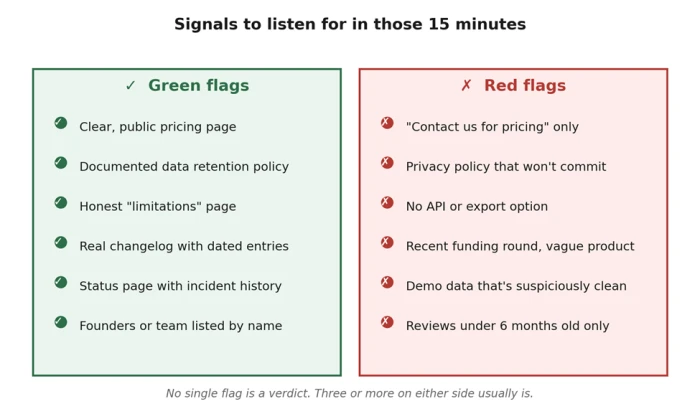
Pattern-recognition shortcuts. None of these is automatic, but they correlate with quality more than they don't.
How to score what you saw
After fifteen minutes, you've got five impressions. Score each on a 0–3 scale: zero (broken or red flag), one (works, but with caveats), two (solid), three (notably good). Add them up. The total is out of fifteen, which is convenient, because you can think of the score as a rough percentage.
Some rules of thumb:
• 11 or higher: worth a deeper trial. Set up a real two-week pilot with actual workflows.
• 7 to 10: ambiguous. Probably worth one more focused session on the weak phase before deciding.
• 6 or below: pass. Don't talk yourself into it. The market will produce a better option in a month.
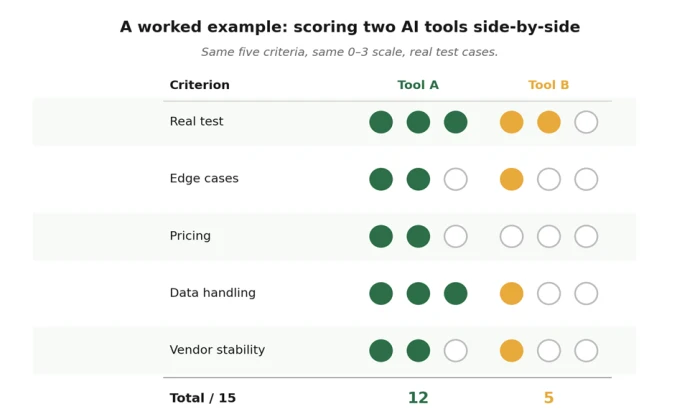
A worked example. Tool B looked great in the demo. Real testing told a different story.
Your blank scorecard
Copy this into a doc, print it, or use it on screen. The point isn't to be precise - it's to force yourself to write something down for each phase. The act of choosing a number is half the value of the framework. Vague impressions don't survive a 0-3 commitment.
| Criterion | Score (0–3) | Notes |
|---|---|---|
| 1. Real test - did it handle your actual task? | ||
| 2. Stress test - how did it fail under pressure? | ||
| 3. Pricing - clear, predictable, sustainable? | ||
| 4. Data handling - training, retention, transparency? | ||
| 5. Vendor stability - likely to exist in 12 months? | ||
| TOTAL | / 15 | 11+ → adopt · 7–10 → trial further · 0–6 → pass |
Use the same scorecard for every tool you evaluate. Comparability is the whole point.
A worked example: how this looks in practice
Imagine your team is considering two new AI meeting assistants. Both demo well. Both have polished homepages. The blog posts about them sound interchangeable. Without a framework, you'll make the call on aesthetics or whoever pitched it more recently.
Tool A
You feed it your worst meeting - the one with three remote callers, two interruptions, and someone's dog. It produces a summary that's 80% there, flags two sections it wasn't sure about, and asks if you want to refine. Pricing is on the homepage, scales linearly, no seat minimum. Privacy policy explicitly says recordings are deleted after 30 days and not used for training. Founded 2022, has a changelog, status page is up. Score: 12 / 15. Move to a two-week trial.
Tool B
Same meeting. Tool B produces a confident, beautifully formatted summary that invents an action item nobody mentioned. Pricing requires a sales call for anything beyond the demo tier. Privacy policy uses the phrase "to improve our services" three times without ever defining what that means. The company has a Series B funding announcement from last quarter but no changelog, no status page, and the team page lists three people. Score: 5 / 15. Pass.
The whole evaluation took thirty minutes for two tools - under your hour budget for the entire decision. Six weeks later, when your colleague pitches a third, you run it through the same framework and either confirm or refute the call you've already made. The framework compounds. Every evaluation makes the next one faster.
Final word
The point of this framework isn't to make you skeptical. It's to make you decisive. Skepticism without a method just means you don't try anything; decisiveness with a method means you try the right things, drop the wrong ones quickly, and free up the cognitive space that AI-tool fatigue would otherwise eat.
Fifteen minutes is a small investment for the right answer to a question that's going to come up forty more times this year. Build the muscle now. The next time someone in your group chat asks "have you tried…", you'll know what to do - and, more importantly, when to be done.
If you used this framework on one tool and saved yourself a bad subscription, it earned its keep.
Comments
Join the discussion and share your perspective.