
In March 2023, three engineers at Samsung's semiconductor division did something that would, within weeks, end up rewriting how a lot of large companies think about AI tools. They pasted things into ChatGPT.
Not maliciously. Not carelessly, even - they were senior engineers trying to do their jobs faster. One pasted source code from a chip-fabrication database to ask for bug fixes. Another submitted yield-test code looking for optimization. A third uploaded a transcript of an internal meeting to generate clean minutes.
Three separate incidents, twenty days, one cloud service operated by a company on a different continent. The data was gone - not stolen, but submitted, voluntarily, into a system whose terms none of them had read closely. Samsung banned consumer generative AI tools on its devices roughly a month later. The story is still cited in enterprise IT meetings three years on, because the lesson it teaches is uncomfortable: the most likely path to an AI-related data leak is not an attack. It's a productive employee with a deadline.
So: is it safe to upload your data to AI tools?
The honest answer is the one you'd get from any decent lawyer: it depends. But - and this is the part most articles skip - it depends on three specific things that you can actually evaluate. This piece walks through what those three things are, what's quietly changed in the AI privacy landscape over the last six months, and how to make sensible calls without either panicking or pretending the risks don't exist.
| The Samsung engineers were not reckless people. They were busy people. That's the actual threat surface - not malice, just the gap between "I'm doing my job" and "I'm sending proprietary data to a cloud service I cannot audit." |
The three things it actually depends on
Cut through the noise and the safety question reduces to three variables. Get all three right and you can use AI tools for almost anything. Get any of them wrong and you're betting more than you realize.
• What you're uploading. A draft blog post is not the same as a patient's medical history.
• Which tier you're using. Free, Pro, Business, Enterprise, and API have different default behaviors. The differences matter more than the model name.
• What the provider does with it. Training, retention, sub-processing, and breach history. This is the layer most users never check.
What "uploading" actually means
Most people picture upload and think file transfer - drag a PDF, click submit, done. With AI tools, the surface area is much wider. You're effectively uploading data when you do any of the following, and the UI rarely makes the distinction:
• Paste text into a chat window - even a single sentence.
• Drag in a file (PDF, image, spreadsheet) for the model to analyze.
• Use a browser extension that reads the page you're on.
• Connect a calendar, email, or cloud-storage integration.
• Talk to a voice assistant on your phone or in your home.
• Accept code completions in an IDE, where surrounding context is sent for prediction.
Each of those is a handoff. And each handoff is a place where the data can be retained, reviewed, or - in the worst cases - leaked. The diagram below traces the journey, with the exposure points marked. It's not designed to scare you. It's designed to make the invisible visible
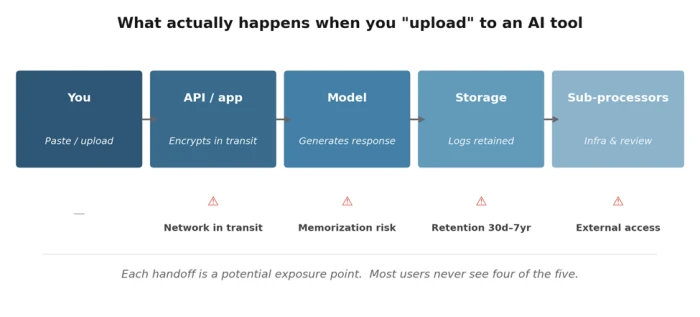
The handoffs most users never think about. Each one has its own risk profile and its own privacy controls.
The five real risks (and how worried to be about each)
1. Training data ingestion
The headline risk. By default, many consumer AI products use what you type to train future versions of the model. The fear is that something distinctive - a phrase, a piece of code, a confidential project name - will eventually surface in someone else's response. This isn't paranoia: language models can and do memorize fragments of training data, especially rare or repetitive ones. The probability is low for any individual chat. The consequence, when it happens, can be severe.
The fix is straightforward: turn off training in your account settings, or use the provider's incognito / temporary mode. Most major tools offer one or both. Worth doing today, not later.
2. Data retention
Even when training is disabled, providers usually retain your conversations for a window - commonly 30 days on consumer plans, sometimes longer for safety, abuse-detection, and compliance reasons. Atlassian's announcement around its AI training rollout, for example, includes a retention period of up to seven years for de-identified metadata. Seven years is a long time for a project that may pivot or close in eighteen months.
Retention isn't necessarily bad. Logs help debug, prevent abuse, and respond to legal requests. But "my chats are private" and "my chats are deleted" are not the same statement, and most users conflate the two.
3. Breaches and bugs
AI providers are software companies, and software companies have bugs. In March 2023, a caching bug in ChatGPT briefly exposed the payment information of around 1.2% of Plus subscribers - names, addresses, last four credit-card digits. Patched quickly, but the lesson stuck: opting out of training does not opt you out of ordinary software failure.
Treat AI providers the way you'd treat any cloud service handling personal data. Strong password, two-factor authentication, separate account for sensitive work if it matters, and an awareness that one bad week of engineering is not impossible.
4. Third-party processors
The AI provider you signed up with is rarely the only company touching your data. Cloud infrastructure, monitoring, evaluation, and sometimes human content review are handled by sub-processors - separate companies bound by contract but still seeing the data flow through their systems.
Most providers publish a list. Read it. If you operate under data-residency rules (the EU is the obvious case, but it applies elsewhere), confirm in writing that your data won't be processed in jurisdictions you can't accept.
5. Regulatory exposure
Healthcare, financial services, legal, and regulated EU data come with rules that consumer AI products were not built to satisfy. HIPAA in the US, GDPR in Europe, and a growing patchwork of state and sectoral rules elsewhere. The Italian data-protection authority temporarily suspended ChatGPT in 2023 over GDPR concerns; that was an early signal of what enforcement looks like when consumer AI meets regulated data.
If you're in a regulated industry, the question stops being "is this convenient" and starts being "does my organization have a Business Associate Agreement, Data Processing Addendum, or equivalent in place with this provider." If you don't know, the answer is probably no.
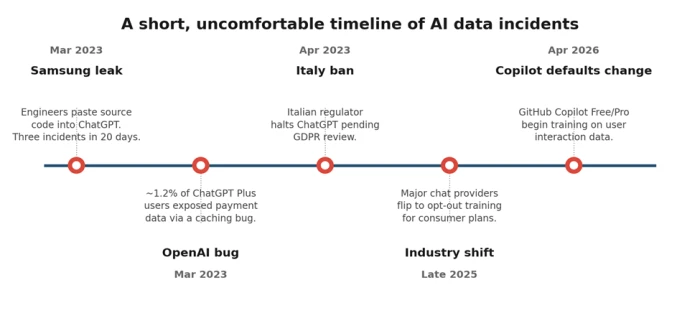
Three of the five biggest privacy moments in AI happened in a single 24-month window. The pace is not slowing.
The quiet 2025 - 2026 shift toward opt-out
If you set your AI privacy preferences in 2023 and haven't checked since, your settings may not mean what you think they mean. Across late 2025 and the first half of 2026, several major providers shifted their consumer plans from opt-in training (you have to consent) to opt-out training (you have to actively decline). The change has been rolled out quietly, often via routine policy-update emails most people delete unread.
Two examples worth knowing about:
• GitHub Copilot announced on March 25, 2026 that starting April 24, interaction data from Copilot Free, Pro, and Pro+ users would be used to train its models unless users opted out. Business and Enterprise customers were excluded by contract. "Interaction data" includes prompts, chat messages, and the code surrounding the cursor - including code in private repositories that you're actively working in.
• Atlassian announced an August 17, 2026 rollout of AI training across Jira, Confluence, and other cloud products. The opt-out structure is tiered by plan: Enterprise customers get full opt-out by default, while Free and Standard tier customers cannot opt out of metadata collection at all. Retention runs up to seven years.
These are not isolated decisions. The pattern is clear and worth naming directly: as AI labs need ever more training data to keep model quality climbing, the path of least resistance is to harvest from the users they already have, with the consent burden shifted onto the user. Nothing illegal about it. Nothing surprising in retrospect. But it does mean settings need re-checking on a cadence - quarterly is reasonable for most people.
Worth doing this week Open the privacy settings of every AI tool you use regularly. Confirm training is off, retention is the shortest available, and any "improve the product" toggles are unchecked. The whole exercise takes under fifteen minutes. |
How the major tools compare today
A snapshot of where the largest consumer AI tools stand in May 2026. The asterisk on Claude reflects the late-2025 default change discussed above. Policies update - verify before relying.
| Tool | Default for free/consumer | Opt-out toggle? | Business/Enterprise tier | API |
|---|---|---|---|---|
| ChatGPT (OpenAI) | Trains on chats | Yes (Settings → Data Controls) | Excluded by default | Excluded |
| Claude (Anthropic) | Trains on chats* | Yes (Settings → Privacy) | Excluded by default | Excluded |
| Gemini (Google) | Tied to Google activity | Yes (Activity controls) | Workspace excluded by default | Excluded |
| Copilot (GitHub) | Trains on interaction | Yes (Privacy settings) | Excluded by contract | - |
| Meta AI | Public posts used | Limited (region dependent) | - | - |
* Anthropic moved consumer Claude plans toward opt-out training in late 2025. API and Enterprise remain excluded.
A simple decision tool
When you're deciding whether to paste something into an AI tool, two variables are usually enough to make the call: how sensitive is the data, and what tier are you on? Map the question on those two axes and the answer is rarely ambiguous.
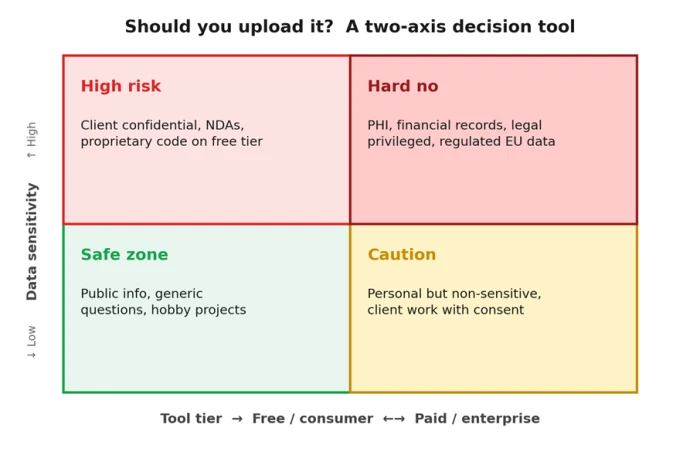
Most everyday AI use lives in the bottom-left. The boundary you actually need to police is the top half.
What to share, what to keep out
A practical, non-exhaustive guide. The left column is generally fine for any reputable consumer AI tool with training disabled. The right column shouldn't be pasted into a consumer-tier AI under any circumstances - even with training off, it's the wrong place for that data.
| ✓ Generally fine to share | ✗ Do not paste into consumer AI |
|---|---|
| Public information you'd happily share on social media | Anything covered by an NDA or confidentiality clause |
| Generic technical questions, definitions, explanations | Client work product before delivery and approval |
| Drafts of your own content (blog posts, essays, fiction) | Source code from a private or commercial repository |
| Brainstorming, summaries, hypothetical scenarios | Customer lists, employee data, internal financials |
| Recipes, travel ideas, hobby planning | Health records, medical histories, prescriptions |
| Code from open-source projects you maintain | Legal correspondence with privilege attached |
| Public research papers and articles | Authentication tokens, API keys, passwords, secrets |
When in doubt, the test is simple: would you be comfortable if this conversation appeared in a leaked dataset next year?
A practical safety checklist
Six things to do, in roughly the order I'd do them. None of them takes long. Together, they push your risk profile from "hopeful" to "deliberate."
1. Audit your settings on every tool, today.
Open each AI tool you've signed into in the last year. Find the privacy or data controls section. Turn off training. Set retention to the shortest available window. Note where the toggle lives so you can re-check it quarterly - providers move them, and "opted out" preferences sometimes don't survive policy rewrites.
2. Use temporary or incognito modes for sensitive queries.
Most major tools now offer a per-conversation private mode that doesn't save history and isn't used for training. Treat it the way you treat a private browsing window: not perfect privacy, but a meaningfully better default for one-off questions involving anything personal.
3. Move work data to a Business or Enterprise tier.
If you're using AI for client deliverables, the case for upgrading is straightforward. Enterprise tiers come with contractual guarantees - no training, stricter retention, signed Data Processing Addendums - that consumer plans cannot match. The price difference is small relative to the cost of one bad incident.
4. Maintain a personal "do not paste" list.
Write down the categories of information you've decided not to send to any AI tool, regardless of convenience. Mine includes: client confidential drafts, anything covered by an NDA, financial account details, and full email threads. Yours will look different. The point is that you've decided once, in advance, so you don't have to relitigate it at midnight while finishing a deck.
5. Read the policy summary, not just the toggle.
Privacy toggles describe defaults. The actual policy describes the floor. If a provider's policy reserves the right to retain de-identified data for years, no toggle changes that. Skim the policy. Or - and this is fair game - ask the AI to summarize its own provider's privacy policy and flag anything unusual. It does this surprisingly well.
6. Reconsider quarterly.
Set a calendar reminder. The AI privacy landscape will move again before the year is out - that's a near-certainty, not a guess. Fifteen minutes every three months keeps you ahead of changes that would otherwise quietly invalidate your old decisions.
Final word
Yes, it can be safe to upload your data to AI tools. It can also be very much not safe. The difference is almost never the technology - it's whether the person hitting submit knows what tier they're on, what gets retained, what gets trained on, and what category of information they're handing over.
Spend the fifteen minutes. Check the toggles. Make a list of what you won't paste. Upgrade the tier you use for client work. Then go ahead and use the tools - they're genuinely useful, and pretending otherwise just means you'll use them anyway, less carefully.
The goal isn't to avoid AI. It's to use it the way you'd use any other system that quietly remembers what you tell it: thoughtfully, with the fine print read, and with the understanding that the convenience is real and the trust is conditional.
If this piece nudged you to open one privacy settings page you've been ignoring, it earned its keep.
Comments
Join the discussion and share your perspective.