
At a glance
| Overall score | 8.3 / 10 — Excellent (first impressions) |
| My verdict | A genuinely capable “do-the-work-for-you” AI agent with slick onboarding and strong outputs, held back mainly by a credit system that is hard to predict. |
| Best for | Solo founders, marketers, researchers and small teams who want finished deliverables, not just answers. |
| Starting price | Free tier available; paid from $20/month (I saw a 50%-off promo of $10/month for the first six months). |
| Owned by | Meta: which agreed to acquire Manus in late 2025 in a deal valued at more than $2 billion. |
What Is Manus, and Why I Tested It?
If you have spent any time around AI tools this year, you have probably seen Manus come up in the “autonomous agent” conversation. Unlike a normal chatbot that answers and waits, Manus is built to take a goal and actually go and do it, research a topic, build a web page, design a slide deck, generate visuals, or run a multi-step job inside its own virtual computer, and then hand you the finished file.
I wanted to see whether that promise holds up in everyday use, so I created a fresh account and ran it through a few real tasks. This guide walks through exactly what I saw, from the sign-up screen to the output, with a screenshot at every step. At the end I have added my own score with likes and dislikes, plus a balanced round-up of what other users and reviewers are reporting, so you get the full picture before you spend a single dollar.
One thing worth knowing up front: Manus is now a Meta company. In late December 2025, Meta agreed to buy Manus, a Singapore-based startup with Chinese roots in a deal valued at over $2 billion, and said it plans to keep running and selling the service. In practice that means Manus is not going anywhere, and it will likely be backed by far more resources going forward.
Step 1: Creating an Account
The first thing that struck me was how familiar and frictionless the entry point feels. From the welcome screen you can sign in with Google, Microsoft or Apple, or just drop in an email address. There is no long form and no credit card required simply to look around, the tagline even nudges you towards building something right away (“Login to deploy a full-stack website”), with a strip of sample sites previewing what it can produce.

The Manus welcome screen, sign in with Google, Microsoft, Apple or email.
Step 2: Verifying Your Phone Number
After choosing a sign-in method, Manus asks you to verify a phone number. The screen is clear that this is for verification only and is not linked to your account, it is an anti-abuse measure to stop people spinning up endless free accounts. For me (in India) it defaulted to the +91 country code; you enter your number, tap “Send code,” and confirm.
My honest take: this is a small friction point. It is a one-time step and takes seconds, but privacy-minded users may hesitate at handing over a phone number before they have even tried the tool.
Phone verification: a one-time, verification-only step.
Step 3: Telling Manus What You Do
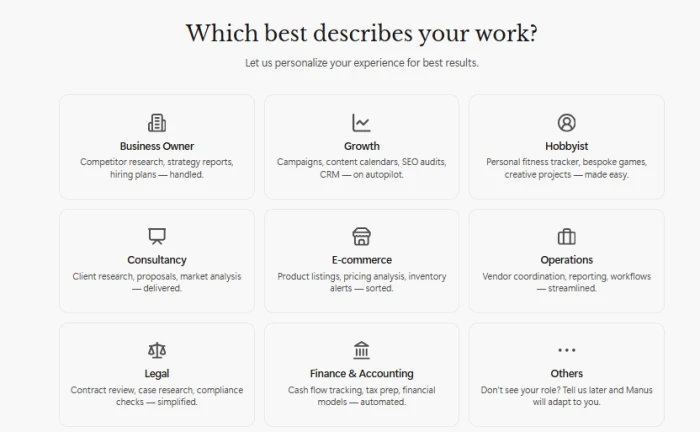
Next comes a genuinely nice personalization step. Manus asks “Which best describes your work?” and offers a grid of roles — Business Owner, Growth, Hobbyist, Consultancy, E-commerce, Operations, Legal, Finance & Accounting, and Others. Each tile hints at the kind of work it will help with; the Growth tile, for example, lists campaigns, content calendars, SEO audits and CRM.
This matters more than it looks. The role you pick shapes the suggestions and starting templates Manus puts in front of you, so it is worth choosing honestly rather than clicking past it. As someone who runs marketing and content operations, I went with Growth.
The onboarding role picker tailors Manus to how you actually work.
Step 4: Pricing & Plans, What Manus Costs
Before going further, it helps to understand how Manus charges, because it is different from most AI subscriptions. Instead of a flat “all-you-can-use” limit, Manus runs on credits: every action the agent takes consumes credits, so a short task costs a little and a long, complex one costs a lot. Each paid plan gives you a monthly credit allowance plus a daily refresh, and the dashboard shows your balance and history.
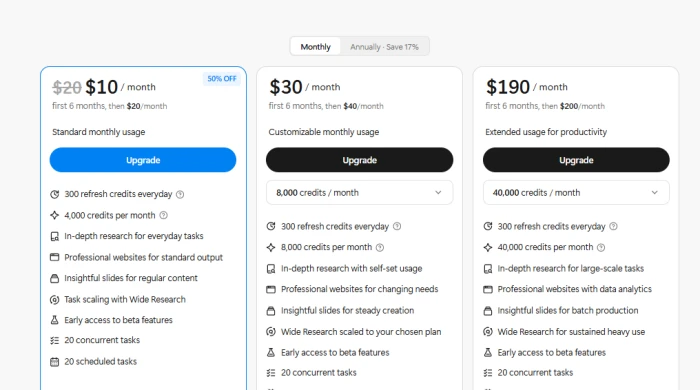
Here are the three paid tiers I was shown. Note the promotional pricing, the first six months are discounted, after which the regular price applies. There is also a free tier (around 300 daily credits on the lightweight model, with a single task at a time) that is perfect for a first look.
| Plan | Promo (first 6 mo) | Regular price | Credits & best fit |
| Standard | $10 / mo | $20 / mo | 4,000 credits/mo + 300 daily. Everyday use and trying things out. |
| Customizable | $30 / mo | $40 / mo | 8,000 credits/mo (adjustable higher) + 300 daily. Changing or heavier needs. |
| Extended | $190 / mo | $200 / mo | 40,000 credits/mo + 300 daily. Large-scale, heavy daily use. |
All paid tiers I saw allowed up to 20 concurrent and 20 scheduled tasks.
One important detail: leftover monthly plan credits generally expire at month-end, while separately purchased add-on credit packs do not. More on why that matters in my verdict.
The pricing page I saw, with a 50%-off promo on the first six months.
Test 1: Generating a Digital-Marketing Infographic
For my first real test I kept it simple and visual. I typed a single line: “Create an image on trends in digital marketing.” No detailed brief, no examples, I wanted to see what it would do with a vague prompt.

My one-line prompt: deliberately vague, to test how Manus fills the gaps.
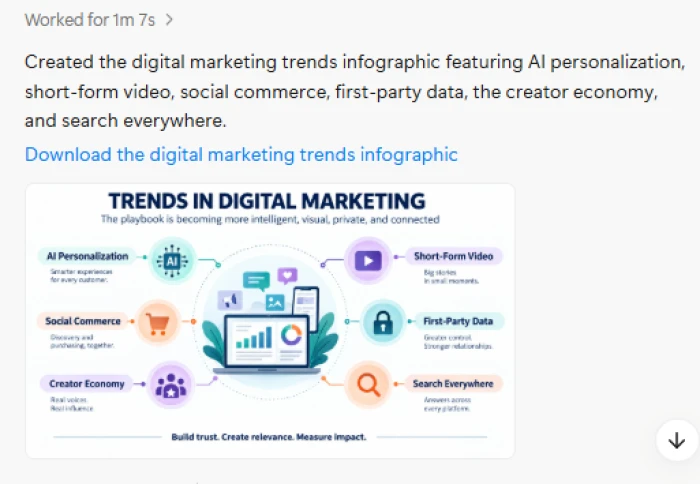
Manus got to work and, after about a minute (it logged “Worked for 1m 7s”), produced a clean, properly labelled infographic. It covered AI personalization, short-form video, social commerce, first-party data, the creator economy and search everywhere, arranged around a central graphic with a tidy headline and a download link.
The finished infographic Manus generated from a single-line prompt.
My reaction: genuinely impressed for the effort involved. From one line, the layout was clean, the categories were sensible and current, and the result was immediately usable, either as-is or as a strong starting point to refine. This is the kind of task where an agent that just goes and produces the deliverable saves real time.
Test 2: Connectors & the AI Travel Planner
Next I wanted to stress-test something more agentic and multi-step, and see how Manus handles connected accounts. I asked it to act as my personal travel planner: connect to my Google Calendar, Gmail and Drive, scan my inbox for future booking confirmations (flights, hotels, Airbnb, restaurant reservations), pull out the dates and details, confirm them with me, and then propose a few travel styles for the destination.
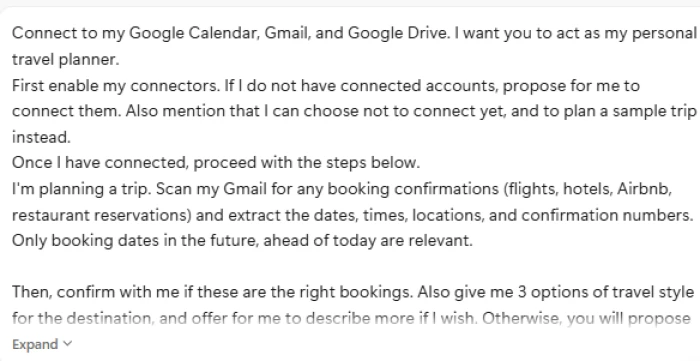
My multi-step prompt asking Manus to connect accounts and plan a trip.
What I liked most was how intelligently it handled the situation. Rather than failing silently or inventing fake bookings, it offered to connect the accounts first, explicitly noted that I could choose not to connect yet and plan a sample trip instead, and then, when it did not have real data to work from, it asked sharp, specific questions: destination, travel dates or duration, departure city, number of travellers, travel style, and preferences such as dietary needs or mobility considerations. It even offered an example of how to phrase a request (“Kyoto for 5 days from Mumbai”).

Manus asking precise clarifying questions instead of guessing, exactly what you want from an agent.
That restraint is the headline for me. An agent you are trusting with your email and calendar should ask before it guesses, and Manus did exactly that. The trade-off is that a finished itinerary is not instant: you either connect your accounts or answer a few questions first. That is the right call for safety, even if it is a touch slower than a one-click result.
How Manus Actually Works?
To use Manus well, it helps to understand what is happening under the hood. A few things set it apart from a standard chatbot:
- It runs in its own computer. Tasks execute in a cloud sandbox with internet access and persistent files, so it can browse, run code, and build real artifacts, not just write text.
- It shows its plan. Manus lays out the steps and tool calls as it goes, so you can follow along and step in mid-task if it heads the wrong way.
- It produces downloadable deliverables. Slides, websites, images, documents and research packs come out as files you can download, rather than being trapped in a chat.
- It can connect to your tools. With your permission, it links to accounts like Gmail, Calendar and Drive to work with your real data, and it asks first.
- It handles tasks in parallel and on a schedule. Paid plans let you run multiple tasks at once and queue scheduled ones.
My Verdict: Score, Likes & Dislikes
The score below reflects my first-hand testing, the sign-up flow, the onboarding, and the two tasks above. It is a first-impressions rating, not a verdict after months of heavy daily use, and I have weighted it towards what actually matters day to day: how easy it is to start, how good the outputs are, and whether it respects your trust and your wallet.
My scorecard
| Category | Score |
| Sign-up & onboarding | 9.0 / 10 |
| Ease of use & interface | 8.5 / 10 |
| Output quality (what I generated) | 8.5 / 10 |
| Speed | 8.0 / 10 |
| Range of capabilities | 9.0 / 10 |
| Transparency (seeing its steps) | 8.5 / 10 |
| Pricing & value for money | 6.5 / 10 |
| Overall | 8.3 / 10 |
What I liked
- Frictionless onboarding. From welcome screen to working account took under a couple of minutes, and the role picker made the experience feel tailored immediately.
- It does the work, not just the talking. You get finished deliverables, an actual infographic with a download link, instead of instructions on how to make one yourself.
- Strong output from a weak prompt. My one-line infographic request produced a clean, current, usable result in about a minute.
- It shows its working. Watching the plan and steps unfold builds trust and lets you course-correct mid-task.
- It asks before it assumes. On the travel task it proposed connecting accounts, offered a no-connection fallback, and asked precise questions rather than hallucinating bookings, exactly the behaviour you want from an agent touching your email.
What I didn't like
- The credit system is hard to predict. Because cost scales with task complexity, it is tough to know in advance how much a long job will burn, and unused monthly plan credits generally expire at month-end.
- Promo pricing hides the real cost. The headline $10/month is only for the first six months; budget for the regular $20–$200 pricing.
- Phone verification up front. A minor privacy speed bump before you have even tried the tool.
- Agentic tasks are not instant. The travel planner needed connectors or answers before it could produce a finished itinerary, the right trade-off for safety, but not a one-click result.
- It is a generalist. For the deepest specialized work (serious coding, legal or financial compliance) a dedicated tool will still go further.
What Other Users & Reviewers Are Saying
My experience was positive, but one person's testing is not the whole story, so I went through what other reviewers and users are reporting. The picture is genuinely mixed, and it is worth seeing both sides before you commit.
| Source | Rating | Main takeaway |
| G2 (user reviews) | 2.4 / 5 | A small sample that skews negative, complaints cluster around cost and occasional reliability, so read it as early-adopter frustration rather than a final word. |
| AI Agent Rank | 78 / 100 (A-tier) | Over a 90-day test of 47 tasks, 83% were satisfactory on the first run. Strongest at documents, data work and research; weaker at web automation and coding. |
| Fast.io review | Positive, with caveats | Praises the sandbox, real deliverables, browser control and API; flags unpredictable credit burn and that you need your own step to store and share output files. |
| eesel AI breakdown | Critical on cost | Estimates the entry plan covers only a handful of large tasks, warns that credits can run out mid-task, and notes crash reports. (Published by a competitor, so weigh accordingly.) |
The common threads. Almost everyone agrees Manus is impressive at autonomous, multi-step work and at turning a prompt into a finished artifact, research packs, documents, data analysis and decks come up again and again as its sweet spot.
The recurring gripe is just as consistent: the credit-based cost is hard to forecast and can feel expensive, and a minority report occasional instability under load. A fair summary is that people love what it does and wish it were easier to predict what it costs.
Who Should Use Manus, and Who Shouldn't
A great fit if you are
- A solo founder, marketer, consultant or researcher who wants finished deliverables (reports, decks, visuals, site scaffolds) rather than just answers.
- Someone who regularly runs multi-step tasks, research-then-analyse-then-produce, and will get value from several tasks a week.
- Comfortable writing a clear brief and reviewing intermediate steps before letting a long task run.
Probably not for you if you
- Need fixed, predictable per-task costs for budgeting or client billing.
- Only have one or two light tasks a week, a flat-rate assistant like ChatGPT Plus may be better value.
- Need deep, specialized depth in coding, legal or financial-compliance work, or a real-time conversational tool.
Tips to Get the Most Out of Manus
- Start free or on Standard. Learn how credits burn on small tasks before committing to a bigger plan.
- Write tight, specific briefs. State the format, length and item count. Narrow prompts use credits far more efficiently than vague ones.
- Use checkpoints. Review intermediate results before letting a long task run to the end, so you do not spend credits on a flawed direction.
- Connect only what you are comfortable with. You can decline connectors and still work in sample or manual mode.
- Buy add-on credits for the long haul. Purchased credit packs do not expire monthly the way plan credits do.
- Export your deliverables out. Download finished files into your own storage rather than leaving them only inside the agent's environment.
The Final Word
Manus delivered on its core promise in my testing: give it a goal, and it goes and produces the thing. The onboarding is smooth, the outputs are strong even from thin prompts, and, importantly, it behaves responsibly when handed access to your accounts, asking before it assumes. The one place it asks for patience is cost: the credit model rewards tight briefs and punishes sprawling ones, and the real price is higher than the promo headline.
My bottom line: at 8.3 / 10, Manus is one of the more genuinely useful AI agents I have tried, well worth a free-tier trial, and worth paying for if you will run several real tasks a week. Just go in with a clear idea of what you want built, and keep an eye on your credit balance.
Frequently Asked Questions
Is Manus free to use?
There is a free tier with a limited daily credit allowance on the lightweight model, which is fine for a first look. Paid plans start at $20/month (I saw a 50%-off promo of $10/month for the first six months).
What can Manus actually create?
In my testing and across reviews: images and infographics, research reports, documents, slide decks, websites, data analysis, and browser-based tasks, delivered as downloadable files.
Who owns Manus now?
Meta. It agreed to acquire Manus in late December 2025 in a deal valued at more than $2 billion and said it intends to keep operating the service.
Manus vs ChatGPT, which should I pick?
They solve different problems. Manus is an autonomous agent that runs tasks in its own computer and hands you finished deliverables; ChatGPT is a more conversational, real-time assistant. Many people use both.
Comments
Join the discussion and share your perspective.