
SeaArt AI Review: Image and Video, Tested
SeaArt AI bundles image generation, video creation, face swapping, model training, and AI character chat into one workspace, and markets itself as an all-in-one creative platform. This review ran it through a hands-on test built around one consistent prompt, then weighed the results against pricing, output quality, and the friction a free account meets in everyday use. The findings below cover what the platform does well, where realism slips, and how much it costs in dollars to keep creating once the free allowance runs dry.
What SeaArt AI Actually Is
SeaArt AI is a freemium, browser-based creative platform that is also available as a mobile app on iOS and Android, registered in Singapore. Rather than focusing on a single task, it folds several generation tools into one ecosystem, which is its main point of difference from single-purpose generators, as the Flyne review notes. Underneath, it draws on foundational image models including FLUX, Stable Diffusion 3, and SDXL, and surfaces a community library numbering in the hundreds of thousands of shared models spanning anime, realism, fantasy, and digital art, per ToolJunction.
Usage runs on two currencies that matter for everything that follows. Stamina is a daily allowance that resets and does not accumulate, while Credits are earned through events or purchased separately and cover paid models and extended generation. That distinction shapes the free experience more than any single feature.
How the Review Was Run
This review followed a single method, the Single-Brief Benchmark: one fixed prompt was run through the full pipeline, from image generation to the image-to-video handoff, so that quality, tooling, and cost friction could be judged against a constant input rather than cherry-picked samples. The prompt stayed identical throughout testing.
A realistic close-up portrait of a young woman in soft natural light, detailed skin texture, expressive eyes, blurred background, cinematic photography, high detail, 4K
Each output was scored on six criteria: prompt fidelity, skin and texture realism, variation consistency, the built-in edit toolkit, the image-to-video handoff, and the cost to keep creating once free stamina ran out. For transparency, several capabilities sat outside this round. LoRA training and ComfyUI workflows were not executed, the mobile apps were not separately benchmarked, and no finished clip was rendered on the free tier because the platform gated that step.
Core Tools Inside the Platform
Beyond the headline generators, SeaArt packs a wider toolset than most rivals. The features below stood out most during evaluation, with model names and versions noted where they shape the result.
AI Image Generator
The image generator accepts a text prompt or a reference image and returns results across anime, realism, fantasy, and illustration styles. A prompt randomizer helps newcomers start, and settings cover image size, aspect ratio, and model choice, though some models such as HiDream, SeaArt Film, and Illustrious 3.5 are locked behind paid plans, per the Filmora review.
AI Video Generator
Video runs on a mix of in-house models, including SeaArt SonoVision, Sono Lite, Sono Wave, and Sono Cast, alongside external models such as Wan 2.5, SeaDance, Wan 2.6, Kling 2.6, Sora 2, and Veo 3.1. Generation accepts either text or an image as the starting point, and most clips draw between 260 and 1,300 Stamina or Credits depending on the model, according to Filmora.
Face Swap
The face swap tool replaces faces in uploaded images, videos, preset templates, and GIFs, with support for swapping several faces in one file. The template selection is still fairly limited and skews toward social trends, but it handles quick edits well.
LoRA Training
Custom model training is unusually accessible. Where many pipelines expect 100 or more images, SeaArt LoRA training asks for roughly 20 to 30 reference images and builds a lightweight file that captures a style, with results depending more on image variety than volume, as Filmora describes.
AI Characters
The AI Character feature lets users define a chatbot persona, including background, personality, tone, and sample dialogue, then chat with it for brainstorming or role-play. A library of pre-made characters, mostly anime, is available for those who prefer ready-made personas.
ComfyUI Workflows
For advanced control, SeaArt offers a node-based ComfyUI workflow in the cloud. It exposes prompt weighting, LoRA influence, and diffusion settings, and saved workflows can be reused, which is genuinely valuable for creators without a local GPU.
Running One Prompt Through the Workflow
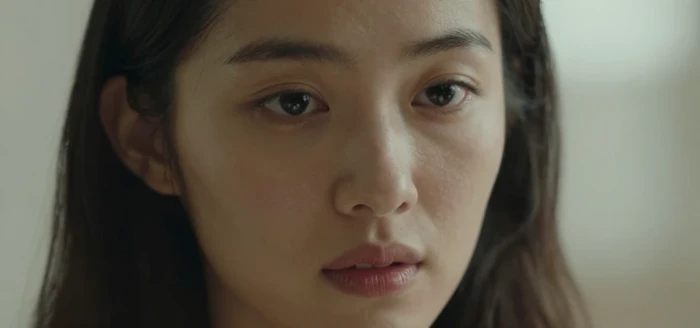
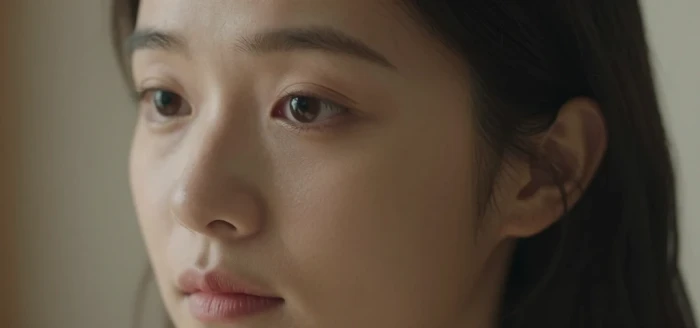
On the first pass, the portrait prompt produced clean, cinematic close-ups that matched the brief: soft directional light, shallow depth of field, and an expressive subject. Identity and mood stayed consistent across the batch, which made the variation pickers useful rather than chaotic.
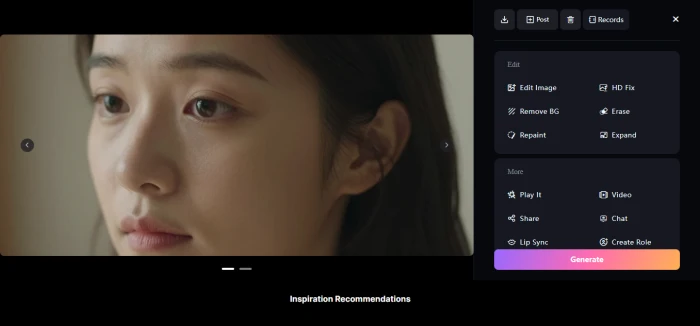
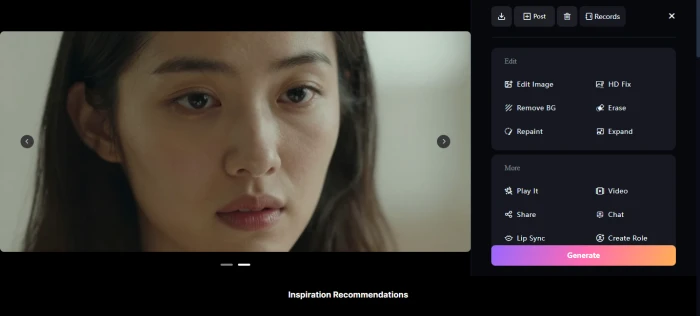
Viewed full frame, the outputs were sharp and well composed. Skin held visible detail, yet on close inspection it read a touch smooth and synthetic, the same realism gap the Filmora review describes for realistic prompts. The look is convincing at a glance and weakest under scrutiny.
Every result carried a built-in edit toolkit (HD Fix, Remove BG, Erase, Repaint, and Expand) along with extras such as Lip Sync and Create Role, and a one-click path into video. That handoff is where the workflow shifted from image to motion.
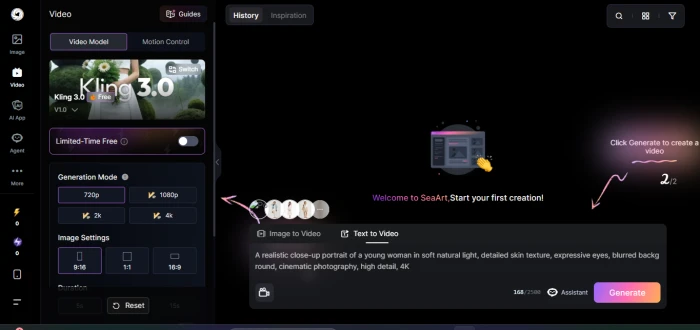
Selecting image-to-video and a model such as Kling 3.0 was straightforward, with resolution choices up to 4K. The wall appeared at render time. With free stamina spent, the platform stopped and prompted an upgrade rather than producing a clip, which lines up with the 260 to 1,300 stamina cost per video generation that Filmora reports. For a free account, the image side is genuinely usable, but video is effectively a paid step.

Where Output Quality Holds, and Where It Slips
The pattern from testing matches the broader picture across both source reviews. Anime and stylized art is the clear strength, with crisp lines and reliable style adherence. Realistic portraiture is capable but carries that synthetic edge, with smooth skin and slightly reduced natural detail, as Flyne and Filmora both observe.
Video is the weaker pillar. Simple motion renders smoothly, but temporal coherence is the main limit: characters can drift in appearance from frame to frame, clips typically run about five to ten seconds, and longer or more complex movement can warp. Clips export as MP4, and higher-quality ten-second HD renders can take several minutes, especially on top-tier models, per Filmora. The output is best treated as short, stylistic, and conceptual rather than finished cinematic footage.
Reception and Real-World Sentiment
Search interest tracked the usual arc for a fast-rising AI tool. It peaked near 33,100 monthly queries in late 2025, then eased to about 22,200 by early 2026, which ToolJunction reads as the platform settling into a steady, real-world user base rather than a novelty rush.
Sentiment among those users is mostly favorable: a 4.4 rating across more than 800 Trustpilot reviews as of 2026, with mobile feedback more divided at 3.3 on Google Play and 4.1 on the App Store, per the Filmora review. Praise tends to center on the breadth of tools, frequent updates, and generous daily rewards, while recurring complaints involve subscription billing and the learning curve of a dense interface.
Pricing and the Stamina Economy, in Dollars
The free tier provides a limited daily stamina allotment, around 150 by the Filmora review, good for roughly 21 image generations, and free outputs carry a watermark. Paid plans remove the watermark and raise the daily ceiling sharply. All figures below are in United States dollars.
| Plan | Price (USD) | Approx. daily images | Image batch | Model access |
|---|---|---|---|---|
| Free | $0 | About 21 images | Standard | Limited, watermarked |
| Beginner | $5.99 / mo | About 50 images | Up to 6 per batch | Limited |
| Standard | $29.99 / mo | About 116 images | Up to 8 per batch | Limited |
| Professional | $59.99 / mo | About 350 images | Up to 8 per batch | Limited |
| Master | $149.99 / mo | About 583 images | Up to 8 per batch | All models |
Prices vary by country and active promotions, and tax is not included, per SeaArt and the Filmora review. Approximate daily image capacity reflects SeaArt published plan details.
One recent change matters for anyone planning to buy Credits. Under SeaArt published terms, Credits earned or purchased on or after April 1, 2026 now expire, with purchased Credits valid for two years and event Credits valid for 90 days to two years, whereas Credits obtained before that date never expire. Stamina, by contrast, still resets daily and never accumulates.
Billing deserves care. Multiple reviews, including Somake, flag auto-renewal, a three-day trial that can default to annual billing, and limited refunds, and advise confirming the platform fits before entering payment details. Treated as a monthly tool to test and cancel deliberately, the value is reasonable; treated casually, the renewal terms can surprise.
Strengths and Trade-offs at a Glance
Read as conclusions from testing rather than feature counts, the balance lands like this.
- Image generation, video, face swap, LoRA training, and AI character chat in one workspace.
- Anime and stylized output is consistently sharp and a clear strength.
- A broad post-generation toolkit (HD Fix, Remove BG, Repaint, Expand, Lip Sync) on every result.
- LoRA training needs only about 20 to 30 reference images rather than a large dataset.
- Access to current third-party models, including Kling, Sora 2, and Veo 3.1.
- A large community library and a usable free tier for first tests.
- Realistic prompts can produce smooth, synthetic-looking skin.
- Video coherence and length are limited, with clips around five to ten seconds.
- Free stamina drains quickly and gates the image-to-video step.
- The interface is dense and can overwhelm new users.
- Reviewers flag auto-renewal and trial billing terms that need attention.
- Content moderation leans on community reporting, so some material can slip through.
Best Fit, and When to Look Elsewhere
SeaArt suits hobbyists, social media creators, and anyone producing anime or stylized artwork, short concept clips, storyboards, or character designs, especially those who want to switch between current models without managing local hardware or training LoRAs on a small image set. The free tier is enough to evaluate the image side before paying.
It is a weaker fit for photorealistic or print-grade work, for long or strictly consistent cinematic video, and for teams that need a full timeline editor in the same place, where a dedicated video editor is the better next step. Anyone sensitive to subscription friction should weigh the billing notes above before committing.
Final Verdict
SeaArt AI earns its all-in-one label on breadth, and that breadth is the real reason to use it: image generation, current third-party video models, face swap, accessible LoRA training, and cloud ComfyUI in one place is a genuine convenience for experimentation. The cost of that breadth is depth. Realism lands a step behind specialist image tools, video is short and stylistically loose, and the free experience nudges toward a paid plan faster than the image generator alone would suggest.
For stylized creators and idea-stage work, the Standard plan at $29.99 per month is the practical entry point once the free tier proves the fit, with Professional and Master reserved for heavy daily volume or full model access. For polished, photoreal, or long-form video, SeaArt is best paired with a dedicated editor rather than relied on alone. The platform is worth using for what it is: a fast, flexible sandbox, scored here at 3.5 out of 5.