
I have watched dozens of AI video tools launch over the past two years, and most made the same promise: type a sentence, get a movie. Few delivered.
Then Seedance showed up, and the promise started looking real. If you have scrolled TikTok or edited a clip in CapCut lately, you may have already seen what this model can do without knowing its name.
That is what pulled me in. It is also why I wrote the guide I wish I had when I first searched “Seedance AI” and found ten thin pages that all contradicted each other.
This is the full picture: what Seedance is and who built it, how it turns words and pictures into footage, every feature worth knowing, the whole model family from 1.0 to the new 2.5, and what it costs on ByteDance’s own platforms as of today. I will also cover the copyright fight that nearly killed it and the companies now building on top of it, then give you a straight answer on whether it fits your work. Screenshots and a pricing table are here too, along with example prompts and notes on where to grab each image for free.
The Short Answer: What Is Seedance AI?
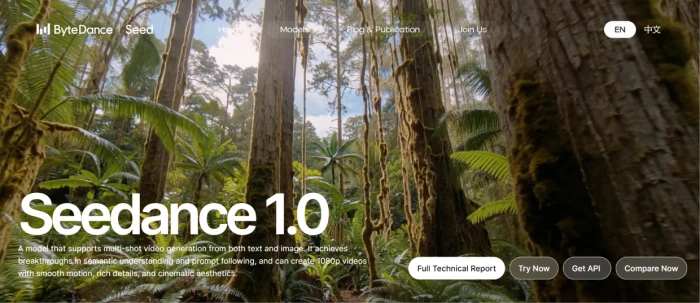
Seedance AI is a family of video-generation models built by ByteDance, the company behind TikTok and CapCut. It creates video from text prompts, still images, audio, and reference clips. The model is known for cinematic motion, character consistency across cuts, native audio generated alongside the picture, and close prompt-following. The current public flagship is Seedance 2.0, with Seedance 2.5 rolling out in July 2026.
1. What Is Seedance AI?
Seedance is not an app you download. That trips people up first, so let me clear it up before anything else.
Seedance is the model, or rather a line of models, that ByteDance drops into its consumer apps and rents out through its cloud. When you make a clip inside CapCut or on Dreamina, Seedance is the engine behind the friendly button, the way a car engine sits behind the car you actually drive.
What can it make? Four input types go in, and one finished clip comes out:
- Text to video: describe a scene, get moving footage.
- Image to video: hand it a photo, it brings the frame to life.
- Video to video: feed it a clip to restyle, extend, edit, or repair.
- Audio and reference inputs: steer the sound and camera with extra files.
ByteDance built Seedance for a plain business reason. It runs the largest short-video pipeline on earth, and shooting short video is expensive. A model that lets a billion CapCut users make footage without a camera keeps them inside ByteDance’s world, from first idea to final post. I will return to that closed loop later.
2. Who Built Seedance, and Why It Matters
Every model carries the fingerprints of the company that made it, and Seedance carries ByteDance’s.
ByteDance is the Beijing giant behind TikTok and CapCut, plus the Chinese apps Douyin and Jianying. Seedance comes out of its research arm, ByteDance Seed, the group behind the Seedream image models and the Seed language models. At the Volcano Engine FORCE conference in Beijing in June 2026, CEO Liang Rubo told the room that climbing the AI summit is the company’s top priority. Seedance is one of the clearest products of that push.
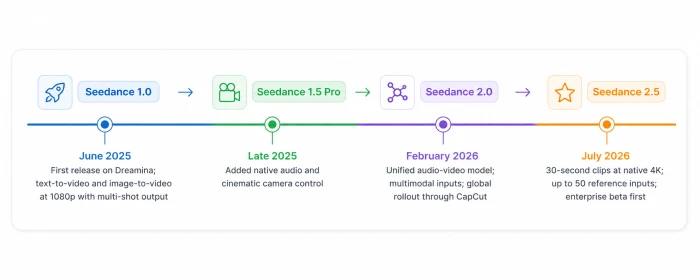
Here is how the line grew up.
| Version | When | What changed |
|---|---|---|
| Seedance 1.0 | June 2025 | First release on Dreamina; text-to-video and image-to-video at 1080p with multi-shot output |
| Seedance 1.5 Pro | Late 2025 | Added native audio and cinematic camera control |
| Seedance 2.0 | February 2026 | Unified audio-video model; multimodal inputs; global rollout through CapCut |
| Seedance 2.5 | July 2026 | 30-second clips at native 4K; up to 50 reference inputs; enterprise beta first |
Why does the parent company matter this much? ByteDance never has to convince you to try Seedance; it can slot the model into apps you already open, a distribution edge no independent lab can match. That single fact shapes pricing and rollout, and it fed the controversy too, both of which I get to below.
3. How Seedance Works (Without the Math)
Here is the plain-English version of what happens between your prompt and your clip.
You give Seedance a starting point: a line of text, a photo to animate, an audio track for the soundtrack, or a reference video showing the camera move you want. Seedance 2.0 takes up to twelve reference files in a single request, roughly nine images plus a few short video and audio clips.
Then the model does two jobs at once. A diffusion process, guided by a transformer that reads your prompt, builds the picture frame by frame out of noise. At the same moment, the sound is generated in the same mathematical space as the image, so footsteps hit the right frame and lips match the words. This joint audio-video design arrived with the 2.x line, and it is why a Seedance clip usually sounds finished rather than silent.
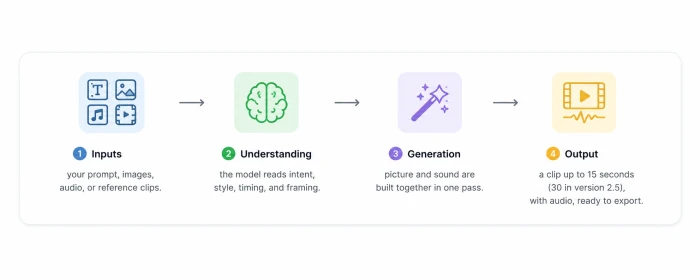
The flow in four beats:
- Inputs: your prompt, images, audio, or reference clips.
- Understanding: the model reads intent, style, timing, and framing.
- Generation: picture and sound are built together in one pass.
- Output: a clip up to 15 seconds (30 in version 2.5), with audio, ready to export.
The point for a non-technical reader: you are directing, not editing. You describe the result and hand over references, and the model does the frame-by-frame labor that used to need a crew. How much you can direct depends on the version and features, which is where we go next.
4. The Features That Matter
Feature lists get long and dull, so I trimmed this to the ten capabilities that change what you can make. As noted above, most stack inside one generation.
Text to Video
Type a description and Seedance builds the shot. Prompts land best when you name the subject, the action, the setting, and the camera move in one line.
Example prompt: A lone skier carves down fresh powder at golden hour, snow spraying, camera tracking smoothly alongside.
Expected result: a 5-to-10-second clip with believable snow physics and a moving camera.
Image to Video
Upload a still and the model animates it while holding the original composition. It is the quickest way to turn a product photo or concept art into motion.
Video to Video
Feed in a clip and Seedance can restyle it, extend the scene, insert matching shots, or tidy up footage. This is the feature that turns it from a toy into a production tool.
Character Consistency
The same face, outfit, lighting, and mood hold across cuts, which is the thing older models botched. One independent benchmark scored Seedance 2.0 at 9 out of 10 for character stability, ahead of Kling and Veo.
Camera and Multi-Shot Control
You can direct pans, push-ins, orbits, and tracking moves, and Seedance can chain several shots into one clip with clean cuts, so a single generation feels edited.
Native Audio
Sound is generated with the picture, including lip-synced dialogue in eight languages and ambient effects. No separate audio step, and no manual syncing.
The Reference System
Version 2.0 let you tag references with an @ symbol to point the model at a specific character or camera style. Version 2.5 pushes that to 50 inputs, spanning images, audio, style boards, and rough 3D models.
Resolution and Speed Tiers
Seedance ships in flavors. Standard chases quality; Fast trades some resolution for speed, and Mini is the budget pick for high volume. Output reaches 1080p on 2.0 and native 4K on 2.5.
3D White-Box Preview (2.5)
New in 2.5, you can render a rough, low-detail animation to check the motion before committing to a full render, which saves credits on failed attempts.
API Access
Developers call Seedance through ByteDance’s Volcano Engine and BytePlus, which is how most of the third-party apps later in this guide actually run it.
5. The Seedance Model Family
I have mentioned the versions in passing, so here they are side by side. ByteDance even skipped four numbers, jumping straight from 2.0 to 2.5.
| Model | Released | Best for | Key upgrade |
|---|---|---|---|
| Seedance 1.0 (Pro / Lite) | June 2025 | First experiments with text and image to video | Multi-shot output at 1080p |
| Seedance 1.5 Pro | Late 2025 | Creators who wanted sound and camera control | Native audio and cinematic camera moves |
| Seedance 2.0 (Standard / Fast / Mini) | Feb 2026 | Most creators today | One model for text, image, audio, and video, with native sound |
| Seedance 2.5 | July 2026 | Studios and pros needing longer, sharper clips | 30-second native 4K and up to 50 references |
A few notes the grid cannot hold. Seedance 1.0 shipped as a Pro tier at 1080p and a lighter Lite tier at 720p. The leap to 2.0 was the big public moment, since that is when native audio and true multimodal input arrived together. Version 2.5, announced on 23 June 2026 and public in early July, targets production teams over casual users; its 3D preview and 50-input ceiling are pro features, and it opened as an enterprise beta first.
If you are choosing today, 2.0 is what most people can actually reach, while 2.5 is the one to watch as it lands. Which raises the question I get most: what does this cost?
6. Seedance Pricing
Seedance has no single price tag, because ByteDance sells it through several of its own products. I am sticking to ByteDance’s official routes here rather than resellers, and every figure below reflects the published plans as of today, 1 July 2026. Prices and regional access shift often, so confirm the live numbers before you pay.
There are two official ways in.
The Consumer Route: Dreamina and CapCut
Dreamina (dreamina.capcut.com) is ByteDance’s international creation platform and the most direct consumer home for Seedance. Its Chinese twin, Jimeng, runs the same model. Pricing is credit-based: you buy a monthly allowance, and each generation spends credits based on length, resolution, mode, and whether you add audio.
| Plan | Price (approx.) | What you get |
|---|---|---|
| Free | $0 | Daily free credits shared across tools; enough for one or two short clips a day, some watermarked |
| Basic | ~$15 / month | Around 1,575 credits, watermark removal, higher resolution |
| Standard | ~$30 / month | More credits and higher daily ceilings for regular creators |
| Advanced / Pro | ~$82 / month | Around 8,645 credits, top resolution, priority queue for heavy use |
Inside CapCut, Seedance sits in the AI Video and Video Studio tools, with a small free monthly quota and higher limits plus 4K export on CapCut Pro. One catch to flag: Dreamina’s free daily credits are shared across every tool, so image work and video work draw from the same pool.
The Developer Route: Volcano Engine and BytePlus
Building software? You skip subscriptions and pay per use through ByteDance’s cloud, Volcano Engine (BytePlus internationally). Billing is token-based at roughly $0.14 per second of 1080p video at list price. New BytePlus accounts get free tokens to test with.
For a rough anchor: a 5-second 1080p clip costs from a few cents to a dollar or two on the consumer credit system, and under a dollar on the official API. Re-rolls are the hidden cost, since most creators run two or three takes per keeper.
7. How to Use Seedance, Step by Step
Theory is fine, so let me walk through an actual first video on Dreamina, the official consumer route from the pricing section. The flow inside CapCut is nearly identical.
- Create a free account at dreamina.capcut.com and sign in. The free tier is enough to follow along.
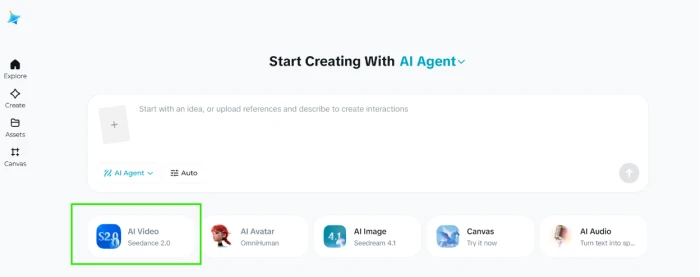
- Open the video generator and select the Seedance model in the model picker.
- Choose your input: start from text, or upload an image as your first frame.
- Write your prompt. Name the subject, the action, the setting, and the camera move. Specific beats vague every time.
- Add references (optional). Tag a character image or a reference clip with the @ system to lock style or motion.
- Set the specs: pick your aspect ratio, length, resolution, and whether to include audio.
- Turn on native audio if you want generated dialogue or sound effects.
- Hit generate and wait; a short clip usually renders in under a minute.
- Review and re-roll. If it misses, tweak one part of the prompt and run again rather than rewriting the whole thing.
- Export your clip, or in CapCut send it straight into your edit and on to TikTok.
One tip from experience: change a single variable at a time between attempts. Rewrite the entire prompt after a bad take and you will never learn what actually fixed it.
8. The Copyright Storm Seedance Had to Survive
No honest guide skips this, and most competing pages do. Seedance’s biggest test was not technical. It was legal.
When Seedance 2.0 launched in China in February 2026, an Irish filmmaker posted a 15-second clip of a fake Tom Cruise fighting a fake Brad Pitt on a rooftop, built from what he called a two-line prompt. It passed 1.2 million views, and Hollywood noticed.
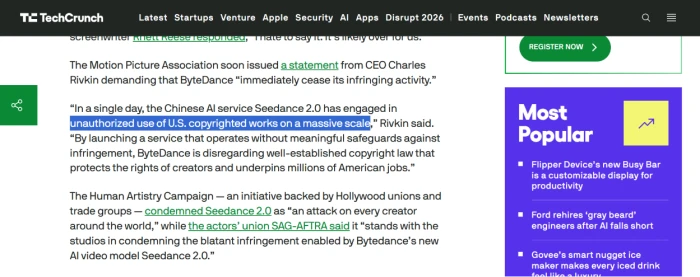
What came next was a first. The Motion Picture Association sent its first-ever cease-and-desist to a major generative AI company, and studios including Disney, Paramount, Warner Bros., Netflix, and Sony sent their own. SAG-AFTRA, the actors’ union, piled on over the use of performers’ likenesses.
ByteDance blinked. It paused the global rollout in mid-March and rebuilt the guardrails before resuming through CapCut on 26 March. The safeguards are strict:
- The model blocks video generation from images or clips that contain real human faces.
- It blocks unauthorized generation of copyrighted characters and other protected IP.
- Every output carries an invisible watermark plus C2PA Content Credentials, so it stays identifiable after it leaves the app.
- A third-party red-teaming partner stress-tested the model before relaunch.
There is a practical upshot for you. The rollout has been regional and careful, starting with paid users across Southeast Asia and Latin America, then widening. As of this writing the United States and India are still excluded, and parts of Europe are waiting. If you sit in a blocked region, official access is limited, which is why the third-party platforms in the next section exist.
9. The Big Names Building on Seedance
So who actually uses this? More of the industry than you would guess, and it splits into two camps: ByteDance’s own products and outside platforms that licensed the model.
Inside ByteDance, Seedance powers four surfaces: CapCut, Dreamina, Pippit, and Jianying in China. CapCut is the whole game: an editor with a user base in the hundreds of millions. Dropping AI video into the app people already use to cut TikToks closes the loop from raw generation to posted clip.
Outside ByteDance, a surprising number of well-known AI tools plugged Seedance in rather than fight it:
- Runway added Seedance 2.0 as a licensed option beside its own Gen-4.5 model.
- fal.ai serves as an official API host for the model.
- Higgsfield runs an exclusive Seedance 2.0 Enhanced Fast tier through a direct ByteDance partnership.
- Reallusion’s AI Studio built professional pipelines on it, and suites like Artlist and getimg.ai offer it too.
The logic is simple: building a competitive video model costs a fortune, and Seedance sits at or near the top of the quality charts, so licensing it beats losing to it. When OpenAI shut down its Sora app in March 2026, much of that vacuum flowed to ByteDance and Google’s Veo, which sets up the comparison you probably want next.
10. Seedance vs the Other AI Video Heavyweights
Each of these deserves its own head-to-head, and I am writing those separately (links at the end). For now, a quick map of who wins at what.
| Tool | Maker | Best at |
|---|---|---|
| Seedance 2.x | ByteDance | Multimodal control and character consistency, with native audio |
| Veo 3.1 | Polished 4K output for premium client work | |
| Sora 2 | OpenAI | Was a strong all-rounder; the consumer app closed in March 2026 |
| Kling 3.0 | Kuaishou | Fast, cheap iterations |
| Runway Gen-4.5 | Runway | Creative editing and a mature pro toolset |
| Pika | Pika Labs | Quick, casual social clips |
The one-line version: Seedance’s edge is taking a character image, a camera-reference video, an audio track, and even a rough 3D model in one request, which none of the others match. Veo answers with cleaner high-end renders. For a real comparison with prompts and side-by-side output, wait for my dedicated pieces.
11. Pros and Cons
Time for the honest ledger. I kept this balanced rather than cheerleading.
| Strengths | Limitations |
|---|---|
| Native audio generated with the video, no separate step | Blocked in the US and India, with parts of Europe still waiting (as of July 2026) |
| Best-in-class character consistency across shots | Clips cap at 15 seconds on 2.0 (30 on 2.5), still short for long-form |
| Multimodal control with up to 50 references in 2.5 | Outputs carry watermarks and IP filters that block some prompts |
| Cheap to start via Dreamina’s free daily credits | Free credits are shared across tools and throttled daily |
| Deep CapCut and TikTok integration for instant publishing | Pricing and access shift often, which makes budgeting tricky |
12. Is Seedance Worth It for You?
The real answer depends on who is asking, so here is my read by type of user. As covered earlier, most people will be on version 2.0 today, with 2.5 arriving for heavier work.
- Beginner: yes. The Dreamina free tier and the CapCut integration make it the gentlest on-ramp in AI video, at no cost to start.
- YouTuber or TikToker: yes. Native audio and instant publishing to TikTok fit short-form better than almost anything else.
- Marketer or agency: strong yes, with a caveat. Character consistency and multimodal control suit branded series and ads, but check regional access for your market first.
- Filmmaker: promising, with limits. Multi-shot control and 4K in 2.5 help with previz and concept work, though the 30-second ceiling keeps it in pre-production for now.
- Developer: yes, through the API. The Volcano Engine and BytePlus route gives you batch generation and integration, plus free tokens to prototype.
Who should skip it? Anyone in a blocked region without a workaround, and anyone who needs long, continuous scenes today instead of short clips stitched together.
My bottom line, after watching this space closely: Seedance is the most capable consumer-reachable video model available right now, and its native audio and character consistency are the two features that pull it ahead. The real question is access. If ByteDance keeps the model live in your country and settles its copyright fights, this is the one to learn first.
Comments
Join the discussion and share your perspective.