
Prices and features verified against suno.com in June 2026. Suno changes plans from time to time, so the live page is the final word.
I signed up for Suno on a Tuesday night with one cheap goal: make a birthday song for a friend without paying a cent. The free plan handled it in about four minutes. What I didn't see coming was the next morning, when I tried to drop that track onto a YouTube clip and learned the song was mine to play but not to publish.
That one moment is what pushed me into the pricing pages, and it's the reason this guide exists.
Suno prices its plans around two things that quietly decide everything else: how many credits you get, and whether you're allowed to sell what you make. The monthly number on the card is the smallest part of the choice. This guide retraces the route I took, one plan at a time, so by the last section you can match a tier to the way you actually make music.
The Plans at a Glance
Before I take each plan apart, here's the shape of the whole lineup. Three tiers sit on one shared credit system, and the price gap widens fast once you leave Free.

| Plan | Monthly | Annual / mo | Credits | Songs | Best for |
|---|---|---|---|---|---|
| Free | $0 | $0 | 50 daily | 10 / day | Trying Suno and personal tracks |
| Pro | $10 | $8 | 2,500 / mo | 500 / mo | Solo creators who publish |
| Premier | $30 | $24 | 10,000 / mo | 2,000 / mo | High-volume work and Studio users |
One detail to fix in your head right away, because it trips up half the articles online. The $8 and $24 figures Suno shows are the per-month price when you pay yearly. The straight monthly price is $10 for Pro and $30 for Premier. I unpack the billing math in its own section later.
Free is the testing ground. Pro is the working tier, and Premier is built for volume. I'll start with the credit system that sits under all three, since the rest of the guide leans on it.
How Suno Credits Work
Every plan is a credit budget wearing a different label. Once the credit math clicks, the price of each tier explains itself.
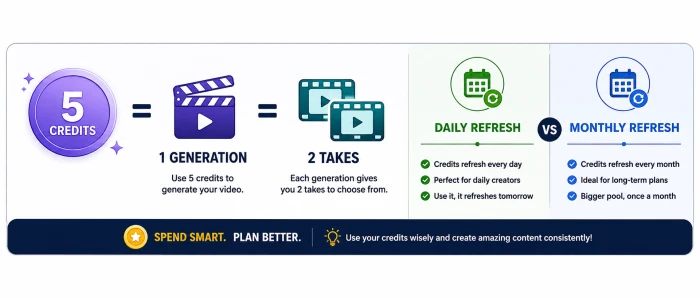
A single song generation costs roughly 5 credits and hands back two versions of the track. That one ratio is the key to reading the entire pricing page. Free hands you 50 credits that refill daily, about 10 songs. Pro gives 2,500 a month, near 500 songs. Premier gives 10,000 a month, close to 2,000 songs.
The rule that catches people
Included credits expire. Free credits reset every day and disappear if you don't spend them. Pro and Premier credits reset on your billing date each month and also never roll over. Suno states this plainly on the pricing page: subscription credits do not carry from day to day or month to month.
Purchased top-up credits are the exception. You can buy add-ons on Pro and Premier, and those don't expire, though you need an active subscription to spend them.
One more thing that surprised me early on: a rejected take still costs credits. Regenerate a chorus eight times to get the right one, and that's credits gone. So the 500-songs figure on Pro is a ceiling, not a monthly forecast. I treat it that way in the plan breakdowns below.
The Free Plan ($0)
This is where my own journey started, so the breakdown starts here too.
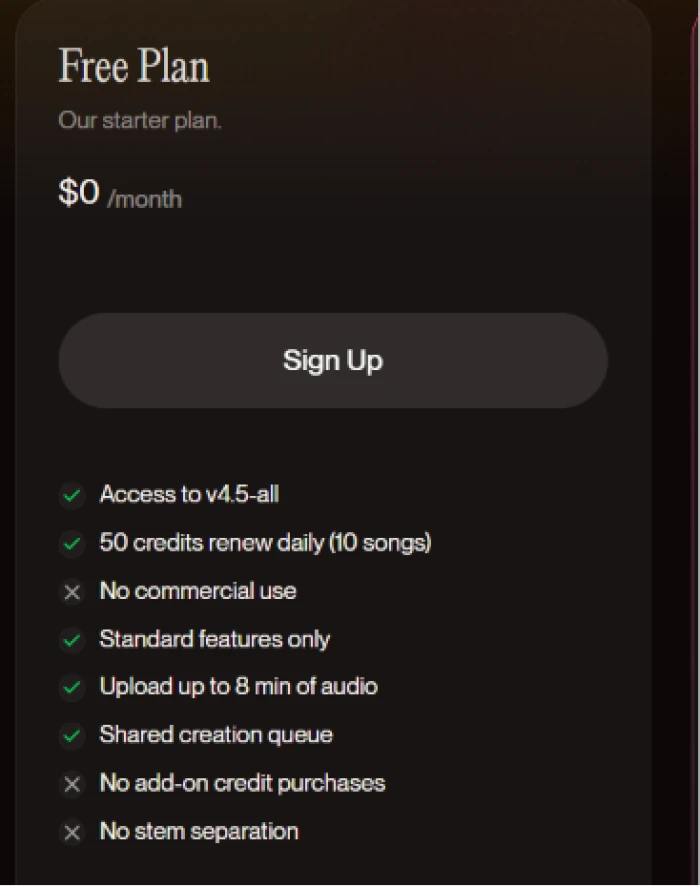
Free costs nothing and refills 50 credits daily, roughly 10 songs on Suno's best free model, v4.5-all. For learning the interface and stress-testing prompt ideas, it's plenty.
What you trade away is the production side. Free songs are licensed for personal use only, so selling them is off the table. That's the exact wall my birthday track hit, as I mentioned at the start. You also wait in a shared creation queue capped at 4 generations at once, with no stem separation and no way to buy extra credits. Audio uploads stop at 8 minutes.
What Free gives you
- 50 credits a day, about 10 songs.
- The v4.5-all model and the core creation tools.
- Audio uploads up to 8 minutes.
- Remix tools (extend, cover, adjust speed) plus co-write.
Where it stops
- No commercial use of anything you make.
- No stem separation.
- Shared queue, 4 songs at a time.
- No add-on credit purchases.
Who it fits: students learning the tool, and hobbyists who only want songs for their own ears. The instant your goal shifts to publishing, you've outgrown it, which leads straight into the next section.
The Pro Plan ($10/mo, $8 yearly)
When my birthday song hit the no-commercial wall, Pro is the plan that solved it. It's the first tier that behaves like a tool instead of a demo.
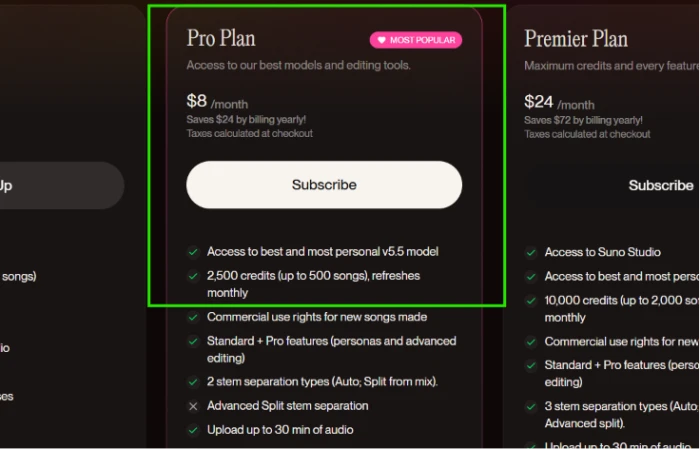
Pro runs $10 a month, or $8 a month if you pay for the year, which saves $24 over twelve months. For that you get 2,500 credits monthly (around 500 songs), plus the piece that mattered most to me: commercial use rights for new songs you make while subscribed.
The feature jump is where the money goes.
Pro at a glance
- Price: $10 monthly, or $8 a month billed yearly (a $24 yearly saving).
- Credits: 2,500 a month, about 500 songs.
- Commercial use rights for new songs made while the subscription is live.
- The v5.5 model, which Suno calls its best and most personal version, with personas and advanced editing.
- Two stem separation types, Auto and Split from mix.
- Audio uploads up to 30 minutes, and the option to add fresh vocals or instrumentals to a track.
- Priority queue, 10 songs at once.
- Voice recording, custom v5.5 tuning with your own audio, add-on credit purchases, plus early access to new features.
Pro is the home for solo creators who publish. YouTubers and podcasters who need clean commercial rights land here, and so do most content makers. The thing to keep in mind is that upgrading later doesn't make your old Free songs commercial, a quirk I get into in the rights section further down.
Who Pro is wrong for: anyone generating at industrial scale, which is the cue for Premier.
The Premier Plan ($30/mo, $24 yearly)
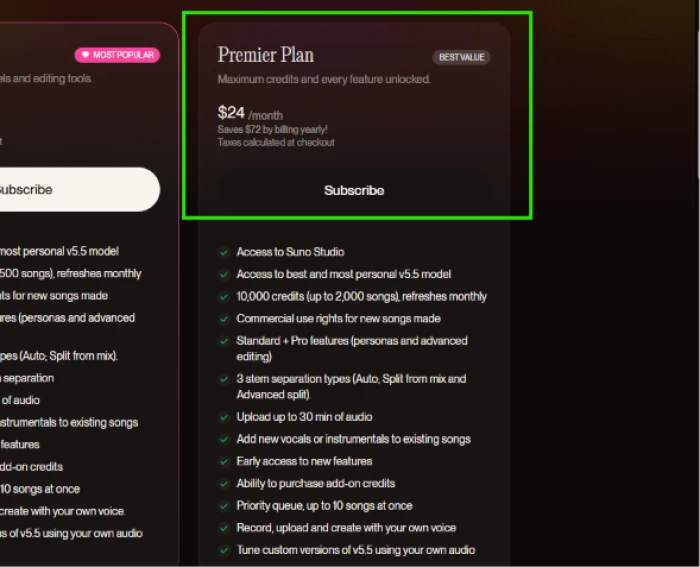
Premier is the plan I looked at last, and the one most people can skip. It costs $30 a month, or $24 a month on yearly billing, a $72 saving across the year.
Here's the part I didn't expect. Premier doesn't hand you a better model or stronger rights than Pro. The v5.5 model is the same, and the commercial terms match word for word. What changes is room: 10,000 credits a month, near 2,000 songs, four times the Pro pool.
The single capability Premier adds on top of everything in Pro is Suno Studio, the browser-based workstation for multitrack editing and stem-level control. Premier also lifts stem separation to three types instead of two.
Premier at a glance
- Price: $30 monthly, or $24 a month billed yearly (a $72 yearly saving).
- Credits: 10,000 a month, about 2,000 songs.
- Everything in Pro, with Suno Studio layered on top.
- Three stem separation types, which adds Advanced Split over Pro's two.
Premier suits high-volume creators and small studios, along with anyone who wants to shape a track like a producer inside Studio rather than accept finished output. Make a handful of songs a month and the larger pool is money you'll never touch. As I noted in the Pro section, the feature gap between the paid tiers is thin. The real decision is volume and Studio, nothing more.
Free vs Pro vs Premier, Side by Side
Having walked each tier on its own, the contrast sharpens in a single grid. This is the table I wish someone had handed me on that first Tuesday night.
| Feature | Free | Pro | Premier |
|---|---|---|---|
| Price, monthly | $0 | $10 | $30 |
| Price, annual / mo | $0 | $8 | $24 |
| Credits | 50 daily | 2,500 / mo | 10,000 / mo |
| Songs | 10 / day | 500 / mo | 2,000 / mo |
| Models | v4.5-all | v4 to v5.5 | v4 to v5.5 |
| Commercial rights | No | Yes | Yes |
| Stem separation | None | 2 types | 3 types |
| Audio upload | 8 min | 30 min | 30 min |
| Queue | Shared, 4 | Priority, 10 | Priority, 10 |
| Add-on credits | No | Yes | Yes |
| Suno Studio | No | No | Yes |
| Early access | No | Yes | Yes |
The grid makes the jump obvious. The biggest money question isn't on it, though. It's whether you can sell what you create, which I flagged twice already and turn to next.
Monthly vs Annual Billing
Suno runs a 20% discount for paying yearly, and the math is worth thirty seconds.
Pro drops from $10 a month to $8 a month on annual billing, which saves $24 over a full year. Premier drops from $30 to $24 a month, a $72 saving across the year.
Monthly billing buys flexibility. Annual billing buys the lower rate.
Pick monthly while you're testing the workflow or need Suno for one short project. Pick yearly once you know you'll create most months and want the floor price. The discount only pays off if you keep the subscription, so I started monthly and switched to annual after my second steady month.
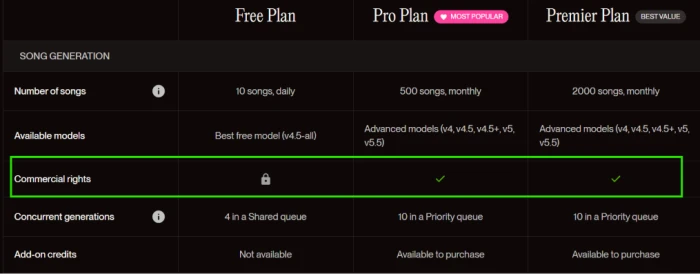
Commercial Rights, the Part That Decides Money
This is the section that started my whole search, so I gave it the most attention.
Songs made on Free are licensed for personal, non-commercial use. You can't monetize them, full stop. That's the wall I hit with the birthday track.
On Pro and Premier, new songs you create while the subscription is active arrive with commercial use rights, and Suno treats you as the owner of those songs. The rights stay attached even if you later cancel and slide back to Free.
Two traps that catch people
- Upgrading doesn't reach backward. Songs made on Free stay non-commercial even after you start paying, so generate anything you plan to sell while you're on a paid plan.
- Rights and copyright are separate ideas. Suno grants commercial use, but its terms note it can't guarantee that copyright vests in any output.
One bigger piece of backdrop earns a paragraph. Warner Music settled with Suno and signed a partnership in late 2025, while a separate case from Universal and Sony was still active in mid-2026. For personal projects this carries no weight. For paid client work, careful teams favor generic styles and read each track for accidental resemblance before they publish.
The Limits the Pricing Page Plays Down
The plan cards look clean. The usage rules underneath them shape the day-to-day more than the headline price does.
I already covered the big one in the credits section: included credits expire each cycle and never roll over. A few others are worth knowing before you commit.
- Free users share a creation queue, so generations wait behind everyone else, while paid tiers get a priority lane.
- Even paid plans carry a monthly cap, and a heavy editing session burns through it faster than the song count suggests.
- The deepest tools, Suno Studio and the third stem type, stay locked to Premier.
- Old Free songs never gain monetization rights, no matter how long you subscribe afterward.
None of these are dealbreakers. They're the difference between picking a plan on its sticker price and picking it on how you'll actually work.
Which Plan I Landed On, and Which You Should
After all of it, my rule turned out to be short, and it maps cleanly onto who you are.
By use case
- Students and hobbyists: Free covers learning and personal tracks with zero spend.
- YouTubers and content creators: Pro, because a public upload needs commercial rights the moment it goes live.
- Musicians and podcasters: Pro as the base camp. Move up only if your monthly output keeps climbing.
- Businesses and agencies: Premier, where volume and speed matter and one shared subscription can sit across several projects.
- Studios: Premier, when Suno is a fixed part of the production pipeline.
I started on Free for the same reason most people do, to find out whether the tool was any good. I moved to Pro the week I wanted to publish, and that's still where I sit. Premier has never earned its place in my workflow, because I don't generate at the volume that justifies the bigger pool.
If you take one rule from this guide, take the order I followed. Start on Free to judge the tool. Upgrade to Pro the moment money enters the picture. Step up to Premier only when your output makes the larger pool cheaper per song than buying top-ups on Pro.
Comments
Join the discussion and share your perspective.