
The best AI writing tool on the market might be the wrong one for you. Popularity and feature counts measure what works for the average user, and you are not the average user. A novelist and an ecommerce manager need almost nothing in common from the same software.
This is why a real AI writing tools comparison starts with your work, not a feature list. Run the test in this guide and the winner tends to reveal itself, often a tool you would have skipped based on the marketing alone
Choosing AI content writing software well comes down to a repeatable test you run on your own work. This guide walks through that test step by step, so the AI writing assistant you land on matches your real writing instead of a polished marketing demo.
Step 1: Start With Your Writing Goals, Not the Tool
Why your use case matters more than features
A feature that impresses one writer is dead weight for another. Bulk product-description generation saves an ecommerce manager hours a week. A novelist will never touch it.
This is why AI for bloggers and AI for marketers rarely point to the same shortlist. A blogger wants long-form drafts that hold a single thread across 1,500 words. A marketer wants ten ad variations in the time it takes to finish a coffee.
List the tasks before you list the tools
Write down the writing jobs you actually do. These are your AI writing use cases, and they shape every later step. Your list might include:
- Blog posts and long-form articles
- SEO content built around target keywords
- Social media captions and threads
- Email marketing sequences
- Product descriptions for an online store
- Technical documentation
- Creative or fiction writing
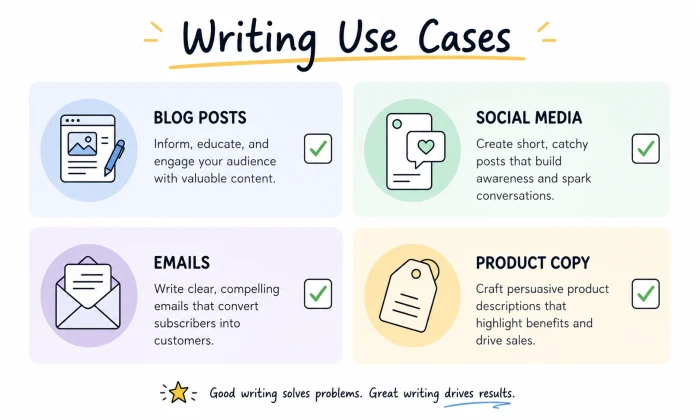
Most people are surprised by how short the real list is. You may find you need a tool to do two jobs well, not twenty.
Key takeaway
Define the specific writing tasks you need help with before you open a single comparison chart.
Step 2: Create a Real-World Testing Scenario
Stop judging tools by their demo content
The samples on a landing page were cherry-picked from dozens of attempts. They show what a tool does on its best day, with a prompt the marketing team spent an hour refining. They say nothing about your Tuesday afternoon.
Build a set of test prompts
Choose three to five AI writing test prompts that mirror the work you do most. A practical set looks like this:
- Write a 1,000-word blog post on a topic in your niche
- Draft a LinkedIn post announcing a product update
- Rewrite a stiff paragraph in a warmer tone
- Summarize a 2,000-word article into five bullet points
- Write product copy for a single item

Save these prompts in a document. You will reuse them on every tool you evaluate.
Why identical prompts matter
Feeding the same prompts into each tool is the only fair way to compare AI content generators. Change the prompt between tools and you learn about the prompt, not the software. Consistent AI content testing is what makes the results mean anything.
Step 3: Compare the Quality of the Output
The first thing that actually matters
With results from several tools in front of you, read them the way an editor would. AI content quality is the deciding factor for most writers, and it shows itself fast.
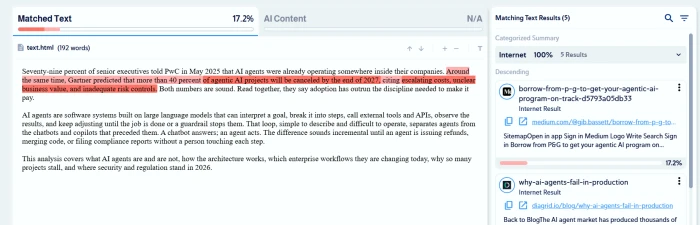
Ask plain questions of each draft. Does it read clearly on the first pass? Does it hold attention or drift? Does it stay on the topic you set, or wander into filler? Does it repeat the same phrase four times in a single page? When you evaluate AI output, judge it for clarity, tone, readability, and how much editing it will need before it goes live.
Warning signs in AI-generated writing
A few patterns signal a weak engine no matter how polished the interface:
- Vague statements that could apply to any topic
- Padding that adds word count without meaning
- The same sentence shape repeated down the page
- A flat, robotic rhythm no person would write
- Sections that quietly contradict each other
Key takeaway
The best AI writing tool is usually the one that hands you the cleanest first draft, not the one with the longest feature list.
Step 4: Evaluate How Much Control You Have
One-click generation is not enough
A strong first draft means little if you cannot steer the second one. Control is what separates a toy from a working tool, and AI tone control is the feature most writers test first and rely on most. The real question is whether the software bends to you or makes you bend to its defaults.
Features worth testing
Push each tool on the controls that change your output:
- Tone adjustment for formal or casual registers
- Brand voice settings that remember how your company sounds
- Audience targeting for different reader segments
- Word-count and length controls
- Formatting options such as headings and bullet structure
- Rewriting and expansion of text you paste in
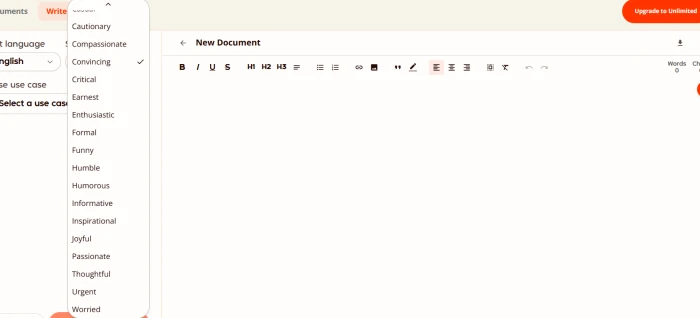
Brand voice AI deserves close attention if you publish under one identity. A tool that captures your voice once but cannot reproduce it next week adds editing time to every piece you ship.
Why control matters
Customizable AI writing shrinks the gap between raw output and the version you publish. Less editing per piece compounds into hours saved each month.
Step 5: Test Long-Form Performance
Can the tool hold a thread?
AI for articles has to do more than write a sharp paragraph. Plenty of tools manage one good paragraph. Far fewer write a coherent 1,500-word piece. Long-form AI content is where weak models fall apart, because every sentence has to remember what came before it.
What to check across a full article
Generate a complete piece, then read the whole thing start to finish:
- Does the logic flow from one section into the next?
- Does the tone stay steady from the opening to the closing line?
- Do transitions connect sections, or does each one start cold?
- Does the same idea reappear two or three times in new words?
- Did it follow your detailed instructions, or only the first one?
The best AI long-form writing tools keep AI content structure intact even at length. Sentence-level polish is common. Article-level coherence is rare.
Key takeaway
Strong long-form performance is non-negotiable for bloggers and publishers. A tool that loses the plot halfway through creates more work than it saves.
Step 6: Verify Accuracy and Research Capabilities
Good writing on wrong facts is worse than no writing
This is the step most comparisons skip, and the one that can damage your name. Polished prose stating a false statistic still states a false statistic. AI factual accuracy decides whether you can trust a draft or have to check every line by hand.
Run an accuracy test
Ask each tool to explain a recent event in your field or pull statistics on a topic you know is cold. Then verify every claim against a primary source. Watch for:
- Invented statistics with no traceable origin
- Confident claims about events the model clearly does not know
- Citations pointing to sources that do not say what the tool claims
- Outdated information presented as current
Why this shapes AI content reliability
The heavier your reliance on research, the more AI content reliability drives your choice. A tool that helps you avoid AI hallucinations is worth more to a journalist than any template library. A tool that invents details quietly will eventually publish something you regret.
Step 7: Look Beyond Writing Features
A tool can write well and still slow you down
Writing is one step in a longer process. Generate text in one tab, paste it into a second, reformat it in a third, and the tool adds friction even when the words are good. AI workflow integration is what turns a writing engine into a real productivity gain.
Workflow features to weigh
Look at how each tool fits the rest of your day:
- Browser extensions that work inside the apps you already use
- Google Docs and Microsoft Word integration
- Direct publishing to WordPress or your CMS
- API access, which opens the door to AI content automation
- Template libraries for formats you repeat

Built for one person or a whole team?
AI writing tools for teams add another layer. Shared brand settings, role permissions, version history, and a central library all matter the moment a second writer joins. AI writing productivity for a solo freelancer is a different measurement from output across a ten-person content team.
Ask yourself
Does this tool slot into the workflow I already run, or does it ask me to rebuild my process around it?
Step 8: Understand the Real Cost
The cheapest plan is rarely the best value
Price is the easiest number to compare, which is why people over-weight it. AI tool pricing comes in shapes that resist a quick glance, and the sticker price often hides the real AI content cost.
What to actually compare
- Monthly plans against annual subscriptions, and the discount for committing
- Credit-based pricing, where each generation draws down a balance
- Usage caps that throttle you at the worst moment
- Cost per article, found by dividing the monthly fee by your real output
- The hours the tool saves, priced at what your time is worth
Do the value math
Picture two tools. One costs $20 a month and needs heavy editing on every draft. The other costs $50 and produces a near-final copy. If the second saves you six hours a month, the best value AI writing software is the pricier one by a wide margin. Cost per article, not cost per month, is the number that decides it.
Step 9: Compare Advanced Features for Future Growth
Think past this month's needs
The tool that fits today can strain under next year's volume. If you expect your content operation to grow, weigh a few capabilities that only matter at scale.
Context window. A larger context window lets a tool hold an entire long document and your style guide in mind at the same time. AI content scalability depends on it, since small windows force you to feed work in fragments and the output fragments with it.
Brand consistency at volume. One on-brand article is easy. Two hundred on-brand articles across five writers is the real test of whether a tool can hold a voice.
Multimodal capabilities. Multimodal AI tools read PDFs, pull text from images, and work from full research documents instead of plain prompts alone. For research-heavy content, that turns hours of manual summarizing into minutes.

Team collaboration. AI collaboration features and shared workspaces decide whether a platform can support a growing team. Permission controls keep that team from overwriting each other once it expands.
Data privacy and security. Find out how the platform stores your content and whether it trains on your data. Ask what enterprise controls it offers, since this climbs the priority list the moment you handle client or proprietary material.
Why this matters
The best long-term choice scales with you. Switching tools after you have built templates and trained a team is costly, so growth potential earns its weight now.
Step 10: Score Your Top Choices
Turn impressions into numbers
After testing, your opinions are scattered across notes and memory. A simple scoring sheet forces them into something you can compare at a glance. This AI writing tool evaluation step is where a fuzzy preference becomes a clear AI writing software ranking.
Score each tool from 1 to 5 on the categories that matter to you. A basic AI writing comparison chart looks like this:
| Category | Tool A | Tool B | Tool C |
|---|---|---|---|
| Output quality | |||
| Ease of use | |||
| Accuracy | |||
| Long-form performance | |||
| Workflow integration | |||
| Customization | |||
| Pricing value | |||
| Advanced features | |||
| Total score |
Add the columns, total each tool, and the result often surprises you. The tool you liked in the demo is not always the one that scores highest once accuracy and editing time sit on the same page as output quality. A side-by-side AI writing assistant comparison strips away the marketing and leaves the numbers.
Step 11: Use the Winner for Two Weeks
The two-week trial that settles it
A scoring sheet narrows the field. Real work names the winner. Run your top choice through an AI writing trial of one to two weeks on live projects, not test prompts. Most tools offer a free trial or a cheap first month, so you can test the AI writing tool properly before you commit to a year.
What to watch during real usage
- How it feels across daily use, not after a single session
- Whether quality holds across different topics and formats
- How much editing each draft still needs
- Where it speeds up your work and where it stalls
AI tool real usage exposes what a demo hides. A clunky interface you forgive for ten minutes becomes a daily irritation over two weeks. Two weeks of steady use is the most reliable AI writing software review you can run, because it is built on your work rather than someone else's screenshots.
Common Mistakes to Avoid When Comparing AI Writing Tools
A few AI writing pitfalls trip up even careful buyers. Knowing them ahead of time keeps you from choosing the wrong AI tool.
Choosing on popularity alone. The tool everyone recommends was chosen for someone else's workflow. Match the software to your tasks, not to a leaderboard.
Fixating on price. A cheap tool that needs constant rewriting is expensive in hours. Value beats cost every time.
Ignoring accuracy. Clean writing wrapped around a wrong fact is a liability, not an asset.
Testing with a single prompt. One prompt shows one slice of behavior. You need several before a pattern appears.
Committing too early. Annual plans look cheaper until you are locked into a tool you have outgrown by month three. Test before you buy and you head off most AI content mistakes before they cost you anything.
Choosing for Your Needs, Not the Market’s
The best AI writing tool for your needs is a moving target. The tool that wins your scoring sheet this quarter may lose it next year as your volume climbs or your team grows. Build the habit of re-running a short version of this test whenever your work changes shape, and you will choose an AI content generator that keeps earning its place instead of one you picked once and forgot.
Comments
Join the discussion and share your perspective.