
Venice AI puts an $18 price tag on its Pro plan and a promise beside it: every model, every medium, no limits. I spent an afternoon with Venice's pricing page and its API documentation, plus a stack of user reviews posted over the last four months, working out whether that sentence survives contact with a billing cycle.
It mostly does. But the number that decides your monthly bill on Venice is not the subscription fee at all. It is the credit balance sitting underneath it.
This article works through the pricing from the outside in. We start with the four plan cards you see first, move to the feature lines that separate them, then get into the credit system that quietly governs everything above basic chat. After that comes API pricing, followed by a handful of contradictions I found across Venice's own pages. The last stop is what people paying for the product every month have to say about the experience.
The Four Plans, Side by Side
Venice sells four tiers. Monthly billing is the default, and a toggle at the top of the page offers yearly savings of up to 16.7%.
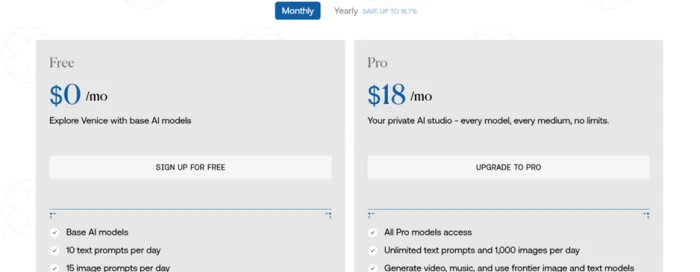
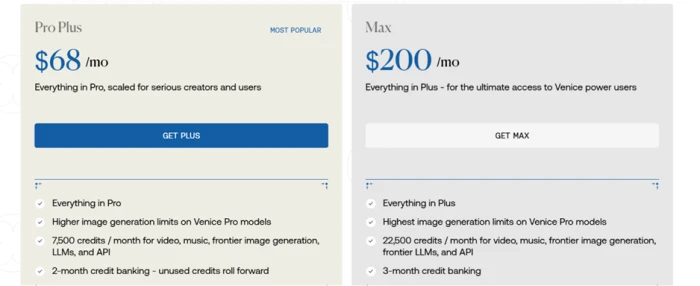
| Plan | Monthly price | Headline allowance |
|---|---|---|
| Free | $0 | Base models, 10 text prompts per day, 15 image prompts per day |
| Pro | $18 | All Pro models, unlimited text, 1,000 images per day, 100 credits per month |
| Pro Plus | $68 | Higher image limits, 7,500 credits per month, 2-month credit banking |
| Max | $200 | Highest image limits, 22,500 credits per month, 3-month banking |
Two things stand out before any feature comparison.
The first is the shape of the ladder. Free to Pro costs $18. Pro to Plus costs another $50. Plus to Max costs another $132. Those gaps widen much faster than the feature list does, and the reason turns out to have almost nothing to do with capability.
The second is the Free tier's ceiling. Ten text prompts a day is a tasting menu rather than a usable allowance. Venice is not pretending otherwise, and the card describes the tier as a way to explore base models.
Pro also carries a few benefits the plan card mentions almost in passing, easy to miss under the headline allowances. Subscribers can build and share custom characters, and they can back up and restore their chat history in encrypted form. The plan additionally promises extended context windows for longer conversations. Hold on to that one. A subscriber quoted later in this article disputes it directly.
Venice marks Pro Plus as its most popular plan. Hold that thought until the credit math a few sections down, because the popularity of a $68 tier over an $18 one says something specific about who is buying.
Where Each Tier Draws Its Line
The comparison table further down Venice's pricing page is where the plans stop sounding similar. Start with model access.
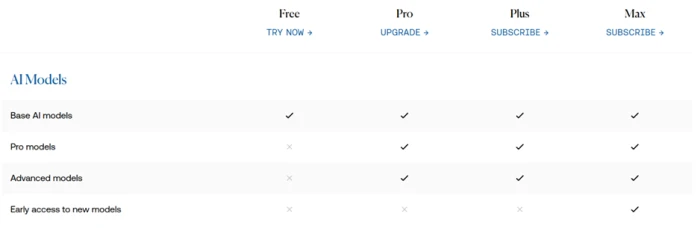
Base models are available on every tier. Pro models and advanced models begin at Pro. Early access to newly released models is reserved for Max alone, which is the only capability in the entire table that $200 buys and $68 does not.
Image generation tells a sharper story.
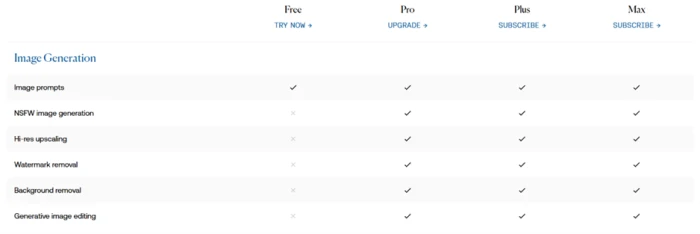
Free accounts can generate images. That is the extent of it. NSFW generation, hi-res upscaling, watermark removal, background removal, and generative image editing all require Pro or above.
Look at the Plus and Max columns in that same table. They are identical to Pro. Not one image feature separates the $18 plan from the $200 plan.
The API section repeats the pattern with one small variation.
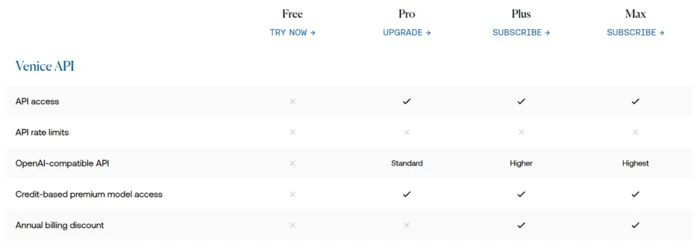
API access starts at Pro. Credit-based access to premium models starts at Pro. What changes as you climb is the rate limit tier, which Venice labels Standard at Pro before stepping up through Higher and Highest on the plans above it. The annual billing discount appears only on those two upper plans.
So the capability ladder effectively tops out at $18. Above that, you are buying throughput and credits. That single observation reframes the entire price list, and it sets up the section below.
Credits Are the Real Pricing Model
Venice publishes its exchange rate openly: 100 credits equals $1. That one line makes every tier above Pro straightforward to evaluate in cash terms.
| Plan | Monthly credits | Cash value | Plan price | You save |
|---|---|---|---|---|
| Free | 0 | $0 | $0 | n/a |
| Pro | 100 | $1 | $18 | n/a |
| Pro Plus | 7,500 | $75 | $68 | roughly 9% |
| Max | 22,500 | $225 | $200 | roughly 11% |
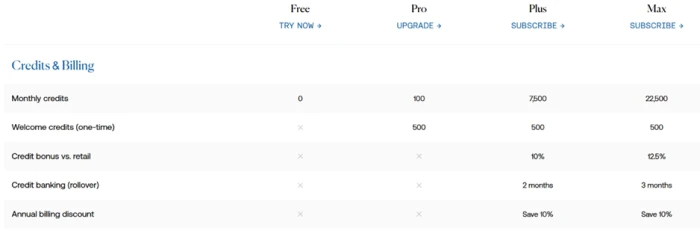
Venice states the same idea in its own terms, listing a credit bonus versus retail of 10% for Plus and 12.5% for Max. Either way you calculate it, the conclusion holds: Plus and Max are credit packages with a subscription bundled in, discounted about a tenth against buying credits outright.
That reframes the earlier question about why Pro Plus is the most popular tier. People are not paying $68 for features. They are paying $68 for $75 of compute.
Pro's 100 monthly credits deserve their own paragraph. At $1 of compute per month, that is a sample rather than an allowance. A single five-second video clip consumes most of it, as the next section shows. Every paid tier also receives 500 welcome credits once, worth $5.
Credit banking matters more than it first appears. Plus rolls unused credits forward for two months and Max for three. Free and Pro get no rollover at all, which means Pro's 100 credits expire every month whether you spend them or not.
What Your Credits Actually Buy
Venice's pricing page gives one worked example: video generation on models like Grok Imagine and Kling costs under 80 credits for roughly five seconds of output. The API documentation lets us go further and price the rest.
Start with video, since it is the most credit-hungry thing on the platform.
| Plan | Monthly credits | Approximate 5-second clips |
|---|---|---|
| Pro | 100 | 1 |
| Pro Plus | 7,500 | 93 |
| Max | 22,500 | 281 |
Now images, priced from Venice's published per-image API rates.
| Image model | Price per image | Credits |
|---|---|---|
| Venice SD35, Lustify v8 | $0.01 | 1 |
| Grok Imagine (1K) | $0.03 | 3 |
| Flux 2 Pro | $0.03 | 3 |
| Nano Banana 2 (1K) | $0.10 | 10 |
| GPT Image 2 (4K) | $0.84 | 84 |
The Plus allowance of 7,500 credits translates to about 750 Nano Banana 2 renders at 1K, or 89 GPT Image 2 renders at 4K. Same balance, an eightfold difference in output, decided entirely by which model you pick from the dropdown.
Text generation stretches that gap even wider. Claude Opus 5 runs $6.00 per million input tokens and $30.00 per million output on Venice, so $75 of credits buys around 2.5 million output tokens. Venice Uncensored 1.2 costs $0.20 and $0.90 for the same units, where $75 carries you past 80 million output tokens.
A factor of thirty in effective cost, sitting behind a model selector. This is the part of Venice's pricing that rewards attention, and it is invisible from the plan cards.
Web search adds a small line item on top. Venice charges $10 per 1,000 search requests, so each search consumes a single credit.
The API Side, Priced Separately
Everything above concerns the Venice app. The API is a separate pricing surface with its own logic.
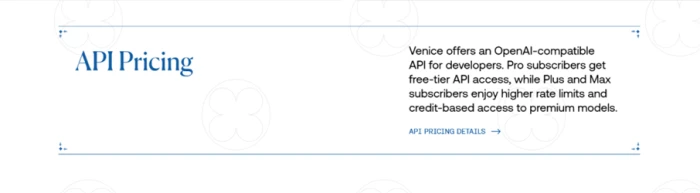
Pro subscribers receive free-tier API access, and the upper plans buy higher rate limits alongside credit-funded access to premium models. Venice publishes per-million-token rates for roughly a hundred text models. A slice of that list shows the range on offer.
| Model | Input per 1M | Output per 1M | Context | Privacy |
|---|---|---|---|---|
| GPT OSS 120B | $0.07 | $0.30 | 128K | Private |
| Venice Uncensored 1.2 | $0.20 | $0.90 | 128K | Private |
| DeepSeek V4 Pro | $1.65 | $3.30 | 1000K | Anonymized |
| Claude Opus 5 | $6.00 | $30.00 | 1000K | Anonymized |
| GPT-5.5 Pro | $37.50 | $225.00 | 1000K | Anonymized |
Every model in the catalogue carries a privacy label. Some run under Venice's Private classification, some are marked Anonymized because they route through a third-party provider, and a growing set of beta models carry an end-to-end encrypted tag. If privacy is the reason you came to Venice, that column deserves more of your attention than the price column.
Two extras bill on top of token costs rather than inside them. Web search runs $10 per 1,000 requests, and web scraping costs the same per 1,000 URLs, with Venice billing only the URLs it successfully retrieves. Budget for these separately if your application calls them on every request, since a chatbot that searches once per turn adds a cent to every exchange before the model has generated a single token.
Payment runs through card or crypto at identical rates. There is also a third route worth understanding, because nothing else in the market prices this way.
Venice lets you stake its Diem token, where one Diem grants $1 per day of credits that refresh daily. Instead of spending down a balance, you hold an asset that regenerates an allowance every morning. For steady high-volume workloads that changes the arithmetic from an operating expense into a capital allocation question, with all the price exposure that implies.
Gaps Worth Checking Before You Pay
Reading the pricing page against the documentation surfaced four places where Venice's own numbers disagree.
1. API access on the Free tier. The Free plan card lists API Access as an included benefit. The comparison table further down the same page marks API access as unavailable on Free.
2. The annual discount. The billing toggle advertises savings of up to 16.7%. The comparison table lists a 10% annual discount for Plus and Max, and no annual discount at all for Pro.
3. Welcome credits. The pricing page lists 500 one-time welcome credits, worth $5. The API documentation states that Pro subscribers receive a one-time $10 API credit on upgrading.
4. The rate limits row. The comparison table marks API rate limits with a cross in all four columns, including Max, while the row immediately below assigns three different rate-limit levels to the paid plans.
None of these involve large sums. They matter because a pricing page is the contract you sign in your head before you click, and four disagreeing rows make it harder to know what you agreed to. Confirming your exact entitlement at checkout costs nothing. The reviews below suggest that some subscribers wish they had.
What Paying Subscribers Are Saying
Venice's review profile splits along a line that maps almost exactly onto the credit system.
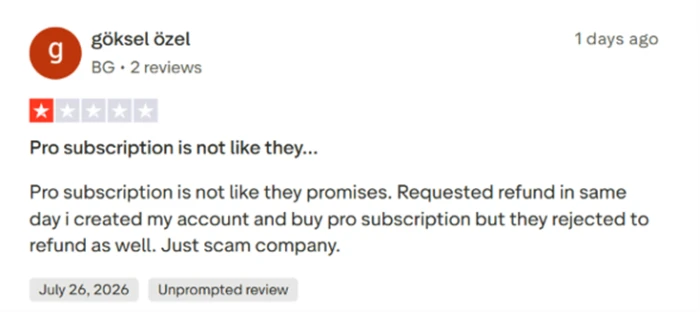
This subscriber reports buying Pro, requesting a refund the same day after finding the plan different from expectations, and having that request declined. The review is dated late July 2026.
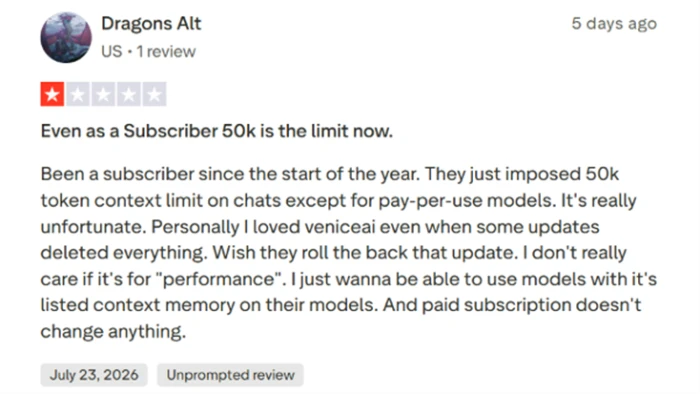
The second one is more specific and, for anyone considering an upper tier, more useful. A subscriber since January reports that Venice imposed a 50,000-token context ceiling on subscription chats, with pay-per-use models exempt from the cap. Their frustration is that a paid plan does not lift it.
Set that claim against two things covered earlier. Venice's Pro card advertises extended context windows for deep work. Its API catalogue lists dozens of models with million-token contexts. If subscription chat caps at 50K while the credit-funded path does not, then the ceiling this reviewer hit is a pricing boundary wearing the costume of a technical one.
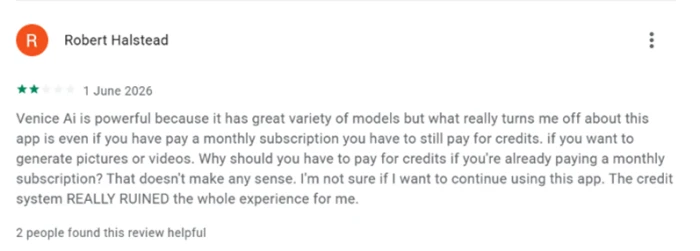
Here is the structural complaint, stated plainly by a two-star reviewer in June 2026: paying a monthly subscription and then paying again in credits for images and video feels like being charged twice.
That reading is accurate. It is exactly how the product is designed, and the credit table above confirms it. Pro's monthly allowance covers roughly one video clip. Anyone arriving at Venice expecting a subscription to work the way a streaming subscription works will hit this wall in week one.
Not everyone hits it the same way.
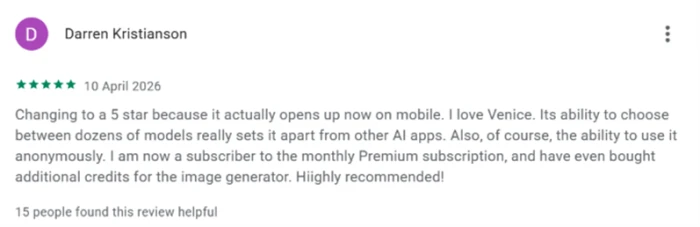
This five-star review from April 2026 praises the breadth of model choice and the ability to use the platform anonymously. The reviewer is a paying subscriber who also bought additional credits for image generation.
Two subscribers, the same credit mechanic, opposite verdicts. One bought credits and felt nickel-and-dimed. The other bought credits and called the platform highly recommended. The variable is not the pricing. It is what each person expected the subscription to cover before they paid.
Matching a Tier to Your Actual Usage
Everything so far points at one practical question: how much do you actually consume?
| If you mostly | Buy | Monthly | Reasoning |
|---|---|---|---|
| Test uncensored chat occasionally | Free | $0 | Ten prompts a day covers casual curiosity |
| Chat heavily and generate images on Venice's own models | Pro | $18 | Unlimited text, 1,000 daily images, full editing toolkit |
| Produce dozens of short videos or use frontier image models | Pro Plus | $68 | 7,500 credits with rollover, priced under retail |
| Run production API workloads or generate video daily | Max | $200 | 22,500 credits, highest limits, early model access |
Two rules of thumb come out of the numbers above.
If your work sits on Venice's in-house models, Pro is the highest tier worth paying for. The credits stacked above it solve a problem you do not have, and the image features are identical.
If you touch video or premium third-party models more than a few times a week, the credit balance is the product and Pro will frustrate you inside a fortnight. Go straight to Plus, where the 10% bonus and two-month rollover both start applying.
One more consideration for anyone leaning toward annual billing. Per the comparison table, that discount attaches only to Plus and Max, so a yearly commitment on Pro may not save you anything.
My Verdict After Reading the Fine Print
If I were spending my own money here, I would buy Pro and nothing else for at least two months.
The reasoning is straightforward. Pro carries the whole feature unlock. Private chat, uncensored models, unlimited text, 1,000 daily images, and the complete image editing toolkit all arrive at $18. What Plus and Max add is a larger credit balance, and until you have watched your own consumption for eight weeks, you are guessing at the size of the balance you need. Guessing costs $50 a month at Plus and $182 at Max. Watching costs nothing.
The thing I would want fixed before recommending Venice without qualification is the distance between what the plan cards promise and what the comparison table delivers. A page that lists API access under a free plan and then marks it unavailable four screens later is not deceiving anyone on purpose. It is being careless with the one document buyers actually read end to end. The refund dispute and the two-star credit complaint above both read like people who trusted the top of the page and discovered the bottom of it after paying.
What Venice has built is genuinely hard to find elsewhere. Model breadth at this scale, combined with a payment path that runs through crypto and token staking, is not something the large labs offer at any price. The privacy architecture appears to be real rather than marketing.
Price it against your own consumption rather than against the plan names, and confirm your entitlements at checkout before the first payment clears. Then start one tier below the one you think you need.
Comments
Join the discussion and share your perspective.