
MCP, short for Model Context Protocol, is an open standard introduced by Anthropic in November 2024 that lets AI assistants connect to external tools and data through one shared interface instead of a separate custom integration for each system. If you have watched an AI assistant check a live support ticket, pull a real figure from a database, or send an actual email over the past year, that shared interface is usually the reason.
You have probably seen the acronym everywhere. Claude supports it. ChatGPT supports it. Cursor, GitHub Copilot, and VS Code support it. The strange part is how fast that happened, and how quietly. This piece explains what MCP actually is, then answers the question most explainers skip: why the whole industry agreed on the same standard in about a year. If you write code, the middle sections go under the hood. If you do not, you can skim those and miss nothing important.
MCP in one sentence, and why it matters to you
Language models are frozen at their training cutoff. Ask one about a file on your laptop, a row in your company database, or an email that arrived this morning, and on its own it either guesses or stops. MCP is the plug that lets the model reach those things safely. That is why AI tools can suddenly act rather than only describe.
What the acronym actually means
Break it apart. Model is the AI. Context is the live information and the tools it can reach beyond what it memorized during training. Protocol is the agreed set of rules for how the two talk. Together, MCP is a shared language any AI application and any tool can both speak, so they stop needing a custom translator built for every pairing.
The 30-second version if that is all you need
The short version ● MCP is an open standard from Anthropic, released in November 2024 and now governed by the Linux Foundation. ● It swaps custom, one-off AI integrations for a single interface any tool and any AI app can use. ● Every major AI vendor adopted it within roughly a year, which is why it seems to have appeared overnight. ● It delivers real capability and a real new class of security risk. Both are covered below. |
|---|
The problem MCP solves: the N times M integration mess
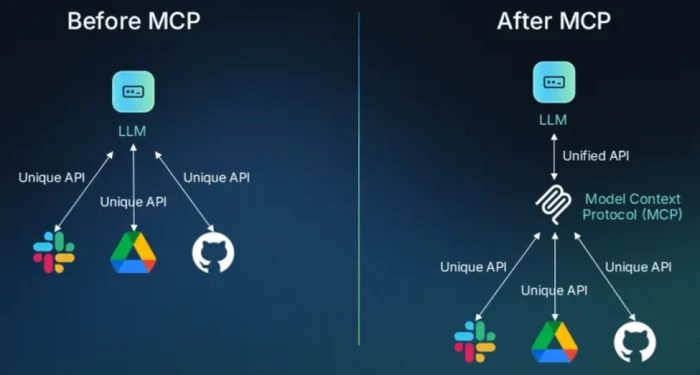
Before MCP, connecting AI to the systems you rely on was manual labor. An engineer wired one AI tool to one internal system, then repeated the work for the next tool and the next system. Anthropic named this the N times M integration problem: with N tools and M AI front-ends, someone had to build and maintain N multiplied by M separate connections. Five AI apps and five tools already means twenty-five brittle integrations, each with its own authentication, data format, and failure modes.
Why models sit behind information silos
Anthropic stated the core problem plainly at launch: even the most capable models are constrained by their isolation from data, trapped behind information silos and legacy systems, with every new data source needing its own custom implementation. That isolation is the wall MCP is built to remove.
From multiplication to addition
MCP flips the arithmetic. Each system builds one MCP server. Each AI tool builds one MCP client. Any client can then reach any server, so the integration count falls from N multiplied by M to N plus M. Build once, connect to everything that speaks the protocol. If you have read the Language Server Protocol spec, this will feel familiar. Code editors once needed a separate plugin for every language, so adding a language meant work in every editor. LSP fixed that: write one language server and any editor can use it. MCP applies the same trick to AI apps and tools.
Where the USB-C analogy helps, and where it does not ● The comparison you will see most often is that MCP is USB-C for AI: one connector any device can use. It captures the interoperability idea well. ● It undersells one thing. A USB-C cable does not read your instructions and act on them. An MCP connection hands a working model a set of functions with real access, which is exactly why the security section later matters. |
|---|
Why is every tool suddenly supporting MCP?
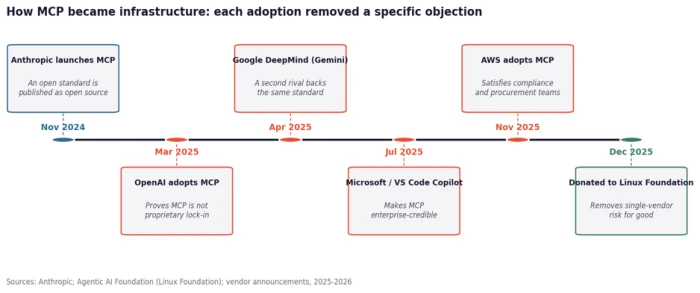
The honest answer is that the surge was not organic hype. It was a sequence of adoption decisions by rival giants, and each one removed a specific reason companies had hesitated. Watch the objections fall away in order.
The adoption timeline, milestone by milestone
Anthropic open-sourced MCP in November 2024. In March 2025, OpenAI adopted it across its Agents SDK, its Responses API, and the ChatGPT desktop app, the same month the spec shipped Streamable HTTP and OAuth 2.1. Google DeepMind confirmed support for Gemini soon after. Microsoft brought MCP support in VS Code Copilot to general availability in July 2025. AWS followed in November 2025. Then, in December 2025, Anthropic handed the whole thing to the Linux Foundation.
Each adoption removed a specific objection
Read the sequence as objection-clearing rather than a popularity contest. OpenAI's move proved MCP was not Anthropic-only lock-in. Microsoft's integration made it enterprise-credible. AWS support reassured compliance and procurement teams. Linux Foundation governance erased the single-vendor risk that made buyers nervous. By the end, the standard question flipped from whether MCP was a fad to how a company should adopt it.
The Linux Foundation handoff, the real turning point
On December 9, 2025, Anthropic donated MCP to the Agentic AI Foundation, a directed fund under the Linux Foundation, co-founded with Block and OpenAI and backed by Google, Microsoft, AWS, Cloudflare, and Bloomberg. Anthropic reported more than 10,000 active public MCP servers at that point, with support across ChatGPT, Cursor, Gemini, Microsoft Copilot, and VS Code. When a protocol stops belonging to one company and starts being co-governed by competitors, it has crossed from product to infrastructure.
The numbers behind the takeoff
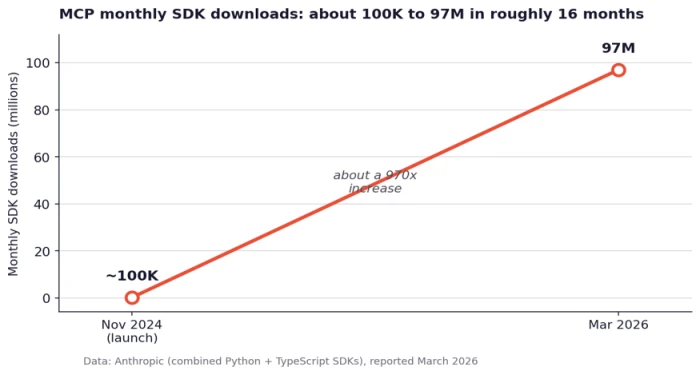
The growth curve is steep enough to be worth seeing. Anthropic reported that combined Python and TypeScript SDK downloads climbed from roughly 100,000 in the launch month to about 97 million monthly by March 2026, close to a 970-fold increase in around 16 months.
One number worth correcting ● Not every stat you will read survives scrutiny. A widely shared claim that 78 percent of enterprises had MCP in production does not hold up, and at least one research team that first published it has walked it back. ● A more grounded figure comes from a December 2025 survey of 300 senior technical leaders by Stacklok: roughly 41 to 45 percent reported even limited production use. Fast adoption, yes. Universal production deployment, not yet. |
|---|
How MCP actually works
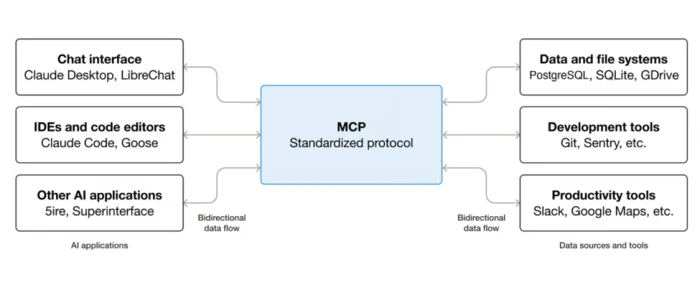
This part goes under the hood. If you are here for the concept rather than the wiring, skim the diagram and the table, then jump to the comparison section. Nothing later depends on memorizing the internals.
The three roles: host, client, and server
MCP follows a client-server design with three roles. The host is the AI application you interact with, such as Claude Desktop, Cursor, or VS Code. The client is the connector the host creates to manage one connection. The server is the wrapper around a specific tool or data source that does the actual work. A host spins up one client per server, and the server never talks to the model directly. The client mediates every message, which keeps the security boundaries clean.
What a server exposes: tools, resources, and prompts
An MCP server can expose three kinds of things. Most explainers mention only the first, so here are all three:
| Primitive | What it is | Concrete example |
|---|---|---|
| Tools | Actions the model can invoke to do something | A get_weather call, or a query against a support-ticket database |
| Resources | Read-only data the server makes available as context | A file, a user profile, or a config document the model can read |
| Prompts | Reusable prompt templates the server offers | A report template or a code-review workflow the user can trigger |
A request from start to finish
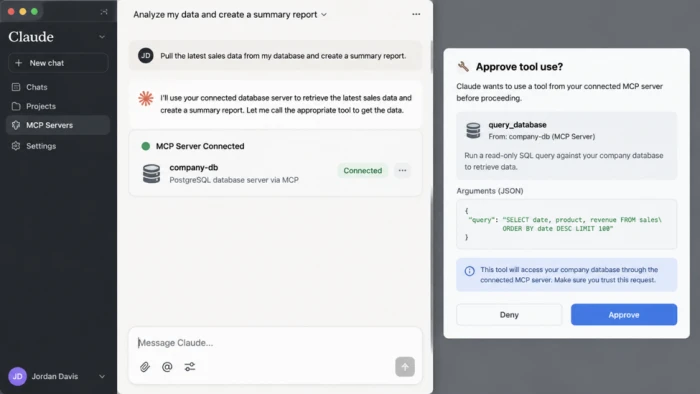
Here is a made-up but representative example. Suppose you tell an assistant, find the latest sales report in our database and email it to my manager. The model cannot touch a database or send mail on its own. Through MCP, the client first discovers the available tools, finds a database query tool and an email tool, then invokes them in turn. The server runs each operation and returns the result, and the host feeds that back into the model's context so it can finish the task with real data.
How the pieces talk: JSON-RPC and two transports
Under the messages, MCP uses JSON-RPC 2.0. When a client connects, it negotiates capabilities, then asks the server what it offers before anything runs. For moving those messages, the spec defines two official transports.
| Transport | Where it runs | Best for |
|---|---|---|
| STDIO | Local, as a subprocess on the same machine | Lowest latency, local tools, single-client setups, strict local security |
| Streamable HTTP | Remote, over HTTP with streaming responses | Shared and cloud-hosted servers, many clients, standard web authentication |
Keeping the list to two transports is deliberate. It means a server you build works with Claude, Cursor, and whatever client ships next month without you thinking about wire compatibility. The July 2026 spec, version 2026-07-28, pushed the design toward a more stateless model, so servers built against older revisions may need updating.
MCP versus APIs versus function calling
Two questions come up constantly, and mixing them up causes most of the confusion around MCP. Handle both here.
Does MCP replace REST APIs?
No. Almost every MCP server calls a regular API underneath. MCP adds a discovery and invocation layer that a model can use, so the same API becomes callable without writing a dedicated client for it. The API stays the system of record. If a job is deterministic, say a nightly sync that always hits the same endpoint, calling the API directly is still the right move.
MCP and function calling compose, they do not compete
Function calling is a model capability: the model emits a structured call against a schema you supply. MCP is the standard for where those schemas come from and how the call gets executed. Without MCP, you define each function inside your application and maintain it there. With MCP, the tool lives in a server outside your app, and every client that speaks the protocol gets it. They fit together, with MCP supplying the tool definitions that function calling consumes.
| Direct API | Function calling | MCP | |
|---|---|---|---|
| Who consumes it | Your code | The model, inside one app | Any MCP-compatible client |
| Tool discovery | You know the endpoints | Defined inline per app | Discovered at runtime |
| Where tools live | In your app | In your app | In a separate server |
| Best fit | Deterministic paths | A single app's own tools | Shared tools across many clients |
Put simply, direct API calls suit fixed paths, function calling suits one app's own tools, and MCP earns its keep when the model chooses the tool, when several AI clients need the same integration, or when you want to add capability without shipping new application code.
What people are actually building with MCP
The concept lands faster with real examples. Adoption clusters into three groups, and only one of them is developer-only.
For developers
The deepest, most mature use is coding. MCP lets an assistant touch live project files, version control, and the development environment, which is why IDEs such as Cursor, GitHub Copilot, and Claude Code leaned in first. It is the area with the most servers and the most polish today.
For teams and enterprises
A quieter pattern may be the biggest one. In field reporting from the Pragmatic Engineer newsletter, one builder described the main benefit as keeping ad-hoc data queries off the data team's plate: instead of interrupting engineers to ask what usage looks like for a feature, colleagues now ask an agent with the MCP server connected. Internal data and platform teams are using MCP to give non-developers safe access to systems.
For everyone else, no terminal required
You do not need a command line. Claude, ChatGPT, Cursor, and VS Code can install servers from a directory with a button, and Claude also accepts a server URL typed into its Connectors screen. Once connected, people are performing Notion actions by voice, issuing Stripe invoices from a chat, and building 3D scenes in Blender by describing them in plain language rather than memorizing shortcuts.
The part most explainers skip: is MCP safe?
Give a model working access to your tools and you have created a new kind of risk. This is the section that separates a useful explainer from a promotional one, so it gets straight talk.
Why MCP creates a new kind of risk
Classic web security assumes the attacker is outside, trying to get in. MCP introduces a subtler threat: the AI agent itself, manipulated through the content it reads, becomes the vector. The attacker does not need to breach your infrastructure. They need to get the right words in front of your agent, and the agent's own tool access does the rest.
The main attack classes, in plain terms
● Indirect prompt injection. A web page, a document, or a database record the agent reads can carry hidden instructions that redirect it mid-task. Sanitizing the user's typed input does not catch this, because the payload arrives through a trusted-looking retrieval step.
● Tool poisoning. A malicious server hides instructions inside a tool's description. The agent reads that description when it connects and folds it into its context. OWASP describes the root cause as a trust gap: descriptions are reviewed once at connect time, while responses flow into the model at runtime with no equivalent check.
● Rug pulls. A server that behaved well when you approved it silently redefines its tools later. Because you already granted trust, nothing prompts you to look again.
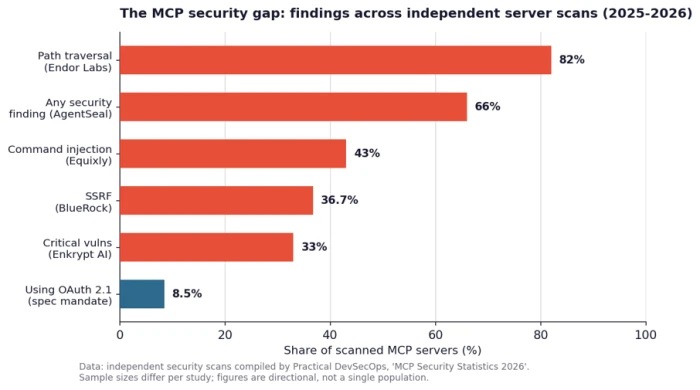
These are not hypothetical. Between mid-2025 and mid-2026, researchers documented tool-description poisoning that leading IDEs would auto-execute, and security firm scans of live servers kept turning up basic weaknesses. The chart below gathers findings from several independent studies. Read it as directional, since each study scanned a different sample, not one shared population.
What good MCP support looks like: a trust checklist
Anthropic's own Claude Code documentation states the rule in seven words: verify you trust each server before connecting it. Beyond that, a trustworthy setup should clear this checklist.
Before you connect a server, confirm it ● Shows you which tool it plans to call and what that tool will read or change, then waits for approval. ● Keeps a human in the loop for actions that write, send, or delete. ● Comes from a source you actually trust, since a server is functions handed to a working model, not a sandboxed plugin. ● Re-prompts when its configuration or tool definitions change, so a silent redefinition cannot slip through. ● Uses OAuth 2.1 for any remote connection, the spec's mandate that many deployed servers still skip. |
|---|
Where MCP goes next
The trajectory now looks less like a trend and more like plumbing. Governance sits with a cross-industry foundation, the spec is moving toward a cleaner stateless design, and remote servers are maturing from local developer toys into cloud-hosted services with real authentication. The comparison people reach for is Docker and Kubernetes: a standard that felt optional for a while, then became the layer everything else assumed.
The open question is not adoption anymore. It is whether the ecosystem closes the security gaps as fast as it adds servers. A model that can act on your behalf is only as safe as the least trustworthy server you have connected, and that, more than any download count, is the number worth watching as MCP settles in as default AI infrastructure. For a deeper walk through the attack classes and how to harden a deployment, a dedicated MCP security guide is the natural next read.
Comments
Join the discussion and share your perspective.