
Last year I lost most of a Thursday afternoon to a single vendor contract. I knew it existed. I had read it two months earlier. Somewhere between a shared drive, an email thread, a chat message and a folder named Final_v2, it had disappeared. Forty minutes of clicking later, a colleague found it on her desktop and sent it over.
That afternoon changed how I work.
It pushed me to take AI document management seriously and to test where the technology earns its keep. This article is the result of that experiment.

What is AI document management?
AI document management is the use of artificial intelligence to classify, tag, search and summarize files automatically. Instead of depending on folder trees and manual naming, the software reads the content of each document and understands its meaning, then finds or condenses information whenever you ask.
The scale of the problem goes far beyond one lost contract. McKinsey research estimated that the average knowledge worker spends nearly 20 percent of the workweek, close to one full day, looking for internal information or tracking down a colleague who can help. Multiply that across a team of fifty and the cost stops being an annoyance and becomes a budget line.
AI will not fix this by replacing anyone. It works best as an assistant that absorbs the repetitive reading and filing while people keep the judgment calls.
This article walks through where AI delivers the greatest value in document management. The journey has three stops. First, how AI organizes files without human effort. Second, how it finds information in seconds. Third, how it turns long documents into summaries you can act on. Along the way you will get real workflows, an honest list of limitations, best practices and a look at what comes next.
Why Traditional Document Management Is No Longer Enough
Before showing what AI does well, I want to be fair about why the old approach collapses. Folders and file names were designed for an era of hundreds of documents. Most businesses now hold millions, spread across drives, inboxes, chat apps and project tools.
Picture a company with 200,000 stored documents. Legal names its contracts Agreement_ClientName. Sales prefers ClientName_2025_signed. Finance files the same agreements under invoice numbers. Every convention makes sense to the team that invented it, and none of them helps anyone else. When the person who filed a document leaves, the document effectively leaves with them.
A few patterns show up in almost every organization I have looked at:
- New files arrive daily with nobody assigned to sort them, so the backlog only grows.
- Duplicates multiply as people email attachments back and forth and save personal copies.
- Version confusion takes over, with final, final2, final-NEW and FINAL-approved sitting side by side.
- Naming conventions die the day their creator changes roles.
- Search matches exact words only, so a file saved as "staff exit checklist" never appears when you look for "offboarding".
None of this reflects laziness. It reflects volume. A Gartner survey of 4,861 employees found that 47 percent of digital workers struggle to find the information or data they need to do their jobs. Nearly half the workforce, blocked by the filing system itself.
Stricter folder rules will not close that gap.
Software that reads every document for you can, and that is where the first of our three stops begins.
How AI Organizes Documents More Efficiently
The umbrella term for this capability is intelligent document processing, or IDP. IDP systems combine optical character recognition, machine learning, language models and workflow automation to read documents the way a person would, then act on what they read. Here is what that looks like in practice.
Automatic document classification
Give an AI system an unsorted pile of files and it reads the actual content of each one, then groups similar documents together. It recognizes an invoice by its line items and totals, and a contract by its clauses and signature blocks. Typical categories include invoices, contracts, reports, resumes and medical records, and the system builds these buckets on its own, without anyone writing rules first.
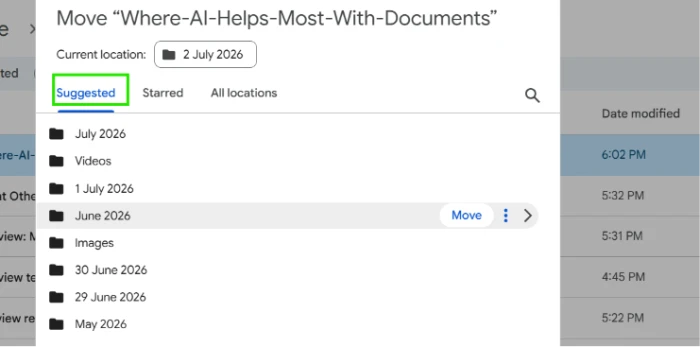
The same engine powers folder recommendations. Upload a new file and the system suggests where it should live, based on where similar files already sit. Google Drive ships a light version of this today: click Move on any file and it offers suggested destinations.
Smart tagging
Classification puts a file in one bucket. Tagging goes further and attaches several labels to the same file, so a single proposal can carry the tags Q3, Acme Corp, marketing and pricing all at once.
The system generates these tags from the text itself: keywords, project names, customer names and department references. The payoff arrives when you filter. One click surfaces every document tied to a specific client, no matter which folder it was dumped into.
Metadata extraction
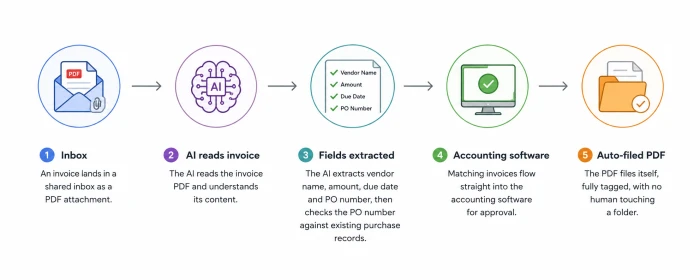
Tags describe a document. Metadata extraction pulls structured data out of it: dates, invoice numbers, addresses, purchase order IDs and customer details, all captured as fields another system can use. Here is what an invoice workflow looks like once extraction is in place:
- An invoice lands in a shared inbox as a PDF attachment.
- The AI reads it and extracts the vendor name, amount, due date and PO number.
- The system checks the extracted PO number against existing purchase records.
- Matching invoices flow straight into the accounting software for approval.
- The PDF files itself, fully tagged, with no human touching a folder.
Nobody typed anything. The five minutes of data entry per invoice dropped to zero.
Duplicate detection
Years of copy-saving leave a mess that AI cleans up fast. Detection tools compare content rather than file names, which lets them catch:
- Exact copies saved in different folders under different names.
- Near duplicates, such as a proposal with one edited paragraph.
- Outdated versions still circulating after the final was approved.
- Renamed files that are the same document wearing a disguise.
Cleanup like this once took an intern a summer. Now it takes an afternoon.
Key takeaways:
- Classification sorts files by what they contain, not what they are named.
- Tags and extracted metadata make every document filterable and reusable.
- Duplicate detection clears years of clutter in a single pass.
- Filing happens at the moment of upload, so backlogs stop forming.
Organized storage solves half of the problem from my Thursday afternoon. The other half is retrieval, which brings us to the second stop.
How AI Makes Finding Information Faster
Vendors group these features under the label enterprise search: one search box that reaches across drives, inboxes, chat tools and databases at the same time. What separates it from the search you already know comes down to how it reads your query.
Semantic search
Traditional search matches characters. Semantic search matches meaning. The difference sounds academic until you watch it work:
| You type | Keyword search returns | Semantic search returns |
|---|---|---|
| staff exit process | Only files containing those exact words, often nothing | Offboarding checklists and handover templates |
| unpaid invoices | Files with the literal word "unpaid" | Invoices with outstanding balances and overdue payment reminders |
| why customers cancel | Little or nothing useful | Churn analyses and retention reports |
| remote work rules | Nothing, unless a file uses that exact phrase | The HR policy section on working from home |
Under the hood, the system converts documents and queries into mathematical representations of meaning, then matches the closest ones. You never see the math. You only notice that the right file appears even when your wording is wrong.
Natural language search
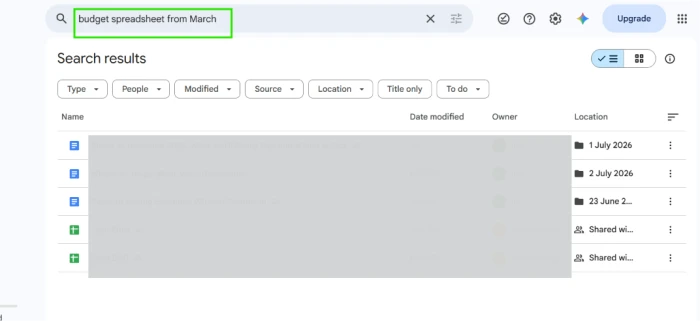
Because the system understands meaning, you can drop the keyword guessing game and search the way you speak:
- "Find contracts signed in 2025"
- "Show unpaid invoices from the last quarter"
- "Locate marketing reports discussing customer retention"
- "Which NDAs expire in the next 90 days"
Each query behaves like an instruction to a capable assistant rather than a string to be matched.
Searching scanned documents
A large share of business information is trapped inside images: scanned PDFs, photographed receipts, faxed forms and decades of paper archives. Optical character recognition, or OCR, converts those pixels into searchable text. Modern OCR copes with skewed scans and mediocre print, and pairing it with AI adds a layer that understands the recognized text instead of merely storing it. The 2009 filing cabinet becomes as searchable as last week's email.
You can test this for free. Upload a photo of a printed page to Google Drive. Right-click it and open it with Google Docs, and the text appears, extracted and editable.
Context-aware search
Good systems also understand how your organization talks. They know PO means purchase order. They treat salary and compensation as neighbors. Search for "termination clause" and results about ending an agreement early appear even when the contract never uses your phrase. As covered in the tagging section above, this same contextual understanding also improves how documents get labeled in the first place.
AI-powered question answering
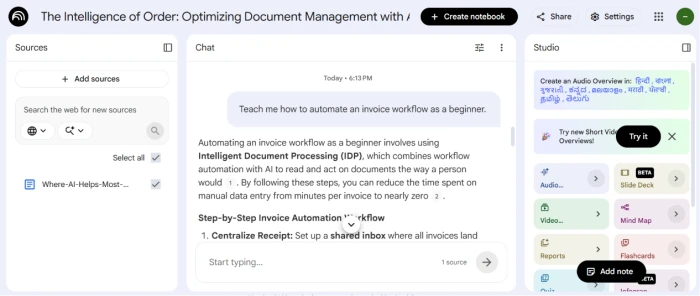
The furthest evolution of search skips the document list altogether and hands you the answer. You ask a question. The system finds the relevant passage and reads it, then replies, usually with a citation pointing at the source page.
- "What is the payment deadline in the Meridian contract?"
- "Who approved this proposal, and when?"
- "What does our policy say about remote work from another country?"
- "Which clause covers early termination fees?"
The citation matters more than the answer itself. It lets you verify in one click, a habit the limitations section below will justify.
Key takeaways:
- Semantic search matches intent, so imperfect wording still finds the file.
- Plain-language queries replace operators and filename guessing.
- OCR turns scans and photos into searchable, living text.
- Question answering returns the fact plus the source that proves it.
Search now takes seconds. Then the document opens and you are staring at 60 pages. The third stop deals with the reading.
How AI Summarizes Information
Summarization is where AI saves the most visible time, because reading is the slowest thing knowledge workers do. The same core skill shows up in several forms.
Executive and report summaries
Feed a 40-page report into an AI tool and ask for a one-page brief. You get the key findings and recommendations in about a minute, with the supporting numbers attached. Students and researchers get the same benefit from academic papers: a plain-language summary of the method and the results, before deciding whether the full read is worth the evening.
Contract summaries
Legal language resists skimming by design. AI summaries pull out the parties, the obligations, the deadlines and the termination terms, then flag unusual clauses for a closer look. The lawyer still reads the contract. The summary tells them which pages deserve attention first.
Meeting summaries
Record a call and the transcript becomes raw material. AI turns an hour of discussion into the decisions made and the owners assigned, so the people who skipped the meeting lose nothing.
Email thread summaries
Nobody reads a 40-message thread. Everybody skims it and hopes.
Ask an AI assistant to summarize the thread instead, and you get:
- Decisions that were actually made
- Next steps, each with an owner
- Questions still unresolved
- Dates and commitments mentioned along the way
Five minutes of anxious scrolling becomes thirty seconds of reading.
Action item extraction
Summaries compress. Extraction converts. Point the AI at a document and it pulls every deadline, task, approval and risk into a structured list you can drop into a project tracker. The step people forget after every meeting now happens on its own.
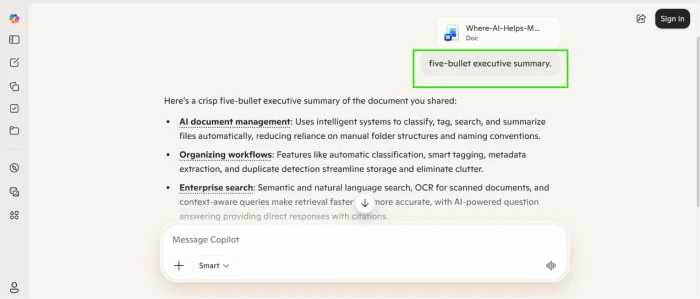
Key takeaways:
- Hours of reading compress into minutes without losing the key points.
- Threads and meetings collapse into decisions, owners, open questions and dates.
- Action items land in trackers instead of dying in inboxes.
- High-stakes documents still require a human read before anyone signs.
Those three stops sound tidy in theory. They get more convincing when you watch them run inside real teams, so let me ground them in the section below.
Real-World Examples of AI Document Workflows
Different industries lean on different parts of the toolkit. Four examples show the range.
Human resources
A recruiting team receives 600 resumes for one opening. AI classification screens them against the role requirements and produces a ranked shortlist in minutes, with every rejected application still available for human review. The same team points a question-answering tool at the employee handbook, and staff stop emailing HR about parental leave because the policy bot answers instantly, page reference attached. Bias checks stay mandatory here, for reasons the limitations section explains.
Finance
Finance teams run the invoice workflow from the organizing section at scale, then extend it to expense reports and audit preparation. When auditors request every payment above a threshold from Q2, the answer takes one search query instead of a week of folder archaeology. Tax season stops being a document hunt.
Legal
Law firms use AI to compare two versions of a 90-page agreement and list every change in seconds. Clause extraction pulls each indemnity and liability term across hundreds of contracts into a single review table, and risk flags mark the clauses that deviate from the firm's standard positions. Partner review remains the final step. The AI shortens the path to it.
Customer support
Support teams turn scattered internal documentation into a living knowledge base, which is knowledge management doing real work instead of sitting in a strategy deck. An agent types the customer's error message and the relevant fix surfaces from a three-year-old ticket. New agents become useful in their first week because the collective memory of the team is finally searchable.
Benefits of AI in Document Management
Pulling the threads together, here is what AI document management delivers and why a business should care:
| Benefit | Business impact |
|---|---|
| Time savings | Hours once lost to searching go back into productive work |
| Reduced manual work | Data entry for invoices and forms happens without human typing |
| Faster onboarding | New hires query the knowledge base instead of interrupting colleagues |
| Better compliance | Retention schedules and audit trails apply on their own |
| Improved collaboration | Everyone works from the current version instead of a stale copy |
| Knowledge sharing | Expertise trapped in old documents becomes searchable for the whole team |
| Better decisions | Summaries put the relevant numbers in front of leaders sooner |
The pattern across every row is the same: the machine handles volume, and people handle judgment.
Challenges and Limitations
I promised honesty earlier, so here it is. Every benefit above arrives with a caveat worth knowing before you commit a budget.
- Hallucinations. Language models sometimes state details that sound confident and are wrong. A summary can invent a deadline the contract never mentions. Keep a human review step for anything with legal or financial consequences, and prefer tools that cite their sources.
- Privacy and security. Pasting confidential documents into a free consumer chatbot can expose them. Check whether a tool trains on your data, how long it retains uploads, where the data is stored and which certifications it holds, such as SOC 2 or GDPR compliance.
- Bias. A screening model trained on past hiring decisions can inherit the prejudices inside them. Audit automated decisions regularly, especially in HR.
- OCR errors. Poor scans, handwriting, faded print and unusual layouts still produce mistakes, and a wrong digit in an extracted invoice amount is worse than no automation at all.
- Cost and adoption. Integration with existing systems takes engineering effort, and employees need training before the tools change daily habits. Budget for both, or watch the software gather dust.
None of these problems is a reason to avoid AI. Each one is a reason to deploy it with review steps built in, which leads directly to the practices below.
Best Practices for Using AI with Documents
These eight habits separate the teams that get value from the teams that get disappointed:
- Keep documents organized. AI amplifies whatever structure you feed it, good or bad, so tidy the source folders first.
- Use consistent naming anyway. Clean, predictable inputs raise classification and extraction accuracy.
- Choose secure tools. Business-grade platforms with clear data policies beat free consumer apps for anything sensitive.
- Protect confidential data. Restrict which document sets the AI can reach, and redact where needed.
- Review AI summaries before acting on them. Ten seconds of verification beats one expensive mistake.
- Audit results on a schedule. Spot-check classifications and extractions monthly, since accuracy drifts as your documents change.
- Train your people. A short session on writing good queries doubles the value of every tool you buy.
- Measure performance. Track time saved and error rates so the next investment decision rests on data.
Future Trends
The tools described above already exist. Here is what arrives next:
- Multimodal AI that reads the visuals inside a document, including charts and tables, instead of only the text.
- Voice search, so you can ask for the Henderson contract while driving to meet Henderson.
- Enterprise copilots that sit inside your email, chat, calendar and files at once, acting as one knowledge assistant for the whole company.
- Predictive organization that files and routes documents before anyone asks.
- Personalized search that ranks results by your role and current projects, so two colleagues typing the same query each see what matters to them.
Final Thoughts
Back to my Thursday afternoon. The same contract search now takes about eleven seconds, and the system quotes the renewal clause without my opening the file. What changed was not my discipline. What changed was that software now does the part of the job that never deserved human attention.
AI helps most with documents in three places. It organizes them. It finds them. It summarizes them. Everything repetitive moves to the machine, while decisions about what a contract means and which risk is acceptable stay exactly where they belong, with people.
If you take one idea away, take this: do not automate everything at once. Pick a single document-heavy workflow that annoys your team every week. Invoice entry. The shared drive nobody can search. The report someone condenses by hand every Friday. Fix that one workflow and measure the hours you get back. Let the result argue for the next one.
Comments
Join the discussion and share your perspective.