
You have almost certainly seen it. You ask an AI image generator for a “coffee shop sign that says OPEN”, and back comes a gorgeous, photorealistic café with a sign that reads “OPNE” or “OEPN”. The picture is flawless; the letters are gibberish. For years this was the single most reliable way to tell an AI image from a real one.
This is not a random bug or a training oversight. It is a direct consequence of how image-generation models are built. Understanding why text breaks tells you a lot about what these systems actually "see" and it explains why a handful of 2026 models have suddenly gotten frighteningly good at typography while others still can't spell. This article walks through the root causes, shows where the field stands today, and gives you practical workarounds that hold up in real production work.
First, How These Models Actually Work
Most modern generators (Stable Diffusion, FLUX, Midjourney, DALL·E) are diffusion models. In simple terms, they learn to start from pure random noise and gradually "denoise" it, step by step, into a coherent image that matches your text prompt. They are trained on billions of image–caption pairs scraped from the web.
The crucial detail is what the model optimizes for. It is rewarded for capturing broad visual patterns — composition, color, style, texture, the general "vibe" of what a thing looks like. It is never explicitly taught that letters are discrete symbols carrying meaning. To the model, the word COFFEE on a storefront is just a particular arrangement of dark squiggles that tends to appear on storefronts, visually, no different from bricks or foliage.
That single fact , text is treated as texture, not language is the seed of every problem below.
The Six Root Causes
Text is rendered as visual texture, not symbols
A human writer knows that C-O-F-F-E-E must appear in exactly that order, with those exact glyphs, or the word is simply wrong. A diffusion model has no such rule. It learned the statistical "look" of text without ever learning that spelling is discrete and unforgiving. So it produces something that has the right shape and rhythm of a word, but not the right characters, the visual equivalent of mumbling.
Tokenization breaks the link between words and letters
Before a prompt reaches the image model, a text encoder converts your words into numeric tokens. Most encoders use sub-word tokenization: the word "encouragement" might become fragments like en / courage / ment. Those fragments are optimized to capture meaning, not spelling. The model receives a signal that says roughly "this is the encouragement concept" , it never receives a clean, ordered list of the individual letters it needs to draw. The map from token to glyph is fuzzy, so the output is fuzzy.
Local sampling and the loss of global coherence
Diffusion models denoise locally, different regions of the image are refined somewhat independently. Researchers call the resulting failure "local generation bias." Each letter region can look individually plausible, but the model struggles to maintain long-range coherence across the whole word. That's why AI text so often reads as "letters that are each fine, assembled into nonsense," and why errors explode as strings get longer: a three-letter word is easy; a full sentence or a paragraph is where models fall apart.
The training data itself teaches imperfection
Most images containing text in a web-scale dataset are photographs of real scenes: blurry signs, angled book spines, warped labels, graffiti, packaging shot in bad light. Clean, perfectly rendered, front-facing typography is actually the exception in the data, not the norm. The model dutifully learns that text is usually distorted, low-contrast, and imperfect, so it reproduces that. You are, in effect, fighting millions of examples that taught the AI a slightly wrong sign is completely normal.
Weak text encoders and the combinatorial explosion
Early models leaned on comparatively small image-text encoders (like CLIP) that were never designed for precise character rendering. On top of that, text is combinatorially enormous: there are effectively infinite valid strings of letters, far more variety than there are types of faces, cats, or skies. A model can memorize what "a golden retriever" looks like; it cannot memorize what every possible word looks like. It has to construct text symbol-by-symbol — precisely the thing its architecture is worst at.
Non-Latin scripts multiply every problem
English has 26 letters. Chinese has 50,000+ characters; Japanese mixes three scripts; Arabic is cursive and context-dependent, with letter shapes that change based on position in the word; Indic scripts like Devanagari stack consonants and vowel marks into complex conjuncts. Training data for these scripts is sparser and the per-character complexity is far higher, so accuracy drops sharply the moment you leave Latin text. This is one of the largest remaining gaps in the field.
The Classic Failure Modes at a Glance
If you generate enough text-in-image, you'll meet all of these. The table maps each symptom to the underlying cause discussed above.
| Failure mode | What you see | Root cause |
|---|---|---|
| Misspelling / letter swaps | "PRESMIUM CFOFEE", "OPNE" | Text as texture (2.1) + tokenization (2.2) |
| Invented / hallucinated glyphs | Letter-like shapes that aren't real characters | Local sampling, no symbol model (2.3) |
| Repeated or dropped letters | "COFFEEE" or "COFEE" | Loss of long-range coherence (2.3) |
| Melting / warped type | Letters bleed into each other | Trained on distorted real-world text (2.4) |
| Collapse on long strings | Fine for 1 word, gibberish for a sentence | Combinatorial explosion (2.5) |
| Non-Latin breakdown | Garbled Chinese, Arabic, Devanagari | Sparse data + script complexity (2.6) |
| Bad edits / patched text | Replaced text looks pasted on | Style/lighting mismatch during inpainting |
Table 1 — Common AI text-rendering failures mapped to their architectural causes.
How Bad Was It, and How Fast Is It Improving?
As recently as 2022, asking DALL·E 2 or Stable Diffusion 1.5 for readable text was almost hopeless. DALL·E 3 (2023) was the first mainstream leap. The real turning point came when generation started being fused with large language models , GPT-4o's native image generation in 2025, and the 2026 wave that followed. The trajectory below is illustrative, but the shape is real: text went from a dead giveaway to nearly solved for short strings in about four years.
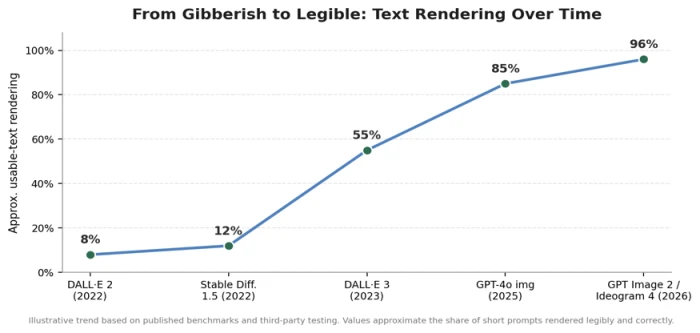
Figure 1 — Approximate share of short prompts rendered legibly and correctly, by model generation (illustrative).
Where the Models Stand in 2026
Text is no longer a universal weakness, it has become a specialization. A few models now render clean multi-line typography reliably, while others remain "art-first" tools that still need help with words. The chart compares approximate accuracy on structured, multi-word prompts.
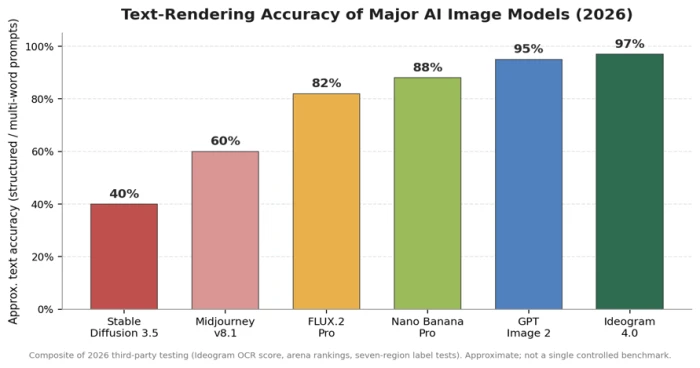
Figure 2 — Approximate text-rendering accuracy on structured prompts, composited from 2026 third-party testing.
A widely cited 2026 test used a "seven-region" coffee-label prompt — mixed case, a date, units, parentheses, an em dash, and a lowercase URL. On the easy four-line version, every current top model was perfect. The hard version separated them: GPT Image 2, Nano Banana Pro and Seedream 5 were exact, while even strong models like Ideogram and FLUX dropped a single digit or a punctuation mark. That's the state of the art: excellent, but not yet flawless on dense, structured layouts.
Model-by-model summary for text work
| Model | Text rendering | Best used for |
|---|---|---|
| Ideogram 4.0 | Best-in-class; ~0.97 OCR score, layout & palette control | Posters, packaging, signage, marketing copy |
| GPT Image 2 | Near-perfect; #1 on quality arenas; reasoning step | General use where quality + text both matter |
| Nano Banana Pro (Google) | Excellent; exact on hard label tests; up to 4K | Photoreal scenes with embedded text, editing |
| Seedream 5 (ByteDance) | Excellent; exact on multi-region prompts; low cost | High-volume text-heavy production |
| FLUX.2 Pro (Black Forest Labs) | Strong; occasional drops on long strings; open weights | Developers, self-hosting, graphic styles |
| Midjourney v8.1 | Weakest of the leaders; still fails many strings | Artistic/editorial imagery — add text in post |
| Stable Diffusion 3.5 | Limited; needs ControlNet / tooling | Local, free, fully controllable pipelines |
Table 2 — Text-rendering standing of major 2026 image models. Capabilities and versions change frequently.
What Changed: Why 2026 Models Can Spell
The improvement wasn't magic , it came from directly attacking each root cause. Four architectural shifts did most of the work:
- Bigger, language-aware text encoders. Swapping small CLIP encoders for large ones (e.g. T5-XXL) gives the model a far richer, more precise understanding of the exact string it's asked to draw.
- Native multimodal / "transfusion" architectures. The biggest leap. Instead of a language model handing off to a separate image model, systems like GPT Image 2 integrate text understanding and image generation in one model. The part that knows how words are spelled is now directly in control of drawing them.
- Glyph- and character-aware conditioning. Newer methods feed the model explicit glyph or layout "blueprints" treating visual text as a first-class citizen with its own spatial plan rather than hoping letters emerge from noise.
- Layout and bounding-box control. Text specialists like Ideogram let you specify where each text block goes (even via JSON), so the model solves "what to write" and "where to put it" separately closer to a design tool than a slot machine.
A reasoning or planning step before rendering also helps: the model effectively "thinks about" the text first, then commits it to pixels which is why the newest models can hold a date, a URL and a price in one image without scrambling them.
Practical Workarounds That Still Matter
Even with 2026's best models, you'll get better, faster results by working with the architecture instead of against it:
Pick the right tool for the job. If typography is the point, start with a text specialist (Ideogram, GPT Image 2, Nano Banana Pro) — not an art-first model like Midjourney.
Put the exact text in quotes. Most models treat quoted strings as literal text instructions, e.g. title: "DEVCON 2026".
Keep strings short and split them up. Accuracy is highest on a few words. Describe multiple short text regions rather than one long paragraph.
Generate several candidates. Text rendering is probabilistic; produce 4+ options and pick the clean one, especially for dense layouts.
Layer text in post for anything critical. For logos, legal text, or exact brand copy, generate the background with AI and add typography in Canva, Figma, or Photoshop. Thirty seconds of overlay beats forty re-prompts.
Be explicit about non-Latin scripts. Name the script and, where possible, include the exact characters directly in the prompt — and expect to verify the output carefully.
The Takeaway
AI images struggle with text because, at their core, these models were built to paint the look of the world, not to spell it. Letters were just another texture, chopped into meaning-first tokens, refined region-by-region, and learned from a web full of imperfect real-world signage. Every symptom, the swaps, the melted glyphs, the collapse on long strings, flows from that.
What's remarkable is how quickly that's being solved. By fusing language models directly into image generation and giving text an explicit place in the pipeline, the 2026 leaders have turned the field's most famous weakness into a genuine strength for short, structured English text, at least. Dense multi-region layouts and non-Latin scripts remain the frontier. For now, the smart move is simple: choose a text-capable model, keep strings short, generate a few tries, and drop in real typography whenever the words absolutely have to be right.
Comments
Join the discussion and share your perspective.