
Last year I tested and reviewed dozens of AI tools for this website. Writing assistants, meeting note takers, image generators, automation platforms, support chatbots. Somewhere around review number twenty, I noticed a pattern that had nothing to do with the tools themselves.
The most common question in my inbox was never “which tool is best.” It was some version of this: “We already pay for four of these and nobody on the team uses any of them. What went wrong?”
That question is the reason this article exists.
Businesses are excellent at buying software and terrible at using it. The research backs this up at a scale that surprised even me, and I spend my working hours inside this industry. Many companies now lose more money to idle subscriptions than they spend on entire departments.
So here is the plan. First, we will put a real price tag on the problem, because most businesses have never calculated theirs. Then we will follow a typical bad purchase from demo to dead login, one decision at a time. After that, we will look at why AI tools poured fuel on the fire, and I will hand you the exact six-step evaluation framework I use before recommending any tool on this site. We will close with three businesses that dug themselves out, plus a simple system that keeps a software stack lean for good.
Let's start with the bill nobody reads.

The Bill Nobody Reads
When I started pulling research for this piece, I expected waste in the range of 10 to 15 percent of software spend. The actual numbers live in a different universe.
| What the research shows | Source |
|---|---|
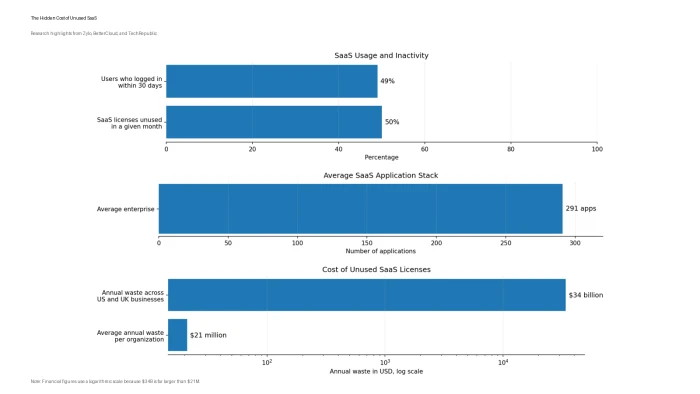
| About half of all SaaS licenses go unused in a given month | Zylo SaaS Management Index |
| Organizations waste an average of $21 million per year on idle licenses, a 14.2% jump in a single year | Zylo, 2025 |
| Only 49% of SaaS users logged in during the past 30 days | BetterCloud, 2026 |
| The average enterprise now runs 291 separate applications | BetterCloud, 2026 |
| Businesses in the US and UK burn around $34 billion a year on unused licenses | TechRepublic |
Sit with that first row for a moment. Half. For every two seats a company pays for, one sits empty.
The damage goes beyond the invoice, too. Employees now switch between applications about 1,200 times per day, which costs them roughly 9 percent of their working hours in context switching alone. The software bought to save time has started eating it.
Small businesses love to assume this is an enterprise disease. It is not. Run the math on a ten-person team: 14 subscriptions at an average of $18 per user per month works out to just over $30,000 a year in SaaS spending. If half of it sits idle, which is exactly what the data predicts, that team is burning $15,000 annually. That is a capable freelance hire or a full quarter of ad budget, converted into login screens nobody visits.
Gartner projects that organizations without centralized visibility into their subscriptions will overspend by at least 25 percent through 2027. Read that projection carefully: waste is the default outcome. Avoiding it takes deliberate effort.
These numbers describe the damage, but they do not explain it. For that, we need to rewind to the day each subscription was purchased, because unused software begins at checkout, long before any renewal notice arrives.
The Anatomy of a Bad Purchase
Every dead subscription I have helped a reader diagnose died from one or more of the same six wounds. Here they are, in the order they usually appear.
1. The purchase starts with a feature list, not a problem
Watch how software actually gets bought. A founder sees a demo or a competitor's case study. The new tool has 40 features. The old tool had 12. The upgrade feels obvious.
Notice what never happened in that story: nobody wrote down the problem. In three years of testing tools for this site, the products my readers renew are almost never the ones with the longest feature pages. They are the ones that removed one painful step from a workflow the team repeats every single day. Feature count is the weakest predictor of software ROI I have found.
2. Hype closes the deal
Once a feature list creates interest, fear finishes the job. A competitor mentions AI in a pitch. A board member forwards an article. The question quietly shifts from “do we need this” to “can we afford to fall behind.”
MIT's State of AI in Business research found that 50 to 70 percent of corporate AI budgets flow into sales and marketing tools, largely because those purchases are the easiest to imagine and justify internally, while the highest measured returns actually came from unglamorous back-office automation. Hype causes bad purchases and, worse, aims the budget at the wrong targets.
3. Nobody owns the rollout
The contract gets signed on a Tuesday. Then what? In most businesses, nothing. No named owner, no onboarding plan, no training budget, no definition of success. Research on failed AI projects found that only 27 percent of executives had a comprehensive adoption strategy, and only 29 percent of organizations could confidently measure return on investment at all.
A tool without an owner is a tool on a countdown timer.
4. The team never asked for it
Software does not change habits. People do.
When a tool arrives from above with no training and no explanation of what it replaces, employees make a quiet, rational choice: they keep the old workflow that already works. Weeks later, leadership concludes the tool failed. The tool never got a chance. Employee adoption is a change-management project wearing a software costume, and businesses keep budgeting for the software while skipping the change management.
5. The stack already had something similar
This is the wound I see most often in the AI category. The average company now carries 6.9 duplicate subscriptions and 4.4 orphaned apps that no active employee even owns, according to License Logic's research. An AI writing assistant here, a chatbot with writing features there, a meeting tool that also drafts emails, a CRM that added its own AI composer last quarter. Four invoices, one job.
6. The annual plan locks the mistake in
Vendors offer 20 to 30 percent off for annual billing, and buyers take the discount before the tool has survived a single month of real work. Auto-renewal does the rest. Organizations now process around 247 SaaS renewals per year, roughly one every business day, and most of them happen without anyone checking usage data first. A monthly plan that costs 25 percent more is often the cheapest insurance a business can buy.
Every wound on this list existed before ChatGPT launched. So why write this article now? Because the AI boom took all six problems and multiplied them.
Why AI Tools Made the Problem Explode

Here is what changed. Traditional software categories had three or four serious vendors. AI categories have hundreds of vendors that launch weekly and describe themselves with the same twelve words. When every product page promises faster writing and automated everything, comparison turns into guesswork, and guesswork produces shelfware.
The outcome data is brutal:
- MIT's NANDA initiative found that 95 percent of enterprise generative-AI pilots showed no measurable impact on profit and loss.
- S&P Global found that 42 percent of companies abandoned most of their AI initiatives in 2025, up from 17 percent just one year earlier.
- Zylo reports that 66.5 percent of IT leaders were hit with unexpected charges because of AI or consumption-based pricing models they did not fully understand at purchase.
- Meanwhile, MIT found that employees at over 90 percent of firms use personal AI tools at work, while only about 40 percent of those firms pay for official enterprise subscriptions.
That last statistic deserves a second look, because it tells the whole story in miniature. The official, expensive tool sits unused while employees quietly get value from a $20 personal subscription they chose themselves. The gap between those numbers is not a technology gap. It is a buying-process gap.
One nuance, in fairness: analysts at BCG and KPMG argue that rising abandonment partly reflects healthier experimentation, meaning firms now run more pilots and kill the failures faster. Fair point. For a buyer, though, the lesson stands: an AI purchase is a hypothesis, and most hypotheses fail. Buy like a scientist, never like a fan.
Before we get to the fix, check whether your business is already carrying this problem. The symptoms are easy to spot once someone names them.
Six Signs You Have Already Overbought
Two or more tools in your stack can perform the same core job.
- A tool gets opened fewer than four times a month by the people licensed for it.
- Your team still runs the real work through spreadsheets while a premium tool sits idle.
- Nobody can name the owner of a given subscription without checking.
- Software spend grew this year while output stayed flat.
- You keep discovering card charges for tools you forgot existed.
If you nodded at two or more of these, the next section will repay the time it takes to read. It is also the exact checklist that sits underneath every review published on this site, so you are seeing the machinery itself, and you can reuse it for any purchase, AI or otherwise.

The Six-Step Framework I Use Before Recommending Any Tool
Step 1: Write the problem down before opening a browser
One sentence, in this shape: “Our [team] loses [hours] each week doing [task] manually.” If you cannot fill in those blanks, you are shopping for entertainment. Every review I publish opens by defining which specific problem the tool claims to solve, because no tool can be judged in a vacuum.
Step 2: Split must-have from nice-to-have
List a maximum of five capabilities the tool must deliver to solve the problem from Step 1. Everything else is decoration. When I score feature quality in a review, I score it against this kind of list, never against the vendor's marketing page. A tool that does five things your team needs beats a tool that does forty things nobody asked for.
Step 3: Check integrations before checking price
As we saw in the anatomy section, orphaned tools die in isolation. If the software cannot connect to the systems where your work already lives (your CRM, your documents, your communication platform, your calendar), then your team has to remember to visit it. They will not. Integration depth carries heavy weight in my reviews for exactly this reason: it is the single best predictor of whether a tool survives six months.
Step 4: Trial with real work, never demo data
Vendors design demos to impress. Your messy reality is the actual test. During the free trial, push one live project through the tool, such as an actual client brief or a genuine data export from your systems. In my own testing process this is the stage where most AI tools fall apart, and it is why my reviews document hands-on use cases instead of repeating spec sheets.
Step 5: Measure adoption at day 30
Set a calendar reminder for 30 days after purchase and answer one question: what percentage of licensed users touched this tool last week? Below 60 percent means you have an intervention to run, either training or cancellation. Recall the BetterCloud figure from earlier: across the industry, active usage sits at 49 percent. Your only goal is to beat the average you now know exists.
Step 6: Do the ROI math on one line
| Input | Example |
|---|---|
| Hours saved per user per week | 2 |
| Users actively using the tool | 6 |
| Average loaded hourly cost | $35 |
| Monthly value created | 2 x 6 x $35 x 4 weeks = $1,680 |
| Monthly subscription cost | $348 |
| Verdict | Keep it (value is about 4.8x the cost) |
If the value does not clear the cost by at least two times, cancel without guilt. The two-times bar exists because your estimates are optimistic and adoption decays over time.
That is the framework. To show what it looks like in the wild, here are three cases drawn from readers and clients of this site, with identifying details changed.
Three Businesses That Dug Themselves Out
The agency paying five tools to do one job
A twelve-person marketing agency wrote to me carrying five separate AI writing subscriptions, each adopted during a different client crisis, costing about $890 per month combined. We ran the audit from the framework above. The must-have list turned out short: long-form drafts, brand voice control, plagiarism checking, and team seats. One tool covered all four. They consolidated to it and trained the whole team on a shared style guide in a single afternoon. New bill: $190 per month. That is roughly $8,400 back per year, with less tool-switching for writers on deadline.
The startup that almost bought three automation platforms
A SaaS startup's operations lead had trials running on three automation platforms at once, each championed by a different team. Instead of letting every team buy its own favorite, they ran one shared pilot: each team submitted its most repetitive workflow, and every platform got two weeks to handle all of them with live data. Only one platform connected cleanly to the company's existing stack, which is Step 3 doing its job. They standardized on that platform, named an owner, documented the setup, and moved on. Two years later it remains their backbone, and building a new workflow takes hours instead of weeks.
The retailer drowning in niche subscriptions
A small online retailer had accumulated seven single-purpose tools: email marketing, review collection, a social scheduler, a popup builder, and three smaller utilities, totaling about $420 per month. During a renewal audit they found one mid-priced platform whose base plan covered five of the seven jobs. They validated it with a real product launch before switching. The two genuinely specialized tools stayed. Monthly software spend fell by nearly half, and the two-person team went from seven logins to three.
Notice what all three stories share. Nobody fixed the problem by buying something new first. Every fix started with an audit, and every purchase decision followed a real-workflow trial. Which brings us to the last piece: making sure the problem never rebuilds itself.
Keeping the Stack Lean After You Fix It
Industry research carries one final warning: even after identifying their waste, companies typically reclaim only 5 to 15 percent of it, because nobody holds the authority or the calendar to act. Insight without a system decays. The system below takes an afternoon to set up and about an hour a quarter to maintain:
- Run a software audit every quarter. List each tool, its owner, its monthly cost, and last month's active users. The first pass takes an afternoon; every later pass takes an hour.
- Build a renewal calendar. Put every renewal date in a shared calendar with a reminder 60 days ahead, while you still hold the power to cancel or negotiate. After auto-renewal, you hold neither.
- Give every subscription a named owner. Send department heads a short monthly note: here is what you pay for, and here is who used it. Usage becomes visible, and visible waste gets fixed.
- Default to monthly billing until a tool survives 90 days of real use. Then take the annual discount with confidence.
And underneath the audit and the calendar sits the cheapest safeguard of all: never be the first test subject for your own money. Someone should push every tool through real workflows before you pay for it. On this site, that someone is me. Every review here follows the six steps you just read. It documents where each tool breaks, which business sizes it fits, and who should skip it entirely. Read the review first, then make your next software purchase the first one your team fully uses.
Comments
Join the discussion and share your perspective.