
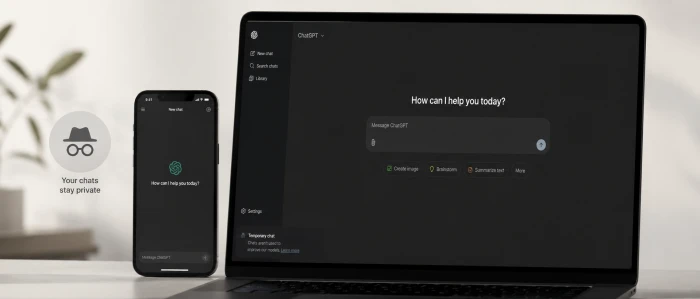
ChatGPT keeps a record of almost everything you type into it. Every question and every half-formed idea lands in your history by default.
There is a way around that, and it has been part of the app the whole time. ChatGPT calls it Temporary Chat. Open one and the conversation never lands in your history or gets used to train OpenAI's models. People tend to call it ChatGPT's incognito mode, since it works like the private window in your browser. Here is what it does and when reaching for it pays off.
What "Incognito Mode" Means in ChatGPT
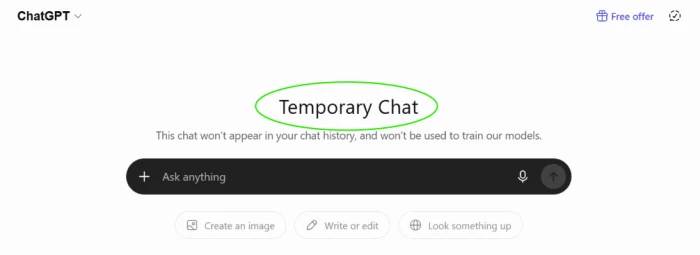
ChatGPT's version of incognito mode is Temporary Chat. Start one and the conversation stays off your history and out of OpenAI's training data. It also skips the personalization that normally shapes answers based on what you have asked before, so each temporary session begins from a blank slate.
The mental model is your browser's private window. Temporary by design, gone when you close it.
Why You Should Consider Using It
Personal questions. A lot of what people ask ChatGPT is the sort of thing they would never put in writing anywhere else, like health symptoms they are nervous about or a money problem they have not told anyone. Temporary Chat lets you ask without it turning into a permanent entry in your account.
A shared or public computer. Borrowing a friend's laptop or signing in on a work machine? A temporary session keeps your questions out of the chat list, so the next person to open the app finds none of what you typed.
A cleaner history. Not every question deserves a permanent spot in your sidebar. Throwaway tests and idle curiosity pile up fast, and after a few weeks your list of past chats becomes clutter you have to scroll through to reach the one conversation you actually wanted to keep. A temporary session absorbs the disposable stuff and leaves your real history clean.
Room to experiment. Custom instructions and memory quietly shape how ChatGPT answers you over time. Run your stranger or more aggressive prompt ideas in a temporary session, and none of it bleeds back into that setup.
A wall between work and personal life. A quick personal question does not need to sit beside your work projects, and a work brainstorm does not need to mix into the rest of your account. Open a temporary chat and the two stay separate.
A smaller data trail. These chats stay out of model training, so a temporary session keeps one specific conversation out of that pipeline.
When You Shouldn't Use Temporary Chat
Temporary Chat is the wrong tool for anything you expect to come back to. A research project that runs over several days, or a piece of writing you are refining in stages: these benefit from a saved thread you can reopen.
Memory is the other reason to stay in a normal chat. ChatGPT gets more useful as it learns your preferences and the shape of your work, and a temporary session deliberately skips that. If you want answers tuned to your earlier conversations, keep history on.
Saved chats also leave you a usable record. You can search back through old answers or copy something you wrote last month. They give you a reference if you ever need to show what a model actually said. Use it when you want a clean break. Skip it when you want a paper trail.
How to Turn It On
Switching to Temporary Chat takes only a few seconds.
- Open ChatGPT on the web or in the app.
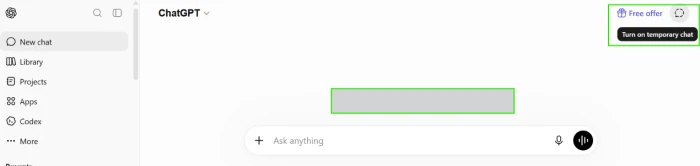
- Find the Temporary Chat toggle near the top of the screen. On the web it usually sits toward the top right. On mobile, tap the model name at the top of the chat to reveal it.
- Switch it on. The screen changes to show you have entered a temporary session.
- Chat as usual. When you finish, close the session or switch back to a normal chat. Nothing from it saves to your history.
To go back, turn the toggle off or start a fresh standard conversation.
Where You Can Use Temporary Chat
Temporary Chat shows up for both free and paid ChatGPT accounts, on the web and in the mobile apps, so you do not need a subscription to use it.
A few conditions can hide the toggle. Some organizations that manage ChatGPT for their staff switch the setting off, and certain workspace or enterprise configurations change what is available. If the toggle is missing on a managed account, an administrator has probably disabled it. Check your account type before assuming the feature is gone.
What It Doesn't Do
The word incognito oversells things a little. A few limits matter before you lean on it for privacy.
It is not full anonymity. The conversation stays off your history and out of training data, but OpenAI may still keep a temporary copy for a limited time to screen for abuse and safety. Check OpenAI's current policy for the exact retention window, since these terms change.
It forgets everything. That is the whole point, and it also means no memory of past chats and no personalization. Every temporary session starts cold.
It does not make you invisible on the network. Like a private browser window, it will not hide your activity from a network administrator or your internet provider. The toggle controls what saves to your ChatGPT account, not what travels across the wider network.
On a monitored work computer, the same caution applies. Your employer's tools can log activity at the device or network level no matter which ChatGPT mode you pick.
Temporary Chat vs. Deleting a Chat
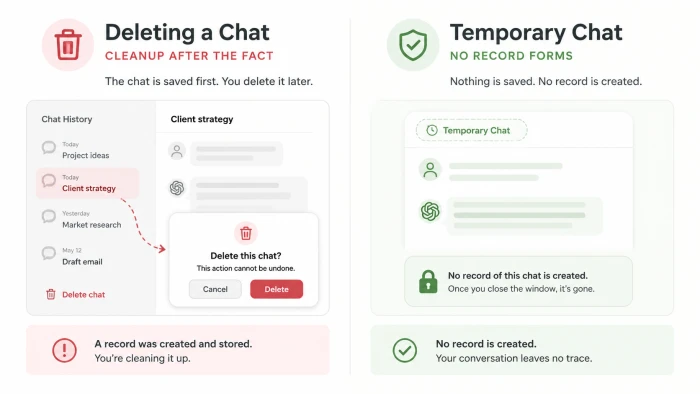
Deleting a chat and starting one in Temporary Chat solve different problems. Deleting cleans up a conversation after it already existed in your history, and depending on timing it may have shaped personalization before you removed it. A temporary session stops that record from forming at all. When you already know a conversation is one you will not want kept, starting it temporary beats deleting it later.
Three sections that add real substance without retreading what's there. I've written each to your style sheet (no em-dashes, no three-item lists, none of the banned phrases, varied rhythm), so you can paste them straight in.
Other Ways to Keep ChatGPT Private
Temporary Chat handles single sessions, but ChatGPT gives you broader controls if privacy is a standing concern.
Inside your data controls, you can switch off the setting that lets your conversations improve the model. With it off, your normal chats stop feeding training while still saving to your history, so you keep continuity without handing over your data. It is the account-wide version of what one temporary session does.
Memory is the next place to check. You can review what ChatGPT has remembered and delete entries one by one. If you would rather start fresh, clear the whole store at once, which helps when it has picked up something you would rather it forget.
For a clean exit, you can export a copy of your data or delete your account outright, and both options live in settings. None of this replaces Temporary Chat. These controls work alongside it, covering the conversations you want gone for good rather than the ones you never want recorded in the first place.
Comments
Join the discussion and share your perspective.