
I opened two browser tabs on the same Monday morning. One had Wix loading its dashboard. The other had Squarespace asking me to start a free trial. My goal was simple. Build the same small business site on both, push each one through design, speed, SEO, and selling, then work out which platform earns the money you hand it every month.
Here is the uncomfortable part for anyone hoping for a clean answer. At the entry level, these two cost almost the same. Wix Light sits at $17 a month on annual billing. Squarespace Basic sits at $19. So price alone will not decide this for you. What happens after you log in will.
I have built and run more than a dozen sites over the years, so I went in looking for the small frustrations that only show up once you are past the demo and living inside the thing.
This article walks through that build, step by step, in the order you would actually hit each decision. We start where every new site starts, with the sign-up screen.
The first fork: a free plan or a ticking clock
Wix lets you build for free, forever. You get a working site on a Wix subdomain with Wix branding on it, and you can take your time. Nothing expires.
Squarespace does not offer a free plan at all. You get 14 days, no credit card needed, and then the site locks until you pay.
That gap matters more than it looks. On Wix I poked around for three days before committing a rupee. On Squarespace I felt the clock from hour one. If you like to test slowly, Wix hands you room that Squarespace simply does not. Keep this difference in mind, because it sets the tone for the two philosophies we meet in the next section.
The editor: freedom versus guardrails
This is where you spend most of your time, so it deserves the closest look.
Wix uses a true drag-and-drop canvas. You can grab any element and drop it anywhere on the page, down to the pixel. A button, a headline, a photo, a whole section, it all moves freely.

Squarespace works differently. Its editor snaps your content into a structured grid. You move things into defined zones rather than onto a blank canvas. You get fewer ways to go wrong, and fewer ways to express something odd.
Both approaches have a cost. Wix freedom means a beginner can create a messy, misaligned page without noticing. Squarespace guardrails mean a beginner lands on something clean fast, but a designer can feel boxed in. Reviewers split on this for a reason. TechRadar and Gizmodo hand ease-of-use to Wix for the creative freedom. Website Builder Expert hands it to Squarespace because the grid produces tidy results with less effort. Both are right, depending on who is holding the mouse.
Two smaller details separated them during my build:
- Wix saves your work automatically. Squarespace still asks you to save changes by hand, which caught me out twice.
- Wix gives you a separate mobile editor so you can tune the phone view directly. Squarespace makes every template responsive on its own, which lines up neatly with Google's mobile-first indexing.
That mobile point leads straight into design, which is the next stop.
Templates and design: quantity against polish
Wix ships more than 900 templates. The range is enormous, and the quality is uneven. Some look sharp. Some look like 2014.
Squarespace ships roughly 150. Every one of them looks like a design studio built it. There is almost no weak link in the catalogue.
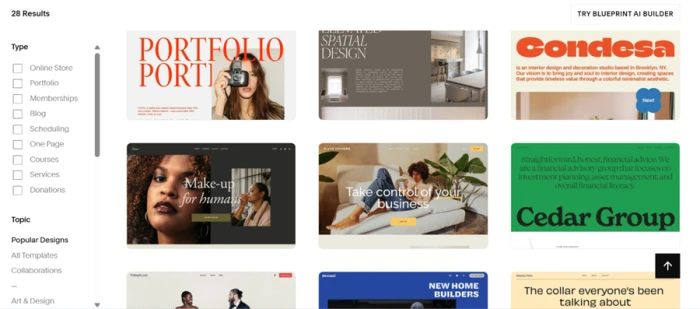
So the template race is a question of what you value. If you want a specific layout for a niche, say a wedding photographer or a tiffin service, Wix probably has a starting point for it. If you want to look expensive without hiring a designer, Squarespace gets you there with less fuss.
One shared limitation is worth flagging honestly. Neither platform lets you swap templates freely once your site is built and full of content. On Squarespace 7.1 the templates all share one underlying structure, so the switch is less dramatic, but on both you are better off choosing well the first time than hoping to redesign later.
Design sets how your site looks. The next section decides how fast it loads, which your visitors feel within the first second.
Speed: what the Core Web Vitals actually show
A pretty site that loads slowly loses visitors and rankings. So I cared about this one.
Independent Core Web Vitals testing in 2026 points to a split result rather than a knockout. Squarespace tends to post faster server response times and better interactivity on mobile, helped by its lean, responsive-by-default templates. Wix holds a small edge on layout stability, meaning less of that annoying jump where a button moves just as you tap it.
In plain terms: Squarespace sites often feel quicker to react, while Wix sites tend to settle into place without shifting around. A steadier layout also protects your sales, because a shopper who taps the wrong button by accident sometimes gives up instead of trying again. Neither platform is slow enough to disqualify it. If raw speed is your top priority, Squarespace has the narrow lead, and that lead feeds directly into the SEO question we turn to now.
SEO: closer to a tie than either fan will admit
Both platforms give you the controls that matter. You can edit page titles, meta descriptions, URL slugs, alt text, and you can connect Google Search Console on either one.
Wix leans on guidance. It offers an SEO setup checklist that walks a beginner through the basics, plus deeper integrations for people who want them. Squarespace leans on structure. Its clean code and automatic responsiveness give you a tidy foundation, though you do more of the meta work by hand. Both auto-generate a sitemap and include SSL on every plan, so the technical floor is solid whichever way you go.
After building on both, my honest read matches what most testers conclude. The platform is not what decides your rankings. Your keywords, your content, your internal links, and the backlinks you earn decide them. Pick either, do the work, and you can rank. A website builder will not do that work for you.
Most of that content ends up living on a blog, and the blog is where Squarespace quietly pulls ahead. We look at that before we reach the shop.
Blogging: a quiet Squarespace win
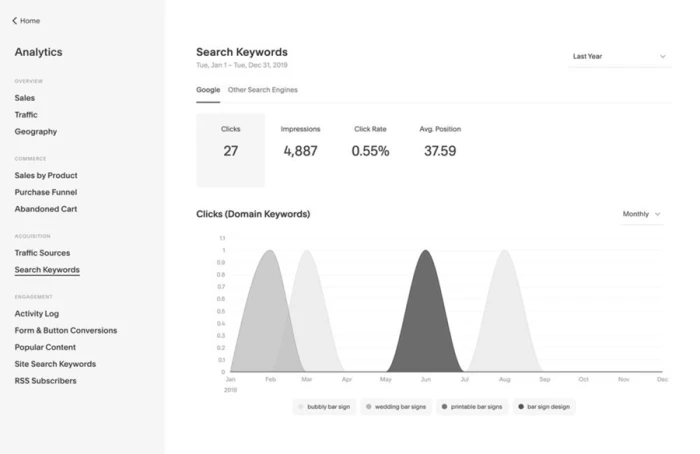
Squarespace grew out of a blogging and portfolio background, and it shows. Its blog editor handles categories, tags, scheduled posts, and multiple authors with less friction than Wix.
Wix blogs well enough for a business that posts now and then. If regular publishing sits at the centre of your plan, Squarespace hands you the smoother writing desk. Content feeds the rankings we just discussed, and rankings feed the shop, so selling is the next stop.
Selling online: the clearest difference of all
If you plan to run a shop, read this section twice.
Wix is built as an all-in-one seller. On paid plans it includes point-of-sale for in-person selling, multichannel tools to list on other marketplaces, dropshipping through Modalyst, and unlimited storage on the top plan. It does not add its own cut on top of your sales. You pay only the payment processor, which for US cards is around 2.9% plus $0.30 per transaction.
Squarespace splits selling by plan, and one number deserves your attention. Its entry Basic plan charges a 2% transaction fee on every sale, on top of payment processing. Move up to Core or higher and that fee drops to 0%. Here is how the two compare on fees:
| Plan level | Wix seller fee | Squarespace seller fee |
|---|---|---|
| Entry paid plan | None beyond processing | 2% (Basic) |
| Mid plan and above | None beyond processing | 0% (Core and up) |
| Payment processing | about 2.9% + $0.30 | 2.5% to 2.9% + $0.30 by plan |
Where Squarespace fights back is services. Its Acuity Scheduling tool is genuinely strong for anyone selling time rather than products, a coach or a consultant. Its product pages also look beautiful out of the box, matching the template polish we saw earlier.
There is one more layer worth knowing. Beyond the built-in tools, Wix opens into a large App Market with hundreds of add-ons for marketing, reviews, bookings, and shipping. Squarespace keeps a smaller, more curated Extensions library, which means fewer choices but far less clutter to wade through.
So the selling verdict divides by business type. Physical products and in-person sales favour Wix. Bookings, digital downloads, memberships, and brand-led shops lean Squarespace. Hold that thought, because it shapes the final recommendation once we fold in price.
When something breaks: getting help
At some point your site will misbehave, and the speed of a reply matters. Wix offers phone callbacks, live chat, email tickets, and a deep help centre, so you can reach a human through more than one door. Squarespace keeps its support mostly in writing, through email and limited live chat, with no phone line at all.
For a beginner running a business alone, that difference can decide a stressful afternoon. With support weighed, the last filter is cost, and that is where we finish the build.
The price tag, side by side
You have now seen how each platform designs, loads, sells, and supports a site. The numbers decide how much that capability costs. All figures below are billed annually, in US dollars for reference. Indian pricing differs, and both companies run heavy discounts around sale periods, so treat these as the list rate.
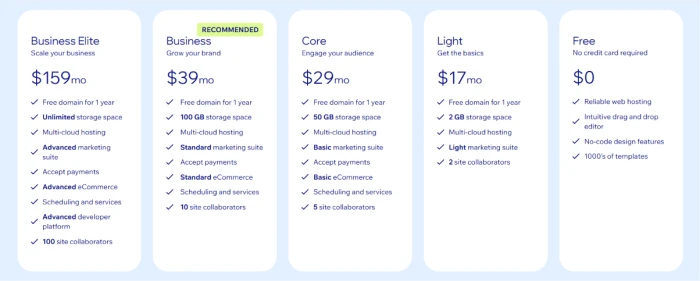
Wix plans:
| Plan | Price per month | Storage | Suited to |
|---|---|---|---|
| Free | $0 | Limited | Testing ideas, with Wix branding |
| Light | $17 | 2 GB | Personal and informational sites |
| Core | $29 | 50 GB | Small online stores |
| Business | $39 | 100 GB | Growing stores |
| Business Elite | $159 | Unlimited | High-volume sellers |
Squarespace plans:
| Plan | Price per month | Seller fee | Suited to |
| Basic | $19 | 2% | Starter sites with light selling |
| Core | $29 | 0% | Small stores and business sites |
| Plus | $49 | 0% | Growing shops |
| Advanced | $99 | 0% | Larger brands |
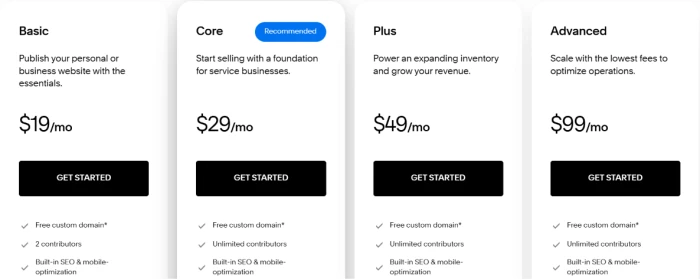
Two things jump out. Wix is the only one of the pair with a real free plan, which ties back to that first fork we started with. And at the top end, Squarespace Advanced at $99 undercuts Wix Business Elite at $159 by a wide margin, though the two top tiers aim at slightly different buyers.
For most small businesses the real fight is in the middle. Wix Core and Squarespace Core both land near $29 a month with no seller fee. At that point you are back to choosing on the editor, the templates, and the selling style, not the price.
So which one is actually worth it?
Here is my verdict after building on both.
Pick Wix if you want freedom and a free start. It fits people who like to arrange a page exactly their way, who sell physical products, who run a shop and a blog under one roof, or who want to launch something today without paying first. The trade is that all that freedom can overwhelm a first-timer.
Pick Squarespace if you want a polished site with less effort. It fits creatives and brand-led businesses, plus service providers who care more about looking sharp than about tweaking every pixel. The trade is the missing free plan and the 2% fee lurking on the cheapest tier.
Comments
Join the discussion and share your perspective.