AI Shorts GeneratorYouTube RepurposingFace TrackingAnimated Subtitles26+ Languages
2short.ai Review
https://2short.ai · Indie-built by Sam Jasik · YouTube to Shorts pipeline
2short.ai turns long YouTube videos into vertical short clips for TikTok, Reels, and YouTube Shorts using AI to extract the most engaging moments automatically. The platform handles face tracking, animated subtitles, multi-aspect-ratio exports, brand presets, and a Video Ideas generator that suggests new content based on the channel topic. Built and maintained by a single developer rather than a venture-backed team, the product sits at the lower end of the AI shorts category pricing: Lite at $9.90 per month, Pro at $19.90, and Premium at $49.90. The free Starter tier offers 30 minutes of monthly AI video analysis, enough to test the workflow before any spend. In a category dominated by Opus Clip and Vizard, 2short.ai is the indie, affordable alternative with the same core feature set at materially lower price points.
FC
FirmCritics Editorial Team
Published May 30, 2026 · 15 min read · Updated regularly
An indie-built AI shorts generator at the budget end of the category
2short.ai is a browser-based tool that takes a long YouTube video, runs AI analysis over the transcript and visuals, and outputs ready-to-publish vertical short clips with animated subtitles, face tracking, and brand presets. The pitch is "10x faster repurposing" of long-form content into TikTok, Instagram Reels, and YouTube Shorts. Built and maintained by a single developer (Sam Jasik), the product sits deliberately at the budget end of the AI shorts category: Lite at $9.90 per month is roughly half the price of Opus Clip's Pro tier and a third of Vizard's Creator plan.
The platform's natural audience is solo creators, podcast hosts, and educators who upload long videos and want to repurpose the best moments without learning a video editor. The tool works specifically with content that has spoken words and captions, which means podcasts, interviews, educational videos, commentary, product reviews, and motivational speeches all fit the workflow. Music-driven or visual-heavy content with minimal dialogue is a weaker fit because the AI uses transcript-driven analysis to find engaging moments.
What Happened When We Tested It
Five steps from a YouTube URL to a finished short clip
The full 2short.ai workflow was tested end-to-end on the free Starter tier, from pasting a YouTube URL through to opening the editor on a generated clip. The Video Ideas dashboard was also tested separately. Each step is documented with a captured screenshot below.
The Dashboard
Step 01 · Onboarding
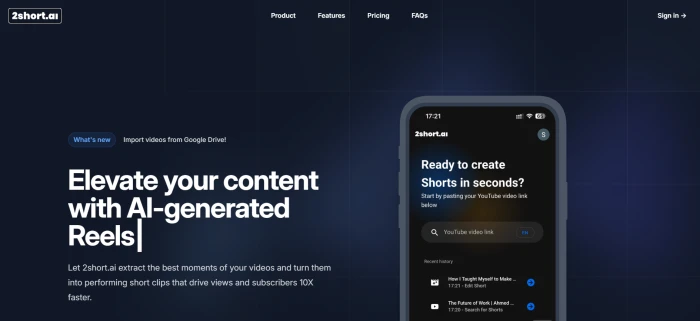
The 2short.ai dashboard with the two main workflows surfaced as primary actions.
The dashboard keeps the surface area small. Two primary actions sit front and centre: Create Short (the core repurposing workflow) and Video Ideas (the content planning tool). No distracting feed, no community content, no upsell wall. For a creator who knows what they came to do, the interface gets out of the way faster than competitors with broader feature sets to surface.
Create Shorts: Input the Long Video
Step 02 · The input form
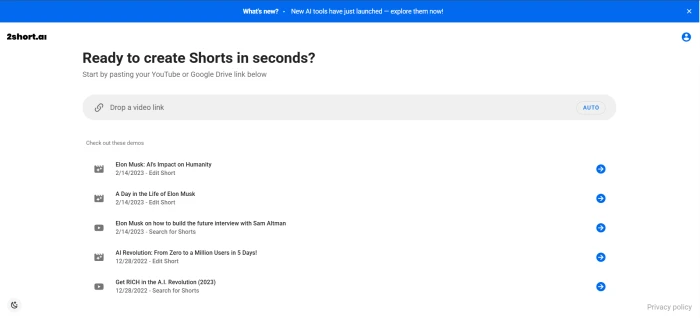
The Create Short workflow takes a YouTube URL (or Google Drive link on paid tiers) and starts the AI analysis.
Paste a YouTube URL, pick the desired aspect ratio, and submit. The AI begins transcript analysis and visual scoring to identify the most engaging moments. Processing time scales with video length, but a 30-minute source typically returns clips within a few minutes. The platform requires source videos to have captions available (YouTube auto-generates captions on most public videos, so this is rarely a blocker in practice).
Generated Shorts with AI Titles
Step 03 · The output
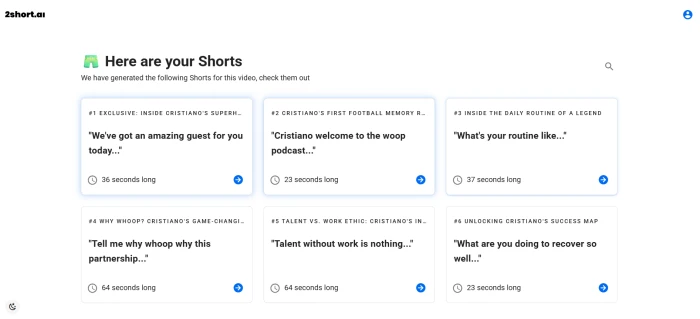
Multiple short clips generated from a single long video, each with an AI-generated title summarising the clip content.
The AI returns a set of candidate clips, each with an auto-generated title that summarises what the moment is about. Titles help with both clip selection and downstream social caption writing, since the title language often translates directly into a usable hook for the published short. The number of clips returned scales with source video length and the density of engaging moments detected.
The Editor: Subtitle Styles and Adjustments
Step 04 · Customisation
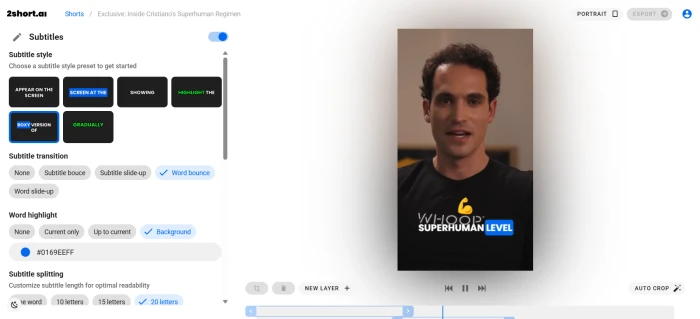
The clip editor with subtitle styling, animated caption options, and aspect ratio controls.
Clicking into a generated clip opens the editor view, where subtitle styles can be changed, animated caption presets applied, and the framing adjusted manually if the auto face-tracking does not pick the right subject. The editor is deliberately scoped: it covers what most creators need (captions, framing, brand logo) without sprawling into a full timeline editor. For users who want deep timeline control, this is a limitation. For users who want a clean caption tool, it is exactly enough.
Video Ideas Dashboard
Step 05 · Content planning
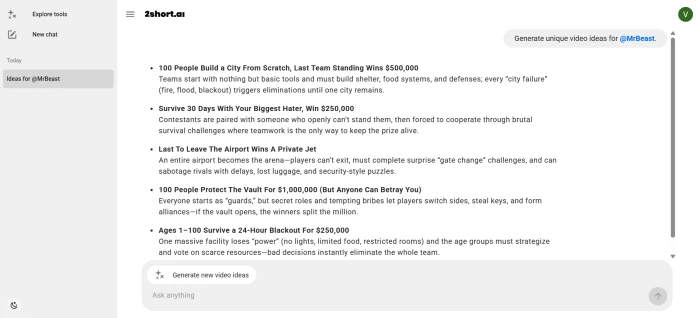
The Video Ideas dashboard generates content suggestions based on the channel name and topic provided.
A creator types in their channel name (or topic) and the tool returns a list of video ideas matched to that niche. This sits outside the core shorts workflow but is genuinely useful for solo creators who run dry on ideas. The output is structured around concrete video concepts rather than vague topic suggestions, which makes it more directly actionable than the standard AI brainstorming chatbots. Not category-defining, but a sensible bundled extra at this price point.
How this review was put together. First-hand testing covered the full Create Shorts workflow (URL input, AI analysis, generated clips, editor view) plus the Video Ideas dashboard, on a fresh free Starter account. Output quality, processing speed, and feature scope were verified directly. Pricing and feature data for Opus Clip, Vizard, Submagic, Klap, and MakeShorts were cross-referenced from each platform's own public pricing pages and from independent AI tool category reviews published in 2026.
Seven Features, Scored
Where 2short.ai earns the score
Scores at a Glance
Pricing Value
8.5
AI Clip Extraction
7.8
Face Tracking
7.8
Animated Subtitles
7.5
Multi-Format Export
8.0
Video Ideas Tool
7.2
Free Tier Allowance
6.5
Feature-by-feature breakdownScored on a 10-point scale
01
Pricing value CATEGORY-CHEAPEST PAID TIER
Lite at $9.90 per month is materially cheaper than Opus Clip Pro ($19.50), Vizard Creator ($19.99), Submagic Standard ($16), and Klap (~$29). For solo creators producing 3 to 10 videos a month, this tier covers the full workflow including unlimited 1080p exports with no watermark. Pro at $19.90 doubles the analysis hours to 15 and adds unlimited fast exports, matching the polish of Opus Clip Pro at the same price point. The pricing structure is the platform's strongest defensible position against larger competitors.
LITE: $9.90/mo, 5 hrsPRO: $19.90/mo, 15 hrs
8.5
STRONG
02
AI clip extraction CORE FEATURE
The platform extracts engaging moments from a long YouTube video by analysing the transcript, scoring segments on engagement signals, and producing candidate clips with auto-generated titles. Testing returned multiple usable clips from a single long-form source, with titles that summarised each clip's hook effectively. Output quality matches the baseline expected from this category, though it lacks the deeper engagement scoring that Opus Clip's ClipAnything engine provides through its larger training dataset.
INPUT: YouTube URL or Google DriveOUTPUT: Multiple clips with AI titles
7.8
GOOD
03
Centre-stage face tracking AUTO + MANUAL
AI face tracking keeps active speakers centred in the vertical frame as they move or as the camera switches between subjects. Testing confirmed the tracking works automatically without intervention on standard talking-head content. Manual override is available in the editor for content where the auto-tracking picks the wrong subject (common in two-person interviews). For a budget-tier tool, this implementation is competitive with paid-only features on competing platforms.
MODE: Auto-tracking with manual overrideAVAILABLE: All tiers including Starter
7.8
GOOD
04
Animated subtitles ONE-CLICK ADD
One-click animated subtitle generation with multiple style presets. The implementation handles 26+ languages including Spanish, French, German, Japanese, Korean, and most major European languages. Style variety is competent rather than category-leading: Submagic still produces more polished, trend-aware caption styles, but at twice the price. For most creators publishing short-form content where readable, on-brand captions matter more than novel visual effects, the 2short.ai presets do the job.
Multi-format export and brand presets UNLIMITED HD
Unlimited 1080p exports on every paid tier with no watermark. Vertical (9:16), square (1:1), and horizontal (16:9) aspect ratios let the same source clip publish to TikTok, Instagram feed, and YouTube without re-rendering. Brand presets let creators add logos and overlays for visual consistency across their published catalogue. These three combined would each be a separate paid upgrade on other tools; here they are included from Lite tier upwards.
QUALITY: 1080p, unlimited, no watermarkASPECT RATIOS: Vertical, square, horizontal
8.0
STRONG
06
Video Ideas generator BUNDLED EXTRA
The Video Ideas dashboard takes a channel name or topic and returns a set of suggested video concepts matched to that niche. Useful for solo creators planning content rather than for shorts repurposing directly. Suggestions are structured around concrete video concepts rather than vague topic prompts, which makes the output more actionable than generic AI brainstorming tools. Not category-defining, but a genuine extra that no direct competitor in the AI shorts category bundles into the same subscription.
INPUT: Channel name or topicOUTPUT: Structured video concepts
7.2
FAIR
07
Free tier allowance TIGHT
The Starter tier offers 30 minutes of AI video analysis per month, which works out to roughly one or two long videos depending on source length. Opus Clip's free tier doubles this at 60 minutes per month (with watermarks). For a tool selling on price competitiveness, the free tier is the weak link in the trial-to-paid funnel. Users who want to evaluate properly need to commit to a Lite month, which at $9.90 is low-cost but still a paid step. The cap is generous enough to verify the workflow works, but not generous enough to genuinely test ongoing daily use.
STARTER: 30 min/monthVS OPUS CLIP FREE: 60 min/month
6.5
FAIR
Pricing
Four tiers, all with full feature access
2short.ai's pricing model is unusual in a positive way: every paid tier includes full feature access, with the tiers differing only on monthly AI video analysis hours and export speed allowance. No feature gating beyond the free tier means a Lite subscriber gets the same face tracking, subtitle styles, brand presets, and aspect ratio support as a Premium subscriber. The choice between tiers is purely a volume decision.
Plan
Price
AI Analysis
What Else
Starter
Free
30 min/month
Full feature access, view and export already generated clips
Lite
$9.90/mo
5 hours/month
Everything in Starter, 60 min fast exports, Google Drive imports, no ads
Pro
$19.90/mo
15 hours/month
Everything in Lite, unlimited fast server-side exports
Premium
$49.90/mo
50 hours/month
Everything in Pro, priority support, access to beta features
How to read it. Lite at $9.90 is the right tier for solo creators producing 3 to 10 videos per month, with 5 hours of analysis covering roughly 10 medium-length sources. Pro at $19.90 makes sense for weekly podcast hosts or daily-content creators whose monthly source volume exceeds 5 hours. Premium at $49.90 is for agencies, podcasters with multi-hour episode formats, and high-volume creators who need 50 hours of monthly analysis. Below the Lite tier, the free Starter plan is suitable only for testing whether the workflow fits, not for ongoing production.
Pros and Cons
Where 2short.ai wins, where it loses
+What users like
Lite tier at $9.90 per month is the cheapest serious paid plan in the AI shorts category, with full feature access
Every tier includes the same features, with the only differentiation being analysis hours and export speed, not feature gating
Unlimited 1080p exports with no watermark on every paid tier, which is rare at this price point
Auto face tracking with manual override handles standard talking-head content reliably
Video Ideas dashboard is a genuine bundled extra that no direct competitor includes in the same subscription
Clean, focused interface without the upsell walls and community feeds that bloat competitor dashboards
−What users dislike
Free tier of 30 minutes is half what Opus Clip offers, making proper evaluation harder before any spend
No native multi-platform publishing means clips have to be exported and uploaded manually to each social platform
Caption style depth lags Submagic, which remains the category leader for trend-aware animated captions
Solo developer means slower feature releases and a smaller support team compared with venture-backed competitors
No AI dubbing or multilingual translation, unlike Vizard or Submagic which both support 100+ language workflows
Source video must have captions (auto-generated YouTube captions work, but uploaded MP4 files without captions cannot be processed)
2short.ai vs the Alternatives
Five rivals on the dimensions that decide it
22short.ai
OOpus Clip
VVizard
SSubmagic
KKlap
Score
7.5
8.2
7.8
7.6
7.4
Free Tier
30 min/mo
60 min/mo (watermark)
Limited preview
3 videos (watermark)
1 video trial
Entry Paid Tier
$9.90/mo
$9.50/mo (yearly)
$19.99/mo
$16/mo
~$29/mo
Pro Tier
$19.90/mo
$19.50/mo
$49.99/mo
$30/mo
~$49/mo
Face Tracking
✓
✓
✓
✓
✓
Animated Captions
✓
✓
✓
Best in class
✓
AI Dubbing
✗
✗
✓
✓
✓
Native Publishing
✗
✗
Partial
✗
✗
Best For
Budget solo creators
Polish + Virality Score
Teams + multi-language
Caption-first polish
Volume on speed
2short.ai's defensible position is the Lite tier at $9.90 with full feature access. Opus Clip remains the category leader on output polish, virality scoring, and the depth of its ClipAnything engine, but its pro tier costs roughly the same as 2short.ai's Pro. Vizard is the right pick for teams and multi-language workflows but is more than twice the entry price. Submagic wins specifically on caption style depth and visual polish. Klap targets speed and volume but at materially higher monthly cost. For a solo creator on a budget, 2short.ai is the most efficient pick available.
What Real Users Say
Collected from creator community feedback and verified user platforms
Used to spend hours editing clips from long podcast recordings. Now the URL goes in and 8 to 10 usable shorts come out in minutes. The auto-generated titles are good enough to drop straight into social captions, which saves real time downstream. Output is not the most polished in the category, but time saved per dollar is unbeatable for a solo operation.
Solo podcaster
G2 verified creator
★★★★☆
Switched from a more expensive option after the trial here covered the actual workflow. Quality difference is maybe 10 percent for roughly half the monthly price, which made the choice obvious. The Video Ideas dashboard is a nice extra that other tools in this category do not bundle in, and it has surfaced concepts I would not have arrived at on my own.
YouTube creator
Reddit creator community discussion
★★★★☆
Face tracking actually works on talking-head content, which surprised me at this price point. Manual override is there when the auto-pick is wrong on two-person interviews. Captions are clean and the multi-language support handled Spanish content without any issues. The free tier is tight, but the Lite plan is genuinely affordable once a workflow proves out.
Small business educator
Capterra verified reviewer
★★★★☆
Indie tool with a clear positioning: budget, focused, no upsell pressure. The interface feels lighter than the venture-backed options and skips the community feeds and feature bloat. Solo developer means slower feature releases compared with larger teams, but what is shipped works as documented. Recommended for solo creators starting out who do not need agency team features.
Creator economy commentator
Product Hunt reviewer
★★★★☆
Across independent reviews and verified user platforms, the recurring praise concentrates on pricing competitiveness, feature parity with leaders at lower cost, and the cleanly focused interface. Multiple reviewers specifically call out the auto-generated clip titles as a downstream time-saver for social captions. The recurring criticism concentrates on the smaller free tier compared with Opus Clip and the absence of native multi-platform publishing. The pattern is consistent: the product delivers what it promises at a materially lower price, and the trade-offs are predictable for an indie-built tool in a venture-backed category.
· The Verdict ·
7.5/10
2short.ai is the budget pick that does the job. The right tier depends on monthly volume and budget tolerance.
The honest take. 2short.ai is not the most polished tool in the AI shorts category. Opus Clip has better engagement scoring, Submagic has better captions, Vizard has better multi-language workflows. What 2short.ai has is the cheapest serious paid tier in the category, full feature access at every paid level, and a focused interface that gets out of the creator's way. For solo creators on a budget, that combination is worth more than a small edge in clip quality. The decision matrix below maps the right tier (or rival) based on monthly volume and budget tolerance.
Budget × Volume
Low Volume 1-3 videos/mo
Medium Volume 4-12 videos/mo
High Volume 12+ videos/mo
Tight Budget (under $15/mo)
2short.ai StarterFree 30-min monthly allowance covers 1-2 videos easily, full features included
2short.ai Lite$9.90/mo with 5 hours covers up to 10 videos, the cheapest serious paid tier
2short.ai Pro$19.90/mo with 15 hours, the best value-per-hour at high volume
Standard Budget ($15-$30/mo)
2short.ai LiteMore than enough capacity, lets the budget cover other creator tools
2short.ai ProUnlimited fast exports plus 15 hours covers a weekly podcast workflow
Opus Clip ProMarginally higher polish and virality scoring justify the same price at this volume
Premium Budget ($30+/mo)
Submagic StandardBest caption styling for visually polished output at low volume
Opus Clip ProBetter engagement scoring on competitive niche content where polish matters
Vizard ProTeam features, multi-language workflows, and agency-grade collaboration
Skip 2short.ai entirely if the workflow requires native multi-platform publishing from one dashboard, AI dubbing for multilingual audiences, or team collaboration features. Those needs push the right answer toward Vizard, Submagic, or higher-priced specialists. For solo creators repurposing their own content on a budget, 2short.ai stays the right call.


Discussion
Join the discussion and share your perspective.