AIVA skips the text prompt other AI music tools lean on and hands you a composer's workspace instead. Generate an orchestral piece in under a minute, then open it in an editor that lets you redraw the melody note by note, mute individual parts, and rearrange labelled song sections. The catch sits in the fine print: on the Free and Standard plans the copyright stays with AIVA, and there is no path to a track with vocals anywhere in the product. It suits creators who need editable instrumental cues for video and game work, not finished songs with a voice on top.
AIVA, short for Artificial Intelligence Virtual Artist, is a music generation tool built by a Luxembourg company that has been at this since 2016. It works from a different premise than the text-to-song crowd. Rather than turning a written prompt into a finished track, it treats generation as the opening move in a composing workflow, then drops you into a browser editor to shape whatever the model produced.
The target user is a creator who needs instrumental music and wants it to sound scored rather than stitched together. Picture background beds for a video edit, a theme for an indie game, an ambient cue for a podcast, or a rough sketch a composer intends to finish in a DAW. AIVA advertises more than 250 styles and lets you upload an audio or MIDI influence to steer the output toward a reference. Three consumer plans sit on the pricing page, running from a free tier up to a Pro plan at €49 a month, with Standard in the middle at €15 a month.
What Happened When We Tested It
02 . 6 tests covering generation, editing, exports and rights
I ran the whole session on a fresh free account and took whatever path the interface pushed me toward, from the first track to the export screen. No workarounds, no digging for hidden menus. The first surprise arrived before I had generated a single note.
No Prompt, No Lyrics, No Vocals
Test 01 . The starting point
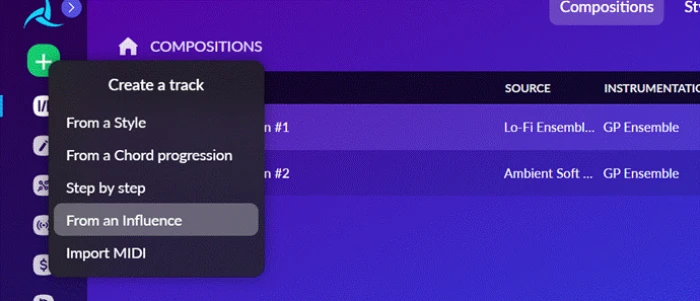
The Create Track menu, with no lyrics or vocal path.
What stood out: AIVA never asks what you want to say. The Create Track menu offers five ways to begin a piece, and every one of them produces an instrumental. There is no lyrics field and no vocal route anywhere in the flow, which quietly rules out a whole category of music before you make a single choice.
A Style Library That Reaches Past Orchestral
Test 02 . Style range
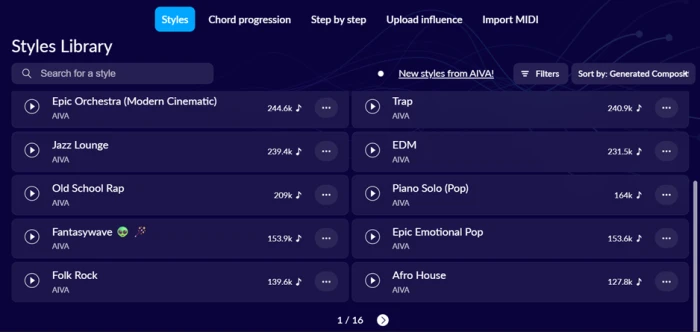
The Styles Library, with a usage counter on every preset.
The evidence: Classical and cinematic presets share the shelf with Trap, EDM, Afro House, and Old School Rap, and each preset carries a counter for how many compositions people have built from it. Epic Orchestra led everything on screen at 244.6k. The breadth looks convincing in the grid. Whether it survives contact with the generate button is a separate question, and one the later tests answered.
Generation Is Fast, the Editor Is Deep
Test 03 . Editor depth
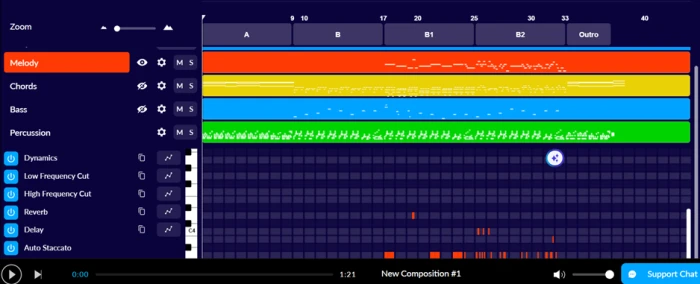
The editor, with four editable layers and labelled song sections.
How it performed: Epic Orchestra returned a finished arrangement in under a minute, split across Melody, Chords, Bass, and Percussion. Opening it in the editor is where AIVA stops behaving like a one-click generator. I could edit any layer down to the single note, mute or solo parts, redraw the melody, and shape volume along a dynamics curve. It had already carved the piece into labelled sections, so rearranging the structure did not mean regenerating from scratch. That depth carries a cost. Anyone who has never opened a piano roll will find the workspace crowded, and a couple of controls hide behind small gear and wave icons that took me several tries to locate.
Where the Free Plan Draws Its Lines
Test 04 . Export gates
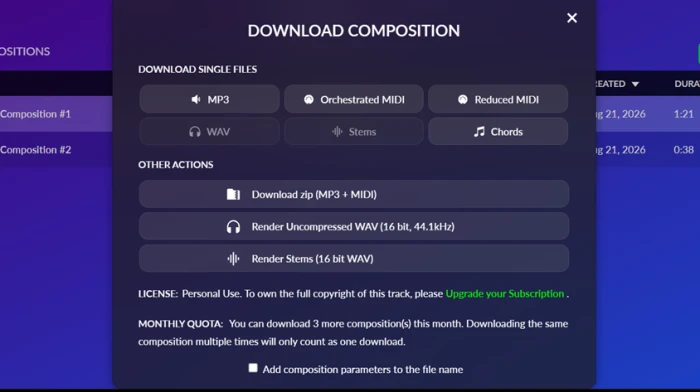
The download panel, with WAV and Stems locked to paid tiers.
Worth noting: MP3 and MIDI downloaded without friction. WAV and Stems sat behind a lock, greyed out for free users. The MIDI itself arrived thoughtfully, in two versions, Orchestrated and Reduced, plus a separate Chords file, which saves real time for anyone finishing in a DAW. The same panel spells out the ceiling in plain language: a free download carries a personal-use license, and the monthly quota stops at three compositions.
The Line That Outweighs Every Feature
Test 05 . Copyright terms
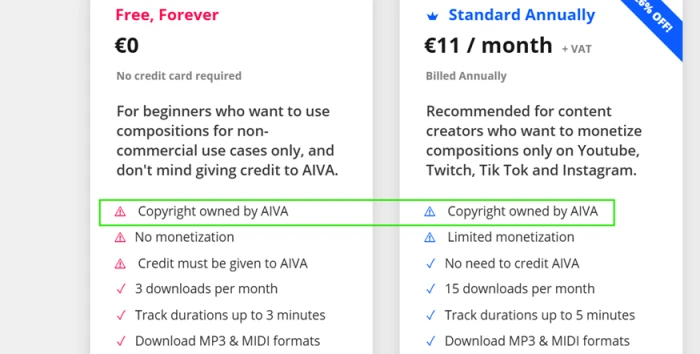
Copyright ownership stays with AIVA on the Free and Standard plans.
The key finding: AIVA keeps the copyright to anything you generate on Free and Standard. Ownership passes to you only on Pro. For a hobbyist making music for fun, that clause is background noise. For anyone planning to monetise a track, it sits above every other feature on the page, because owning your output is the whole reason to pay.
Sharing Without Spending a Download
Test 06 . Sharing
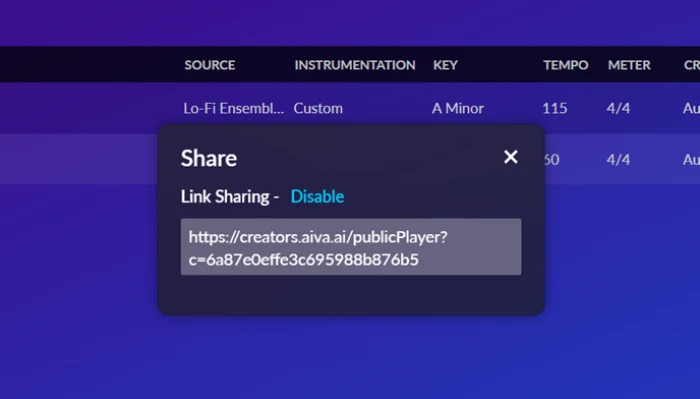
Each composition generates its own public player link.
Where it lands: Every composition gets a public player link of its own. I could send a track to someone or embed the player without burning one of my three monthly downloads. On a plan rationed this tightly, a sharing route that leaves the quota untouched is a small mercy worth knowing about.
★
Orchestral Generation Plus a Real Editor
The combination that held up across every test was orchestral generation feeding a note-level editor. The cinematic tracks arrived sounding composed, with audible dynamic movement and phrasing that stayed coherent, and the editor let me reshape them rather than reroll and hope. That pairing is where AIVA earns its keep.
!
It Falls Apart Outside Its Comfort Zone
The split between genres was the sharpest result of the session. Orchestral and cinematic briefs sounded finished. The pop and trap attempts came out thin and mechanical, and with no vocals on offer they read as backing beds rather than songs. AIVA is a scoring tool wearing the coat of a general generator, at its best when the brief asks for an instrumental cue.
How this review came together. I tested AIVA on a free account in August 2026, generating and editing tracks across orchestral and modern styles, then pushing each result through the export and sharing screens to find where the free tier stops. Pricing was verified the same week against the plans listed on aiva.ai. The style usage counts and download limits quoted here are taken from the live interface at the time of testing.
10-Point Feature Review
03 . Scored against what the session showed
Feature Scores at a Glance
Orchestral & Cinematic Output
8.5
Note-Level Editor
8.0
Song Section Control
7.5
Style Library Breadth
7.5
Export & DAW Handoff
7.5
Sharing & Playback
7.0
Ease of Use
5.5
Free Plan Value
5.0
Modern Genre Quality
4.5
Vocals & Lyrics
3.0
Feature-by-feature breakdownEach score justified against the session, not the marketing
01
Orchestral & Cinematic Output Standout
The orchestral and cinematic generations were the best thing AIVA produced. Phrasing held together across a full arrangement, and the dynamics moved like a scored cue rather than a loop. It stops short of 9 because longer pieces still lean on the same build trick, that brass-and-crescendo climb turning up more than once in a track.
Best genre: CinematicWeak spot: Repetition past 90s
8.5
Excellent
02
Note-Level Editor Standout
Few generators let you touch the output at this resolution. Editing individual notes, muting parts, redrawing a melody, and dragging a dynamics curve are all on the table. The half-point gap to a 9 comes from the workspace itself, which assumes piano-roll fluency and tucks a few essential controls behind unlabelled icons.
Editable layers: 4Note editing: Yes
8.0
Excellent
03
Song Section Control Useful
AIVA splits each piece into labelled sections you can reorder without regenerating, which turns a fixed output into something you can restructure. Half a point short of 8 because reordering is the extent of it. You cannot add a new section type the model did not already create for you.
Auto sections: A / B / OutroRearrange: Yes
7.5
Strong
04
Style Library Breadth Wide
More than 250 presets run from classical through electronic, and the usage counters hint at what other people trust each one for. The catalogue is broad on paper. It does not score higher because the modern-genre presets flatter to deceive, promising range the engine cannot deliver once you hit generate.
Styles: 250+Influence upload: Audio or MIDI
7.5
Strong
05
Export & DAW Handoff For DAW users
MIDI comes down in Orchestrated and Reduced versions with a separate Chords file, which is precisely what you want for finishing a piece elsewhere. That thoughtful split earns the score. The number stalls at 7.5 because WAV and Stems, the formats a professional reaches for, stay locked away from free users.
Free formats: MP3, MIDILocked: WAV, Stems
7.5
Strong
06
Sharing & Playback Handy
A public player link for every composition, usable without spending a download, is a sensible touch on a quota-limited plan. It is useful rather than remarkable, which is where 7.0 sits. There is no private-share toggle and no link expiry to speak of.
Player link: PublicUses a download: No
7.0
Good
07
Ease of Use Learning curve
Generating a track is a two-click affair, but the editor is where newcomers stall. The workspace is dense, and a handful of the controls that matter hide behind small gear and wave icons. It clears 5 because the generation side stays approachable, and falls well short of 7 because the part that makes AIVA special is the part that intimidates.
Generation: SimpleEditor: Steep
5.5
Fair
08
Free Plan Value Gated
The free tier is a real trial rather than a demo. You get unlimited generation, full editor access, and MP3 and MIDI export. What holds it at the midpoint is the gating that follows: three downloads a month, a personal-use license, and copyright the platform keeps for itself until you pay up.
Downloads: 3 / monthCopyright: Withheld
5.0
Fair
09
Modern Genre Quality Weak spot
The pop and trap outputs came back thin and mechanical, the kind of result you would rework heavily or throw away. The presets exist, so this is not a zero. It cannot climb out of the low fives because the engine's classical training shows the moment you leave orchestral territory.
Usable-result rate: LowVocals to carry it: None
4.5
Weak
10
Vocals & Lyrics Not supported
Nothing in the interface accepts lyrics or synthesises a voice, and a sung track is simply not on the menu. For an instrumental scoring tool, that is a design choice rather than a defect, which keeps it off the floor. Measured as a general music generator in 2026, though, the total absence of vocals is a serious gap.
Lyrics input: NoneVocal output: None
3.0
Poor
Pros and Cons
04 . What you notice after a week
+What Works
Composed-sounding output: orchestral and cinematic tracks arrive with real dynamic movement instead of a flat loop.
Note-level control: you can redraw a melody, mute parts, and reshape whole sections by hand.
DAW-friendly exports: MIDI lands in Orchestrated and Reduced versions with a separate Chords file.
Influence uploads: feed it an audio or MIDI reference to steer the feel of a generation.
Quota-free sharing: every track gets a public player link you can send or embed instantly.
Wide preset shelf: more than 250 styles cover far more ground than the orchestral core.
−What Frustrates
No vocals at all: there is no lyrics field and no way to produce a sung track.
Weak on modern genres: pop and trap outputs come back thin and need heavy rework.
Steep editor: the workspace assumes piano-roll fluency and hides controls behind tiny icons.
Ownership is not automatic: by default the platform holds the copyright to what you generate.
Repetition on longer pieces: tracks past ninety seconds start looping the same phrase.
Pricing Breakdown
05 . Three plans, one clause that decides everything
Feature
Free€0 / forever
Standard€15 / mo
Pro€49 / moOwn the rights
Own the copyright
✗
✗
✓
Monetize freely
✗
Limited
✓
No credit to AIVA required
✗
✓
✓
WAV + Stems export
✗
✗
✓
Downloads per month
3
15
300
Max track length
3 min
5 min
5 min 30 s
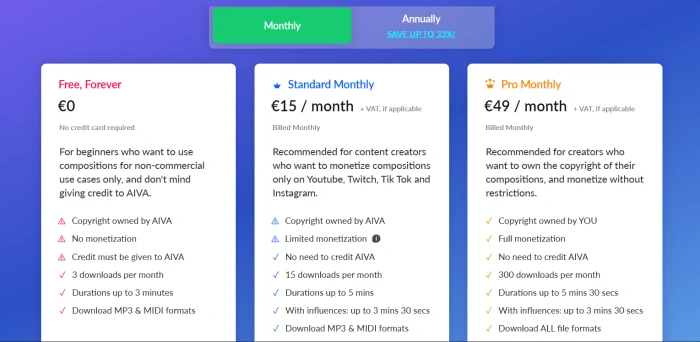
The tier math: the headline monthly figures are not the whole story. Billed annually, Standard drops to €11 a month and Pro to €33 a month, so the price you see depends entirely on which billing toggle is live when you look, with VAT landing on top of all of it. The number that should drive the decision is not the download count. It is copyright. Standard costs real money and still leaves ownership with AIVA, which means the only plan that makes a monetised track legally yours is the €49 Pro tier. Standard's monetisation is also capped to a short list of social platforms, so a creator publishing anywhere else gets pushed toward Pro regardless of how few tracks they make.
AIVA's three consumer plans on the monthly billing view.
Pricing verified August 21, 2026 on the vendor's site. Plans and discounts move around, so confirm the current numbers on AIVA's official pricing page before you subscribe.
AIVA vs the Top 3 Alternatives
06 . Where it wins and where Suno takes over
AAIVA
SSuno
UUdio
MMusicful
Score
6.4
8.3
6.1
7.9
Vocals & lyrics
None
Full vocals
Full vocals
Vocals from lyrics
Note-level editing
Yes, piano roll
Studio DAW on top tier
Section and stem tools
Limited
Copyright default
Held until top plan
Commercial on paid
Commercial on paid
Commercial on paid
Best For
Editable orchestral cues
Complete vocal songs from a prompt
Vocal tracks with finer audio control
Fast social-ready songs
Bottom line: if your project needs a human voice or a finished pop song, AIVA is the wrong tool and Suno at 8.3 is the obvious pick, with full vocal generation and a browser studio for cleanup. Udio suits people who want vocal tracks and will trade a little polish for tighter audio control. Where AIVA pulls ahead is the narrow lane it was built for: orchestral and cinematic instrumentals you intend to open up and edit. Nothing else in this group matches its note-level workspace for that job.
What Users Are Saying
07 . Four voices from Trustpilot
AIVA failed to recognize or develop the main musical theme.
Use AIVA if you need editable orchestral or cinematic instrumentals for video and game work, you would rather shape a track by hand than accept a one-click result, and owning the copyright is worth stepping up to the top plan.
Skip AIVA if you need vocals or a finished pop song. Suno at 8.3 does that far better, and Udio at 6.1 is worth a look for vocal tracks with more audio control.

Discussion
Join the discussion and share your perspective.