


Home / Reviews / AI Video Generator / Artlist AI
Logo
AI Creative Suite Credit-Based Generation

Artlist AI Review

artlist.io · Artlist Ltd.

Artlist is a stock-media veteran that now routes 100+ image, video, voiceover and music models through a single account and one shared credit pool. The real draw is consolidation: Veo, Kling, Seedance, Nano Banana and ElevenLabs sit behind one subscription instead of five. It fits creators who already live inside Artlist's music and footage catalog and want generation in the same login.

Reviewer Score
7.3
/10
Capable Pick
Strong model access,
shaky free-trial promise
Model Breadth9.0
Workflow Integration8.5
Ease of Setup8.0
Credit Transparency5.5
Free Trial Access5.0
Platform
Web browser
AI Models
100+ accessible
Entry AI Plan
$11.99 /mo annual
Starter Credits
16,500 monthly
Media Types
5 image, video, voice, music, 3D
Free Sample
Limited advertised

What Artlist Does

01 . Overview

Artlist started life as a royalty-free music licensing service and spent years building a catalog of footage, sound effects, templates and plugins. The AI Suite is its answer to a market that fragmented fast. Rather than ship a standalone generator, Artlist folded image, video, voiceover, music, 3D and avatar tools into the same account its subscribers already use, all drawing from one monthly credit allowance.

The pitch is aggregation. Instead of paying for Veo in one place, Kling in another and ElevenLabs somewhere else, you reach them through a single workspace called Artlist Studio, write a prompt, pick a model and generate. The commercial license covers everything you make. For creators who want breadth without juggling five logins and five invoices, that consolidation is the whole point.

Plans split by intent. The AI Suite tiers (AI Starter, AI Core, AI Creator) sell generation tools on their own, while the Max plans bundle the full stock catalog on top. AI Starter opens at $11.99 per month billed annually, and the lineup climbs to a Custom Business tier for agencies.

What Happened When We Tested It

02 . 6 tests covering free signup, model selection, generation limits and the usage dashboard

We created a brand-new free Artlist account to see the AI tools the way a first-time visitor meets them. No card was requested, and the account was live in under a minute. The plan was simple: sign up, pick a free-tagged model, run one image prompt, and watch where the trial actually ends. What the session exposed was a gap between what the account page promises and what the generator will let a free user do.

Setting up the free account

Test 01 . Signup flow
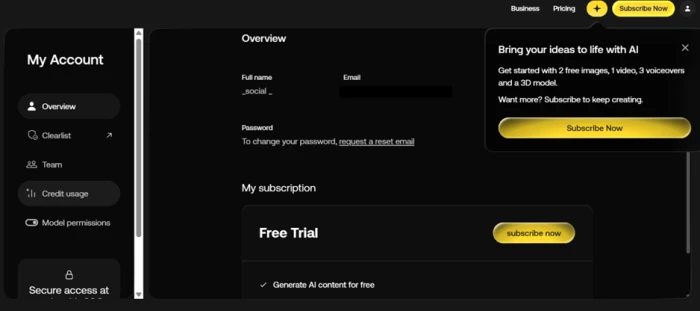
Artlist account page showing a Free Trial plan with a tick next to Generate AI content for free and a starter allowance of 2 images, 1 video, 3 voiceovers and a 3D model
The account page promises free AI generation and lists a small starter allowance for a new account.
First impression: The account page set a clear expectation. It showed a Free Trial plan with a tick beside generating AI content for free, and a pop-up named a starter allowance of 2 images, 1 video, 3 voiceovers and a 3D model. On paper that was enough to judge output quality before paying a cent.

Choosing a model and entering a prompt

Test 02 . Generator UI
★ Prompt Used

"cinematic shot of a coffee cup on a rainy window, warm morning light, shallow depth of field"
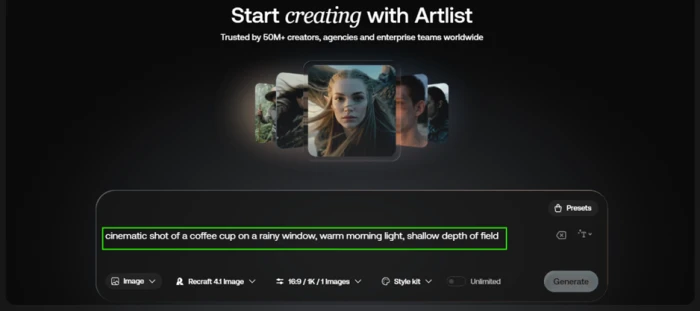
Artlist AI image generator with a prompt typed in and the Recraft 4.1 Image model selected, but the Generate button greyed out and unresponsive
The prompt is ready and a FREE-tagged model is selected, but Generate will not activate.
What we observed: We opened the AI image generator, typed the prompt and picked Recraft 4.1 Image, one of several models carrying a green FREE tag. The Generate button stayed greyed out and would not respond. No error, no explanation, just a dead control.

Reading the FREE label correctly

Test 03 . Model picker
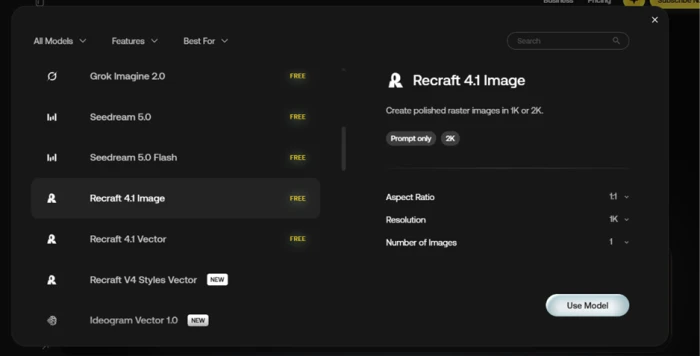
Artlist model picker showing a grid of AI image models, several stamped with a green FREE label
Several models are stamped FREE, which refers to credit cost on paid plans rather than free use on a trial account.
Under the surface: We opened the model picker to check whether a different model behaved differently. Many carried the same FREE label, so the tag was not the blocker. That badge means the model costs no credits on a paid plan. It does not mean a free account can run it. A new user reads FREE and assumes access, and the interface does nothing to correct that.

Hitting the wall before creating anything

Test 04 . Trial limit
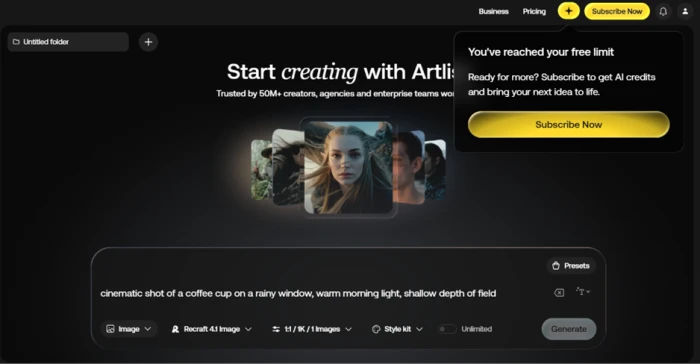
Artlist message reading You've reached your free limit with a prompt to subscribe for AI credits, shown on a brand new account
A same-day account with zero generations is already told it has reached its free limit.
The signal here: Then came the part that did not add up. A message appeared reading that we had reached our free limit, asking us to subscribe for AI credits. This was a same-day account. We had not generated a single thing. The promise on the account page and the behaviour on the generation page flatly contradicted each other.

Confirming the library was empty

Test 05 . My Library
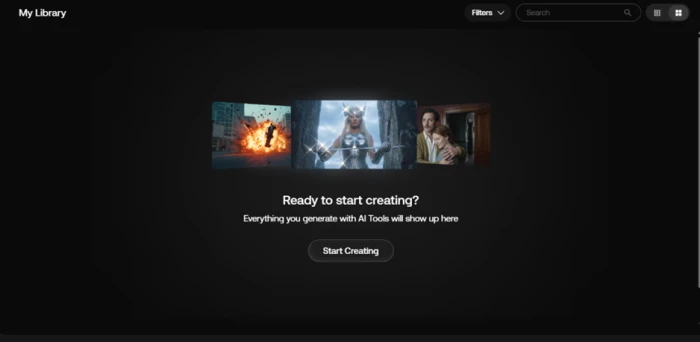
Artlist My Library page showing no creations and an empty-state message reading Ready to start creating
My Library is empty, proving no generation was ever made.
What this confirms: To rule out a display glitch, we opened My Library, where every creation is meant to land. It was empty, showing a Ready to start creating prompt. The account had produced nothing, yet the tool still refused to run. A rollout bug or a deliberate gate would both explain it, and from the user's chair the difference does not matter.

Checking the usage dashboard

Test 06 . Credit usage
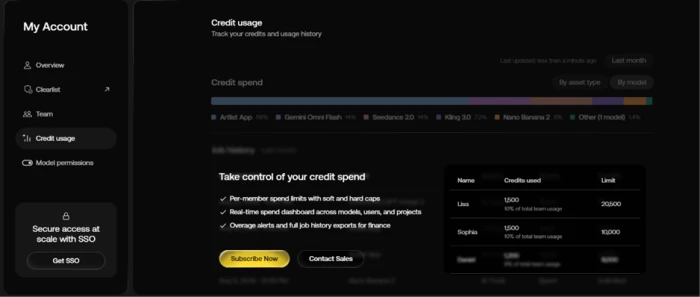
Artlist Credit usage page showing a sales pitch for paid team features next to a sample table filled with placeholder names and invented numbers instead of real account data
The Credit usage page shows marketing copy and sample data rather than the account's own usage.
Worth noting: We opened the Credit usage page to see our own activity. Instead of real figures it showed a sales pitch for paid team features sitting next to a sample table stuffed with placeholder names and invented numbers. A free user cannot see genuine usage here, which turns an account-management screen into one more upgrade prompt.
★
One login reaching Veo, Kling, Seedance and Recraft

The genuine strength we could confirm, even without generating, is the sheer catalog of models inside one picker. Browsing the generator showed named access to Veo, Kling, Seedance, Nano Banana, Recraft and ElevenLabs side by side. A paying creator who wants to test several frontier models against the same brief gets that comparison without opening six accounts, which is the clearest value Artlist offers here.

!
The advertised free trial never ran for us

Artlist markets a free sample of its AI tools, and the account page repeated that promise with a specific allowance. On our same-day account the Generate button never activated and a free-limit wall appeared before any generation. A buyer counting on the trial to test quality first cannot assume it will work.

How this review was put together. We tested Artlist on October 28, 2026, using a newly created free account on web, walking the image generator, model picker, library and credit dashboard in a single session. We did not reach paid output because the free trial blocked generation, so the testing section reports what a free user actually encounters rather than paid results. Every pricing figure was verified the same day against Artlist's official pricing page at artlist.io/pricing.

10-Point Feature Review

03 . Scored against observed behaviour and official plan details
Feature Scores at a Glance
Model Breadth
9.0
Workflow Integration
8.5
Account Setup
8.0
Commercial Licensing
8.5
Interface Design
7.8
Plan Value
7.0
Label Clarity
6.0
Credit Transparency
5.5
Usage Dashboard
5.8
Free Trial Access
5.0

Pros and Cons

04 . Where Artlist helps and where it frustrates
+What works
  • Frontier models under one roof: Veo, Kling, Seedance, Recraft and ElevenLabs reachable from a single picker
  • No tool-hopping: image, video, voice, music and 3D share one Artlist Studio workspace
  • Clean onboarding: account ready in under a minute with no card at signup
  • Clear ownership: you keep rights to what you generate, with a commercial license built in
  • Intuitive layout: the generator and library are easy to navigate even for AI newcomers
−What frustrates
  • Trial that would not trigger: our free account hit a limit wall before a single generation
  • Misleading FREE badges: the label implies a free account can run a model when it cannot, with no in-app explanation
  • Silent dead controls: the Generate button greyed out with no error and no reason given
  • Output misses the brief: reviewers report results that stray from clear, well-spelled prompts
  • Hollow usage page: the dashboard showed placeholder data rather than real account activity

Pricing Breakdown

05 . Four AI tiers from entry to agency scale
Feature AI Starter$11.99/mo annual AI Core$23.99/mo annualMost Popular AI Creator$41.67/mo annual Custom BusinessCustomcontact sales
Monthly credits 16,500 80,000 Custom
Up to AI images 1,650 8,000 Custom
Up to AI videos 103 500 Custom
Up to AI voiceover 3 hrs 16 hrs Custom
Up to AI songs 110 533 Custom
Access to 100+ models ✓ ✓ ✓
Unlimited on select models ✗ ✓ ✓
Team members Up to 3 Up to 3 Custom
Legal indemnification ✗ ✗ ✓

The tier math: The jump from Starter to Core more than doubles credits for roughly twice the price, and Core is where unlimited generations on select models switch on, which is the real reason it carries the Most Popular tag. Watch two things the table rows gloss over. Those headline counts are maximums that assume you only make one media type, and the shared pool means mixing video into your month collapses the image and song ceilings fast. The annual prices shown reflect the standing 40 percent saving over monthly billing, so the monthly-billed rate runs noticeably higher if you are not ready to commit to a year.
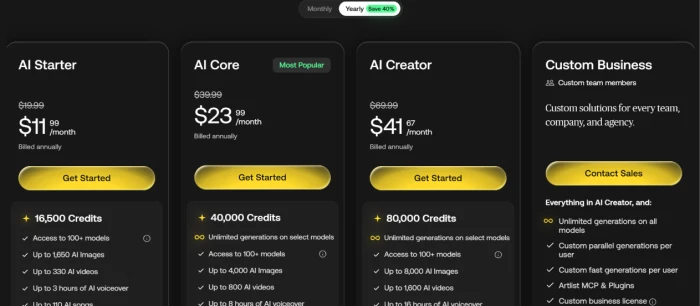
Artlist AI pricing page showing the AI Starter, AI Core, AI Creator and Custom Business tiers with annual prices and credit allowances
The four AI Suite tiers as shown on Artlist's pricing page, with annual billing selected.

Pricing verified October 28, 2026. Artlist adjusts plans and credit bundles regularly, so confirm the current figures on the official pricing page before you subscribe.

Artlist vs the Top 3 Alternatives

06 . How the bundled-model approach stacks up
AArtlist RRunway EEnvato Elements
Model access100+ via aggregatorRunway in-house modelsLimited AI, large stock
Media typesImage, video, voice, music, 3DVideo-first, some imageStock plus basic AI
Credit modelShared pool, monthly resetCredits, rollover variesSubscription, limited AI caps
Entry price$11.99/mo annual$15/mo billed annually$16/mo billed annually
Best ForTesting many frontier models in one loginCreators who want deep video control in one engineTeams who mainly need stock with light AI

Where it lands: Pick Artlist if your priority is reaching many generation engines without opening separate accounts, and you already value its music and footage catalog. Runway suits a creator who would rather master one capable video engine with granular controls than browse a buffet. Envato Elements makes sense when stock assets are the main event and AI is a bonus rather than the reason you signed up. The deciding question is whether you want breadth across models or depth within one.

What Users Are Saying

07 . Verified feedback from Trustpilot and G2
As an old school photographer at 73 and a graphics designer for 40-plus years, they say they are blown away by the ability to recover near in-focus old images and adjust the lighting, a use case our testing never touched.
Verified Trustpilot reviewer
On restoring and retouching old photos
★★★★★
trustpilot.com
They praise the customer service but wish it did not take so many credits like other sites such as Venice AI or Freepik, especially when pictures do not turn out like the prompts.
Verified Trustpilot reviewer
On credit cost versus prompt accuracy
★★★★☆
trustpilot.com
A new AI user calls the platform dummy-proof so far and the site very intuitive, while wishing it offered more educational content to learn from.
Verified Trustpilot reviewer
On the learning curve for beginners
★★★★★
trustpilot.com
Yehonatan suggests shaping prompts in a language model first, then bringing those cleaner prompts into Artlist for more consistent results, a workflow worth adopting.
Yehonatan
On getting consistent output
★★★★☆
saasworthy.com
A reviewer warns the platform burns credits, saying three short videos and one image used up nearly the full 16,500-credit starter allowance, and advises caution with any AI subscription here.
Verified Trustpilot reviewer
On how quickly credits disappear
★☆☆☆☆
trustpilot.com
A G2 reviewer strongly recommends avoiding the platform until it becomes more transparent and honest about pricing, pointing to other AI video tools they found fairer and more functional.
Verified G2 reviewer
On pricing transparency
★☆☆☆☆
g2.com
· The Verdict ·
7.3/10
Who should actually subscribe to Artlist AI?

Use Artlist if you want one login that reaches Veo, Kling, Seedance and a hundred other models, you lean heavily on image generation over video, and you already use the Artlist catalog for music and footage. Budget for credits running out faster than the advertised counts suggest, and do not count on the free trial to vet quality first.

Skip Artlist if you mainly generate video and want predictable per-generation costs, where a dedicated engine like Runway gives you more control, or if stock assets are your real need and a platform like Envato Elements covers that with AI as a minor extra.

Category RankCapable Pick
Compared To3 Alternatives
Entry Price$11.99/mo
Free TierAdvertised

Discussion

Join the discussion and share your perspective.