

What AutoDraft AI Is and Who It Is For
AutoDraft AI is a 2D animation creation platform built by Allbots Technologies, an Indian SaaS company. The core promise is straightforward: anyone with a story idea can produce a fully animated YouTube video without animation skills, voice acting, or paid stock libraries. The platform handles every step from script to final 4K render in one workspace, with credits as the unit of cost rather than a flat subscription.
The target user is specific. AutoDraft is built for the YouTube animation niche: animated stories for kids, nursery rhymes, explainer videos, fable retellings, and educational content. Reviewers on G2 and product directories consistently describe the platform as designed for creators who want to monetize YouTube channels with animated content but lack the skills or budget to hire an animator. That focus is the reason the Story Writer generates scripts with embedded scene descriptions and timing tags. The output is ready to be passed through the rest of the pipeline, not just to be read.
What Happened When We Tested It
To evaluate AutoDraft on production work rather than demo videos, the testing covered the two writing tools that gate the rest of the pipeline: the Story Writer (which feeds the animation flow) and the SEO Writer (which generates marketing content from a brief). The free tier provides 20 credits, which was just enough to run these two tests before the meter hit zero.
The Dashboard
Onboarding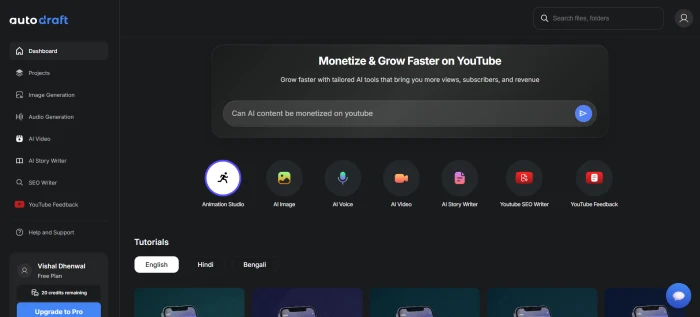
Story Writer
Test 01 · The script engine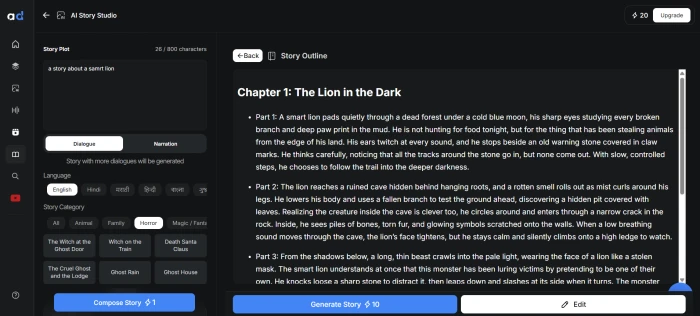
The Story Writer worked in two stages. First, the prompt produced a four-scene outline with brief scene descriptions. Then a Generate Story button expanded the outline into a complete, production-ready script. The script for a four-word prompt ran 455 seconds (7 minutes 35 seconds) of total spoken duration across four scenes, with embedded scene descriptions, narrator lines, character dialogue, and per-line timing tags in seconds. The structure is unusually thorough for an AI-generated story.
Scene Description: A dead forest under a cold blue moon. Bare trees lean over a narrow muddy path. A lion moves slowly between roots and broken branches, alert and silent.
Narration: The forest looked dead even in moonlight. No leaves moved. No insects sang. Under the cold blue moon, a lion named Rakan padded through the mud, placing each paw with care as he studied every mark on the ground.
Rakan: Too many prints. Deer, boar, fox... all fresh enough to matter.
Narration: He was large, but he moved with quiet patience, stopping often to inspect a snapped twig or a deep paw mark filled with dark water.
Asha the Owl: Then maybe it wants to smell like nothing at all.
Rakan: Asha. You should not glide up on me in a forest like this.
Two things stood out. First, the writing quality is genuinely above what most AI text tools produce at this length. Characters have distinct voices, the dialogue carries narrative tension, and the pacing leaves room for visual beats rather than walls of explanation. Second, the embedded structure makes this script immediately ready for the animation pipeline. The scene descriptions feed the AI background generator, the narrator and character lines feed the voiceover engine, and the timing tags drive lip-sync and primary animation. Nothing about the output requires manual conversion to the next step.
SEO Writer
Test 02 · Marketing content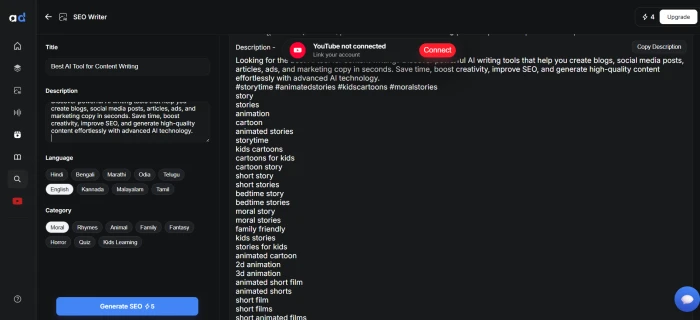
The SEO Writer accepts a title and a meta-description-style brief, then generates marketing content matched to the inputs. The output landed in usable shape on the first run, though the tool is positioned as a general-purpose content generator rather than the deep SEO research platform that Surfer or Frase offer. For a YouTube creator who needs accompanying blog descriptions, video summaries, or social copy to support animated content, this is a useful bundled feature. As a standalone SEO tool, it is competent rather than category-leading.
Seven Features, Scored
Pricing
AutoDraft uses a credit-based pricing model where each generation consumes a set number of credits depending on the feature and complexity. New users receive 20 credits at signup, which functions as a product trial rather than an ongoing free tier. The Pro plan starts at approximately $10 per month (roughly ₹833 for Indian users via Techjockey), unlocking full feature access and a much larger monthly credit allocation.
| Tier | Price | What It Unlocks |
|---|---|---|
| Free trial | $0 | 20 credits one-time, all features accessible until credits run out |
| Pro | From $10/mo (~₹833) | Full feature access, monthly credit refill, watermark-free output, 4K rendering |
| Higher tiers | Variable | Larger credit allocations for high-volume creators, priority rendering, custom model training |
The pricing model is competitive against the broader animation tool market. Animaker, Steve.ai, and similar platforms run subscription plans in the $20 to $50 per month range, which makes AutoDraft's $10 entry tier materially cheaper. The trade-off is the credit system: a heavy month of script generation, voiceover renders, and animation outputs can outpace the included credit allocation, which means the real cost depends on production volume rather than a flat ceiling.
Pros and Cons
- The only single-workspace pipeline from script to 4K animated render in this segment of the market
- Story Writer outputs production-ready scripts with timing tags, scene descriptions, and dialogue formatting that feed the next step automatically
- Pro tier at $10 per month is materially cheaper than Animaker, Steve.ai, or comparable AI animation subscriptions
- Voiceover quality with emotion-aware presets removes the cost of hiring a voice actor on most projects
- Style consistency across AI-generated backgrounds avoids the visual disconnect that breaks competing tools
- Built and supported by an Indian SaaS company with active product updates and direct customer feedback channels
- 20 free credits is not enough to test the full pipeline before committing to a paid plan
- Real learning curve exists for the full suite, especially for users with no prior animation experience
- Credit consumption is hard to predict across different features and output complexities
- SEO Writer is competent rather than category-leading compared with dedicated SEO content platforms
- The platform is web-only, with no native desktop or mobile app for offline work
- Output range is narrow: 2D animated content only, no live-action editing or 3D animation
AutoDraft AI vs the Alternatives
| AAutoDraft | AAnimaker | SSteve.ai | PPictory | LLumen5 | |
|---|---|---|---|---|---|
| Score | 7.8 | 7.6 | 7.5 | 7.4 | 7.2 |
| Starting Price | $10/mo (~₹833) | $15/mo | $15/mo | $19/mo | $19/mo |
| Free Tier | 20 credits | Limited free | 3 day trial | 3 video trial | 5 video limit |
| Script Generation | Story Writer with timing | Basic scripts | AI scripts | Article to script | Article to script |
| 2D Character Animation | ✓ AI generated | ✓ Library | ✓ AI | ✗ | ✗ |
| AI Voiceover | ✓ 100s of presets | ✓ | ✓ | ✓ | ✓ |
| Output Quality | 4K | HD/4K | HD/4K | HD | HD |
| Best For | YouTube animated stories | Explainer videos | AI video for marketers | Article to video | Social media video |
AutoDraft's defensible advantage is the script-to-render pipeline aimed specifically at YouTube animated storytelling. Animaker has a deeper character library and a longer track record, but its starting price is 50% higher and the script-to-animation handoff is less integrated. Steve.ai targets video marketers rather than story creators. Pictory and Lumen5 are article-to-video tools rather than animation suites, which puts them in a different category entirely. For the specific use case of YouTube animated story content, AutoDraft is the most focused product on the list, and the cheapest entry point.
What Real Users Say
Across verified user review platforms and creator community discussions, the recurring praise concentrates on three things: voiceover quality, the consistency of AI-generated backgrounds, and the time saved over manual animation workflows. The recurring criticism is the learning curve, particularly for users new to animation, and the credit-based pricing model's predictability problem. The pattern matches what testing confirmed: the product delivers on its core promise, the free tier is too restrictive to evaluate the full pipeline, and the workflow rewards users willing to invest the time to learn it.
Discussion
Join the discussion and share your perspective.