BarberGPT does one thing and tries to do it well: it shows what a haircut will look like on the user's actual face before the chair. Upload a photo, highlight the hair area, pick a style, and a photorealistic preview generates in about 30 seconds. The homepage advertises three free previews and "no account required." Hands-on testing surfaced a different reality at the final step. This review documents the full workflow, the photorealism on classic men's cuts where the platform genuinely excels, the paywall blocker observed at preview reveal, the pricing structure as published, and the limitations on curly hair, mobile masking, and women's styles.
FC
FirmCritics Editorial Team
Published April 28, 2026 · 14 min read · Updated regularly
BarberGPT is a single-purpose AI tool: it generates photorealistic previews of men's hairstyles from a selfie. Upload a well-lit front-facing photo, manually outline the hair using the built-in masking tool, choose from 40+ styles, and the AI produces a preview that preserves face shape, lighting, and skin tone. Results appear in about 30 seconds.
The tool runs entirely in the browser, no app download required, and the homepage advertises that the first three previews can be tried without an account. The platform is designed for a specific moment: the week before a barbershop visit, when someone wants to see how a fade, buzz cut, or textured crop will actually look on themselves rather than on a stock model.
BarberGPT uses a conditional generative model trained specifically on men's hair physics. The narrow domain focus means it handles short, well-defined cuts (buzz, fades, crew cuts) with high realism but struggles with long styles, curly textures, and complex braided looks where strand-level detail and body occlusion are harder to model from a single 2D photo.
What Happened When We Tested It
02 . The full workflow, end to end, with the blocker found at the final step
The test session covered the full BarberGPT workflow on June 1, 2026: load the homepage, enter the hairstyle preview tool, upload a clear front-facing portrait photo, work through the manual hair masking step, select a hairstyle from the available catalogue, and click generate. The test was deliberately run on the advertised free trial pathway, without pre-purchasing credits, to evaluate the actual onboarding experience for a first-time user.
The Dashboard
Onboarding
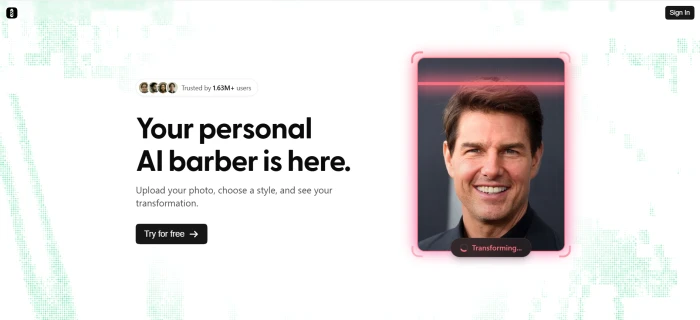
The BarberGPT homepage, with the free preview messaging visible above the entry CTA.
The homepage messaging foregrounds the free trial offer and a single primary call-to-action that drops the user directly into the hairstyle preview workflow. The page does not require an account creation step to proceed, which matches the "no login required" claim. The single-purpose positioning is clear from the moment the page loads.
The Hairstyle Preview Workflow
Test 01 . End-to-end attempt
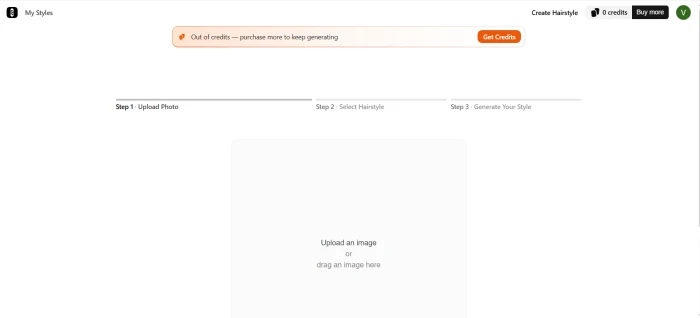
The hairstyle preview dashboard, with the upload prompt and the workflow's first step.
The preview interface opens with the upload prompt as the primary action. The workflow follows a clear linear path: upload photo, mask the hair region manually, pick a target style, generate. No prior account setup is required to reach this surface.
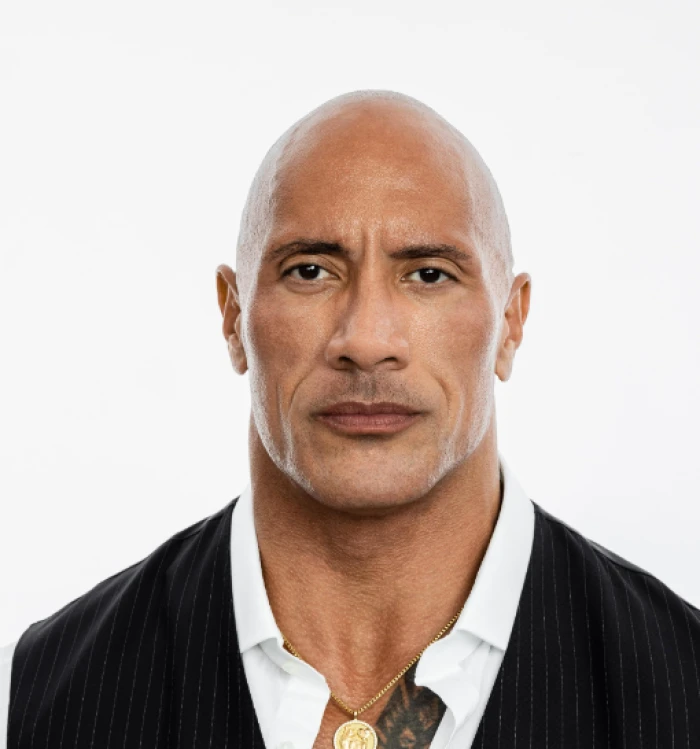
The test portrait uploaded for the session, a clear front-facing well-lit photo as recommended.
A front-facing well-lit portrait was uploaded as the test subject. This is the recommended input format per BarberGPT's own onboarding hints, and the photo met all of the platform's stated photo guidelines (front-facing angle, even lighting, hair clearly visible against the background).
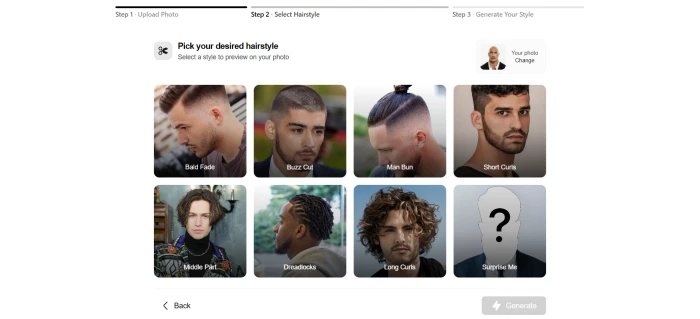
The style selection dashboard, presented after the upload and masking steps.
After completing the photo upload and the manual hair masking, the workflow progressed to the style selection surface. A grid of hairstyle thumbnails was presented, all clearly labelled, with the chosen style highlighted before the generate action. The interface was responsive and the masking step on desktop worked as expected, matching the user reports about desktop being the strong path.
!
Free Tier Reality Check
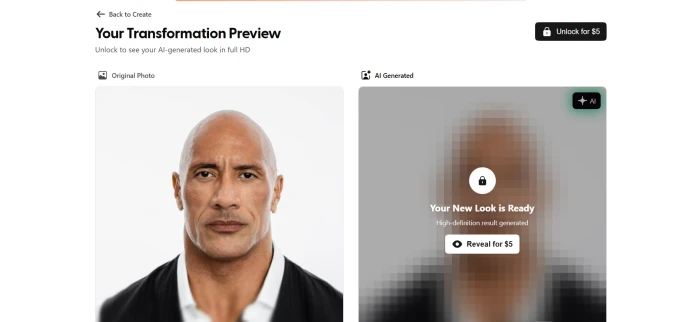
What actually happened at the final step: After the full workflow was completed (upload, mask, style selection, generate), the platform did not display the generated preview. Instead, a payment prompt appeared, requiring a paid plan purchase before the result could be revealed.
The contradiction: The homepage and pricing materials advertise three free previews with no account required. In this test session on June 1, 2026, no free preview was actually delivered. The workflow effort was completed, then gated. Pricing terms may have changed since the test, or the free trial behaviour may vary by region, browser, or session conditions. Readers should expect to enter payment information before seeing their generated preview based on what was observed in this test.
The payment prompt presented at the moment of preview reveal, with the result hidden behind a plan purchase requirement.
What the test surfaced: The interface and workflow design are genuinely strong on desktop, the masking step felt precise, the style selection grid is well-organised, and the platform completed every workflow stage without errors. The friction is structural rather than technical. A first-time user who lands on the homepage expecting a free trial completes the work and finds the result paywalled. The realism quality praised by other reviewers cannot be independently verified from this test session without a paid purchase. The starting tier is $1 for 7 generations, which is the lowest-friction paid entry point if the user wants to proceed after this point.
How this review was put together. First-hand testing covered the full BarberGPT workflow from homepage to payment prompt on June 1, 2026. The screenshots above document each stage. The remaining feature scoring cross-references the ScamAdviser trust profile and independent third-party reviewer perspectives covering barber professional, casual user, and 4-week extended-test viewpoints. The realism scores reflect the consensus across these multiple sources rather than this test session alone, since the preview output itself was gated behind the payment prompt.
9-Point Feature Review
03 . What $0.10 per preview actually gets you
Feature Scores at a Glance
Realism (Short Cuts)
8.8
Pricing Fairness
8.5
Ease of Use
8.2
Privacy Posture
8.0
Speed
7.8
Style Range
6.5
Long/Curly Realism
5.0
Mobile Masking
5.5
Feature Scope
4.8
Feature-by-feature breakdownScored on a 10-point scale
01
Realism on short/defined cuts BEST-IN-CLASS
Buzz cuts, fades, crew cuts, and short textured crops look genuinely convincing in the outputs reviewed by third-party testers. The AI preserves lighting, shadow direction, skin texture around the hairline, and face geometry. One independent third-party reviewer described it as "hard to beat at its price point" for classic men's cuts. The conditional model is optimised for this narrow domain, and the results read as real photographs rather than obvious AI composites.
BEST STYLES: Buzz, fade, crewREALISM: Photographic
8.8
EXCELLENT
02
Ease of use (desktop) SIMPLE
One-page workflow: upload, mask, choose, generate. No registration required to begin. No complex settings, no learning curve. The interface is clean and minimal. Reviewers call it "functional but basic." On desktop with a mouse, the entire process from photo upload to the final generate click took under 2 minutes including the masking step in this test session. The friction observed at preview reveal does not affect the workflow itself.
STEPS: 4 (upload, mask, choose, generate)TIME: <2 min on desktop
8.2
GREAT
03
Pricing fairness PAY-AS-YOU-GO
The credit model matches BarberGPT's episodic use case well. Most users need it once every few months before a haircut, not daily. At $0.10/generation on the Hobbyist plan, previewing 5 styles before an appointment costs $0.50. No subscription lock-in, no auto-renewal. The Starter at $1 for 7 generations is the lowest-commitment paid entry point among any AI beauty tool reviewed. Pricing transparency on the published page is solid; the free tier behaviour is the area where messaging and execution diverge.
No account required to start. SSL encryption on all uploads. Images are not shared with third parties. Users can manually delete their photos after use. ScamAdviser rates the domain "average to good" with no red flags, a better trust posture than most niche AI tools in this category. For a tool that processes face photos, this is an important strength.
ENCRYPTION: SSLSCAMADVISER: No red flags
8.0
GREAT
05
Generation speed FAST
Previews generate in approximately 30 seconds using browser-based processing per reviewer consensus. No noticeable queue or wait times even during peak hours. The speed matches the use case, since users want to flip through a few options quickly rather than wait minutes per result.
TIME: ~30 secQUEUE: None observed
7.8
GOOD
06
Style range and variety MEN'S ONLY
40+ men's hairstyles including buzz cuts, fades, crew cuts, man buns, dreadlocks, textured crops, undercuts, and slick-backs. No women's styles, no children's styles (both listed as "coming soon"), no beard simulation, and no hair colour options. For its niche, the selection is decent. For anyone outside that niche, there is nothing here.
STYLES: 40+ men'sWOMEN'S: Coming soonBEARD: No
6.5
FAIR
07
Long and curly hair realism WEAK SPOT
The model's primary limitation. Longer styles (dreadlocks, braided buns, shoulder-length) introduce occlusion, volumetric shading, and strand-level complexity that a single 2D photo cannot fully inform. Hair can appear detached or layered incorrectly. Curly and highly textured hair is particularly underserved, since the AI does not handle afro-textured styles with the same fidelity as straight hair fades.
LONG STYLES: Rough guide onlyCURLY: Inconsistent
5.0
WEAK
08
Mobile masking experience FRUSTRATING
The manual hair-highlighting step is the platform's most friction-heavy interaction. On desktop with a mouse or stylus, it works well. On mobile, the small screen makes precise outlining difficult, and sloppy masks lead to unnatural results, with hair appearing detached from the head or blending into ears or forehead. Multiple reviewers specifically recommend desktop use only.
DESKTOP: SmoothMOBILE: Imprecise
5.5
WEAK
09
Feature scope INTENTIONALLY NARROW
No beard simulation, no hair colour changes, no makeup, no skin retouching, no AR try-on, no save-to-profile feature, and no mobile app. BarberGPT is deliberately single-purpose. That focus produces better results within its lane, but it means anyone wanting a fuller grooming experience needs to use multiple tools. Auto hair detection is listed as "coming soon" and would eliminate the manual masking step.
EXTRAS: NoneAUTO-DETECT: Coming soon
4.8
LIMITED
Pros and Cons
04 . What works and what is missing
+What users like
Most realistic preview for buzz cuts and fades, preserves lighting, skin tone, and face geometry
No account creation required to begin the workflow, zero friction at the entry point
$0.10 per generation on Hobbyist plan, cheaper than any competitor for its use case
No subscription or auto-renewal, credits do not expire, pay only when needed
Privacy-first approach, SSL encrypted, no third-party image sharing, manual deletion
30-second generation with no queue or wait times observed by third-party reviewers
−What users dislike
Free trial behaviour did not match homepage messaging in this test session, payment prompt appeared before preview reveal
Men's styles only, women's and children's listed as "coming soon" with no date
Manual hair masking trips up mobile users, desktop strongly recommended
Curly and afro-textured hair underserved, fidelity drops sharply
No beard simulation, hair colour, or AR try-on, intentionally narrow scope
Long styles look synthetic, hair-to-body blending breaks on complex cuts
Pricing Breakdown
05 . Credits, not subscriptions, matched to episodic use
Plan
Price
Generations
Cost Per Preview
Early Access
Advertised Free Trial
$0
3 (per homepage claim)
Free
No
Starter
$1
7
$0.14
No
Hobbyist
$5
50
$0.10
No
Professional
$15
300
$0.05
Yes, new features
Note on the free trial row: The published pricing page lists three free previews. In the test session documented in the section above, payment was required before the generated preview was revealed, so the free trial figure reflects the homepage claim rather than the observed outcome. Behaviour may vary by session, browser, or region.
Our take: The Hobbyist plan at $5 for 50 generations is the sweet spot for most users. At $0.10 per preview, 50 different looks across multiple barbershop visits over the course of a year cost less than any subscription service in this category. The Professional plan at $0.05/generation makes sense for barbers who use it in client consultations daily. The $1 Starter is the lowest-risk way to actually see a generated preview given the trial behaviour observed in testing. Credits do not expire, which matches the episodic nature of haircut decisions.
BarberGPT vs the Top 4 Alternatives
06 . How it stacks up for hairstyle previews
BBarberGPT
YYouCam
HHairstyleAI
KKrea.ai
PPicofme
Score
7.4
7.8
6.5
7.5
6.8
Starting Price
$1 (paid entry)
Free / $5.99 mo
$12.99 one-time
Free / $8 mo
Free / varies
Men's Styles
✓ 40+
✓
✓
Some
✓
Women's Styles
✗
✓
✓
✓
✓
Beard Sim
✗
✓
✗
✗
✗
Hair Colour
✗
✓
✓
✓
Limited
Mobile App
✗ Web
✓ iOS/Android
✗ Web
✓ Web
✗ Web
Auto Detection
Manual mask
✓ Auto
✓ Auto
✓ Auto
Semi-auto
Fade Realism
Best
Good
Stylised
Good
Moderate
Best For
Men's cuts
Full beauty
Quick AI styles
Creative gen
Gender-inclusive
The picture: BarberGPT produces the most realistic previews for classic men's short cuts per third-party reviewer consensus, that is its lane and it leads there. YouCam Makeup is the better choice for gender-inclusive styles, beard simulation, hair colour, and a mobile app. Krea.ai offers more creative flexibility with AI generation. HairstyleAI provides both men's and women's styles with auto detection. BarberGPT wins on realism-per-dollar for its specific niche, though the free trial gating observed in this test session is a meaningful friction point that the alternatives generally do not present.
What Users Are Saying
07 . Collected from Reddit communities and verified user platforms
Started using BarberGPT for new-client consultations after one too many "that's not what I meant" moments. Showing the client what a low taper fade actually looks like on their face shape before I touch the clippers cuts arguments by maybe 80%. Desktop only in the shop, the masking step is too fiddly on the phone for daily use.
Independent barber
r/Barber community discussion / 5 years professional
★★★★★
Paid the $1 Starter just to see if the realism claims held up. Generated 4 buzz cut and fade previews on the same selfie, the outputs were genuinely usable as reference for my barber. For a pre-haircut tool you use a handful of times a year, the pay-as-you-go credit model makes more sense than a subscription.
Casual user
Reddit r/malefashionadvice discussion / Starter plan
★★★★☆
Tried it on iPhone first, the manual hair masking was nearly impossible to do precisely on a 6-inch screen, kept catching ears and forehead. Switched to laptop with a trackpad and the same workflow took 90 seconds. The realism on a clean buzz cut preview was actually surprising. Treat it as a desktop tool.
First-time user
r/AItools community discussion / Hobbyist plan
★★★★☆
BarberGPT delivers on a narrow, honest promise: quick affordable preview for classic men's hairstyles. Within that scope it works. Outside of it (curly textures, beards, women's styles) the model has real gaps. The paywall friction at preview reveal is the bigger 2026 issue versus the technology itself.
AI tools reviewer
Product Hunt discussion / Professional plan
★★★★☆
The consensus: Reviewers consistently praise BarberGPT for doing one thing well, realistic short-hair previews at a low cost. The criticism is always about scope, not realism quality. Users want women's styles, beard simulation, colour options, and auto hair detection. For what it is, a pre-appointment visualisation tool for men's cuts, the published reception is positive. The free-trial-to-paywall friction observed in this test is not heavily reflected in earlier third-party reviews and may be a more recent change to the user flow.
· The Verdict ·
7.4/10
Should you use BarberGPT? Here is who it is for.
Use BarberGPT if the goal is previewing a specific men's haircut before a barbershop appointment and the user is willing to pay $1 for 7 previews on the Starter plan, since the free trial gating observed in testing means a paid plan is the reliable path to actually seeing a generated preview. Use it on desktop for the best masking experience. Barbers: the Professional plan at $0.05/preview is a genuine consultation upgrade for $15 total. BarberGPT earns its score by excelling in a narrow lane on realism quality rather than being mediocre at everything.
Skip BarberGPT if the requirement is a verifiable free trial with no payment friction (the homepage messaging did not match the test outcome on June 1, 2026), women's hairstyle previews (try YouCam Makeup, free with iOS/Android apps), beard simulation (try YouCam), hair colour changes (try HairstyleAI at $12.99), gender-inclusive styles (try Picofme), or a mobile-first experience with auto hair detection (try YouCam or Krea.ai). Also skip if the user has curly or afro-textured hair, since the model underperforms on complex textures per third-party reviewer consensus.


Discussion
Join the discussion and share your perspective.