ChatOn wraps several frontier models behind one clean app and shines at creative work: a single request rewrote one email into three registers, formal through blunt, and its 80s photo transform came back with clean neon lighting and no melted faces. The trouble starts the moment you ask it for facts. It invented dated news headlines and produced citations whose links mostly led nowhere. It suits people who want fast drafting and image play on their phone, not anyone sourcing real information.
ChatOn is a consumer AI assistant from AIBY that puts several large language models behind a single chat window. Instead of picking one provider, you get routing across GPT, Gemini, Claude and Perplexity Sonar, plus a set of extras built for everyday phone use: image generation, photo style transforms, PDF summaries and voice transcription.
The pitch is breadth and ease. It runs in a browser and on both mobile platforms, and leans hard on presets and templates so someone who has never written a prompt can still get a usable result. A free tier covers basic chat, while a PRO subscription opens the stronger models and the heavier features. PRO runs $19.99 a month, with cheaper effective rates on the quarterly and annual plans.
What Happened When We Tested It
02 . 6 tests covering writing, knowledge and image work
I ran ChatOn on the web app with a fresh account, mixing the tasks it markets against the tasks people quietly rely on an assistant for. The creative side and the factual side told two completely different stories.
Rewriting one email three ways
Test 01 . Tone control
★ Prompt Used
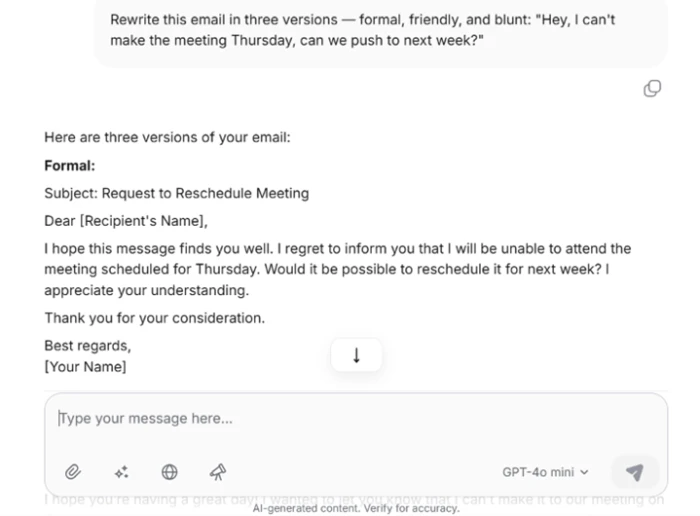
"Rewrite this email in three tones: formal, friendly, and blunt."
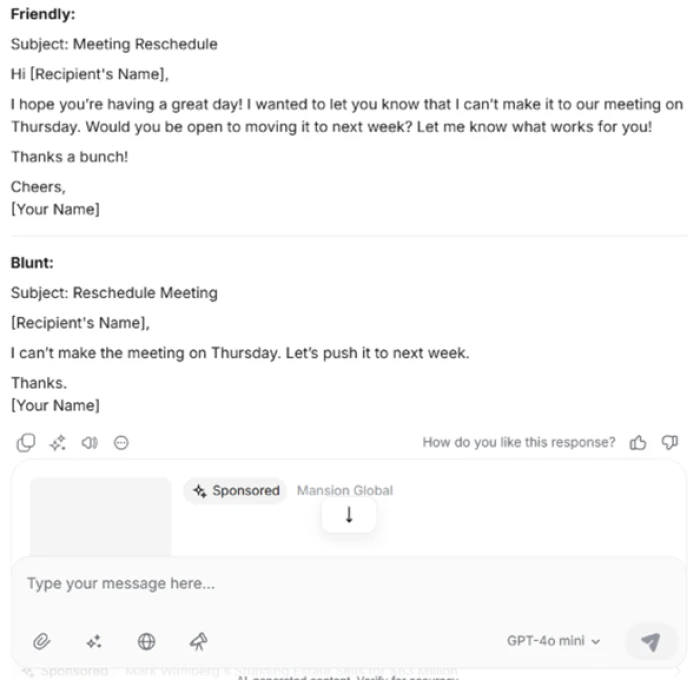
The prompt and the formal version, with a clean subject line and a full closing.The friendly and blunt versions, with a Sponsored ad sitting below the reply.
First impression: This is what the app is built for, and it delivered. The formal version had a subject line and a proper sign-off. The friendly one warmed up without turning sugary, and the blunt one landed in two sentences. The only jarring note was the sponsored listing parked directly beneath the answer.
Asking what happened in the news this week
Test 02 . Current knowledge
★ Prompt Used
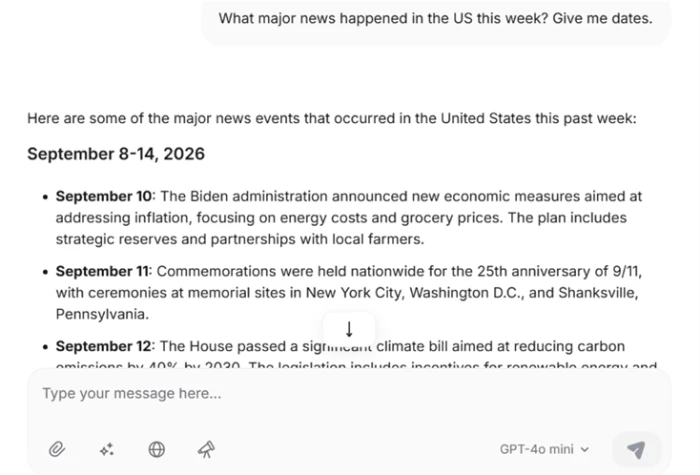
"What major news happened in the US this week? Include the dates."
Confident, specific and wrong: dated headlines that never happened.
The real story: ChatOn built a tidy list under a "September 8 to 14, 2026" header and credited fresh economic measures to an administration that no longer holds the White House. It did not hedge or admit any gap in live access. It manufactured dated headlines and served them as fact, which is worse than simply saying it did not know.
Requesting real, sourced research
Test 03 . Citations
★ Prompt Used
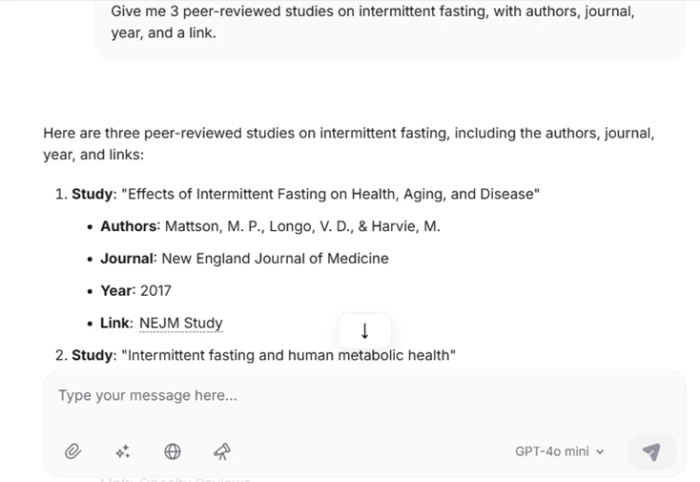
"Give me three peer-reviewed studies on intermittent fasting, each with authors, a journal, a year, and a working link."
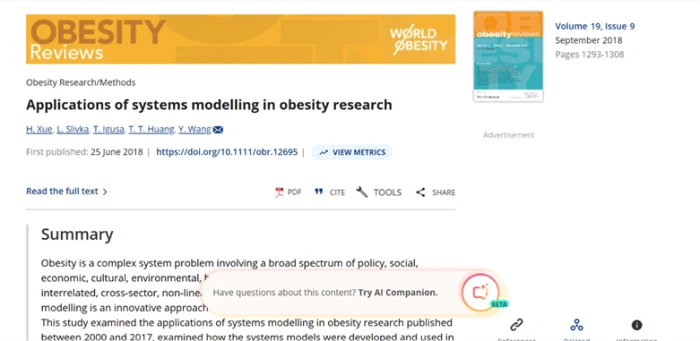
On the surface the citations look authoritative.The one link that resolved points to an unrelated systems-modelling paper.
The key finding: The formatting was convincing, with real-sounding names and recognizable journals. Then I clicked. Two of the three links threw 404 errors. The survivor opened a paper in Obesity Reviews about systems modelling in obesity research, which has nothing to do with fasting. For a health post or a school assignment, that quietly sinks you.
Generating an image from a prompt
Test 04 . Image generation
★ Prompt Used
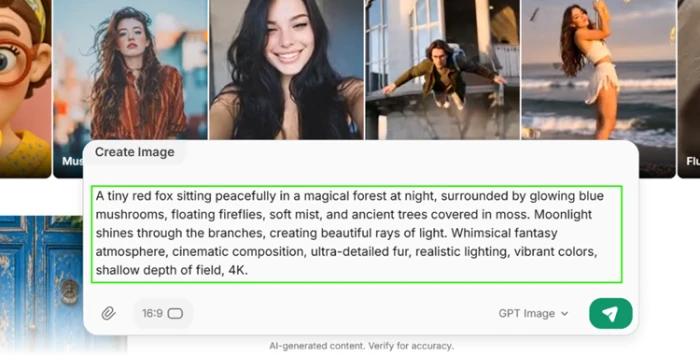
"A red fox in a glowing nighttime forest, detailed, cinematic lighting."
The image prompt screen, with an aspect-ratio picker and a model selector.
What this confirms: The generation flow is clean and puts the aspect-ratio control right up front. This is where the app starts to earn its keep, and the visual features held together far better than the knowledge features.
Running a template photo transform
Test 05 . Style transfer
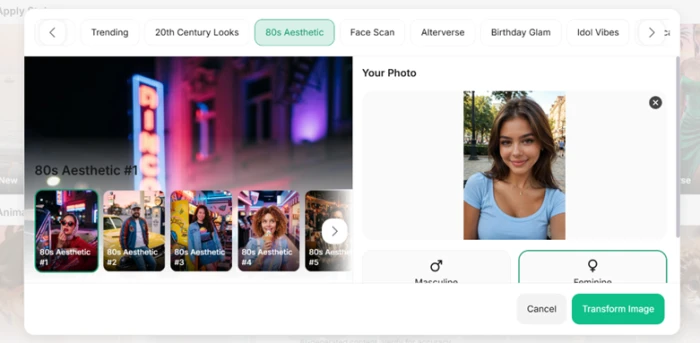
The template picker, with the "80s Aesthetic" style selected.The result: coherent styling, strong neon lighting, believable detail.
The takeaway: I fed a portrait into the "80s Aesthetic" preset and the output held together nicely. Neon reflections, period styling and sharp focus on the subject, with no melted hands or garbled background. This is the feature I would come back for.
Hitting the upgrade wall
Test 06 . Paywall
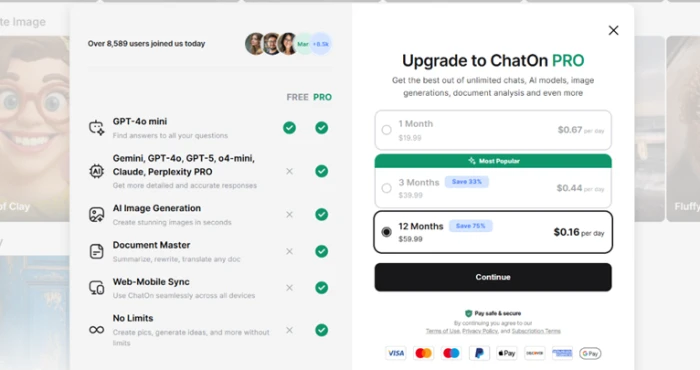
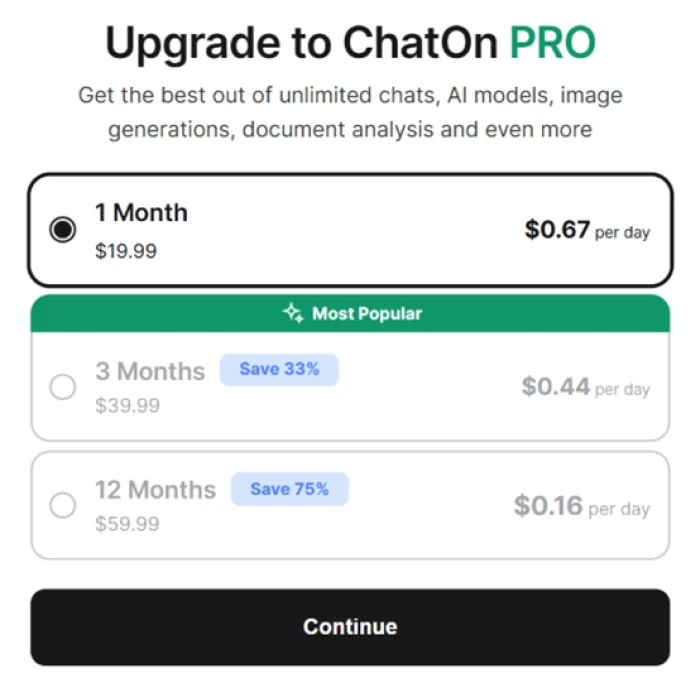
The ChatOn PRO screen, priced by the day to soften the sticker.
The signal here: You do not have to go looking for the upgrade wall. The PRO screen gates the stronger models along with image generation, document analysis and cross-device sync, and it frames every plan as a daily cost so the yearly tier reads as pennies a day. The free tier stays usable for plain chat, but the features people actually want sit behind that wall.
★
The visual tools are the real reason to open it
The fox render came out clean and the 80s transform kept the subject sharp under heavy neon, with none of the mangled hands or smeared edges that give cheap generators away. On images, ChatOn earns a return visit.
!
It fabricates facts without warning you
Asked for this week's news, ChatOn invented dated headlines and pinned them on the wrong administration. Its citations were worse, with most links returning 404 and the one that loaded pointing to an unrelated study. Nothing in the interface signals that any of this might be made up.
How this review was put together. I tested ChatOn on the web app in September 2026 with a new account, running writing, current-knowledge, citation, image-generation, style-transfer and paywall tasks. Every screenshot here comes from that session. Pricing was read straight from the ChatOn in-app upgrade screen, since the marketing site does not publish plan figures. The account details and the tool link sit at chaton.ai.
10-Point Feature Review
03 . Scored against what the session actually showed
Feature Scores at a Glance
Writing & Tone Control
8.5
Image Generation
8.0
Photo Style Transforms
7.5
Ease of Use
7.5
Everyday Chat Quality
7.0
Model Selection
6.5
Pricing Transparency
5.5
Ad-Free Experience
5.0
Source Citation Reliability
3.5
Current-Events Accuracy
3.0
Feature-by-feature breakdownScored 5.0 to 9.0 against the tested session
01
Writing & Tone Control Standout
One prompt produced three distinct registers that each held their shape, formal through blunt. It lands at 8.5 rather than 9.0 because the tones are reliable but not surprising, and it does not reach a full mark since the app still needs a check on strict length or format instructions.
Registers returned: 3 of 3Rework needed: None
8.5
Standout
02
Image Generation Strong
The fox render came back coherent and cleanly lit from a plain prompt, with an aspect-ratio control offered before generation. It sits at 8.0, not higher, because a single strong render is not proof of range, and not lower because the output needed no retries to be usable.
Aspect control: Up frontUsable first pass: Yes
8.0
Strong
03
Photo Style Transforms Strong
The 80s preset kept the subject sharp and applied period lighting without warping the face. It earns 7.5 because template output this clean is a real result, held under 8.0 because a preset is a narrower test than a freeform edit, which I could not push far on the free tier.
Face integrity: PreservedStyle match: Convincing
7.5
Strong
04
Ease of Use
Presets and templates lower the barrier and responses come back quickly, which matches the wider reviewer consensus. It gets 7.5 rather than more because history has no search and long threads are easy to lose, small gaps that add friction once you use it daily.
Learning curve: LowHistory search: Absent
7.5
Solid
05
Everyday Chat Quality
For brainstorming, drafting and general questions the replies were fluent and on topic. It sits at 7.0 because the writing is strong, but the score is capped by the same instruction drift seen elsewhere, where precise constraints sometimes slip.
Fluency: HighInstruction drift: Occasional
7.0
Solid
06
Model Selection
Access to GPT, Gemini, Claude and Sonar in one place is a real draw, but the app does not make it clear which model answered a given message. It lands at 6.5 because the choice exists yet the transparency around it does not, so you cannot always tell what you are talking to.
Models offered: Four familiesActive model shown: Unclear
6.5
Mixed
07
Pricing Transparency Watch
Every plan is framed as a cost per day rather than what actually hits your card, and reviewers repeatedly report auto-renewals they did not expect. It gets 5.5 because the figures are shown before purchase, but held down because the daily framing is built to blur the real yearly total.
Framing: Per dayRenewal complaints: Common
5.5
Mixed
08
Ad-Free Experience Watch
A sponsored listing sat directly under a reply in the free tier, stacked on top of the upgrade prompt. It scores 5.0 because plain chat still works around the clutter, but the in-chat ad makes the free experience feel cramped next to cleaner rivals.
Ads in chat: Yes, free tierPlacement: Under replies
5.0
Mixed
09
Source Citation Reliability Fails
Of three requested citations, two links returned 404 and the third opened a paper unrelated to the topic. It scrapes to 3.5 rather than lower only because the formatting and metadata looked plausible, which is arguably the more dangerous failure since it invites trust.
Working links: 1 of 3On-topic sources: 0 of 3
3.5
Fails
10
Current-Events Accuracy Fails
Asked for dated news, it fabricated a week of headlines and misattributed policy to the wrong administration, with no disclaimer. It bottoms out at 3.0 because the answer was not just wrong but confidently, specifically wrong, which is the worst outcome for a knowledge task.
Live access: None admittedAccuracy: Fabricated
3.0
Fails
Pros and Cons
04 . What stands out, good and bad
+What works
Tone rewrites: nails formal, friendly and blunt versions from a single request
Image generation: photo-real renders with the aspect ratio chosen before you generate
Style transforms: presets like the 80s look apply cleanly without warping faces
Many models, one app: routes across GPT, Gemini, Claude and Sonar in a single window
Low barrier: presets and quick responses make it friendly to non-technical users
Wide toolkit: chat, images, PDF summaries and transcription all live in one place
−What frustrates
Invents current events: produced specific dated headlines that never happened
Broken citations: dead links and a source mismatched to the claim
Ads in the chat: sponsored listings sit right under replies in the free tier
Overconfident on gaps: no hint when it lacks live or reliable information
Loose on instructions: drifts on strict limits or leaving out requested items
Pricing Breakdown
05 . Free chat, paid everything-else
Plan
Free$0/forever
PRO 1 Month$19.99/month
PRO 3 Months$39.99/3 monthsMost Popular
PRO 12 Months$59.99/year
Advertised rate
–
$0.67 / day
$0.44 / day
$0.16 / day
Effective monthly
Free
$19.99
~$13.33
~$5.00
Savings vs monthly
–
–
Save 33%
Save 75%
Full PRO features
✗
✓
✓
✓
The tier math: All three PRO plans unlock the same features, so the only real choice is how long you commit. Pay by the month and you hand over close to four times the annual rate for an identical app, which is the true cost of staying flexible. The per-day sticker on every option is there to make the longer commitment feel painless. Whichever term you land on, the split that actually matters is Free against PRO: plain chat costs nothing, but everything heavier, image work included, sits behind the subscription.
The upgrade screen, showing all three billing terms priced as a daily rate.
Pricing verified September 14, 2026 from the ChatOn in-app upgrade screen, which is where the app surfaces its plans. Terms shift and vary by store, so confirm the current rates on the official site before you subscribe.
ChatOn vs the Top 3 Alternatives
06 . How it stacks up on price and trust
CChatOn
GChatGPT
GGemini
PPoe
Entry Price
$19.99/mo
$20/mo
$19.99/mo
From $4.17/mo
Live Web Access
None
Yes
Yes
Varies by bot
Image Generation
PRO only
Included
Included
Multiple models
Best For
Fast mobile creative drafts
Reliable reasoning and tools
Live info and Google apps
Trying many models at once
Where it fits: If your work leans on current facts or real sourcing, ChatGPT and Google Gemini both have live web access and win that use outright. Poe is the closest match to ChatOn's many-models pitch and its entry tier starts far cheaper, though its points system meters heavy use. ChatOn's own case is narrow but real: quick tone rewrites and image transforms on a phone, provided you verify anything factual somewhere else.
What Users Are Saying
07 . Voices beyond the test account
Never got any email before the automatic renewal, only after, so I canceled.
Fine for creative drafts, wrong for anything you have to get right
Use ChatOn if you want quick tone rewrites and clean image transforms on your phone, and you will treat anything factual it produces as a draft to verify elsewhere.
Skip ChatOn if you need current information or real sources, where ChatGPT and Google Gemini both bring live web access, or if you want the same multi-model access for less, where Poe starts far cheaper.



Discussion
Join the discussion and share your perspective.