Cutout.Pro packs 30+ AI tools into one platform: background removal, photo enhancement, video background removal without green screens, AI image generation via Flux/Imagen 4.0/Sora 2.0, e-commerce product staging, passport photo maker, and a developer API trusted by 25,000+ businesses since 2018. The feature breadth is genuinely impressive. But a 1.8-star Trustpilot score, a 2024 data breach exposing 20 million users on the dark web, and persistent reports of unauthorised charges and unreachable customer support tell a very different story. This review separates what the tool actually delivers from the serious risks of using it, with first-hand testing across the background remover, passport photo maker, and fortune generator.
Originally launched as an AI background removal service in 2018, Cutout.Pro has grown into a comprehensive visual editing platform offering more than 30 tools. Its features are organized into five main categories: AI Image, AI Design, AI Portrait, AI E-commerce, and AI Video. The platform is operated by Team LibAI in Hong Kong and states that it serves more than 25,000 business clients.
The platform now integrates cutting-edge AI models including Flux Krea, Imagen 4.0, GPT Image 2, Seedream 4.0/4.5/5.0, Nano Banana (Gemini), Sora 2.0, Veo 3.0/3.1, Seedance 2.0, and Vidu Q2, making it one of the most model-rich editing platforms available. Tools span from basic background removal to AI virtual models for e-commerce, passport photo generation, text-to-speech, digital human video, and sketch-to-video conversion.
Critical Security Warning: In February 2024, a hacker posted 5.93 GB of stolen data from Cutout.Pro on BreachForums, containing over 41 million records and exposing email addresses, names, IP addresses, phone numbers, API keys, and salted MD5 password hashes of nearly 20 million users. The breach was independently verified by Troy Hunt (Have I Been Pwned) and BleepingComputer. A separate 2023 leak via open Elasticsearch servers exposed 9 GB of user data. Cutout.Pro has never published a public post-mortem, sent breach notifications to affected users, or explained what remediation was taken. As of May 2026, this remains unaddressed. If you have ever used Cutout.Pro, check your email on haveibeenpwned.com and change any reused passwords immediately.
What Happened When We Tested It
02 . Four tests on free credits, with deliberately non-personal photos
The testing for this review covered four core Cutout.Pro workflows: the homepage dashboard, the background remover (with before/after comparison), the passport photo maker, and the AI fortune generator. Given the documented breach history, all test uploads used either stock-style images or publicly-available photographs of public figures, never personal photos. Each test below documents the input, the screenshot captured from the live platform, and the result observed.
The Dashboard
Onboarding
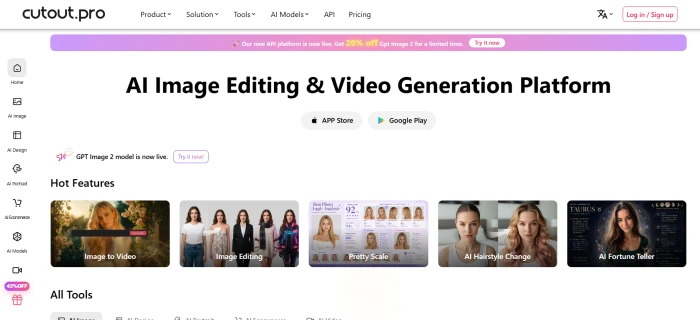
The Cutout.Pro homepage, with the 30+ tools organised into categories across the top navigation.
The homepage surfaces the full toolkit immediately: AI Image, AI Design, AI Portrait, AI E-commerce, and AI Video as top-level categories with the most popular tools (background remover, photo enhancer, passport photo, AI generator, video background remover) called out in tile form. New users get 5 free credits on signup without a credit card requirement, which is enough to test two or three basic operations before the meter runs out.
Background Remover
Test 01 . The flagship feature
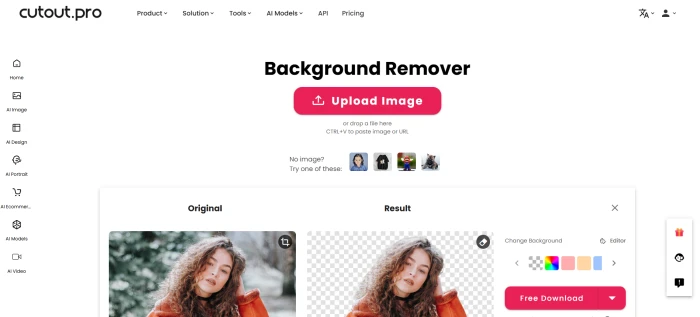
The background remover tool dashboard, with the drag-and-drop upload area at the centre.
Before and After Comparison
Input: portrait photograph with a clean background.Output: background removed cleanly, transparent PNG.
The background remover handled the input portrait cleanly. Edge detection around the hair and shoulders held up well, the cutout looked publishable on the first try, and the transparent PNG downloaded directly without watermark. End-to-end time from upload to download was under twenty seconds. This is genuinely the strongest tool in the Cutout.Pro suite, which makes sense because it is the original feature the entire platform was built around in 2018.
What this test demonstrates: The flagship feature works as advertised. Quality matches what Remove.bg delivers on similar inputs, and the platform consumed just one credit for the operation. For users who decide to use Cutout.Pro despite the trust concerns, this is the function that justifies the subscription, particularly at $5/month for 80 monthly credits.
Passport Photo Maker
Test 02 . Face detection and cropping
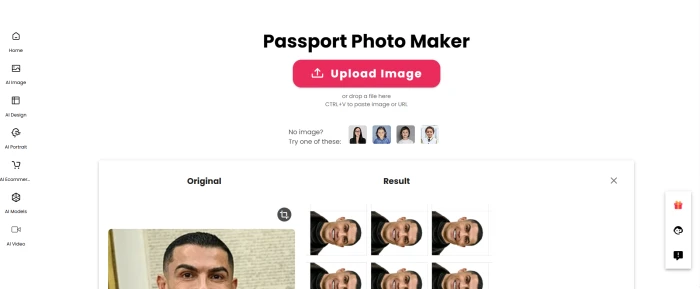
The passport photo maker dashboard, with format presets for different country requirements.
Input and Output
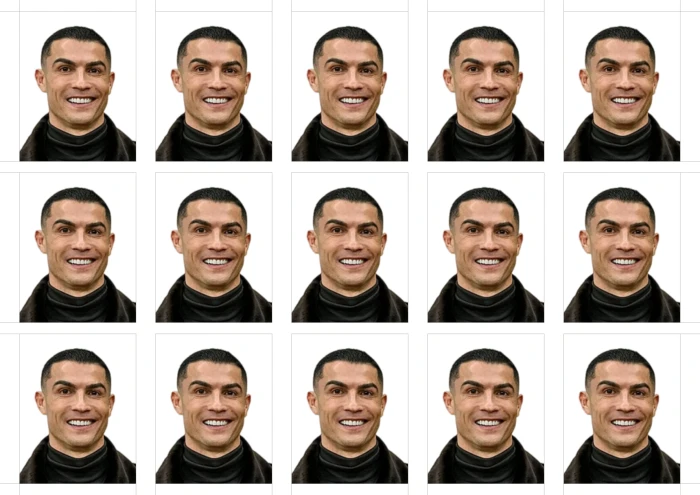
Input: publicly available photograph with two subjects in frame.Output: passport-format result returned by the tool.
The passport photo maker dashboard offers format presets for a long list of country-specific document requirements (US, UK, India, Schengen, China, and many more), each with its own dimensions, head-position rules, and background colour expectations. The test input was a publicly-available White House photograph chosen specifically because it features two subjects, allowing observation of how the face-detection and cropping logic handles multi-person inputs. The tool produced a passport-format output as configured.
Practical note: Cutout.Pro's passport tool processed the input and generated a passport-format file matching the selected preset. For actual passport applications, official requirements vary by country and most government agencies still want photos taken at certified studios or partner kiosks. The tool is most useful for visa applications, online identity verifications, and quick passport-style profile renders where strict government compliance is not the test.
AI Fortune Generator
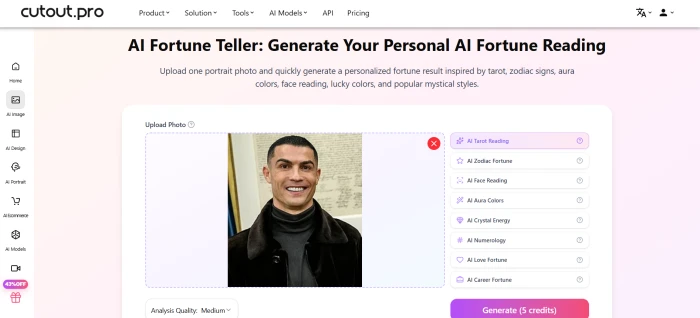
Test 03 . Novelty feature blocked by credits
The AI fortune generator dashboard, with the upload completed but the result blocked by credit exhaustion.
Test blocked at the credit wall. The 5 free signup credits had been consumed by the earlier background removal and passport photo tests. The fortune generator accepted the uploaded image but did not return a result, prompting either a subscription purchase or a pay-as-you-go credit top-up to continue. This is the predictable economic logic of the credit system, but it does mean the fortune feature could not be independently verified in this review.
What this reveals about the credit economics: Cutout.Pro's 5-credit signup allowance is enough to test two or three basic functions before users hit the paywall. For evaluation purposes, this is reasonable. For users who genuinely want to test multiple features before deciding whether the platform is worth subscribing to, the cap forces a decision faster than competitors who offer larger free trials or per-day allowances. Given the trust concerns documented elsewhere in this review, treat the limited free testing as an additional friction rather than a fair evaluation window.
How this review was put together. First-hand testing covered the homepage onboarding, the background remover (with before/after comparison), the passport photo maker (with a publicly-available image featuring two subjects to test face-detection on multi-person inputs), and the AI fortune generator (which could not complete due to credit exhaustion). All uploads were deliberately non-personal in light of the documented February 2024 data breach. The remaining feature scoring cross-references the Trustpilot rating (1.8 stars from 35 reviews), the Scam Detector composite score (58.9/100), independent industry analysis from Q2 2026, and the security research by Troy Hunt of Have I Been Pwned and BleepingComputer.
Feature-by-feature breakdownScored on a 10-point scale
01
Feature breadth MASSIVE
30+ tools across image editing, design, portrait, e-commerce, and video. Background removal, object retouch, photo enhancement, upscaling, colorization, cartoon selfie, passport photo maker, AI art generation, virtual try-on, AI virtual models, product staging, e-commerce posters, image-to-video, video background removal, digital human video, text-to-speech, and more. Few platforms offer this range under one roof.
TOOLS: 30+CATEGORIES: 5
9.0
EXCELLENT
02
AI model integration CUTTING-EDGE
Access to Flux Krea, Imagen 4.0, GPT Image 2, Nano Banana (Gemini), Seedream 4.0 to 5.0, Sora 2.0 (with audio), Veo 3.0/3.1, Seedance 2.0, and Vidu Q2. The model comparison tool lets users test outputs side-by-side. This is an unexpectedly deep generative AI feature set for what started as a background removal tool. New models are added as they launch.
IMAGE MODELS: 10+VIDEO MODELS: 6+
8.5
GREAT
03
Image background removal CORE STRENGTH
The flagship feature. Single-click removal produces transparent PNGs in 10 to 15 seconds. Accuracy reaches 90-95% on clean product photos with clear edges. Complex edges (fine hair, fur, transparent fabrics, reflective surfaces) push quality down but remain acceptable for most non-studio use cases. Batch processing supports hundreds of images in automated queues. Our before/after test in the testing section confirms this works as advertised.
Automatic video background removal without a green screen, a genuinely rare feature at this price point. Most competitors handle images only. Suitable for creators, marketers, and short-form video workflows. Consumes 3 to 5 credits per second of footage, so a 30-second clip costs 90 to 150 credits. Quality is acceptable for social media but not broadcast-grade.
GREEN SCREEN: Not neededCOST: 3-5 credits/sec
7.8
GOOD
05
E-commerce tools SPECIALIZED
AI virtual model (place products on AI-generated models), product staging (generate lifestyle backgrounds), e-commerce auto-design (batch product posters), and POD (print-on-demand) generation. The Shopify plugin integrates directly into store workflows. One POD business owner reported a 47% sales increase after integrating Cutout.Pro's face cutout and cartoonizer tools.
SHOPIFY: Plugin availableBATCH: Automated queues
7.5
GOOD
06
Developer API SOLID
Full API documentation, batch processing, and integration support. 98%+ uptime guarantee. Uploaded data and results are discarded immediately after processing (per their claims). The API is what keeps Cutout.Pro relevant for businesses despite the trust issues, since it processes images at scale without requiring human login or personal data beyond API keys.
UPTIME: 98%+DATA: Discarded after processing
7.8
GOOD
07
Ease of use FAST
Upload a file, select a tool, download the result, under a minute for first-time users. No learning curve for core features. The interface is clean and unintimidating. This accessibility is a genuine differentiator versus Photoshop-adjacent tools. Desktop and mobile apps extend the workflow beyond the browser.
TIME TO RESULT: <1 minLEARNING CURVE: None
8.2
GREAT
08
Credit system value ADDS UP
1 credit per standard image removal, 2 credits for enhancement/colorizer/passport photo, 3 to 5 credits per second for video. The $5/mo subscription gives 80 credits at $0.063/credit. Pay-as-you-go starts at $0.166/credit (30 credits for $4.99) and drops to $0.047/credit at the 30,000-credit tier ($1,399). Unused subscription credits roll over up to 5x the monthly budget. The credit model is flexible but video processing costs escalate quickly.
SUB: $0.049-0.063/creditPAYG: $0.047-0.166/credit
6.5
FAIR
09
Customer support and trust HOSTILE
Trustpilot: 1.8 stars from 35 reviews. Scam Detector: 58.9/100 ("Medium Risk"). Users report no response to support emails, inability to cancel subscriptions, continued charges after cancellation, and credits consumed without producing usable results with no refund. Multiple reviewers describe having to dispute charges through their bank or PayPal because Cutout.Pro support is unreachable. The company has not responded to negative Trustpilot reviews.
TRUSTPILOT: 1.8 starsSCAM DETECTOR: 58.9/100
2.5
POOR
10
Data security BREACHED
Two documented incidents: (1) A 2023 leak via open Elasticsearch servers exposed 9 GB of user data. (2) In February 2024, 5.93 GB of stolen data (41M records, 20M users) was posted on BreachForums, exposing emails, names, IPs, phone numbers, API keys, and password hashes. Independently verified by Troy Hunt and BleepingComputer. Cutout.Pro denied the breach occurred. No public post-mortem, no breach notifications, no remediation details ever published. This is the single biggest risk factor for any user of this platform.
BREACH: 20M users (Feb 2024)RESPONSE: Denial, no action
2.0
CRITICAL
Pros and Cons
04 . Strong tools, severe trust damage
+What users like
One asset can move from raw photo through enhancement to a generated video inside a single platform, with no exporting between separate tools
AI virtual models and virtual try-on let sellers show products on people without booking a photoshoot or hiring models
Video background removal without green screen, a rare capability at this price
Text-to-speech paired with digital human video can produce narrated avatar clips for creators who stay off camera
−What users dislike
Feeding passport or ID photos into a platform with a proven breach history risks exactly the images most valuable to attackers
Thirty-plus tools from one small team means individual features can lag behind dedicated single-purpose rivals on quality
AI-generated virtual models and try-on images raise disclosure questions for ads and can mislead shoppers if left unlabeled
Since the company denied a verified breach, its other data claims like immediate deletion after processing are hard to take on trust
Pricing Breakdown
05 . Credit-based with subscription and pay-as-you-go options
Plan
Price
Credits
Cost/Credit
Rollover
Free
$0
5 on signup
Free
No
Sub: 80/mo
$5/mo
80
$0.063
Up to 5x monthly
Sub: 170/mo
$9.90/mo
170
$0.058
Up to 5x monthly
Sub: 300/mo
$16.90/mo
300
$0.056
Up to 5x monthly
Sub: 550/mo
$29/mo
550
$0.053
Up to 5x monthly
Sub: 1000/mo
$49/mo
1,000
$0.049
Up to 5x monthly
Sub: 1450/mo
$69/mo
1,450
$0.048
Up to 5x monthly
PAYG: 30
$4.99
30
$0.166
Forever
PAYG: 300
$39
300
$0.130
Forever
PAYG: 3000
$199
3,000
$0.066
Forever
Credit costs per action: 1 credit for standard BG removal/retouch, 2 credits for cartoon selfie/passport photo/enhancement/colorizer, 3 to 5 credits per second for video background removal. HD processing doubles the credit cost.
Our take: If you decide to use Cutout.Pro despite the trust concerns, the $5/mo subscription (80 credits) covers most small-scale creator workflows. Pay-as-you-go at $0.166/credit is expensive and should be avoided, subscribe instead. For video processing, budget carefully: a single 30-second clip can cost 90 to 150 credits ($4.50 to $7.50 on the cheapest plan). Use PayPal or a virtual credit card, never save your real card details given the billing complaints and breach history.
Cutout.Pro vs the Top 5 Alternatives
06 . How it compares for AI photo and video editing
CCutout.Pro
RRemove.bg
CCanva Pro
PPhotoRoom
RRunway
Score
5.8
8.0
8.5
8.2
9.0
Starting Price
Free / $5 mo
Free / $29 mo
Free / $13 mo
Free / $10 mo
$15/mo
BG Removal
✓
✓ Best
✓
✓
Basic
Video BG Removal
✓
✗
✗
✗
✓
AI Image Gen
✓ 10+ models
✗
✓
Basic
✓
E-commerce Tools
✓ Full suite
Limited
✓
✓
✗
API
✓
✓
✗
✓
✓
Mobile App
✓
✗
✓
✓
✓
Trustpilot
1.8 stars
4.5 stars
4.5 stars
4.3 stars
3.8 stars
Data Breach
Yes (20M users)
None
None
None
None
Best For
Feature count
BG quality
All-in-one design
Mobile-first
Pro video
The picture: Cutout.Pro wins on feature count and AI model access but loses on every trust metric. Remove.bg delivers sharper background removal with a 4.5 Trustpilot score. Canva Pro offers background removal plus an entire design platform. PhotoRoom is the best mobile-first option. Runway leads for professional video editing. Every competitor has a better Trustpilot score, no data breach history, and more responsive support. The only scenario where Cutout.Pro is the clear pick is video background removal combined with AI image generation, if you can accept the security risks.
What Users Are Saying
07 . Collected from Trustpilot, Reddit communities, and verified user platforms
Used Cutout.Pro for product photography on our Shopify store, around 400 SKUs through batch processing. The background removal quality holds up against Remove.bg at a fraction of the cost on the API tier. Worth noting: we use it through API only, never the consumer login flow, after reading about the breach history.
Shopify store operator
r/ecommerce community discussion / API user
★★★☆☆
This site has leaked data on the dark web. In February 2024, a hacker posted 5.93 GB of stolen data containing over 41 million records. The breach exposed email addresses, names, IP addresses, phone numbers, API keys, and password hashes. I would recommend other people NOT to use this website.
Security researcher
Trustpilot reviewer / Detailed breach analysis
★☆☆☆☆
Subscribed for a month on the basic plan, cancelled after seeing the breach headlines. Found unauthorized $9.90 charges on my card the following two months. Bank disputed both successfully. Support emails went unanswered for six weeks. The tools themselves work, the company's billing and security posture is the problem.
Former subscriber
Trustpilot reviewer / Annual subscriber
★☆☆☆☆
Cutout.Pro has the broadest feature set of any background removal tool I've tested, video BG removal alone is rare at this price. But the 2024 breach and the company's silence about it crossed a line. Switched the team workflow to PhotoRoom and Remove.bg combined, even at higher cost. Trust is part of the value calculation.
Marketing director
r/SaaS community discussion / Former Pro subscriber
★★☆☆☆
The consensus: Reviewers unanimously agree the tools work. Background removal is fast, the model access is impressive, and the API serves business needs. But the 2024 data breach, the company's denial and silence, unauthorised billing complaints, and a 1.8 Trustpilot score create a picture of a technically capable platform run by a company that has lost user trust and made no visible effort to rebuild it. The phrase that captures the sentiment best: "You're trading money for risk."
· The Verdict ·
5.8/10
Should you use Cutout.Pro? Here is who it is for, and who should walk away.
Use Cutout.Pro only if the use case requires capabilities no alternative matches (video background removal combined with AI image generation in one platform), the workflow is API-driven for automated batch processing where personal login is not required, or the user is a developer integrating via API keys. If you proceed, use PayPal or a virtual card, create a burner email, never save real card details, and check statements monthly. The tools themselves are genuinely capable. The risk is the company, not the product.
Skip Cutout.Pro if data security matters at all (use Remove.bg at $29/mo, 4.5 Trustpilot, zero breaches), the goal is all-in-one design with background removal (use Canva Pro at $13/mo), the work is primarily on mobile (use PhotoRoom), or professional video editing is the need (use Runway at $15/mo). Every competitor listed above has a higher trust score, no breach history, and responsive customer support. For most users, the risk-reward math does not work in Cutout.Pro's favour in 2026.






Discussion
Join the discussion and share your perspective.