

Home / Reviews / AI Video Generator / Descript AI
Video Editing AI Co-editor

Descript Review

www.descript.com · Descript, Inc.

Descript turns video editing into text editing: cut a sentence from the transcript and the matching footage disappears with it. Its Underlord AI co-editor goes further, auto-transcribing and leveling an upload before you touch anything, then drafting a full scene-by-scene plan for an AI-generated video. It suits creators who would rather work in a document than a timeline. The reckoning arrives the moment you approve that plan, and it is counted in credits.

Reviewer Score
7.0
/10
Capable Pick
A brilliant editor
with a brutal free tier
Text-Based Editing8.5
Guided Onboarding8.5
Editor Flexibility8.0
Free Tier Value5.5
Credit Economics5.0
Platform
Web, Mac & Windows
Known For
Transcript editing
Free Media
60 min / month
Free AI Credits
100 one-time
Entry Paid
$16 /mo annual
Free Export
720p watermarked

What Descript Does

01 . Overview

Descript is a text-based editor for video and audio. Rather than scrubbing a timeline, you edit a transcript. Delete a sentence and the matching footage or audio is cut with it. Move a paragraph and the clips follow the words. That one idea, shipped back in 2017, is what pulled the tool into newsrooms and podcast studios at outfits like the BBC and Spotify.

Underlord, the built-in AI co-editor, has since pushed Descript well past simple cleanup. It transcribes speech, strips filler words, sharpens rough audio with Studio Sound, drafts scripts, and now spins up whole videos with AI avatars and voices from a single prompt. The result is a platform that wants to own the entire path from raw recording to published clip.

Descript runs on a free plan and three paid tiers that begin at $16 per person a month on annual billing. What that money actually buys, and where the meter bites, comes later.

What Happened When We Tested It

02 . 8 tests, from first upload to the export screen

I ran a short clip through Descript's AI video maker on a free account and followed it the whole way, from the moment Underlord took over to the file it finally handed back. The account opened with 99 AI credits and 56 media minutes. The story of this session is the story of where those credits went.

Underlord preps the file before you lift a finger

Test 01 . First contact
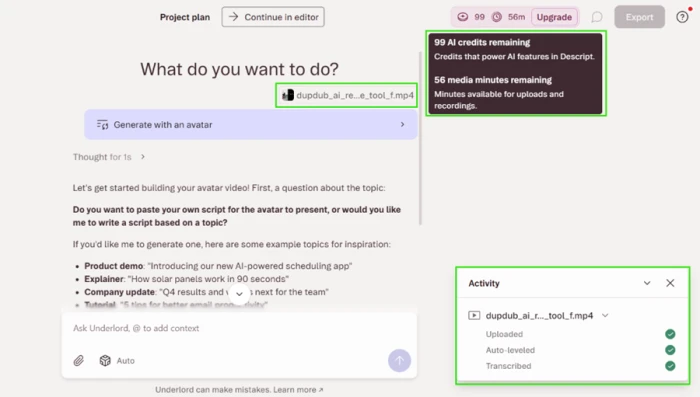
Descript's Underlord AI co-editor interface showing 99 AI credits and 56 media minutes, with an option to write a script or paste one
Underlord offers to write the script or use my own, with the credit balance in view.
First impression: My file was already uploaded and transcribed before I clicked anything, with the audio auto-leveled on the way in. Underlord asked whether it should write the script from a topic or take mine, and it had noticed my uploaded video, offering to base the avatar clip on that same subject. For a first thirty seconds, this is as smooth as onboarding gets.

Six credits gone before anything rendered

Test 02 . The meter starts early
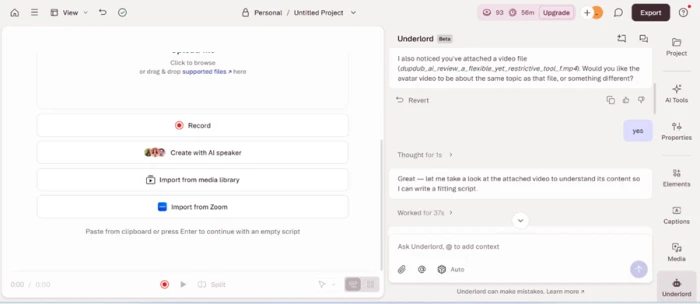
Descript editor view after setup with the AI credit counter reduced from 99 to 93
By the time the editor loaded, the balance had dropped from 99 to 93.
What stood out: I had not generated a single frame, yet the counter had already fallen six credits from answering setup questions. The meter runs during planning, not just production. On an account that starts with 99, spending six on choices you have not committed to is a warning about how the rest will go.

Voice direction that puts in real thought

Test 03 . Voice and avatar
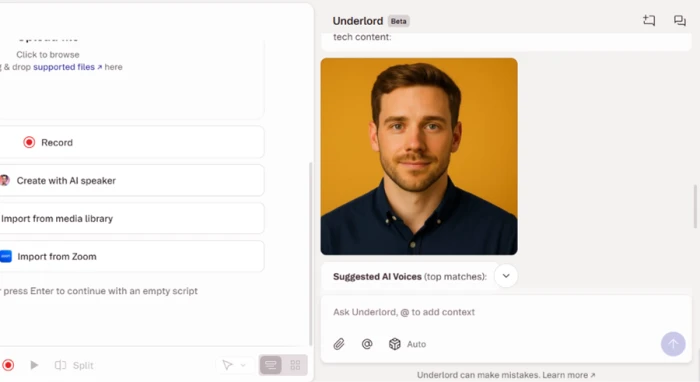
Descript avatar and voice selection screen showing a stock presenter still photo and narrator voice previews
A stock presenter appears as a still, with narrator previews alongside.
Where it lands: The suggested avatar was a clean-cut professional man, shown as a static photo. The voice picker was the strongest moment of the setup. Underlord previewed several narrators, including a Canadian technical read and a British professional one, then recommended a pairing it judged right for a balanced tech review. That is voice-to-content matching, not a plain dropdown.

A production brief that reads better than the result

Test 04 . The plan
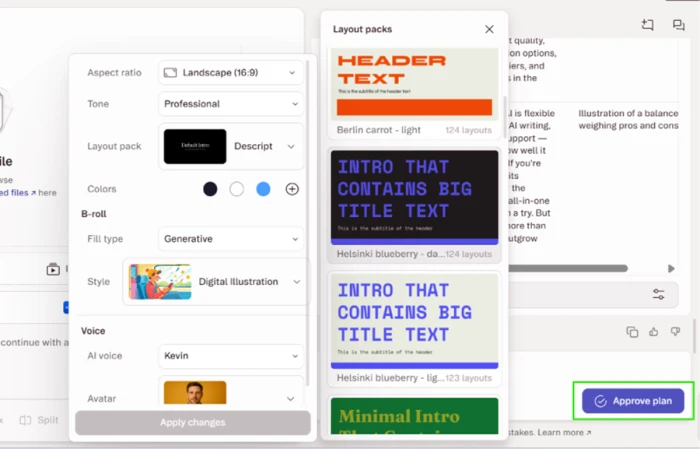
Descript's Underlord production plan showing a script summary, chosen voice and avatar, color palette, runtime, and a scene-by-scene table
The pre-render plan lays out palette, runtime, and every scene.
Worth noting: Before rendering, Underlord wrote out a complete brief covering the script summary, the voice and avatar, the visual style, the palette, the runtime, and a scene-by-scene table. I could set aspect ratio, tone, layout pack, colors, and b-roll fill without opening an advanced menu. On paper this is a genuinely professional front end. The gap between the plan and what it produced is the rest of this review.

The b-roll ignored the video I uploaded

Test 05 . Media matching
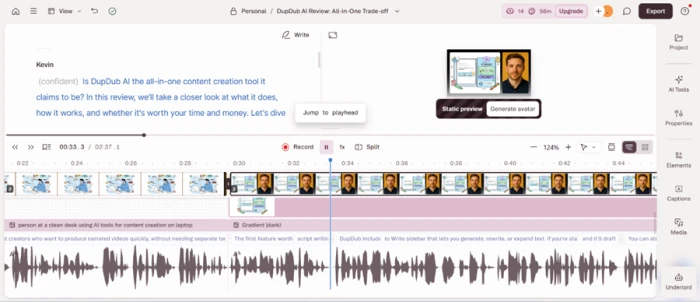
Descript timeline showing generic AI cartoon b-roll of a figure at a desk instead of the uploaded footage
The generated b-roll is a generic cartoon, not the source clip.
The real story: The flow opened by offering to match my uploaded file, then filled the cut with generic AI illustration, a cartoon figure at a tidy desk. Nothing in the finished b-roll came from the video I actually gave it. The one promise that would have made this feel bespoke was quietly dropped.

The meter hits zero, and a paywall replaces it

Test 06 . Where credits vanish
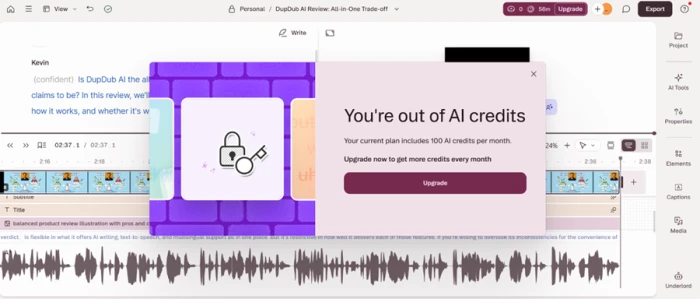
Descript upgrade wall appearing after the AI credit balance reached zero mid-project
The balance empties partway through editing, and AI actions stop.
The key finding: Generating the speech alone dropped the balance to 38 and flagged that I was under half my credits. The avatar came back as a frozen still, mouth shut. Making him actually speak was quoted at 211 credits for a Kling Avatar v2 render, more than double the 100 credits a free account is granted. One video of roughly two and a half minutes emptied the entire allowance before I had finished editing.

Past the meter, the editor genuinely holds up

Test 07 . Inside the editor
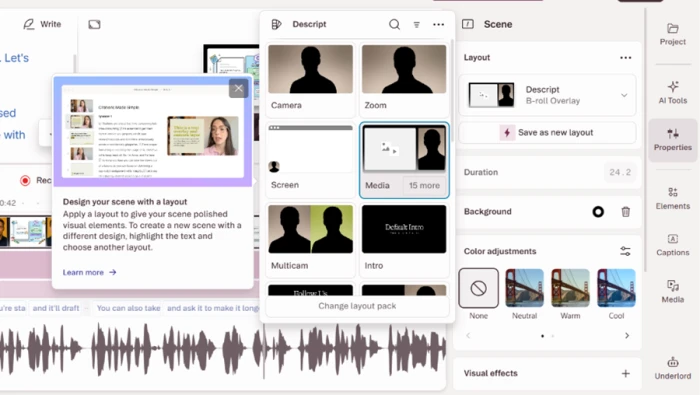
Descript editor showing layout packs such as Camera, Zoom, Screen, and Media for restyling a scene
Any scene can be re-shaped with layout packs after generation.
Under the surface: Look past the credit counter and the editor is the part people stay for. Any scene can be restyled with layout packs such as Camera, Zoom, Screen, or Media, so the structure stays editable long after generation. The caption tools were a strength too, with several font and highlight styles that would suit short vertical clips. This flexibility is real, and it is why users tolerate the rest.

The finished first frame told the whole story

Test 08 . The output
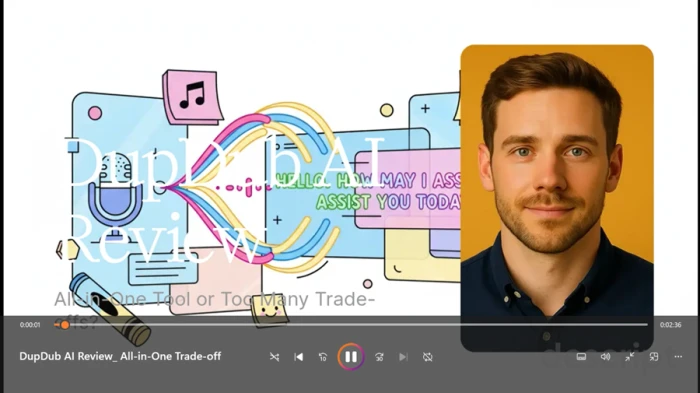
Descript's exported video first frame showing a garbled title reading DupD..b AI Review, a placeholder assistant graphic, a frozen avatar, and a watermark across the middle
The exported opener: a mangled title over a placeholder graphic, watermark included.
The takeaway: The title rendered as a garbled "DupD..b AI Review," a stock "Hello, how may I assist you today" graphic filled the background, the presenter sat silent, and a watermark stretched across the middle. Free exports also top out at 720p. For a cut that Descript pushed straight to a public share link on download, it was nowhere near ready to share.
★
A polished plan before you spend a single credit

The front half of this flow is excellent. The upload arrives transcribed and leveled. The voice picker reasons about tone, and Underlord writes a full scene-by-scene brief you can approve or rework. If Descript's whole job were planning a video, it would score near the top.

!
The free tier cannot finish one video

Animating the avatar was quoted at 211 credits against the 100 a free account gets, so the presenter stays frozen. The b-roll ignored the file it opened by offering to match. And hitting download auto-published the half-rendered, watermarked cut to a public link with embed code, without asking first.

How this review was put together. This is a hands-on run through Descript's AI video maker on a free account in September 2026, followed from upload to export. The session covered onboarding, voice and avatar choice, the Underlord production plan, generation, the editor, and the final download. Every AI credit cost quoted in the app was recorded as it appeared during that run. All plan prices, media-hour and credit allowances, and free-tier limits were verified on Descript's official pricing page at descript.com/pricing, where the free grant is listed as 100 one-time credits.

10-Point Feature Review

03 . Ten dimensions scored against the session
Feature Scores at a Glance
Text-Based Editing
8.5
Guided Onboarding
8.5
Voice & AI Speech
8.0
Editor Flexibility
8.0
Caption Styling
7.5
Production Planning
7.5
Free Tier Value
5.5
AI Talking Avatars
5.0
B-roll Relevance
5.0
Credit Economics
5.0
Feature-by-feature breakdownScored on the tested flow and verified capabilities, weighted toward core editing
01
Text-Based Editing Signature
The reason Descript exists, and it works exactly as promised. Cutting text cuts the media, and the upload arrived transcribed on import without a prompt from me. It stops short of a 9.0 only because I did not stress a long-form, multi-track edit in this session.
Approach: Edit text, edit mediaOn import: Auto-transcribed
8.5
Excellent
02
Guided Onboarding Standout
Descript transcribed and leveled the file before I touched anything, and Underlord framed the next steps clearly. It loses half a point because that same guidance quietly spent six credits on setup choices, which a first-timer would not expect.
Pre-edit prep: Transcribe + levelSetup cost: 6 credits
8.5
Excellent
03
Voice & AI Speech Strong
Narrator previews were varied and the recommended pairing suited the content, which is more than most tools attempt. It sits at 8.0 rather than higher because the generated speech alone ate a large chunk of the balance, so testing more voices was not free.
Previews: Multiple, with pairingStock speakers: 25+ to 60+
8.0
Strong
04
Editor Flexibility
Layout packs let me restyle any scene after generation, so a bad AI pass is not a dead end. It earns 8.0 over a lower score because the flexibility is genuine, and falls short of the top only because reaching it means first clearing the generation stage.
Layout packs: Camera, Zoom, Screen, MediaRestyle: After generation
8.0
Strong
05
Caption Styling
Several font and highlight presets are ready to drop onto vertical clips, and they look clean. It stays at 7.5 rather than 8.0 because captions are table stakes for this category now, so doing them well is expected rather than exceptional.
Presets: Multiple stylesBest fit: Vertical social
7.5
Solid
06
Production Planning
The scene-by-scene brief was thorough and let me set the look before spending on a render. It does not reach 8.0 because the plan oversold the result: what it described was more coherent than what the generator actually delivered.
Plan: Scene-by-scene tableSet first: Ratio, tone, palette
7.5
Solid
07
Free Tier Value Limited
You can plan and preview, but not finish. Exports are 720p and watermarked, the credits are one-time rather than monthly, and the download auto-published an unfinished cut. It clears 5.0 because the transcript editor itself remains usable, and no higher because you cannot complete a video.
Export cap: 720p, watermarkedFree credits: 100 one-time
5.5
Fair
08
AI Talking Avatars Costly
The headline feature returned a static still. Animating it was quoted at 211 credits for a Kling Avatar v2 render, so the whole point of the flow sits behind an outsized spend. It avoids a lower score only because the still image itself rendered cleanly.
Default: Static still imageAnimate cost: 211 credits
5.0
Weak
09
B-roll Relevance Off-brief
The generator filled scenes with generic cartoon illustration and never used the video it opened by asking to match. It rates 5.0 because the b-roll at least rendered and fit the runtime, and no higher because relevance to the source was zero.
Source match: Ignored uploadFill: Generic AI art
5.0
Weak
10
Credit Economics Opaque
The balance fell before generation even began, and a single short video emptied it entirely. Per-action costs only surfaced at the moment of spending. It holds at 5.0 because the counter was at least always visible, and drops no lower because the pacing gives a new user no room to experiment.
One 2.5-min video: Emptied balanceTop-ups: Creator and up
5.0
Weak

Pros and Cons

04 . What lands and what grates
+What Works
  • Transcript-native editing: cut a line of text and the matching footage disappears with it.
  • Zero-setup onboarding: uploads arrive transcribed and audio-leveled before the editor even opens.
  • Voice direction, not a dropdown: narrator previews come with a recommended voice-to-content pairing.
  • Planning before rendering: Underlord writes a scene-by-scene brief you can approve or rework first.
  • Restyleable scenes: layout packs re-shape any scene after generation, no timeline required.
  • Caption presets: multiple font and highlight styles suit vertical social clips out of the box.
−What Grates
  • Static avatars by default: the presenter comes back as a frozen still, and animating it drains an outsized share of credits.
  • B-roll ignores your source: it offered to match my uploaded video, then filled the cut with generic cartoons.
  • Output can render garbled: the finished title came out as "DupD..b AI Review" behind a placeholder assistant graphic.
  • Surprise auto-publishing: downloading pushed an unfinished cut to a public link with embed code.
  • The meter runs during setup: the balance drops on planning choices before anything is generated.

Pricing Breakdown

05 . Where the credits actually go
Feature Hobbyist$16/mo annual Creator$24/mo annualMost Popular
Media hours / month 10 hours
AI credits / month 400
Export resolution 1080p
Generate video with latest AI models ✗
Credit & media top-ups ✗
Team seats 1

Where the value sits: The headline number is not the trap. Hobbyist looks like the cheap way in, but it has no top-up escape hatch, so exhaust either monthly meter and you wait for the reset. Creator is where video generation with current AI models and mid-month top-ups switch on, which is what the "Most Popular" badge is quietly selling. The free plan's credits are a one-time grant rather than a monthly refill, so a single talking-avatar render cannot complete even once. And the sharpest increase is billing cadence, not tier: paying month to month lifts both paid plans by roughly a third over the annual rate shown above.
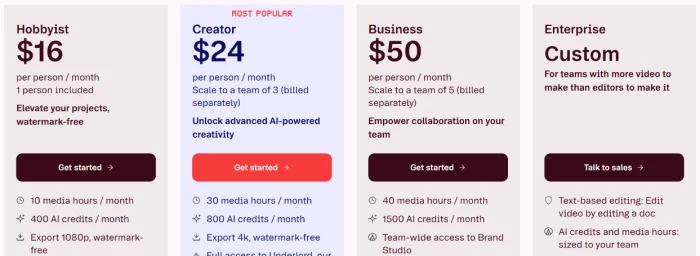
Descript pricing page showing Hobbyist at $16, Creator at $24 marked Most Popular, Business at $50, and Enterprise custom, all per person per month
Descript's paid tiers on annual billing, from Hobbyist through Enterprise.

Pricing verified September 21, 2026 on Descript's own pricing page. Credit costs and plan limits move quickly, so check the official pricing page before you commit to a cycle.

Descript vs the Top 3 Alternatives

06 . How it stacks up on approach and avatars
DDescript VVeed HHeyGen CCapCut
Core approachEdit by editing the transcriptBrowser timeline with AI subtitlesAvatar-first spokesperson videoFree social-clip editor
AI talking avatarsAdd-on, credit-heavyAvatar libraryCore product, hundreds of avatarsLimited
Text-based editingSignature featurePartial, caption-levelNoNo
Best ForPodcasts and repurposing spoken videoFast subtitled clips in-browserScripted presenter and training videosZero-budget social edits

How to choose: It comes down to what you start with. If your raw material is a recording and you think in sentences, Descript's transcript editing has no real equal in this group. If the goal is a presenter who actually moves and speaks without wrecking a credit balance, HeyGen is built for exactly that and costs less per finished video. Veed is the browser middle ground for subtitled clips, and CapCut is the one to reach for when the budget is zero and the destination is a social feed.

What Users Are Saying

07 . Voices from G2 and Trustpilot
Editing was described as easy as editing a document, and it's very fast, with the transcript approach praised for turning sections into cold opens by copy and paste.
Verified G2 review
On the transcript editing workflow
★★★★★
g2.com
One reviewer valued the automation for repurposing, noting that the AI also helps in creating clips and trailers, even while flagging how quickly credits are used.
Verified G2 review
On AI clips and repurposing
★★★★☆
g2.com
Support drew sharper words, with a reviewer reporting that the customer service is basically non-existent, just an AI bot and the subscription tiers confusing to navigate.
Verified G2 review
On support and plan clarity
★★★☆☆
g2.com
A billing-toggle slip stung one user, who wrote that the button to switch is very small and I accidentally spent 192 euros on the annual plan.
Trustpilot reviewer
On the annual billing toggle
★★☆☆☆
trustpilot.com
Renewals frustrated another, who said they were charged for an annual renewal even though I hadn't used it since 2023 and met a copy-paste refund reply.
Trustpilot reviewer
On renewals and refunds
★★☆☆☆
trustpilot.com
· The Verdict ·
7.0/10
The best way to edit video by editing text, if you budget for the credits

Use Descript if you start from recordings and would rather cut a transcript than a timeline, you lean on auto-transcription and Studio Sound cleanup, and you plan to pay for Creator so current AI video models and mid-month top-ups are available to you.

Skip Descript if a talking presenter is the whole point, since HeyGen animates one far more cheaply per render, or you want free, watermark-free social edits, where CapCut wins outright.

Category RankCapable Pick
Compared To3 Alternatives
Entry Price$16 /mo
Free TierYes, limited

Discussion

Join the discussion and share your perspective.