DiGen AI aggregates Sora 2.0, Veo 3.1, Seedance 2.0, Kling 3.0, Runway, and its own Real Motion 3.1 engine into one video generation platform, letting users compare outputs from multiple models before spending credits. Add lip-sync avatars, AI sound effects, text-to-speech in 70+ languages, and a built-in community feed where millions of creators share results, and the result is one of the most model-rich AI video platforms of 2026. The catch: free daily credits burn fast, the Trustpilot score sits at a mixed 3.0 to 3.5 range with persistent billing complaints, and third-party models (Sora, Veo) do not integrate as cleanly as DiGen's own native tools. This review tests the image-to-video continuation workflow end-to-end and documents where the value is real and where the friction hides.
FC
FirmCritics Editorial Team
Published May 5, 2026 · 18 min read · Updated regularly
DiGen AI is an AI video generation platform that aggregates multiple third-party and proprietary video models into one interface. Instead of subscribing to Sora, Veo, Runway, Kling, and Seedance individually, DiGen lets users access all of them from a single dashboard with a unified credit system. Pick the model, set the prompt and duration, generate, then compare outputs before committing credits.
Beyond video generation, the platform includes a full creative editor (Lip Motion for synced talking-head videos, Act Motion for body animation, Effect Models for stylistic filters), AI image generation with 12+ models (Nano Banana Pro, FLUX.2, GPT Image 2, Seedream 5.0, Sora Image), and a suite of utility tools (video upscaler, watermark removal, FPS booster, image upscaler). A social community feed lets creators share, remix, and browse AI-generated content.
DiGen appears to be Vietnamese in origin (Vietnamese locale support, vi_VN meta tags) with a global-facing English product. The company operates via [email protected] with a Discord community for support. WHOIS data is hidden, and no company registration name is prominently displayed on the site. Company details should be verified manually for enterprise procurement decisions.
What Happened When We Tested It
02 . Three tests, one continuation workflow from image to video
The testing for this review followed a deliberate narrative arc: generate an image with DiGen's AI image model, then use that exact image as the input for the video generator, demonstrating the continuation workflow that makes DiGen distinct from single-purpose tools. Each test below documents the prompt, the screenshot captured from the live platform, and the result.
The Dashboard
Onboarding
The DiGen AI homepage, with the main tool categories surfaced in the navigation.
The homepage organises the platform around the multi-model proposition: image generation, video generation, lip motion, and the community feed all surface in the top navigation. The model variety is visible from the start, which sets the right expectation that this is an aggregation platform rather than a single-engine generator.
AI Image Generation
Test 01 . Mars astronaut prompt
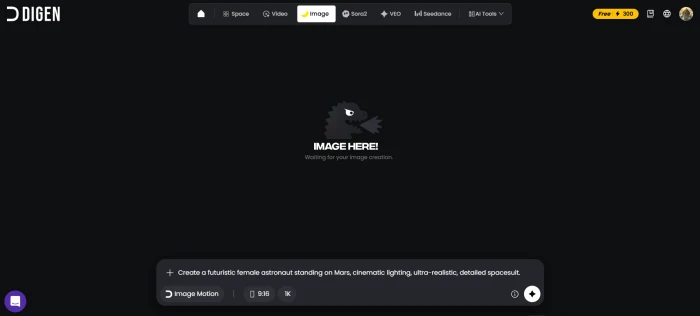
The image generation dashboard with the test prompt entered.
Image prompt entered
Create a futuristic female astronaut standing on Mars, cinematic lighting, ultra-realistic, detailed spacesuit.
The generated image: cinematic Mars astronaut, used as input for the video test below.
Prompt adherence on this image generation was strong. The cinematic lighting modifier carried through to the rendered output, the spacesuit detail held up at portrait resolution, and the Martian setting read as intended. The output is publishable as a standalone hero image for marketing or social media content, which is the right baseline for a multi-model platform that competes with dedicated tools like Midjourney and Ideogram.
Credit cost observed: Image generation consumed a modest portion of the free daily credit allocation, leaving enough headroom for the follow-up video test. This is the design pattern DiGen seems built around, generate a base image, then animate it.
Image-to-Video Animation
Test 02 . The continuation workflow
↹
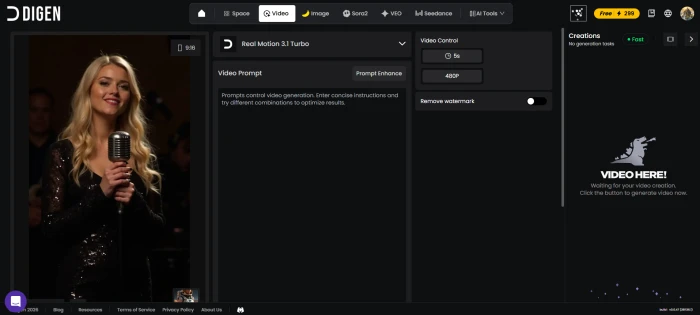
Continuation workflow: The Mars astronaut image generated in Test 01 was used directly as the input image for this video generation test, with no intermediate file export or upload step. This is the multi-tool advantage DiGen advertises in action.
The video creation dashboard, with the Mars astronaut image loaded as the source frame.
Motion prompt entered
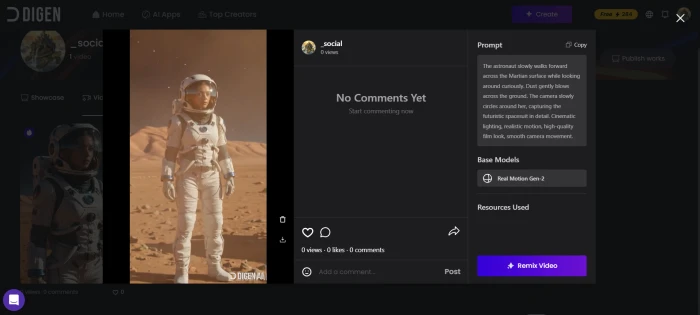
The astronaut slowly walks forward across the Martian surface while looking around curiously. Dust gently blows across the ground. The camera slowly circles around her, capturing the futuristic spacesuit in detail. Cinematic lighting, realistic motion, high-quality film look, smooth camera movement.
The generated video playing in the DiGen player, with the camera-orbit motion prompt translated into smooth movement.
The animated output translated the motion prompt into actual on-screen behaviour: the astronaut walks forward, dust blows across the ground, and the camera performs a slow orbit around the subject. Cinematic quality holds across the short duration, and the character identity stays consistent from the source image, which is the failure mode that catches most image-to-video tools. The output URL is not externally shareable, which is why the screenshot captures a frame from the playback rather than an embedded video link.
What this demonstrates: The continuation workflow (image then video, in one session, without leaving the platform) is genuinely useful and is the main editorial argument for DiGen against single-purpose competitors. Sora and Veo accessed directly do not offer the image generation step in the same pipeline, requiring users to bring assets from elsewhere. DiGen lets the entire chain happen in one session, which is the time-saving advantage.
How this review was put together. First-hand testing covered the homepage onboarding, the AI image generator with a Mars astronaut prompt, and the image-to-video animation flow using that generated image as the source frame. The remaining feature scoring cross-references the Trustpilot review history (approximately 3.0 stars from 62 reviews), the ScamAdviser composite analysis, and independent third-party AI tool reviews. Pricing details required JavaScript to render fully on the official site, so the figures below reflect both first-hand observation and cross-referenced third-party listings.
10-Point Feature Review
03 . Where DiGen delivers and where it stumbles
Feature Scores at a Glance
Model Variety
9.2
Tool Breadth
8.2
Native Video (Real Motion)
8.0
Community Features
7.8
Lip Sync / Avatars
7.5
Image Generation
7.6
Free Tier
6.8
3rd-Party Integration
6.0
Billing Clarity
5.5
Support & Trust
5.8
Feature-by-feature breakdownScored on a 10-point scale
01
Video model variety UNMATCHED
Access to Sora 2.0 (with audio), Veo 3.1, Seedance 2.0, Kling 3.0, Runway, HappyHorse, Grok Video, and DiGen's own Real Motion 3.1, all from one dashboard. No other consumer-facing platform aggregates this many video generation models in one interface. Users can compare outputs from different models on the same prompt before committing credits, which is genuinely useful for finding the right aesthetic.
VIDEO MODELS: 10+COMPARE: Side-by-side
9.2
EXCELLENT
02
Creative tool breadth COMPREHENSIVE
Beyond basic text/image-to-video, DiGen offers Lip Motion (realistic talking-head videos from a single photo), Act Motion (full-body animation), Effect Models (stylistic video filters), AI Sound Effects, Text-to-Speech in 70+ languages, and a built-in video editor. The utility toolkit adds video upscaling, watermark removal, FPS boosting, and image upscaling. This positions DiGen as a creative hub, not just a generator. The image-to-video continuation tested above is the workflow that makes this breadth pay off in practice.
DiGen's proprietary Real Motion 3.1 engine delivers consistent, high-quality outputs for image-to-video animation. One Trustpilot reviewer specifically noted: "I primarily use DiGen's native features, Image Motion and Real Motion, which deliver consistent and high-quality outputs." Third-party models (Sora, Veo) produce higher-ceiling results but with more variability and occasional integration glitches.
NATIVE: Real Motion 3.1CONSISTENCY: High
8.0
GREAT
04
Community and social features ENGAGING
The Explore feed is a full social platform where creators share AI-generated videos, browse trending content, use templates, and remix others' work. Short films, meme videos, and creative experiments get featured. The feed adds genuine discovery value, since users can see what each model produces before generating themselves. The community is active with millions of shared creations.
FEED: Social + discoveryTEMPLATES: Available
7.8
GOOD
05
Lip sync and avatar creation STRONG
Create a personalised AI avatar from just a 1-second video clip. Lip-sync technology matches mouth movements to any uploaded audio or AI-generated voiceover with natural facial expressions. Supports 70+ languages for global reach. Useful for marketing videos, educational content, and social media. Quality is described as "realistic" by multiple reviewers, though not yet matching dedicated platforms like HeyGen or Synthesia for professional use.
AVATAR: From 1-sec clipLANGUAGES: 70+
7.5
GOOD
06
Image generation MULTI-MODEL
12+ image models including Nano Banana Pro, Nano Banana 2, FLUX.2 Dev, FLUX.2 Klein, GPT Image 2, GPT Image 1.5, Seedream 5.0 Lite, Sora Image, and Z-Image. Supports multiple aspect ratios and up to 2K resolution. The image tab doubles as a source for image-to-video workflows: generate an image, then animate it with any video model in the same session. The Mars astronaut test in the section above demonstrates this flow.
MODELS: 12+MAX RES: 2K
7.6
GOOD
07
Free tier value ENOUGH TO TEST
Daily free credits let users generate a handful of short clips (5-second, 720p) without paying. No credit card required to start. The free tier includes access to templates and the community feed. However, free credits burn through quickly, one or two video generations per day depending on the model selected. Free outputs are limited to 720p resolution. Useful for evaluation, not for sustained production.
DAILY: Free creditsRESOLUTION: 720p free
6.8
FAIR
08
Third-party model integration ROUGH EDGES
While DiGen offers access to Sora 2.0, Veo 3.1, and others, multiple reviewers note these third-party models do not integrate as smoothly as DiGen's native Real Motion engine. One detailed Trustpilot review stated: "I do not rely on third-party tools within DiGen, as they do not integrate as well as DiGen's own built-in systems." Expect occasional generation errors and longer processing times on external models during traffic spikes.
NATIVE: SmoothTHIRD-PARTY: Variable
6.0
FAIR
09
Billing and credit clarity COMPLAINTS
Trustpilot reviews include recurring complaints about billing issues and unclear token/credit consumption. DiGen's support team has responded to multiple Trustpilot complaints citing "technical adjustments and traffic fluctuations" as the cause of generation errors that consumed credits without producing usable output. The pricing page requires JavaScript to load, making it hard to evaluate plans before signing up. Credit costs per model are not transparently displayed upfront.
TRANSPARENCY: LowCOMPLAINTS: Billing + credits
5.5
WEAK
10
Support and company trust IMPROVING
Support is available via email ([email protected]) and live chat. DiGen actively responds to Trustpilot reviews with detailed explanations and marks cases as "Priority Handling." Recent reviews (April 2026) are more positive than earlier ones, suggesting improvements. However, the company identity is undisclosed (hidden WHOIS), ScamAdviser flagged a low initial Trustpilot score, and third-party security analysis services note risk indicators for phishing and spam activity. The trajectory is upward but trust gaps remain.
SUPPORT: Email + chat + DiscordCOMPANY: Not disclosed
5.8
WEAK
Pros and Cons
04 . What works and what needs fixing
+What users like
Most video models in one platform, Sora 2, Veo 3.1, Seedance, Kling, Runway, Real Motion all accessible
Native Real Motion 3.1 engine is consistent and well-optimised for image-to-video workflows
Full creative suite beyond generation, lip-sync avatars, act motion, effects, sound, TTS in 70+ languages
Active community feed for discovering templates, remixing, and seeing model outputs before generating
Mobile apps on iOS and Android with smooth saves and background exports
Sora watermark removal tool is free and works well for externally generated Sora 2 videos
−What users dislike
Third-party models integrate less smoothly than native DiGen tools, errors and delays reported
Billing and credit consumption lack transparency, per-model costs not clearly displayed upfront
Company identity not disclosed, hidden WHOIS, no registration name visible on site
Credits consumed on failed generations without clear redress beyond a report button
Advanced features locked behind paid tiers, free clips limited to 5s at 720p
Support response times inconsistent during high-traffic periods despite active Trustpilot engagement
Pricing Breakdown
05 . Credit-based with free daily allocation
Detail
Free
Paid (from $4.99/mo)
Daily Credits
Limited (varies)
Expanded allocation
Video Duration
5 seconds max
Longer clips available
Resolution
720p
Higher resolutions
Watermark
Likely present
Removed
Model Access
Basic models
All models including Sora 2, Veo 3.1
Tools
Basic access
Full suite (upscaler, FPS, watermark removal)
Community
Full access
Full access
Lip Sync
Limited
Full access
Integrations
Basic
Premiere Pro, Canva, CapCut, ChatGPT, Drive
Our take: The free daily credits are enough to test 1 to 2 video generations and browse the community. Start there for at least a week before paying. When upgrading, pay attention to which models consume more credits, Sora 2 and Veo 3.1 likely cost significantly more per generation than DiGen's native Real Motion. The native tools offer the best value-per-credit ratio based on user feedback.
DiGen vs the Top 5 Alternatives
06 . How it compares for AI video generation
DDiGen
RRunway
PPika
HHeyGen
LLuma AI
Score
7.2
9.0
8.2
8.5
8.0
Starting Price
Free / $4.99
$15/mo
Free / $10/mo
$29/mo
Free / $10/mo
Models Available
10+ (multi-provider)
Gen-4 (own)
Pika 2.2 (own)
HeyGen (own)
Dream Machine (own)
Lip Sync
✓ 70+ languages
✗
✗
✓ Best-in-class
✗
Image Gen
✓ 12+ models
Basic
Basic
✗
✗
Community Feed
✓ Active
Gallery
Gallery
✗
Gallery
Mobile App
✓ iOS+Android
✓
✓
Web
✓
Video Quality
Good (native)
Best-in-class
High
Avatars best
High
Billing Clarity
Low
Clear
Clear
Clear
Clear
Best For
Model comparison
Pro video
Quick clips
Talking avatars
Motion quality
The picture: DiGen's unique advantage is model aggregation. No competitor lets users compare Sora 2, Veo 3.1, Seedance, Kling, and Runway outputs from one dashboard. But each native platform delivers deeper quality and better reliability for its own model. Runway Gen-4 remains the industry leader for creative professionals. HeyGen dominates lip-sync avatar quality. Pika and Luma produce consistent quick clips. DiGen is the pick for creators who value breadth and experimentation over polish and reliability.
What Users Are Saying
07 . Collected from Trustpilot and Reddit creator communities
I primarily use DiGen's native features, Image Motion and Real Motion, which deliver consistent and high-quality outputs. DiGen Space is a newer feature that provides a straightforward workflow for managing generation projects. It is especially useful for preserving project history.
Verified user
Trustpilot reviewer / Regular creator
★★★★★
For the pricing, it's pretty good. With generous daily credits, you can easily test out the quality for yourself. The amount of free tools provided is quite amazing. I have used multiple sites before and it's up there among the best ones.
Deeply Intrigued
Trustpilot reviewer / New user
★★★★☆
The model comparison feature is the actual draw, no other platform lets you generate the same prompt across Sora 2, Real Motion 3.1, and Kling 3.0 in one session to pick the best output. Used it for short-form Reels and TikToks for two months, mobile app works well for quick generations on the go.
Short-form content creator
r/TikTokCreators community discussion / Pro subscriber
★★★★☆
Video generation errors and delayed customer service responses experienced by some users are caused by technical adjustments and traffic fluctuations. We are urgently communicating with the platform team to restore services. We sincerely apologise for the inconvenience.
DiGen Support Team
Trustpilot official response
·
The pattern: Users who stick with DiGen's native Real Motion engine and the community features rate it highly. Users who rely on third-party models (Sora, Veo) hit more friction, generation errors, longer wait times, and credits consumed without usable output. The billing complaints are real but DiGen's active Trustpilot responses suggest the team is aware and working on it. Recent reviews (April 2026) trend more positive than earlier ones, indicating improvement. The overall trajectory is upward, but the transparency gaps around company identity and credit pricing remain unresolved.
· The Verdict ·
7.2/10
Should you use DiGen AI? Here is who it is for.
Use DiGen AI if the goal is to experiment with multiple AI video models from one dashboard without subscribing to each separately. The native Real Motion 3.1 engine is genuinely good for consistent image-to-video animations, as the Mars astronaut continuation test demonstrated. The lip-sync avatar feature in 70+ languages is strong for marketing and educational content. Start with the free tier for a week, focus on native tools rather than third-party models for the best experience, and browse the community feed for inspiration and templates before generating.
Skip DiGen AI if the requirement is the highest possible video quality from a specific model (subscribe to Runway at $15/mo for Gen-4, or HeyGen at $29/mo for avatars directly), transparent per-credit pricing matters before subscribing (the JavaScript-only pricing page makes this hard), reliable customer support with guaranteed response times is essential, or a platform with a disclosed company identity is needed for enterprise compliance. Also skip if third-party model reliability matters, since Sora and Veo work better through their native platforms than through DiGen's aggregation layer.



Discussion
Join the discussion and share your perspective.