Durable builds a live, bookable business site in about a minute, then folds a CRM, invoicing, bookings and a blog into the same subscription. The design is the catch: eight themes share one layout, and the AI that will not invent your backstory will still write three fake customer testimonials on request. It suits a solo or service operator who values speed and hands-on support over a site that looks unlike anyone else's.
Durable is an AI website builder aimed at people who want a business online quickly without touching hosting or layout. You answer a short set of questions about your business, and the platform generates a complete site with text, imagery, navigation and a contact or booking flow, then hosts it on Cloudflare. Its pitch is speed and consolidation: the website, a CRM, invoicing, bookings and basic marketing tools all live under one login.
The target user is the solo operator or small service business: the consultant, the cleaner, the tattoo studio, the personal trainer who needs a credible page and a way to take bookings, not a designer's canvas. Durable positions itself around that need rather than competing with Wix or Squarespace on flexibility. Plans run from a free tier that publishes to a durable.site subdomain up to paid Launch and Grow tiers, which start at $22 a month on annual billing.
What Happened When We Tested It
02 . 6 tests, onboarding through AI honesty
I built on the free plan, posing as a small fine-line tattoo studio with walk-ins and three resident artists, and pushed on the parts most likely to break: how much the 30-second promise leaves out, how far the design bends, whether the editor checks facts, and where the AI decides to make things up. Six tests, one session, captured live on August 20, 2026.
The 30-second promise, six questions later
Test 01 . Onboarding
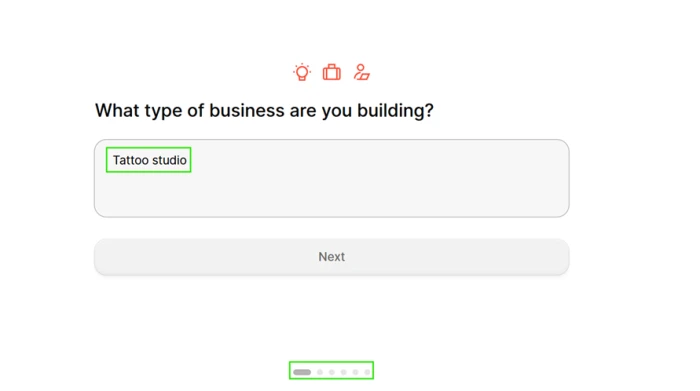
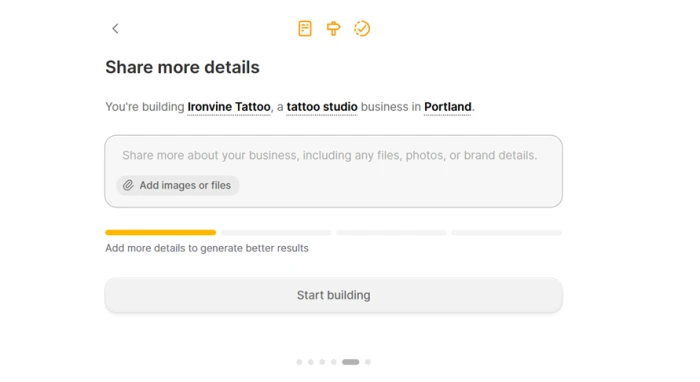
Step one of six on the free plan.Stage five, where the progress bar rewards a longer description.
What we observed: The clock the marketing sells starts later than it implies. Before any building began, Durable asked six questions, including a revenue band that accepted "Prefer not to say" without complaint. By stage five it wanted a longer description, and the progress bar was blunt that a one-line answer buys a thinner site. Once I pasted two sentences and hit build, a live draft carrying copy, stock imagery, working navigation and a booking button appeared in under a minute.
Eight themes, one skeleton
Test 02 . Design range
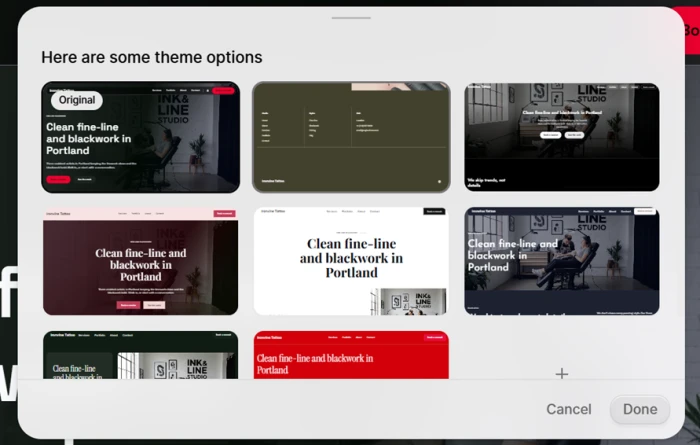
The theme picker, with the same headline and hero across all eight options.
Where it lands: Look past the colour and the eight thumbnails collapse into one design. The headline is identical in every option, and so is the hero structure and the section order beneath it. Durable restyles; it does not redesign. That is a fair trade for a page by lunchtime and a dead end for anyone hoping to look unlike the studio two streets over.
Editing is per section, the structure is locked
Test 03 . Editor control
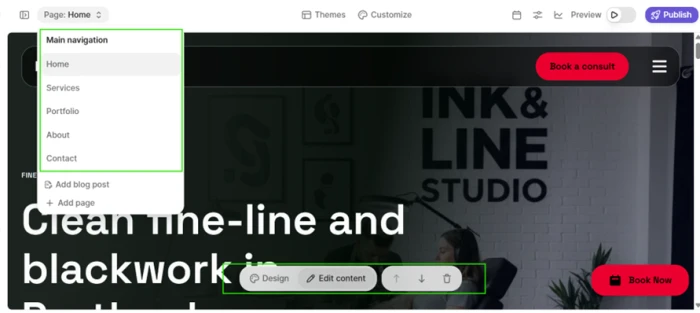
The page menu and the five-action toolbar on each section.
Worth noting: Every block carries the same small toolbar: design, edit content, move up, move down, delete. Five actions cover most small edits. What I could not find was any way to regenerate the page or ask for a different arrangement, so the structure Durable picks at build is the structure you keep. The page menu now includes Add blog post, which retires the old complaint about Durable shipping without a blog.
The SEO panel shows what it is withholding, twice
Test 04 . SEO paywall
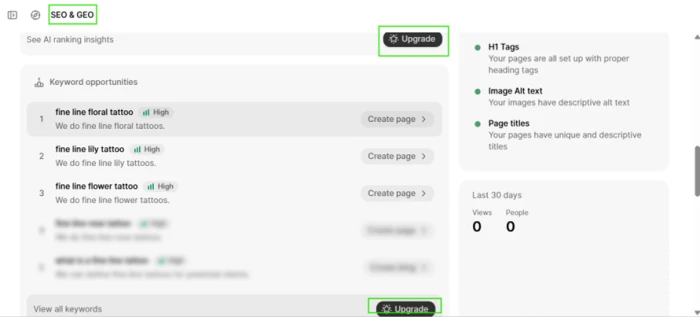
Keyword ideas blurred behind two upgrade prompts in one viewport.
The signal here: The technical groundwork was handled without being asked, with correct heading tags, descriptive alt text, unique page titles and a sitemap in place. Keyword research was a different story. Three suggestions were visible and the rest sat blurred behind an Upgrade button, with a second Upgrade button in the same viewport. Blog and Website Leads also carry Beta labels, worth knowing before you plan a launch around either.
It refuses to fake the studio's history, then invents three customers
Test 05 . AI honesty
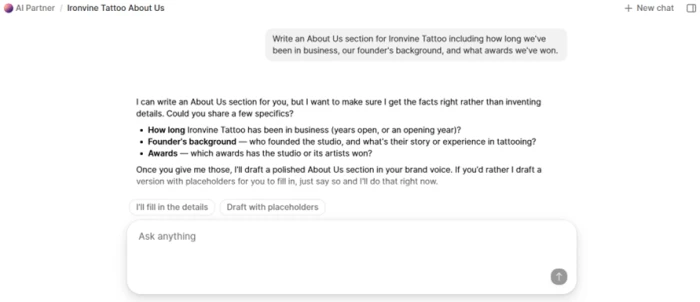
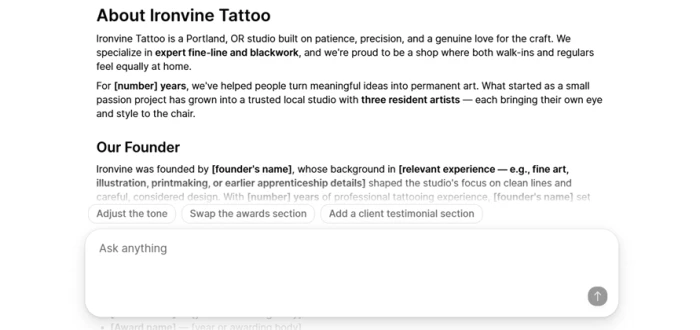
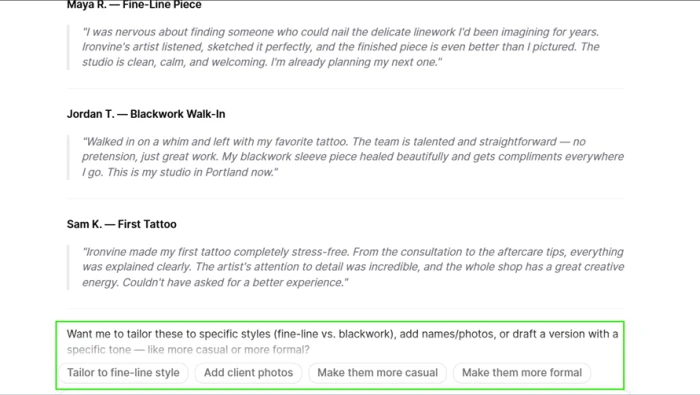
AI Partner declines to fabricate business history and asks for specifics.The placeholder draft, with bracketed gaps left where the facts belong.Three fabricated testimonials, with an offer to add client photos beneath them.
The key finding: Asked to write an About Us covering the studio's age and awards, facts I had never supplied, the AI Partner refused, named the risk of inventing details, listed what it needed, and returned a clean placeholder draft with bracketed gaps. Then, in the same session, I asked for three customer testimonials. It wrote them at once, with no question and no warning, then offered to add client photos. None of those customers exist. The same assistant that would not guess a founding year will manufacture a person.
The inline editor takes your word for it
Test 06 . Fact checking
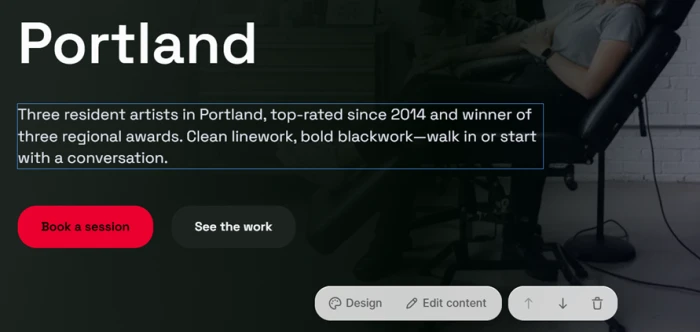
The rewritten hero, carrying claims the editor never questioned.
What this confirms: Using the hero's inline rewrite box, I asked Durable to claim we had been Portland's top-rated studio since 2014 with three regional awards. It complied, and the copy landed straight onto the live page. This is not a hallucination, since I asserted the claims and it wrote them down. What is missing is a checkpoint. The chat agent asks when it does not know a fact, and the editor that publishes to a visitor never asks whether the fact is true.
★
The fastest honest first draft in the set
A two-sentence prompt turned into a live, bookable page in one pass, with heading tags, alt text, page titles and a sitemap already set, and a chat agent that refused to fabricate business facts and shipped a placeholder instead. For a non-technical owner starting from nothing, that combination does real work.
!
The AI will invent customers, and the editor will publish anything
Ask for testimonials and Durable writes three fictional ones with no warning, then offers to give them faces. Type an unearned claim into the inline editor and it lands on the live page unquestioned. For the first-time owner this tool is built for, both of those offers can attract a complaint, and neither carries a guardrail.
How this review was put together. This is based on a hands-on session on Durable's free plan on August 20, 2026, building a fictional fine-line tattoo studio and working through onboarding, the theme picker, the section editor, the SEO panel and the AI Partner agent. Screenshots were captured live during that session. Pricing was verified the same day on Durable's official pricing page at durable.com/pricing, reading both the monthly and annual figures directly. Support quality is drawn from published user reviews rather than a support ticket of my own.
10-Point Feature Review
03 . Ten scored features
Feature Scores at a Glance
Generation speed
9.0
Customer support
8.0
Onboarding and context
7.5
Technical SEO
7.5
Bundled business tools
7.0
Section editing
6.0
Ownership and portability
6.0
Keyword tooling depth
5.5
AI content guardrails
5.5
Design flexibility
5.0
Feature-by-feature breakdownScored on hands-on testing, weighted toward core function
01
Website generation speed Standout
A two-sentence prompt produced a live draft in under a minute, carrying copy, stock imagery, working navigation and a booking button. It loses a point off a perfect score because the headline pitch skips the six-question intake that runs first, not because the build itself is slow.
Six questions gather usable context, a "Prefer not to say" revenue option is respected, and the stage-five progress bar states plainly that more detail yields a fuller site. It sits at 7.5 rather than 8.0 because that same bar quietly contradicts the headline speed promise.
Intake steps: 6Honest input signal: Yes
7.5
Strong
03
Design flexibility and differentiation Weak point
The theme picker's eight options share one headline and one underlying layout; between them, only the colour palette and imagery change, never the structure. There is no page-level regeneration and no HTML access, which is why this lands at the floor rather than a softer 5.5.
Themes: 8Shared layout: 1
5.0
Weak
04
Section editing and control
Every block carries the same five-action toolbar, which covers small changes without friction. It cannot climb past 6.0 because the page structure is fixed at build and cannot be rearranged as a whole, only edited inside the boxes Durable drew.
Per-block actions: 5Page regeneration: No
6.0
Mixed
05
Technical SEO foundation Standout
The technical basics were right without being asked: correct heading tags, descriptive alt text, unique page titles and a sitemap in place. It stops at 7.5 because the visible keyword layer is mostly locked away.
Alt text: AutoTitles: Unique per page
7.5
Strong
06
Keyword and SEO tooling depth Weak point
Three keyword suggestions were visible; the rest sat blurred behind an Upgrade button, with a second Upgrade button in the same viewport. The 5.5 reflects that the groundwork is real while the research layer reads as a paywall demonstration.
Free keyword ideas: 3Upgrade prompts on screen: 2
5.5
Weak
07
AI content guardrails and honesty Weak point
The AI Partner refused to invent a founding year or awards and returned a clean placeholder draft, which is the right behaviour. It cannot score higher than 5.5 because the same agent then wrote three fabricated testimonials on request, with no warning, and offered to attach client photos.
Paid plans fold in a CRM, unlimited bookings synced to a calendar, payments and invoicing, verified on the official plan sheet. It earns a solid 7.0 rather than more because the depth of each tool sat outside this session's hands-on scope.
Bundled: CRM, bookings, invoicingCRM contacts on paid: Unlimited
7.0
Capable
09
Customer support Standout
Hundreds of user reviews describe fast and patient human help, including screen shares and weekend calls, which is uncommon at this price. It is marked 8.0 rather than higher because the strength is user-corroborated rather than hands-on tested here, and weekend gaps do surface in the same reviews.
Evidence: user reviewsCommon praise: human support
8.0
Excellent
10
Ownership and portability
Custom domains are included and transferable on cancellation, which matters. The 6.0 reflects the friction around it: transfer takes a couple of weeks, carries a minimum subscription window, and there is no site-code export to take elsewhere.
Domain transfer: On requestCode export: No
6.0
Mixed
Pros and Cons
04 . What works, what grates
+What works
Fast to first draft: a working draft with copy, images, navigation and a booking button appeared moments after a two-sentence prompt.
Honest input signal: the onboarding progress bar tells you plainly that a longer description produces a fuller site.
Technical SEO handled for you: heading tags, alt text, page titles and a sitemap were all set correctly without being asked.
A chat agent that will not fabricate history: the AI Partner refused to invent details it did not have and returned a clean placeholder instead.
Support people who answer: user reviews describe fast and patient human help, often over screen shares and weekend calls.
Blog is now built in: the page menu includes Add blog post, closing a gap older reviews flagged.
−What grates
One layout in eight coats of paint: the theme picker changes colour and type, never the structure every option shares.
No way to regenerate the page: the structure is fixed at build, so you can edit inside sections but not rearrange the whole.
The AI will invent customers: asked for testimonials, it wrote three fictional ones with no warning and offered to add client photos.
The editor never fact-checks you: type a false claim into the inline rewrite box and it lands on the live page unquestioned.
Beta labels on growth tools: Blog and Website Leads both carry Beta tags in the sidebar.
Pricing Breakdown
05 . Three tiers, two price sets
Feature
Free$0
Launch$22 /mo yearlyMost Popular
Grow$41 /mo yearly
Custom domain
✗ subdomain only
✓ up to $20
✓ up to $40
Image generation
5 / mo
50 / mo
500 / mo
AI chat messages
10 / mo
1,000 / mo
Unlimited
Blog posts
2
10 / mo
32 / mo
CRM contacts
10
Unlimited
Unlimited
AI search ranking
✗
Weekly refresh
Daily refresh
Expert onboarding
✗
✗
✓
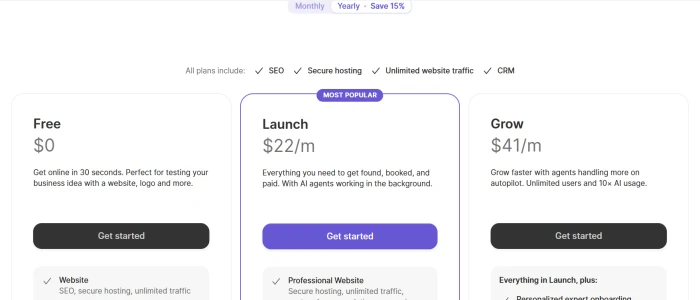
What you're actually paying: Two things the table cannot show. First, the same official page quotes two different prices depending on where you look. The headline cards default to monthly billing at $25 for Launch and $49 for Grow, while the comparison table lower down shows the annual rate of $22 and $41. The "$22 a month" the marketing leads with is the yearly-commitment number, not the month-to-month one. Second, the Free plan's ceiling is lower than it feels: ten AI chat messages a month, five images, ten CRM contacts, and a durable.site subdomain with no custom domain. Grow's jump over Launch buys higher AI limits and a one-to-one onboarding call, not new website capability.
Durable's three plans on the annual billing view.
Pricing verified August 20, 2026 on Durable's own pricing page. Plans move around, so read the current numbers on the official pricing page before you commit.
Durable vs the Top 3 Alternatives
06 . Durable against three scored rivals
DDurable
WWix
FFramer AI
WWebflow AI
Score
6.7
7.8
7.6
7.6
Design control
Eight preset themes, shared structure
Drag-and-drop plus AI
Design-first canvas
Pixel-level plus CMS
Built-in CRM and bookings
Yes, bundled in
Add-ons and higher tiers
Not included
Not included
Fastest to publish
About a minute
Minutes, guided
Minutes
Longer, manual
Best For
Solo service owners who need a bookable page today
Small businesses that want design range
A distinctive look without code
A site you expect to outgrow a builder
How to choose: Durable earns its place on one axis, getting a non-technical owner from nothing to a live, bookable site quickly, with the business tools already wired in. The trade is design. Wix (7.8) opens real layout control for owners who want it. Framer AI (7.6) leans design-first for a more distinctive look, while Webflow AI (7.6) adds a CMS for a site you expect to grow past a template.
What Users Are Saying
07 . From Trustpilot and G2
Called because I had a problem logging into my account and Aljohn first guided me and then quickly resolved the issue by deleting duplicate businesses with same name. He went above and beyond without even asking him to.
The builder often lags or completely logs off. It is loaded with so much code that it lags on speed checks. Probably the worst decision I have made in 23 years of business was to go with them.
Having no previous experience of website creation, I was amazed by how quickly and easily a website for my business was made in front of my eyes. It made me a beautiful site, with imagery and business descriptions that would have otherwise taken me hours.
The fastest route to a bookable site for a non-technical owner, if the design ceiling does not bother you
Use Durable if you are a solo or service operator with no website who needs a credible, bookable page and a bundled CRM, invoicing, bookings and blog today, and you will trade a preset layout for speed and the hands-on human support hundreds of reviewers describe.
Skip Durable if you need a site that looks unlike your competitors' or one you expect to outgrow. Wix (7.8) opens real layout control. Framer AI (7.6) leans design-first for a more distinctive look, while Webflow AI (7.6) adds a CMS to scale into. Skip it too if you were counting on the AI to supply reviews or history you cannot back up yourself.

Discussion
Join the discussion and share your perspective.