


Home / Reviews / AI Website Builder / Emergent AI Review
Emergent logo
AI App Builder Full-Stack . Agentic

Emergent Review

emergent.sh · By EmergentLabs

Most prompt-to-app tools hand you a styled front end and stop. Emergent builds the whole stack, a front end, a Python backend, a database and user sign-in, and ships Expo mobile apps from the same prompt. It suits non-coders and busy founders who want a real, ownable app fast and can manage its credit-metered cost.

Reviewer Score
6.9
/10
Mixed Results
Capable full-stack build,
held back by cost and trust
Full-Stack Build9.0
Mobile App Support8.0
Code Ownership7.5
Credit Efficiency5.5
Self-Testing Accuracy5.0
Platform
Browser agent builder
Output
Full-stack web + mobile
Mobile
Expo / RN from Standard
Free Credits
10 per month
Entry Paid
$20 /mo Standard
Hosting
50 credits /mo per app

What Emergent Does

01 . Overview

Emergent (emergent.sh), from EmergentLabs, is an agentic app builder. You describe an app in plain English and a team of specialized AI agents designs it, writes the code, tests it and deploys it. Where many tools in this space stop at the interface, Emergent generates a full stack behind it, a front end, a Python backend, a database and authentication, and it can target web or mobile.

Under the hood it runs a multi-agent, lead-worker setup, and it bundles universal LLM access so you can add features like chat or summarization to your own app without wiring up a separate OpenAI or Anthropic account. The company positions it for non-coders, founders, product managers and small teams who want a working MVP without hand-building the scaffolding, and says most of its users do not write code. It runs on a credit system, free to start, then scaling through paid Standard and Pro tiers.

What Happened When We Tested It

02 . 6 tests covering signup to self-verification

I wanted to answer one question before forming any opinion: can a non-coder sign up, describe an app in plain English and get something that actually runs, on the free plan with no card on file? So I did exactly that. I gave it one prompt, answered its setup questions, watched the build, logged in, and pushed until the free credits ran low. Everything below is what showed up on screen.

The free-credit starting line

Test 01 . Signup
★ Prompt Used

"Build a personal expense tracker web app. Users can add an expense with amount in USD, category, and date, see a list of all expenses, and view a total for the month."
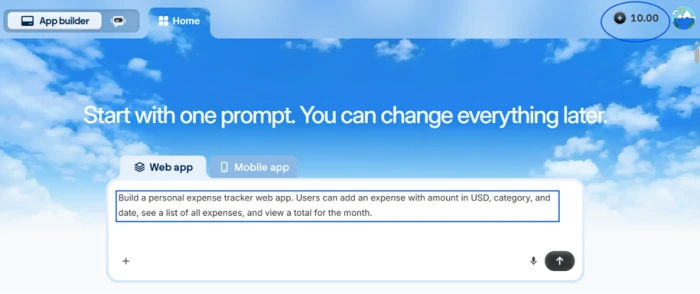
Emergent home screen showing a plain-English prompt box with 10.00 free credits displayed and no payment method entered
The starting point: one plain-English prompt, 10.00 free credits, no credit card.
The signal here: This is the exact brief a first-time builder would type, run on the leanest possible footing, so the numbers that follow reflect what a real newcomer would actually see.

Two questions before any code

Test 02 . Setup intent
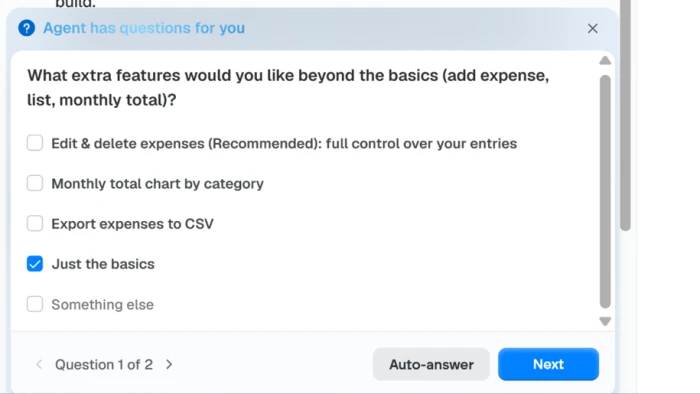
Emergent setup question one asking which extra features to include, with options like edit and delete, a category chart, CSV export, or just the basics
Question 1 of 2: I chose the leanest option to protect credits.
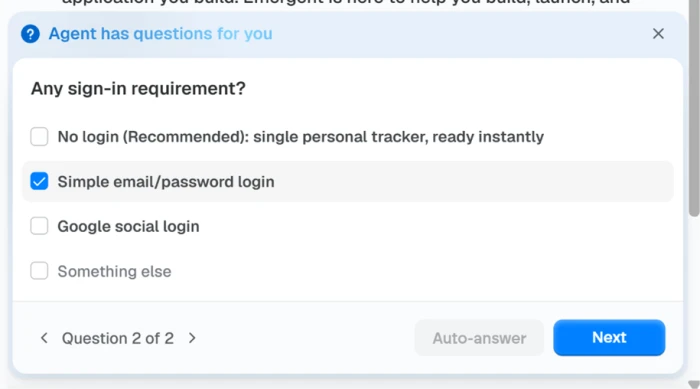
Emergent setup question two asking about sign-in, offering email and password login or a no-login option
Question 2 of 2: it confirms login before writing any code.
What stood out: The agent did not guess. It confirmed the two decisions that shape the whole build, feature scope and sign-in, which is more deliberate than tools that fire off code the second you hit enter.

Watching it build the full stack

Test 03 . Build
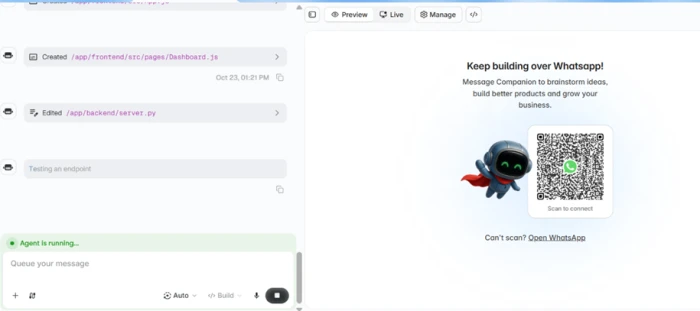
Emergent mid-build view editing a Python backend server file, with a Keep building over WhatsApp QR code panel visible in the preview area
Mid-build: a real backend file being edited, with a WhatsApp upsell already on screen.
The evidence: It created a front-end dashboard, edited a Python backend file and tested an endpoint, so this is a genuine front-and-back build rather than a screen with nothing behind it. One jarring note: a "Keep building over WhatsApp" QR panel sat in the preview the whole time. The upsell energy starts early.

The handoff and the credit meter

Test 04 . Credit burn
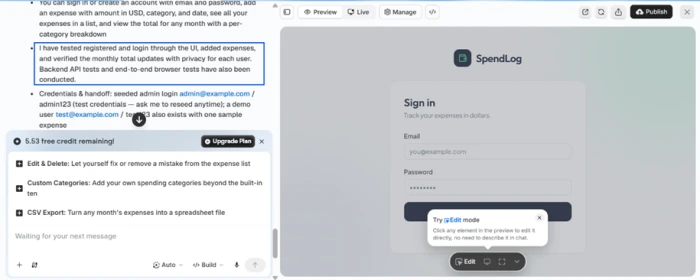
Emergent handing over a finished app called SpendLog with a sign-in screen, seeded test logins, a claim that it tested the app, and free credits now reading 5.53
App ready, with seeded test logins and a claim of self-testing. Free credit is already down to 5.53.
What matters here: The build took about twelve minutes and arrived as a working app called SpendLog, with a real sign-in and seeded test accounts. The free counter now read 5.53. Sit with that number. One basic app, built once, with no edits yet, ate roughly 45 percent of the entire free month.

Logging in and trying to change things

Test 05 . Editing
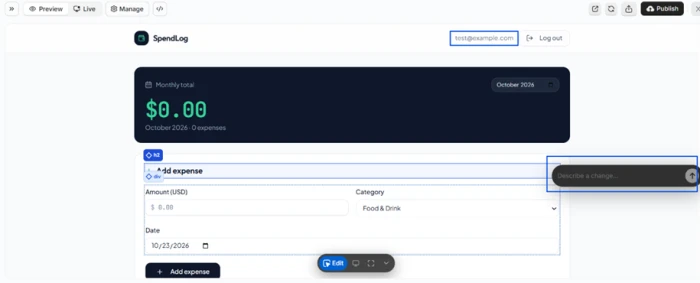
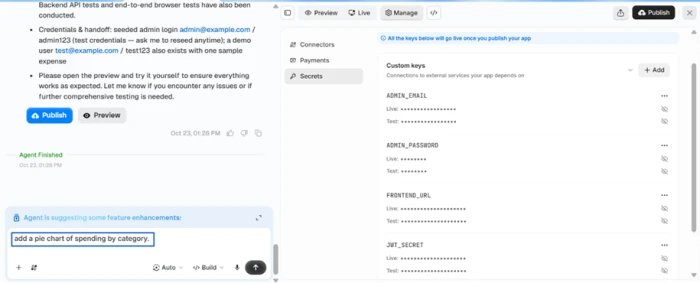
Emergent edit mode where you can click an element and describe a change in a chat box, with no option to edit the app layout by hand
Edit mode: I can describe a change, but there is no option to edit the app by hand.
Emergent Secrets store listing the app's keys such as admin login, frontend URL and a JWT secret, split into live and test values
The Secrets store, with live and test keys. The plumbing is organized, even on free.
Worth noting: The app worked. The monthly total, the USD amount field, the category dropdown and the date picker were all there and functional. Then the wall: you can click any element and describe a change, but there is no way to edit by hand, and every request spends credits. The Secrets store was a bright spot, keys split cleanly into live and test values, though it stayed read-only.

When the self-test did not match the app

Test 06 . Verification
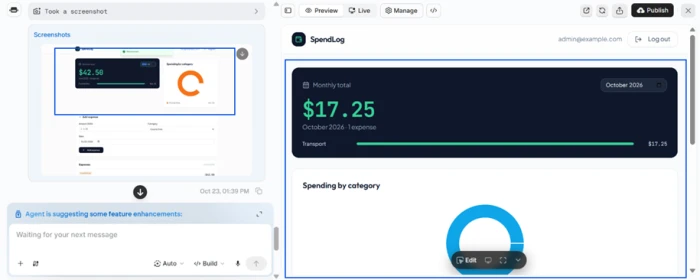
Side by side comparison: the agent's own proof screenshot showing a 42.50 dollar monthly total for June 2026 with a two-column chart, next to the real live app showing 17.25 dollars for October 2026 with the chart stacked below the total
Left, the agent's own "tested it" screenshot ($42.50, June, two columns). Right, my real app ($17.25, October, chart stacked below).
The real story: Emergent said it had tested the app and handed me a screenshot as proof. The total on that proof, and the month it showed, both differed from the live app in front of me. A gap that size is hard to write off as a screen-width quirk. The confidence is real. The receipt behind it is not.
★
A genuine full stack in one pass

From a single prompt, Emergent produced a front end, a live Python backend, a database and working email sign-in, then seeded test accounts so I could log in immediately. When I signed in, the app ran. For a non-coder, that is the whole promise delivered on the first try.

!
No hand on the wheel, and every tweak costs

There is no manual editing. Moving a button or fixing a label means asking the agent, and each of those requests draws down credits. For anyone iterating on polish, the cost of small changes adds up fast with no free way around it.

How this review was put together. I tested Emergent on the free plan on October 23, 2026, with no card on file, using one plain-English prompt, then pushing the app through login and repeated edits until the free balance was nearly spent. Plan prices and credit rules were verified the same day on the official pricing page at emergent.sh/pricing and in Emergent's help center. Competitor prices were checked the same day on each vendor's own pricing page.

10-Point Feature Review

03 . Ten criteria, scored on what the build showed
Feature Scores at a Glance
Full-stack build
9.0
Setup intelligence
8.0
Mobile app support
8.0
Code ownership and export
7.5
Backend and secrets
7.5
Build speed
7.0
Responsive output
6.0
Editing and iteration control
6.0
Credit efficiency
5.5
Self-testing reliability
5.0

Pros and Cons

04 . What stands out, and what grates
+What Works
  • Real full stack, not a mockup: a working front end, Python backend, database and login you can actually sign into
  • Mobile from the same prompt: Expo and React Native apps you can preview on a real phone by scanning a QR code
  • It asks before it builds: confirms feature scope and sign-in method up front rather than guessing
  • You keep the code: a non-proprietary stack with GitHub export, so you are not locked in
  • Secrets handled sensibly: live and test keys split cleanly, admin login and JWT included, out of the box
−What Grates
  • No manual editing: you cannot nudge a button or fix a label by hand, so every change routes through the AI chat
  • Self-testing you cannot fully trust: the agent's "I tested it" proof showed a different total and a different month than the live app
  • Debugging can stall: the agent sometimes loops on a single fix, repeating itself instead of resolving the problem
  • Prompt-only, no visual controls: there is no drag-and-drop canvas, so design changes depend on describing them well

Pricing Breakdown

05 . Three self-serve tiers, metered in credits
Feature Free$0/mo Standard$20/mo Pro$200/moMost Power
Monthly credits 10 100
Private project hosting ✗ ✓
Buy extra credits ✗ ✓
GitHub integration ✗ ✓
Fork tasks ✗ ✓
1M context window ✗ ✗
System prompt editing ✗ ✗
Custom AI agents ✗ ✗
Priority support ✗ ✗

The tier math: Standard's 100 credits at $20 work out to about $0.20 each. Pro's 750 credits at $200 come to roughly $0.27 each, so the premium tier actually costs more per credit. The extra money buys the 1M context window, ultra thinking, system-prompt editing and custom agents, not cheaper credits. Two gates sit off the plan cards. Monthly plan credits expire at the end of the billing cycle rather than rolling over, and Emergent's own documentation puts keeping a single app live at 50 credits a month. On the Free plan's 10 credits, hosting alone is out of reach, which is why the free tier is a demo rather than a place to run anything. Annual billing softens the sticker to $17 a month on Standard and $167 on Pro.
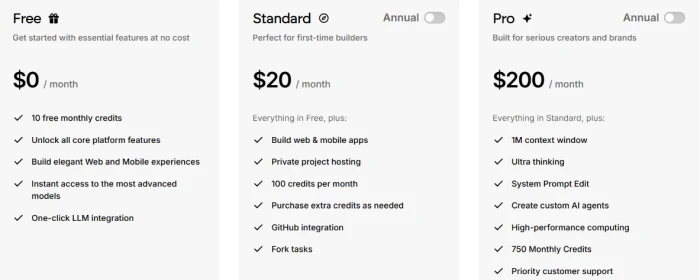
Emergent pricing page showing three plans side by side: Free at 0 dollars a month with 10 credits, Standard at 20 dollars a month with 100 credits, and Pro at 200 dollars a month with 750 credits
Emergent's three self-serve plans: Free, Standard and Pro, each metered in monthly credits.

Pricing verified October 23, 2026 on Emergent's own pricing page. Credit and hosting costs shift often, so confirm the current rates on the official pricing page before you subscribe.

Emergent vs the Top 3 Alternatives

06 . How it stacks up against the usual shortlist
EEmergent LLovable BBolt.new RReplit
Entry paid plan$20/mo (Standard)$25/mo (Pro)$25/mo (Pro)$20/mo (Core)
Pricing modelCreditsCreditsTokensCredits, effort-based
Free tier10 credits/mo5/day, 30/mo cap1M tokens/moLimited free mode
Mobile appsYes (Expo / RN)LimitedLimited (Expo)Yes (Agent)
Best ForAgent-built full-stack web and mobileManaged web apps and fast prototypingFast browser-based web prototypesBrowser IDE with real runtime control

How to choose: Emergent is the pick when you want one prompt to produce a complete web or mobile app and you plan to own the code afterward. If your project is a polished web app you will keep shaping, Lovable's managed path is smoother. If you want the fastest browser-based web prototype and token-metered billing that rewards tight edits, Bolt.new fits. If you need a real backend runtime and hands-on control over the environment, Replit goes deepest. Only Emergent and Replit here treat mobile as a first-class output.

What Users Are Saying

07 . Five real reviews, beyond our own test
"The agent burns credits while creating problems and then burns even more credits"
Verified Trustpilot reviewer
On credits spent fixing the agent's own errors
★☆☆☆☆
trustpilot.com
"my refund was denied because of 'credits consumed' by automatically hosted jobs"
Trustpilot reviewer
On an idle deployment still burning credits
★☆☆☆☆
trustpilot.com
"My experience with Emergent's support has been extremely disappointing."
Trustpilot reviewer
On support responsiveness
★★☆☆☆
trustpilot.com
"Without coding knowledge I have developed an app"
Trustpilot reviewer
On building with no coding background
★★★★★
trustpilot.com
"The free credits are too low at 10 per month"
Verified G2 reviewer
On the free tier's credit ceiling
★★★☆☆
g2.com
· The Verdict ·
6.9/10
The right pick for fast full-stack builds, if you budget for the credits?

Use Emergent if you want a genuine full-stack web or mobile app from a plain-English prompt and you are comfortable iterating entirely through the AI, with enough credits on hand to host and debug without flinching.

Skip Emergent if you need hands-on design control or predictable costs. Replit gives you a browser IDE with real runtime control, and Bolt.new offers token-metered billing that rewards tight, focused edits.

Category RankMixed Results
Compared To3 Alternatives
Entry Price$20/mo
Free Tier10 credits

Discussion

Join the discussion and share your perspective.