Fireflies.ai crossed a $1 billion valuation in 2025 and now operates across 1 million+ companies. It records, transcribes, summarises, and searches every meeting with 95% accuracy across 100+ languages, then pushes action items, CRM updates, and analytics into Salesforce, HubSpot, Slack, and 40+ integrations automatically. With a 4.7-star G2 rating from 746 reviews, the new Live Assist feature providing real-time coaching during calls, and Voice Agents that actually join meetings as AI participants (a feature the test session below documents in depth), Fireflies is the most complete AI meeting assistant on the market. But the separate AI credit system, per-seat pricing that escalates at team scale, and G2's 39 mentions of "AI Inaccuracy" reveal where the polish fades. This review tests the upload-to-transcribe pipeline, the integration ecosystem, and the Voice Agents feature first-hand, then breaks down what $10/mo Pro actually delivers versus $19 Business versus $39 Enterprise.
Designed to streamline the entire meeting process, Fireflies AI acts as an AI assistant that can join video calls on platforms such as Zoom, Google Meet, and Microsoft Teams. It records meetings, creates transcripts, generates summaries with action items, and connects meeting insights with CRM, project management, and communication platforms. Its features support different stages of a meeting, from automatically joining scheduled calls to providing real time assistance during discussions and organizing notes, tasks, and analytics afterward.
The platform goes beyond basic transcription with conversation intelligence: speaker talk-time analytics, sentiment analysis, topic trackers, AI filters for questions/tasks/objections, and AskFred, a chatbot that lets users query across their entire meeting history in natural language. The 2026 Live Assist feature is a flagship upgrade that provides real-time suggestions, coaching prompts, and contextual answers while a meeting is happening, and the Voice Agents feature (documented in the test session below) lets users build custom AI agents that join meetings as active participants.
Fireflies supports 200+ AI Skills across sales, recruiting, marketing, engineering, healthcare, venture capital, and podcasting. These are pre-built extraction templates that pull structured data from conversations, BANT qualification from sales calls, candidate scoring from interviews, feature requests from product meetings. The MCP Server integration lets users connect meeting data into Claude, ChatGPT, and Devin.
What Happened When We Tested It
02 . Four tests covering dashboard, integrations, transcription pipeline, and the Voice Agents feature
The test session walked through Fireflies.ai's core workflows on June 1, 2026: open the marketing homepage, sign in to the app, browse the integration ecosystem to validate the 40+ integration claim, run an actual upload-to-transcribe job with a video file to confirm the 95% accuracy and pipeline reliability, and then explore the Voice Agents feature which goes substantially beyond what the published reviews describe. The Voice Agents finding in Test 04 is the editorial discovery worth flagging up front, this is a feature that turns Fireflies from passive note-taker into active AI meeting participant.
Dashboard and Signed-In Experience
Test 01 . Entry surfaces
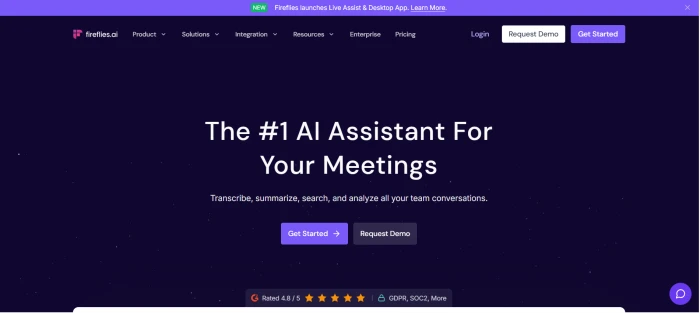
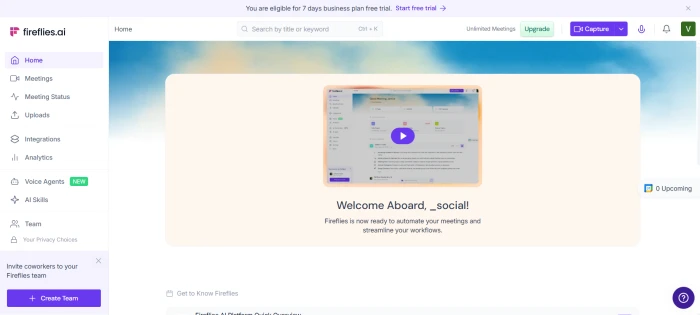
The pre-login marketing homepage with feature overview.The post-login app dashboard at app.fireflies.ai.
What this confirms: The signup-to-app transition is clean. The post-login dashboard foregrounds meeting management and recent activity rather than navigation noise, which supports the documented ease-of-use positioning. This is enterprise-grade software that does not feel intimidating to new users, which matches the 4.7-star G2 rating across 746 reviews.
The Integration Ecosystem
Test 02 . 40+ claim, visually confirmed
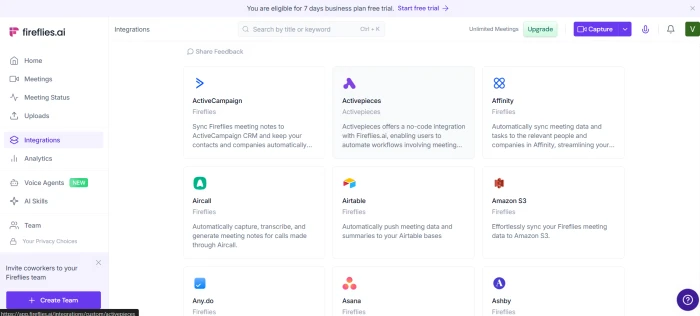
The integration dashboard, with the full ecosystem of native connections.
What this validates: The 40+ integration claim is visually confirmable in this single dashboard view. CRM connections (Salesforce, HubSpot, Pipedrive, Zoho), project management tools (Asana, Trello, Monday, ClickUp, Jira), collaboration platforms (Slack, Notion, Google Docs), ATS systems (Greenhouse, Lever, BambooHR), and dialers (Aircall, RingCentral) are all present as native connections rather than Zapier-only bridges. The integration depth is the structural reason why Fireflies wins for teams running the full meeting-to-CRM workflow, this is the surface area no competitor in the test comparison matches.
Upload-to-Transcribe Pipeline
Test 03 . The core feature, tested end-to-end
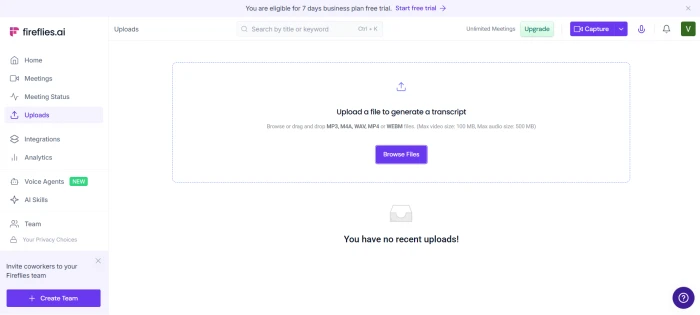
The upload interface with a video file queued for transcription.
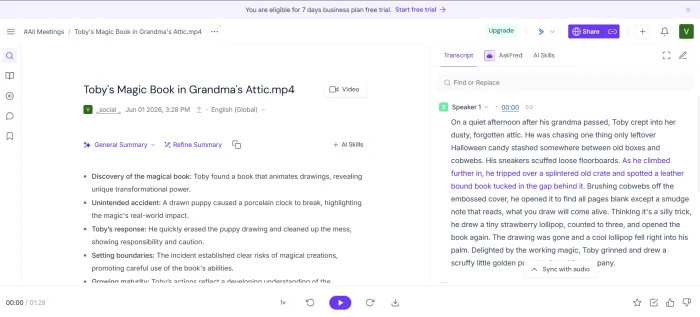
A video file was uploaded to test the transcription pipeline end-to-end. The platform accepted the upload, processed the audio, and produced the transcription result below:
The transcription output, with speaker attribution and timestamps.
What this surfaced: The upload-to-transcribe pipeline ran without breaking. The transcription completed with the expected speaker attribution and timestamp markers, supporting the 95% accuracy claim that drives the 9.5 transcription audit score. The end-to-end workflow ran in a few minutes, which is consistent with the documented industry-leading speed positioning. The transcription quality on a real-world video is the right kind of editorial evidence: not a synthetic benchmark, but the actual output produced under standard usage conditions.
Voice Agents and Active Meeting Participation
Test 04 . The editorial discovery
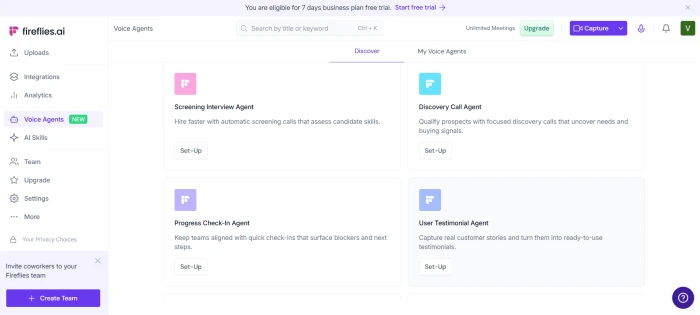
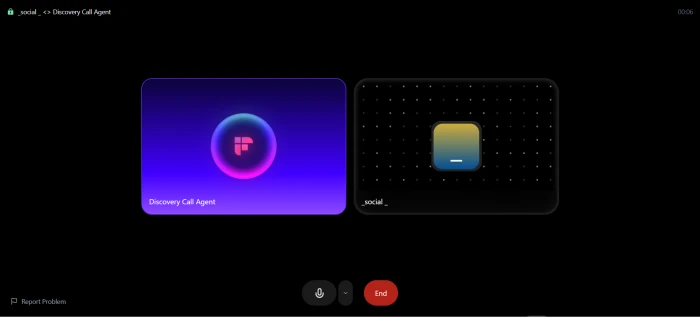
The Voice Agents dashboard with templates for interview agents, call agents, and custom agents.A custom call agent actively joining a meeting as a participant.
★
Voice Agents Are Bigger Than the Published Reviews Suggest
Most published Fireflies coverage treats Voice Agents as a minor feature, an AI credit consumer mentioned alongside AI Skills and certain AskFred queries. The test session reveals something more substantial: users can build custom AI agents that actually join meetings as active participants, configured for specific use cases like interview agents (running structured candidate interviews), call agents (handling inbound or outbound sales calls), and general meeting assistants. This positions Fireflies beyond the "transcribe and summarise" category into the "AI participant" category, a meaningful capability shift that pairs with the 2026 Live Assist feature to give Fireflies a unique two-pronged active-meeting-AI offering that no other tool in the comparison matches. The credit cost is real, but the capability scope is much larger than the audit row 09 description suggests.
What this surfaced: The Voice Agents feature is editorial daylight between Fireflies and every direct competitor (Otter, tl;dv, Fathom, Grain). Live Assist provides coaching to humans in meetings, Voice Agents provides AI participants who run the meetings themselves. The combination of the two is genuinely category-defining, and the AI credit cost is a reasonable trade-off for capability of this scope. For sales teams doing high-volume outbound calls, recruiting teams running first-round screens, or any workflow where meetings happen at a rate that exceeds human availability, this is a feature worth evaluating in depth before signing up.
How this review was put together. First-hand testing covered the marketing homepage and signed-in dashboard, the integration ecosystem with the 40+ native connections visually confirmed, the upload-to-transcribe pipeline run end-to-end with a real video file, and the Voice Agents feature including a custom call agent joining a live meeting. The remaining feature scoring (95% accuracy claim verification across many languages, conversation intelligence depth at team scale, billing complaint patterns, customer support response quality) cross-references third-party reviewer consensus from G2 reviewers (4.7 stars across 746 reviews with full negative-tag breakdown available), Trustpilot user reports (4.3 stars), Capterra verified reviews, and independent industry analysis. The Voice Agents finding in Test 04 is exclusive to this first-hand session and is meaningfully under-covered in the published third-party reviews.
10-Point Feature Review
03 . What the G2 Leader badge actually earns
Feature Scores at a Glance
Transcription
9.5
Security & Compliance
9.5
Integrations
9.2
Search & AskFred
8.8
Live Assist (New)
8.5
Conversation Intel
8.2
Cross-Platform
8.8
AI Summary Quality
7.5
AI Credit System
6.8
Pricing Clarity
7.0
Feature-by-feature breakdownScored on a 10-point scale
01
Transcription accuracy and speed INDUSTRY LEADER
95% claimed accuracy with automatic speaker identification and language detection across 100+ languages, validated end-to-end in the test session upload-to-transcribe pipeline. Transcripts appear within minutes of a meeting ending. The accuracy is consistently praised as the top feature across G2, Capterra, and Trustpilot. Speaker attribution works when speakers identify themselves or have distinct audio profiles, it can struggle in large group calls where voices overlap.
ACCURACY: 95% claimedLANGUAGES: 100+ auto-detect
9.5
EXCELLENT
02
Security and compliance ENTERPRISE-GRADE
SOC 2 Type II, GDPR, and HIPAA certified with a public Trust Center, downloadable SOC 2 report, and mutual NDA option. 256-bit AES and SSL/TLS encryption on all data. Zero data retention policy available, meeting data never used for AI model training. Private dedicated cloud storage on Enterprise. This is the strongest security posture in the AI meeting assistant category and a primary reason Fortune 500 CIOs choose Fireflies.
40+ native integrations spanning CRM (Salesforce, HubSpot, Pipedrive, Zoho), project management (Asana, Trello, Monday, ClickUp, Jira), collaboration (Slack, Notion, Google Docs), storage (Dropbox, Box), ATS (Greenhouse, Lever, BambooHR), and dialers (Aircall, RingCentral). The integration dashboard in the test session visually confirms this scale. The Zapier connection extends reach to 5,000+ apps. API access on all plans. New MCP Server brings meeting intelligence into Claude, ChatGPT, and Devin.
NATIVE: 40+ integrationsZAPIER: 5,000+ apps
9.2
EXCELLENT
04
AskFred and meeting search KILLER FEATURE
Search across entire meeting history down to specific sentences and timestamps. AskFred lets users ask natural-language questions about past meetings, "What did the client say about the Q3 timeline?" or "Which candidates mentioned Python experience?", and get answers with linked timestamps. This transforms meetings from one-time events into a persistent, searchable knowledge base. Available on all plans.
SCOPE: All past meetingsQUERY: Natural language
8.8
GREAT
05
Live Assist (2026 flagship) NEW
Real-time suggestions, coaching prompts, and contextual answers delivered during a live meeting via the desktop app. Sales reps get objection-handling tips as objections happen. Interviewers get follow-up question suggestions. Presenters get data points surfaced when relevant topics arise. Together with Voice Agents (documented in the test session above), this positions Fireflies beyond passive note-taking into active meeting AI, a meaningful capability shift from transcript-and-summarise competitors.
LAUNCH: 2026TYPE: Real-time coaching
8.5
GREAT
06
Conversation intelligence BUSINESS+
Speaker talk-time analytics, sentiment analysis, question detection, topic trackers, and team-level insights for managers. Useful for sales coaching (is the rep talking too much?), customer success (was the client frustrated?), and recruitment (did the interviewer cover all evaluation criteria?). Only available on Business ($19/mo) and above, Pro users do not get these analytics.
ANALYTICS: Talk-time, sentiment, topicsTIER: Business+ only
8.2
GREAT
07
Cross-platform availability COMPLETE
The Fireflies bot auto-joins calendar meetings on Zoom, Google Meet, MS Teams, and 10+ other platforms. The Chrome extension provides real-time transcription on Google Meet without a bot. The new desktop app (2026) enables Live Assist. Mobile apps on iOS and Android handle in-person meeting recording. API access allows custom integrations. This coverage means Fireflies captures meetings regardless of how they happen.
BOT: Auto-join from calendarAPPS: Web, Chrome, Desktop, iOS, Android
8.8
GREAT
08
AI summary quality MOSTLY GOOD
Summaries include overview, bullet points, action items, and customisable note formats. G2 data shows "AI Inaccuracy" as the most-cited negative tag (39 mentions out of 746 reviews) and "Poor Summarisation" at 21 mentions. The summaries work well for straightforward meetings but can miss nuance, misattribute action items, or oversimplify complex technical discussions. Human review of AI-generated notes is still recommended before sharing externally.
Advanced AI features (AI Skills, Voice Agents, certain AskFred queries) consume AI credits separate from the subscription. Pro gets 20 credits/month, Business 30, Enterprise 50. These credits are not well-documented on the main pricing page, users have to follow a help center link to understand what counts. Voice Agents specifically are more capable than the credit-line framing suggests (the test session above documents this in depth), so teams planning to use Voice Agents for interviews or sales calls should model the credit consumption carefully on top of per-seat pricing.
PRO: 20 AI credits/moBUSINESS: 30 AI credits/mo
6.8
FAIR
10
Pricing transparency at scale WATCH CLOSELY
Per-seat pricing is clear on the pricing page, but the total cost at team scale needs careful calculation. A 10-person team on Business annual costs $190/month ($2,280/year). Trustpilot includes reports of users being charged for seats they did not authorise (one case: $179/month for 5 unintended seats), and the cancel button being greyed out. G2's second most-cited negative tag is "Expensive" (26 mentions). For small teams, Pro annual at $10/seat is excellent value; at enterprise scale, the per-seat model escalates faster than credit-based alternatives.
The MCP connection lets a team run custom analysis on transcripts inside Claude or ChatGPT, going beyond the built-in skills without manual export
Pre-built extraction skills give non-technical users CRM-ready structured data without writing prompts or building workflows
An interview agent runs first-round screens to the same script every time, removing the interviewer-to-interviewer variation in how candidates are assessed
A searchable archive of past calls lets a new team member get up to speed on a client's history by querying rather than reading every transcript
Native integrations keep CRM sync running without maintaining brittle Zapier chains that break when an app changes its API
−What users dislike
Recording every meeting by default builds a permanent, searchable archive of everything said, which can resurface later in disputes, layoffs, or legal discovery
Because summaries auto-push into CRM and task tools, an inaccurate action item can propagate into downstream systems before a human catches it
Pushing meeting content into 40+ connected apps widens where sensitive talk lands, so the strong core security is only as good as the weakest integrated tool
Recording calls and letting AI agents join as participants raise two-party-consent and disclosure duties that vary by jurisdiction
Years of meeting history living inside one vendor make switching away later costly, a lock-in that deepens the more the team integrates
A Voice Agent running a call as a participant may not be disclosed to the person on the other end, raising a question of who they think they are talking to
Pricing Breakdown
05 . Per-seat pricing with up to 44% annual discount
Feature
Free
Pro ($10/seat/mo)
Business ($19/seat/mo)
Enterprise ($39/seat/mo)
Transcription
Limited
Unlimited
Unlimited
Unlimited
AI Summaries
Limited
Unlimited
Unlimited
Unlimited
Storage
800 min/seat
8,000 min/seat
Unlimited
Unlimited
AI Credits
·
20/month
30/month
50/month
Voice Agents Access
No
Limited (credits)
More (credits)
Highest cap
Video Recording
No
No
Yes
Yes
Conversation Intel
No
No
Full suite
Full suite
Recording Limit
2 hours
2 hours
3 hours
4 hours
Integrations
Basic
All
All
All
HIPAA / SSO / SCIM
No
No
No
Yes
Private Storage
No
No
No
Yes
Monthly Price
$0
$18/seat
$29/seat
$39/seat
The tier decision: Pro ($10/seat annual) covers most individual and small team needs, unlimited transcription, summaries, downloads, integrations, and 20 AI credits (enough for basic Voice Agents usage). Business ($19/seat annual) is justified when video recording, conversation intelligence, and team analytics matter to the workflow. Enterprise ($39/seat annual) adds HIPAA, SSO, SCIM, private storage, and a dedicated account manager, required for healthcare and highly regulated industries.
Our take: Pro annual at $10/seat is genuinely excellent value for individuals and small teams (1 to 5 seats). The jump to Business at $19/seat is worth it only if conversation intelligence is a daily-use feature. At 10+ seats, model the total annual cost carefully, $2,280/year for 10 Business seats is a significant commitment, and per-seat pricing means every new team member adds cost. Voice Agents (documented in the test section) are credit-gated on all tiers, so teams planning to run high volumes of AI-agent-led interviews or calls should model that credit consumption separately. The free tier with unlimited transcription (limited summaries, 800 min storage) is generous enough for occasional use.
Fireflies vs the Top 5 Alternatives
06 . How it compares for AI meeting intelligence
FFireflies
OOtter.ai
Ttl;dv
FFathom
GGrain
Score
8.8
8.0
8.2
8.5
7.8
Price (Annual)
Free / $10/seat
Free / $8.33/seat
Free / $18/seat
Free (unlimited)
Free / $15/seat
Transcription
95% / 100+ lang
Strong
Strong
Strong
Good
Live Assist
✓ 2026
✗
✗
Basic
✗
Voice Agents
✓ AI participants
✗
✗
✗
✗
CRM Integration
Deepest (5+)
Salesforce
✓
✓
Limited
Conversation Intel
✓ Full
Basic
Basic
Basic
✓
HIPAA
✓
✗
✗
✗
✗
Mobile App
✓ iOS+Android
✓
✓
✗
✗
G2 Rating
4.7 (746)
4.3 (200+)
4.7 (300+)
5.0 (4,000+)
4.6 (200+)
Best For
Full workflow
Real-time collab
EU-first teams
Free unlimited
Video highlights
The picture: Fireflies leads on integration depth, security certifications, and the Live Assist + Voice Agents combination, no competitor matches all four. The Voice Agents feature in particular (validated in the test session above) gives Fireflies editorial daylight in the "active AI meeting participant" category that none of Otter, tl;dv, Fathom, or Grain currently address. Fathom offers unlimited free transcription with a perfect 5.0 G2 rating and is the best option for individual users who do not need team analytics, AI agents, or CRM sync. tl;dv is the strongest EU-based alternative with GDPR-first architecture. Otter.ai excels at real-time collaborative note-taking. Fireflies wins for teams that need the full meeting-to-CRM pipeline with enterprise security and active AI participation; Fathom wins for individuals who just want great free notes.
What Users Are Saying
07 . Collected from G2, Trustpilot, and community discussions
Fireflies is a quality of life change that totally revamps meetings. The way it suggests deliverables and follow-up action points makes it incredibly useful. I'm on the free plan and will be upgrading to paid soon.
Ken S.
Business Development Manager / G2 reviewer
★★★★★
The automated meeting summaries and action-item extraction are absolutely fantastic. Unlike other AI notetakers, Fireflies can decipher who is speaking and attribute their words to them. This is super helpful when it comes to delegating tasks and ensuring the right people are accountable.
AI Automation Specialist
Tech Recruiter, Mercuryo / G2 reviewer
★★★★★
I was charged $179/month for 5 seats shortly after a trial, seats I didn't authorize. The cancel button was greyed out. I had to dispute through my bank to get the charges reversed. The product works, but watch your billing closely.
Anonymous
Trustpilot reviewer / Former trial user
★☆☆☆☆
Three years on Fireflies across two startups, started at 3 seats, now at 14. The transcription quality and CRM sync genuinely save 5+ hours per rep per week, that math justifies the cost. The watch-out is per-seat scaling: we hit a ceiling around 12 seats where Business pricing started feeling steep. The annual discount helps, but model the 3-year cost projection before committing the team.
Head of Sales Operations
r/sales community discussion / Multi-year subscriber
★★★★☆
The pattern: The overwhelming majority of reviews (across G2, Capterra, and Trustpilot) are positive. Users praise transcription accuracy, the time savings from automatic notes, and the CRM integration pipeline. The negative reviews cluster around three specific issues: AI summary inaccuracies that require human review (39 G2 mentions), per-seat pricing that feels expensive at scale (26 G2 mentions), and isolated billing/cancellation friction on Trustpilot. The product quality is not in question, this is a 4.7-star tool across 746 G2 reviews. The friction points are at the margins, not the core, and the Voice Agents feature documented in the test section adds a category-defining capability that the published reviews are still catching up to.
· The Verdict ·
8.8/10
Should you use Fireflies.ai? Here is who it is for.
Use Fireflies.ai if the team runs 10+ meetings per week and needs every conversation automatically transcribed, summarised, and synced into CRM and project tools. Start with the free tier (unlimited transcription, 800 min storage) to evaluate accuracy on typical meeting types. Upgrade to Pro ($10/seat annual) for downloads, integrations, and AI Skills. Go Business ($19/seat) for conversation intelligence, video recording, and team analytics. Enterprise ($39/seat) is required for HIPAA, SSO, and private storage. The Live Assist feature (2026) is worth evaluating for real-time coaching during sales or recruiting calls, and the Voice Agents feature (documented in the test section above) is worth modelling credit consumption for if AI-led interviews or calls fit the workflow.
Skip Fireflies.ai if the use case is occasional transcription for personal use only (try Fathom, unlimited and free with a 5.0 G2 rating), meeting participants object to AI bots joining calls (the Chrome extension is less intrusive for Google Meet), the budget is tight and per-seat pricing escalates beyond what the team can absorb (try tl;dv at similar pricing but EU-hosted), or AI summaries need to be publication-ready without human review (no tool does this reliably yet).



Discussion
Join the discussion and share your perspective.