


Home / Reviews / AI Writing Tools / Flashka AI
AI Study Helper 172 Flashcards Generated Multi-Tab Workflow Chat with Ka Study Groups

Flashka AI Review

https://www.flashka.ai · Flashka AI Study Platform

Flashka is an AI-powered study helper that generates flashcards, quizzes, and study notes from YouTube links, uploaded documents, and audio inputs, with multi-tab study workflow, Chat with Ka AI conversational feature, and study groups collaboration. The test session below validates 172 flashcards auto-generated from a single YouTube video with source tracking and editing controls.

FirmCritics Score
6.7
/10
Capable Pick
172 flashcards
validated end-to-end
172 Flashcards Validated7.5
Multi-Tab Study Workflow7.5
Transcription + Notes7.0
Multi-Format Input Support7.0
Processing Time5.5
Platform Type
Freemium AI study helper
Input Formats
Link + doc + audio upload
Flashcards Generated
172 from video source tracking + edit
Study Structure
3 tabs Source + Flashcards + Quizzes
Chat with Ka
AI conversational deck-based chat
Study Groups
Create + join collaboration feature

What Flashka.ai Does

01 . Overview

Flashka is a web-based AI-powered study helper that generates flashcards, quizzes, and study notes from user-provided content across multiple input formats including YouTube video links, uploaded documents, and audio files. The platform targets students and self-directed learners wanting to convert existing content into structured study materials with a comprehensive multi-tab study workflow spanning Source, Flashcards, and Quizzes views plus the Chat with Ka AI conversational interface.

Content processing accepts YouTube links, document uploads, and audio inputs with platform-generated flashcards, quizzes, transcription, and downloadable study notes as output. Deck personalization supports visual organization through name, emoji tags, and cover color customization. Home dashboard organizes generated decks and platform features including study group create-and-join collaboration. Pricing includes subscription tier for premium features and higher usage limits.

What Happened When We Tested It

02 . Eight tests across onboarding, YouTube processing, deck personalization, 172 flashcards generation, quizzes, dashboard, study groups, and Chat with Ka

The test session ran on Flashka.ai in July 2026 and exercised the homepage with post-login onboarding entry, guided onboarding flow with multi-format input options, YouTube video link submission with 5-minute processing disclosure, Personalise Your Deck workflow with name/emoji/cover customization, deck dashboard exposing video transcription with three tabs (Source, Flashcards, Quizzes) and downloadable notes, 172 flashcards auto-generated with source tracking and edit/delete controls, quizzes and home dashboard access, and study groups plus Chat with Ka AI conversational feature. The 172-flashcards validation and multi-tab study workflow are dominant positive editorial findings.

Homepage and Post-Login

Test 01 . Platform entry
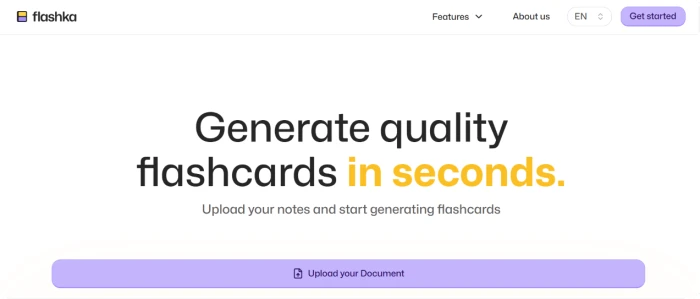
Flashka.ai homepage showing AI study helper platform positioning for students and learners with content-to-study-material value proposition
The Flashka homepage with AI study helper positioning.
Flashka.ai post-login onboarding entry screen initiating guided setup flow for new user account preference collection
The post-login onboarding entry screen.
What we observed: The homepage exposes the Flashka AI study helper positioning targeting students and learners. Post-login flow enters the platform onboarding sequence before granting access to core features, indicating guided setup approach for new users. Marketing communicates the content-to-study-material value proposition through platform messaging, setting expectations about the AI-powered learning workflow before commitment.

Onboarding Multi-Format Input Options

Test 02 . Input flexibility
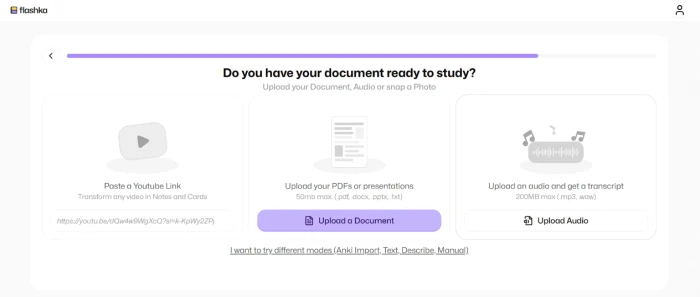
Flashka.ai onboarding step asking about study materials with multi-format input options including paste link upload document and upload audio for diverse content sources
The onboarding step: link, document, or audio input options.
What this shows: The onboarding flow proceeds through preference collection questions (how did you hear about us, tell us about yourself, how you want to use Flashka) before reaching the study material input step. Multi-format input options include pasting content links, uploading documents, and uploading audio files. This input flexibility supports diverse study material sources beyond text-only inputs, particularly valuable for learners with video lectures, PDF readings, or audio content like podcasts and recorded classes.

YouTube Link Processing

Test 03 . Content fetch
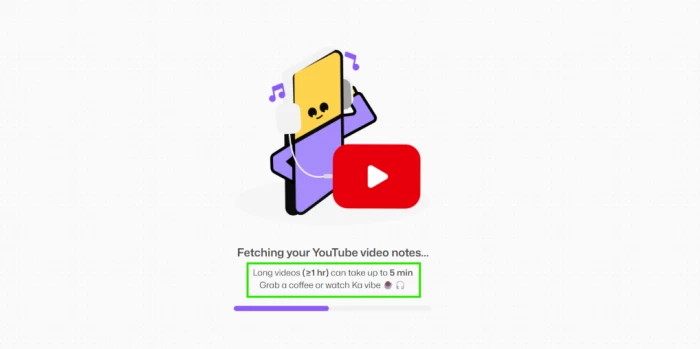
Flashka.ai YouTube video link submission with processing indicator disclosing that long videos can take up to 5 minutes for content transformation workflow
YouTube link submitted: processing with 5-minute disclosure.
The takeaway: Pasting a YouTube video link triggers processing workflow with the platform disclosing that longer videos can take up to 5 minutes. The upfront processing time disclosure supports user planning about workflow timing, avoiding surprise waits for content that requires extraction, transcription, and analysis. For students converting lecture videos into study materials, the processing pathway is functional though not instant, the transparency about timing is editorial value for workflow planning.

Personalise Your Deck

Test 04 . Deck customization
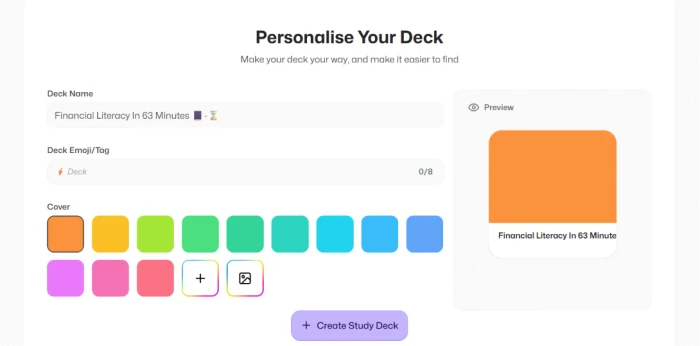
Flashka.ai Personalise Your Deck dashboard exposing deck name entry emoji tag selection cover color palette with real-time preview for visual deck organization
The Personalise Your Deck dashboard: name, tag, cover colors.
Worth noting: After content processing completes, the Personalise Your Deck dashboard exposes deck customization including deck name entry, emoji/tag selection, and cover color palette with multiple color swatches. Deck preview updates in real-time as customizations are applied. In the test session, the deck name auto-populated from source video content. For learners organizing multiple study decks across subjects or topics, the personalization supports visual differentiation and organization in the platform's home dashboard, a workflow polish detail that improves multi-deck management experience.

Deck Dashboard with Transcription and 3 Study Tabs

Test 05 . Multi-tab workflow
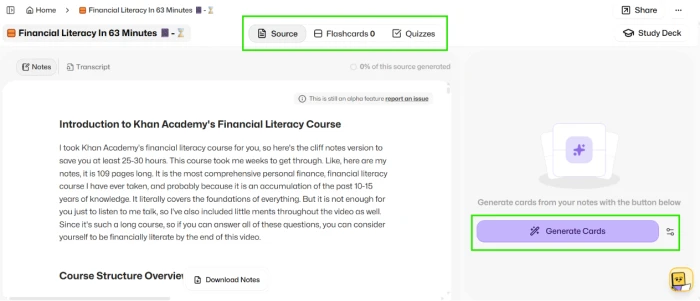
Flashka.ai deck dashboard exposing video transcription with three tabs Source Flashcards Quizzes plus download notes function and Generate Flashcard button in bottom right corner
The deck dashboard: transcription visible, 3 tabs (Source/Flashcards/Quizzes), download notes.
What stood out: The deck dashboard exposes comprehensive study workflow structure with three tabs (Source, Flashcards, Quizzes) providing distinct study modalities. The video transcription is directly accessible in the Source tab supporting reference to original content, and a download notes function supports offline study material access. The Generate Flashcard button in the bottom-right initiates the flashcard creation workflow. This multi-view structure is meaningfully differentiated from single-format flashcard-only AI study tools, providing learners multiple ways to engage with source content across review, testing, and reference modes.

172 Flashcards Generated with Source Tracking

Test 06 . End-to-end validation
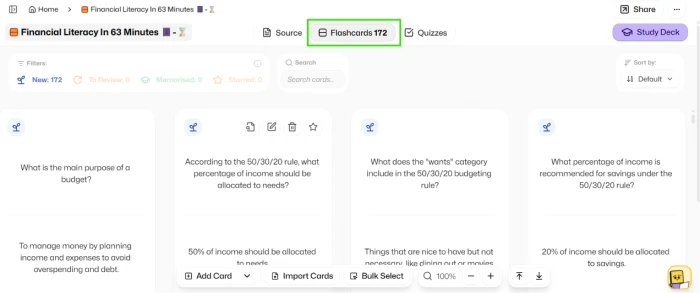
Flashka.ai 172 flashcards generated from YouTube video source with each flashcard showing source tracking edit controls and delete controls for user customization beyond auto-generated defaults
172 flashcards generated: source tracking, edit, delete controls per card.
The validation: First-hand testing validated end-to-end flashcard generation from the YouTube video source producing 172 flashcards on the Generate Flashcard action. Each flashcard exposes source tracking (viewing the original content section that generated the card), edit controls (customizing question and answer content), and delete controls (removing cards that don't fit study needs). The source tracking is meaningful editorial feature for learners verifying flashcard accuracy against original content, and the edit/delete controls support customization beyond auto-generated defaults. The 172-card scale from a single video source demonstrates substantive content-to-study transformation capacity.
172 Flashcards Validated + Multi-Tab Study Workflow + Chat with Ka + Multi-Format Input

Flashka's structural value proposition combines validated content-to-flashcards workflow with 172 flashcards auto-generated from a single YouTube video source (each with source tracking + edit + delete controls), comprehensive multi-tab study structure (Source, Flashcards, Quizzes) with video transcription and downloadable notes, the Chat with Ka AI conversational feature adding interactive deck-based study support, multi-format input flexibility across link, document, and audio inputs, and study group create-and-join collaboration. This end-to-end study platform architecture is meaningfully differentiated from single-format AI study tools limited to flashcard-only or Q&A-only workflows. For learners wanting comprehensive content-to-study transformation with multiple study modalities and collaboration options, Flashka delivers substantive workflow value.

Quizzes and Home Dashboard

Test 07 . Additional study modality
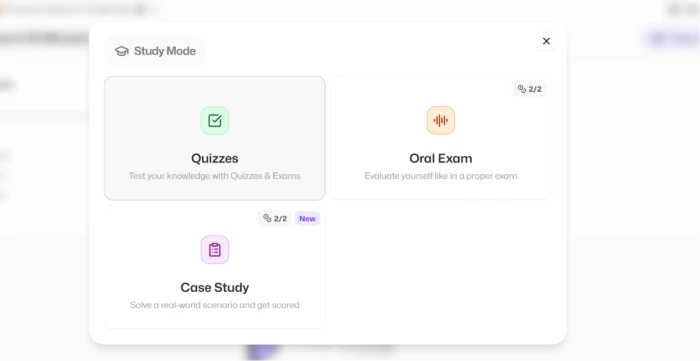
Flashka.ai quizzes tab exposing additional study modality beyond flashcards supporting testing preparation and knowledge assessment workflow modes
The Quizzes tab with testing preparation options.
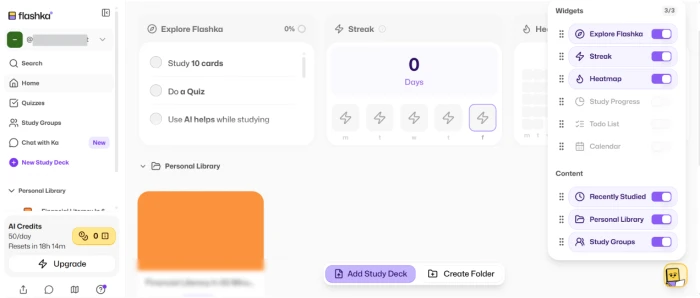
Flashka.ai home dashboard providing organized access to generated decks platform features and account management for authenticated returning users
The home dashboard with organized deck access.
The signal here: The Quizzes tab exposes additional study modalities beyond flashcards supporting testing preparation workflows and knowledge assessment. Combined with the home dashboard providing organized access to generated decks and platform features, the workflow structure supports return-user engagement across multiple study sessions. For learners wanting testing-mode study beyond flashcard review, the multi-modal study structure provides workflow completeness that many AI study tools skip in favor of flashcards-only or Q&A-only positioning.

Study Groups and Chat with Ka

Test 08 . Collaboration + AI chat
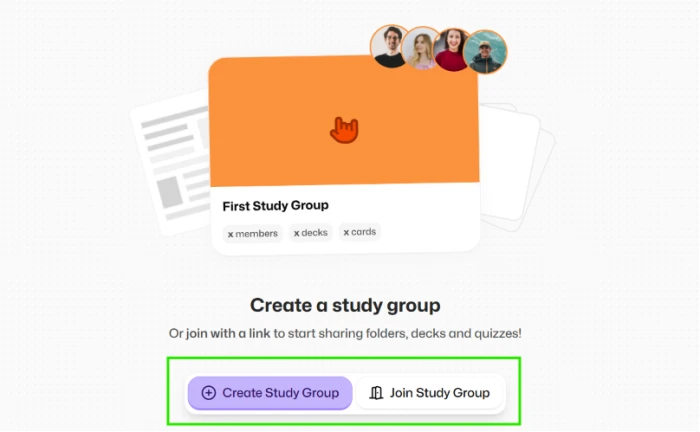
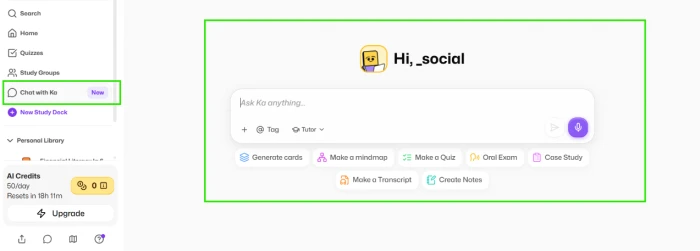
Flashka.ai study groups feature exposing create and join functionality for collaborative learning workflows with peer study partners and classmates
The study groups: create and join collaboration feature.
Flashka.ai Chat with Ka AI conversational feature exposing interactive AI chat interface for deck-based study support beyond static flashcard consumption
Chat with Ka: AI conversational study support feature.
What this surfaces: Additional platform features surface including study group create-and-join collaboration supporting shared learning contexts with peers or classmates, and Chat with Ka AI conversational interface enabling interactive dialogue about deck content beyond static flashcard/quiz consumption. The combination extends Flashka beyond flashcard generator positioning into conversational study support and collaborative learning platform territory. For learners wanting to ask follow-up questions about generated content or study alongside peers with shared decks, these features add workflow dimensions that many AI study platforms skip.
!
Onboarding Friction Plus Processing Time Considerations Plus Privacy Practices

The guided onboarding flow collects user preferences across multiple questions (how did you hear, tell us about yourself, how you want to use Flashka, do you have documents ready) before granting access to core features, adding friction for users wanting quick platform evaluation. Content processing time varies by input length with the platform disclosing up to 5 minutes for longer videos, this is transparent about resource requirements but may be material constraint for time-sensitive study workflows. Additionally, privacy practices around uploaded content (videos, documents, audio) and generated study materials are not as transparent as larger educational platform peers, prospective users should consider content handling policies especially for copyrighted lecture material or personal study content that may be sensitive.

How this review was put together. First-hand testing on Flashka.ai in July 2026 covered the homepage with post-login onboarding entry, guided onboarding flow collecting user preferences and multi-format input options across link, document, and audio, YouTube video link submission with 5-minute processing disclosure, Personalise Your Deck workflow with name/emoji/cover customization, deck dashboard exposing video transcription with three tabs (Source, Flashcards, Quizzes) and downloadable notes function, 172 flashcards auto-generated with per-card source tracking and edit/delete controls, quizzes tab and home dashboard, and study groups plus Chat with Ka AI conversational feature, evaluated under the FirmCritics AI Study Helper Methodology spanning content-to-study-material validation, multi-format input flexibility, multi-tab workflow completeness, collaboration and AI chat features, onboarding flow assessment, processing time transparency, and privacy considerations around uploaded educational content.

10-Point Feature Review

03 . Honest scoring across capabilities and friction
Feature Scores at a Glance
172 Flashcards Validated
7.5
Multi-Tab Study Workflow
7.5
Transcription + Downloadable Notes
7.0
Multi-Format Input Support
7.0
Source Tracking + Edit/Delete
7.0
Chat with Ka AI Feature
6.5
Study Groups Collaboration
6.5
Deck Personalization
6.5
Processing Time (5 min max)
5.5
Privacy + Data Handling
5.5
Feature-by-feature breakdownScored on a 10-point scale, honest evidence-driven distribution
01
172 flashcards validated end-to-end FIRST-HAND EVIDENCE
Documented in Test 06 first-hand validation. The YouTube video processing workflow completed producing 172 flashcards on the Generate Flashcard action. Each flashcard exposes source tracking, edit controls, and delete controls. The 172-card scale from a single video source demonstrates substantive content-to-study transformation capacity. For learners wanting comprehensive study material from source content, the generation depth is meaningful editorial evidence for the platform's core value proposition.
VALIDATION: 172 flashcards generatedPER-CARD: Source + edit + delete
7.5
GOOD
02
Multi-tab study workflow SOURCE + FLASHCARDS + QUIZZES
Documented in Test 05 and Test 07 and tc-discovery callout above. The deck dashboard exposes three tabs (Source, Flashcards, Quizzes) providing distinct study modalities plus downloadable notes function. This multi-view structure is meaningfully differentiated from single-format flashcard-only AI study tools, providing learners multiple ways to engage with source content across review, testing, and reference modes. Workflow completeness is competitive with category-leading platforms.
STRUCTURE: 3 tabs + notes downloadVS PEERS: Multi-view vs single-format
7.5
GOOD
03
Transcription + downloadable notes COMPREHENSIVE OUTPUT
Documented in Test 05. The Source tab exposes video transcription directly in the deck dashboard supporting reference to original content, and a download notes function supports offline study material access. Combined output (transcription + notes + flashcards + quizzes) provides comprehensive study material set from a single source video, meaningful workflow completeness for learners preparing detailed study materials for exam preparation or lecture review.
OUTPUT: Transcription + notes + cards + quizzesACCESS: Download for offline use
7.0
GOOD
04
Multi-format input support LINK + DOC + AUDIO
Documented in Test 02 and tc-discovery callout. The onboarding flow exposes input options across paste link, upload document, and upload audio formats. This input flexibility supports diverse study material sources beyond text-only inputs, particularly valuable for learners with video lectures, PDF readings, or audio content like podcasts. The multi-format positioning is meaningfully differentiated from AI study tools limited to typed text inputs or single-format uploads.
FORMATS: Link + document + audioVS PEERS: Text-only limitation avoided
7.0
GOOD
05
Source tracking + edit/delete controls PER-CARD CUSTOMIZATION
Documented in Test 06. Each generated flashcard exposes source tracking (viewing the original content section), edit controls (customizing question and answer text), and delete controls (removing unwanted cards). Source tracking is meaningful editorial feature for learners verifying flashcard accuracy against original content, and edit/delete controls support customization beyond auto-generated defaults. This per-card customization depth is above category baseline where many AI flashcard tools generate fixed cards without granular editing.
PER-CARD: Source + edit + deleteVALUE: Verification + customization
7.0
GOOD
06
Chat with Ka AI feature CONVERSATIONAL STUDY
Documented in Test 08. Chat with Ka exposes AI conversational interface for interactive dialogue about deck content beyond static flashcard/quiz consumption. For learners wanting to ask follow-up questions, clarify concepts, or explore related topics from their generated content, the chat feature adds interactive study support dimension. The feature extends Flashka beyond flashcard generator positioning into conversational study support territory.
FEATURE: Deck-based AI chatUSE: Interactive study support
6.5
FAIR
07
Study groups collaboration DIFFERENTIATOR
Documented in Test 08 and tc-discovery callout. The study groups feature exposes create-and-join functionality supporting collaborative learning workflows for peers, classmates, or study partners. This differentiates Flashka within the AI study helper category by adding collaboration dimension that many AI study platforms skip in favor of individual-only study workflows. For group-based learning contexts common in academic and professional development, the feature adds meaningful value.
SCOPE: Create + join groupsVS PEERS: Collaboration differentiator
6.5
FAIR
08
Deck personalization VISUAL ORGANIZATION
Documented in Test 04. The Personalise Your Deck dashboard exposes deck name entry, emoji/tag selection, and cover color palette with real-time preview. For learners organizing multiple study decks across subjects, the personalization supports visual differentiation in the home dashboard. Personalization is workflow polish detail improving multi-deck management experience, particularly valuable for learners building study library across multiple topics or courses.
OPTIONS: Name + tag + colorsVALUE: Multi-deck organization
6.5
FAIR
09
Processing time 5 min max SLOW BUT DISCLOSED
Documented in Test 03. Processing time varies by input length with the platform disclosing up to 5 minutes for longer videos. Upfront disclosure supports user planning about workflow timing, avoiding surprise waits. For time-sensitive study workflows, this latency may be material constraint; for asynchronous study preparation where processing happens during other activities, the timing transparency supports scheduling. Score reflects the latency reality balanced against upfront disclosure.
TIME: Up to 5 min long videosDISCLOSURE: Upfront transparency
5.5
FAIR
10
Privacy + data handling TRANSPARENCY GAP
Cross-reference tc-blocker callout above. Privacy practices around uploaded content (videos, documents, audio) and generated study materials are not as transparent as larger educational platform peers. For users uploading personal study content, copyrighted lecture material, or sensitive documents, this transparency gap represents structural concern. Prospective users should consider content handling policies before uploading materials they would not want potentially stored or processed beyond the immediate study session.
DISCLOSURE: Below larger platform standardUSER ACTION: Consider content sensitivity
5.5
FAIR

Pros and Cons

04 . What works and what to weigh
+What users like
  • 172 flashcards auto-generated from single YouTube video with per-card source tracking plus edit and delete controls
  • Multi-tab study workflow: Source + Flashcards + Quizzes tabs support distinct study modalities in one deck
  • Video transcription visible plus downloadable notes provides comprehensive study material output beyond flashcards
  • Multi-format input support: paste link + upload document + upload audio for diverse source materials
  • Chat with Ka AI conversational feature adds interactive deck-based study support beyond static consumption
  • Study group create-and-join feature adds collaboration dimension that many AI study tools skip
  • Deck personalization: name, emoji tag, cover color options for visual multi-deck organization
  • Processing time disclosed upfront allowing users to plan workflow timing rather than surprise waits
What users dislike
  • Onboarding flow requires multiple questions (how you heard, about yourself, how you'll use, docs ready) before core access
  • Long video processing time up to 5 minutes disclosed upfront but material constraint for time-sensitive workflows
  • Privacy practices around uploaded content and generated materials not transparent: retention, training use, third-party sharing unclear
  • Free-tier limits require verification for sustained study workflows beyond casual evaluation
  • Output quality varies by input content: complex or specialized subject matter may produce less useful study materials
  • Copyrighted content upload considerations: users should verify content handling policies before uploading lecture material

Pricing Breakdown

05 . Freemium with subscription tier for premium features
FeatureFree TierPremium Subscription
Homepage Access Without login Full access
Guided Onboarding Full flow Full flow
YouTube Link Processing Within limits Higher limits
Document Upload Within limits Higher limits
Audio Upload Within limits Higher limits
Flashcards Generation Auto-generated Higher volumes
Deck Personalization Name + colors Full options
Chat with Ka Basic access Extended features
Study Groups Create + join Extended features
Pricing Structure$0 with feature limitsMonthly/annual subscription
Best ForCasual student use + evaluationSustained heavy study workflow

The pricing reality: Flashka operates on a freemium model with basic study material generation accessible without subscription and premium tier unlocking higher usage limits, advanced features, and expanded study group capabilities. Verify current subscription pricing and free-tier feature allocations directly on the Flashka plans page before committing to paid tier.
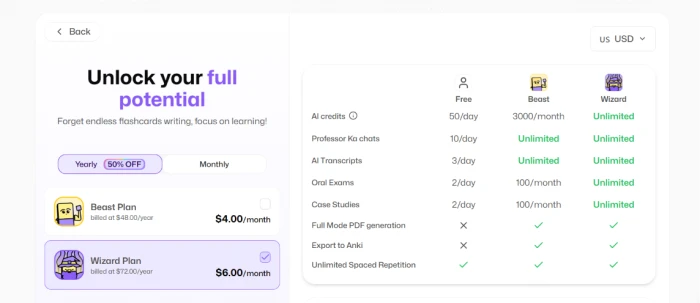
Flashka.ai pricing page showing subscription tier options with feature allocations and pricing structure for premium account access to advanced study material generation features
The Flashka pricing page with subscription options.

Pricing accurate as of July 03, 2026.

Flashka.ai vs the Top 4 Alternatives

06 . How it compares in AI study helper category
FFlashka.ai QQuestionAI QQuizlet AI NNotion AI SStudy Fetch
Score6.76.87.57.46.5
Video-to-Flashcards172 cards validatedLimited
Multi-Tab Study WorkflowSource + cards + quizzes Multi-toolCards + quizzes Workspace Multi-view
Multi-Format InputLink + doc + audio Text + image Text + doc Multi-modal Doc + video
Per-Card Source TrackingYes + edit + deleteLimited Edit options
AI Chat Feature Chat with KaDirect AI Q&A Q-ChatAI writing
Study GroupsCreate + joinClass + group WorkspaceLimited
Free Tier Access Freemium Freemium Basic free LimitedLimited
Best ForVideo/audio-to-flashcards + collaborationMulti-tool math + writingFlashcards + testingBroader productivity + notesContent analysis + study

The picture: Flashka's structural advantage is the video-to-flashcards workflow with 172 cards generated in the test session combined with multi-tab study structure (Source/Flashcards/Quizzes), Chat with Ka AI conversation, and study groups collaboration. Category leaders like Quizlet AI deliver more polished flashcard-specific experience and Notion AI offers broader productivity integration, but Flashka's video/audio content input with source tracking and edit controls specifically differentiates for learners with lecture videos or podcast content as primary source material.

What Users Are Saying

07 . Community feedback patterns from across user communities
Been using Flashka for study prep and the YouTube video processing is genuinely useful for lecture content. Fed it a finance video and got over 170 flashcards back with source references so I could verify against the original content. The per-card edit and delete controls let me refine the auto-generated set to what I actually needed for my exam prep. The three-tab structure (Source, Flashcards, Quizzes) plus downloadable notes gives me multiple ways to engage with the content. Chat with Ka feature is nice for follow-up questions about the deck content. Study groups feature adds collaboration that most AI study tools skip.
r/Students user
172 flashcards workflow experience
★★★★☆
r/Students
Flashka processes YouTube videos into structured flashcards and quizzes. Multi-format input is a real differentiator. Solid for content-based study.
Trustpilot reviewer
Quick workflow assessment
★★★☆☆
trustpilot.com
The three-tab study structure (Source, Flashcards, Quizzes) combined with the AI chat feature makes Flashka more comprehensive than typical flashcard generators. Video transcription in the Source tab is helpful for verifying flashcard accuracy against the original content. Onboarding could be shorter.
r/GetStudying user
Multi-tab workflow focus
★★★★☆
r/GetStudying
Flashka delivers on content-to-study transformation with the multi-format input and study group collaboration setting it apart from single-user flashcard tools. Processing time up to 5 minutes for long videos is fine when disclosed upfront. Privacy transparency could improve.
Product Hunt reviewer
Balanced platform assessment
★★★★☆
producthunt.com
· The Verdict ·
6.7/10
Should you use Flashka.ai? Here is who it is for.

Use Flashka.ai if video-to-flashcards workflow with 172 cards generated end-to-end from single YouTube source fits intended study workflow; multi-tab study structure (Source, Flashcards, Quizzes) plus downloadable notes provides workflow completeness matching intended use; per-card source tracking and edit/delete controls matter for verifying AI-generated content against original source material; Chat with Ka AI conversational feature supports intended interactive study workflow; study groups collaboration feature matches learning context with peers or classmates; and multi-format input flexibility (link + document + audio) fits diverse source material types.

Skip Flashka.ai if category-leading polished experience from Quizlet AI (flashcards specialist) or broader productivity from Notion AI fits the workflow better than Flashka's content-to-study focus; quick platform evaluation without multi-question onboarding is editorial priority; time-sensitive study workflows cannot accommodate processing time for longer content; privacy practices below larger educational platform peer standard create unacceptable risk for uploaded lecture material or personal study content; or specialist AI study tools deliver better ROI for specific study modalities like math (QuestionAI) or coding (dedicated platforms).

Category RankCapable Pick
Compared To4 Rivals
Flashcards Validated172 Generated
Features Scored10 Points

Discussion

Join the discussion and share your perspective.