
Home / Reviews / AI Video Generator / Flux AI
Flux AI logo
AI Image Generator Multi-Model Studio

Flux AI Review

flux-ai.io · rebranding to Flyne AI

Flux AI wraps dozens of image and video models, from Flux.1 Schnell to Nano Banana and Seedream, behind a single credit wallet, so you switch engines without juggling subscriptions. A cheap Schnell portrait came back looking far better than its 10-credit cost. It fits hobbyists and prompt tinkerers who want range on a pay-as-you-go budget rather than teams who need private, reliable output.

Reviewer Score
6.6
/10
Mixed Results
Strong range and faces
Shaky video and privacy
Model Breadth9.0
Portrait Quality8.5
Free Built-In Tools8.0
Text In Images5.0
Free Video Reliability5.0
Platform
Web plus mobile apps
Starter Credits
40 new users
Daily Check-In
20 credits
Cheapest Pack
$9.99 4,000 credits
Schnell Cost
10 credits/image
Credit Validity
100 days

What Flux AI Does

01 . Overview

Flux AI is a web platform that puts a long list of generative models under one roof. The headline engines are Black Forest Labs' Flux.1 family (Schnell, Dev, Pro, and Kontext), but the catalog reaches well past them into Nano Banana, Seedream, Qwen, Ideogram, Recraft, and a rack of video models that runs from Veo through Kling to Seedance. You pick an engine, write a prompt, then spend credits from a shared balance.

The audience it chases is the solo creator who would rather not keep separate Midjourney and Ideogram subscriptions running next to a standalone video tool. Flux AI positions itself as the one account that touches all of them. Around the paid generators sits a band of free utilities, a background remover, an upscaler, an image-to-prompt reader, that run without drawing down credits at all. Access is tiered through one-time credit packs rather than a recurring subscription, with a free tier that hands new users 40 credits and tops them up by 20 a day for checking in.

One housekeeping note that shapes everything below: the brand is mid-rename. A popup on load announces that flux-ai.io is becoming Flyne AI, same account, same tools, new name.

What Happened When We Tested It

02 . 6 tests covering images, free tools, video, and the free-tier ceiling

I ran these on a fresh free account, the one most people land on before paying anything. That account opened with 40 credits, which quietly sets the boundaries of what you can try. Flux.1 Schnell costs 10 credits per image and Flux.1 Dev costs 30, so those starter credits stretch to roughly four fast images or a single sharper one. Here is what each test turned up.

A rebrand popup before a single pixel

Test 01 . First load
Flux AI popup announcing the platform is becoming Flyne AI with the same account and features
The first thing on screen is a name-change notice, not a canvas.
First impression: Before I could generate anything, Flux AI told me it is turning into Flyne AI and promised the same login and the same feature set. For anyone weighing the tool, that belongs up top. The product is not moving, but the name on the door is changing.

A 10-credit portrait that punched above its tier

Test 02 . Photorealism
★ Prompt Used

"close-up portrait of an elderly fisherman, weathered skin, salt-and-pepper beard, golden hour light, 85mm photo, sharp detail"

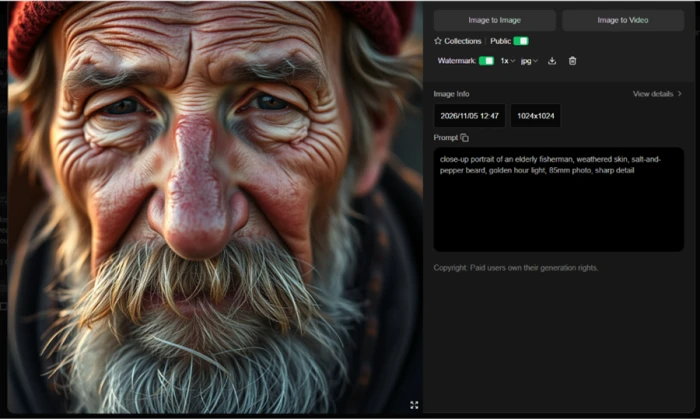
Flux.1 Schnell generation screen set to the cheapest 10-credit model before running the fisherman portrait
I kept the model on Flux.1 Schnell, the cheapest setting at 10 credits.
Generated close-up portrait of an elderly fisherman with weathered skin, detailed beard, and golden hour lighting
The output at 1024x1024, with skin texture and a catch-light in the eyes.
What stood out: The result came back stronger than 10 credits has any right to produce. Skin texture held, the eyes carried a real catch-light, and the beard kept a soft golden edge. If faces are your workload, the cheapest engine here already clears a usable bar.

Public by default, and an ownership line worth reading

Test 03 . Privacy mechanics
Flux AI generator interface showing the Public toggle locked on and the row of free tools beneath the generator
The Public toggle would not switch off on the free plan.
The signal here: Two things on this screen matter for a buyer. The Public toggle stayed locked on, so every free-plan image is visible to other users, and private generation sits behind the paywall. The info panel also states that paid users own their generation rights, which reads as a gap for free users even though the pricing page lists commercial rights in the free column. That is a contradiction worth clearing up before you rely on anything you make here.

The free tools are the quiet highlight

Test 04 . Background remover
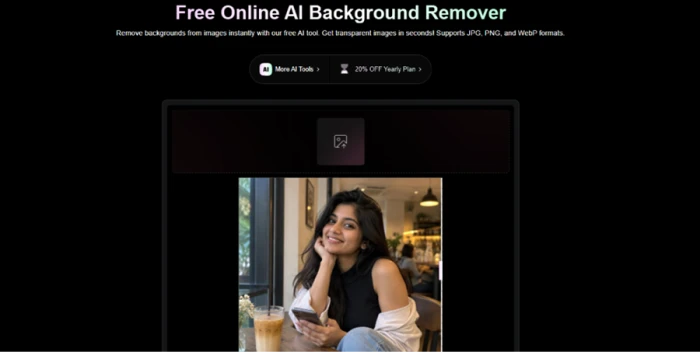

A cafe photo loaded into the Flux AI Background Remover tool before processing
I pushed a cafe photo through the free Background Remover.
Clean subject cut-out on a transparent background produced by the Background Remover, with hair edges mostly preserved
A clean cut-out on a transparent background, hair edges mostly intact.
What clicked: This row of utilities leaves your credit balance untouched, and the Background Remover handed back a tidy transparent PNG ready to drop onto a layout. It is the one piece I would keep using outside of a review, and it costs nothing.

Same model, same settings, a sign it could not spell

Test 05 . Text rendering
★ Prompt Used

"a wooden cafe sign that reads 'FLUX COFFEE BOOTH NOW IN YOUR AREA', hanging outside a brick storefront, morning light, photorealistic"

Generated cafe sign where the top line reads correctly but the lower text collapses into misspelled duplicated words
The top line held. The lower line fell apart.
The same generated image showing a flux-ai.io watermark in the corner that the free plan does not allow removing
A flux-ai.io watermark the free plan will not let you strip.
Where it lands: FLUX COFFEE BOOTH rendered cleanly, then the lower line collapsed into garbled, duplicated text that no reader could parse. Same engine that nailed the portrait, opposite result. Faces it handles, legible text it does not, and the free output arrived stamped with a watermark you cannot remove without paying.

A video that queued, stalled, then died

Test 06 . Free video queue
★ Prompt Used

"Create an ultra-realistic video of a beautiful young adult woman smiling naturally at the camera, with realistic facial expressions, gentle movements, flowing hair, soft natural lighting, and cinematic 4K quality."

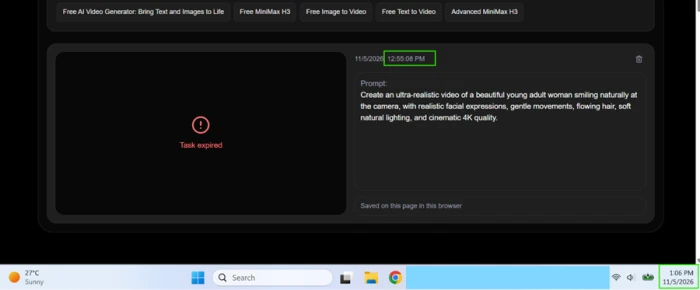
Flux AI free Text to Video tool set to 480p and 5 seconds with the clip submitted to a shared queue
The free Text to Video tool at 480p, 5 seconds, dropped into a shared queue.
The video job resolving into a red Task expired message after roughly ten minutes with nothing rendered
Ten minutes later, one red line: "Task expired."
The real story: I queued the clip at 12:55, watched it spin for ten minutes, and it resolved into a dead "Task expired" with nothing rendered and no retry offered. A faster queue exists for paying users, which turns the free wait into a sales pitch rather than a hardware ceiling. On the free plan, video is a maybe, not a feature.
★
Cheap Schnell portraits plus free credit-neutral tools

The combination that actually earned its keep was a 10-credit Schnell face paired with the free Background Remover. One produced a portrait that looked professional at the lowest price point, the other cut it out cleanly without spending a credit. For headshots and quick composites, that pairing alone justifies opening an account.

!
Free video expired with nothing to show

The free Text to Video job sat in a shared queue, then timed out with "Task expired" after ten minutes. No render, no retry, just a prompt to run again from scratch. If video is why you came, the free tier will not prove the feature out, and the only fix on offer is the paid fast queue.

How this review was put together. Testing ran on a fresh free account in November 2026, covering image generation on Flux.1 Schnell, the free Background Remover, a text-in-image prompt, and a free Text to Video job, alongside the privacy and ownership settings exposed in the interface. All pricing was verified the same month against the official pricing page at flux-ai.io/pricing. Screenshots capture the exact sessions described above.

10-Point Feature Review

03 . Scored against what the free account actually delivered
Feature Scores at a Glance
Model & Engine Breadth
9.0
Portrait & Photoreal Quality
8.5
Free Built-In Tools
8.0
Pricing Transparency
7.2
Interface & Onboarding
7.0
Free-Tier Image Allowance
6.5
Brand Stability
6.0
Privacy & Ownership
5.5
Free Queue Speed
5.0
Text-In-Image Rendering
5.0

Pros and Cons

04 . What a real session rewards and what it punishes
+What Works
  • Utilities that cost nothing: the Background Remover and its neighbors run without touching your credit balance.
  • Fast to first image: a new user can land a generation in under a minute with no setup.
  • Per-model costs are published: you can see what each engine spends before you commit to it.
−What Grates
  • Legible text falls apart: anything past a couple of words renders garbled and duplicated.
  • Free video is unreliable: a queued clip expired after ten minutes with nothing to show.
  • Forced public output: the Public toggle stays locked on, so images are visible to other users.
  • Muddled ownership language: the in-app note on generation rights contradicts what the site states elsewhere.

Pricing Breakdown

05 . One free tier and four one-time credit packs
Feature Free$0 Basic$9.99 one-time Ultra$19.99 one-time More$49.99 one-time Max$99.99 one-timeBest Value
Credits 40 start, 20/day 4,000 10,000 26,000
Private generations ✗ ✓ ✓ ✓
Fast generation queue ✗ ✓ ✓ ✓
AI video generation Shared queue ✓ ✓ ✓
History window 15 days 365 days 365 days 365 days
List discount None 0% off 20% off 25% off

The tier math: The packs are one-time purchases, not subscriptions, which is the headline difference from most rivals. Two catches decide whether they are worth it. Premium feature access lasts only one month from payment, and the credits themselves expire after 100 days, so a big pack bought for occasional use can lapse before you spend it. The Basic pack is the only one at full list price with no discount, while the discount climbs as you scale up, reaching 30% on Max. If you generate in bursts, the smaller packs waste less; if you generate daily for a month, the larger packs cost far less per credit.
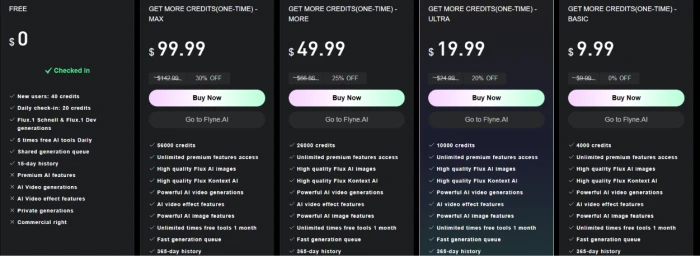
Flux AI pricing page showing the free tier and four one-time credit packs priced at $9.99, $19.99, $49.99, and $99.99
The free tier sits beside four one-time credit packs.

Pricing verified November 5, 2026. These figures move, so confirm the current packs on the official pricing page before you buy.

Flux AI vs the Top 3 Alternatives

06 . How it stacks up against the generators buyers shortlist
FFlux AI IIdeogram KKrea MMidjourney
Entry Price$9.99 one-time$15/mo$5/mo$10/mo
Free TierYesYesYesNo
Billing ModelCredit packsSubscriptionSubscriptionSubscription
Text In ImagesWeakBest in classVaries by modelImproving
Best ForModel variety on a pay-as-you-go walletPosters and text-heavy graphicsAggregating many models in one editorPainterly, artistic image quality

Picking between them: Flux AI and Krea play the same aggregator game, many models behind one login, but Krea bills monthly from $5 while Flux AI sells credit packs you can let sit, so the right pick depends on whether you create in bursts or every day. Reach for Ideogram the moment your work involves readable text, a poster, an ad, a quote card, because that is exactly where Flux AI broke in testing. Midjourney stays the choice for pure artistic polish, though its lack of a free tier means you commit $10 before seeing a single result.

· The Verdict ·
6.6/10
Who is this cheap, sprawling model buffet actually for?

Use Flux AI if you want to sample many image engines on a pay-as-you-go wallet, your work leans on faces and photoreal scenes rather than text, and the free Background Remover alone would earn its place in your kit.

Skip Flux AI if you generate text-in-image graphics, where Ideogram leads outright, or you want a steady monthly aggregator, where Krea starts at $5 a month with all its models in one editor.

Category RankMixed Results
Compared To3 Alternatives
Entry Price$9.99
Free TierYes

Discussion

Join the discussion and share your perspective.