


What Fotor Does
Fotor is a browser-based creative suite that pairs a classic photo editor with a deep bench of generative AI. The workspace that handles cropping and retouching also runs text-to-image generation, AI video, background removal, and an object eraser, so moving from a manual edit to an AI one never means leaving the tab.
The positioning is breadth without a learning curve. Fotor leans on putting several leading generation models in one place, Nano Banana and FLUX among them, and aims at creators and small-business owners who want finished visuals quickly rather than a professional's toolset. It runs on a free Basic tier, with paid plans opening at US$3.99 a month on annual billing.
What Happened When We Tested It
Testing ran in-browser on a free account. Each tool got a real task and the output was judged at full size, with the credit meter left to behave the way a new user would see it.
Background removal on a clean object
Test 01 . Background removal

Text to image, one precise instruction
Test 02 . Text to image"Ultra-realistic photograph of a beautiful 25-year-old woman with natural facial features, expressive eyes, flawless yet realistic skin texture, long dark hair, and a gentle smile. Elegant outfit, soft natural lighting, professional DSLR photography, 85mm lens, cinematic background blur, lifelike details, photorealistic, 8K resolution, no artificial beauty filters or AI-looking features."


A run that stopped for a login
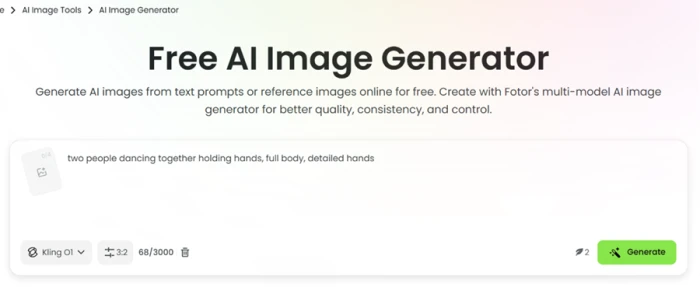
Test 03 . Paywall mechanics"two people dancing together holding hands, full body, detailed hands"

AI video and its credit tag
Test 04 . Video credits"The woman gently smiles, blinks naturally, slightly tilts her head, and softly moves her hair in the breeze. Subtle realistic body movements, natural facial expressions, cinematic camera movement, smooth motion, realistic lighting. Maintain the exact same face, identity, hairstyle, and outfit throughout the video. Ultra-realistic 4K video."

Magic Eraser draws from the same pool
Test 05 . Object removal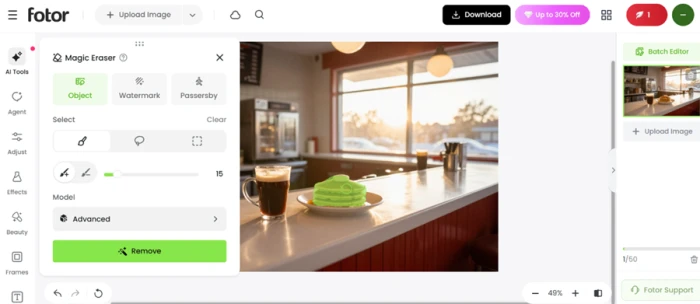
On a clean-edged object the background remover held the outline, handle included, and exported with no watermark. The dancing-couple generation came back correctly proportioned, hands meeting without spare fingers. Both landed in under a minute.
A second generation stopped to force a login, then flagged a charge before it would run. Every AI action, the video tool and the eraser included, pulls from the same small free balance, and a single video clip costs 75 of those credits.
10-Point Feature Review
Pros and Cons
- Replaces or removes backgrounds with minimal effort.
- Supports batch editing to speed up repetitive tasks.
- AI image expansion to extend photos beyond their original borders.
- Background removal can struggle with complex edges and hair.
- AI retouching may produce unnatural skin textures.
- Complex edits may require additional manual adjustments.
- Processing large or high-resolution images can sometimes be slow.
Pricing Breakdown
| Feature | BasicFree | ProUS$3.99 /mo yearly | Pro+US$5.83 /mo yearlyBest Value | MaxUS$13.99 /mo yearly |
|---|---|---|---|---|
| Monthly credits | Limited free | 100 | 300 | 1,000 |
| Nano Banana Pro images | None | ≈6 | ≈20 | ≈66 |
| Seedance 2.0 videos | None | ≈2 | ≈8 | ≈28 |
| Billed annually | Free | US$47.99 | US$69.99 | US$167.92 |
| Credit top-up | None | Fixed | Fixed | Up to 50k |
Where the value sits: Every paid tier bills annually, so the per-month numbers only hold once a full year is paid up front. Credits are the real currency, and the output estimates expose the squeeze: a free balance burns through a clip or two before the tools lock. Pro+ is where the math eases, tripling the entry tier's monthly credits for a modest step up, while Max layers on an adjustable allowance that climbs toward fifty thousand credits for heavy workloads. The 30 percent cuts stamped on the upper tiers are promotional, measured against higher list prices, so read them as a current offer and not the standing rate.
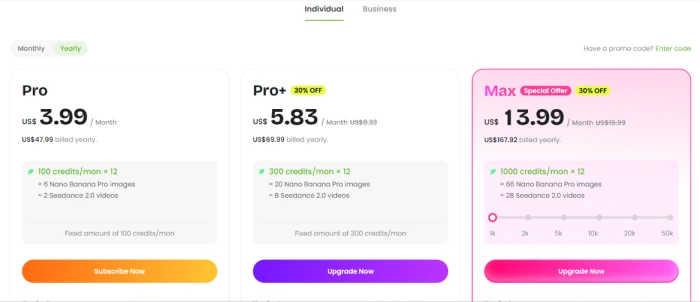
Pricing verified November 6, 2026. Discounts and tiers move around, so open the official pricing page before committing.
Fotor vs the Top 4 Alternatives
| FFotor | CCanva | AAdobe Express | PPixlr | PPicsart | |
|---|---|---|---|---|---|
| AI image models | Several in one place | Built-in generator | Firefly | Single generator | Built-in generator |
| AI video | Multiple models, credit-gated | Template-led clips | Firefly clips | Minimal | Yes, mobile-first |
| Free plan | Limited credits | Generous | Limited | Ad-supported | Ad-supported |
| Best For | Fast all-in-one AI editing | Template-driven team design | Adobe-ecosystem creators | Manual layer-based editing | Mobile-first social edits |
How to choose: Canva still wins for teams building branded templates, and Pixlr suits anyone who wants the manual layer control Fotor does not offer. Fotor's case is breadth at speed, putting more generation models in one browser tab than most rivals keep in one place, as long as the credit meter cooperates.
Discussion
Join the discussion and share your perspective.
david_cooper101
Nov 7, 2026My AC gave out in July, which in Phoenix is basically an emergency. Compressor was making a grinding noise, then the house hit 92 by late afternoon. I got three quotes that week. One company wanted $1,900 to 'diagnose and repair' with no real explanation of what was broken. Second never called back. Third was Abeja A/C HVAC Services Phoenix, and they were the only ones who actually walked me through what was happening. Turned out the capacitor was shot and the blower motor was on its way out too. They replaced both same trip, showed me the dead parts, charged me around $540 all in. That was it. No upsell for a whole new unit, which I fully expected after the other quote. I've had them back twice since — a tune-up in fall and a thermostat that stopped reading correctly. Both times the tech showed up in the window they promised and both prices matched what they quoted on the phone. My neighbor runs a small salon near 43rd Ave and now uses them for her commercial unit too. Their shop is at 4406 W Whitton Ave, Phoenix, AZ 85031, and they're open Monday through Saturday, 7am to 5pm. Number is +1 602 362 4855, or you can check them out at https://abejaacservicesllc.com. Honest take: they're not the cheapest in the valley, but they're the only crew I've used here that didn't try to scare me into a full replacement. If your AC is acting up before the summer heat hits, call these guys first. My only complaint is I wish I'd found them before wasting an afternoon on that first quote.