
Home / Reviews / AI Website Builder / Framer AI
AI-Native Website Builder AI Agent Multi-Page Generation

Framer AI Review

https://www.framer.com · Framer AI-Native Website Builder

Framer is an AI-native design-first website builder combining an AI agent that generates multi-page websites from natural language prompts, an editable canvas where every element is customizable, integrated CMS and localization and analytics, a plugin ecosystem for extensibility, and multi-project management. The test session validates a 4-page AI-tools-review site generated from a single detailed prompt covering hero, categories, reviews, comparison cards, and newsletter signup, with every generated element editable. Pricing starts free with 500 credits, then Basic at $10/month billed yearly and Pro at $30/month.

Reviewer Score
7.6
/10
Preferred Pick
AI-native design-first
website builder
AI Multi-Page Generation8.0
Edit-Anywhere Canvas7.5
Multi-Tool Platform7.5
Plugin Ecosystem7.0
Credit-Based Metering6.5
Platform Type
AI-native design-first website builder
AI Generation
Multi-page validated 4 pages from single prompt
Multi-Tool Platform
Canvas + CMS + localization + analytics + plugins
Free Tier
500 credits 1 GB bandwidth + Framer subdomain
Basic Plan
$10/month yearly 1,000 credits + custom domain + 50 GB
Pro Plan
$30/month yearly 3,000 credits + 100 GB + 10 CMS collections

What Framer Does

01 . Overview

Framer is an AI-native design-first website builder positioning itself around the tagline "Start free, then scale your site" combining an AI agent that generates multi-page websites from natural language prompts, an editable canvas where every element is customizable after generation, integrated CMS collections and multi-language localization and site analytics, a plugin ecosystem for extending functionality, and multi-project management for running multiple websites from a single account.

The platform targets designers, creative professionals, freelancers, agencies, marketing teams, and product companies wanting AI-accelerated website creation with full design freedom rather than template lock-in. Pricing offers three visible tiers: Free ($0) with 500 credits and 1 GB bandwidth for evaluation, Basic ($10/month billed yearly) unlocking custom domain and 2 CMS collections and 50 GB bandwidth for creative personal sites, and Pro ($30/month billed yearly) providing 3,000 credits and 100 GB bandwidth and 10 CMS collections and site redirects for growing professional sites. Enterprise plans are available via top-navigation contact-sales.

What Happened When We Tested It

02 . Eight tests validating AI generation, editability, and multi-tool platform

The July 2026 test session on Framer.com exercised homepage entry and post-login project dashboard, AI agent website generation with a detailed prompt for an AI tools review site including hero and categories and reviews and comparison cards and newsletter signup, the generated 4-page editable website output, real-time responsive preview across screen sizes, the multi-tool platform combining Canvas plus CMS plus localization plus analytics, plugin ecosystem exposure, site settings and multi-project management, and learning tutorials. AI multi-page generation from single detailed prompt is strongest concrete evidence in this assessment.

Homepage and Post-Login Dashboard

Test 01 . Platform entry
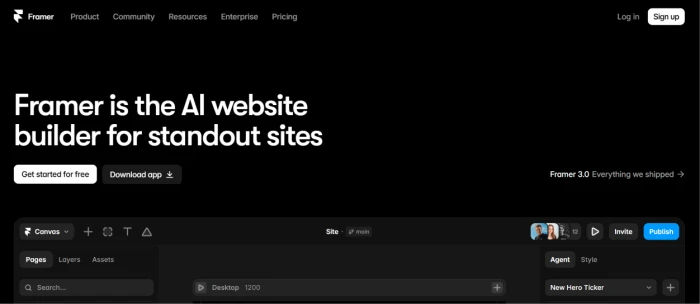
Framer.com homepage exposing AI native design first website builder positioning with clean modern interface product community resources enterprise pricing navigation and clear signup calls to action targeting designers creative professionals freelancers agencies and product teams wanting AI accelerated website creation with full design freedom
Framer.com homepage: AI-native design-first positioning.
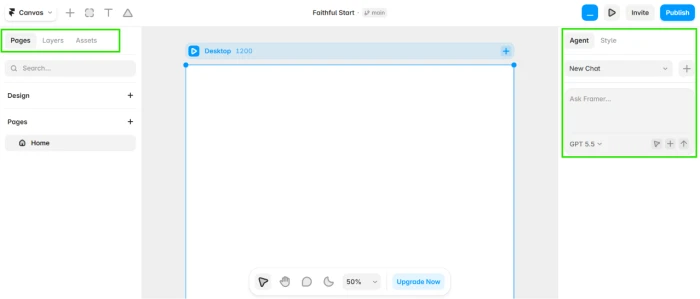
Framer post login project dashboard exposing multi project workspace with existing website projects visible AI agent sidebar navigation account controls and access to design canvas CMS localization and other platform capabilities from unified account interface
Post-login dashboard: multi-project workspace + AI agent access.
What we observed: Homepage exposes Framer's AI-native design-first positioning with tagline "Start free, then scale your site" and clean modern interface with clear signup calls-to-action. Post-login project dashboard provides multi-project workspace where users can create and manage multiple websites from single account, with AI agent accessible via sidebar for prompt-based generation. Multi-project support above single-site website builder baseline (Squarespace, Wix Free tier), meaningful for freelancers, agencies, and professionals managing multiple client sites or personal projects from one account.

AI Agent Website Generation from Detailed Prompt

Test 02 . AI generation entry
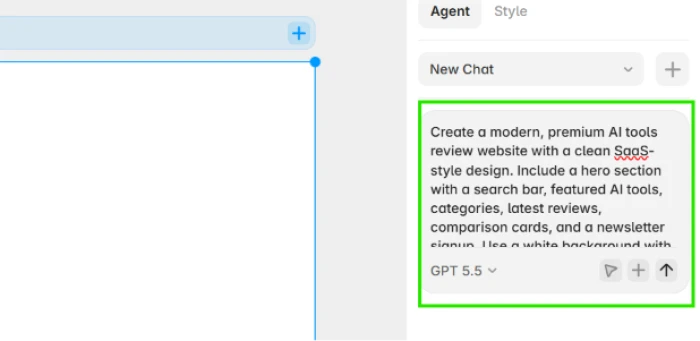
Framer AI agent website generation interface exposing prompt input area on right side sidebar accepting detailed natural language specification for target website including design style sections content structure color palette animations layout and responsive design requirements
AI agent generation: prompt input for detailed website specification.
Test AI Generation Prompt
Create a modern, premium AI tools review website with a clean SaaS-style design. Include a hero section with a search bar, featured AI tools, categories, latest reviews, comparison cards, and a newsletter signup. Use a white background with blue and purple accents, rounded cards, subtle animations, responsive layout, dark mode, sticky navigation, and SEO-friendly pages. The design should feel fast, minimal, and professional, similar to leading tech review websites.
What this shows: Framer's AI agent accepts detailed natural language prompts covering design style (modern, premium, SaaS-style), specific sections (hero with search bar, featured tools, categories, reviews, comparison cards, newsletter), design tokens (white background, blue and purple accents, rounded cards), interaction patterns (subtle animations, sticky navigation, dark mode), and technical requirements (responsive layout, SEO-friendly pages). Prompt-driven generation above template-selection baseline (Wix, Squarespace default flow), positioning Framer as capable of translating full website briefs into generated output.

Generated 4-Page Editable Website Output

Test 03 . AI generation validated
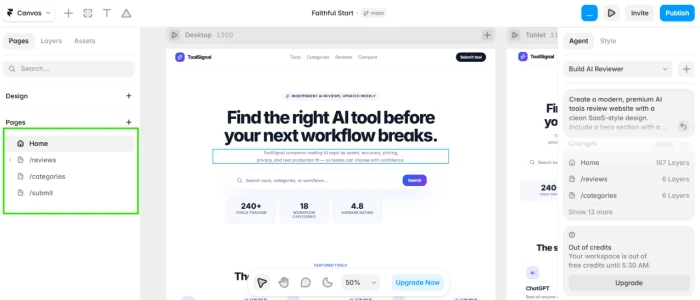
Framer AI generated website output showing four page structure created from single prompt with hero section featured AI tools categories reviews comparison cards and newsletter signup all rendered with white background blue and purple accents rounded cards and every element remaining editable in the canvas for further customization
Generated 4-page website: hero + tools + categories + reviews + comparison + newsletter.
The validation: First-hand testing validated AI generation producing a 4-page website output from the single detailed prompt, covering hero section, featured AI tools, categories, latest reviews, comparison cards, and newsletter signup with white background plus blue and purple accents plus rounded cards as specified. The critical differentiator is that every element in the generated output remains fully editable in the canvas rather than being locked template blocks. Multi-page generation with edit-anywhere freedom above single-page AI website generators (basic Wix Free, template-based tools), and above template-locked builders where designs cannot be customized beyond block-level swaps. Strongest concrete evidence in this session.

Real-Time Responsive Preview Across Screens

Test 04 . Responsive validation
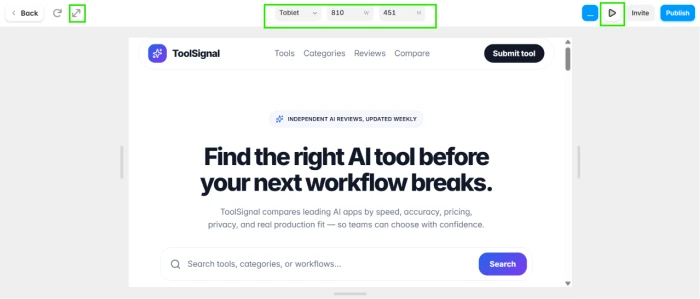
Framer real time preview interface exposing responsive design validation across desktop tablet and mobile screen sizes allowing users to test how the generated website will perform and render on different devices before publishing with instant visual feedback for design adjustments
Real-time preview: responsive validation across screen sizes.
What stood out: Real-time preview enables responsive design validation across desktop, tablet, and mobile screen sizes with instant visual feedback for design adjustments before publishing. Multi-device preview above single-view builder baseline where responsive behavior is guessed rather than tested, meaningful for designers ensuring quality across viewports without leaving the editor. Iterative design workflow where changes propagate immediately to preview reduces round-trips to browser testing that traditional web design workflows require.

Multi-Tool Platform: Canvas + CMS + Localization + Analytics

Test 05 . Platform breadth
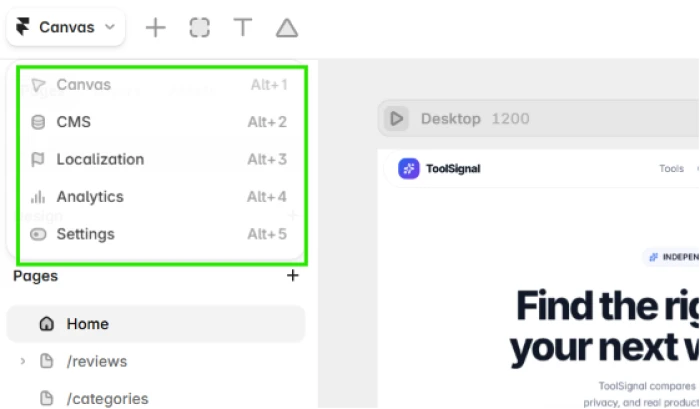
Framer multi tool platform exposing four core capabilities including canvas for design editing CMS for content management with collections localization for multi language support and site analytics for performance tracking all accessible from unified project navigation within single account
Multi-tool platform: Canvas + CMS + Localization + Analytics.
The takeaway: The platform exposes four core capabilities in unified project navigation: Canvas for visual design, CMS for content collections (2 on Basic, 10 on Pro), localization for multi-language sites, and Analytics for performance tracking. Multi-tool breadth above single-purpose builders reduces platform sprawl for teams needing design plus content plus multilingual plus analytics from single subscription. Native localization at platform level above baseline where multilingual sites require separate plugins.

Plugins Ecosystem for Extensibility

Test 06 . Extension capability
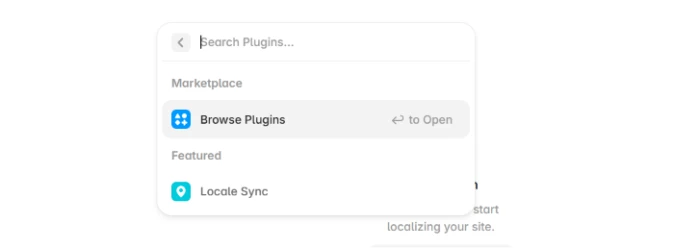
Framer plugins ecosystem exposing third party and native plugins that extend platform functionality beyond core capabilities allowing users to run custom integrations design components and workflow enhancements from within the editor
Plugin ecosystem: extend Framer beyond core capabilities.
Worth noting: Framer exposes a plugin ecosystem allowing users to run third-party and native plugins extending platform functionality beyond core Canvas plus CMS plus localization plus analytics capabilities. Plugin architecture above closed-system builder baseline (Wix, Squarespace with limited integrations), meaningful for designers wanting custom components, developers building workflow enhancements, and teams needing specific integrations not natively supported. Extension model reduces vendor lock-in and provides upgrade path as user needs mature.

Site Settings + Multi-Project Management

Test 07 . Administrative control
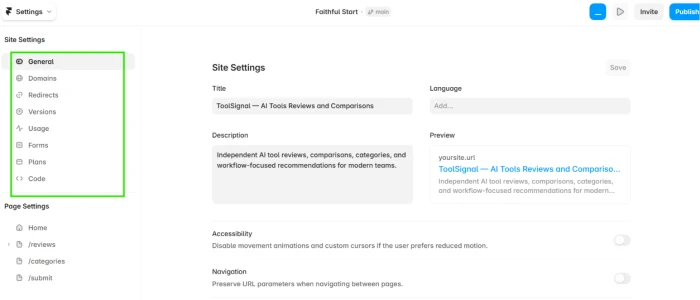
Framer site settings interface exposing administrative controls for domain configuration SEO metadata publishing options page settings and site level configuration accessible from project navigation for post generation customization and publishing preparation
Site settings: administrative + configuration controls.
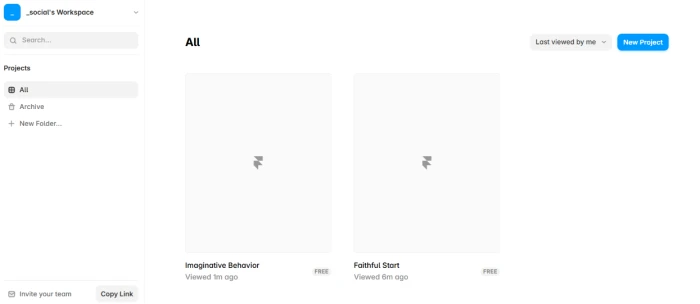
Framer multiple projects management exposing account level workspace where users can create and manage multiple website projects from single account with project cards showing status and access to each project canvas from centralized dashboard
Multi-project workspace: multiple sites from single account.
What this surfaces: Site settings expose administrative controls for domain configuration, SEO metadata, publishing options, and page-level settings accessible from project navigation. Multi-project management enables running multiple websites from single account with project cards showing status and quick access to each project canvas. Administrative depth above builder-focused platforms where settings are minimal, and multi-project support above single-site subscription baseline where each website requires separate account or plan. Meaningful for freelancers billing per project, agencies serving multiple clients, and creators experimenting with multiple concepts.

Tutorials for Learning Framer

Test 08 . Education support
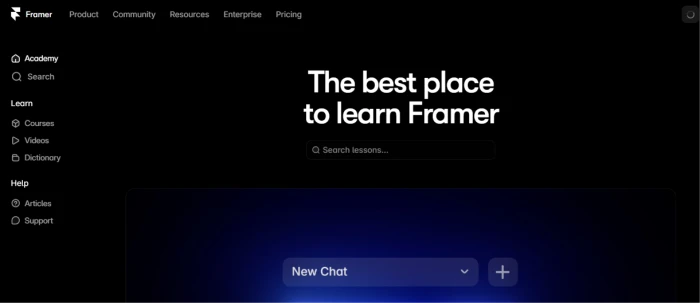
Framer tutorials section exposing structured learning resources covering platform navigation AI agent usage canvas editing CMS setup localization workflow analytics interpretation and advanced techniques for user onboarding and skill development from beginner to advanced designer level
Tutorials: structured learning resources for Framer mastery.
The signal here: Framer provides structured tutorial resources covering platform navigation, AI agent usage, canvas editing, CMS setup, localization workflow, analytics interpretation, and advanced design techniques. Education resources above documentation-only baseline for design tools, meaningful for beginner designers learning the platform, professionals transitioning from Figma or Adobe XD, and teams onboarding new members. Learning investment signals platform maturity and confidence in user retention beyond initial signup, supporting long-term adoption rather than churn after novelty wears off.
AI Multi-Page Generation + Edit-Anywhere Canvas + Multi-Tool Platform + Plugin Ecosystem + Multi-Project Support + Tutorials + Free Tier

Framer's structural value combines validated AI multi-page website generation (4-page AI-tools-review site from single detailed prompt), edit-anywhere canvas where every generated element remains fully customizable, integrated multi-tool platform spanning Canvas plus CMS plus multi-language localization plus analytics, plugin ecosystem for extensibility beyond core features, real-time responsive preview across screen sizes, multi-project management for multiple websites from single account, structured tutorials for learning support, and free tier with 500 credits plus 1 GB bandwidth for evaluation. AI-native design-first positioning is genuinely differentiated against both template-locked builders (Squarespace, basic Wix) and manual design-first builders (Webflow) that lack AI generation.

!
Credit-Based Metering + Free Tier Bandwidth Cap + No Built-In Business Suite + Enterprise Pricing Opaque

Framer uses credit-based metering for AI generation (500 credits Free, 1,000/month Basic, 3,000/month Pro) creating usage anxiety for heavy workflows and requiring plan upgrade when limits hit. Free tier caps bandwidth at 1 GB, restrictive for real traffic. Framer is design-first without built-in business suite (no native e-commerce, marketing automation, or CRM comparable to Wix Business Suite or Shopify), requiring third-party integrations for commerce and lead-management. Enterprise pricing is opaque and requires contact-sales. Category-typical website builder concerns apply for high-volume commerce where dedicated e-commerce platforms may serve better.

How this review was put together. First-hand testing on Framer.com in July 2026 covered homepage and post-login dashboard, AI agent website generation with a detailed prompt for a modern AI tools review site (hero plus featured tools plus categories plus reviews plus comparison cards plus newsletter with blue and purple accents), validation of the 4-page editable output, real-time responsive preview, multi-tool platform (Canvas plus CMS plus localization plus analytics), plugin ecosystem, site settings and multi-project management, and tutorials. Pricing verified from Framer's pricing page for the three visible tiers (Free, Basic, Pro on yearly billing) with Enterprise via top-nav contact-sales route. Evaluated under the Editorial Website Builder Methodology spanning AI generation quality, edit-anywhere freedom, platform breadth, and tier fairness.

10-Point Feature Review

03 . Honest scoring across validated capabilities and friction
Feature Scores at a Glance
AI Multi-Page Generation
8.0
Edit-Anywhere Canvas
7.5
Multi-Tool Platform
7.5
Responsive Preview
7.5
Multi-Project Support
7.5
Free Tier + $10 Basic
7.5
Plugin Ecosystem
7.0
Tutorials + Learning
7.0
Credit-Based Metering
6.5
Free Tier 1 GB Bandwidth
6.0
Feature-by-feature breakdownScored on a 10-point scale based on hands-on validation and honest workflow assessment
01
AI multi-page generation 4 PAGES VALIDATED
Documented in Tests 02 and 03. Detailed AI-tools-review prompt covering hero plus featured tools plus categories plus reviews plus comparison cards plus newsletter with specific design tokens (white background, blue and purple accents, rounded cards) produced 4-page editable website output. Multi-page generation from single detailed prompt above single-page AI website generators and template-selection baseline (Wix, Squarespace default flow). Industry-leading AI website generation capability.
OUTPUT: 4 editable pagesPROMPT: Detailed with design tokens
8.0
GOOD
02
Edit-anywhere canvas FULL DESIGN FREEDOM
Documented in Test 03. Every element in AI-generated output remains fully editable in the canvas rather than being locked template blocks. Edit-anywhere freedom above template-based builders where designs cannot be customized beyond block-level swaps, meaningful for designers wanting AI acceleration without sacrificing customization control.
FREEDOM: Every element editableMODEL: AI + manual customize
7.5
GOOD
03
Multi-tool platform CANVAS + CMS + LOCALIZATION + ANALYTICS
Documented in Test 05. Unified project navigation exposes Canvas for design, CMS for content collections (2 on Basic, 10 on Pro), localization for multi-language sites, and analytics for site performance. Multi-tool breadth above single-purpose builders reduces platform sprawl. Native localization support above baseline where multilingual sites require separate plugins.
TOOLS: 4 integrated capabilitiesLOCALIZATION: Native platform-level
7.5
GOOD
04
Responsive preview MULTI-DEVICE
Documented in Test 04. Real-time preview across desktop, tablet, and mobile screen sizes with instant visual feedback. Multi-device preview above single-view builder baseline where responsive behavior is guessed rather than tested. Reduces round-trips to browser testing during design iteration.
DEVICES: Desktop + tablet + mobileMODEL: Real-time in-editor
7.5
GOOD
05
Multi-project support MULTIPLE SITES
Documented in Test 07. Multi-project management enables running multiple websites from single account with project cards showing status and quick access. Multi-project support above single-site subscription baseline where each website requires separate account or plan. Meaningful for freelancers, agencies, and creators experimenting with multiple concepts.
ACCESS: Multiple sites from single accountUSE CASE: Freelancers + agencies + creators
7.5
GOOD
06
Free tier + $10 Basic ACCESSIBLE ENTRY
Free tier at $0 with 500 credits plus 1 GB bandwidth plus Framer subdomain provides evaluation runway. Basic at $10/month billed yearly unlocks custom domain plus 2 CMS collections plus 50 GB bandwidth, meaningful upgrade path with clear value. Accessible entry pricing above premium builder baseline (Squarespace $16-49/mo). Yearly billing option supports long-term cost predictability.
FREE: 500 credits + 1 GBBASIC: $10/mo + custom domain
7.5
GOOD
07
Plugin ecosystem EXTENSIBILITY
Documented in Test 06. Plugin architecture allowing users to run third-party and native plugins extending platform functionality beyond core capabilities. Plugin support above closed-system builder baseline (Wix, Squarespace with limited integrations), meaningful for designers wanting custom components and developers building workflow enhancements. Reduces vendor lock-in.
MODEL: Third-party + native pluginsVALUE: Extensibility beyond core
7.0
GOOD
08
Tutorials + learning EDUCATION DEPTH
Documented in Test 08. Structured tutorial resources covering platform navigation, AI agent usage, canvas editing, CMS setup, localization workflow, and advanced design techniques. Education resources above documentation-only baseline. Meaningful for beginners learning the platform, professionals transitioning from Figma or Adobe XD, and teams onboarding new members.
SCOPE: Beginner to advancedCOVERAGE: Platform + features + techniques
7.0
GOOD
09
Credit-based metering USAGE ANXIETY
Cross-reference tc-blocker callout. Credit-based metering (500 Free, 1,000/month Basic, 3,000/month Pro) creates usage anxiety for heavy AI generation workflows and requires plan upgrade or credit top-ups when limits hit. Metered model above flat-fee subscription baseline (Wix, Squarespace) creates uncertainty for users who cannot predict AI generation cadence.
FREE: 500 credits totalPAID: 1K-3K credits/month
6.5
FAIR
10
Free tier bandwidth cap 1 GB LIMIT
Free tier caps bandwidth at 1 GB per month which is restrictive for any real traffic beyond personal evaluation. 50 GB unlocks at Basic ($10/mo) and 100 GB at Pro ($30/mo) providing scale for real websites. Prospective users planning production sites should budget for Basic or Pro from launch rather than expecting Free tier to serve production workloads.
FREE: 1 GB/month bandwidthUPGRADE: 50 GB Basic or 100 GB Pro
6.0
FAIR

Pros and Cons

04 . What works and what to weigh
+What users like
  • AI multi-page generation validated: 4-page AI-tools-review site from single detailed prompt including hero + tools + categories + reviews + comparison + newsletter
  • Every element editable after generation: canvas freedom above template-locked builders where designs cannot be customized beyond block swaps
  • Multi-tool platform in one subscription: Canvas + CMS + localization + analytics unified in project navigation
  • Native multi-language localization: platform-level support above baseline where multilingual sites need separate plugins
  • Real-time responsive preview: desktop + tablet + mobile validation with instant visual feedback in-editor
  • Plugin ecosystem for extensibility: third-party and native plugins extending beyond core capabilities
  • Multi-project workspace: multiple websites from single account, meaningful for freelancers and agencies
  • Free tier evaluation runway: 500 credits + 1 GB bandwidth + Framer subdomain enables platform testing
  • Basic at $10/month unlocks custom domain: accessible entry pricing above premium builder alternatives
  • Structured tutorials: covering platform navigation, AI agent usage, canvas editing, CMS setup, localization
What users dislike
  • Credit-based metering creates usage anxiety: 500 Free, 1,000/mo Basic, 3,000/mo Pro require plan upgrade or top-ups when limits hit
  • Free tier bandwidth capped at 1 GB: restrictive for any real traffic beyond personal evaluation
  • No built-in business suite: design-first positioning without native e-commerce, marketing automation, or CRM (Wix Business Suite alternative)
  • Enterprise pricing opaque: not shown on public pricing page, requires contact-sales negotiation for enterprise tier access
  • CMS collections capped by tier: 2 on Basic, 10 on Pro, may require Pro or Enterprise for content-heavy workflows
  • Category-typical concerns: high-volume commerce workflows may be better served by dedicated e-commerce platforms like Shopify

Pricing Breakdown

05 . Three-tier structure verified from official pricing page (yearly billing shown)
Feature Free$0/month Basic$10/month yearlyCreative Sites Pro$30/month yearly
Positioning Try for free Growing professional sites
AI Credits 500 credits to try 3,000 credits/month
Bandwidth 1 GB/month 100 GB/month
Domain Framer subdomain Free custom domain
CMS Collections 10 collections
Design Pages Available Available
Site Redirects Site redirects
Best For Platform evaluation + personal test sites Growing professional sites + agencies + business websites

The pricing reality: Framer offers three visible tiers verified from the official pricing page on yearly billing. Free ($0) provides 500 credits, 1 GB bandwidth, and Framer subdomain for evaluation. Basic ($10/month billed yearly) unlocks 1,000 credits monthly, free custom domain, 2 CMS collections, and 50 GB bandwidth for creative personal sites. Pro ($30/month billed yearly) provides 3,000 credits monthly, 100 GB bandwidth, 10 CMS collections, and site redirects for growing professional sites. Enterprise plans are available via top-navigation contact-sales. Credit dropdowns on Basic and Pro cards indicate customizable allocation above base tier amounts. Verify current pricing on the Framer pricing page.
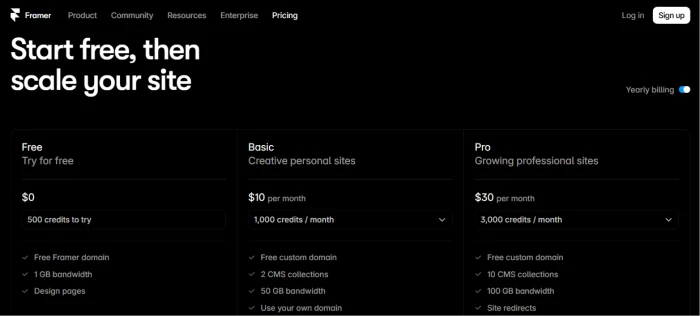
Framer.com pricing page exposing three visible tier structure with Free at zero dollars for evaluation Basic at 10 dollars per month billed yearly for creative personal sites and Pro at 30 dollars per month billed yearly for growing professional sites plus yearly billing toggle enabled and Enterprise section accessible via top navigation
Framer.com pricing page: Free + Basic + Pro tiers on yearly billing.

Pricing verified from Framer pricing page on July 16, 2026 (yearly billing shown). Verify current pricing on the Framer pricing page.

Framer.com vs the Top 4 Alternatives

06 . How it compares in AI-native and design-first website builder category
FFramer SSquarespace WWix.com SShopify WWebflow
Score7.68.07.87.87.5
AI Website GenerationMulti-page validated (4 pages) Template-based AI AI + hybrid editingLimited AIManual design-first
Edit-Anywhere CanvasFull design freedomTemplate blocks Hybrid manual + AITheme-basedFull design freedom
Multi-Tool PlatformCanvas + CMS + Localization + Analytics Design + CMS + commerceDesign + Business SuiteCommerce + marketing Design + CMS
Native LocalizationPlatform-levelExtensions Multi-language Markets Localization
Plugin EcosystemThird-party + native plugins Closed system Wix App MarketShopify App Store Marketplace
Business Suite Design-first only Commerce + marketingFull business suiteCommerce-nativeBasic e-commerce
Free Tier500 credits + 1 GB Trial only Free plan3-day trial Free starter
Entry Paid Price$10/mo yearly Basic$16/mo Personal$17/mo Light$29/mo Basic$14/mo Basic
Best ForAI-native design freedom + freelancers + designersPremium design templates + established platformAll-in-one + business ecosystem + hybrid AIE-commerce first + commerce-native workflowDesigner-focused + manual design freedom

The picture: Framer leads on AI multi-page generation (4-page validated output) plus edit-anywhere canvas freedom plus native localization. Squarespace leads on premium templates and platform maturity. Wix leads on all-in-one positioning with business suite and hybrid AI. Shopify leads on e-commerce-native workflow at $29 Basic. Webflow leads on manual design freedom for designers preferring code-adjacent workflow. Framer differentiates through AI-native positioning with plugin ecosystem plus multi-project support plus lower entry pricing ($10 Basic vs $16-29 alternatives), meaningful for freelancers, designers, and agencies wanting AI acceleration without sacrificing design control. Skip Framer if built-in business suite is priority where Wix or Shopify serve better.

What Users Are Saying

07 . Community feedback patterns from user communities
Been using Framer for client work over the past year and the AI multi-page generation is the real differentiator. Fed it a detailed brief for a SaaS review site with hero and comparison cards and newsletter signup and it generated a 4-page structure that was genuinely usable as starting point rather than needing complete rebuild. The best part is every element remains editable after generation, so you get AI acceleration without template lock-in that plagues Wix and Squarespace. Canvas plus CMS plus localization plus analytics from single subscription reduces the plugin sprawl I used to deal with on WordPress. Credit-based metering is the only real friction, Basic at 1,000/month runs thin for heavy AI iteration on multiple client projects.
r/webdesign user
Agency workflow assessment
★★★★☆
r/webdesign
Framer AI generation is impressive but 1 GB free bandwidth is a joke. Basic $10 unlocks real usage.
Trustpilot reviewer
Free tier limitation focus
★★★★☆
trustpilot.com
Framer versus Webflow comparison is worth thinking through carefully. Framer AI generation is genuinely faster for initial site scaffold, but Webflow has deeper CMS depth for content-heavy sites and stronger designer community. For freelancers doing marketing sites and portfolios, Framer wins on speed to first draft. For content-heavy publications or complex commerce, Webflow or dedicated platforms like Shopify serve better. Plugin ecosystem on Framer is growing but not yet at Wix App Market or Shopify App Store scale. Multi-project management is meaningful for agencies but Business tier pricing is opaque which creates uncertainty for scale planning. Pro at $30/month yearly is fair for growing sites.
Product Hunt reviewer
Comparative platform assessment
★★★★☆
producthunt.com
Framer tutorials for AI agent usage are useful. Responsive preview across devices works well. Localization at platform level is unusual for builders in this price range.
r/nocode user
Platform depth review
★★★★☆
r/nocode
· The Verdict ·
7.6/10
Should you use Framer.com? Here is who it is for.

Use Framer.com if AI multi-page website generation with detailed prompt-driven output fits workflow; edit-anywhere canvas freedom is priority (every element editable after generation, no template lock-in); multi-tool platform combining Canvas plus CMS plus localization plus analytics reduces plugin sprawl; native multi-language localization matches multilingual site needs; plugin ecosystem supports custom components; multi-project management fits freelance or agency workflow; free tier with 500 credits provides evaluation runway before Basic at $10/month unlocks custom domain plus 50 GB bandwidth; and design-first positioning aligns with creative professional or product marketing use case.

Skip Framer.com if built-in business suite is priority (Wix or Shopify serve commerce and marketing better); credit-based metering creates workflow anxiety and flat-fee subscription is preferred; template-based rapid launch is preferred workflow; enterprise pricing transparency is required upfront (Framer requires contact-sales); content-heavy publications or complex commerce need deeper CMS or e-commerce (Webflow or Shopify); or free tier 1 GB bandwidth cap creates friction before validating paid scope.

Category RankPreferred Pick
Compared To4 Rivals
Entry Price$10/mo Basic
Free Tier500 Credits

Discussion

Join the discussion and share your perspective.