Freepik AI now opens as Magnific, the same engine under a new badge since the April 2026 rebrand. On the free plan our product-shot prompt came back looking like a real campaign frame, with a brushed-steel bottle, believable condensation on the surface, background depth, and short label text that stayed sharp. The catch showed up fast: fine print on a serum label dissolved into invented characters, a banking-app mockup broke down on close reading, output stayed capped at 1K, video sat behind a paywall, and no credit counter ever told us how much we had left.
Daily image cap unpublished, no commercial license
Entry Plan
$14.50 per month, billed annually (Premium)
Video
Paid plans only credits per clip
Rebrand
Freepik is now Magnific since April 2026
What Freepik AI Is Now
01 . Overview
Freepik spent a decade as a stock-asset library. On April 28, 2026 it rebranded its whole AI platform as Magnific, the upscaler brand it had acquired in 2024, and folded image, video, audio, and 3D generation into a single workspace at magnific.com.
That history explains a small surprise at the start of this test. I opened Freepik's Free AI Image Generator, typed a prompt, and the generate click dropped me straight into the Magnific interface with my text carried over. Same engine, new badge. The platform now routes one prompt box to more than 30 models from Google, OpenAI, ByteDance, xAI, Alibaba, and others, wrapped around the original 250-million-asset stock library and the Magnific enhancement tools. The audience it courts runs from solo creators making social graphics to marketing teams producing product and campaign imagery at volume.
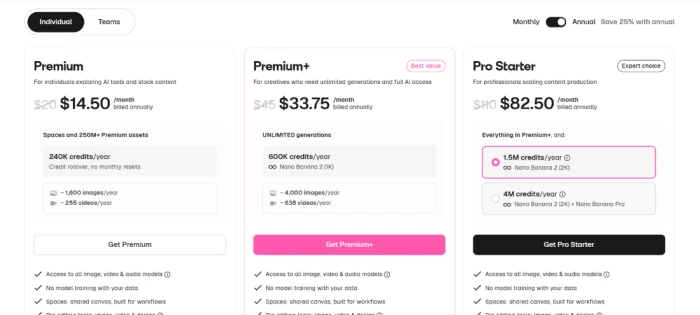
It runs on a freemium model. A free plan sits below the paid tiers, which on the individual view begin at Premium for $14.50 a month, then Premium+ at $33.75 and Pro Starter at $82.50, each billed annually. This review is about the free plan: what it lets you make, and where it stops you.
What Happened When We Tested It
02 . 7 tests, from a product shot to a gated video prompt
I ran Freepik on its free plan in a desktop browser over one session, pushing it through a product shot, a packaged label, a mobile app interface, and a video prompt. The results split hard. The image work ranged from campaign-ready to broken depending on what I asked, and the free plan kept its own limits hidden until it stopped me.
The tool I opened was not the tool that answered
Test 01 . Freepik, now Magnific
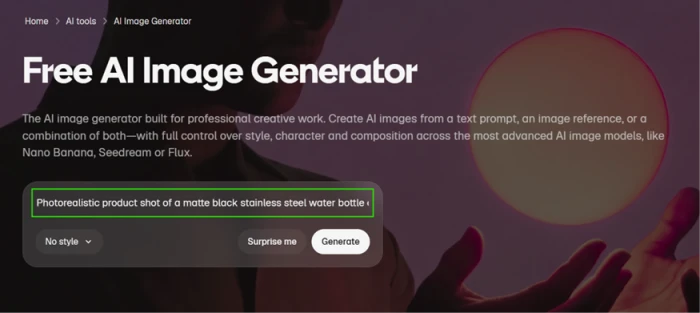
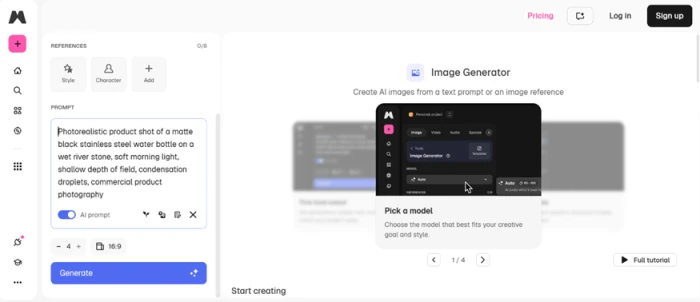
Starting point: Freepik's Free AI Image Generator with the product prompt entered.The same session opens inside the Magnific interface, confirming the rebrand.
What happened: I started on Freepik's Free AI Image Generator page and entered my first prompt. The generate click did not keep me on Freepik. It opened the Magnific workspace with the same prompt already loaded. Nothing broke, but it is worth knowing before you start: the Freepik AI you searched for and the Magnific app you end up in are the same product since the April 2026 rebrand. Accounts, credits, projects, and saved history carry across, and the contributor marketplace where people sell stock kept the Freepik name.
A product shot that could pass for a real campaign
Test 02 . Product photography
★ Prompt Used
"matte black stainless steel water bottle on a wet river stone, soft morning light, condensation on the surface"
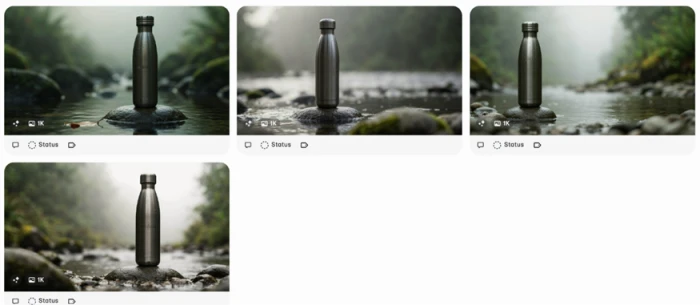
Four free-tier variations at 1K, all usable straight out of the generator.The hero result: clean lighting and realistic texture, with the short label text rendered correctly.
The strongest result of the day: Running on Auto, the free plan returned four variations at 1K. The best of the four beat my expectation. The metal read as brushed steel and the condensation droplets sat believably on the surface. The fog and moss behind the bottle carried enough depth to pass as a real product concept. The detail that stood out most: the bottle wore the word AURORA and the figure 750 ml cleanly, with no warping. Short text on an open surface is something the model handled without a fight, which set up the sharper failure later.
The model menu is where the platform earns its keep
Test 03 . Model selection
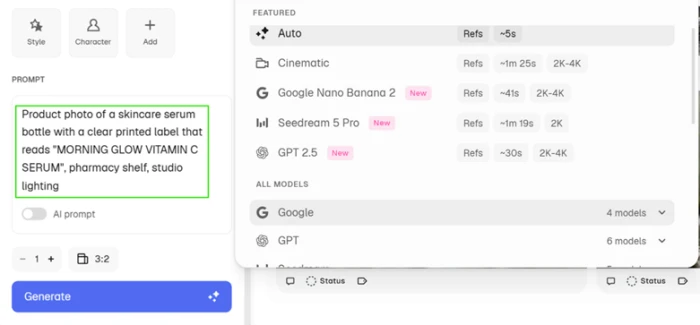
The model menu. Resolution ceilings climb to 2K and 4K, which matters for the free plan.
The real draw: From one prompt box I could switch between Auto, Cinematic, Google Nano Banana 2, Seedream 5 Pro, GPT 2.5, and several more, each tagged with an approximate render time and a resolution ceiling. Not having to leave the tool to try a different visual direction is a real convenience, and it is the feature that separates this from a single-model generator. The same menu quietly exposes the free ceiling, though. Most of the stronger models list 2K to 4K output, yet every free generation I ran capped at 1K. The choice of models is wide; the quality tiers behind them are where the paywall sits.
Where it breaks: small, dense label copy
Test 04 . Fine print and packaging text
★ Prompt Used
"skincare serum bottle with a printed label reading MORNING GLOW VITAMIN C SERUM"
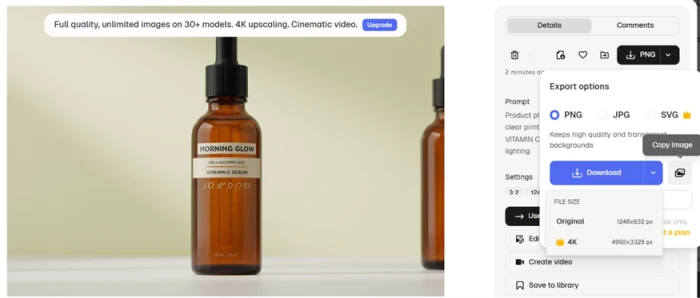
The headline reads correctly; the small print below it is garbled, and the 4K export sits behind an upgrade.
The honest version of the text criticism: The headline text came through fine. The problem sat in the fine print underneath, which dissolved into invented characters that only look like typography from a distance. Zoom in and it is nonsense. This is the narrow, accurate finding: the tool does not fail at all text. It fails at the small, dense print a real product mockup needs, even as the clean AURORA bottle earlier proves the flip side. The same screenshot doubles as paywall evidence. The export panel offered my image at its original 1248 by 832 pixels, while the 4K option at 4992 by 3328 sat locked behind a crown icon and an upgrade banner promising unlimited images across more than 30 models.
An interface that falls apart under inspection
Test 05 . App UI generation
★ Prompt Used
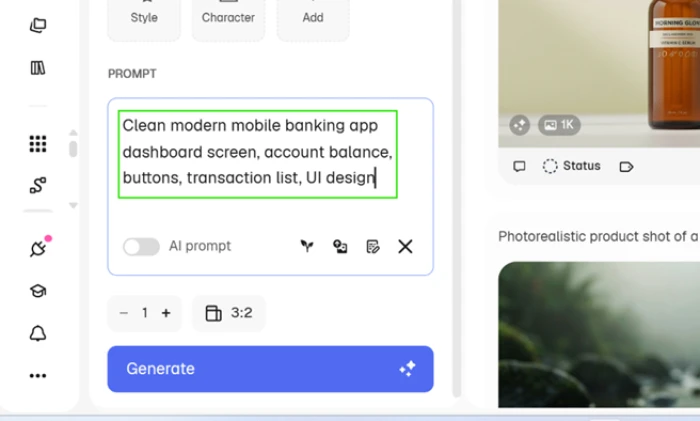
"clean modern mobile banking dashboard with a balance, action buttons, and a transaction list"
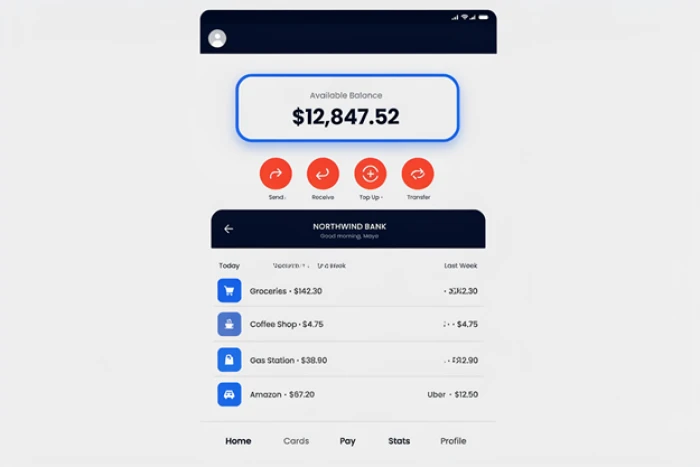
The UI prompt as entered.Structure looks right, but the transaction data and column headers break down on close reading.
Structure right, content wrong: At a glance the result looks plausible. The balance card, the four action buttons, the transaction list, and the bottom navigation all sit where a designer would place them. Then you read the details. The transaction column headers degrade into fragments like a mangled Last Week, the right-hand amounts corrupt into strings such as $3H2.30 and F512.90, and a stray Uber entry lands in a row it does not belong to. The layout instinct is there; the content layer collapses. For a mockup you plan to put in front of a client, that is the difference between a starting point and a redo.
The free plan hides its own limits
Test 06 . Usage transparency
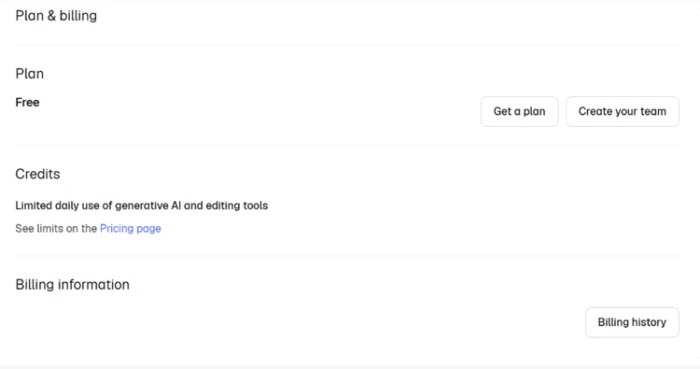
The free plan lists no credit figure, only a pointer to the Pricing page.
No counter anywhere: I went looking for a credit counter through the whole generation flow and never found one. The Plan and billing page confirms the gap: under Credits it states only that the free plan includes limited daily use of generative AI and editing tools, then points to the Pricing page for the actual numbers. The Pricing page does not spell out the free tier's daily allowance either, so the loop never closes. You generate without knowing how much you have left until the tool stops you and surfaces an upgrade. Independent trackers peg the free cap near 20 images a day, but Magnific does not publish the figure, and that opacity is a fair knock on the free experience by itself.
Video is paid, full stop
Test 07 . Video on the free plan
★ Prompt Used
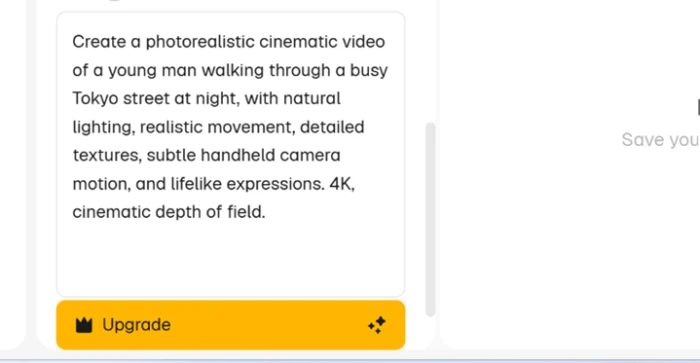
"photorealistic cinematic clip of a young man walking through a busy Tokyo street at night"
Video generation is gated. The prompt is accepted, but output requires a paid plan.
A locked door with a preview window: The last thing I tried was video. I wrote a prompt for a cinematic night-street clip and the generate button was replaced by a yellow Upgrade button before a single frame rendered. The prompt is accepted; the output is not. For anyone weighing the free plan for video, that is the whole answer. Image generation gives you real room to work. Video is gated entirely, and paid clips consume credits on top of the subscription once you are past the wall.
★
Product photography and model choice are the real value
The two things I would point a new user to are the product-shot quality and the model menu. The bottle prompt returned a frame that could anchor a real campaign, with correct short-label text and believable material and light. Behind it sits a single prompt box that reaches more than 30 models, so you can chase a different look without leaving the tool. For clean product and lifestyle imagery, this is a strong free-plan generator.
!
The free plan behaves like a guarded demo
Four limits stack up against the free experience. Output caps at 1K while the model list advertises 2K and 4K. Fine label text and app interfaces break down on close reading. Video is locked behind a paid plan. And no credit counter shows how much daily allowance is left until you hit the wall. Judge Magnific on a paid tier if you need higher resolution, unlocked video, dense-text accuracy, or a visible credit budget.
How this review was put together. I tested Freepik, now Magnific, on a fresh free account in September 2026, running prompts for a product shot, a packaged label, a mobile app interface, and a video clip in a desktop browser, and capturing each screen as it surfaced from results to export panels to upgrade prompts. Plan names and prices were read from magnific.com and cross-checked against the current pricing view, not lifted from a third-party roundup. The behavior described here reflects that single session on the free plan.
10-Point Feature Review
03 . Scored on what it did, not what it claims
Feature Scores at a Glance
Product photography realism
8.5
Multi-model access from one box
8.0
Short-label text rendering
7.5
Interface and creative workflow
7.0
Export options and formats
6.0
Video generation on the platform
5.5
Free-tier resolution ceiling
5.0
Free-tier usage transparency
4.5
Fine-print and dense label text
4.5
Interface and UI mockups
4.0
01
Product photography realism Standout
The matte-black bottle prompt returned the best output of the session: brushed-steel texture and condensation that sat believably on the surface, with background fog carrying real depth. It reads as a campaign frame rather than an AI test. It lands at 8.5 rather than higher only because the free plan capped it at 1K, so the polish you see is not the resolution a print job would need.
Best use: Product and lifestyleFree-plan resolution: 1K
8.5
Excellent
02
Multi-model access from one box Strong
One prompt box reaches Auto, Cinematic, Nano Banana 2, Seedream 5 Pro, GPT and more, each tagged with a render time and a resolution ceiling. Switching visual directions without leaving the tool is the platform's clearest advantage over a single-model generator. It scores 8.0 because the free plan can only sample the weaker end of that roster and holds every output at 1K.
Models available: 30+Free ceiling: 1K
8.0
Strong
03
Short-label text rendering Solid
The bottle carried AURORA and 750 ml cleanly, and the serum headline MORNING GLOW came through without a slip. Short, punchy text on an open surface is reliable here. It holds at 7.5 because that reliability ends the moment the copy gets small or dense, which the next test exposed.
Headline text: CleanWarping seen: None on short copy
7.5
Strong
04
Interface and creative workflow Easy
The single prompt box, the model dropdown with its render-time and resolution tags, and the session that carried straight from Freepik into Magnific make the tool easy to move through. It scores 7.0 because the same flow hides the usage information a paying-minded user wants up front, so ease of use and transparency pull in opposite directions.
Prompt box: One, multi-modelOnboarding: Session carries over
7.0
Solid
05
Export options and formats Fair
The export panel offered the native file at 1248 by 832 and a 4K option at 4992 by 3328. That is a useful spread, but on the free plan the 4K export sits behind a crown icon and an upgrade banner. It scores 6.0 because the ceiling you can actually reach without paying is the smaller of the two.
Free export: 1248 x 8324K (4992 x 3328): Paid
6.0
Fair
06
Video generation on the platform Mixed
Video is a real part of the platform, with a prompt box that accepts a full brief. On the free plan it renders nothing: the generate button becomes an Upgrade button before a frame appears. It scores 5.5 because the capability exists and works on paid tiers, while the free experience is a preview with no output and paid clips still draw down credits.
Free-plan output: NonePaid clips: Consume credits
5.5
Mixed
07
Free-tier resolution ceiling Capped
Every free generation capped at 1K even when the chosen model advertised 2K or 4K. For social and web use that is workable; for print or large-format it is not. It scores 5.0 because the gap between the advertised ceiling and the free ceiling is wide and is not signposted before you spend a generation on it.
Advertised: up to 4KFree actual: 1K
5.0
Weak
08
Free-tier usage transparency Opaque
There is no credit counter in the generation flow, and the Plan and billing page lists only limited daily use without a number. The Pricing page does not close the gap either. It scores 4.5 because you cannot see how much you have left until the tool stops you, which is poor form on a metered free plan.
Credit counter: None shownDaily cap: Unpublished
4.5
Weak
09
Fine-print and dense label text Garbled
The serum label's small print dissolved into invented characters that only resemble type from a distance. Dense, informational copy is exactly what a product mockup needs, and it is where the model fails. It scores 4.5 because the failure is consistent on small text even as short headlines stay clean, so the two cannot be separated in one generation.
Fine print: GarbledFix needed: Add text manually
4.5
Weak
10
Interface and UI mockups Broken
The banking-dashboard mockup placed its cards and buttons correctly, then fell apart in the details: mangled column headers, corrupted amounts like $3H2.30, and a transaction landing in the wrong row. It scores 4.0 because the layout instinct cannot rescue a content layer this broken for anything past a rough wireframe.
Layout: PlausibleContent and data: Corrupted
4.0
Weak
Living With Freepik AI
04 . What you feel using it day to day
+What Works
Campaign-grade product shots: the bottle prompt returned brushed steel and believable condensation, with background depth that reads as real.
Thirty-plus models in one box: switch visual directions without leaving the tool or stacking separate subscriptions.
Reliable short text: headline and short-label copy like AURORA and 750 ml came out clean and unwarped.
Low-friction workflow: one prompt box, a tagged model menu, render-time labels, and a session that carries straight over from Freepik.
Built-in enhancement: the Magnific upscaler heritage means refine and detail tools sit beside the generator.
−What Grates
Garbled fine print: small, dense label copy dissolved into invented characters unusable for real packaging.
Broken UI mockups: an app dashboard kept its layout but corrupted the text and numbers inside it.
Invisible limits: no credit counter anywhere, and the free daily cap is never published.
Capped resolution: free output stays at 1K while the model list advertises far higher.
Video walled off: the free plan accepts a video prompt, then blocks the render entirely.
Pricing Breakdown
05 . Free through Pro Starter, and where the credits bite
What you're actually paying: The figures above are the annual-billing rate on the individual view, which Freepik discounts against paying month to month, so choosing monthly raises each price. What a plan buys is credits. They are spent per generation, and the per-image cost swings with the model and resolution you pick, so a heavier model like Nano Banana 2 at high resolution drains a balance far faster than a light one. Premium adds a 240,000-credit yearly pool that rolls over with no monthly reset. Premium+, the Best Value tier, opens unlimited generations plus a set of premium models that run without touching credits. Pro Starter stacks a larger credit pool on top for production teams. The free plan is the one to watch: a daily cap the company does not publish, output held at 1K, video blocked, and no counter to show what is left.
Freepik's individual plans on the annual billing view: Premium, Premium+, and Pro Starter.
Pricing checked against Freepik's official pricing page at magnific.com on September 17, 2026. Plans and credit limits shift often, so confirm the current numbers on the official pricing page before you subscribe.
Freepik AI vs the Top 4 Alternatives
06 . Where it wins and where a rival fits better
FFreepik / Magnific
IIdeogram
RRecraft
LLeonardo AI
DDeepAI
FirmCritics Score
6.6
7.1
7.2
6.8
7.0
Models in one box
30+
Few
Multiple
Multiple
One
Product-photo realism
Strong
Good
Good
Good
Basic
In-image text
Headline only
Best in class
Strong
Fair
Weak
Free tier
Daily cap, opaque
Yes, queue
Yes, public
Yes, credits
Yes
Video generation
Paid only
No
Paid, Pro
Yes, Motion
Limited
Best For
Product shots and model breadth
Text-heavy posters
Editable vector and brand
All-round creative suite
Quick free basics
Where to land: If the deliverable is a clean product or lifestyle image and you want several model looks to pick from, Freepik/Magnific is the strongest free-plan option here, as long as you can live with a 1K ceiling. Reach for Ideogram (7.1 in our testing) when the words inside the image are the whole job, since its typography still leads the field. Choose Recraft (7.2) when you need an editable vector logo or icon rather than a flat picture. Leonardo AI (6.8) suits an all-round creative suite with its own motion tools, and DeepAI (7.0) is the bare-bones free pick for a quick image and nothing more. Anyone chasing polished product imagery across multiple models should trial Freepik first.
What Users Are Saying
07 . Real users on the parts we could not test
Sentiment splits by platform. On G2 the platform sits around 4.5 to 4.7 stars, with users praising the model breadth and the speed of having everything in one place. Trustpilot tells a rougher story, near 3.5 across several thousand reviews, where the complaints cluster around billing disputes, refused refunds, sudden credit burn, and slow support. Read both before you commit a card.
Is Freepik AI, now Magnific, worth it on the free plan?
Use the free plan if you want clean product or lifestyle images and the freedom to try several models from one prompt box. In testing it produced a bottle shot that could anchor a real campaign, with correct short-label text and convincing material, which makes it a strong free generator for that kind of work.
Look elsewhere if you need dense label copy, working app interfaces, 4K output, or free video, since small text garbled, a UI mockup broke down, resolution held at 1K, and video sat behind a paywall. If typography inside the image is the whole job, Ideogram (7.1 in our testing) is the sharper pick.



Discussion
Join the discussion and share your perspective.