Genspark AI Workspace 6.0 is an "everything" launcher, a single prompt box above a tray of apps, and AI Slides is the deck generator inside it. I gave it one vague sentence and watched it research real sources, then produce a fourteen-slide deck with actual art direction. The one scar on the run is a hard sign-in wall that blocks every pixel of output until you create an account.
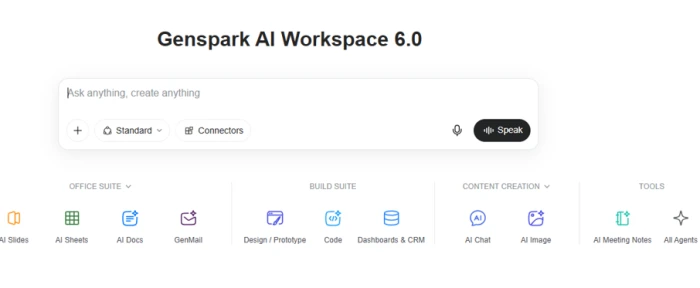
Genspark does not present itself as a slide tool. The home screen is one "Ask anything, create anything" box sitting over a tray of apps grouped into an Office Suite, a Build Suite, content tools and agents. AI Slides is the deck generator tucked inside that launcher, closer in spirit to a ChatGPT-style front door than to a dedicated builder like Gamma.
That framing is the whole proposition and its one tension. You get breadth, slides sitting next to sheets, docs, dashboards and chat under a single login and a single credit balance, and a deck generator that runs a research pass before it designs. What the home screen never argues is why its slides specifically should beat a purpose-built rival. This review answers that by handing AI Slides the kind of lazy brief a real user types and following the result through to the editor.
What Happened When We Tested It
02 . 5 moments, from the home screen to the finished deck
I treated this the way a first-time user would: land on the workspace, type one broad request, and see how far the tool carries it with no hand-holding. The brief was deliberately thin, "can you create a presentation on the latest digital marketing trends," because that is exactly the vague ask these tools have to survive. Each step below carries its own verdict out of five, weighted toward first-run experience and the quality of what lands on screen.
The landing workspace
Test 01 . First impression · 4/5
One prompt box over a tray of named apps.
First impression: A newcomer knows what to do in two seconds: type, or pick an app. Pushing a Speak button and Connectors this early shows real ambition. The cost of the do-everything layout is that nothing here argues why its decks beat a focused rival, it sells breadth over a point of view.
The prompt
Test 02 . The ask · 4/5
★ Prompt Used
"can you create a presentation on the latest digital marketing trends"
The request, with mode and connector controls still in reach.
The ask: No audience, no slide count, no tone. The box takes it without forcing a wizard, and keeps the mode and data-source controls visible at the moment of asking, which is the right call. What is missing is any nudge toward a sharper brief, so every assumption about which trends and how many slides rides entirely on the model.
The sign-in wall
Test 03 . Friction point · 2/5
A mandatory sign-in modal, before any output appears.
The friction point: The instant I submitted, a hard authentication wall dropped. No slide, no preview, nothing until you hand over an account. The business logic is obvious, generation is expensive and this captures a signup at peak intent, but it stops a curious user at the exact moment they were promised a payoff. The dialog is clean; the placement is the problem.
Research and generation
Test 04 . Under the hood · 5/5
The agent names its sources before it draws anything.
Under the hood: Before a single slide, it reported pulling from HubSpot, Deloitte, Kantar, eMarketer and Gartner, then previewed the scope in plain English, a free outline review you can redirect early. One honest limit sits here and nowhere else in this review: naming sources is not citing them. There are no figure-level references, so every number is yours to verify before it faces a client.
The generated deck and editor
Test 05 . The payoff · 5/5
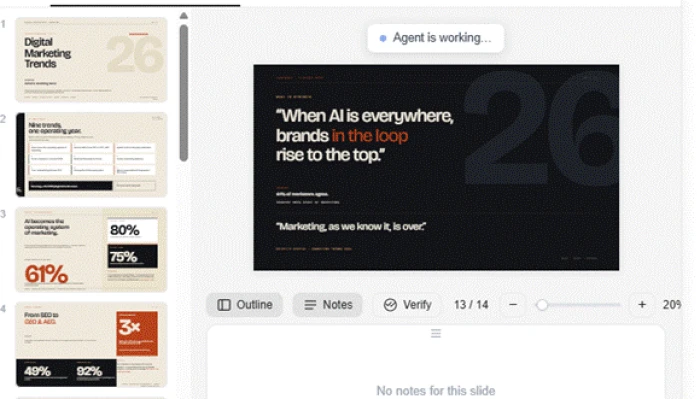
Fourteen slides, a dark editorial look, and an Outline/Notes/Verify editor.
The payoff: Fourteen slides with a genuine art direction, a dark title treatment, a giant "26" motif, pull-quotes and stat-led data slides built on big legible figures. The editor is a real surface: a thumbnail rail, an Outline view, speaker Notes, zoom, and a Verify button that squarely acknowledges the checking burden. An "Agent is working" pill was still visible, so this was a strong draft mid-build, not a signed-off deliverable.
★
It researches before it designs, and the design lands
The two best moments reinforce each other. Announcing recognised sources up front is what separates a useful tool from a confident bluffer, and the deck that follows looks designed rather than templated. For an internal deck or the first version of a pitch, the raw output is strong enough to build on, and it lands in minutes.
!
Gating all output behind sign-up is the weakest link
Capturing the signup at that moment is commercially smart, but "prove it first, then ask me to sign up" would convert at least as well with far less resentment. A one-slide teaser or a watermarked preview, the pattern Gamma uses, would soften this enormously. As it stands, 100% of the value is locked until you commit, and that is the single thing most likely to lose a curious newcomer.
How this review was put together. I ran one live session of Genspark AI Slides on 9 October 2026, landing on the workspace as a new user, submitting a single open-ended prompt, and following the flow through the sign-in gate, the research step and into the editor. Scores weight first-run experience and output quality most heavily, since those decide whether someone keeps the tool. Plan prices were taken from Genspark's official help-center membership page, and the long-term reliability notes come from published user reviews, flagged as such.
10-Point Feature Review
03 . Scored on the run, weighted toward output and first-run
Feature Scores at a Glance
Deck design quality
9.0
Speed to first draft
9.0
Research transparency
8.5
Editor control
8.0
Prompt input experience
7.5
Onboarding clarity
7.0
Fact-check guardrails
6.0
Pricing and credits value
5.5
Named sources vs citations
5.0
First-run friction
3.0
Feature-by-feature breakdownScored 3.0 to 9.0, weighted toward output and first-run
01
Deck design quality Standout
The fourteen slides arrived art-directed, with a dark editorial treatment, a recurring numeric motif and stat-led data layouts rather than bullet dumps. It earns 9.0 instead of a perfect mark only because a mid-generation pill was still showing and some speaker-note slots came up empty, so it is a strong draft, not a finished file.
Slides: 14Look: designed, not templated
9.0
Standout
02
Speed to first draft Standout
One plain sentence in, a full deck minutes later. For the idea-to-draft leap that is the entire reason to use a generator, it is hard to beat. It holds at 9.0 rather than higher because the clock does not include the human editing pass the output still needs before anyone sees it.
Input: one sentenceOutput: minutes
9.0
Standout
03
Research transparency Strong
Reporting that it drew on HubSpot, Deloitte, Kantar, eMarketer and Gartner, then previewing the scope, is a trust move most generators skip. It scores 8.5 because the move is real and the topic picks were current, held just below the top by the citation gap scored separately below.
Sources named: 5Scope preview: yes
8.5
Strong
04
Editor control Strong
Past the generation, the canvas is a real workspace: thumbnail rail, Outline, Notes, zoom and a position indicator. It lands at 8.0 because the Verify button, while exactly the right instinct, is unproven, I could see it exists but not how deep its checking actually goes.
Views: Outline, NotesVerify: present, untested
8.0
Strong
05
Prompt input experience
The box takes natural language and keeps mode and connector controls in reach, with no rigid wizard. It sits at 7.5 because it offers no optional chips for audience, length or tone and no read-back of how it parsed the request, so a weak brief goes straight through unexamined.
Input: natural languageGuardrails: none
7.5
Capable
06
Onboarding clarity
The home screen is legible in seconds and the app tray is well grouped, so intent is never the problem. It drops to 7.0 because the breadth-first design leaves a newcomer unsure which of a dozen apps to trust for a serious deck, clarity of layout, less clarity of purpose.
Time to orient: secondsApp groups: 4
7.0
Mixed
07
Fact-check guardrails
The built-in verify step and the upfront sourcing show the product takes accuracy seriously, which many rivals do not. It scores 6.0 because those are gestures toward checking rather than proof of it, and the burden of confirming each figure still lands on the user.
Signal: in-editor checkProof: not yet
6.0
Mixed
08
Pricing and credits value Weak
Plus at $24.99 a month is reasonable, but reviewers report credits draining fast on heavy jobs and a recent swap of unlimited chat for a weekly cap. It rates 5.5 because the jump to Pro at $249.99 is a tenfold leap with little in between, so middling-heavy users are stranded.
Plus: $24.99/moPro: $249.99/mo
5.5
Weak
09
Named sources vs citations Weak
On-screen authority says "from Gartner," but there are no inline references or a bibliography tying a figure to a report page. It scores 5.0 because the plausible-looking numbers are exactly the ones a busy user would ship unchecked, and the deck does nothing to stop them.
Sources shown: namedReferences: none
5.0
Weak
10
First-run friction Weak
Blocking every slide behind a sign-up, with no teaser, is the lowest point of an otherwise strong flow. It gets 3.0 because the wall is aggressive and dropped at the worst possible moment, lifted off the floor only by a clean modal and sensible single-sign-on choices.
Output before login: noneTeaser: none
3.0
Weak
Pros and Cons
04 . Drawn from Genspark's Trustpilot reviews and this test
+What works
Slides are the standout: reviewers name it their go-to presentation tool and cite hours saved on decks
Support that actually refunds: users report wasted credits and a mistaken renewal refunded fast, not fought over
The weekly Free Quota eased the credit burn: reviewers who ran dry say the quota change fixed the worst of it
It is still closing gaps: one long-term user notes early limits, like JSON input handling, since resolved
−What frustrates
The plan shake-up stings: long-time users resent unlimited chat being swapped for a weekly usage cap
Heavy use drains credits quickly: a repeated complaint, sharpest before the quota change arrived
Video generation stumbles: some users hit timeout and limit-reached errors trying to make a clip
The ratings are shaky: Trustpilot suppressed Genspark's score after removing fake reviews, so the headline number is not trustworthy
Pricing Breakdown
05 . A free daily allowance, then a steep climb
Plan
Free$0
Plus$24.99/moPopular
Pro$249.99/mo
Team$35/seat/mo
Annual rate
Free
$19.99/mo ($239.99/yr)
$199.99/mo ($2,399.99/yr)
Monthly only
Monthly credits
100/day*
10,000
125,000
10,000/seat
Free Quota
None
Weekly balance
10× Plus
Per seat
Best for
Trying it out
Solo regular use
Heavy or agency use
Small teams
Where the value sits: Plus is the real entry point at $24.99 a month, or $19.99 on the annual commitment, and 10,000 monthly credits covers steady solo work. The Free plan hands you 100 credits a day, but that daily refill stops once a lifetime allowance runs out, so it is a trial runway rather than a permanent tier. Reviewers confirm the lived version of this: credits vanish fast on big jobs, softened by the newer weekly Free Quota.
The gap above Plus is the real story. Pro costs $249.99 a month for 125,000 credits, a tenfold price jump with nothing between it and Plus, which strands anyone whose usage outgrows 10,000 credits but does not approach agency scale. Team pricing is flatter at $35 per seat for 10,000 credits each. Annual billing shaves both paid tiers by roughly a fifth.
Prices taken from Genspark's official help-center membership page on 9 October 2026. Genspark has already reworked its plans once this year, so confirm the current rates on the official pricing page before subscribing.
Genspark vs the Top 3 Alternatives
06 . Where the deck generators diverge
GGenspark
GaGamma
BBeautiful.ai
CvCanva
Core shape
Multi-app workspace
Dedicated deck tool
Dedicated deck tool
Design suite
See output before sign-up
No, hard gate
Partial preview
Account needed
Account needed
Research-first generation
Yes, names sources
Light
Minimal
Minimal
Best For
Research-led first drafts
Fast web-style decks
On-brand team slides
Design plus slides
How to choose: Genspark's edge is the research pass and the design quality of the first draft, so it suits anyone turning a vague topic into a credible starting deck. Gamma is the one to try if seeing a preview before committing matters, since it does not gate everything behind sign-up the way Genspark does. Beautiful.ai leans toward locked, on-brand templates for teams that value consistency over art direction, and Canva fits people who want slides inside a wider design workflow. Competitor plans change often, so confirm each on its own site before paying.
What Users Are Saying
07 . Read with the rating caveat in mind
One thing has to be said before any quote: Trustpilot currently suppresses Genspark's star score, flagging a guidelines breach and stating it removed fake reviews. Across 472 reviews the split is unusually polarised, 45% five-star against 26% one-star, so treat the headline rating as unreliable and weigh the specifics instead. The quotes below cover the parts my single session never reached: credits over time, plan changes, reliability and billing.
Very great tool for creating presentation decks, It saved me a lot of time and was uncomplicated to use.
One of the better one-shot deck generators, gate aside
Use Genspark if you want a research-grounded first-draft deck from a one-line brief and you will do a short human pass before it goes anywhere. The design quality is good enough for internal use or a client pitch, and it saves real hours doing it.
Hold off if you want to judge the output before creating an account, since everything sits behind a hard sign-up, or if your usage lands in the dead zone above Plus but far below the $249.99 Pro tier. If a preview-before-signup matters most, Gamma is the gentler on-ramp.




Discussion
Join the discussion and share your perspective.