
Home / Reviews / Education / Gimkit
Gimkit logo
Classroom Game Show K-12 Review

Gimkit Review

gimkit.com · Built by Josh Feinsilber

Gimkit reframes classroom review as a strategy game, where correct answers earn in-game energy that students spend to move and climb, not a plain leaderboard that rewards whoever buzzes in first. Built by a high schooler who found ordinary review games dull, it runs a deep library of 2D modes in any browser with no student login. It fits middle and high school classes that want repetition to feel like a game worth playing.

Reviewer Score
7.5
/10
Capable Pick
Deep modes, instant reports.
Free limits and hidden Pro pricing hold it back.
Student Join Flow9.0
Live Game Modes8.5
Reports & Export8.5
Free Plan Access5.5
Pricing Transparency5.0
Platform
Browser no download
Question Types
2 choice + text
Build Methods
6 incl. AI
Free Modes
~3 rotating
Reporting
Excel per-question
Groups Licence
$650 /yr, 20 teachers

What Gimkit Does

01 . Overview

Gimkit is a browser-based review platform where a teacher writes a set of questions, called a Kit, and students answer them inside a live game. Every correct answer pays out in-game energy or currency, and that payout is the point: students decide how to spend it, which turns a quiz into a round of small strategic choices. The platform started as a high-school project in Issaquah, Washington, and it still carries that student-built sensibility, leaning on arcade-style 2D modes rather than a single quiz format.

The audience is squarely K-12, with the strategy layer rewarding older classes more than a fast trigger finger would. Teachers build Kits and host them live or send them as assignments, then group their students into classes for tracking. Gimkit competes with Kahoot, Blooket, Wayground, and Quizlet, and it splits its plans four ways: a free Basic tier, a paid individual Pro upgrade, a Department licence, and a School licence.

What Happened When We Tested It

02 . 10 tests covering kit building, live hosting, reports, and classes

We ran the full loop on a Gimkit Pro account: built a Science kit from scratch, loaded questions, hosted a live game, played it as a student, then pulled the reports and set up a class. Where the free Basic plan changes the picture, we flag it inside the relevant test.

Setting up the kit and its cover

Test 01 . Kit setup
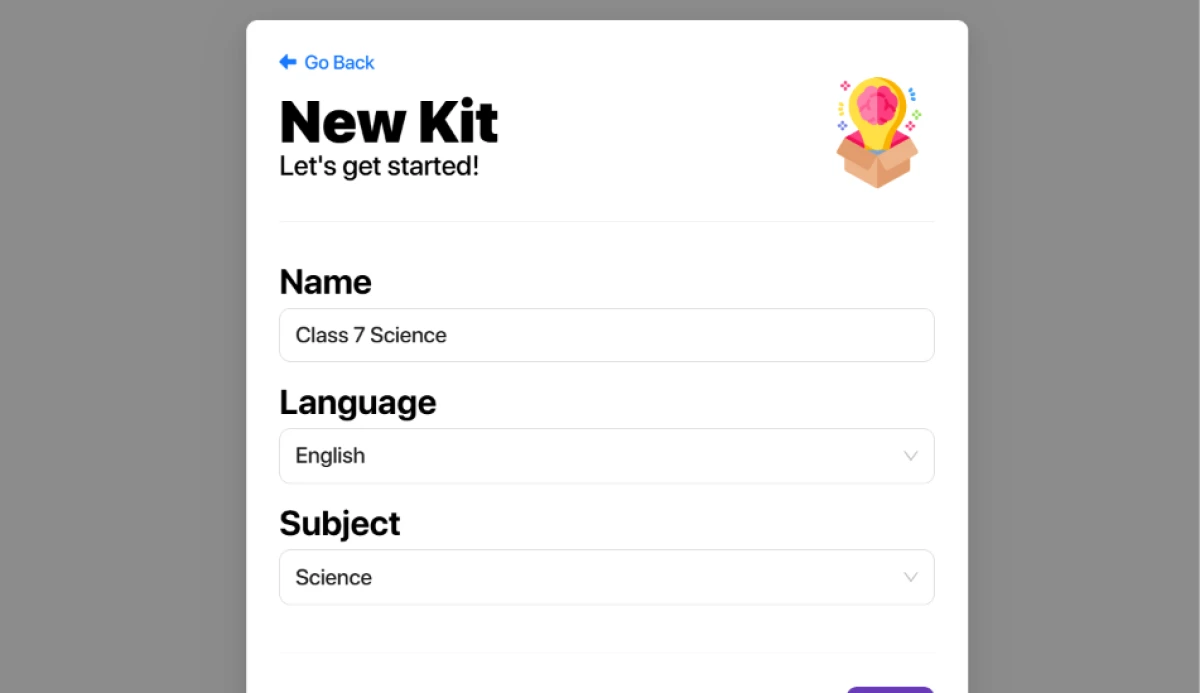
Gimkit New Kit screen with the name field filled in as Class 7 Science and the subject set to Science
The New Kit screen. Name and subject, nothing more.
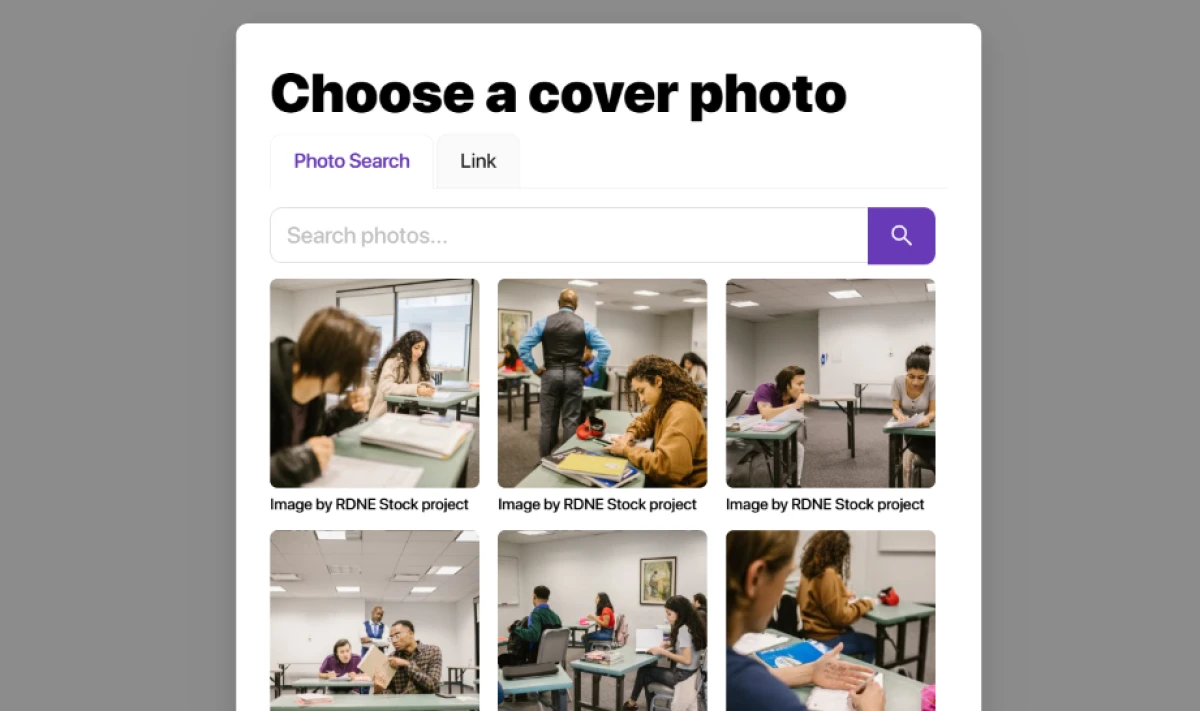
Gimkit cover photo picker showing Pexels stock image results with no upload button
The cover step pulls from Pexels, with no upload option.
First impression: Creating the kit took under a minute, a name and a subject on one screen. The cover step was the first wall. There is no way to upload your own image, so the artwork comes from the Pexels library or an external link, which is a small friction for anyone who wanted a branded or screenshotted cover.

Six ways to add questions

Test 02 . Question sources
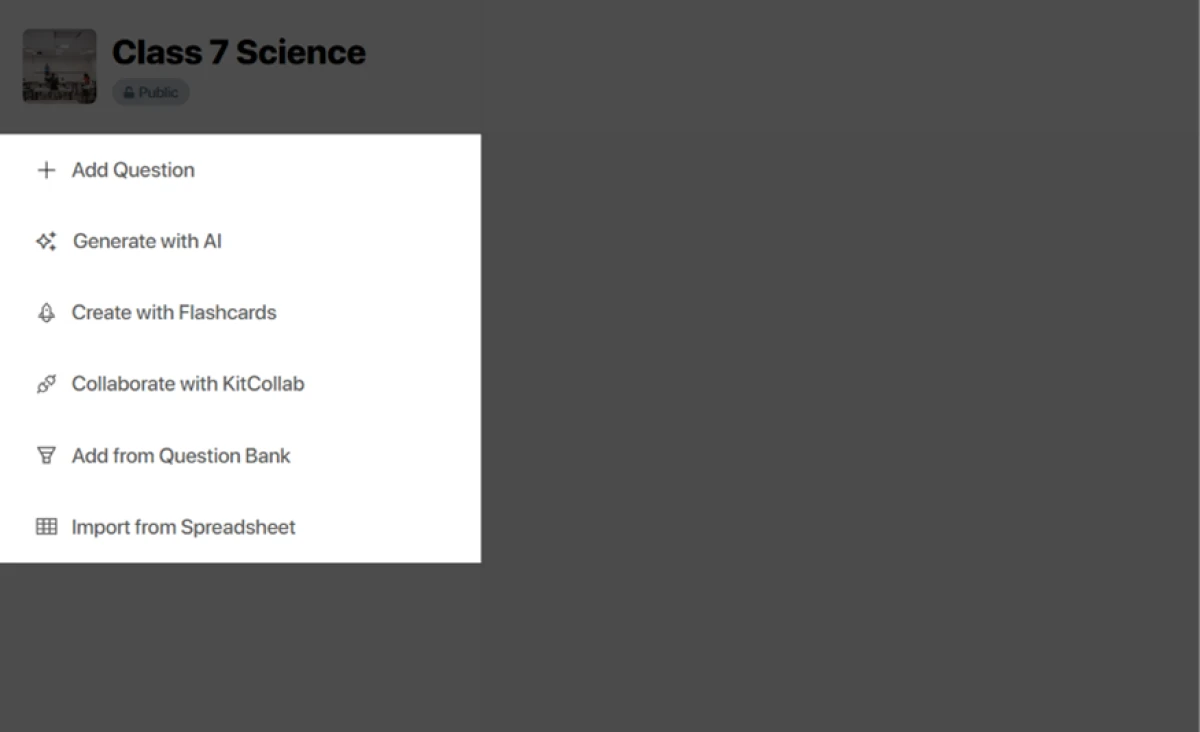
Gimkit question menu listing six ways to add questions including type manually, Generate with AI, flashcards, Question Bank, KitCollab, and spreadsheet import
Six build paths, from manual typing to AI generation.
What stood out: This is where Gimkit opens up. Beyond typing questions by hand or generating them with AI, you can build from flashcards, pull ready-made sets from the Question Bank, co-write with KitCollab, or import a spreadsheet. Few tools in this category give a teacher that many on-ramps into the same kit.

Loading a full set from the Question Bank

Test 03 . Question Bank
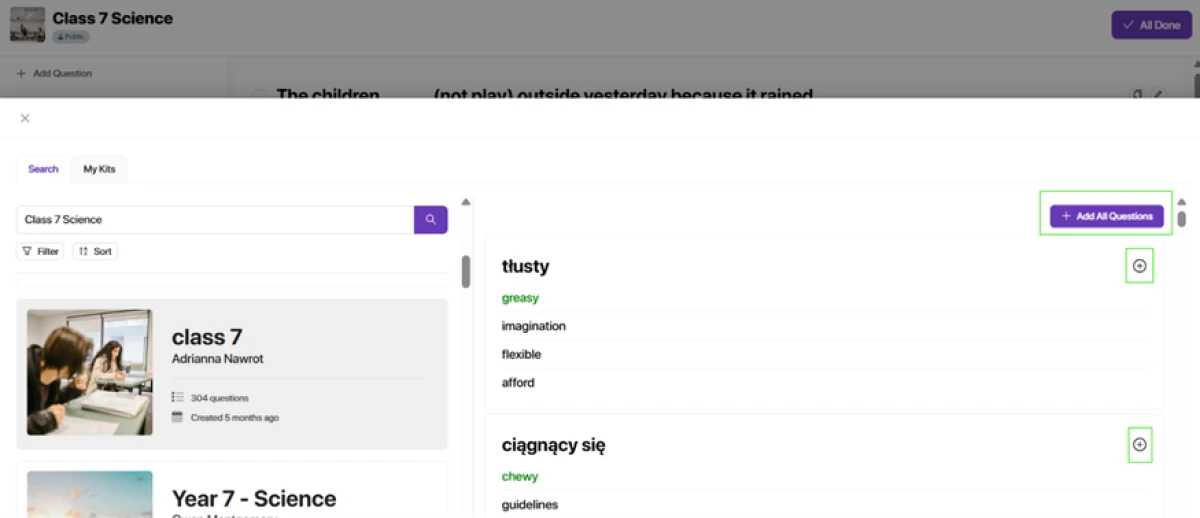
Gimkit Question Bank searched for Class 7 Science with an Add All Questions button visible
A search for Class 7 Science, loaded with one Add All click.
How it performed: Searching the Question Bank for our topic surfaced a complete set, and Add All Questions dropped the whole thing into the kit in a single click. Fast, though the time saved comes with a caveat: borrowed questions still need a read-through for duplicates and the occasional joke entry before they go in front of a class.

Inside the question editor

Test 04 . Editor
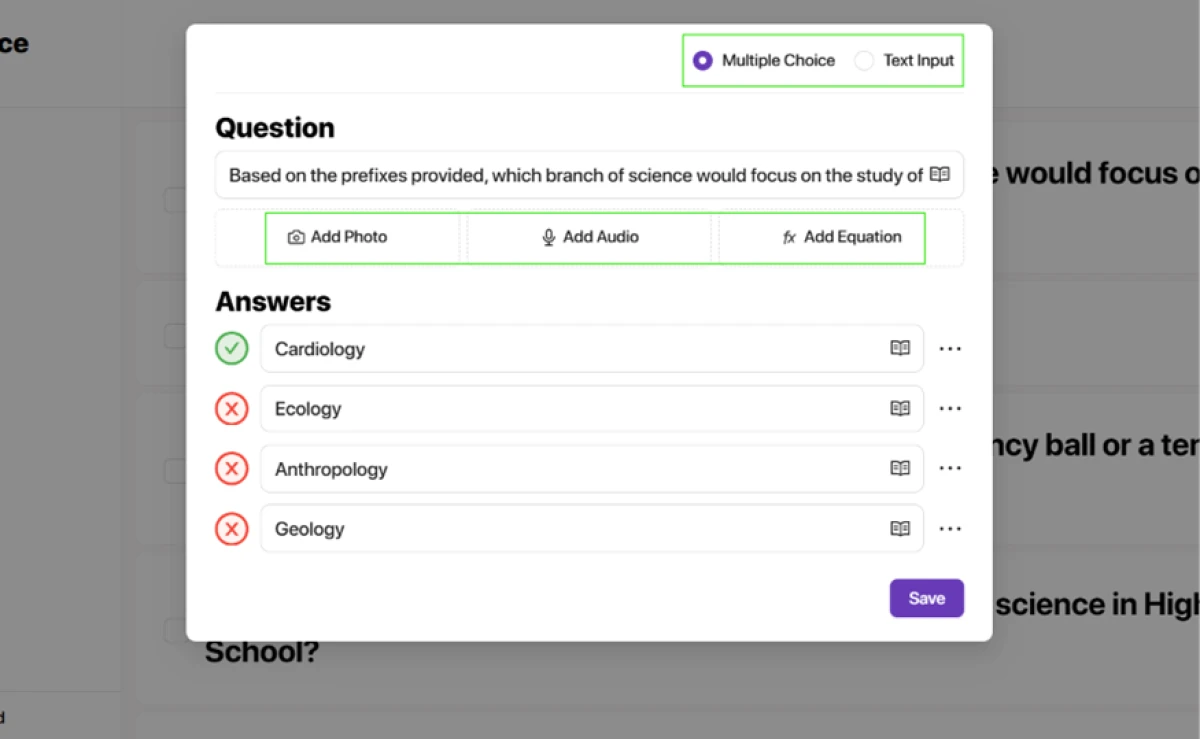
Gimkit question editor showing multiple choice and text input options with buttons for equations, photos and audio
Multiple choice and typed answers, with equation support.
Worth noting: The editor handles multiple choice and typed answers, and an equation can ride along with any question. Photo and audio attachments are present too, but both are Pro features, so a teacher on Basic composes with text and equations alone.

Hosting a live game

Test 05 . Live hosting
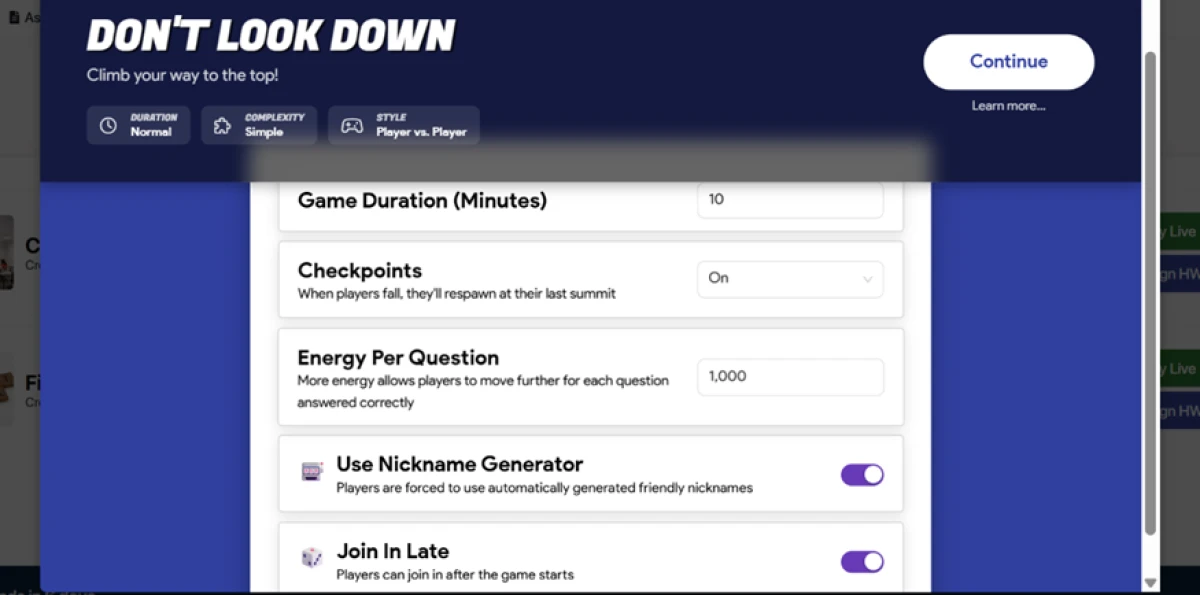
Gimkit host settings panel for Don't Look Down with controls for game length, checkpoints, energy per question, and the nickname generator
Host controls for Don't Look Down, one of the climbing modes.
Where it lands: We picked Don't Look Down, a climbing mode, and the host panel handed over control of game length, checkpoints, energy per question, and a nickname generator that filters out rude handles. The mode runs on the free plan with two catches: it caps at 5 players, and Gimkit keeps only about three modes free at any one time.

How students join

Test 06 . Join flow
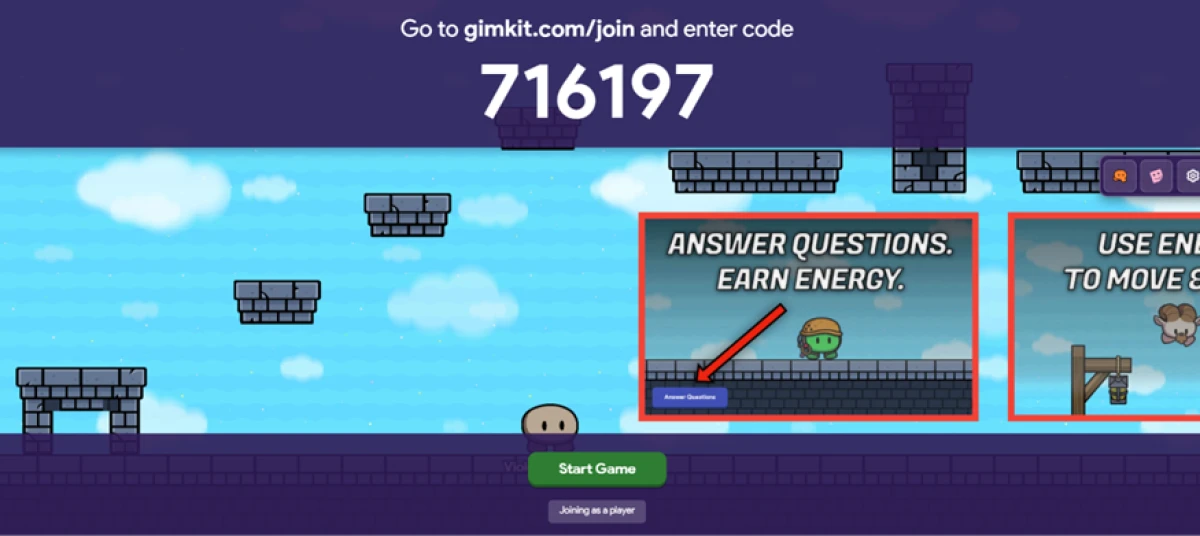
Gimkit join screen prompting players to enter game code 716197 at gimkit.com slash join
Players enter the on-screen code at gimkit.com/join.
What clicked: Students open gimkit.com/join and type the code on the board, which was 716197 for our session. No download, no account, no login to play live. For a substitute teacher or a one-off period, that absence of setup on the student side is the single biggest reason this format spreads.

Playing the game

Test 07 . Gameplay
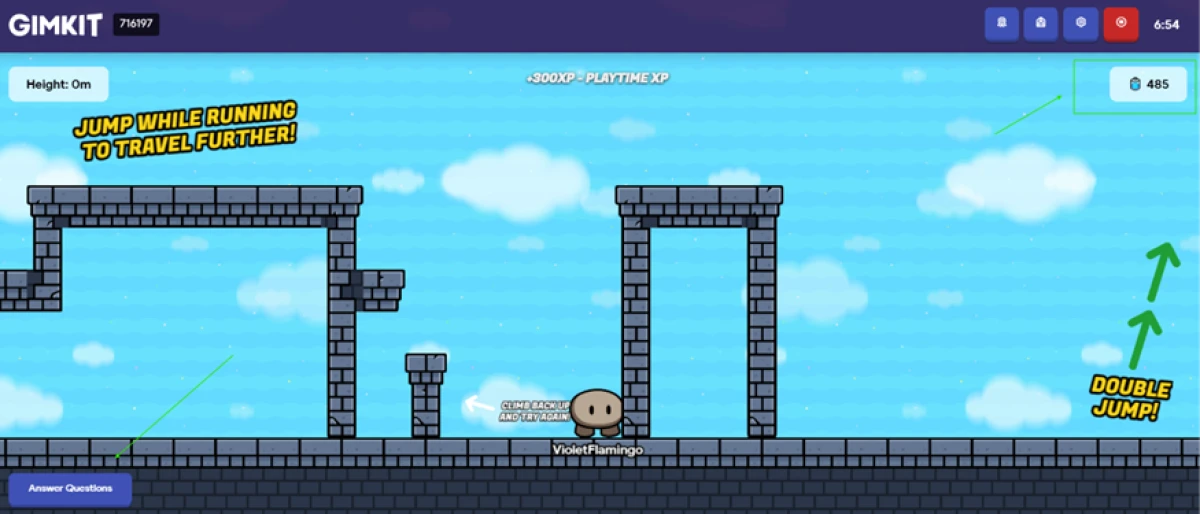
Gimkit gameplay as the player VioletFlamingo, where correct answers earn energy that moves the character upward
Playing as VioletFlamingo. Right answers earn energy.
What we observed: We joined our own game as VioletFlamingo and started answering. Right answers earn energy, and energy is what moves the character forward and up. The loop ties knowing the material to progress in the game without feeling like a test, which is the whole trick.

Reading the results screen

Test 08 . Results
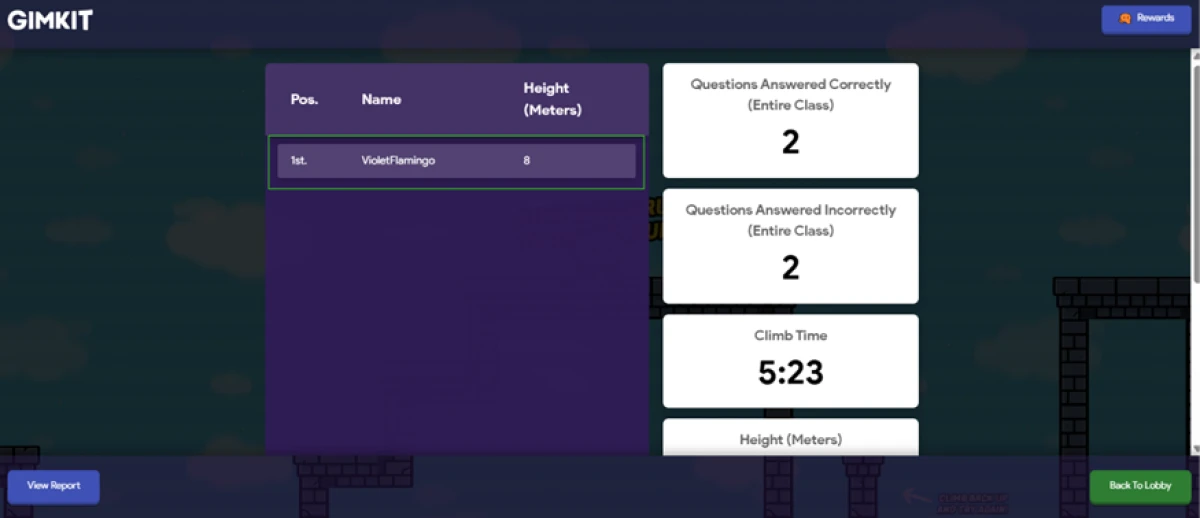
Gimkit results screen where final ranking follows climbing height rather than the count of correct answers
Final position follows climbing height, not raw score.
The real story: Final position comes from height climbed, and height depends on how a player spends energy, not on raw correct answers. Two students with the same number right can land in different spots. That rewards strategy, but it also means the leaderboard is a weak proxy for who actually knew the content.

Reports and the Excel export

Test 09 . Reports
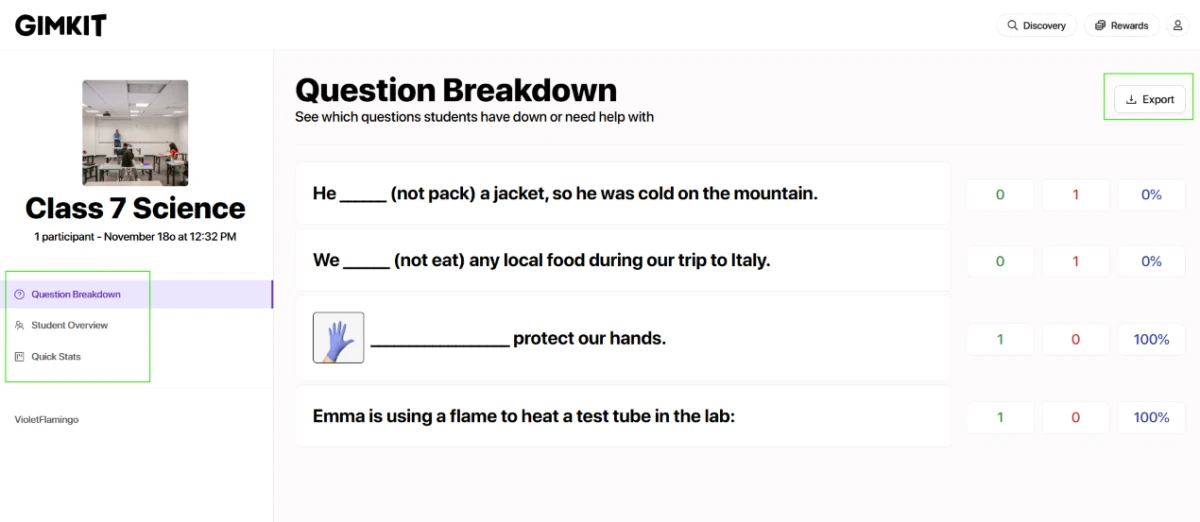
Gimkit in-app Question Breakdown report showing per-question correct and incorrect counts with an accuracy figure for the class
The in-app Question Breakdown, per question.
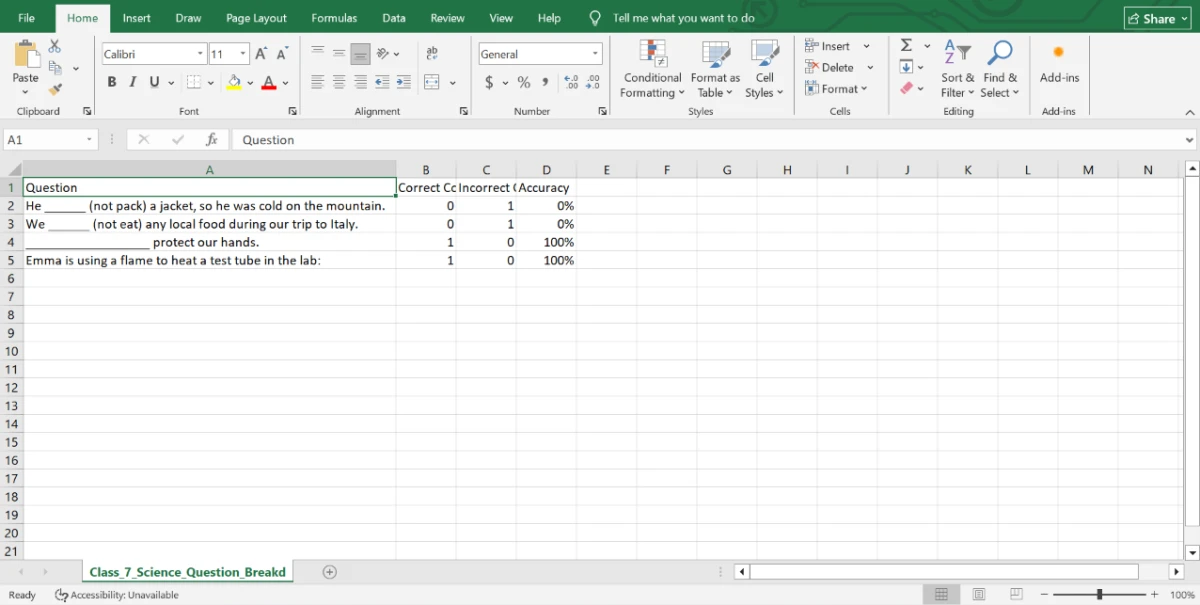
The same Gimkit Question Breakdown report exported into an Excel spreadsheet
The same report, one click into Excel.
The key finding: Gimkit saved a report the moment the game ended, no prompting. The Question Breakdown listed every question with its correct and incorrect counts and an accuracy figure, and a single click sent the whole table to Excel. This is where Gimkit answers the question the leaderboard dodges: which questions actually stumped the room.

Setting up a class

Test 10 . Classes
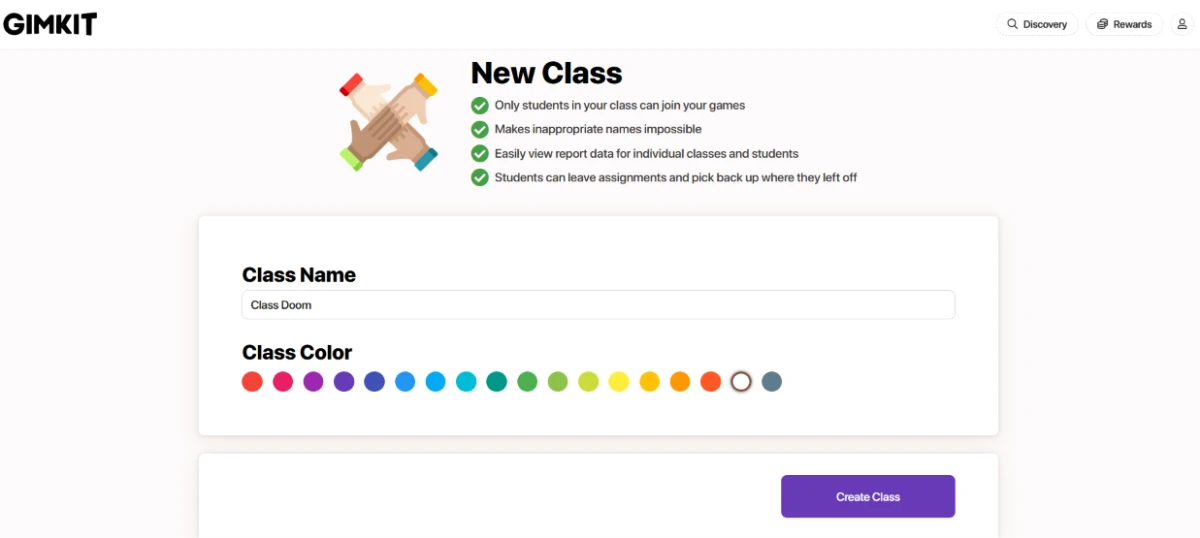
Gimkit create a class screen asking for a class name and a colour before a Create Class button
A name, a colour, then Create Class.
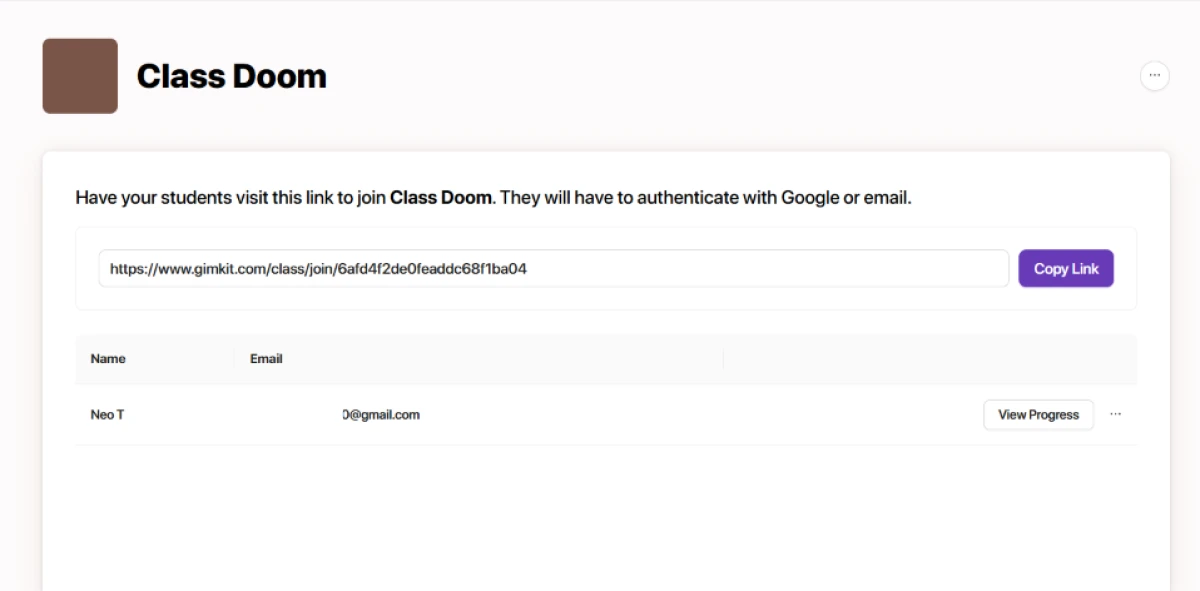
Gimkit class link and student roster with a View Progress button next to each student
The class link and roster, with View Progress per student.
What this confirms: A class keeps games private and reports tidy. We named ours and picked a colour, then students joined through one link after signing in with Google or email. Each one landed in the roster with a View Progress button, and this tracking runs on the free plan, not behind the upgrade.
★
The reporting-to-roster chain just works, start to finish

The strongest run of the session was everything after the game ended. Per-question accuracy saved itself on the spot, then exported to Excel in one click and fed a class roster with per-student progress that Basic users keep for free. For a teacher who reviews before a test, that is the data that actually changes the next lesson.

!
The free plan rations the thing you came for

Don't Look Down played on Basic but stopped at 5 players, and only about three modes stay free at a time on a rotation Gimkit controls. Pair that with media uploads and assignments all sitting behind Pro, and the free tier works as a try-before-you-buy more than a classroom plan for a full roster.

How this review was put together. Testing ran on November 18, 2026 using a Gimkit Pro account, covering kit creation, the Question Bank, the live host for Don't Look Down, student-side play, the post-game reports, and class setup. Free-plan limits were confirmed by checking each feature against the Basic tier. Pricing was verified against Gimkit's own Groups page at gimkit.com/group/pricing rather than any third-party listing.

10-Point Feature Review

03 . Each score tied to something tested or verified
Feature Scores at a Glance
Student Join Flow
9.0
Live Game Modes
8.5
Reports & Export
8.5
Kit Building & Sources
8.0
Class Tracking
8.0
Question Editor
7.5
Host Controls
7.5
Results & Scoring Model
6.5
Free Plan Access
5.5
Pricing Transparency
5.0

Pros and Cons

04 . What a teacher actually notices
+What works
  • Deep mode library: the 2D formats keep repeat review sessions from feeling like the same quiz twice.
  • Zero-setup student entry: a code at gimkit.com/join, no app and no account, gets a class playing in seconds.
  • Many on-ramps to a kit: AI, flashcards, the Question Bank, KitCollab, and spreadsheet import all feed the same editor.
  • Instant, exportable reports: per-question accuracy saves itself and drops into Excel with one click.
  • Class tracking included: rosters and a per-student View Progress button for every account.
−What grates
  • Cover art from Pexels only: no way to upload your own kit image.
  • Height-based standings: placement follows climbing height, so the leaderboard and real accuracy can diverge.
  • Rotating mode lineup: a mode you built a lesson around can drop out of the available set.
  • Imports need a pass: Question Bank sets still require a check for duplicates and joke entries.

Pricing Breakdown

05 . What Gimkit prices in public, and what it doesn't
Feature BasicFree ProNot posted set in-appUpgrade
Featured game modes Rotating set
Player cap on gated modes Capped at 5
Assignments and homework ✗
Image and audio in questions ✗
Copy other teachers' kits ✗
Class reports and roster ✓

What you're actually paying: The only figures Gimkit posts in the open are its two Groups licences, a Department plan at $650 a year for 20 teachers and a School plan at $1,000 a year for an entire building with no per-teacher cap. A solo teacher's monthly or annual Pro price never appears on a public page. It surfaces only at the in-app upgrade screen once you have signed in, which is why Basic is the honest starting point for anyone sizing the tool up. The gate most teachers hit first is not a number but the rotation: the free mode set changes on Gimkit's schedule, so a mode you demoed in September can sit behind the upgrade by November.
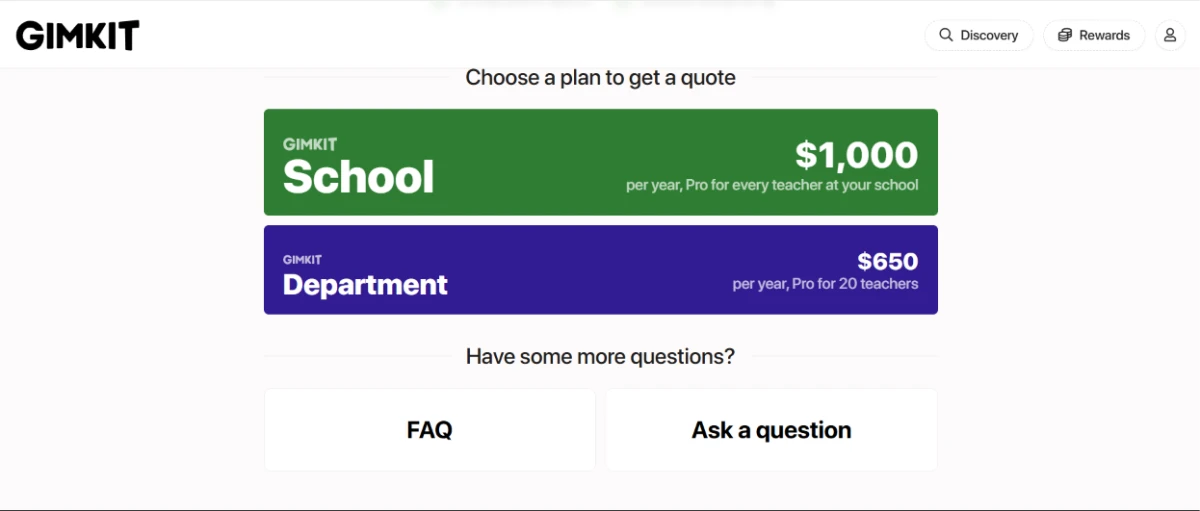
Gimkit Groups quote page showing the School plan at $1,000 per year and the Department plan at $650 per year
The Groups quote page carries the two licences Gimkit prices openly.

Pricing checked November 18, 2026 against Gimkit's official Groups page. Plans move often, so confirm the current terms before you buy.

Gimkit vs the Top 3 Alternatives

06 . Where each one actually fits
GGimkit KKahoot BBlooket WWayground
Free player accessNo cap on featured modes40 per game, teacher account60 per gameGenerous free tier
Game-mode depth13+ live 2D modesQuiz-first, few variants15+ arcade modesLive plus self-paced
Self-paced homeworkAssignments, ProYesYesStrong async flow
Best ForStrategy-led review for older classesFast, music-driven whole-class quizzesYounger classes that like collectingSelf-paced homework quizzes

How to choose: The split is about what you want review to feel like. Kahoot rewards the fastest correct answer and runs on music and speed, which lands best with younger rooms, and its Gold tier sits at $120 a year for 200 players. Blooket leans into arcade collecting for elementary classes. Wayground, the tool formerly called Quizizz, owns the self-paced homework lane. Gimkit earns its spot when you want repetition to carry real strategy and an older class will chase a climbing score across a full period.

What Users Are Saying

07 . Pulled from Trustpilot and Quora
This website is a frustrating headache every single time. Blooket is much simpler and easier to understand.
Christopher Plemons
On the learning curve
★☆☆☆☆
trustpilot.com
You have to pay to get more XP and coins, or you wait a week which sucks.
Ariana Lee
On the in-game economy
★★★☆☆
trustpilot.com
This is a hard app to understand and, I see other children making their own gimkits with foul language.
Barbara
On moderation of shared kits
★☆☆☆☆
trustpilot.com
First off, it has good music and second, it has variety. You can go fishing, play capture the flag, draw, be on teams, play singles. It's the variety and the fact that you're playing a game that makes it so popular.
Quora contributor
On why it spreads
quora.com
Different systems may fit different moments in your class. Do you want your students to have repeated practice? Do you need some energy in your room? Each of these different systems provide different benefits.
Quora contributor
On choosing between tools
quora.com
· The Verdict ·
7.5/10
A sharp review game for older classes, if you can live inside the free modes or pay to leave them

Use Gimkit if you teach middle or high school and want review sessions where students strategize across a full period, and you value the post-game reports and free class tracking more than a five-minute quiz.

Skip Gimkit if your classes skew young and you want a fast buzzer quiz, where Kahoot's music-driven format lands easier, or if self-paced homework is the core of your plan, where Wayground's async flow is stronger.

Category RankCapable Pick
Compared To3 Alternatives
Entry PriceFree (Basic)
Free TierYes

Discussion

Join the discussion and share your perspective.