grammarly.com · Part of the Superhuman product family
Grammarly's grammar engine is still the category benchmark. In testing it flagged 11 issues in a deliberately broken passage within a second, and nothing slipped past it. What complicates the picture is how much sits behind Pro: the full-sentence rewriter, the plagiarism checker, AI detection, and the larger prompt allowance are all gated. Best for daily writers who want a dependable proofreader in every app and will judge the paid AI on its own merits.
Grammarly is an AI writing assistant that checks grammar, spelling, punctuation, and clarity as you type, then layers rewriting and tone tools on top. It runs as a browser extension and a desktop app, and it ships a mobile keyboard too, so the same checker follows you from Gmail to Google Docs to a Slack message. The company positions it as an everywhere-you-write partner rather than a standalone editor, and it now sits inside the broader Superhuman product family.
Three plans anchor the lineup. Free costs nothing and covers core grammar with 100 AI prompts a month, Pro runs $12 per member per month on annual billing, and Enterprise is quote-based for larger teams. What each tier actually unlocks, and where the jumps hurt, comes later in the pricing section.
I ran Grammarly on a free account across a set of real writing tasks: a broken passage to stress the grammar engine, an overloaded message to test condensing, a bloated sentence inside Google Docs, a deliberately punchy technical passage, and the Pro-only panels. The session revealed a clean split between what the free tier does well and what it holds back.
Catching grammar mistakes
Test 01 . Core engine
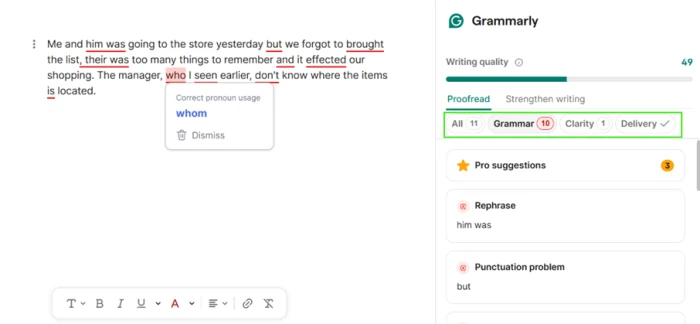
The grammar engine working through a two-sentence passage seeded with errors.
The evidence: The engine flagged 11 issues in about a second and rated the passage 49 out of 100. Ten were grammar, one was clarity. It caught the pronoun error in "him was" and the punctuation around "but," and it pushed "who" toward the stricter "whom," a call most everyday writing does not need. On fundamentals, nothing slipped.
Rewriting and tightening text
Test 02 . Condense
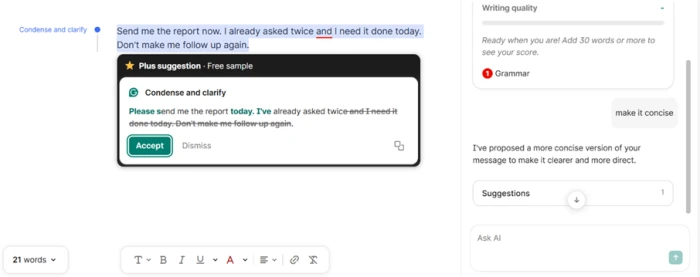
A blunt four-line message run through the Condense and clarify option.
Where it lands: The Condense and clarify option turned a four-line demand into a shorter, more polite version that kept the meaning intact. The rewrite worked. The label did not: "Plus suggestion, Free sample." Useful rewrites are a paid feature, and free users get a brief taste before the option closes. The score panel also refused to grade anything under 30 words, so short messages got no feedback at all.
Working inside Google Docs
Test 03 . Cross-app
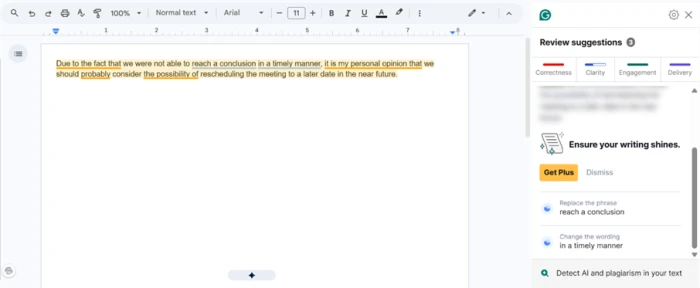
The browser extension checking a bloated sentence directly inside Google Docs.
What this confirms: Inside Google Docs the extension underlined a bloated sentence and dropped suggestions into a side panel sorted by category, with no friction. The core checking clearly travels across apps. So does the upsell, since several of the stronger suggestions sat behind a Get Plus button.
Where it flattened my writing
Test 04 . Voice
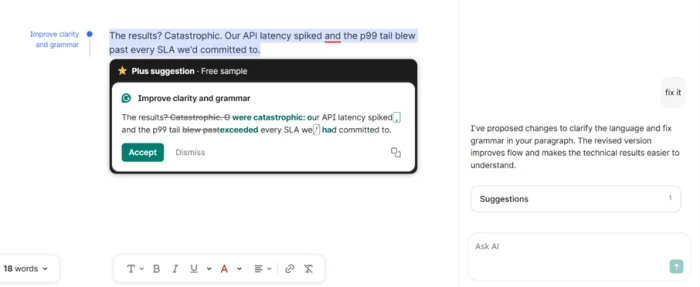
A punchy passage built on short fragments after Grammarly's fix suggestions.
The real story: Handed a passage built on short, deliberate fragments, Grammarly folded "The results? Catastrophic." into the flat "The results were catastrophic:" and swapped the vivid "blew past" for the corporate "exceeded." Cleaner grammar, yes. The personality was gone. Writers with intent behind their phrasing will want to dismiss this one and trust their own ear.
What stays locked behind Pro
Test 05 . Paywall
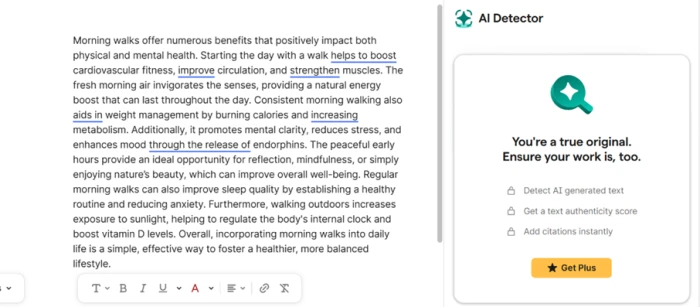
The AI detector panel, padlocked behind Get Plus on the free plan.
What stood out: Opening the AI detector produced a wall, not a result. Padlocked options for detecting AI text and scoring authenticity sat behind Get Plus, and the plagiarism checker refused to run without a subscription. If either feature is your reason for looking at Grammarly, the free plan keeps you at arm's length from both.
★
Grammar accuracy paired with real cross-app reach
The combination that held up was the grammar engine and its coverage. Eleven correct catches in a second on the free tier, and the same checker running unchanged inside Google Docs. For pure proofreading across the apps you already use, this is what earns the reputation.
!
The free tier is a proofreader, not a writing tool
Every capability past grammar fixes is gated: the rewriter, the plagiarism checker, AI detection, and the larger prompt pool all require Pro. Free users hit a Get Plus wall the moment they reach for the parts most people upgrade to try. The taste-then-lock pattern repeats across the product.
How this review was put together. Testing ran on a free Grammarly account on August 26, 2026, across grammar checking, rewriting, in-app behavior inside Google Docs, and the Pro-gated panels. Pricing was verified the same day against Grammarly's official plans page at grammarly.com/plans. Competitor figures were pulled from each vendor's own pricing surface rather than any roundup.
10-Point Feature Review
03 . Scored against what the session actually showed
Feature Scores at a Glance
Grammar & Spelling Accuracy
9.0
Cross-App Coverage
8.0
Tone Detection
7.5
Full-Sentence Rewrites
6.5
Free Plan Value
7.5
AI Prompt Allowance
6.0
Plagiarism Checker
6.0
AI Text Detector
5.5
Score Feedback
6.0
Billing & Upsell Friction
5.0
Feature-by-feature breakdownWeighted toward core writing help over peripheral tools
01
Grammar & Spelling Accuracy Standout
Eleven issues surfaced in roughly a second on a two-sentence passage, ten grammar and one clarity, with no misses on the planted errors. It sits at 9.0 rather than higher because the "whom" push shows it still over-applies formal rules, and not lower because the core catch rate was flawless.
Issues caught: 11Response time: ~1 sec
9.0
Excellent
02
Cross-App Coverage Strong
The same engine ran inside Google Docs and the browser with no setup, and Grammarly reaches desktop and a mobile keyboard as well. It lands at 8.0 because reviewers report the iOS keyboard lags and drops keystrokes. An 8.5 would ignore that, a 7.5 would undersell how well the desktop and browser paths hold up.
Real-time tone reading is useful and drove the polite rewrite during testing. It holds at 7.5 because it over-formalizes casual context, with users noting it nudges family messages toward a work register. Not 8.0 for that reason, not 7.0 because the read itself is accurate.
Read: Real-timeWeak spot: Casual context
7.5
Good
04
Full-Sentence Rewrites Trade-off
The condense function worked and preserved meaning, but the rewriter flattens deliberate voice, trading fragments and vivid verbs for generic phrasing. It earns 6.5, not 7.0, because the flattening is consistent enough to hurt distinctive writing, and not 6.0 because the mechanical result is clean.
Meaning kept: YesVoice kept: No
6.5
Mixed
05
Free Plan Value Useful
The no-cost tier covers unlimited grammar and spelling, tone reading, and 100 AI prompts, which is more than most rivals hand over for nothing. It sits at 7.5 because that ceiling is usable for proofreading, and no higher because everything past grammar is walled off.
Grammar: UnlimitedAI prompts: 100/mo
7.5
Good
06
AI Prompt Allowance Capped
Free gives 100 prompts a month and Pro gives 2,000, with no way to buy more once you run dry. The 6.0 reflects a workable Pro ceiling paired with a free allowance that vanishes in days and a hard stop with no top-up when it does.
Free: 100/moTop-ups: None
6.0
Mixed
07
Plagiarism Checker Gated
The checker exists and is bundled into Pro, but it refuses to run at all for free users, showing a locked panel instead of a limited result. It scores 6.0: present and functional for subscribers, invisible to everyone else with no preview to judge it by.
Access: Pro onlyFree preview: None
6.0
Mixed
08
AI Text Detector Unreliable
Detection is Pro-gated and, per repeated user reports, inconsistent even once unlocked. It lands at 5.5 rather than 6.0 because the accuracy doubts compound the wall, and not lower because it does function on paid plans.
Access: Pro onlyAccuracy: Questioned
5.5
Weak
09
Score Feedback Rigid
The quality score is quick and motivating, but it refuses text under 30 words and penalizes intentional fragments, which frustrates anyone doing short or creative work. That leaves it at 6.0: a useful signal undercut by inflexible limits.
Minimum: 30 wordsFragments: Penalized
6.0
Mixed
10
Billing & Upsell Friction Poor
Get Plus prompts run through the whole free experience, and reviewers repeatedly flag auto-renewal charges landing after trials with strict refund terms. The 5.0 is the lowest score here because the friction is structural rather than occasional.
Renewal: AutomaticRefunds: Strict
5.0
Weak
Pros and Cons
04 . What a real user notices
+What works
Best-in-class grammar catch: flags real errors instantly and rarely misses fundamentals
Works everywhere you type: browser, desktop, and mobile, with clean behavior inside Google Docs
Unlimited core proofreading: grammar and spelling checks with no cap on document length
Real-time tone reading: tells you how a message will land before you send it
Low-friction suggestions: fixes appear in a side panel sorted by category
−What grates
Rewrites flatten distinctive voice: swaps deliberate fragments and vivid verbs for generic phrasing
AI detector reliability is shaky: inconsistent results that are hard to trust on real text
Score panel is inflexible: refuses short text and penalizes intentional fragments
Persistent upgrade prompts: Get Plus nudges interrupt the writing flow constantly
Mobile keyboard lags: the iOS keyboard drops keystrokes and feels sluggish
Over-formalizes casual writing: nudges relaxed messages toward a stiff work register
Pricing Breakdown
05 . Where the tiers actually diverge
Feature
Free$0/mo
Pro$12/mo billed annuallyMost Popular
Write without mistakes
✓
✓
Full-sentence rewrites
✗
✓
Adjust writing tone
✗
✓
Plagiarism + AI detection
✗
✓
2,000 AI prompts / month
✗
✓
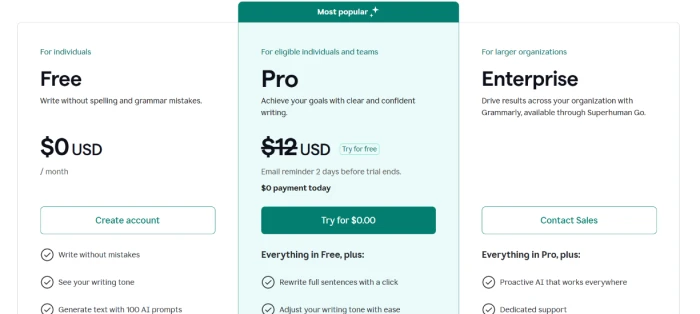
What you're actually paying: The real gap between the tiers is not grammar, which the free plan already handles, but everything Grammarly markets as AI: the rewriter, the tone controls, originality checks, and the larger prompt pool all live on Pro. The monthly rate is where it stings. Paying month to month costs $30, two and a half times the $12 annual-equivalent, so the flexible option quietly penalizes anyone who does not commit to a year up front. There are no prompt top-ups either, so a heavy stretch on the free plan's 100 prompts simply stops until the monthly reset.
The three published Grammarly plans, shown side by side.
Pricing verified August 26, 2026. Rates shift often, so confirm the current numbers on the official pricing page before you subscribe.
Grammarly vs the Top 3 Alternatives
06 . How it sits against the shortlist
GGrammarly
QQuillBot
PProWritingAid
LLanguageTool
Entry Price (annual)
$12/mo
$8.33/mo
$10/mo
€4.90/mo
Free Tier
Unlimited grammar
125-word paraphrase cap
500-word limit
Web checker only
Best For
Everyday cross-app proofreading
Paraphrasing and summarizing
Long-form style reports
Multilingual checking on a budget
Where each one wins: Grammarly is the pick when you write across many apps and want the catch rate to be the priority. QuillBot makes more sense if rewriting and paraphrasing existing text is the actual job. ProWritingAid rewards long-form writers who want deep manuscript-level style reports rather than a quick proofreader, and LanguageTool is the value option for anyone working across languages who can live with a lighter AI layer.
What Users Are Saying
07 . Verbatim from three review platforms
I use Grammarly online all the time and I love it. But the iPhone version is laggy. It doesn't pick up all of my keystrokes the way the stock keyboard does, and it just feels sluggish trying to keep up with my typing.
My favorite feature is the weekly reports about how my writing is doing. The program does not like the Oxford comma, and it does not work with the Canvas program that I use to grade my students.
As a non-native English speaker the tool really made the difference during my university years. But I had been paying a hefty quarterly bill for a year without any email informing me of the charges.
Use Grammarly if you write across many apps every day and want the most reliable grammar and spelling catch rate available, with tone feedback that travels from your inbox to your docs.
Skip Grammarly if you mostly rewrite or paraphrase existing text, where QuillBot is the better-shaped tool, or you need deep manuscript-level style reports, where ProWritingAid pulls ahead. Multilingual writers who want a lighter, cheaper layer should look at LanguageTool.

Discussion
Join the discussion and share your perspective.