Home / Reviews / AI Video Generator / Hailuo AI
Hailuo AI logo
AI Video Generator Text & Image to Video

Hailuo AI Review

hailuoai.video · by MiniMax

Hailuo AI pairs believable single-subject motion with ambient sound on its cheapest MiniMax H3 model, something most low-cost video tools leave out. A free account rendered a four-second clip in about two minutes, watermark included. It suits short-form creators who want cinematic motion quickly, and struggles the moment a prompt turns complex.

Reviewer Score
7.4
/10
Capable Pick
Strong motion and image quality.
Weak on complex prompts and hands.
Motion & Physics9.0
Still Image Quality8.5
Render Speed8.0
Prompt Adherence5.0
Hand Rendering5.0
Platform
Web browser
Developer
MiniMax
Test Model
MiniMax H3
Video Cost
28 credits 768p, 4s clip
Image Cost
1 credit
Free Credits
One-time trial 0 monthly

What Hailuo AI Does

01 . Overview

Hailuo AI is MiniMax's text-to-video and image-to-video generator. Type a prompt or upload a still and pick a model. It returns a short cinematic clip. A built-in image generator sits next to the video tool, so a flat concept can become a still and then a moving shot inside one workspace.

MiniMax builds the product around motion realism and character consistency rather than long runtimes or heavy editing controls. Clips are brief and priced in credits, which aims Hailuo at social creators and marketers producing quick visual hooks instead of full scenes.

What Happened When We Tested It

02 . Six tests covering motion, identity, image value, and prompt adherence

Every clip and image below came from a new free account on the cheapest model, MiniMax H3. A 768p four-second video cost 28 credits, each still cost one. That gap shaped the session. A fresh free balance barely covers two video runs, so most ideas were tested as images first, with video saved for the prompts that actually needed motion.

The credit math before any prompt

Test 01 . Credit economics
Hailuo AI model picker with MiniMax H3 selected and a 28-credit cost shown for a 768p four-second video
The model picker and the credit cost on a free account.
First impression: A single 768p clip rang up at 28 credits before the Create button, while a still cost one. On a free balance that funds only a couple of videos, that ratio pushed most of the testing toward images and made every video prompt a deliberate choice.

Motion and physics, the strongest result

Test 02 . Liquid motion
★ Prompt Used

"Close-up of hot coffee being poured into a clear glass cup, steam rising, liquid swirling and settling, natural slow motion"
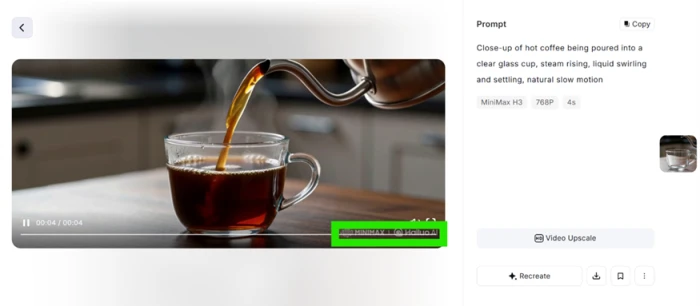
Hailuo AI generated clip of hot coffee pouring into a clear glass with rising steam and a watermark in the lower right corner
The coffee pour at 768p, ambient sound included, watermark lower right.
What stood out: The clip arrived in about two minutes. The pour read as real liquid, the steam drifted the way it should, and the coffee settled with weight. It came back with ambient sound, which the cheapest model was not expected to add. A Hailuo watermark sat in the corner.

A photo turned into motion

Test 03 . Identity hold
★ Prompt Used

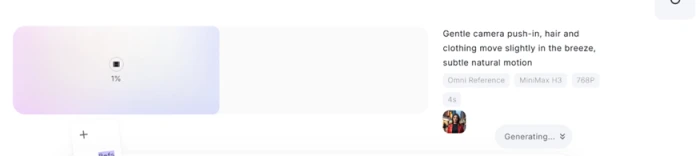
"Gentle camera push-in, hair and clothing move slightly in the breeze, subtle natural motion"

Street portrait of a woman in a red jacket, the still uploaded as the starting frame
The still photo uploaded as the starting frame.
Hailuo AI render progress indicator for the four-second clip
The clip rendering, ready in about two minutes.
Generated Hailuo AI clip keeping the woman's face and red jacket consistent as the scene moves
The generated clip, face and jacket kept consistent.
The validation: Her face and the red jacket stayed recognizable across the four seconds while light motion played over the scene. Holding a real person's identity steady is where plenty of image-to-video tools slip, and this one did not.

Still images gave the best return

Test 04 . Image quality
★ Prompt Used

"Create a stunning, ultra-realistic image of a young women with cinematic lighting, vibrant colors, incredible details, and a professional artistic composition"

Hailuo AI image generation screen with the prompt entered and a one-credit cost displayed
The image screen with the prompt entered, cost showing one credit.
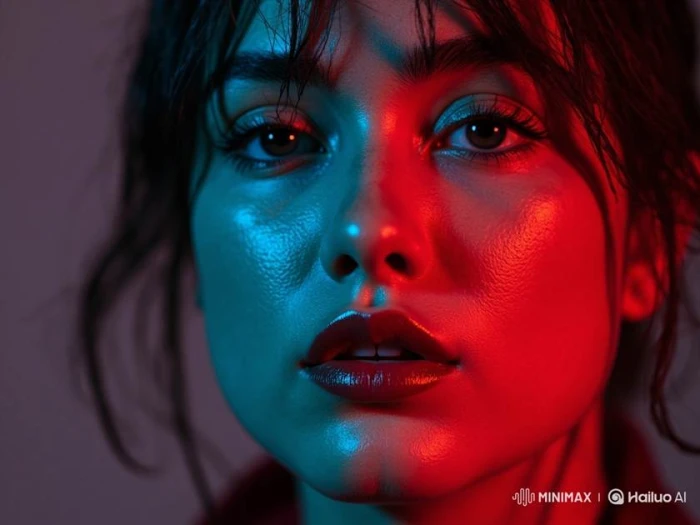
Portrait generated by Hailuo AI for one credit, with sharp skin texture and bold colored lighting
A single credit produced this portrait.
Where it lands: At one credit, the portrait came back with sharp skin texture and strong colored lighting. For the cost, nothing else in the session matched it, which is why the image tool absorbed most of the testing.

Where it ignored the instructions

Test 05 . Prompt adherence
★ Prompt Used

"Create a surreal scene of a transparent glass elephant riding a bicycle underwater, holding a tiny umbrella with its trunk, while its reflection shows a completely different animal. Every object must obey two contradictory physical laws simultaneously, with impossible shadows and endlessly looping geometry."

Hailuo AI image screen with the long impossible-scene prompt entered before generating
The full prompt entered on the image screen.
Hailuo AI output of a plain glass elephant on a bicycle underwater, ignoring the abstract parts of the prompt
The output looks clean, yet obeys almost none of the prompt.
The real story: The output was clean and attractive, and also just a glass elephant on a bicycle. The reflection showed the same elephant, the shadows were ordinary, and no looping geometry appeared anywhere. Hailuo read the concrete nouns and quietly dropped every abstract idea without a word of warning.

Where it broke completely

Test 06 . Hands and anatomy
★ Prompt Used

"Close-up of a chef's hands chopping vegetables with a knife"

Hailuo AI close-up where a chef's fingers merge together and the knife points backward toward his own hand
Merged fingers and a blade turned the wrong way, pointing back at his hand.
What this shows: The lighting and the wooden board looked professional. The hands did not. Fingers merged into each other, an extra thumb appeared near the blade, and the knife faced backward toward his own hand instead of the food. Every object was present, but they would not fit together.
★
Believable motion with ambient sound, rendered in about two minutes

On MiniMax H3, the coffee pour combined real-looking liquid physics with drifting steam and arrived with matching audio, all from a free account in roughly two minutes. For single-subject motion at the lowest tier, that is a genuinely strong result.

!
A free account runs dry after two videos

At 28 credits per clip, a new free balance covers only a couple of video generations before it is gone. Anyone who wants to iterate on motion will exhaust the trial fast and hit a subscription decision almost immediately.

How this review was put together. Testing ran on November 13, 2026, from a new free Hailuo account using MiniMax H3, the cheapest model on offer. Video prompts were generated at 768p for four seconds, and image prompts at the single-credit rate. Pricing was verified on the official pricing page at hailuoai.video/subscribe.

10-Point Feature Review

03 . Scored against what the session actually produced
Feature Scores at a Glance
Motion & physics
9.0
Still image quality
8.5
Image-to-video identity
8.0
Render speed
8.0
Ease of use
8.0
Ambient sound
7.5
Watermark & export
6.5
Free-tier credit value
6.0
Prompt adherence
5.0
Hand & anatomy accuracy
5.0

Pros and Cons

04 . What a real session rewards and punishes
+What works
  • Believable single-subject motion: liquids and fabric move with real weight.
  • Fast renders: a four-second clip finishes in roughly two minutes.
  • Strong identity hold: uploaded faces and clothing stay recognizable in motion.
  • Sharp still images: portraits show fine skin texture and controlled lighting.
  • One-tool concept to motion: generate a still, then animate it without switching apps.
−What frustrates
  • Drops abstract instructions: complex prompts lose their conceptual parts silently.
  • Unreliable hands and anatomy: fingers merge and blades face the wrong way.
  • Watermarked clips: generated videos carry a Hailuo mark in the corner.
  • No failure feedback: nothing signals which prompt elements were ignored.

Pricing Breakdown

05 . A free trial and four paid tiers
Plan Free$0/mo Standard$8.40/mo Pro$30.40/moPopular Master$71.20/mo Max$184.00/mo
Billed yearly $0 $100.80 $854.40 $2,208.00
Monthly credits 0 one-time trial 1,000 10,500 27,000
Best for Testing Light use Heavy iteration Studios

What the credits actually buy: The Free plan is the catch. It carries no recurring monthly credits, only a one-time trial balance, so free use ends once that runs out. Credit allowances scale steeply across the paid tiers, from 1,000 on Standard to 27,000 on Max, where heavy, high-volume production is meant to live. Every rate in the table is the annual-billing price, running 41 to 45 percent below the month-to-month cost, so the regular monthly figures sit higher at $14.99 for Standard and $54.99 for Pro. The gaps between tiers are wide, and Master is the first real jump for anyone outgrowing Pro.
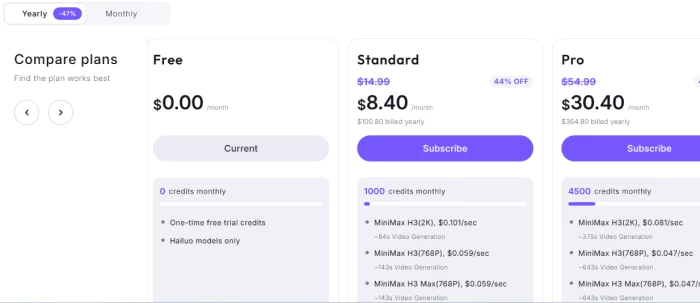
Hailuo AI pricing page showing the Free, Standard, Pro, Master and Max plans
A look at the plan tiers on the pricing page.

Pricing verified November 13, 2026 on the official pricing page. Hailuo reshuffles its tiers often, so confirm the current plans on the official pricing page before subscribing.

Hailuo AI vs the Top 4 Alternatives

06 . How it fits against the short-form video field
HHailuo AI KKling AI RRunway Gen-4 LLuma Dream Machine SSora 2
Best ForFast single-subject motionLonger cinematic clipsPro editing workflowsQuick stylized shotsSynced-audio scenes
Native audioYes, ambientYesNoYesYes
Clip lengthShortUp to minutes5 to 10 secondsShortLonger scenes
StandoutMotion realism on a budgetPhysics on complex motionCreative controlSpeed and moodAudio and coherence

Where this leaves you: Hailuo earns its place when the shot is one subject and the clip is short, and it does that cheaply with sound baked in. For tangled, multi-element action, Kling holds motion together better. Teams that need to edit and direct a shot will get more from Runway, while Sora pulls ahead on longer scenes with matched audio. Luma is the pick when speed and mood matter more than raw fidelity.

What Users Are Saying

07 . Pulled from Reddit and Trustpilot
There definitely ought to be a middle-ground option between $10 and $100/month.
u/shmehdit
On the gap between plans
★★★☆☆
reddit.com
I find the cost of 30 credits per video generation unjustifiable.
u/Unleazhed1
On credit cost per clip
★★☆☆☆
reddit.com
IM actually okay with the Prices to be honest.
u/sky_shazad
A dissenting, positive take
★★★★☆
reddit.com
They showed up twice on the same bill.
Kelly Eshpeter
On a double charge
★☆☆☆☆
trustpilot.com
The lack of effective customer support when something goes wrong.
Doris Gladzinski
On support response
★☆☆☆☆
trustpilot.com
It has gotten worse and worse with facial consistency.
Rob Rule
On quality over time
★★☆☆☆
trustpilot.com
· The Verdict ·
7.4/10
Is Hailuo AI worth it for short-form video?

Use Hailuo AI if you make short, single-subject clips and want believable motion with sound, fast, and you are happy to test on images before spending credits on video.

Skip Hailuo AI if your work needs reliable hands and faithful prompt adherence, or runs on long multi-shot sequences. Kling handles tangled motion more cleanly, and Runway gives far more editing control over a shot.

Category RankCapable Pick
Compared To4 Alternatives
Entry Price$8.40/mo
Free TierTrial only

Discussion

Join the discussion and share your perspective.