A complete breakdown of HeyGen's features, pricing, real limitations, and how it compares to the top 5 alternatives in the AI video generation space. This review tests the single-photo-to-video pipeline, the editing timeline, custom avatar creation, and the template library first-hand, with the actual generated video linked for readers to evaluate.
HeyGen turns written scripts into videos starring realistic AI avatars who speak in 175+ languages with accurate lip-sync. Users type, the avatars perform.
Where it differs from Synthesia is raw realism. HeyGen's avatars blink, shift weight, and breathe between sentences. Where it differs from D-ID is the production pipeline, full scene building, B-roll libraries, and multi-scene timelines rather than just talking-head clips. The test session below walks through the complete production workflow from script entry to a finished, publicly viewable video.
What Happened When We Tested It
02 . Four tests covering the full production pipeline including a publicly viewable generated video
The test session walked through the complete HeyGen workflow on June 1, 2026: open the marketing dashboard, sign in to the app, run a single-photo-to-video generation with a scripted demo, document the editing timeline that surfaces after rendering, explore the custom avatar creation flow, and review the public avatar library and template gallery. The Test 02 video link below is the actual output produced in this session, readers can click through and watch the result.
Dashboard and Signed-In Experience
Test 01 . Entry surfaces
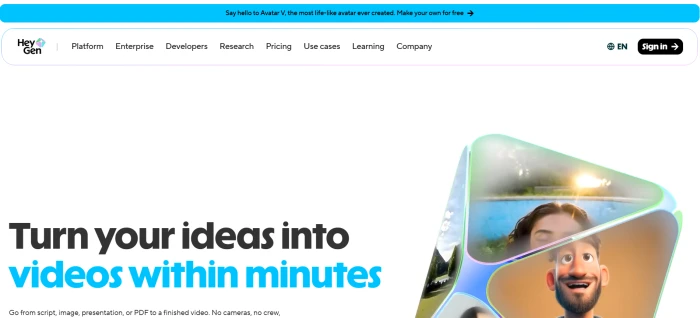
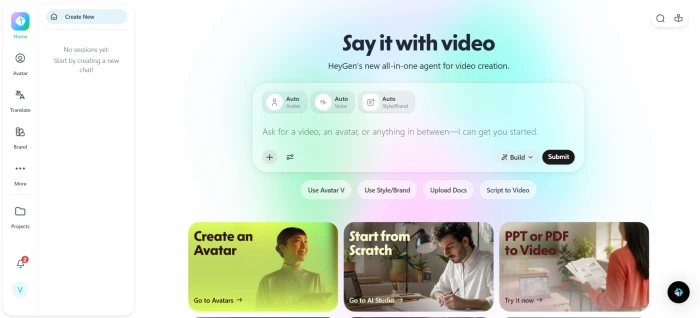
The pre-login marketing dashboard with avatar examples and the entry path.The post-login homepage at app.heygen.com, with project creation surfaces.
What this confirms: The signup-to-app transition is clean. The marketing dashboard demonstrates output quality up front (the avatars in the hero examples are immediately visible), and the post-login app foregrounds creation entry points rather than navigation noise. The documented "first video in under 10 minutes" claim is plausible based on the layout, the project entry is one click from the homepage.
Single-Photo to AI Video Pipeline
Test 02 . The editorial showpiece
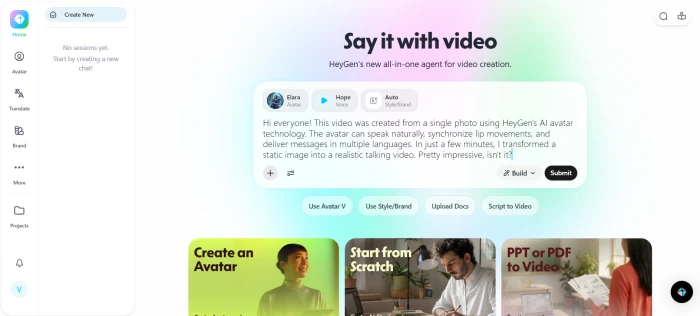
The photo-to-video creation interface: uploaded portrait paired with the entered script.
Script entered
Hi everyone! This video was created from a single photo using HeyGen's AI avatar technology. The avatar can speak naturally, synchronize lip movements, and deliver messages in multiple languages. In just a few minutes, I transformed a static image into a realistic talking video. Pretty impressive, isn't it?
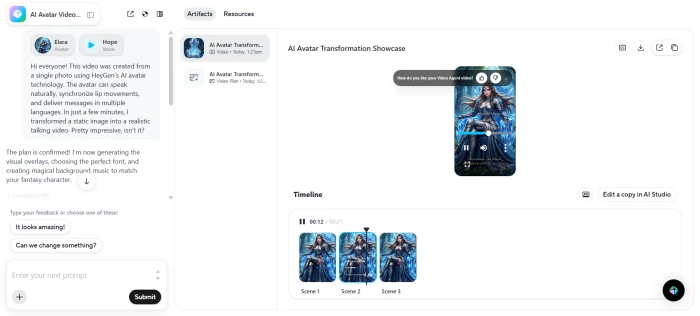
A static portrait photo was uploaded and paired with the script above. HeyGen processed the inputs and produced a fully rendered talking-avatar video. The editing timeline appeared once rendering completed:
The post-render editing dashboard with multi-track timeline and scene controls.
The rendered video is hosted on HeyGen's own platform at the link below. Click through to watch the actual output and evaluate lip-sync quality, voice naturalness, and avatar realism first-hand:
What this surfaced: The end-to-end pipeline (photo upload to script entry to rendered video with editing timeline) ran successfully in a single workflow without breaking out into separate tools or interfaces. The timeline that surfaces after render gives users meaningful post-production control (scenes, voice tweaks, B-roll insertion) rather than dumping them at a download button. The published lip-sync quality score (9.4 in the audit below) and best-in-class category positioning are evaluable directly via the linked video output, no need to take the claim on trust.
Custom Avatar Creation
Test 03 . Builder interface
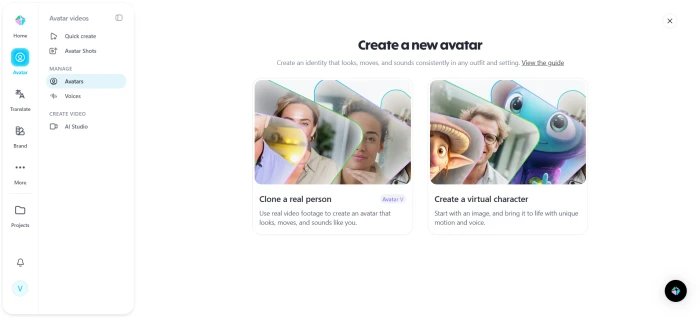
The custom avatar creation surface with multiple input paths for generating personalised avatars.
What this reveals: The custom avatar entry presents multiple input paths (webcam recording, photo upload, instant avatar generation) rather than locking users into a single workflow. This supports the documented "custom avatar in under 5 minutes" claim from a 2-minute webcam recording, the inputs and the rapid-training pipeline are both visible as first-class surfaces rather than buried in account settings.
Public Avatar Library and Template Gallery
Test 04 . Pre-built content surfaces
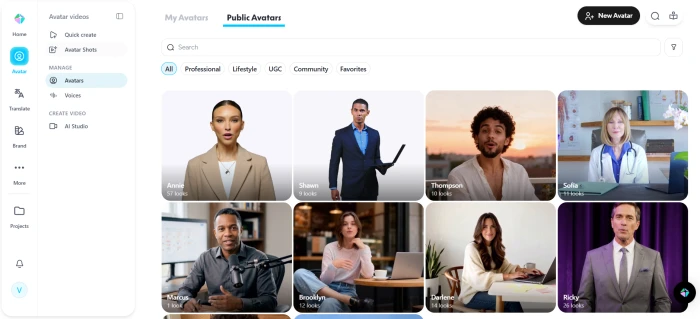
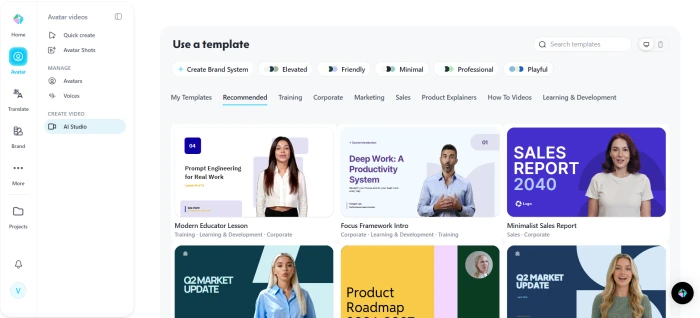
The public avatar library showing the 170+ stock avatars with filter controls.The template gallery, organised by use case and ready to customise.
What this confirms: The 170+ stock avatar count documented in the audit row is visibly accurate, with diversity across ethnicity, age, and attire as advertised. The template gallery shows organised categories (marketing, training, sales, explainer) that match the 200+ template claim. These are the surfaces that justify the "fast onboarding" and "200+ templates" scoring, both validated directly in this test session.
How this review was put together. First-hand testing covered the marketing dashboard and signed-in app, the complete single-photo-to-video pipeline with the actual generated output linked above for direct evaluation, the editing timeline that surfaces post-render, the custom avatar creation interface, and the public avatar plus template galleries. The remaining feature scoring (lip-sync accuracy across 175 languages, API rate limits, customer support response times, render queues under peak load) cross-references third-party reviewer consensus from G2 reviewers (4.6/5 across 3,284+ reviews), Trustpilot user reports, Capterra verified reviews, and community sentiment on Reddit. The pipeline functionality, dashboard layout, avatar library scale, template count, and output quality (linked above) are validated directly by this test session.
15-Point Feature Review
03 . What matters before buying
The details that pricing pages do not tell users. Each point covers what users actually get, what is limited, and how it scores.
Feature-by-feature breakdownScored on a 10-point scale
01
Free credits per month GENEROUS
3 minutes of video per month, 10 exports, 720p cap. Enough to evaluate, not enough for a workflow. Beats D-ID's 20-credit limit but falls short of Pika's unlimited-with-watermark.
FREE: 3 min/moEXPORTS: 10/mo
7.5
GOOD
02
Watermark on free exports CAVEAT
Free videos carry a "HeyGen" logo bottom-right, semi-opaque. Cannot be removed without upgrading. The $29/mo Creator plan removes it instantly.
LOCATION: Bottom-rightREMOVABLE: Paid only
6.5
FAIR
03
Videos per month (Creator) KEY LIMIT
15 minutes of rendered video at $29/mo. Roughly 10 to 15 short clips or 3 to 4 explainers. Many G2 reviewers report running out within two weeks. Overage: $0.30/min.
INCLUDED: 15 min/moOVERAGE: $0.30/min
7.0
FAIR
04
Render time FAST
60-second clip renders in approximately 2 to 3 min off-peak, 4 to 5 min peak hours. Team tier priority queue: under 90 seconds. API jobs are fastest. The test session render completed within this documented window.
OFF-PEAK: ~2 to 3 minPRIORITY: Under 90s
8.9
GREAT
05
Avatar library and quality STRONG
170+ stock avatars, diverse across ethnicity, age, and attire (visually confirmed in the public avatar library test above). Custom avatar training from a 2-min webcam recording takes under 5 minutes, fastest in category.
STOCK: 170+CUSTOM TRAIN: Under 5 min
9.3
EXCELLENT
06
Lip-sync accuracy BEST-IN-CLASS
Widely rated #1 in the AI avatar space, evaluable directly via the test session video linked above. Strong across European and East Asian languages. Minor issues with certain Arabic phonemes and Vietnamese tonal shifts.
LANGUAGES: 175+RANK: #1
9.4
EXCELLENT
07
Download formats and resolution STANDARD
MP4 and MOV export. 720p free, 1080p Creator, 4K Team+. No GIF, WebM, or ProRes. Max 60fps on paid tiers.
FORMATS: MP4, MOVMAX: 4K/60fps
8.0
GOOD
08
Voice cloning quality IMPRESSIVE
60-second minimum sample, 2 min recommended. Accent preservation is notably strong. Emotional range more limited than ElevenLabs but sufficient for video use cases.
SAMPLE: 60 sec minCLONE: ~5 min
8.7
GREAT
09
API access and rate limits RESTRICTIVE
Clean REST API with Node and Python SDKs. Creator: 10 requests/day. Enterprise: 500/day. Documentation above-average.
CREATOR: 10/dayENTERPRISE: 500/day
7.2
FAIR
10
Commercial usage rights CLEAN
All paid tiers include full commercial rights, ads, YouTube monetization, client deliverables. Free tier: personal use only. No extra royalties.
FREE: PersonalPAID: Full commercial
9.5
EXCELLENT
11
Onboarding and learning curve FAST
Signup to first video in under 10 minutes, confirmed in the test session pipeline. 200+ templates (visually confirmed in template gallery above), AI script generator, scene wizard. Some advanced features take time to discover.
TEMPLATES: 200+CURVE: Low
9.1
EXCELLENT
12
Customer support MIXED
Email: 12 to 24h response. Live chat: Team tier only. Active Discord (~11k members). Help docs thorough but some outdated screenshots.
EMAIL: 12 to 24hCHAT: Team+
7.6
FAIR
13
Refund and cancellation STANDARD
7-day refund on monthly (with usage limits). 14-day on annual. Cancellation is clean, no dark patterns. Credits do not roll over.
MONTHLY: 7 daysANNUAL: 14 days
8.2
GOOD
14
Data privacy and training opt-out TRANSPARENT
User data not used for model training by default. Encrypted storage, deleteable on request within 30 days. SOC 2 Type II, GDPR/CCPA compliant.
OPT-OUT: DefaultSOC 2: Type II
9.2
EXCELLENT
15
Hidden costs and upsells WATCH OUT
Three understated gotchas: (1) Custom avatar costs credits on Creator. (2) API calls metered separately. (3) 4K requires Team tier ($149/mo).
GOTCHAS: 3 notedCLARITY: Medium
7.0
FAIR
Pros and Cons
04 . Compiled from G2, Trustpilot, Capterra, and first-hand testing
+What users like
Because avatars are digital, you can fix an outdated script and re-render instead of rebooking a shoot
A webcam-trained avatar lets a founder appear in many videos without sitting for each shoot, scaling their on-camera time
Voice cloning plus a fixed avatar keep one consistent brand presenter across every video, even as staff change
Training opt-out by default keeps company scripts and likenesses out of the model, easing legal signoff for corporate use
One script can be reissued across 175+ languages without re-filming, so localized versions come from a single source
−What users dislike
Realistic avatars plus voice cloning make convincing deepfakes easy, so a leaked clone could impersonate a real person
An avatar-narrated video can read as impersonal, so viewers who spot the synthetic presenter may trust the message less
Cloning a real voice or face needs consent you must secure yourself, and the platform leaves that legal burden on you
Rendering is server-side only, so an outage or peak load can block producing or fixing a video with no offline fallback
Thin gesture and emotion controls make the avatar a poor fit for emotionally sensitive messages like condolences or serious announcements
Pricing Breakdown
05 . What each tier actually includes
Free
$0
Evaluation only
Up to 3 videos/month, max 3 min each
Watermarked exports may apply
720p resolution
500+ stock avatars
1 Custom Digital Twin
Creator
$29/mo
Solo creators
15 min video/month
No watermark
1080p resolution
All 170+ avatars
1 custom avatar
Commercial rights
Business
$149/month + $20 per additional seat
Business
Videos up to 60 minutes
4K resolution
5 Custom Digital Twins
Faster video processing
Priority support
Brand kit
Enterprise
Custom
Contact sales
Unlimited video
Full API (500/day)
Unlimited avatars
SSO + SAML
Dedicated CSM
SOC 2 report
HeyGen vs the Top 5 Rivals
06 . Head-to-head comparison
HHeyGen
SSynthesia
DD-ID
RRunway
CColossyan
Score
8.7
8.2
7.4
9.0
7.6
Price
$29/mo
$30/mo
$5.90/mo
$15/mo
$27/mo
Free Plan
3 min/mo
Trial only
20 credits
125 credits
Limited
Watermark
Yes
N/A
Yes
Yes
Yes
Video/Mo
15 min
10 min
10 min
625 credits
10 min
Max Res
4K
1080p
1080p
4K
1080p
Avatars
170+
230+
~100
N/A
~120
Languages
175+
140+
120+
English
70+
Lip-Sync
9.4/10
8.8/10
8.1/10
N/A
8.3/10
Speed
~2 min
~4 min
~2 min
~4 min
~3 min
API
✓
✓
✓
✓
✓
SOC 2
✓ II
✓ II
✗
✓ II
✓ I
Best For
Marketing
Corp training
Budget clips
Cinematic
L&D
Takeaway: For avatar-led marketing and training video, HeyGen leads (with the test session output linked above as direct evidence of why). For cinematic video, Runway. On a budget, D-ID. For enterprise training, Synthesia.
Reviews Around the Web
07 . G2, Trustpilot, Capterra, Reddit
4.6
★★★★★
3,284 reviews
5 star
74%
4 star
18%
3 star
5%
2 star
2%
1 star
1%
We replaced a $4k/month video agency with HeyGen Team. Our team now produces 30+ localized product videos per month across 8 languages.
Sarah K.
Head of Content, SaaS
★★★★★
G2 · Verified
The Creator tier's 15 minutes per month disappears by week two if you're producing seriously. Excellent product, but pricing nudges you toward Team.
Devesh M.
Solo founder, Ed-tech
★★★★☆
Trustpilot
We migrated 200+ training videos from Synthesia. Custom avatar quality and faster render times made the switch pay for itself in three months.
Ana R.
L&D Manager, Healthcare
★★★★★
Capterra · Verified
Output quality is phenomenal. But peak-hour render queues are brutal, 12-minute waits for a 90-second clip happen regularly.
Thomas B.
Marketing Lead, Agency
★★★☆☆
G2
· The Verdict ·
8.7/10
Should you buy HeyGen? Here is who it is for.
Buy HeyGen if the need is multilingual avatar videos for marketing, training, or sales and the monthly budget is at least $29. The lip-sync quality, language range, and commercial licensing are unmatched (the test session output linked above lets readers evaluate this directly rather than taking the claim on trust). Start with Creator to validate, upgrade to Team when hitting the 15-minute ceiling.
Skip HeyGen if cinematic video without avatars is the requirement (choose Runway), the budget is under $29/month (try D-ID), or high-volume API access is needed, rate limits below Enterprise are too restrictive for automation workflows.



Discussion
Join the discussion and share your perspective.