Ideogram is the image generator built to spell. In our testing it produced a jazz poster where even the tiny legal fine print stayed legible across all four variations, then held up in Korean without a single broken character. It is aimed at designers and marketers who need words inside the picture, not just a decorative background. The catch is a free tier restrictive enough that it reads as a demo rather than a place to work.
Ideogram is a text-to-image generator with one obsession: getting the letters right. Most models treat words in an image as decoration and hand back garbled shapes where the text should sit. Ideogram was built by a group of former Google Brain researchers around the opposite premise, that a poster or a logo is useless if you cannot read it, and legible typography has been its calling card since launch.
The product has grown past that single trick. It now runs its current 3.0 and 4.0 models well beyond typography, into photorealism and illustration, and layers on a Style References system that copies the look from up to three uploaded images. Everything lives inside Canvas, an infinite board that adds inpainting through Magic Fill and outpainting through Extend. A Describe tool runs the process backward into captions. Batch generation pulls prompts from a spreadsheet, and the whole model line is exposed through a developer API. The audience it courts is practical: designers and small businesses making posters, ad creative, packaging mockups, and book covers where the words have to land.
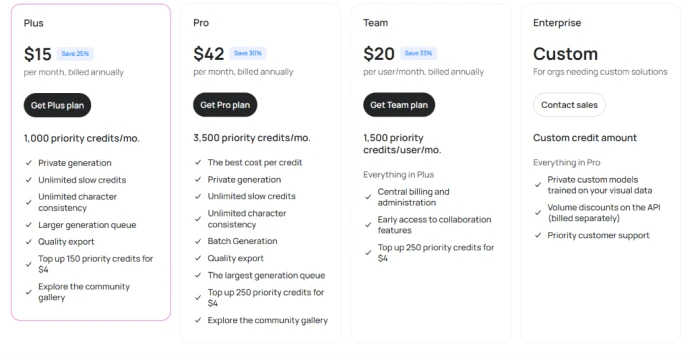
It runs on a freemium model, with a free tier below a Plus plan at $15 a month and a Pro plan at $42, both billed annually, with Team and Enterprise options above them.
What Happened When We Tested It
02 . 5 tests, from poster text to office portraits
I signed up for a free account to find where the paywall actually sits. The five prompts I ran were chosen to lean on the two things AI image tools tend to fumble, legible text at small sizes and photographs of people, with a detour through a non-Latin script to see how far the text engine really stretches.
The credit clock starts at login
Test 01 . Free-tier limits
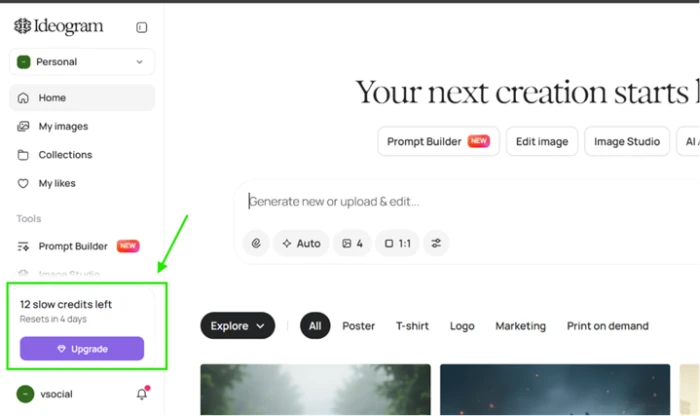
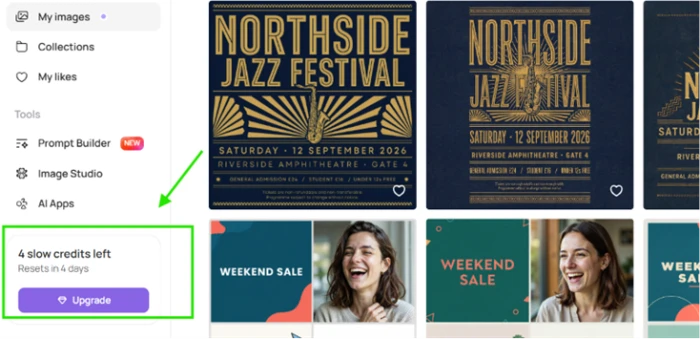
The free account's starting balance and the reset countdown.
First impression: The moment I logged in, the sidebar showed 12 slow credits and a four-day reset, with an Upgrade button one click below. The batch size defaults to four images and the single-image options are frozen, so on a free plan every prompt spends the whole set of four at once.
A poster packed with small text
Test 02 . In-image text
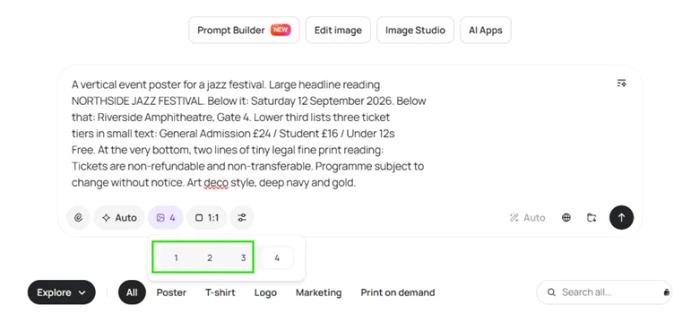
★ Prompt Used
"A vertical jazz festival poster, art deco style in deep navy and gold. Headline reading NORTHSIDE JAZZ FESTIVAL, with a date and venue, three ticket tiers priced out in small text, and two lines of tiny legal fine print along the bottom."
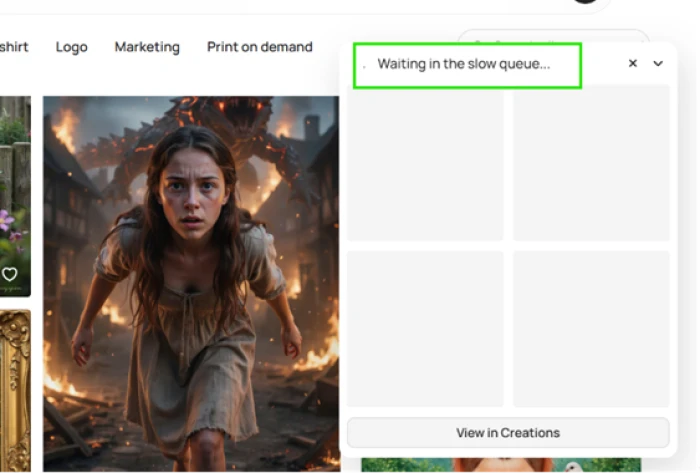
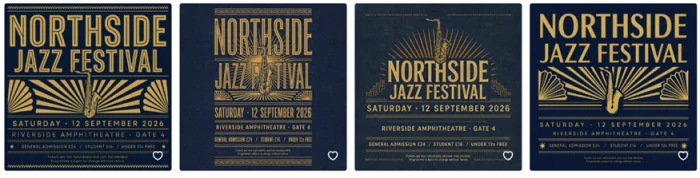
The prompt as entered, before it dropped into the queue.Free generations wait behind paying users in the slow queue.All four returns, with the text intact.
The evidence: Every version spelled NORTHSIDE JAZZ FESTIVAL correctly. The date and venue read cleanly. The three ticket tiers held their prices, and the two lines of tiny legal fine print along the bottom stayed legible across all four posters, which is exactly where most generators dissolve into shapes that only resemble letters. The art deco framing, gold saxophone and sunburst fans, looked composed rather than thrown together.
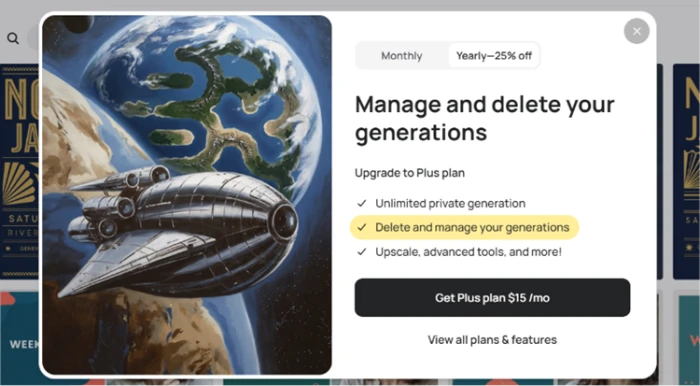
You cannot delete your own images
Test 03 . Paywall mechanics
Removing a generation you made is gated behind Plus.One prompt later, the balance had dropped to four.
Worth noting: When I tried to tidy the gallery and remove one of my own generations, a popup told me that deleting and managing images is a Plus feature at $15 a month. That single four-image prompt had already pulled the balance from 12 down to 4. A free account, in practice, gets two or three prompts before it locks for four days.
The same text engine, in Korean
Test 04 . Multilingual text
★ Prompt Used
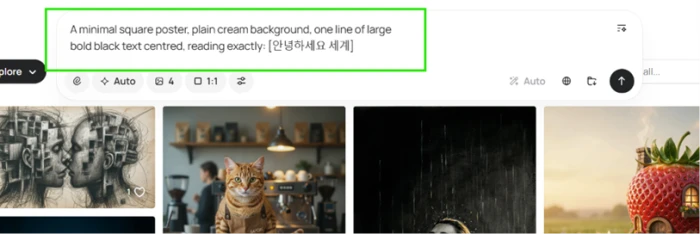
"A minimal square poster, plain cream background, one line of large bold black text centered, reading exactly 안녕하세요 세계."
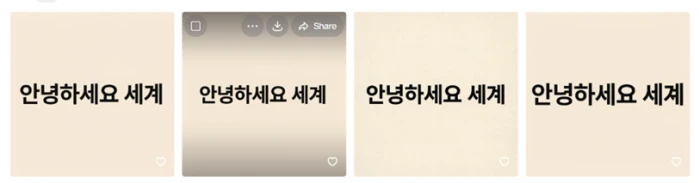
The multilingual test prompt.Four clean returns, no broken glyphs.
What stood out: English is the easy case, so I pushed it into Korean. All four returns rendered 안녕하세요 세계 cleanly, correctly spaced and in the bold black weight I asked for, with no mangled or invented characters. Handling a non-Latin script that accurately is a level most image models never reach.
People look real until you count them
Test 05 . Photorealism
★ Prompt Used
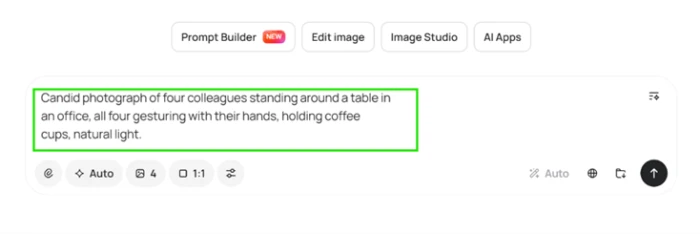
"A candid photograph of four colleagues standing around a table in an office, all four gesturing with their hands, holding coffee cups, in natural light."
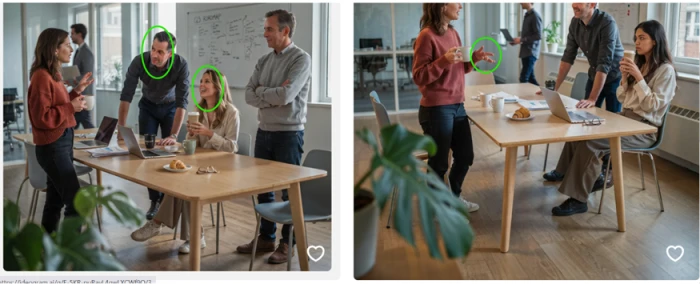
The photorealism prompt.At a glance, it reads like a stock photo.Look closer: a missing colleague and a merged hand.
The real story: The skin texture and the office light were convincing enough to pass for a real stock photo. Then the details fell apart. My prompt asked for four colleagues, and one of the four images returned only three people. In that same frame, one woman's hand collapsed into a clump of merged fingers. The model can light a room, but it still miscounts people and mangles hands.
★
Legible text in two scripts, fine print and all
The strongest thing I validated was consistency, not a single lucky render. Across every variation, the English headline and its bottom-of-poster fine print stayed readable, and the model repeated the feat in a second language just as cleanly. For anyone whose work depends on words inside the image, that reliability is the reason to be here.
!
The free tier is a demo, not a workspace
The free plan cannot hold real work. Single-image generation is locked, and so is deleting your own output. The credit balance empties in two or three prompts, and then the account sits idle until it resets. Anyone serious should judge Ideogram on a paid trial, since the free experience is designed to move you off it.
How this review was put together. I tested Ideogram on a fresh free account in early August 2026, running five prompts and capturing every result and upgrade prompt as it surfaced. Pricing and plan features were read directly from Ideogram's own in-app upgrade screen and cross-checked against ideogram.ai, not lifted from a third-party roundup. The behavior described here reflects that single session, without cherry-picking the best of each set.
10-Point Feature Review
03 . Scored on what it did, not what it claims
Feature Scores at a Glance
In-image text rendering
9.0
Style range and control
8.0
Multilingual text
8.0
Developer API
7.5
Photorealism
7.0
Output and export
7.0
Editing tools on Canvas
6.5
Generation speed on free
5.5
Anatomy: hands and counts
5.0
Free tier generosity
5.0
Feature-by-feature breakdownScored 1 to 10 on hands-on returns and verified features
01
In-image text rendering Standout
This is the whole reason to choose Ideogram, and testing confirmed it holds at the sizes that matter: even small-print text stayed legible where rival models smear it. It sits at 9.0 rather than a perfect score because placement control is weak, and users note you cannot always nudge text into an exact position. It stays at the top of the range because legibility, the hard part, was flawless in every return I generated.
Smallest legible text: Fine printMisspellings seen: None
9.0
Excellent
02
Style range and control Deep
The art deco brief produced composed, on-theme results rather than a generic pastiche, and the wider system runs deep: Style References copy the look from up to three uploads, and saveable Style Codes lock a brand aesthetic across a campaign. I put it at 8.0 because the poster was the only style I stress-tested directly. It holds above the mid-sevens because the reference system is well regarded and the one result I did push looked deliberate.
Style refs: Up to 3 imagesReusable styles: Style Codes
8.0
Strong
03
Multilingual text Verified
Non-Latin text is where the engine surprised me: the return came out clean and correctly spaced with no broken glyphs. It lands at 8.0, not higher, because I stress-tested a single script and Ideogram is built around English, so wider multilingual reliability is unproven. Nothing in that one return warranted a deduction, which keeps it firmly in the eights.
Non-Latin tested: KoreanGlyph errors: None
8.0
Strong
04
Developer API Differentiator
Ideogram ships a real per-image API with endpoints for generation, remix, editing, and reframing, a clear edge over Midjourney's closed setup and a reason startups build on it. It earns 7.5 rather than more because access is billed separately from the subscription and some users have flagged rate limits on heavier runs. A published, per-image API with editing endpoints is more than most consumer image tools offer, which keeps it comfortably above 7.
API billing: Per imageEditing endpoints: Yes
7.5
Strong
05
Photorealism Improving
Skin texture and natural office light were convincing enough that the scene could pass for stock photography, and independent testers now put the gap to Midjourney at roughly a single point. The score stops at 7.0 because coherence breaks under close inspection, with small errors surfacing once you look past the lighting. Nudge it up and you would be ignoring those flaws; nudge it down and you would be underselling how real the light looked.
Base realism: Stock-photo gradeHolds up close: Not always
7.0
Solid
06
Output and export Gated
Paid plans export at native 2K with clean PNGs and alpha channels, enough for print and layered design work. It settles at 7.0 because the free tier drops you to compressed JPG only, so the higher-quality output waits behind an upgrade. It holds at 7 rather than lower because the ceiling, 2K with transparency, is competitive for a consumer tool.
Max export: Native 2KFree downloads: Compressed JPG
7.0
Solid
07
Editing tools on Canvas Paywalled
Canvas is a capable in-app editor, with Magic Fill for inpainting and Extend for outpainting, and Magic Fill keeps text correct when you swap it. Two things hold it at 6.5: editing uploaded images requires a paid plan, and users repeatedly report the model refusing simple edits like resizing a subject or shifting text. It stays above 6 because the core inpainting and outpainting tools work and go beyond what many rivals bundle.
Inpaint / outpaint: Magic Fill, ExtendEdit uploads: Paid only
6.5
Mixed
08
Generation speed on free Slow queue
On priority credits the model returns in seconds, but the free tier routes you into a slow queue behind paying users, and my poster sat waiting on placeholder tiles. It lands at 5.5 because Ideogram has quietly stretched slow-queue waits before, so the free experience is unhurried by design. It clears 5 because paid generation is quick once you are off the queue.
Free queue: Slow, sharedPaid speed: Seconds
5.5
Slow
09
Anatomy: hands and counts Weak
The office test exposed the classic weakness head on, where the model lost a person from one frame and rendered a hand as merged fingers. The 5.0 is deliberate: the defect appeared on a simple, explicit request and marred an otherwise usable image. It does not drop below 5 because three of the four returns in that set were clean, so the failure is intermittent rather than constant.
Hand artifacts: PresentCount accuracy: 3 of 4 correct
5.0
Weak
10
Free tier generosity Restrictive
The free plan produces full-quality generations, more than watermarked rivals offer, but the locks are heavy: no single-image mode, no deleting your own work, public outputs, and a balance that vanishes in a couple of prompts. It scores 5.0 because those restrictions push it toward a trial rather than a usable free tool. It avoids a lower mark only because the images it does make carry no watermark or resolution cap.
Free credits: 12, four-day resetOutput visibility: Public
5.0
Weak
Pros and Cons
04 . What you feel using it day to day
+What Works
Text that ships: headlines and small print come out legible enough to drop into a layout without fixing them.
Multilingual typography: it renders non-Latin scripts cleanly, not only English.
Deep style control: Style References and saved Style Codes keep a brand look consistent across a campaign.
A real editing surface: Canvas with Magic Fill and Extend covers inpainting and reframing in one place.
Convincing base photorealism: skin and light read like stock photography at first look.
Developer-ready: a per-image API with editing endpoints lets teams build generation into their own apps.
−What Grates
Unreliable hands and crowds: multi-person scenes and fingers still distort, so people shots need a close check.
Rigid iterative editing: it often balks at simple after-the-fact changes like resizing a subject or nudging text.
Coherence has limits: convincing at a glance, but details drift once you inspect them.
A learning curve on prompts: loose prompts wander into odd results until you adapt to its phrasing.
Pricing Breakdown
05 . Free, Plus and Pro, and the credit catch
Feature
Free$0
Plus$15/mo billed annuallyMost Popular
Pro$42/mo billed annually
Priority credits per month
None
1,000
3,500
Slow credits
12, four-day reset
Unlimited
Unlimited
Private generation
✗
✓
✓
Delete and manage your own images
✗
✓
✓
Quality export, uncompressed
✗
✓
✓
Batch generation from a spreadsheet
✗
✗
✓
Generation queue
Slow only
Larger
Largest
Credit top-up rate
None
150 for $4
250 for $4
What you're actually paying: The figure that matters is not the monthly price but what a credit buys. Credits are spent per generation, and how many images you get from a batch shifts with the model and quality you pick, so Plus's 1,000 priority credits can mean a few hundred images or a few thousand depending on how you generate. That priority allotment is a monthly ration, so unused credits do not bank, and the uncapped slow queue is the release valve once they run out. Climbing to Pro roughly triples the priority credits and is the only personal plan that adds spreadsheet batch generation, so the reason to move up is throughput rather than any single headline feature. Against the subscription-only image tools, Ideogram's entry point lands well under the category's usual starting price, which is the whole pitch for text-forward design work.
Ideogram's paid tiers, from Plus up to Enterprise.
Pricing checked against Ideogram's in-app upgrade screen on August 10, 2026. Plans and credit limits shift often, so confirm the current numbers on the official pricing page before you subscribe.
Ideogram vs the Top 4 Alternatives
06 . Where it wins and where a rival fits better
IIdeogram
MMidjourney
FFirefly
DDALL·E 3
RRecraft
In-image text
Best in class
Weak
Passable
Good
Very good
Free tier
Yes, slow queue
No
Yes
Yes, in ChatGPT
Yes
Developer API
Yes, per image
None official
Yes
Yes
Yes
Best For
Text-heavy posters and logos
Photoreal art and style
Commercial-safe Creative Cloud work
Casual prompts inside ChatGPT
Editable vector and brand sets
Where to land: If the brief has words in it, whether a headline or a logo lockup, Ideogram is the safe default and the rest trail it on legible type. Reach for Midjourney when the image is pure atmosphere and you want the most refined realism. Firefly earns its place if you already work inside Photoshop and need output you can defend on licensing. The close call is Recraft, which matches Ideogram on typography and adds true vector export, so any design team shipping editable brand assets should trial both before committing.
What Users Are Saying
07 . Real users on the parts we could not test
Really love playing with this app and creating. I do really wish you could leave comments and communicate with other creators within the app itself. I also really wish you receive credits back for deleted pics. I delete about 80% of images created.
Over the last year it's been the fastest and easiest UI to use for images... the best for uploading real-life faces to be used as consistent characters.
I was previously very happy with my Ideogram Plus subscription, especially for workflows involving reference images. One of the biggest reasons I subscribed was that I could continue using reference images even after my priority credits had run out. Unfortunately, this changed quite literally overnight.
Do not subscribe to Ideogram AI. They make it practically impossible to cancel your membership. The cancellation button is hidden, so you cannot end your subscription, and they keep charging your bank account.
They have an amazing customer service. I only had a couple of issues and they resolved them in a very timely manner and very efficiently. This is also a great product!
Use Ideogram if your work puts words inside the image, whether posters, packaging, ad creative, or book covers, and you care more about legible type than picture-perfect realism. It rewards anyone willing to pay for private generation and a queue that moves.
Skip Ideogram if photorealistic people are the job, since hands and crowds still distort and Midjourney holds the realism edge, or if you want one broad creative suite, where Leonardo AI (6.8 in our testing) bundles image and video generation under one roof.


Discussion
Join the discussion and share your perspective.