
Home / Reviews / AI Image Generator / ImagineArt AI
ImagineArt logo
AI Image & Video Generator Generative AI Suite

ImagineArt Review

imagine.art · by Vyro AI

ImagineArt is an all-in-one generative studio that puts a wide roster of image and video models behind one dashboard, Nano Banana 2 and Seedream among them. Alongside text-to-image and text-to-video it bundles newer tools like AI Influencer for custom character clips. It targets creators and marketers who want one subscription covering both stills and motion rather than juggling separate generators.

Reviewer Score
7.1
/10
Capable Pick
Strong stylized output, fast
but the free tier is locked down
Anime & Stylized Art8.5
Generation Speed8.5
Model Library8.0
Text in Images5.0
Free Tier Privacy5.0
Platform
Browser no install
Free Credits
100 daily, +75 start
Free Models
4 ImagineArt, Qwen+
Video (free)
Locked PRO only
Entry Plan
US$9 /mo yearly
Top Models
Nano Banana 2 PRO locked

What ImagineArt Does

01 . Overview

ImagineArt, built by Vyro AI, is a browser-based creative suite for generating images and video from text. The same dashboard runs text-to-image, text-to-video, image editing, and character tools, pulling from a large library of in-house and third-party models that a user switches between per generation.

The positioning is a model buffet. Rather than training a single engine, ImagineArt aggregates many of the names creators already chase, Qwen, Recraft, Kling and Seedream among them, and wraps them in a credit system and a mobile app. It aims at creators and marketers who want stills and motion from one tool. The platform runs on a free tier with daily credits, and paid plans open at US$9 a month on annual billing.

What Happened When We Tested It

02 . 6 tests across ImagineArt's free plan

Testing ran on the free plan, in-browser, straight after a Google sign-up. Each tool got a real prompt and the output was judged at full size, with the credit balance left to drain the way a new user's would.

Signing up and the free credits

Test 01 . Onboarding
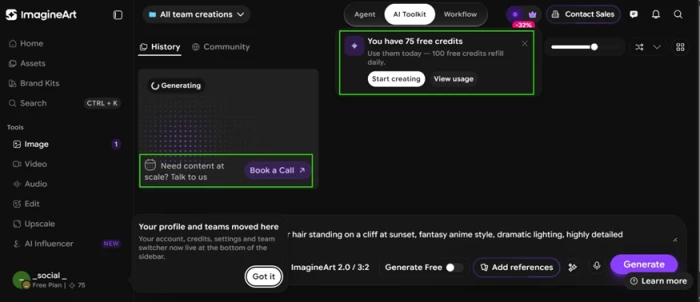
ImagineArt dashboard after sign-up showing a 75-credit balance alongside Book a Call and Contact Sales prompts
The dashboard on first login, upsell buttons already present.
First impression: Creating an account took under a minute with Google sign-in, and the dashboard handed over 75 free credits plus a note that 100 credits refill every day. That is enough to test the tool properly. The upsell starts early, though. A Book a Call prompt and a Contact Sales button sat on screen before a single image existed, and a discount badge trailed the whole session.

The anime result impressed me

Test 02 . Stylized image
★ Prompt Used

"A young warrior with silver hair standing on a cliff at sunset, fantasy anime style, dramatic lighting, highly detailed"

ImagineArt image generator with a fantasy anime warrior prompt entered
The anime prompt in the image generator.
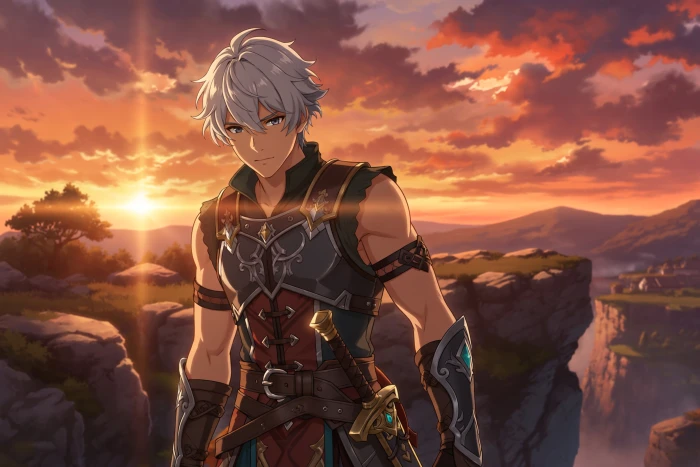
AI-generated fantasy anime warrior with silver hair on a cliff at sunset, sharp armor detailing and clean sunset backdrop
The generated warrior, with armor and sunset lighting intact.
What clicked: The generation finished in seconds and the output held up. Lighting and armor detailing both looked sharp, and the sunset backdrop framed the character cleanly. This is where ImagineArt earns its reputation. For anime and fantasy character art, the free output is good enough to publish as it stands.

A realistic portrait and a text problem

Test 03 . Photorealism
★ Prompt Used

"Close-up portrait of a 30-year-old man with a short beard, soft natural window light, 85mm lens, photorealistic"
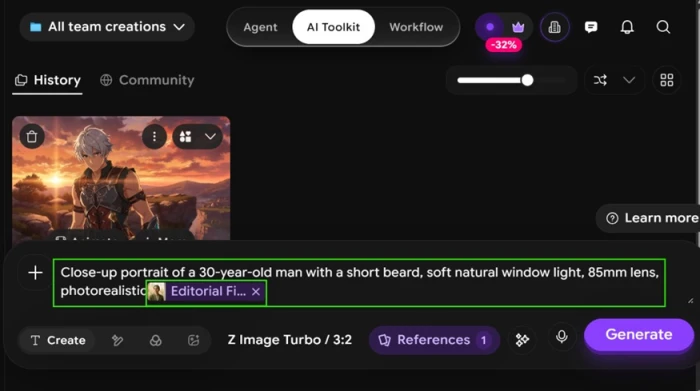
ImagineArt photorealistic portrait prompt with a style preset applied
The portrait prompt with a style preset selected.
AI portrait of a bearded man with garbled preset text printed across the lower half of the image
The result, with mangled preset text across the lower half.
The key finding: The face came out convincing, skin texture and window light both reading real. Then the flaw showed. ImagineArt printed the style preset's description onto the image as text, and that text was garbled. Mangled words like "Editorial-film" and a broken "35mm Kodak Portra 400" ran across the lower half. Any image that needs readable words will hit this weakness fast.

Model costs and what sits behind Pro

Test 04 . Model picker
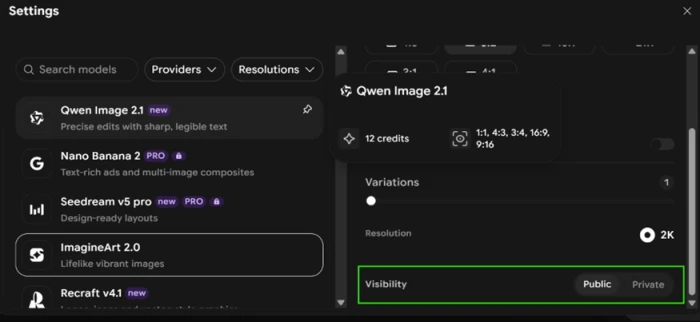
ImagineArt model picker showing free models beside PRO-locked models with padlock badges and per-generation credit costs
The model picker, free options beside PRO-locked ones.
The signal here: The model picker is where the free plan draws its lines. Free models like ImagineArt 2.0, Qwen Image 2.1, Recraft v4.1 and Z Image Turbo are available, each charging a different credit cost. Qwen Image 2.1 alone took 12 credits per generation, draining the daily balance faster than the starting number suggested. The best models, Nano Banana 2 and Seedream v5 pro, both sat behind a PRO padlock.

Video, and the privacy catch

Test 05 . Locked tiers
ImagineArt video model list with every model carrying a PRO badge
Every video model wearing a PRO badge.
Under the surface: Moving to the video tools turned up no free model at all. Happy Horse, Seedance 2 Fast, Wan 3, Kling 3.0 Turbo Pro and Google Omni Flash each carried a PRO badge, so video is entirely off the table on free credits. The same wall guards privacy. The Settings panel offers a Private toggle, but it cannot be selected without a paid plan, which leaves every free generation public by default.

Two new features: AI Influencer and Sabre

Test 06 . New tools
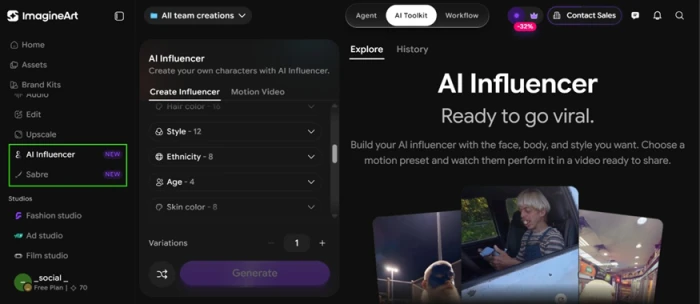
ImagineArt sidebar showing the new AI Influencer and Sabre tools
AI Influencer and Sabre in the free plan's sidebar.
How it performed: ImagineArt has added two tools since its earlier versions. AI Influencer builds a custom character with a face and body you pick, then drops them into a motion video using a chosen preset. Sabre sits next to it as another recent addition. Both appear in the free sidebar, though the actual generation leans on the same credit and PRO-model limits as the rest of the suite.
★
Anime and fantasy art that is ready to publish

On a fantasy prompt the output arrived in seconds, with sharp lighting and clean armor detailing, strong enough to post without a paid plan. For stylized character work, the free tier delivers real results.

!
The free tier is a locked showroom

The best image models and every video model sit behind a PRO padlock, private output needs a paid plan, and credits drain unevenly, with one model costing 12 a generation. Add a bug that prints garbled preset text onto portraits, and the free plan previews the suite rather than finishing work.

How this review was put together. Testing ran on November 6, 2026 from a new, free ImagineArt account, entirely in-browser, across image generation, the model picker, video, and the newer character tools. Prompts were entered exactly as written and each result judged at full size. Pricing was confirmed on ImagineArt's official pricing page at imagine.art/pricing rather than a third-party listing.

10-Point Feature Review

03 . How ImagineArt scored across ten checks
Feature Scores at a Glance
Anime & Stylized Art
8.5
Photorealistic Portraits
8.0
Text-in-Image Rendering
5.0
Generation Speed
8.5
Model Library
8.0
Free Credit Allowance
6.5
Privacy Controls
5.0
Video Access
5.5
Onboarding & Ease
7.5
Upsell Pressure
5.5

Pros and Cons

04 . What stands out and what wears thin
+What works
  • A real model buffet: in-house and third-party engines sit in one picker
  • Convincing photorealism: skin texture and natural light read as real
  • One-minute onboarding: Google sign-in dropped straight into a working dashboard
  • Stills and motion together: image, video, and character tools share a single workspace
−What grates
  • Garbled text on images: a preset description printed as mangled words across a portrait
  • Public by default: private output is unavailable without paying
  • Uneven credit burn: a single model swallowed 12 credits per generation
  • Upsell from the start: sales prompts appeared before the first image

Pricing Breakdown

05 . Every plan, side by side
Feature FreeFree BasicUS$9 /mo yearly UltimateUS$34 /mo yearlyBest Value CreatorUS$83 /mo yearly
Standard monthly Free US$13 US$120
Monthly credits 75 + 100 daily 3,000 45,000
Approx images Varies ≈600 ≈9,000
Approx videos Locked ≈96 ≈1,500
Private output No Yes Yes

The tier math: Every plan bills annually, and the "3 months free" badge is the yearly discount, so the struck monthly rates are what month-to-month buyers pay. Credits are the real currency and they do not spend evenly, which means a headline allowance buys fewer premium generations than it implies once a 12-credit model is in play. The step from Basic to Ultimate is where cost-per-credit improves most, while Creator adds a slider that pushes the monthly allowance toward 100,000 credits for studio-scale output. Private generations and the top image and video models only switch on at paid tiers, so the free plan is a trial, not a workspace.
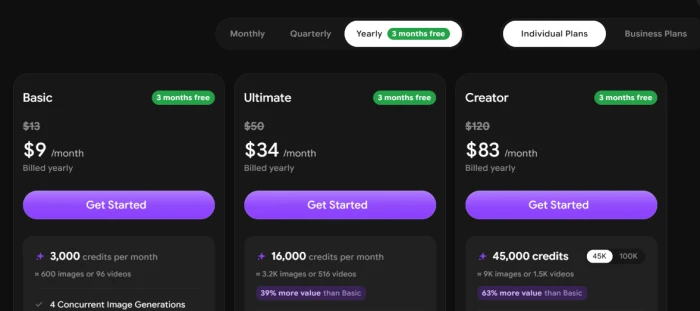
ImagineArt Individual plans on yearly billing showing Basic, Ultimate, and Creator with their monthly-equivalent prices and credit allowances
ImagineArt's Individual plans on yearly billing.

Pricing verified November 6, 2026. ImagineArt changes its offers and credit allowances often, so check the live tiers on the official pricing page before you buy.

ImagineArt vs the Top 4 Alternatives

06 . How the generative suites compare
IImagineArt MMidjourney LLeonardo AI FFreepik AI KKrea AI
Model breadthMany, incl. Nano Banana 2Own model, versionedMultiple plus fine-tunesAggregates many modelsAggregates top models
AI videoFull roster, PRO-gatedYes, newer featureMotion clipsMultiple modelsMultiple models
Free tierDaily credits, public-onlyNoneDaily tokensLimited dailyLimited
Best ForAll-in-one stills and motionTop-tier stylized artGame and concept artStock plus AI in one placeReal-time and newest models

How to choose: Midjourney still sets the bar for pure stylized image quality, and Krea or Freepik match ImagineArt's model-buffet approach with their own aggregated line-ups. ImagineArt's edge is packing image generation and a deep video roster into one dashboard, AI Influencer included, provided you are ready to pay to unlock the best of it.

What Users Are Saying

07 . Voices from Trustpilot and G2
Warns that "you don't get refund for ai image anatomy mistakes."
Verified Trustpilot reviewer
On refunds and pricing
★★☆☆☆
trustpilot.com
"The platform is modern, well-designed, and very easy to use."
Verified Trustpilot reviewer
On the interface
★★★★★
trustpilot.com
"I have made so much viral content" with the platform.
Verified Trustpilot reviewer
On real-world results
★★★★★
trustpilot.com
Praises the "amazing range and variety of art styles and models available."
Faiza K.
On model variety
★★★★☆
g2.com
· The Verdict ·
7.1/10
Is ImagineArt's model buffet worth it for you?

Use ImagineArt if you make anime or stylized art and want many image and video models under one subscription, and you are willing to pay to unlock the best engines, private output, and video.

Skip ImagineArt if you need readable text inside images, heavy free-tier use, or private work without paying. Midjourney leads on pure image quality, and Krea or Freepik offer a similar multi-model spread.

Category RankCapable Pick
Compared To4 Alternatives
Entry PriceUS$9/mo
Free TierDaily credits, public

Discussion

Join the discussion and share your perspective.