


What Img2Go Does
Img2Go is an online image workshop. It runs entirely in the browser and bundles editing, conversion, compression, and a set of AI tools into one place, so a photo can be cropped, cut out from its background, shrunk for email, or turned from HEIC into JPG without opening a separate site for each job. QaamGo Web GmbH, a German company in Radolfzell, builds and runs it.
The pitch is speed and access over depth. There is no software to download and nothing to sign up for before the first edit, which puts it in the same lane as the quick web utilities people reach for mid-task rather than the installed suites they plan projects around. Paid plans exist for anyone who outgrows the free wall, starting with Starter and climbing to a Business tier aimed at teams, but the free tier is the front door and most casual users will never leave it.
What Happened When We Tested It
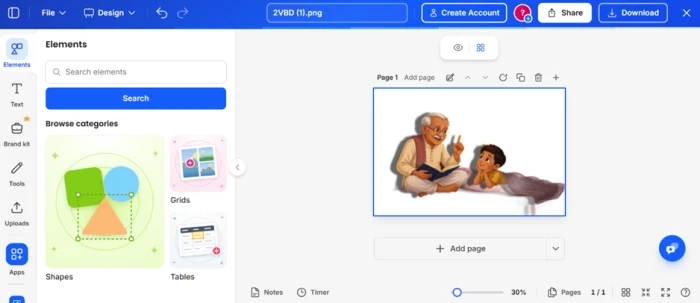
We worked through Img2Go logged out, on the free tier, feeding it the kind of mixed material a normal user throws at a free editor: a busy photo, an illustrated scene, an iPhone-style file, and a general poke at how far free actually goes. Here is where each test landed.
Changing a background by describing it
Test 01 . AI Edit"replace the background with white background"
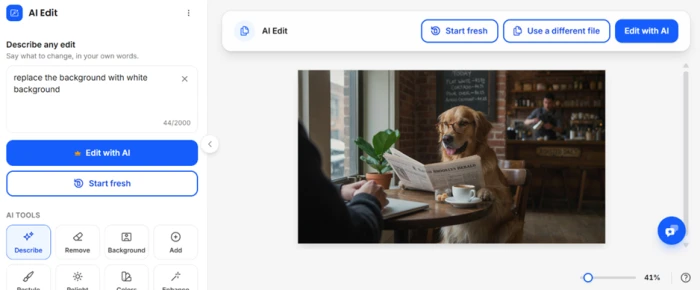

Picking a model before the cutout
Test 02 . Remove Background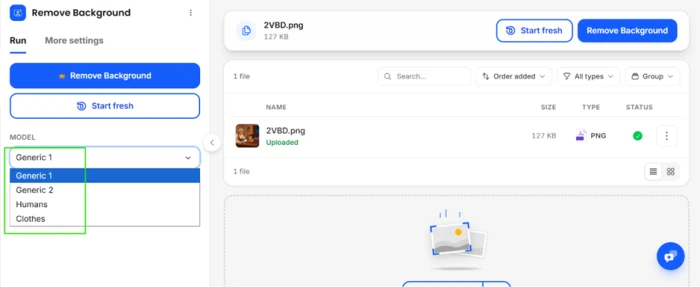


One tab, many jobs
Test 03 . Tool menu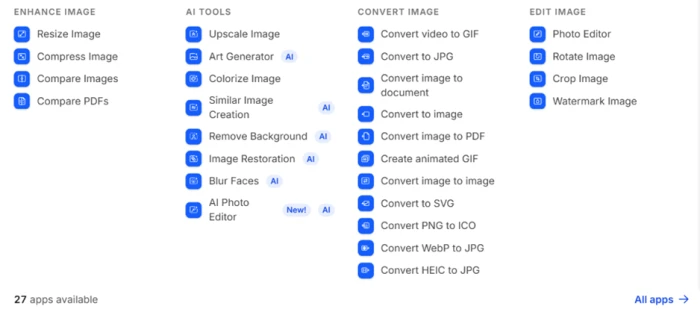
Saving the file, and where free stops
Test 04 . Export gates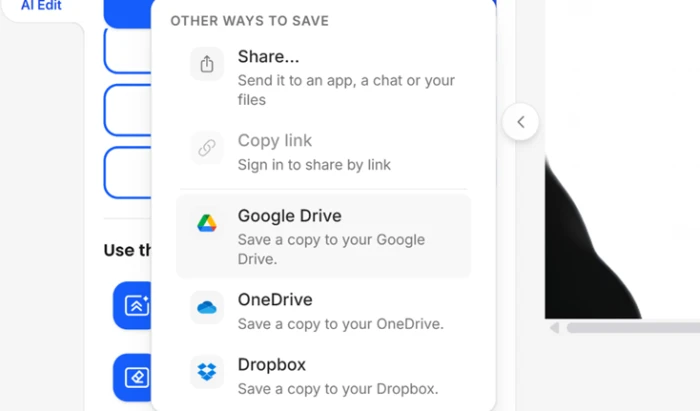
What happens to your uploads
Test 05 . File handling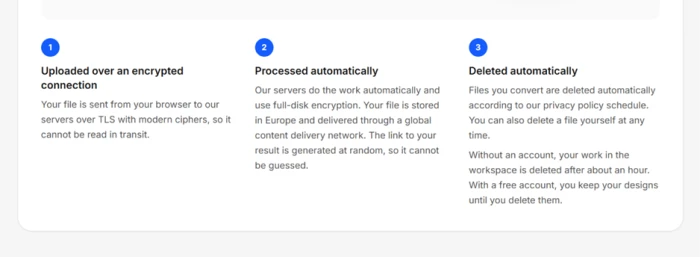
The pairing that held up best across testing: full editing and background removal with no login at all, backed by automatic file deletion within about an hour. You get real work done and the uploads do not linger, which is rare for a free image tool.
Copy link is greyed out until you create an account. If your workflow ends in pasting a link to a teammate rather than downloading a file, the free tier stops you at the last step, and a separate "use the result" path hands you off to an outside editor that also wants an account.
10-Point Feature Review
Pros and Cons
- No barrier to the first edit: tools open with no install and no account, so you are working seconds after landing.
- Model choice on cutouts: picking Humans or Clothes before removal gives cleaner edges than a blind one-click eraser.
- Uploads do not linger: encrypted transfer and automatic deletion after about an hour when logged out.
- Handy for iPhone files: the HEIC-to-JPG converter sits right beside the editor.
- Link sharing is locked out: Copy link stays greyed out until you make an account.
- Confusing outside handoff: the "use the result" path leaves Img2Go for an external editor without saying so clearly.
- Edges can slip: the cutout left a sliver of the cot leg behind on the illustration test.
- Opaque AI cap: the crown icon warns of a limit the free tier never actually showed us.
Pricing Breakdown
| Feature | Free$0 | Starter$8/mo | Pro$29/moMost Popular | Business$89/mo per person |
|---|---|---|---|---|
| Access to most apps | ✓ | ✓ | ✓ | ✓ |
| Max file size | Limited | 64 GB | 64 GB | Custom |
| Batch processing | ✗ | ✓ | ✓ | ✓ |
| Queue priority | Standard | Priority | Faster priority | Skip queue |
| Ad-free experience | ✗ | ✓ | ✓ | ✓ |
| AI usage allowance | Not included | 1x | 5x Starter | 20x Starter |
| Zapier & Make automation | ✗ | ✗ | ✓ | ✓ |
| Centralized billing | ✗ | ✗ | ✗ | ✓ |
Where the value sits: The jump that matters is Free to Starter at $8, the step that lifts the free limits and switches the AI tools on. Pro at $29 mostly buys AI headroom, five times Starter's allowance, so it only pays off if the AI tools are your daily driver rather than an occasional convenience. Business at $89 per person is a team product with centralized billing, not an upgrade a solo user should weigh. The free tier's real cost is not money but the locked Copy link and the "limited file processing" ceiling.
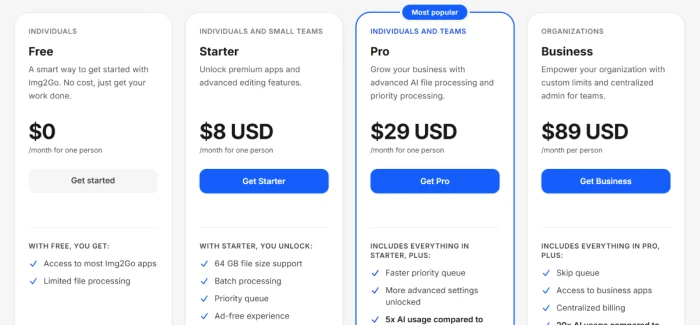
Pricing verified October 26, 2026. Plans and limits shift, so confirm current rates on the official pricing page before you commit.
Img2Go vs the Top 3 Alternatives
| IImg2Go | iiLoveIMG | PPixlr | PPhotoroom | |
|---|---|---|---|---|
| Free tier | Yes, no account | Yes | Yes | Trial |
| Entry paid plan | $8/mo | $5/mo annual | $2.49/mo | $7.50/mo annual |
| Tool count | 27 apps | 14 tools | Editor suite | Product-focused |
| Background models | 4 to choose | One-click | One-click | One-click |
| Best For | All-round free image jobs with no sign-up | Fast conversions tied to the iLovePDF suite | Layered editing plus AI generation credits | E-commerce product shots and catalogs |
How to choose: Img2Go wins on sheer range and the no-account start, and the model-pick cutout is a genuine edge over the one-click removers its rivals ship. If you only convert and compress, iLoveIMG does it cheaper on an annual plan. Pixlr is the pick when you want real layers and AI image generation rather than quick utilities, and Photoroom is built for sellers staging product photos, not general editing.
Discussion
Join the discussion and share your perspective.