InVideo hands your brief to an agent that rewrites it before anything renders. One line about a bakery promo came back as a six-panel storyboard carrying panel borders and film grain nobody asked for, and the file came back ready to use. What the platform will not tell you is what any of that costs until after the meter has already run past zero.
invideo sells video creation as delegation. You describe the film you want, and an agent called Agent Two takes over the jobs a director would normally hand to a crew: script, shot planning, model selection, and the prompt writing that feeds each shot into a generator.
The company launched in 2017 as a template editor, and that product survives as invideo Studio. The current pitch points somewhere else entirely. invideo now aggregates other companies' models instead of shipping only its own, with Seedance, Veo, Kling, Nano Banana and ElevenLabs music all reachable inside one workspace, and it meters access to them in credits rather than minutes of finished video. The stated audience is creators and small marketing teams who would rather brief a system than operate one, a positioning the homepage makes explicit by promising AI you do not have to babysit.
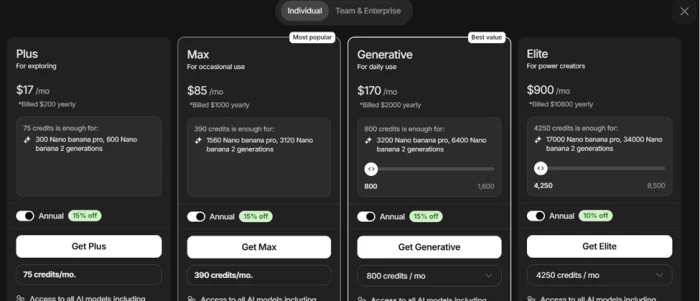
Individual plans run from a free tier through Plus at $20 a month, Max at $100, Generative at $200, and an Elite tier at $900.
What Happened When We Tested It
02 . 8 tests on a free account, signup through download
Everything below happened in one sitting on a free account opened the same morning, with no card attached and no upgrade at any point. The session carried a hard ceiling built into it, because a new account holds barely enough balance to finish anything. That ceiling turned out to be the most useful constraint available. It puts the credit system under a microscope from the first click.
The free tier opens with one credit, not five
Test 01 . Free account audit
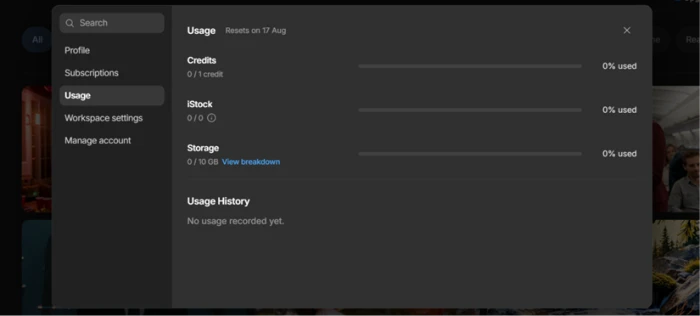
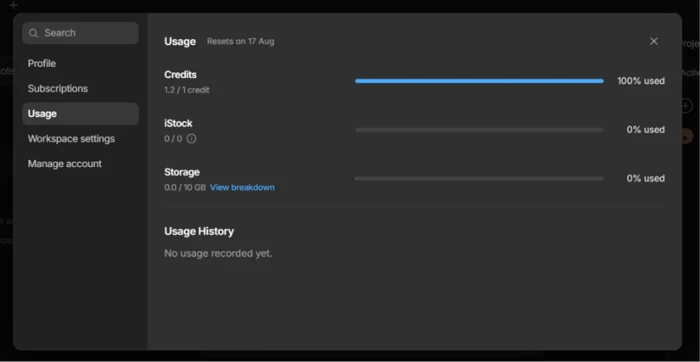
The usage panel on a fresh account, before any generation ran.
First impression: Several third-party pricing guides put the invideo free tier at five credits. The panel showed one, next to 10GB of untouched storage. That gap changes what a review of the free tier can honestly promise a reader, so the number here comes from the account rather than from anyone's summary of it.
One prompt, and the platform changed the subject
Test 02 . First generation attempt
★ Prompt Used
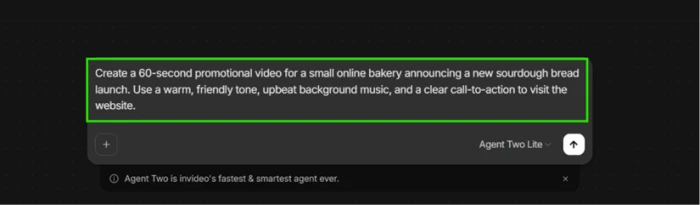
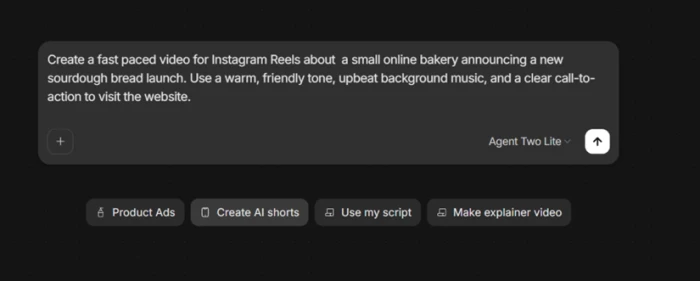
"Create a 60-second promotional video for a small bakery launching a new sourdough loaf. Friendly in tone, ending on a call to visit the website."
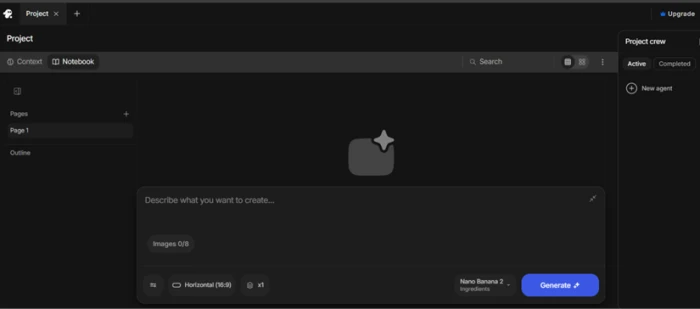
The prompt entered on the dashboard, agent left on the default Lite setting.Where the prompt actually landed, in a workspace tied to an image model.
What we observed: Sending the prompt did not start a video. It opened a Project workspace with Context and Notebook tabs, plus a generation panel running Nano Banana 2, a model built for stills. No message on screen explained the switch, so the reasonable move was to treat the new box as the next required step and paste the same prompt again.
The paywall arrives before the first render
Test 03 . Upgrade timing
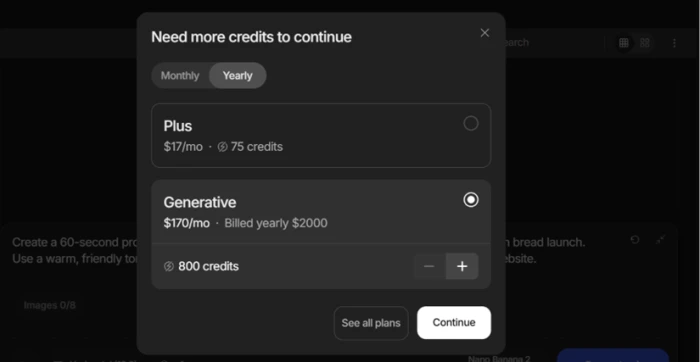
The upgrade card, triggered on the second generate click.
The signal here: Hitting generate in the second box produced an upgrade card rather than an image. Two paid options appeared with monthly prices and credit counts attached. Nothing had rendered yet, and nothing had been spent yet, which makes this the earliest possible point at which a new user meets the wall.
Three intelligence tiers, no price on any of them
Test 04 . Cost visibility
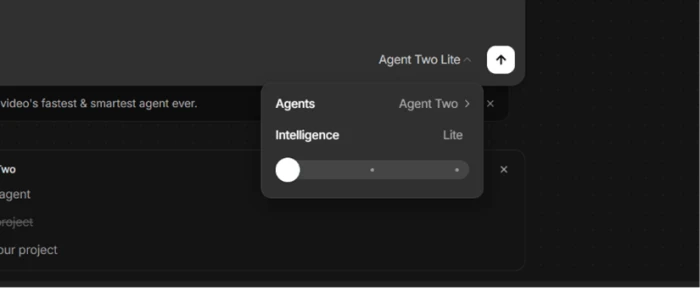
The Intelligence slider, parked on Lite with two notches above it.
Worth noting: Agent Two runs on a tunable Intelligence setting. Two higher notches sit above the default, and neither carries a credit cost or a price. invideo's own billing documentation states that you can see the credit cost before confirming each generation. On this screen you cannot see what moving the slider would do to the bill.
The structured wizard is the same box in different clothes
Test 05 . Alternate entry point
Wizard answers, flattened into one paragraph and returned to the agent box.
What this shows: The Create short video wizard asks for a pace and a platform, takes the topic as free text, and offers toggles for music, subtitles, voice actors and watermark text. Clicking Proceed folded every answer into a single paragraph and dropped it back into the agent box already used in Test 02. Three separate doors, one room behind all of them.
A second agent asks questions before it builds
Test 06 . Agent interview
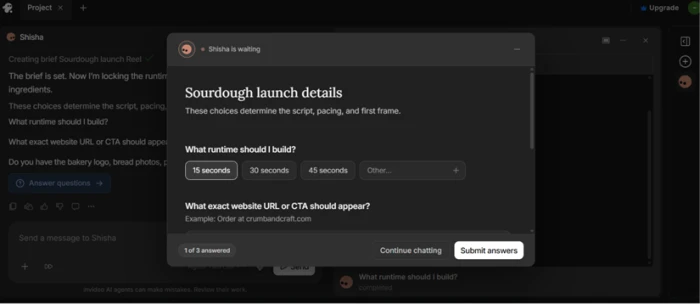
Shisha pauses for runtime and brand details before generating anything.
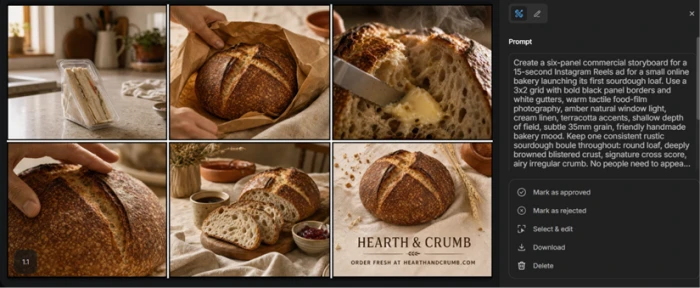
What stood out: A second project, with the agent named Shisha, behaved nothing like the first. It asked what runtime to build, then asked for the exact call to action and whether any bakery photos or brand colours existed. Given a 15-second runtime and a placeholder URL, it wrote out its plan before touching a model, settled on a fictional bakery identity called Hearth & Crumb, and named the generator it intended to use: GPT Image 2.
Generation stopped at 83 percent and delivered the file anyway
Test 07 . Failure behaviour
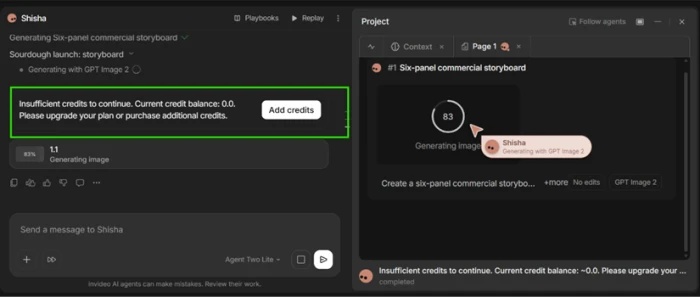
The render stops partway, reporting a balance of zero.The finished storyboard, on screen after the stop message.
The key finding: The stop message asked for an upgrade or a credit purchase. Then a complete six-panel commercial storyboard appeared on the page, six bakery shots lit and textured consistently, closing on a logo card. Clicking download produced a full-resolution image with no lock and no watermark on it.
The usage panel reads 1.2 of 1
Test 08 . Ledger check
Final usage panel after the storyboard downloaded.
Where it lands: The generation drew past the entire account balance instead of halting at it. For a product that meters every action by credit, a ledger that can end the day above its own ceiling is the detail a buyer should weigh before putting a card on file.
★
The agent wrote a better brief than the one it was given
Shisha expanded a single line into a 3x2 grid with panel borders and warm window light, plus an instruction to hold one loaf consistent from frame to frame. None of that came from the typed prompt. The render then honoured it, which is the part that matters: the agent set a standard the model could actually hit.
!
The meter can pass zero mid-render with no warning first
Nothing flagged the cost before the job started, and nothing capped it once the balance ran out. On a free account the overage is academic. On a paid plan the same behaviour draws from an allowance that resets to zero at the end of the cycle and never rolls forward.
How this review was put together. Testing ran on August 12, 2026, on a free account created that morning, covering signup, three separate generation entry points, one completed storyboard render, and the download that followed. No paid tier was purchased, so paid-plan behaviour is reported only where invideo documents it. Plan prices came from the in-app upgrade screen and from the official invideo pricing page, cross-checked against the billing help centre at invideo.io/help/billing/subscriptions-and-refunds/. No figure in this review is carried over from a third-party roundup.
10-Point Feature Review
03 . Ten checks, scored 4.0 to 8.5
Feature Scores at a Glance
Agent Output Quality
8.5
Prompt Expansion
8.0
Model Breadth
8.0
Download Terms
8.0
Project Workspace
7.5
Pricing Transparency
5.5
Cost Preview
5.0
Onboarding Clarity
4.5
Free Tier Viability
4.5
Credit Metering
4.0
Feature-by-feature breakdownScored on a free account, August 12, 2026
01
Agent output quality Strongest
The storyboard came back usable on the first attempt, with lighting and texture holding steady from panel to panel and a closing logo card that matched the identity the agent had invented minutes earlier. A single successful still render is a narrow sample and no video ever completed, which puts 9.0 out of reach. Nothing needed a retry, which is what lifts it clear of 8.0.
Panels returned: 6Retries needed: 0
8.5
Strong
02
Prompt expansion Strength
A one-line brief became a full shot specification covering grid layout, border treatment, light direction and film grain. That is the part of the workflow most users handle worst, and invideo removed it entirely. Half a point comes off because the agent also invented a brand name without asking whether one already existed.
invideo advertises access to more than 200 image, video, audio and music models, and named two different ones during a single free session without being asked to. Breadth is real and verifiable on the pricing page. Model selection at the default setting happens for you rather than by you, and that is what holds the score under 8.5.
Advertised models: 200+Named in session: 2
8.0
Strong
04
Download terms Strength
The file saved unlocked at full resolution on a free account with an empty balance, carrying no watermark anywhere on it. invideo's documentation confirms downloads never cost credits, and the session matched the documentation exactly. Not higher, because what reached the download stage was a still rather than the video originally requested.
Watermark: NoneCredit cost to download: 0
8.0
Strong
05
Project workspace Solid
Context and Notebook tabs give a project somewhere to keep its own memory, and the second agent used that structure to interview before generating. The score stays at 7.5 rather than 8.0 because the same workspace opened without explanation the first time and looked like an error.
Workspace tabs: 2Clarifying questions asked: 3
7.5
Solid
06
Pricing transparency Weak
Four individual tiers appear in the app. The billing help centre lists three, omitting Elite entirely. The same help page claims annual billing saves up to 40 percent on Max while its own table shows 15 percent. Everything needed to price the product is published, which keeps this above 5.0, but the published surfaces disagree with each other.
Tiers in app: 4Tiers in help centre: 3
5.5
Weak
07
Cost preview before generation Weak
invideo documents that the credit cost of a generation is visible before you confirm it. The Intelligence slider showed three positions and no cost against any of them, and the storyboard job gave no estimate before it started. Per-model credit tables do exist in the help centre for anyone willing to look them up separately, and that alone keeps this out of the bottom band.
Slider positions: 3Prices shown in-flow: 0
5.0
Weak
08
Onboarding clarity Poor
The dashboard offers a main prompt box and a structured wizard, with a project workspace behind both. All three funnel into the same agent input, and the first one silently switched from a video request to an image model. The score is not lower only because each individual screen is legible on its own.
Entry points tried: 3Distinct destinations: 1
4.5
Poor
09
Free tier viability Poor
One credit funds part of one storyboard and no video at all, and invideo's own documentation describes free allowance only as limited, with a weekly reset rather than a monthly one. It clears 4.0 because the tier is permanent and produced a genuinely usable asset. It fails to reach 5.5 because a prospective buyer cannot evaluate the headline feature on it.
Starting credits: 1Videos completed: 0
4.5
Poor
10
Credit metering accuracy Weakest
A job ran past the account's total allowance, reported a zero balance mid-render, and then completed. The panel afterwards showed more spent than existed. The one thing holding this above 3.0 is that the overage landed in the user's favour on this occasion. Metering that can be wrong in one direction can be wrong in the other.
Allowance: 1.0Recorded spend: 1.2
4.0
Weakest
Pros and Cons
04 . Where the product helps and where it fights you
+What works
Prompt writing is handled for you: a one-line brief comes back as a full shot specification
Visual consistency holds: the same subject and lighting carried across every panel of a multi-shot render
Clean exports: files save unlocked, unwatermarked and at full resolution
The agent interviews before it builds: runtime and brand assets get asked about rather than guessed
Model names are disclosed: the interface tells you which generator is doing the work
Projects keep their own context: a dedicated workspace holds notes and references per film
−What breaks
Every door leads to the same room: separate entry points collapse into one agent input
Silent redirects: a video request can open an image model with no explanation on screen
The wizard discards its own structure: careful answers get flattened into one paragraph
Quality settings carry no cost label: raising the intelligence tier is a blind decision
Balances can go past zero: a render that reports failure may still finish and still bill
Behaviour differs between agents: one interviews you, another proceeds straight to generation
Pricing Breakdown
05 . Four individual tiers, metered in credits
Feature
Free$0/mo
Plus$20/moEntry paid
Max$100/mo
Generative$200/mo
Credits per month
Limited
75
390
800
Annual billing
None
$200/yr
$1,000/yr
$2,000/yr
Allowance reset
Weekly
Monthly
Monthly
Monthly
Unused credits roll over
✗
✗
✗
✗
One-time top-up packs
✗
✓
✓
✓
Nano Banana Pro images
Not stated
~300
~1,560
~3,200
The tier math: Two things do not line up on invideo's own surfaces. An Elite plan sits in the app at $900 a month for 4,250 credits and is missing from the billing help centre's individual plans table altogether. The same help page tells buyers that annual billing saves up to 40 percent on Max, while the table directly above that claim works out to 15 percent. Read the annual columns carefully too, because the in-app cards round the effective monthly rate up: Plus shows $17 a month against a $200 annual charge, which is $16.67. The figure that matters more than any of them is the reset. Nothing carries forward, on any tier, including credits you buy separately.
The Individual plan cards as they appear inside the app.
Pricing verified August 12, 2026. Tiers and credit costs move without notice, so confirm on the official pricing page before you subscribe.
invideo vs the Top 3 Alternatives
06 . Scored reviews, prices checked the same day
ivinvideo
MMorph Studio
KKrea AI
HHeyGen
Score
6.5
7.4
8.2
8.7
Entry paid plan
$20/mo
$12/mo
$5.25/mo billed yearly
$29/mo
Free tier
Limited, 1 credit observed
75 credits monthly
100 units daily
3 videos monthly
Failed generations
Billed, per this test
Not charged, per vendor
Not published
Not published
Best For
Handing a whole brief to an agent
Cheap model-by-model experiments
Image-led design and real-time canvas work
Talking-head and localised training video
How to choose between them: invideo is the only one of the four that tries to run the whole production for you, and that is exactly why its metering matters more than anyone else's. Morph Studio costs less at entry and states plainly that a failed generation costs nothing, which is the safer place to test model quality before committing budget. Krea AI is the better buy if your work is mostly stills with occasional motion. HeyGen is a different product wearing similar language, built around presenters and translation rather than shot planning.
What Users Are Saying
07 . 4.5 on G2, 3.7 on Google Play, three separate Trustpilot profiles
Producing the final video required "more than 360 credits", roughly five times what this reviewer expected from the advertised usage on a single five-minute business video.
For one contact centre team lead, "the voice over is the best feature", with the caveat that generation results depend heavily on how specific the request is.
Who should hand a brief to invideo, and who should not?
Use invideo if you want shot planning and prompt writing taken off your desk, and your work is short marketing pieces where a strong first draft beats precise control. Budget for a bill that moves with model choice rather than with output minutes.
Skip invideo if you need to know a job's cost before it runs. Morph Studio (7.4) charges nothing for failed generations and starts lower. Krea AI (8.2) is the stronger buy for image-first work, and HeyGen (8.7) wins outright for presenter-led video.

Discussion
Join the discussion and share your perspective.